Framekit templates
Start from a designer-made template
 Use template
 Use template
 Use template
 Use template
 Use template
 Use template
 Use template
 Use template
Every comparison of AI interior design tools quotes a price per generated image, and nobody generates one image of a room and shows it to a client.
You generate four or five, discard the ones where the sofa has three arms or the window looks onto a wall that does not exist, and present the one that survived.
Every tool in this category charges per generated image and quotes its price that way, so the number on the pricing page is roughly a quarter of what a room you would actually deliver costs.
Run that through the real prices. Spacely AI's cheapest credit top-up works out at $0.03 a credit, so a room at four generations is about $0.12. Collov's Enterprise add-on photos are $0.24 each, so the same room is about $0.96, which is eight times more for the same job.
An AI interior design tool is software that generates a styled render of a room, either from a photograph of an existing space or from a 3D model you build, replacing the render pass that used to take an afternoon in V-Ray.
A render is an argument aimed at a client, and it loses most of its force as a folder of JPEGs attached to an email. Framekit is where that argument tends to get assembled into a deck instead, which is why it has a section below rather than a place in the ranking.
The best AI interior design tool for most people in 2026 is Spacely AI, because its free tier gives 40 credits with a commercial licence and no watermark, its integrations reach SketchUp, Revit, AutoCAD and Rhino, and its credit top-ups fall to $0.03 each, which is the cheapest verified rate in this comparison.
Planner 5D is the better answer if you need to design the space rather than restyle a photograph, at $399.99 a year for unlimited 4K renders. Collov is the strongest option for property marketing, at $19 a month for 60 photo credits.
The honest caveat is that these tools produce images that look plausible rather than buildable, and none of them will give you a specification a contractor can price.
- 1Spacely AITop pickA Free Tier With Commercial Rights, and the Cheapest Credits
- 2Planner 5DUnlimited 4K Renders, Because the Render Is Not the Product
- 3Collov AIBuilt for Property Marketing, Priced Per Photo
- 4CoohomA Full Design Suite With a Usable Free Tier
- 5ReimagineHomeStaging and Editing, With Pricing That Needs Reading
Updated in September 2026: we re-verified Framekit's plans and added how renders get presented to a client as a concept deck, since Framekit now includes Slides; the AI design tools are as tested in August 2026.
How We Compared 11 AI Interior Design Tools
We priced one specific pattern of use rather than a generic one: a designer or agent producing roughly 20 finished room images a month, allowing four generated attempts per image they would actually show, needing commercial rights and no watermark, and occasionally needing the result to connect to a real 3D model rather than a photograph.
Prices and plan contents were read from vendor pages during this comparison wherever those pages served readable content, and each entry says which grade of claim it carries.
Where a page published a price range without mapping it to tiers we say which figures are inferred from that range rather than read. Judgments are ours.
Three vendors would not serve readable prices. Foyr Neo returned a 403, HomeDesigns AI rendered its page without the plan table, and Homestyler's tiers did not resolve for us. RoomGPT and Interior AI figures come from third-party reporting and are labelled as reported throughout.
In one lineeleven tools, 20 finished rooms a month at four generations each, judged on cost per image you would actually show, commercial rights and whether it connects to real geometry.
What Generating the Same Room Eleven Times Showed
The finding that reorganises this category is that two completely different products are sold under one search term, and they are priced on opposite principles.
- AI restyling tools charge per generated image, from $0.03 to about $0.47 a credit.
- 3D design suites charge for the software and treat renders as unlimited or incidental.
- A room you would actually show a client takes about four generations, so the real cost is roughly four times the quoted credit price.
- Spacely's free tier includes a commercial licence and no watermark, which is unusual enough to be a deciding factor.
- Collov's free trial is explicitly watermarked, which is the normal arrangement in this category.
- The cheapest verified credit rate here is about 8 times cheaper than the most expensive add-on rate.
For the tool matched to the work you are doing, jump to the decision guide.
Cost Per Credit, and Cost Per Room You Would Actually Show
Here is the arithmetic the pricing pages leave out. The left column is what vendors advertise, the right column is what a deliverable costs at four generations per keeper.
| Tool and plan | Price | Credits | Cost per credit | Cost per room at 4 tries |
|---|---|---|---|---|
| Spacely AI, free tier | Free | 40 | $0.00 | $0.00 |
| Spacely AI, 5,000 top-up | $150 | 5,000 | $0.030 | About $0.12 |
| Spacely AI, 1,000 top-up | $35 | 1,000 | $0.035 | About $0.14 |
| Spacely AI, 200 top-up | $9 | 200 | $0.045 | About $0.18 |
| RoomGPT, 200 pack, reported | Reported $29 | 200 | Reported $0.145 | About $0.58 |
| RoomGPT, 100 pack, reported | Reported $19 | 100 | Reported $0.190 | About $0.76 |
| Collov Enterprise | $127 a month | 526 | $0.241 | About $0.96 |
| Collov add-on photos | $0.24 each | 1 | $0.240 | About $0.96 |
| Collov Premium | $79 a month | 263 | $0.300 | About $1.20 |
| Collov Standard | $19 a month | 60 | $0.317 | About $1.27 |
| Collov Advanced | $49 a month | 150 | $0.327 | About $1.31 |
| ReimagineHome, inferred lower bound | $14 a month | 30 | About $0.467 | About $1.87 |
Two things in that table are worth sitting with.
The first is the spread. Spacely's cheapest top-up is about 8 times cheaper per credit than Collov's cheapest plan and about 16 times cheaper than the low end of ReimagineHome's published range.
For a studio producing 20 rooms a month at four generations each, that is 80 credits, which is $2.40 at Spacely's best rate and about $25.36 on Collov Standard.
The second is Collov's internal ordering, which is the opposite of what you expect. Standard at $19 for 60 credits is $0.317 each, and Advanced at $49 for 150 is $0.327 each, so upgrading makes each credit slightly more expensive.
The volume discount only arrives at Premium and Enterprise. Read the credit counts rather than assuming a bigger plan is better value.
The ReimagineHome figures are inferred rather than read. Its page publishes a range of $14 to $99 a month and separately lists 30, 200, 400 and 900 credit tiers without mapping prices to them, so the $0.467 above assumes the 30-credit plan sits at the bottom of that range.
In one linethe advertised credit price is about a quarter of what a presentable room costs, and the spread between the cheapest and dearest tool here is roughly eight times.
Two Different Products Sold Under One Search Term
Half the AI interior design tools in this comparison restyle a photograph of a room that already exists, and half let you design a space from nothing, and confusing the two is the most common way people in this category buy entirely the wrong product.
Restyling tools take a photograph of a room that already exists and reimagine it in a different style. Spacely, Collov, RoomGPT, ReimagineHome, Interior AI and HomeDesigns AI all work this way.
They are fast, cheap per image, and excellent for property marketing, virtual staging and showing a client a direction. What they produce is a mood, not a plan.
Design suites let you build the room, place real furniture from a catalogue, and render it. Planner 5D, Coohom, Homestyler and Foyr Neo work this way.
They are slower, priced as software rather than per image, and what they produce can carry dimensions, a furniture list and in some cases a CAD export.
The pricing follows directly. Planner 5D's Professional plan is $399.99 a year with unlimited 4K renders because the render is not the product, the modelling is. Spacely charges $0.03 a credit because the render is the entire product.
The practical test is what happens after the client says yes.
If the next step is ordering furniture and briefing a contractor, you need the design suite, because a restyled photograph contains no information about what anything is or where it goes.
If the next step is listing the property, the restyled photograph is exactly right and the design suite is a waste of a week.
In one linerestyling tools sell you a mood at a few cents an image, design suites sell you a specification for a few hundred a year, and choosing wrongly wastes either your money or your month.
The 11 Best AI Interior Design Tools in 2026: Full Comparison
Scores are out of 10 across four weighted criteria: cost per room you would actually show a client (30%), commercial rights and watermark policy on the tier you would realistically use (25%), output quality and control over the result (25%), and whether it connects to real geometry or stops at a photograph (20%).
| Tool | Type | Entry price | Free tier | Cost per credit | Score |
|---|---|---|---|---|---|
| Spacely AI | Restyling with CAD links | Free, then top-ups | 40 credits, commercial, no watermark | $0.030 to $0.045 | 8.9 |
| Planner 5D | Design suite | Free, Premium $4.99 a month | Free plan, unlimited projects | Unlimited 4K on Professional | 8.5 |
| Collov AI | Restyling for property | $19 a month | 5 trials, watermarked | $0.241 to $0.327 | 8.1 |
| Coohom | Design suite | Free, Pro $29 a month | Basic, limited uploads | Not stated per render | 7.9 |
| ReimagineHome | Restyling and staging | Range of $14 to $99 a month | 5 designs | About $0.11 to $0.467, inferred | 7.6 |
| Interior AI | Restyling, reported | Reported $49 a month | Reported limited | Reported by tier | 7.3 |
| RoomGPT | Restyling, credit packs | Reported $9 for 30 | Reported 1 free design | Reported $0.145 to $0.300 | 7.0 |
| Homestyler | Design suite | Not readable | Free tier exists | Not readable | 6.8 |
| HomeDesigns AI | Restyling | Not readable | Not readable | Not readable | 6.4 |
| Foyr Neo | Design suite | Not readable | Not readable | Not readable | 6.2 |
| DecorMatters | Consumer app | Free with purchases | Yes | Not comparable | 5.8 |
Four entries could not be priced at source and say so in their reviews. Ranking them on structure and category position is a compromise, and leaving out established products because their sites block automated requests would serve a reader worse than labelling the gap.
1. Spacely AI: A Free Tier With Commercial Rights, and the Cheapest Credits
PriceRead at source. The free plan is $0 forever with 40 trial credits, access to all features, high-resolution download, private mode, a commercial licence and no watermark. Education is $30 a month for 1,500 credits with an academic email.
Personal, Studio with up to 2 seats, and Agency with up to 5 seats did not display monthly figures for us, with yearly billing stated to save 20%.
Credit top-ups are 200 for $9, 1,000 for $35 and 5,000 for $150, which is $0.045, $0.035 and $0.03 a credit.
Best forDesigners and architects who want AI restyling that connects to the model they already built.
Rating8.9 out of 10
Spacely wins this comparison on two things, and the first is a free tier that behaves like a paid one rather than like the three watermarked sample images most of its competitors hand you.
Forty credits, all features, high-resolution download, no watermark and a commercial licence is not a trial in the usual sense of the word. It is ten finished rooms at four generations each, usable in client work, at no cost.
Compare that with Collov, whose free trial is explicitly watermarked, which is the normal arrangement in this category.
For a designer testing whether AI restyling belongs in their process at all, that difference decides whether the test is real.
The second thing is the integrations, and they are what separate this from the photograph-only tools.
SketchUp, Revit, AutoCAD and Rhino connections mean the AI is restyling geometry you built rather than guessing at a room from a photograph, which produces results that respect the actual dimensions of the space.
That matters more than it sounds. The recurring failure of photograph-based restyling is that the model invents architecture, and starting from a model removes that failure mode.
The credit economics are the third reason. At $0.03 a credit on the 5,000 pack, a studio producing 20 rooms a month at four generations each spends $2.40 a month, which is close enough to nothing that the budgeting question disappears.
The gotcha is that the three main paid tiers did not show us prices, so if the free credits run out you are entering a purchase decision we could not verify. The top-ups are published and are the route we would take.
Skip it ifyou need to design a room from scratch with a real furniture catalogue, which is a Planner 5D or Coohom job.
Verdict: the best AI interior design tool in 2026 and by a distance the best free tier, with a commercial licence and no watermark on output you can actually use. Start on the free 40 credits and buy top-ups rather than a subscription.
2. Planner 5D: Unlimited 4K Renders, Because the Render Is Not the Product
PriceRead at source. Free at $0 a month with unlimited projects, cross-device use and access to 50% of the furniture catalogue.
Premium is $4.99 a month or $59.99 a year, adding floor plan upload with 3D conversion, the full catalogue of more than 10,000 items, 3D model importing, standard renders and a budget tracking widget.
Professional is $49.99 a month or $399.99 a year, adding unlimited 4K renders, custom 3D model uploads in OBJ, FBX, BLEND and STL, 360 degree walkthroughs, CAD export, a specs organiser and branded profiles. Enterprise is custom.
Best forDesigners who need to specify a room rather than restyle a photograph of one.
Rating8.5 out of 10
Planner 5D is the answer when the render has to be backed by something. You build the room, place real items from a catalogue, and the output carries dimensions and a furniture list rather than a vibe.
The pricing structure tells you what kind of product it is. Professional at $399.99 a year includes unlimited 4K renders, because Planner 5D is not selling images, it is selling the modelling environment. Once you have built the room, generating another view costs nothing.
For a designer producing many views of a few spaces, which is what client presentation actually looks like, that is the right shape. The restyling tools charge per image and a full presentation is fifteen images.
The floor plan upload with 3D conversion on Premium at $4.99 a month is the underrated feature. Photographing or scanning an existing plan and getting a 3D model back removes the slowest part of the job, and it is available on a plan that costs less than a coffee.
CAD export on Professional is the detail that makes it usable alongside professional workflows rather than instead of them.
The gotcha is the ceiling. This is a consumer and prosumer tool, and an architect will find the modelling constrained compared with SketchUp or Revit. The catalogue is large and it is a catalogue, so specifying a specific real product outside it means importing a model yourself.
Skip it ifyour job is restyling photographs of existing rooms, where a $0.03 credit does in seconds what this does in an afternoon.
Verdict: the best value design suite here, with a genuinely useful free tier and unlimited 4K renders at $399.99 a year. Buy Premium at $59.99 a year first, and only move to Professional when you need CAD export or 4K.
3. Collov AI: Built for Property Marketing, Priced Per Photo
PriceRead at source. Standard is $19 a month for 60 photo credits with unlimited regeneration, no watermark and all room types and styles. Advanced is $49 a month for 150 credits, adding AI Chat Edit and photo editing.
Premium is $79 a month for 263 credits, adding an AI Listing Agent, virtual tours, 360 panorama and 3D tour. Enterprise is $127 a month for 526 credits with API access and dedicated support. Annual billing is stated at a 25% discount.
A 5 design free trial on Standard and Advanced carries a watermark. Enterprise add-on photos are $0.24 each.
Best forEstate agents and property marketers who need virtual staging and listing assets together.
Rating8.1 out of 10
Collov has aimed squarely at property rather than at design, and the feature list gives it away: an AI Listing Agent, virtual tours, 360 panoramas and 3D tours are not things an interior designer needs and are exactly what a listing needs.
For that audience it is coherent in a way the general restyling tools are not. One subscription produces the staged photographs, the tour and the listing copy, and the alternative is three tools.
Unlimited regeneration on Standard is a genuinely important detail and it partly answers this article's opening complaint.
If regenerating does not consume a credit, the four-attempts-per-keeper maths does not apply in the same way, and the effective cost per delivered room falls closer to the quoted $0.317.
That said, read the credit ladder carefully, because it does not behave as expected. Standard is $0.317 a credit and Advanced is $0.327, so the middle upgrade costs slightly more per credit, and the volume discount only arrives at Premium at $0.300 and Enterprise at $0.241.
The watermark on the free trial is the other thing to know. Five designs with a watermark tells you whether you like the output and not whether you can use it, which is a materially weaker trial than Spacely's.
Skip it ifyou are a designer rather than a marketer, because you are paying for listing features you will never open.
Verdict: the right tool for property marketing and overpriced per credit for general design work. Standard at $19 a month is the tier to take, and check whether unlimited regeneration covers the operations you actually use before assuming it removes the credit problem.
4. Coohom: A Full Design Suite With a Usable Free Tier
PriceRead at source. Basic is free, described as free to use for basic design needs with limited uploads of 3D models, texture mapping and finishes. Pro is $29 a month with a 7-day free trial. Elite is $69 a month. Enterprise is custom.
The page states savings of up to 75% with yearly billing. Render quotas per plan were not specified on the page we read.
Best forDesigners who want a professional design suite with a large product catalogue and cloud rendering.
Rating7.9 out of 10
Coohom is the most capable design suite in this comparison after the professional CAD packages, and its strength is the catalogue. It is built around real products from real manufacturers, which means a rendered room can correspond to items somebody can actually order.
The cloud rendering is the structural advantage over desktop tools. Renders are processed on Coohom's infrastructure rather than on your laptop, so a photorealistic image does not require a workstation and does not stop you working while it computes.
The stated saving of up to 75% with yearly billing is unusually large and worth checking directly, because at that magnitude the monthly price is close to irrelevant to the decision.
The gotcha is that render quotas were not published on the page we read, and in a category where renders are the unit of consumption, that is the number you most need before subscribing. Verify it before committing to a year.
The other honest note is the learning curve. This is professional software with the interface density that implies, and somebody expecting to upload a photograph and get a styled room in thirty seconds is in the wrong product.
Skip it ifyou want speed over specification, where the restyling tools deliver in seconds what this delivers in hours.
Verdict: a serious design suite with a free tier worth trying and a large real-product catalogue. Confirm the render allowance on your intended plan before buying annually, since the page did not state it.
5. ReimagineHome: Staging and Editing, With Pricing That Needs Reading
PricePartly read at source.
The page header states a range of $14 to $99 a month, and lists four tiers by credit allowance without mapping prices to them: Essential at 30 credits a month with basic staging, light edits, virtual staging and watermark-free images; Pro at 200 credits adding conversational design flow, real product discovery, reference photos and faster rendering; Advanced at 400 credits; and Agency at 900 credits.
New users get 5 free designs described as the same AI and same quality as paid plans.
Best forVirtual staging at moderate volume, particularly where you want to identify real products in the result.
Rating7.6 out of 10
ReimagineHome's most interesting feature is real product discovery, which surfaces actual purchasable items matching what the AI generated. That closes part of the gap this whole category suffers from, where a beautiful render corresponds to furniture that does not exist.
For a designer using AI to present a direction and then having to source it, that is a meaningful time saving rather than a novelty.
Watermark-free images on the entry tier is the second good decision, and it puts ReimagineHome ahead of Collov on the question of whether cheap output is usable output.
The pricing presentation is the problem. Publishing a range of $14 to $99 and a separate ladder of 30, 200, 400 and 900 credits without connecting them means you cannot compare it to anything without starting a purchase.
Our inferred figure of about $0.467 a credit at the bottom of the range assumes Essential is the $14 plan, and if that assumption is wrong, so is the comparison.
The 5 free designs at full quality are a fair trial, smaller than Spacely's 40 credits and honest about what you get.
Skip it ifyou need to compare cost per image before committing, which the current pricing page makes unnecessarily difficult.
Verdict: good staging output with genuinely useful product discovery, sold behind a pricing page that will not tell you the unit cost. Take the 5 free designs, and price the tier you want directly before subscribing.
6. Interior AI: The Established Name, Priced Above the Market
PriceReported. Interior AI's pricing URL returned a 404 to our requests. Plans are reported to run from about $49 a month at Pro to about $199 a month at Ultra, with monthly credit renewals reported at roughly 200 to 1,200 credits, and lower rates on yearly billing.
Best forUsers who want an established tool with a large style library and are not optimising for price.
Rating7.3 out of 10
Interior AI was one of the first tools of this kind to reach a general audience and it retains a strong style library and a recognisable output quality. For many people it is the tool they have heard of, which is worth something when a client asks what you used.
The reported entry price of about $49 a month is where the difficulty lies for this audience.
At a reported 200 credits, that is roughly $0.245 a credit, which is in Collov's range and about eight times Spacely's best top-up rate, for a product that does not offer CAD integrations.
We could not read the pricing page, so this entry is ranked on category position and reported figures rather than on economics we verified, and it is ranked accordingly rather than on reputation alone.
Skip it ifcost per image matters, because the reported rates sit at the expensive end of a category with a very cheap floor.
Verdict: a capable and well-known tool at reported prices that are hard to justify against Spacely. Worth trying if its particular style output suits your work, and worth pricing yourself since we could not.
7. RoomGPT: Credit Packs, No Subscription
PriceReported. RoomGPT's pricing URL returned a 404 to our requests. Credit packs are reported at $9 for 30 credits, $19 for 100 and $29 for 200, which works out at a reported $0.300, $0.190 and $0.145 a credit.
A free tier with one free design is reported, and users are reported to complain that the paywall appears before they see a result.
Best forOccasional use where a subscription would be wasted.
Rating7.0 out of 10
RoomGPT's structure is the right one for irregular use, and it is the main thing to like about it. Credit packs with no subscription mean a designer who needs twenty images this month and none next month pays once and stops.
At a reported $0.145 a credit on the 200 pack, it is roughly five times Spacely's best rate and roughly half Collov's, which puts it in the middle of this market on price with a friendlier commitment structure.
The reported complaint about the paywall appearing before you see a result is the thing to weigh, because it inverts the normal trial logic.
Paying to find out whether the output is good enough is a worse deal than Spacely's 40 usable credits or ReimagineHome's 5 full-quality designs.
We could not verify prices at source, so treat the figures above as reported rather than confirmed.
Skip it ifyou want to evaluate output quality before paying, which several competitors allow and this reportedly does not.
Verdict: a fair pay-as-you-go structure at mid-market reported rates, weakened by a trial that reportedly shows you the bill before the result. Fine for occasional use, and check the current free allowance before assuming you can test it.
8. Homestyler: A Design Suite We Could Not Price
PriceNot readable. Homestyler's pricing tiers did not resolve for us, so we quote no figures. A free tier is documented and the product is a browser-based 3D interior design suite with a furniture catalogue and rendering.
Best forDesigners who want a browser-based suite without installing anything.
Rating6.8 out of 10
Homestyler occupies the same space as Coohom and Planner 5D, as a browser-based room design tool with a catalogue and a render engine, and it has a long-standing user base particularly among students and hobbyists.
Running entirely in a browser is its practical advantage. Nothing to install, works on a modest machine, and a project is accessible from anywhere, which suits a designer who moves between a studio and client sites.
Because we could not read the plan structure or the render allowances, this entry is ranked on category position rather than on verified economics. In a category where the render quota is the number that matters, that is a real limitation on how strongly we can recommend it.
Skip it ifyou need to compare cost per render before committing, which we could not do here.
Verdict: a credible browser-based design suite with a free tier, whose pricing we could not confirm. Worth trying free and worth pricing yourself against Planner 5D's published $59.99 a year.
9. HomeDesigns AI: Restyling With an Unreadable Plan Table
PriceNot readable. The pricing page rendered without its plan table for us, mentioning only an early bird discount, so we quote no figures.
Best forRestyling and exterior visualisation, on terms you should verify yourself.
Rating6.4 out of 10
HomeDesigns AI covers interior restyling alongside exterior and landscape visualisation, which is a wider scope than most of this category and genuinely useful for anyone marketing whole properties rather than rooms.
The exterior capability is the differentiator worth noting. Most tools here stop at interiors, and a property listing usually needs the outside of the building to look its best too.
With no readable pricing, no credit allowances and no visible free tier terms, this entry is ranked on scope rather than value, and we would not recommend committing to an annual plan without confirming the render allowance first.
Skip it ifyou only need interiors, where better-documented options exist at verified prices.
Verdict: a wider scope than most of this category and pricing we could not read. Worth a look for exterior work, and price it yourself before subscribing.
10. Foyr Neo: Professional Suite Behind a Closed Door
PriceNot readable. Foyr's pricing page returned a 403 to our requests. Foyr Neo is a browser-based professional interior design suite with a large product catalogue and rendering, positioned for working designers rather than consumers.
Best forProfessional interior designers wanting an all-in-one browser suite.
Rating6.2 out of 10
Foyr Neo is aimed at working designers and its positioning reflects that: model, furnish from a catalogue, render photorealistically and produce client presentations from one browser application, without the desktop hardware a traditional pipeline requires.
For a designer whose alternative is SketchUp plus V-Ray plus a rendering machine, consolidating that into one subscription has obvious appeal, and the professional focus means the output is aimed at client presentation rather than social sharing.
We could not read prices, allowances or trial terms, and in a professional tool that is a larger gap than in a consumer one, because the purchase is bigger. It is ranked low here on verifiability rather than on capability.
Skip it ifyou need to know what it costs before investing time in learning it.
Verdict: a professional suite with a coherent proposition and pricing we could not access. Request it directly if the all-in-one browser workflow appeals, and compare it against Coohom's published $29 a month Pro tier.
11. DecorMatters: A Consumer App That Is Not Really For You
PriceFree to download with in-app purchases. Not directly comparable to the professional tools above.
Best forHomeowners playing with ideas for their own space.
Rating5.8 out of 10
DecorMatters is included because it appears constantly in searches for this category and because it is worth knowing that it is a different kind of product.
It is a mobile-first consumer app with gamified design challenges, a social feed and shoppable furniture, aimed at people decorating their own homes.
For that audience it is genuinely enjoyable and the shoppable catalogue closes the loop between an idea and a purchase, which several professional tools do not manage.
For a designer producing client work it is the wrong shape entirely. The output is not a deliverable, the workflow assumes a phone, and the commercial licensing position for professional use is not the point of the product.
Skip it ifyou are producing work for anybody other than yourself.
Verdict: a fun consumer app and not a professional tool, listed so you can rule it out quickly. If you are decorating your own flat, it is the most enjoyable thing in this article.

Watermarks and Commercial Rights on Free Tiers
The free tier is where the AI interior design tools in this comparison differ most from one another, and the difference decides whether an evening spent trying one tells you anything you can act on.
| Tool | Free allowance | Watermark | Commercial use |
|---|---|---|---|
| Spacely AI | 40 credits | None | Commercial licence included |
| ReimagineHome | 5 designs | Watermark-free images listed on Essential | Stated as same AI, same quality |
| Planner 5D | Unlimited projects, 50% catalogue | Not stated | Standard renders on Premium |
| Coohom | Basic plan, limited uploads | Not stated | Free for basic design needs |
| Collov AI | 5 trial designs | Watermarked | Trial only |
| RoomGPT, reported | Reported 1 free design | Reported | Reported |
A watermarked trial answers one question, which is whether you like the aesthetic. An unwatermarked trial with a commercial licence answers the question that actually matters, which is whether this tool can do a real job for a real client.
Spacely's 40 credits with a commercial licence and no watermark is therefore not a marketing gesture, it is ten deliverable rooms. That is enough to run a genuine pilot on live work before spending anything, and it is the single strongest reason it tops this ranking.
The general pattern worth internalising when evaluating any tool in this category: check the watermark policy and the commercial rights on the tier you would actually use, not on the tier in the headline.
Several tools here remove watermarks only above the entry plan, which turns an advertised price into a starting price.
In one linea watermarked trial tells you whether you like the output and an unwatermarked one with commercial rights tells you whether you can sell it, and only one of those is worth your evening.
What These Tools Still Cannot Do
Being clear about the ceiling matters more with AI interior design tools than with most software, because the output is persuasive in a way that invites overconfidence in both the designer and the client looking at it.
They do not produce buildable information.
Generated output is not a construction document, and professional bodies such as the American Society of Interior Designers define the discipline around evidence, codes and human wellbeing rather than around imagery.
A generated image contains no dimensions, no product specifications, no material schedule and no idea whether the sofa fits through the door, which is the gap a real 3D pipeline fills and why our comparison of Blender alternatives still matters for specification work.
Presenting one to a client as a design rather than as a direction is how expectations get set that the actual project cannot meet.
They invent architecture. Photograph-based restyling regularly moves windows, changes ceiling heights and produces reflections that do not correspond to the room.
This is the failure mode that Spacely's CAD integrations partly solve by starting from real geometry rather than from a flat image.
They cannot source what they show. Most generated furniture does not exist, which is why ReimagineHome's real product discovery is a genuinely differentiating feature rather than a checkbox.
They do not understand budget. A render costs the same whether the room it depicts costs 5,000 or 500,000, and clients do not intuitively discount for that.
The professional workflow that has emerged around these limits is straightforward. Use AI restyling to establish direction quickly and cheaply, get agreement on the direction, then produce the specification in a design suite or by hand.
Trying to skip the second step is where the trouble starts.
In one linethese tools sell agreement on a direction for pennies, and they do not sell a specification, so the second half of the job still costs what it always did.
Where the Renders Get Presented and Seen
This is our own category, so read this section as an interested party making its case and the limits at the end as the honest part, because a render is only worth the conversation it starts with the client, and that conversation usually happens in a deck before it happens on a website.
An interior designer's work is entirely visual, which is why our guide to website builders for interior designers treats image handling as the deciding feature, the same problem architects face with built work.
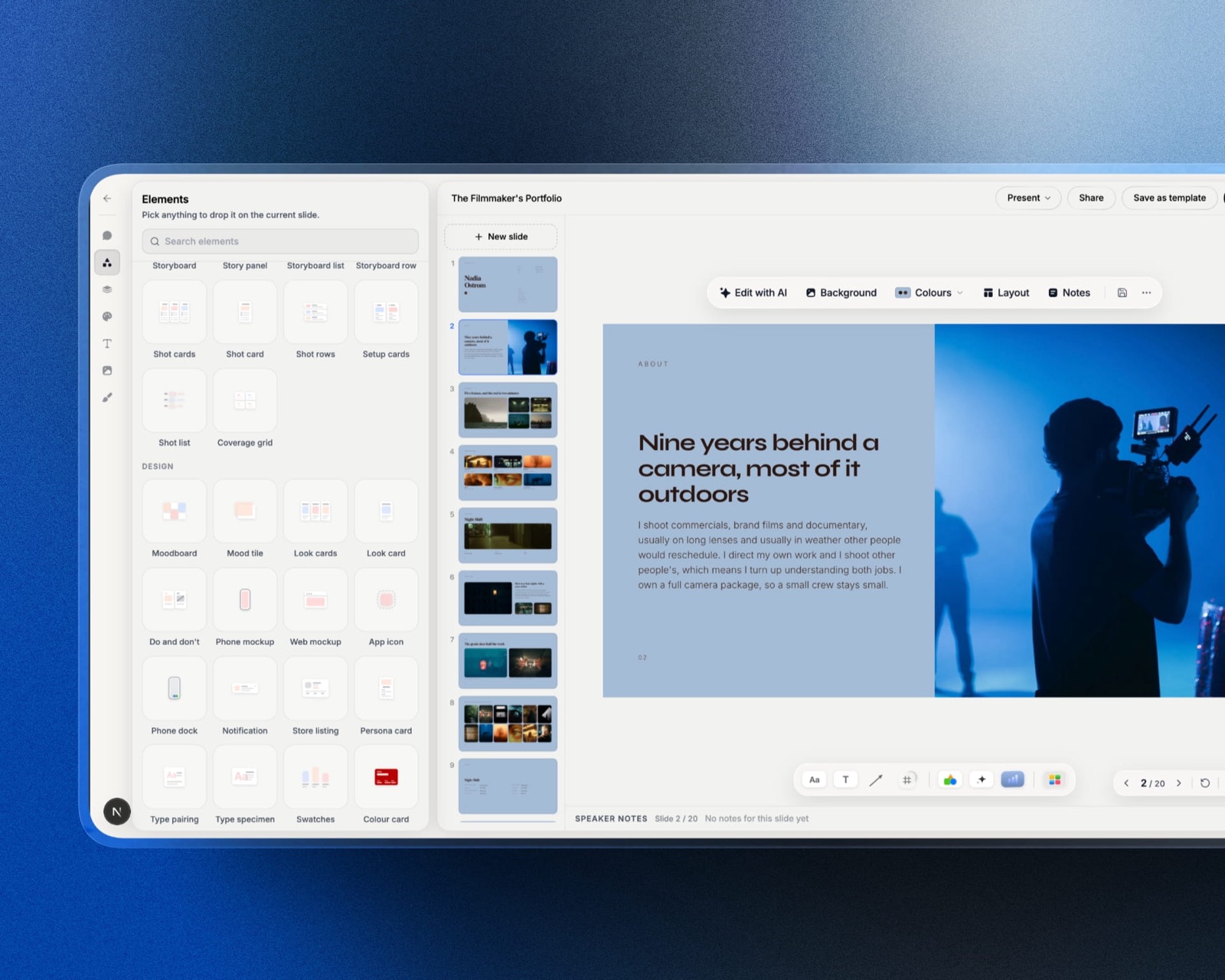
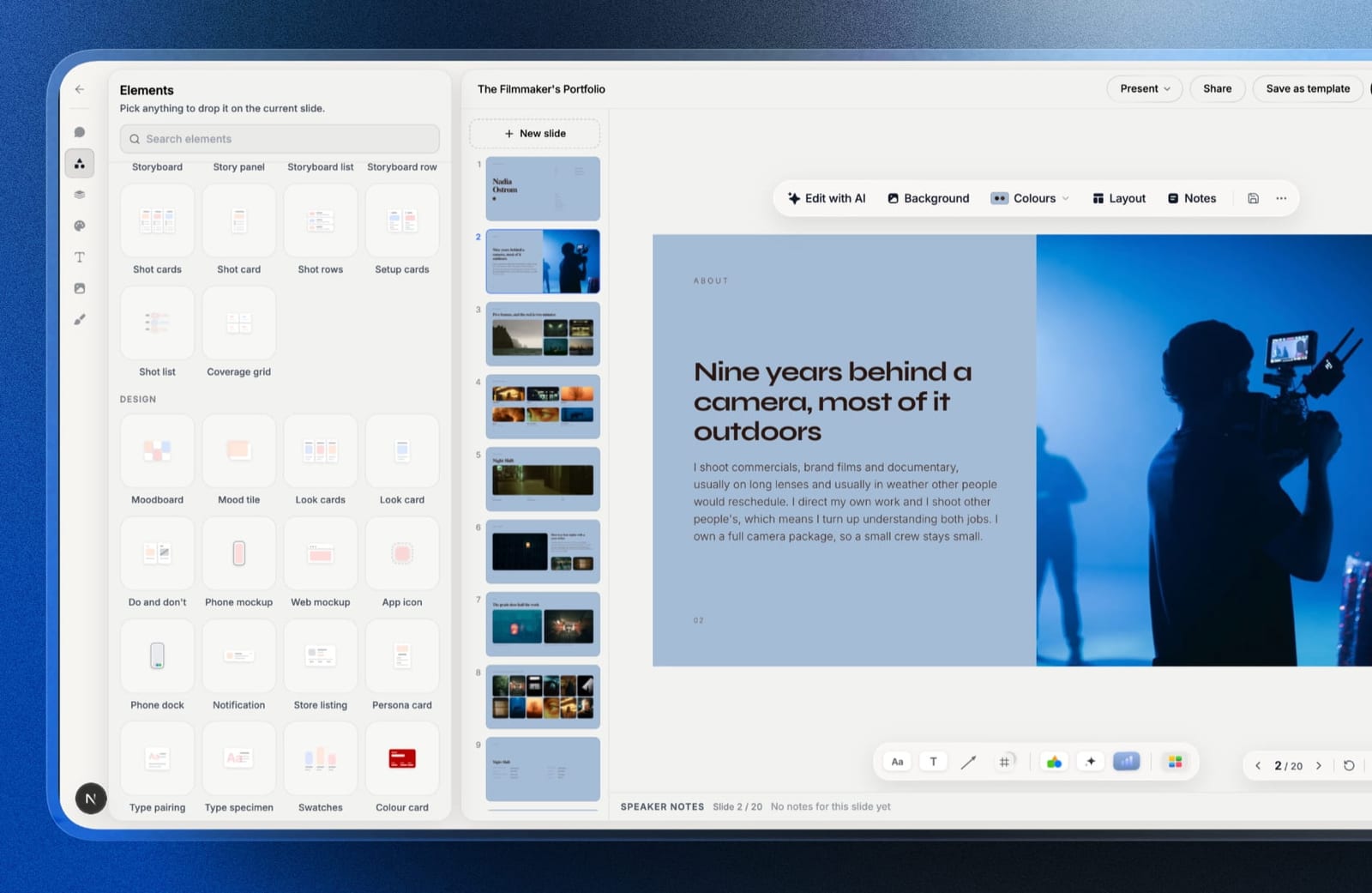
Framekit is an AI website builder with a Slides tool for concept presentations.
You describe the scheme and the AI lays out a deck, editable by hand, with moodboards, look cards, colour swatches and before-and-after mockups as ready-made elements, your own fonts and colours throughout, and speaker notes for the meeting.
Present it full screen, share a link or export a PDF on every plan. The same account builds the portfolio site, where a page of twenty renders behaves properly on a phone.
Where this argument loses, plainly. It does not generate renders, and nothing here replaces the tools ranked above. Deck links have no password and no per-project client approvals, and an interactive 3D walkthrough is developer work.
The Decision Guide
Work down this list until a branch matches the job you are doing, because the biggest mistake in this category is buying a restyling tool for a specification job or the reverse.
You want to test whether AI restyling is useful at all. Spacely AI's free tier. 40 credits, no watermark, commercial licence, which is roughly ten deliverable rooms at no cost.
You restyle photographs regularly and want the lowest cost. Spacely AI top-ups at $0.03 a credit on the 5,000 pack, which is about $0.12 a room at four generations.
You already model in SketchUp, Revit, AutoCAD or Rhino. Spacely again, for the integrations, because restyling real geometry avoids the invented-architecture problem.
You are marketing property and need staging plus tours plus listing copy. Collov Standard at $19 a month for 60 credits, with unlimited regeneration.
You need to design a room, not restyle one. Planner 5D. Premium at $59.99 a year for the floor plan conversion and full catalogue, Professional at $399.99 a year when you need CAD export and unlimited 4K.
You need a professional suite with a real product catalogue. Coohom, starting free and moving to Pro at $29 a month, after confirming the render allowance.
You need the AI to identify real, purchasable furniture. ReimagineHome, for its product discovery, priced directly since the page will not tell you the unit cost.
You need images occasionally and hate subscriptions. RoomGPT credit packs, reported at $29 for 200 credits, accepting that you reportedly pay before seeing a result.
You also need exteriors and landscaping. HomeDesigns AI, priced yourself since we could not read its plans.
You are decorating your own home. DecorMatters, and enjoy it.
Frequently Asked Questions
How much does an AI room render cost?
Between nothing and about $0.47 a generated image, and roughly four times that per room you would actually show a client.
Spacely AI's top-ups fall to $0.03 a credit on the 5,000 pack, Collov ranges from $0.241 to $0.327 a credit depending on plan, and RoomGPT is reported at $0.145 to $0.300. Free tiers exist at most of them.
Can I use AI interior design renders commercially?
It depends on the tool and the tier. Spacely AI states a commercial licence on its free plan with no watermark, and ReimagineHome lists watermark-free images on its entry tier. Collov's free trial is explicitly watermarked.
Always check the watermark and commercial rights on the tier you will actually use rather than the one in the headline.
What is the difference between AI restyling and a design suite?
Restyling takes a photograph of an existing room and reimagines it in a new style, priced per generated image at a few cents each.
A design suite lets you build the room with real catalogue furniture and produces dimensions, specifications and sometimes CAD export, priced as software from about $59.99 a year. One sells a direction, the other sells a plan.
Do AI interior design tools produce buildable plans?
No. A generated image carries no dimensions, no product specification, no material schedule and no guarantee that the furniture shown exists or fits.
The established workflow is to use AI to agree a direction quickly, then produce the specification separately in a design suite or by hand.
Which AI interior design tool has the best free tier?
Spacely AI, clearly. 40 credits, access to all features, high-resolution download, no watermark and a commercial licence is enough to complete roughly ten client-ready rooms at no cost. Most competitors offer three to five watermarked trial images.
Why do my AI renders have windows in the wrong place?
Because photograph-based restyling infers a three-dimensional room from a flat image and gets it wrong. The model has no ground truth for ceiling height, window position or what is beyond the frame.
Starting from real geometry, which Spacely allows through its SketchUp, Revit, AutoCAD and Rhino integrations, largely removes this failure.
Is it cheaper to buy credits or a subscription?
For irregular use, credits. Spacely's 5,000 credit top-up at $150 has no expiry pressure and works out at $0.03 a credit, against monthly plans that reset.
For steady high volume, a subscription with a large allowance usually wins, but check the ladder carefully, since Collov's Advanced tier is slightly more expensive per credit than its Standard tier.
How many generations does one usable room take?
Usually three to five, which is why we priced this article at four. Models produce anatomically odd furniture, invented architecture and lighting that does not match the room, and the discard rate is the single biggest gap between advertised and actual cost in this category.
How should interior designers present AI renders to clients?
As a concept deck rather than a folder of images: a moodboard, the palette, two or three renders per room with the brief beside them, and a clear note that renders are indicative.
Framekit Slides has moodboard, swatch and mockup elements and exports PDF free, and Canva works if you already design there.
The Verdict
Spacely AI is the best AI interior design tool in 2026, because its free tier gives 40 credits with a commercial licence and no watermark, which is roughly ten deliverable rooms before you spend anything, and because its top-ups at $0.03 a credit are about eight times cheaper than the next verified option.
Planner 5D is the right purchase when the job is designing rather than restyling, at $59.99 a year for the tier most people need and $399.99 for unlimited 4K renders and CAD export.
Collov is the property specialist, and Standard at $19 a month with unlimited regeneration is the tier to take if listings rather than interiors are your business.
The finding that ran through every table in this article is that the quoted price is not the price.
A room you would actually show a client takes about four generations, so the advertised credit rate is roughly a quarter of the real cost, and no vendor in this category publishes that number.
So the last recommendation is a testing one. Spend the free 40 credits at Spacely on a real client job before you subscribe to anything, count how many generations you actually discarded, and multiply. That number, not the pricing page, is what this category costs you.
Where Framekit loses, since we named ourselves above: we do not generate renders, our decks have no per-project approvals or password, and an interactive 3D walkthrough a visitor can move through in the browser is developer work rather than something a builder gives you.