Framekit templates
Start from a designer-made template
 Use template
 Use template
 Use template
 Use template
 Use template
 Use template
 Use template
 Use template
Every AI logo maker works the same way. You type a business name, it generates a wall of options, you fall in love with one, and only then does it tell you what downloading it costs.
The number on the pricing page and the number you need to pay for a logo you can actually use are frequently different, and at one popular service the entry package is a single low-resolution PNG with a coloured background baked in.
You cannot put that on a white page. It is a logo you own and cannot use.
An AI logo maker is a tool that generates logo options from a business name, industry and style preferences, then sells you the files. The generation is free almost everywhere.
What you are buying is the vector file, the commercial rights, and in some cases the right to keep using the mark at all.
A logo is only worth what it ends up on.
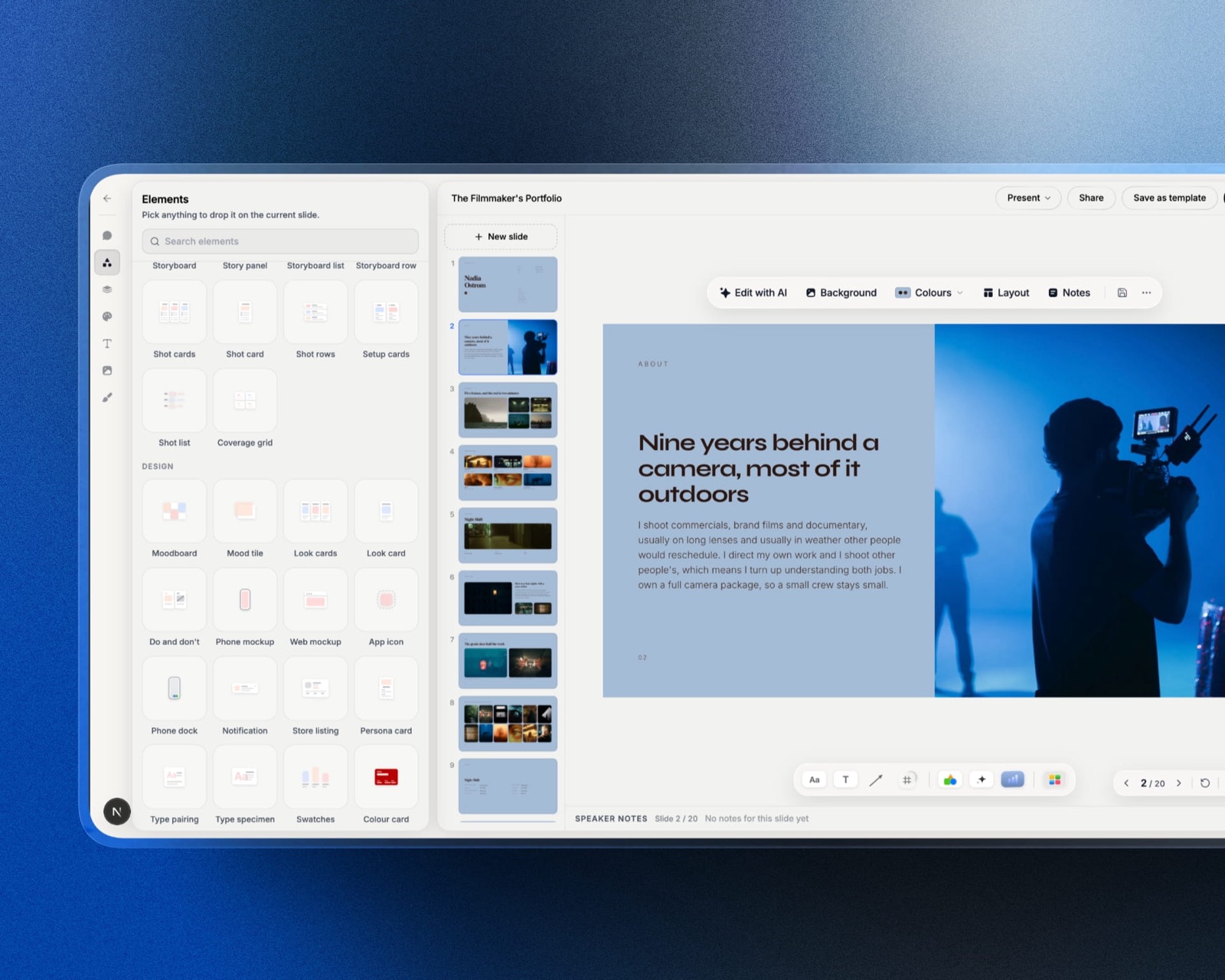
Framekit is where a new mark usually has to land next: an AI website builder that puts the brand on your own domain and holds the logo, type and colours as site-wide settings, so they stay consistent on every page you add later instead of drifting.
The best AI logo maker in 2026 is Brandmark, because its $35 entry package includes vector files and full copyright rather than holding them back for a higher tier, which is unusual in this category.
Zarla is genuinely free and hands over both PNG and SVG at no cost, Logo.com's free plan includes a commercial licence on the PNG, and Looka produces the best-looking results if you accept that the real price is $65 rather than the $20 on the page.
The trade-off across every tool here is distinctiveness: a mark assembled from a shared icon library is harder to register as a trademark, and that matters more than the price.
Updated in September 2026: we re-verified Framekit's plans and refreshed our own section on where a new brand actually lives. Logo package prices and what each tier hands over are as read in August 2026.
How We Compared 11 AI Logo Makers
We ran the same brief through every tool: a fictional specialty coffee roaster with a two-word name, asked for a modern and minimal style, and generated until each tool ran out of meaningfully different directions.
Then we went through the checkout on each one, or as far as each one would let us, and recorded exactly which file formats and which rights the cheapest usable package included. Everything ran on 9 August 2026.
Findings are labelled by grade throughout.
Generation quality, how much genuine variety each tool produced before repeating itself, how well the editor let us adjust spacing and colour, and what actually arrived in the download are things we did with the tools open.
Prices were read at each vendor's own page on 9 August 2026 where the page rendered figures, and several did not.
Price transparency in this category is poor and worth naming. Looka, Namecheap and Turbologo return a 403 to automated requests. LogoAI publishes its pricing chart as an image rather than as text. Canva blocks automated access entirely.
For those, figures below come from third-party pricing coverage and are labelled as reported rather than read at source.
In one lineeleven tools, one identical brief, every checkout followed to the point where the real price appears, prices read at source where the vendor showed one and labelled where it did not.
What Buying the Same Logo Eleven Times Showed
The single most useful finding is that the advertised entry price and the price of a usable logo are different numbers at most of these services, and the gap is not small. Two vendors are honest exceptions and one of them is free.
- The cheapest package that includes a vector file and full rights ranges from $0.00 to $65.
- 3 of the 11 hand you an SVG or EPS at no cost at all.
- At the most popular service in the category, the $20 entry package is a single low-resolution PNG with a coloured background.
- 2 of the 11 sell logos on a subscription, which raises a question nobody asks at checkout about what happens if you stop paying.
- The gap between an entry package and the vector-inclusive package averaged around $32 across the paid tools.
- 0 of the 11 can tell you whether your generated mark is registrable as a trademark, which is the question that actually matters for a business.
For the pick matched to your situation rather than the whole field, jump to the decision guide.
What a Usable Logo Actually Costs
A usable logo means three things: a vector file you can scale to a building sign, the raster exports you need day to day, and rights that let you use it commercially and stop anyone else using the same mark.
Pricing by that definition rather than by the headline entry tier reorders the category completely.
| Tool | Advertised entry price | Cheapest package with vector plus rights | The gap |
|---|---|---|---|
| Zarla | Free | Free, PNG and SVG | $0 |
| Shopify Logo Maker | Free | Free, raster focused | $0 |
| Namecheap Logo Maker | Free | Free, raster focused | $0 |
| Logo.com | Free PNG with commercial licence | $72 a year for vector | $72 a year |
| Brandmark | $35 | $35, vector included | $0 |
| LogoMakr | $29, raster only | $60 | $31 |
| Wix Logo Maker | About $20 | Reported from about $49 | About $29 |
| Looka | $20, low-resolution PNG | $65 | $45 |
| Tailor Brands | Subscription from about $9.99 a month | Subscription, ongoing | Never ends |
| LogoAI | Free to design | Not readable at source | Unknown |
| Canva | Free tier | Not verifiable | Unknown |
Two rows tell the story. Brandmark charges $35 and gives you the vector in that $35, which after going through ten other checkouts felt almost eccentric.
And Looka's advertised $20 is not a logo package in any practical sense, so the honest price for the tool most people end up choosing is $65, more than three times the number that got them to sign up.
The three free rows at the top are real. Zarla in particular hands over an SVG at no cost, which is the file every paid tier in this table treats as the upsell.
In one linea vector logo with full rights costs between $0.00 and $65, and at most vendors the advertised entry price buys you something you cannot actually put on a website.
The 11 Best AI Logo Makers in 2026: Full Comparison
Scores are out of 10 across four weighted criteria: what the cheapest usable package actually includes in files and rights (30%), design quality and how much genuine variety the generator produced (25%), the editor's control over spacing, colour and type (20%), and pricing honesty, meaning how closely the advertised price matches the price of a usable result (25%).
That last criterion is unusual and it is here because this is the category where the gap between the two is largest.
| Tool | Cheapest usable package | Vector included | Rights | Best for | Score |
|---|---|---|---|---|---|
| Brandmark | $35 | Yes, at $35 | Full copyright stated | Honest pricing and good output | 8.9 |
| Zarla | Free | Yes, SVG free | Commercial use | Anyone with no budget | 8.5 |
| Logo.com | Free PNG, $72/yr vector | On the paid plan | Commercial licence on free tier | Testing before paying | 8.1 |
| Looka | $65 | Yes, SVG and EPS | Full ownership | Best-looking output | 7.8 |
| LogoMakr | $60 | Yes, at the Pro tier | Full commercial rights | Manual control | 7.4 |
| Shopify Logo Maker | Free | Raster focused | Free commercial use | Shopify sellers | 7.1 |
| Namecheap Logo Maker | Free | Raster focused | Free commercial use | A quick free mark | 6.8 |
| Wix Logo Maker | Reported from about $49 | On higher tiers | Full rights on purchase | Wix site owners | 6.5 |
| Canva | Free tier, paid above | On paid tiers | Restrictions on templates | People already in Canva | 6.2 |
| LogoAI | Pay to download | Tier-dependent | Stated at checkout | Not verifiable enough to rank higher | 5.8 |
| Tailor Brands | Subscription | On paid tiers | While subscribed | Bundled business services | 5.4 |
Tailor Brands finishes last and the reason is structural rather than about design quality.
Renting a logo is a strange thing to do, because a brand identity is the one asset a business most needs to keep, and a subscription introduces a dependency exactly where you least want one.
1. Brandmark: The Only One That Prices Honestly
Brandmark generates from a colour and keyword brief rather than an icon picker, and it is the only paid tool in this comparison whose cheapest package contains everything you actually need.
What it feels like to useless like browsing a catalogue and more like steering. You describe the brand in keywords, choose a colour direction, and the generator produces marks that respond to both.
The variety within one session was the second best here, and the type pairing was consistently more considered than the icon-plus-name output that dominates the category.
Designer is $95 and adds source files, brand guidelines and matching collateral, and Enterprise is $195 with up to ten hand-crafted concepts.
The detail nobody writes aboutthe vector is in the $35 tier. Across the rest of this comparison the vector file is the upsell, the thing that turns a $20 sign-up into a $65 purchase, and Brandmark simply includes it.
That single decision is why it ranks first here, ahead of tools that generate marginally prettier marks.
The gotchathe generation style is recognisable once you have seen enough of it. There is a Brandmark look, in the same way there is a Looka look, and a designer will spot it. That is true of every tool on this page and worth saying out loud.
Skip it ifyou want to hand-place elements yourself, where LogoMakr's manual editor gives you more control for less money.
Verdict: the best paid choice in this category and an unusually straight deal. $35 for a vector logo with full copyright is what every other vendor here should be charging and mostly is not.
Building the rest of the brand around it? We compared the tools in the best Illustrator alternatives, four of which cost nothing.
2. Zarla: Genuinely Free, Vector Included
Zarla gives away the thing every other tool here sells. You can generate, customise and download both high-resolution PNG and SVG files at no cost, with no card required.
What it feels like to usesimpler than the paid tools and noticeably narrower in output. The generator produces fewer genuinely different directions before it starts repeating, and the editor gives you less control over spacing and type than Looka or LogoMakr.
The real number$0.00, including the SVG. Against Looka's $65 for the equivalent files that is the largest single saving available in this comparison, and against Brandmark it is $35.
The detail nobody writes abouthanding over the SVG for free removes the entire business model that the rest of this category runs on, which raises the obvious question of what Zarla is actually selling.
The answer is its website builder, at a reported $2.99 a month for Premium and $6.99 for Business, and the logo is the funnel. That is a legitimate arrangement and worth understanding before you assume the free tier is charity.
The gotchaoutput quality is the trade. If you generate for twenty minutes here and twenty minutes in Looka, you will notice the difference, and whether it matters depends on whether the logo is a placeholder or the foundation of a brand.
Skip it ifthe mark is going to carry a business for years, where $35 to $65 for a better starting point is not a meaningful expense.
Verdict: the right answer when the budget is genuinely zero, and an easy first stop for everyone else because finding out costs nothing. Generate here first; if nothing lands, then pay.
3. Logo.com: Best Free Tier With Real Rights
Logo.com's free plan is unusual in this category because it includes a commercial licence rather than a watermark, so what you download is legally usable rather than a preview.
What it feels like to usepolished and fast, with a large icon library and an editor that handles the basics well. Output quality sits comfortably in the upper half of the field, and the brand-asset generation around the logo is more extensive than most.
The real numberthe free plan includes a downloadable PNG with a full commercial licence and ownership, with no card required. The Brand Plan is reported at $72 a year or $12 a month and adds vector files, over 1,200 branded templates, a website, domain registration and brand guidelines.
The gotchafree means raster. A PNG at any resolution is a fixed-size image, so the moment you need the logo on a vehicle, a sign, an embroidered shirt or anything printed large, you are into the $72 a year plan.
That is a subscription rather than a purchase, which for a file you want to own forever is the wrong shape.
Skip it ifyou know you will need the vector, where Brandmark's $35 one-time purchase is cheaper than one year of this and does not renew.
Verdict: the best way to get a legally usable logo for nothing, and a poor way to get a vector. Use the free tier to test a direction, then buy the vector somewhere that sells it once.
4. Looka: Best-Looking Output, Worst-Looking Price Ladder
Looka is the most polished product in this category and produces the most professional-looking marks, and its pricing ladder is the clearest example of the problem this article is about.
What it feels like to usegenuinely good. The generator asks better questions than its competitors, the results feel designed rather than assembled, and the editor gives real control over spacing, colour and type. If you put the outputs of all eleven tools on a wall, most people would pick Looka's.
The real numberthe Basic Logo Package is reported at $20 and includes a single low-resolution PNG file with a coloured background.
The Premium Logo Package at $65 includes vector files in SVG and EPS, multiple colour variations and full copyright ownership. Brand Kit subscriptions are reported at $96 a year, and Brand Kit with Web at $129 a year.
Looka returns a 403 to automated requests, so all of these are reported.
The detail nobody writes about, and it is the headline of this whole article: a low-resolution PNG with a coloured background is not a usable logo.
It cannot go on a white page without a visible box, it cannot go on a dark page at all, and it cannot be printed.
The $20 tier is not a cheap version of the product, it is a different thing entirely, and the real entry price for Looka is $65.
The gotchaat $65 it is still reasonable for what arrives. The problem is the $20 number doing the marketing.
Skip it ifyou are choosing on price, where Brandmark gives you vector plus rights for $35 and Zarla gives you an SVG for nothing.
Verdict: the best output in the category at nearly twice the price of the best deal in it. Worth $65 if the mark matters; never worth $20.
5. LogoMakr: The Manual One
LogoMakr is less a generator than an editor with a large icon library, which makes it the most hands-on option here and the best fit for anyone who wants to place things themselves.
What it feels like to usecloser to a simplified vector editor than to a wizard. You search icons, place them, set type, and adjust. That takes longer and it means the result is yours rather than a template's, which for distinctiveness matters more than any generator setting.
The real numberreported at $29 for the Basic package covering web files in PNG and JPG with full commercial rights, $60 for Pro adding high-resolution raster and vector files in SVG, EPS and PDF plus six design credits, and $120 for a tier with thirty credits.
The gotchathe $29 tier is raster only, so the pattern repeats: the advertised price is not the price of a vector. The real entry point here is $60, which is close to Looka's $65 and nearly double Brandmark's $35.
Skip it ifyou want the tool to make the design decisions, which is the entire point of the generators above.
Verdict: the best choice for someone who half-knows what they want and would rather build it than pick it. Buy Pro or do not buy it.
6. Shopify Logo Maker: Free, and No Longer Called Hatchful

Shopify's free logo maker is the tool most people still know as Hatchful, and the name change is worth knowing because a lot of articles still link to a domain that no longer exists.
What it feels like to usetemplate-driven, quick and clearly aimed at someone launching a store this afternoon. The output is competent and firmly generic, with a strong tendency toward the same icon-above-name arrangement.
The real numberfree, with no watermarks, no premium tier and every template, font, icon and export available at no cost. The Hatchful domain was retired in 2025 and the tool now lives on Shopify's own site as its logo maker.
The gotchathe exports are raster-focused, so this is a fast free PNG rather than a foundation you can scale. For a store launch that is often exactly right, and for a brand that will exist in five years it is not.
Skip it ifyou need a vector, which Zarla gives away for the same price of nothing.
Verdict: a good free tool with a naming problem, and a reminder to check whether the tool an article recommends still exists under that name.
7. Namecheap Logo Maker: Free and Nearly Unknown
Namecheap gives away a logo maker as a customer-acquisition tool for its much larger domain registration business, which means it is free with none of the account gymnastics or upgrade prompts that usually accompany a free tier in this category.
What it feels like to usesimple and limited in the way free tools attached to another business usually are. Fewer style directions than Zarla, and perfectly serviceable output for a small project.
The real numberfree. Namecheap returns a 403 to automated requests so we could not read its terms page directly, and its free positioning is consistently documented elsewhere.
The gotchaas with Shopify's, the useful exports are raster. Free logo makers attached to a larger business almost always hold back the vector, because the vector is what a designer would charge for.
Skip it ifyou need scalable files or genuine distinctiveness.
Verdict: worth ten minutes if you are registering a domain there anyway, and not worth seeking out over Zarla, which gives you an SVG.
8. Wix Logo Maker: Fine If You Are Building a Wix Site
Wix's logo maker exists to feed its website builder, and it is priced accordingly, with the logo as an entry point rather than the product.
What it feels like to useconsistent with the rest of Wix, which is to say approachable and template-led. Output quality is mid-field and the editor is easier than most for someone who has never adjusted kerning.
The real numberreported at about $20 for a basic logo download, with one-time payments from about $49, and a Deluxe package at about $24 a month that bundles high-resolution files with a matching website and business cards.
The gotchathe bundling is the point. A $24 a month package that includes a website is not a logo purchase, it is a website subscription with a logo attached, and comparing it against a $35 one-time logo is comparing two different products.
Skip it ifyou are not building a Wix site, in which case you are paying for adjacency you will not use.
Verdict: reasonable inside the Wix ecosystem and poor value outside it. If the website is going elsewhere, so should the logo.
9. Canva: Where a Lot of Logos Actually Come From
Canva is not marketed as a logo maker and produces an enormous number of real-world logos, because it is already open on the screen of the person who needs one.
What it feels like to usea design tool rather than a generator, with a template library and no meaningful constraint on what you make. That freedom is both the appeal and the problem.
The real numberCanva blocks automated access to its pricing page, so we are not quoting a figure. Free-tier downloads are lower resolution than paid ones, which is the constraint that matters.
The gotcha, and it is a serious oneCanva's terms restrict trademarking designs that use its stock template elements, because those elements are licensed to every other Canva user simultaneously.
A logo built from a Canva template is a logo you share, and that is precisely the situation trademark law exists to prevent. Read the licence before you build a business on it.
Skip it ifyou intend to register the mark, which is most businesses that survive.
Verdict: fine for a placeholder, a personal project or an event, and the wrong foundation for a brand you intend to defend.
10. LogoAI: Good Output, Unreadable Prices
LogoAI generates from a name and industry with a strong emphasis on typographic marks, and it produced some of the better wordmarks in our test.
What it feels like to usecapable, with a brand-kit generator that extends the mark across collateral more thoroughly than most. Free to design, pay to download, which is the standard shape.
The real numberwe could not read one. LogoAI publishes its pricing chart as an image rather than as text, so the Basic, Pro and Brand tier prices are not machine-readable, and we do not quote figures we could not verify.
What the page does state is that designing is free and you pay only to download, that purchases are one-time rather than subscriptions, and that a designer can make manual fixes for $40 extra.
The gotchapublishing prices as an image is a choice, and in a category where the entry tier is frequently not a usable product, it is a choice worth noticing.
Skip it ifyou want to know what something costs before you invest an hour in generating with it.
Verdict: decent output held back by the least legible pricing here. Generate for free by all means, and read the checkout total carefully.
11. Tailor Brands: The One That Rents You a Logo
Tailor Brands sits inside a much wider business-formation service that covers company registration, ongoing compliance filings, websites and business banking introductions, and within all of that the logo is one component of a subscription rather than a product you buy outright.
What it feels like to usemore like signing up for a service than buying a file. The logo generation itself is mid-field, and the surrounding product is genuinely useful if you are actually forming a company and want one vendor for it.
The real numberreported from about $9.99 a month, falling to about $3.99 a month on an annual term and about $2.99 on a two-year term, with Essential at about $199 a year and Elite at about $249 a year. High-resolution vector files are included on paid plans.
The gotcha, and it is the reason for the rankinga subscription for a logo raises a question the checkout does not answer, which is what happens to your rights and your files when you stop paying. For an asset you intend to put on a building, that dependency is the wrong shape regardless of the monthly figure.
Skip it ifyou only want a logo, which is most people reading this.
Verdict: a reasonable bundle for someone forming a company who wants formation, compliance and branding from one vendor, and the worst way in this comparison to buy a logo on its own.
The Trademark Question Nobody at Checkout Answers
In one linetrademark law does not care that a machine drew your logo, it cares whether the mark is distinctive and whether it conflicts with an existing one, and templated AI output frequently fails the first test and sometimes the second.
This is the question that actually matters for a business, and it is worth separating three things people run together.
Copyright is not the issue you think it is. Copyright protects creative works and its treatment of purely machine-generated output is genuinely unsettled.
Trademark is a different system: it protects marks that identify the source of goods and services, and it does not require human authorship in the way copyright does.
As of mid-2026 there is no examination guidance prohibiting AI-generated marks, and the practical position is that a generated logo is assessed like any other.
Distinctiveness is the real barrier. A mark has to function as a source identifier, which means it has to be distinctive enough that people can associate it with you specifically.
A generic icon of a coffee cup above a coffee company's name, assembled from an icon library that five hundred other businesses drew from, is exactly the shape of mark that struggles.
The examiner's objection is not that a machine made it, it is that it does not distinguish anything.
Similarity is the risk you cannot see. These tools draw from shared libraries and are trained on data that includes existing logos, so a generated mark can resemble a registered one closely enough to cause a problem, entirely by accident.
No tool in this comparison runs a trademark search, and none of them can tell you whether the mark you just bought is already someone else's.
Three habits close most of the gap and none of them require a lawyer to start.
Modify what the generator gives you. Custom type, a distinctive lockup, an unusual colour relationship, anything that moves the mark away from its template increases both its distinctiveness and your claim to it.
This is the single highest-value hour you can spend, and it is why the tools with real editors rank higher here.
Run a visual trademark search before you commit. National trademark offices publish searchable databases and image search is available in several. Doing this before you print stationery is free; doing it after you have built a brand is not.
Document use in commerce. Trademark rights in many jurisdictions accrue through use, so dated evidence of your mark on real products, invoices and a live website matters independently of registration.
None of this makes an AI logo a bad idea. It makes an unmodified, unsearched, template-assembled AI logo a bad foundation for a business you intend to defend, which is a narrower and more useful claim.
The Five Tells of a Generated Logo
In one lineevery tool here has a house style, five specific characteristics give a generated mark away to anyone who looks at logos professionally, and fixing them takes about an hour and costs nothing.
This is the practical answer to "will people be able to tell", and it is more useful than the answer.
The icon sits above the name, centred, at a predictable size. This is the default lockup in nearly every generator because it always works and never surprises. Moving to a horizontal lockup, or removing the icon entirely, immediately reads as more considered.
The typeface is one of about twenty. Generators draw from a set of open-licence fonts, and the same handful appear across thousands of marks. Substituting a different face, even another free one, is the single highest-impact change available.
Default letter spacing. Wordmarks that have not been kerned by hand have an evenness that reads as untouched. Tightening the spacing slightly, and adjusting the two or three specific pairs that sit awkwardly, is what separates a set typeface from a designed one.
The colour combination is from a palette generator. Certain teal-and-navy and coral-and-charcoal pairings are so common in generated output that they are effectively a signature.
Choosing a colour relationship with an unequal weighting, one dominant and one used sparingly, moves away from it instantly.
The icon is a recognisable stock symbol. A coffee cup for a coffee brand, a mountain for an outdoors brand, a leaf for anything sustainable.
This is the tell that matters most, because it is also the reason the mark is hard to trademark. Abstraction, an unexpected metaphor, or a monogram all solve it.
The reason this section exists in a pricing comparison is that these five fixes affect distinctiveness, and distinctiveness is what determines whether your mark is registrable. Time spent here is worth more than the difference between the $35 tool and the $65 one.
What You Are Actually Buying: The File Formats
In one linethe difference between the cheap tier and the real tier at almost every vendor here is a vector file, and knowing why it matters stops you buying the wrong one.
A PNG or JPG is a fixed grid of pixels. Enlarge it and it softens. It has one size, and every other size is a degraded copy. This is what the entry tiers sell.
An SVG or EPS is a set of instructions. Scale it to a business card or the side of a van and it is equally sharp, because it is redrawn rather than stretched.
This is what a printer, a sign-maker, an embroiderer and any future designer will ask you for, and it is the file that makes a logo an asset rather than an image.
A PDF sits in between in practice, usually carrying vector data and accepted by most print suppliers, which is why several packages include it alongside the SVG.
The practical test for whether you need the vector: will this logo ever be printed, embroidered, cut in vinyl, or displayed larger than a laptop screen. If yes, you need it, and paying $20 for a PNG means paying again later.
If the mark genuinely only ever appears as a website header and a social avatar, a high-resolution PNG is enough and the free tiers cover you.
One detail that catches people: transparency. A logo delivered on a coloured or white background rather than with a transparent one cannot be placed over a photograph or a coloured section.
Check for a transparent PNG in whatever package you buy, because it is a separate thing from resolution and is missing more often than you would expect.

What Happens to Your Logo If You Stop Paying
In one linetwo tools in this comparison sell logos on a subscription, and the question of what you keep when you cancel is answered nowhere on either checkout page, which is reason enough to prefer a one-time purchase for this particular asset.
Most software subscriptions are fine. You stop paying, you lose access to the tool, and the work you exported stays yours. A logo is different, because the thing you exported is the entire asset and it needs to keep working for as long as the business exists.
Three specific risks are worth thinking about before choosing a subscription route.
File access. If your only copies of the vector, the colour variations and the reversed version live in a vendor's dashboard, cancelling can mean losing the working files even when you retain the rights.
The fix is trivial and nobody does it: download everything to your own storage the day you buy, and keep it with your business records rather than in a downloads folder.
Rights continuity. A one-time purchase that states full copyright transfers something permanent.
A subscription that grants usage rights while active is a different arrangement, and the difference only becomes visible when you stop. Read the specific words rather than assuming.
The brand-asset trap. Once a mark is on your signage, your packaging, your vehicle and your business cards, the cost of losing access to the source files is not the subscription price, it is a reprint of everything.
That asymmetry is why the recommendation here leans so hard toward one-time purchases even when the monthly figure looks small.
The practical rule: whichever tool you use, treat the download as the moment you take ownership. Save the vector, every colour variant, and a copy of the licence terms as they read on the day you bought, into somewhere you control.
That takes five minutes and removes the entire category of problem.
When to Hire a Human Instead
In one linean AI logo costs $0 to $65 and a designer costs a great deal more, and the honest dividing line is not budget, it is whether the mark needs to be defensible and distinctive or merely present.
We publish this on a site built for designers, so the bias is declared and the analysis is still the same one we would give a friend.
AI is the right answer when you need a mark this week, when the business is unproven and the identity may change, for a side project, an event, a personal brand or a store you are testing.
Spending four figures on an identity for a business that may not exist in a year is a worse decision than spending $35.
A designer is the right answer when the mark has to be distinctive enough to register and defend, when the identity needs to work across a system rather than as a single logo, when the business has a real position that a template cannot express, and when you are going to print the thing on a thousand physical objects.
The middle path most small businesses actually take, and it works: start with a generated mark, run the business, and commission a proper identity when the business has proved itself and you know what it stands for.
The generated logo is a placeholder with a job, and treating it as one removes most of the anxiety about whether it is good enough.
What does not work is spending $65 on a template mark and then treating it as a permanent brand asset without ever revisiting it. That is how you end up with a business whose logo says nothing, on a mark you cannot register, three years after it stopped being a placeholder.
Run This Test Before You Pay
Before you hand over any money, generate your favourite mark and then put it through the following three checks, all of which cost nothing and take about fifteen minutes between them. Each one catches a different and common failure.
Put it on a white background and a dark one. A logo that only works on the coloured background it was generated against is not finished, and this catches the low-resolution-PNG-with-a-background problem immediately.
Shrink it to 32 pixels. That is a browser tab favicon, and it is where most logos fall apart. If the mark is unreadable at that size, it will be unreadable in every small placement your business has.
Search the trademark database in your country for similar marks in your industry. It is free, it takes ten minutes, and it is the single check that separates a logo you can build on from one that becomes a problem later.
If it passes all three, buy the vector package and move on. If it fails the third, generate again, because no amount of money spent on the file fixes a mark somebody else already owns.
Where a New Brand Actually Lives
A logo is not a brand and a file is not a business. The mark has to appear somewhere a customer can find you, which is the part this whole category quietly assumes you have already sorted out. That is what we build, so read this as disclosure rather than a twelfth entry.
Framekit is an AI website builder for creators, designers and small businesses, so the logo you just generated goes onto a real site with your own domain rather than a social profile you rent.
For a new brand specifically, the useful part is that the site, the portfolio and the store are one system, so the mark, the colours and the type stay consistent across all of them rather than drifting between three tools.
Two honest limits. Framekit does not generate logos and is not an alternative to anything ranked above.
And if you sell through it there is a transaction fee that starts at 5% on the free and Starter plans, drops to 3% on Pro at $19 a month and reaches 0% on Business at $39 a month, with the point where a flat plan beats a percentage at around $780 a month in sales.
The Decision Guide
Work down these questions in order and stop at the first yes, because what you intend to do with the mark decides this far more than which generator produces the prettiest options.
Is the budget genuinely zero and do you need a scalable file? If yes, Zarla, which hands over an SVG at no cost. Nothing else here does that.
Do you want a legally usable logo for nothing and only need a raster file? If yes, Logo.com's free plan, which includes a commercial licence, or Shopify's free logo maker.
Do you want the best deal on a proper vector package with full rights? If yes, Brandmark at $35, which is the only paid tool here that includes the vector in its entry tier.
Do you want the best-looking output and can you accept the real price? If yes, Looka at $65, and ignore the $20 tier entirely because it is a low-resolution PNG on a coloured background.
Do you want to place the elements yourself rather than pick from generated options? If yes, LogoMakr's Pro tier at a reported $60.
Are you already building a Wix site or forming a company through Tailor Brands? If yes, use their bundled logo tools, and understand you are buying adjacency rather than the best logo.
Will this mark be registered as a trademark and defended? If yes, none of these on its own. Generate a direction here, then pay a designer to make it distinctive, and run a trademark search before you print anything.
Frequently Asked Questions
What is the best AI logo maker in 2026?
The best AI logo maker in 2026 is Brandmark, whose $35 Basic package includes both PNG and vector files with full copyright stated, making it the only paid tool in this comparison that does not hold the vector back for a higher tier.
Zarla is the best free option and hands over an SVG at no cost, Logo.com's free plan includes a commercial licence on a PNG, and Looka produces the best-looking marks at a real price of $65 rather than the $20 on its page.
Is there a genuinely free AI logo maker?
Yes. Zarla lets you generate, customise and download both high-resolution PNG and SVG files at no cost with no card required, which is unusual because the vector file is what almost every competitor charges for.
Logo.com's free plan includes a downloadable PNG with a full commercial licence, and Shopify's free logo maker has no watermarks and no premium tier.
All three are funnels into an adjacent paid product rather than charity, which is worth understanding but does not change what you get.
Why do AI logo makers charge more for the vector file?
The vector file is the only version that scales to any size, so it is the file a printer, sign-maker or future designer needs, and vendors price it as the point where a casual user becomes a committed one.
A PNG covers a website header and a social avatar; an SVG or EPS covers everything else.
That is why entry packages at $20 to $29 are frequently raster-only and the vector-inclusive tier is $60 to $65 at most vendors, with Brandmark at $35 the notable exception.
Can you trademark an AI-generated logo?
Trademark law does not require human authorship, so an AI-generated logo can be registered in principle, and as of mid-2026 there is no examination guidance prohibiting it.
The practical obstacles are distinctiveness and similarity: a mark assembled from a shared icon library that hundreds of other businesses also used may not distinguish your business, and generated marks can accidentally resemble existing registered ones.
Modify the output substantially and run a visual trademark search before you commit.
Do I own the logo I generate with an AI logo maker?
It depends on the tier you buy, and the free tiers are where this gets complicated. Brandmark states full copyright with its $35 package, Looka's $65 Premium includes full ownership, and Logo.com's free plan includes a commercial licence.
Canva restricts trademarking designs built from its stock template elements, because those elements are licensed to every other user simultaneously, which is a meaningful limitation if you plan to register the mark.
What is wrong with Looka's $20 package?
Looka's Basic package at a reported $20 includes a single low-resolution PNG file with a coloured background, which cannot be placed on a white page without a visible box, cannot be used on a dark background, and cannot be printed.
It is not a cheaper version of the product so much as a different thing, and the practical entry price for Looka is the $65 Premium package that includes SVG and EPS vector files with full ownership.
Should I pay a subscription for a logo?
Generally no.
A brand identity is the asset a business most needs to keep permanently, and a subscription introduces a dependency exactly where you least want one, raising a question about what happens to your files and rights if you stop paying.
Tailor Brands and Logo.com's vector plan both work this way. A one-time purchase such as Brandmark's $35 or Looka's $65 gives you the files outright, which is the correct shape for this particular asset.
Are AI logos unique?
Not reliably. Most of these tools assemble marks from shared icon libraries and font pairings, so two businesses in the same industry entering similar briefs can receive recognisably similar results.
Tools with real editors, such as LogoMakr and Looka, let you move further from the template, and the single most valuable thing you can do with any generated mark is modify it substantially before you adopt it.
Is Hatchful still available?
Hatchful still exists, under a different name and address.
The Hatchful domain was retired in 2025 and the tool now lives on Shopify's own site as its logo maker, with the same functionality, still free, with no watermarks and no premium tier.
Articles linking to hatchful.shopify.com are pointing at a domain that no longer serves the tool, which is worth noticing about the currency of their other recommendations.
How much does a real logo designer cost compared to AI?
A designer costs substantially more than the $0 to $65 range in this comparison, and what you are buying is different: a distinctive mark rather than a template arrangement, a system rather than a single file, and a mark far more likely to survive trademark examination.
The sensible dividing line is not budget but permanence. Use AI for an unproven business, a side project or a placeholder, and commission a designer once the business has proved itself and you know what it stands for.
What file formats should a logo package include?
A complete package includes an SVG or EPS vector file, a PDF for print suppliers, high-resolution PNGs with transparent backgrounds, and colour variations covering full colour, single colour and reversed for dark backgrounds.
Transparency is the element most often missing and it is separate from resolution: a logo delivered on a solid background cannot be placed over a photograph regardless of how many pixels it has.
Will an AI logo look cheap?
An unmodified one often will, because each tool has a recognisable house style that people who look at logos will spot.
The tells are a generic icon sitting above a name in a popular free font, default letter spacing, and colour combinations that appear across thousands of other generated marks.
Changing the type, tightening the lockup and choosing a less obvious colour relationship removes most of that, and takes about an hour.
Which AI logo maker is best for a small business on a budget?
For a small business on a budget, Zarla is the best free option because it includes the SVG, and Brandmark at $35 is the best paid one because the vector and full copyright are in the entry tier rather than an upsell.
Avoid entry packages that deliver only a low-resolution raster file, because you will pay again the first time you need the logo printed, which for most businesses is within the first year.
Do I need a logo before I build a website?
No, and waiting for one is a common reason people never launch. A clean wordmark set in a good typeface is a perfectly respectable identity and is what a number of well-known brands use permanently.
Build the site, use your business name set in type, and add a mark later once you know what the business actually is. That order also produces a better logo, because you will be briefing from something real.
A logo arrives with colours attached, and those colours have to survive contact with a website, which is why we priced and tested eleven colour palette tools on whether they check contrast before you commit.
A logo is the start of a brand system rather than the end of one, and the rules that keep it used correctly need somewhere to live, which is what our comparison of brand guidelines tools covers.
Final Verdict: The Best AI Logo Maker in 2026
Brandmark at $35 is the answer for most people who intend to pay, because it is the only tool in this comparison whose advertised price is the price of a usable logo.
Everywhere else, the number that gets you to sign up and the number you pay to walk away with a vector are different, and the gap averaged around $32.
If the budget is zero, Zarla hands over an SVG for nothing, which is the file the rest of this category is built on selling. If you only need a raster logo with real rights, Logo.com's free plan covers you.
Where this whole category loses, plainly: none of these tools can tell you whether your mark is distinctive enough to register or whether it already resembles someone else's, and templated output frequently fails on both counts.
If the logo is going to carry a business you intend to defend, generate a direction here, then pay someone to make it yours, and run a trademark search before you print anything.
That is a real limitation and no vendor on this page will tell you about it.
Where Framekit loses, and it is worth stating directly: we do not generate logos and we are not an alternative to anything ranked above.
We are the site the new brand goes on afterwards, and if a logo is what you came for then the eleven tools here are your list and we are not on it.
The short version. Best paid deal: Brandmark at $35, vector included. Best free with a vector: Zarla. Best free with real rights: Logo.com. Best-looking output: Looka at $65, never at $20. Most manual control: LogoMakr Pro.
Already on Shopify or Wix: use theirs. Registering a trademark: hire a designer.
Related readingthe best Illustrator alternatives, the best AI tools for designers, the best mockup generators, the best website builder for graphic designers, and how to choose a domain name for your portfolio.