Framekit templates
Start from a designer-made template
 Use template
 Use template
 Use template
 Use template
 Use template
 Use template
 Use template
 Use template
The short film was locked at eleven on a Tuesday night and it looked like three different movies stitched together.
The A-camera material was creamy and pushed slightly green, the B-camera was a stop hotter in the highlights and noticeably cooler, and the drone plates might as well have been shot on another planet.
Forty-two shots, three cameras, six days to the festival deadline, and nobody had started the grade.
So you go shopping for color grading software and the price list stops making sense almost immediately. The application feature colorists actually finish films in costs nothing. The control panel that sits under their hands costs $34,665.
A film emulation plugin that adds grain, halation and gate weave costs $999 outright. A grading engine that runs inside Avid costs $295 every year, and the application it competes with costs $295 once.
In one working year, two filmmakers can spend $0 and $40,000 on the same forty-two shots and both numbers are defensible.
That is the shape of this category in 2026, and it is unlike anything else in post production. The free end is not a crippled demo: it is the same application a Netflix show gets finished in, minus a specific and knowable list of features.
This guide names that list and prices every rung above it.
The software is free. The eye is not.
A color grading software package is the application where the final look of a film gets set - exposure, balance, contrast, saturation and hue, shot by shot - and where a colorist matches cameras, builds and applies a look, manages the pipeline from camera log to delivery, and renders masters a distributor will accept.
Framekit, which we make, grades nothing and is not ranked here. It is where the graded film gets seen afterwards: a reel and case-study page on a domain you own, with timecoded client review in the same account for the approval pass before delivery.
The best color grading software in 2026 is DaVinci Resolve, because the free version is a genuinely professional node-based grading application with full ACES support and no watermark, and the $295 Resolve Studio licence is a one-time perpetual purchase that unlocks Dolby Vision, noise reduction and the AI Neural Engine rather than a subscription that never ends.
The honest trade-off: Resolve is heavy on your GPU and its node graph punishes anyone trained on layers, so FilmLight Baselight remains the finishing standard at the top of the market, Adobe Premiere Pro's Lumetri is the better answer if your edit already lives in Premiere, and Colourlab AI is the fastest way to match three cameras when the deadline is tomorrow.
How We Compared 9 Color Grading Tools
Grading tools are not interchangeable, so a single score would be dishonest without saying what it measures.
We compared all nine on four criteria, each of which gets its own analysis section later, and held one test project constant across every application so the comparisons mean something.
Licence model and real first-year cost. Perpetual versus subscription, what the entry price unlocks, and what you have paid by month twelve. This is where the category's spread lives, so it carries the most weight.
Color management and ACES. Whether the tool can take log footage from three camera manufacturers, transform it into a common working space, and hand back correct Rec.709 and HDR masters. This is the difference between matching cameras and fighting them.
Grading architecture, HDR and Dolby Vision. Node-based, layer-based, or a plugin bolted onto someone else's stack, and which tier of which product can actually produce an HDR10 or Dolby Vision master.
Hardware, round-tripping and collaboration. GPU dependence, which panels the software talks to and what they cost, whether a grade survives the trip back to an NLE, and whether two people can work the same job.
Our test artifact was the same throughout: a 42-shot short film we will call the Harbourlight cut, built from three cameras (an ARRI Alexa A-camera in Log C, a Sony FX3 B-camera in S-Log3, and a DJI drone C-camera in D-Log), running about nine minutes, delivered in both Rec.709 and HDR10.
Three kinds of finding, kept separate. Measured means hands-on: we graded or partially graded the Harbourlight cut in DaVinci Resolve, Resolve Studio, Premiere Pro, Final Cut Pro, Colourlab AI, Dehancer and Filmbox, and round-tripped between Resolve and both NLEs. Verified means checked against the vendor's own pricing or documentation in August 2026 without paying for it.
We did not license Baselight, Assimilate Scratch or Nucoda; we previewed Baselight Editions and Scratch on trial builds and read the current documentation. Community sentiment means colorists report it and we could not test it, always labelled as such.
Test conditions: fresh installs in August 2026 on a 2024 MacBook Pro (M4 Pro, 48GB) and a Windows workstation with an NVIDIA RTX 4080, US list pricing, no discounts, and no vendor review before publication.
What Comparing 9 Color Grading Tools Showed
Opinions are easy in this category and numbers are not, so before the reviews, here are the figures that actually drove the ranking, each verified against a vendor page in August 2026 rather than repeated from another roundup.
- 1 of 9 gives you a professional, unwatermarked, node-based grading application for $0 with full ACES support (DaVinci Resolve).
- 2 of 9 are one-time purchases you can genuinely stop paying for: DaVinci Resolve Studio at $295 and Final Cut Pro at $299.99.
- 7 of 9 charge you again every year: Baselight Editions at $295 a year, Premiere Pro at about $22.99 a month, Colourlab AI from $150 a year, Assimilate Scratch at $99 a month or $795 a year, Nucoda inside Filmworkz Phoenix from $239 a month, and both film emulation plugins offer quarterly subscriptions alongside perpetual options.
- The spread between the cheapest and most expensive control surface here is $34,106: the Micro Color Panel is $559 and the Advanced Panel is $34,665.
- 3 of 9 can master Dolby Vision, and the free version of the category leader is not one of them.
- 8 of 9 support ACES. Final Cut Pro is the exception, and that single gap is why it is fourth and not second.
- The cheapest complete professional setup including a real trackball panel is $559: the Micro Color Panel plus free DaVinci Resolve.
For a pick tailored to your situation, skip to the decision guide. Otherwise, the full comparison is next.
The 9 Best Color Grading Software Picks in 2026: Full Comparison
How the ratings work: every tool is scored against the criteria above, weighted by what decides whether a filmmaker can finish and deliver - real first-year cost 25%, color management and ACES 20%, grading architecture and toolset depth 20%, HDR and Dolby Vision 15%, round-tripping and collaboration 10%, hardware and panel support 10%.
Cost is weighted heaviest because the gap between $0 and $34,665 changes who can do the work at all.
That weighting is why Baselight, which several working colorists would name as the better image, lands at 9.1 behind Resolve's 9.5: it wins the picture and loses the price.
The two film emulation plugins are scored as plugins rather than grading systems, because that is what they are.
| Tool | Best For | Licence | Entry price | Our Rating |
|---|---|---|---|---|
| DaVinci Resolve / Studio | Almost everyone | Free or perpetual | $0 / $295 | 9.5/10 |
| FilmLight Baselight | Feature and episodic finishing | Annual sub | $295/yr (Editions) | 9.1/10 |
| Adobe Premiere Pro (Lumetri) | Grading inside your edit | Subscription | $22.99/mo | 8.6/10 |
| Final Cut Pro | Mac editors paying once | Perpetual or bundle | $299.99 | 8.1/10 |
| Colourlab AI | Matching mixed cameras | Subscription | $150/yr | 7.9/10 |
| Assimilate Scratch | Dailies, conform, finishing | Sub or perpetual | $99/mo | 7.6/10 |
| Filmbox Pro | The most convincing emulation | Sub or perpetual | $129/quarter | 7.4/10 |
| Dehancer Pro | Affordable film emulation | Sub or perpetual | See entry | 7.2/10 |
| Nucoda (Filmworkz) | Restoration plus grading | Subscription bundle | $239/mo | 6.9/10 |
Prices verified against each vendor's own pricing pages in August 2026, in US list terms before tax. The Adobe figure is the annual-commitment rate billed monthly; month-to-month is higher.
The real price table: perpetual, subscription, and the panel
Headline prices hide the two numbers that matter: what you have paid after twelve months, and what the hardware costs when typing numbers into a keyboard stops being good enough. This table puts both in one place, with the licence model that decides whether the cost repeats.
| Tool | Perpetual | Subscription | Cost after 12 months | Panel cost |
|---|---|---|---|---|
| DaVinci Resolve (free) | Free | None | $0 | $559 Micro Color Panel |
| DaVinci Resolve Studio | $295 once | None | $295 | $559 to $34,665 |
| Baselight Editions | No | $295/yr | $295 | Host panel |
| Baselight (macOS, turnkey) | No | Quoted, 3 or 12 months | Four to five figures | Blackboard, quoted |
| Premiere Pro | No | $22.99/mo annual | About $275.88 | Tangent |
| Final Cut Pro | $299.99 once | $12.99/mo bundle | $299.99 or $129 | Third-party |
| Colourlab AI 3 Creator | Some tiers | $15/mo or $150/yr | $150 | Tangent on Pro |
| Assimilate Scratch | $995 with support | $99/mo or $795/yr | $795 to $1,188 | Tangent |
| Filmbox Pro | $999 | From $129/quarter | $516 to $999 | Host panel |
| Dehancer Pro | Offered | Offered | See entry | Host panel |
| Nucoda (Phoenix Core) | No | $239/mo | $2,868 | Tangent, Precision |
The Blackmagic panel prices come straight from the DaVinci Resolve panels page, where the Micro Color Panel is $559, the Mini Panel is $2,319 and the Advanced Panel is $34,665, with the Speed Editor at $435 and the Editor Keyboard at $669.
Support matrix: ACES, HDR, node or layer, collaboration
The four capabilities below decide whether a tool can actually finish a professional job, and they are exactly the ones marketing pages blur. This matrix is the compressed version of every claim we verified.
| Tool | ACES | HDR | Dolby Vision | Architecture | Collaboration |
|---|---|---|---|---|---|
| DaVinci Resolve (free) | Yes | Yes | No | Node | Blackmagic Cloud |
| DaVinci Resolve Studio | Yes | Yes, ST.2084 and HLG scopes | Yes | Node | Blackmagic Cloud |
| FilmLight Baselight | Yes | Yes | Yes | Layer | Multi-seat |
| Premiere Pro (Lumetri) | Yes, ACEScct | Yes, Rec.2100 PQ and HLG | No | Effect stack | Team Projects |
| Final Cut Pro | No | Yes, wide-gamut | No | Inspector stack | No |
| Colourlab AI | Yes | Via host | Via host | Match engine | No |
| Assimilate Scratch | Yes, ACES 1.3 | Yes, PQ and HLG | Not verified | Layer stack | Limited |
| Filmbox Pro | Inside ACES hosts | Host dependent | Host dependent | Plugin | Via host |
| Dehancer Pro | Inside ACES hosts | Host dependent | Host dependent | Plugin | Via host |
| Nucoda | Yes | Yes | Yes | Color layers | Facility |
1. DaVinci Resolve and Resolve Studio: Best Overall
Our rating: 9.5/10
There is no other software category where the best answer for most people is also the free one, and DaVinci Resolve is why this guide exists.
The free version is not a trial, not watermarked and not time-limited: it is a node-based grading application with primaries, curves, qualifiers, power windows, tracking and ACES color management, and the same application a large share of streaming and theatrical work gets finished in.
Grading the Harbourlight cut in the free version, the only wall we hit was self-inflicted. The drone plates were noisy and temporal noise reduction is a Studio feature, so the fix was upgrade or accept grain.
Everything else - matching the Alexa to the FX3, building a show look on a shared node, tracking a window across a handheld push-in, rendering a Rec.709 master - happened without paying anything.
The real numberResolve Studio is $295, paid once, with no renewal.
That is less than fourteen months of a Premiere Pro subscription at $22.99 a month, and unlike a subscription it does not expire.
Blackmagic ships free point updates within a version and has historically not charged existing owners again between major releases, which is why so many freelancers still run a Studio dongle bought years ago.
The standout nobody writes aboutResolve's collaboration is not behind the Studio paywall. Blackmagic Cloud project libraries cost $5 a month for the host and collaborators join at no cost, so a two-person team can share a live project library for the price of a coffee.
The gotcha that bites in week threethe node graph.
If you learned color in Lumetri or Final Cut Pro, the first fortnight is fine and the third week is miserable, because parallel and layer mixer nodes, node ordering and the difference between a serial and a parallel branch stop being cosmetic and start deciding your result.
What reviewers say elsewhereCapterra rates DaVinci Resolve 4.8 out of 5 across 270 reviews, unusually high for professional software, with reviewers repeatedly singling out the free tier as offering close to everything the paid one does.
The counterweights are the learning curve and the hardware appetite: users report crashes and slowdowns on underpowered machines, and 4K work wants a discrete GPU.
Skip it ifyou cut short-form on a base-model laptop and will never deliver HDR. Resolve will run, but you will spend your evenings managing optimized media instead of grading.
Verdict: DaVinci Resolve is the correct first answer for almost every filmmaker in 2026, and Resolve Studio at $295 perpetual is the best value purchase in post production. Start free, upgrade the day a job needs noise reduction or Dolby Vision, and put the savings into a $559 Micro Color Panel instead of a subscription. Our best AI tools for filmmakers guide covers what pairs with it. Visit DaVinci Resolve
2. FilmLight Baselight: The Top of the Market
Our rating: 9.1/10
Baselight is what the other end of the price ladder looks like: the grading system a large share of feature films and prestige episodic television is finished on, built by a company whose entire business is color science.
The real numberthere are two Baselights, and conflating them is the most common mistake readers make.
Baselight Editions runs the Baselight grading engine as a plugin inside Foundry Nuke and Avid Media Composer for a US$295 annual subscription, node-locked or floating, with a 30-day trial.
The full Baselight - the macOS versions and the turnkey systems - is quoted rather than listed, runs into four and five figures a year, and at the top end the hardware, panel and support package costs more than a car.
The standout nobody writes aboutthe free Editions licence.
FilmLight gives away the ability to accurately read and render a BLG grade file, so a small post house that has never bought anything from FilmLight can still receive a grade from a Baselight facility and render it correctly.
That is why BLG became the common language for passing looks between facilities.
The gotcha that bites in week threethe ecosystem, not the software. Baselight assumes a room - calibrated reference monitoring, a Blackboard panel, an assistant who conforms, a support contract.
License it and grade on a laptop screen and you have bought the best color engine in the business and neutralised most of its advantage.
What reviewers say elsewhereBaselight has too few public G2 or Capterra reviews to quote a meaningful star rating, which is itself informative - it is sold through resellers to facilities, not downloaded by individuals.
Community sentiment among working colorists is consistent: FilmLight's handling of highlight rolloff and skin tone is held in unusually high regard, and its Base Grade tool is frequently called the most perceptually sensible primary control in the business.
Skip it ifyou are an individual filmmaker or a small production company. Your entry point is Baselight Editions at $295 a year inside Nuke or Avid, and if you do not already own Nuke or Avid, that sentence has answered the question.
Verdict: Baselight is the best image in this guide and the worst fit for most of its readers, which is why it is second rather than first. If you run a facility finishing features or episodic television, it is the standard for good reasons. If you are one person with three cameras and a deadline, $295 once on Resolve Studio will get your film delivered and $295 a year on Baselight Editions will not. Visit FilmLight
3. Adobe Premiere Pro and Lumetri: Grading Without Leaving Your Edit
Our rating: 8.6/10
Lumetri is the color panel most working editors will ever touch, and the case for it has never been about depth. It is about proximity.
The grade happens in the same timeline as the edit, on the same clips, with no conform and no version confusion, and where the editor is also the colorist and the client changes the cut on Friday afternoon, that is worth more than a better qualifier.
Adobe has also quietly closed the gap that used to make this a non-argument.
Premiere Pro's rebuilt color management works in ACEScct with proper tone mapping, ships preset sequence settings for Rec.709 and wide-gamut workflows, and makes the most-used effects color-space aware, so log footage from three cameras lands in a common working space rather than being eyeballed clip by clip.
Grading the Harbourlight cut here was the fastest route from rough cut to a watchable Rec.709 review copy of anything we tested.
The real numberthe Premiere Pro single-app plan is about $22.99 a month on an annual commitment, roughly $275.88 a year, with a month-to-month rate around $34.49. Over three years that is roughly $828 against $295 once for Resolve Studio.
Adobe's counter-argument is everything else in the subscription, and if you also need After Effects it gets stronger fast.
The standout nobody writes aboutcolor-space-aware effects. An effect applied inside a wide-gamut sequence now behaves correctly rather than clipping the moment it meets log values, the specific failure that used to make Premiere grading feel fragile.
That one change is why Lumetri belongs in a serious comparison in 2026 and did not in 2021.
The gotcha that bites in week threeno native Dolby Vision mastering. Premiere works in Rec.2100 PQ or HLG and produces a competent HDR deliverable, but the moment a distributor asks for a Dolby Vision master with trim passes, the job leaves Premiere.
OpenColorIO support also remains incomplete enough that colorists report it misbehaving in ACEScct workflows.
What reviewers say elsewherePremiere Pro sits at roughly 4.5 out of 5 on G2 across a very large review base, marginally below Resolve's 4.7. The recurring theme is the one Adobe cannot fix: subscription fatigue, and a sense that the price rises faster than the color toolset.
Skip it ifgrading is the job rather than a step in it. Lumetri's shape - a stack of effects on a clip rather than a routable graph - will constrain a working colorist within a month, and the round-trip to Resolve you keep doing is the tell.
Verdict: Premiere Pro is the right grading tool for editors who grade, and the wrong one for colorists who edit. If your production already lives in Adobe, grade in Lumetri until a job demands Dolby Vision or heavy noise reduction, then round-trip that one job. Our best website builder for video editors guide covers the client-facing half. Visit Adobe Premiere Pro
4. Final Cut Pro: One Payment, Mac Only
Our rating: 8.1/10
Final Cut Pro is the second perpetual licence in this guide and the only one that also buys an entire editing application.
Apple sells it for $299.99 on the Mac App Store with a 90-day trial, and every major version since 2011 has arrived without an upgrade fee, which over a decade makes it one of the cheapest professional applications a filmmaker can own.
Its color toolset is real, if narrower than the specialists: color wheels in a color inspector, color curves, hue and saturation curves, color and shape masks for isolation, custom LUT support, and an Enhance Light and Color effect driven by machine learning that gave a usable one-click balance on our drone plates.
On an Apple silicon Mac it stays responsive on material where Resolve wants optimized media, which matters when you grade on a laptop on location.
The real number$299.99 once, or $12.99 a month and $129 a year through the Apple Creator Studio bundle introduced this year, which also includes Motion, Compressor, Logic Pro, Pixelmator Pro and MainStage after a 30-day trial.
Students and educators pay $2.99 a month or $29.99 a year. The bundle only beats the outright purchase if you genuinely use Logic and Pixelmator.
The standout nobody writes aboutcolor masks. Final Cut Pro's color mask is a hue and chroma isolation tool closer to a qualifier than most editors expect from a consumer-facing NLE, and combined with shape masks it handles secondary work far more competently than its reputation suggests.
The gotcha that bites in week threeno ACES. Final Cut Pro handles wide-gamut and HDR in its own color processing rather than an industry-standard scene-referred pipeline. On a single-camera project this never surfaces.
On the Harbourlight cut, with Log C, S-Log3 and D-Log in one timeline, it means matching by transform LUTs and eye, and our match was noticeably less stable across shot changes than the same work in Resolve.
What reviewers say elsewhereFinal Cut Pro holds roughly 4.7 out of 5 across 143 Capterra reviews, with the cleanest interface in the category as the recurring praise and interoperability with other studios' tools as the recurring complaint.
Skip it ifyou work in a mixed studio, deliver Dolby Vision, or need to hand a project to a colorist. Final Cut Pro is macOS-only, has no meaningful multi-user collaboration, and its project format is the least portable here.
Verdict: Final Cut Pro is the best one-payment option for a Mac-based solo filmmaker whose grading is finishing rather than a service they sell. Buy it for the editing and treat the color tools as a capable bonus; the moment ACES or Dolby Vision appears in a spec, the job needs Resolve. Showing the graded work is the other half - see our best website builders for filmmakers. Visit Final Cut Pro
5. Colourlab AI: Matching Mixed Cameras Fast
Our rating: 7.9/10
Colourlab AI is not a grading system and does not pretend to be.
It is a matching and look engine that sits beside one, and it solves the most tedious problem in this guide: making forty-two shots from three cameras look like one film before anyone makes a creative decision.
You point it at a reference frame, it analyses your timeline, and it produces the balance and match a colorist would otherwise dial in shot by shot.
Since version 3.2 it runs as an OFX plugin inside Resolve with project-level ACES handling, rather than as a standalone that round-trips.
On the Harbourlight cut this was the most striking single result of our testing. The auto-balance pass took the wildly divergent D-Log drone plates and the S-Log3 B-camera to a defensible common starting point in one operation.
It did not produce a finished grade. It produced a starting point about two hours of manual work up the road.
The real numberColourlab AI 3 Creator is $15 a month or $150 a year, the cheapest paid entry in this guide, including AI Color Match, AI Balance, region matching, Neural Looks, Look Design and dual-system activation across DaVinci Resolve, Premiere Pro, After Effects and Final Cut Pro.
Look Designer is sold separately at $24 a month, $249 a year or $490 perpetual, and Halo Lab runs $18 a month or $149 a year, with a 15-day trial and no card required.
The gotcha that bites in week threeit makes footage match, not good. A perfect technical match across three cameras still leaves a flat, characterless timeline, and the temptation is to ship it because it is consistent.
Community sentiment also flags Windows GPU optimisation as lagging behind macOS, so test on your own machine during the trial.
Skip it ifyou shoot one camera in one format. The whole value proposition is reconciling divergent sources, and a single-camera interview series will never see the benefit.
Verdict: Colourlab AI is the best $150 a documentary or multi-camera filmmaker can spend, because it converts the least creative hours in the job into a one-click pass. It is an accelerator, not a grading application, and anyone selling it as a replacement for a colorist is overselling it. For the wider AI toolkit around a film, see our best AI tools for filmmakers roundup. Visit Colourlab AI
6. Assimilate Scratch: Dailies, Conform and Light Finishing
Our rating: 7.6/10
Scratch has been the quiet professional's answer for two decades: a fast, format-agnostic system for taking camera originals through dailies, conform, grade and delivery without the weight of a facility pipeline.
It reads an unusually wide range of camera raw formats natively, its ACES implementation runs on the GPU with version selection down to ACES 1.3, and it moves through a shoot's worth of material with less ceremony than anything else here.
We previewed it rather than licensing it, so treat the workflow notes as informed rather than lived.
The real numberAssimilate sells Scratch three ways: $99 a month, $795 for a one-year licence (which Assimilate describes as saving over 30% against monthly), or $995 as a permanent licence including one year of support and updates.
That $995 option is the only outright purchase at this tier of the market, and it costs roughly what four months of Nucoda inside Filmworkz Phoenix does.
The gotchathe community is small. Scratch has a fraction of Resolve's user base, meaning fewer tutorials, fewer forum answers at midnight, and a thinner pool of freelancers who can sit at your station and be productive on day one.
Skip it ifyou want a creative grading suite rather than a pipeline tool. If your bottleneck is artistry rather than logistics, the same money buys more in Resolve Studio plus a panel.
Verdict: Scratch is the specialist's pick for dailies, conform and fast finishing, and the $995 permanent licence makes it the only high-end grading application here you can buy outright and stop paying for. Its trade-off is a small ecosystem, which matters more than the feature list when you are hiring. Visit Assimilate
7. Filmbox Pro: The Most Convincing Film Emulation
Our rating: 7.4/10
Filmbox is the plugin that made film emulation a serious technical subject again rather than a LUT with grain sprinkled on top.
Video Village models the whole photochemical chain - color and tone, grain, texture, detail, halation, gate weave, dust and the contact print stage - as a physical process rather than a preset, which is why the result survives being pushed around by a grade in a way a LUT does not.
We ran it on the Harbourlight cut after the base grade and the difference was not subtle: halation bloomed around practical lights in proportion to their intensity rather than as a uniform glow, and the grain sat in the image rather than on it.
The real numberFilmbox Pro is $999 perpetual or from $129 every three months, which is $516 a year on the quarterly plan, so the perpetual licence pays for itself inside two years of continuous use.
Filmbox Looks, the preset-driven version, is $199 perpetual or from $29 a quarter and is included with Pro. Both come with a 14-day trial, and it runs in DaVinci Resolve, Baselight, Premiere Pro, After Effects, Final Cut Pro and Motion.
The gotchathe GPU requirement is real and asymmetric. Video Village optimises for Metal on macOS and NVIDIA on Windows and Linux, so a Windows workstation with an AMD card is the wrong machine for this plugin. Check that before the trial, not after.
Skip it ifyou deliver corporate, event or broadcast work where a client will ask why the picture has grain in it.
Verdict: Filmbox Pro is the most technically serious film emulation available and the right choice when the look is the product. If you sell looks rather than only apply them, our best platforms to sell LUTs guide covers that business. Visit Filmbox
8. Dehancer Pro: Affordable Film Emulation With Real Controls
Our rating: 7.2/10
Dehancer occupies the middle of the film-emulation market and has become the default for filmmakers who want more than a LUT and less than a four-figure plugin.
It profiles specific film stocks, and its control set goes deeper than most competitors: separate handling of halation, bloom, grain size and intensity, film compression, expand and print curves, and a bleach bypass that behaves like the chemical process.
Applied to the Harbourlight cut, its most useful trait was restraint at low settings, where it adds the texture that keeps a digital image from looking sterile without announcing itself.
The real numberthis is the one price in this guide we could not verify from the vendor, and we are saying so rather than inventing a figure.
Dehancer renders pricing dynamically and none of our attempts to read the Dehancer product page returned a dollar amount.
Third-party reviews in 2026 place the permanent Pro licence in the mid-hundreds of dollars, between Filmconvert and Filmbox, and Dehancer's documentation confirms the permanent plan carries two independent seats you can move between devices.
Treat any figure quoted elsewhere as unverified and check the shop first.
The gotchait is a parameter playground. There are enough controls to build something spectacular and enough to build something unusable, and the trial watermarks output, so the first real test of your settings happens after you have paid.
Verdict: Dehancer Pro is the best-value serious film emulation for filmmakers who want real photochemical controls without Filmbox money, with the honest caveat that we could not confirm its current price. Trial it inside your own grade first. Visit Dehancer
9. Nucoda: Restoration Plus Grading in One Seat
Our rating: 6.9/10
Nucoda earned its reputation as a high-end grading and mastering system in broadcast and archive facilities, and the color engine is still excellent: unlimited color layers with a memories view, fifteen GPU color tools per layer, mattes, keyers and shapes, layer routing with blend modes, ACES support, HDR grading and Dolby Vision mastering, plus Tangent and Precision panel support.
The reason it finishes ninth is commercial rather than technical.
Nucoda is no longer sold as a standalone grading application. Filmworkz now packages it inside Phoenix, the combined restoration and color platform, at $239 a month for Phoenix Core, $419 for Phoenix Film, $479 for Phoenix Video and $599 for Phoenix Ultimate, with the DVO Essentials restoration pack included on every subscription.
The real number$239 a month is $2,868 a year, roughly nine and a half Resolve Studio licences, with no perpetual option. For a facility restoring archive material where DVO is the reason you are buying, that is defensible.
For a colorist who only wants to grade, it is the most expensive per-feature subscription in this guide.
The gotchayou are buying a restoration platform whether or not you need one. If your work is contemporary narrative or commercial, a large part of every monthly payment is noise reduction, grain management, chroma correction and dirt removal aimed at film scans.
Verdict: Nucoda remains a serious color engine and the restoration pairing is genuinely rare, but folding it into Phoenix turned it from a grading purchase into a facility platform commitment. Buy it for the archive work; do not buy it for the grade alone. Visit Filmworkz
Where the Graded Film Actually Gets Seen
Every tool above ends at the same place: a rendered master and a link. What decides whether the grade wins the next job is where that link lives, and it is the part of the pipeline most filmmakers never budget for.
A reel buried on a video platform next to autoplaying suggestions for someone else's work is not a portfolio.
The pages that convert are boring in structure and specific in content: a reel above the fold, then three or four projects with the brief, the constraint, the frames, and one line about what you did.
For colorists and cinematographers that means before-and-after stills, the camera and format, and the delivery spec.
A director of photography who publishes the Log C frame beside the graded frame is making an argument no showreel makes alone.
Framekit is an AI website builder that generates that kind of site from a description of your work, then hosts your reel, your case studies and your digital store on your own custom domain rather than a platform subdomain.
It does not grade footage and has no color tools, so nothing in the ranking above changes because of it.
What it adds on either side of the grade is practical: the same account runs Frame.io-style video review, so a client leaves notes at the exact frame ("warm the highlights slightly") and marks the version approved, and its store sells the LUT packs you build, at a 5% fee that drops to 0% on the $39 Business plan.
Then it makes the finished grade findable and credited when a producer searches for you six months later. (We re-verified these Framekit details against its pricing page in September 2026.)
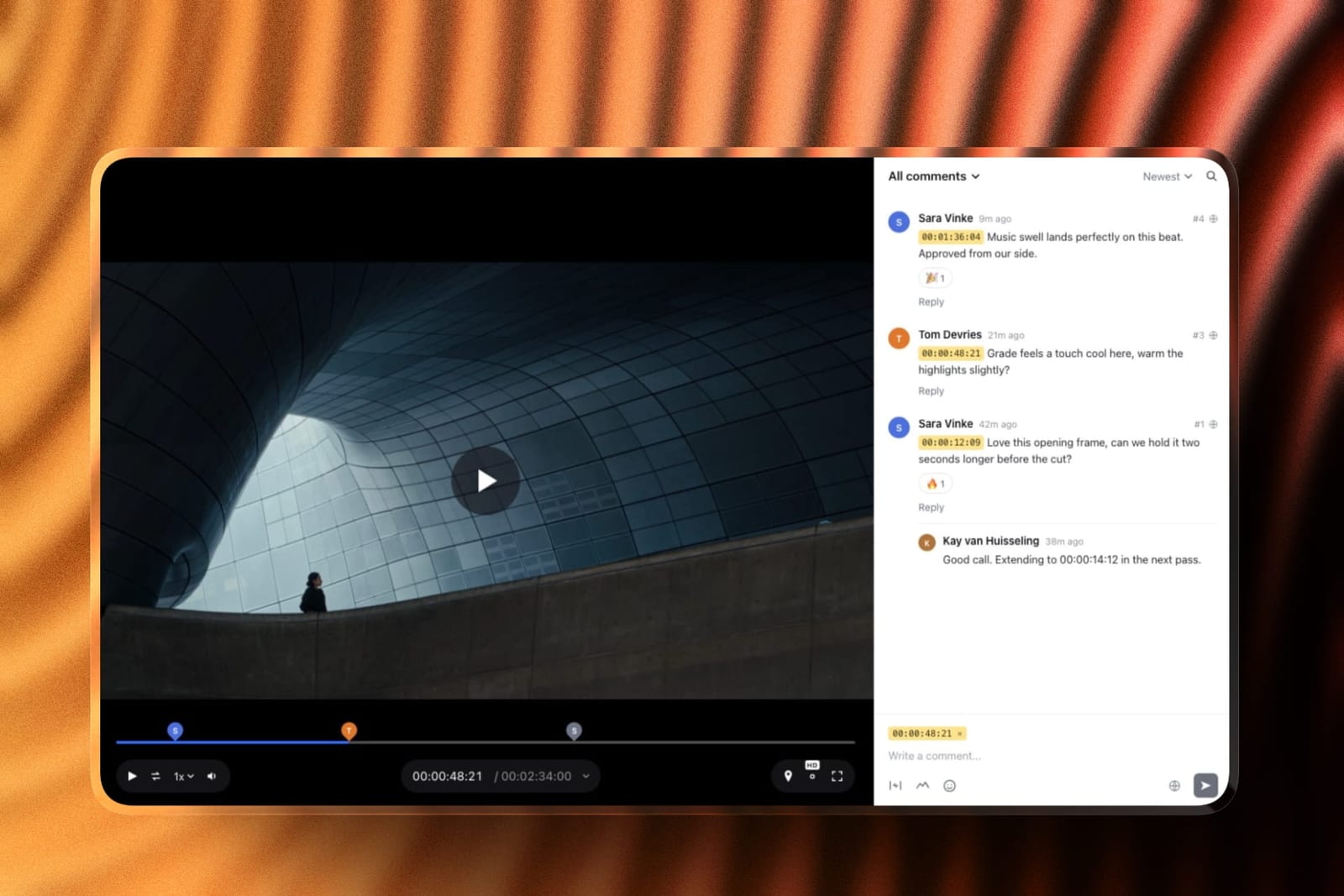
Two adjacent guides cover the pieces either side of it: best website builders for filmmakers for the site, and best video review and approval tools for timecoded client notes on a grade, where Framekit ranks second behind Frame.io because it has no NLE panel for Resolve.
What the Money Actually Buys in Color Grading Software
The free-versus-paid split in this category is unusually honest, because Blackmagic publishes the feature list rather than hiding it, and once you read that list the upgrade decision stops being a judgement call and becomes a delivery-spec question.
In one linefree DaVinci Resolve gives you the entire creative grading toolset and full ACES color management, and the $295 Studio licence buys delivery capability - Dolby Vision, noise reduction, higher resolutions and frame rates, the Neural Engine and remote grading - so you upgrade the day a spec sheet demands it, not before.
Start with what free does not limit, because most guides get this backwards.
The free version has the complete color page: primaries in wheels, bars and log controls, custom and HSL curves, qualifiers, power windows, tracking, node graphs of any complexity, scopes, and ACES or DaVinci YRGB color management.
No watermark, no export restriction on standard formats, no time limit, multi-user collaboration included.
The paid list, verified from Blackmagic's own Studio page, reads as three groups.
First, noise reduction, temporal and AI spatial: the most common reason a working filmmaker upgrades, because a night exterior on a small sensor is unusable without it.
Second, delivery: Dolby Vision, IMF, DCP, and HDR scopes measuring ST.2084 and HLG, all of which arrive with a deadline attached when a distributor is involved.
Third, speed and scale: multi-GPU acceleration, hardware H.264 and H.265 encoding, the DaVinci Neural Engine, 45-plus extra Resolve FX, stereoscopic tools, remote grading, and the jump from 60fps at Ultra HD to 120fps at up to 32K.
That third group is a comfort purchase until the day it is not.
The licence matters as much as the list.
Resolve Studio is perpetual with free point updates within a version, sold as a download code or a USB dongle, and it does not lapse: $295 once against $275.88 every year for Premiere Pro or $2,868 a year for Nucoda inside Phoenix.
Here is the cheapest honest path at three levels of seriousness, holding the same 42-shot project constant.
| Your situation | Cheapest capable setup | Year-one cost | What you give up |
|---|---|---|---|
| Learning, or delivering Rec.709 only | DaVinci Resolve free | $0 | Noise reduction, Dolby Vision, Neural Engine |
| Working freelancer, mixed client specs | Resolve Studio plus Micro Color Panel | $854 | Nothing that matters below feature level |
| Facility finishing HDR deliverables | Resolve Studio plus Mini Panel, or Baselight | $2,614 and up | Budget, mostly |
The middle row is the one to look at hardest. $854 buys a permanent professional grading licence and a real trackball panel, and it is less than four years of a single Adobe subscription. There is no other discipline in filmmaking where the professional ceiling is that cheap.
Node-Based Versus Layer-Based Grading, and Who Each Suits
This is the fork that decides how a grade feels to build, and the one thing you cannot change your mind about cheaply, because the muscle memory does not transfer. It is also badly explained almost everywhere, as a preference rather than a structural difference.
In one linelayers are a linear top-down stack that is faster for straightforward corrections, nodes are a branching graph that is better for selective, multi-path grades where routing and order matter, and the right answer depends on whether you are correcting shots or building images.
A layer stack works the way an editor already thinks. Each adjustment sits on top of the last, the image flows straight down, and reading the grade means reading the list.
Baselight, Lumetri, Final Cut Pro and Nucoda all work this way, and Baselight has refined the model far past what a stack sounds like on paper.
A node graph works the way a compositor thinks. Each node is a single operation wired to others, and the image can split down parallel branches, be keyed on one, and recombine.
That routing is the point: pull a specific hue onto its own branch, treat it, mix it back at a controlled opacity, and the graph becomes a readable document of what you did and in what order.
On the Harbourlight cut this mattered on exactly two shots, both with a practical sodium light in frame, and on those two it was decisive.
Who each suits, plainly. If you are an editor grading your own work, a layer stack will make you faster and you should stop feeling guilty about it.
If you are paid to grade other people's footage, you will eventually need node routing, because the requests that arrive on a client call - warm her face but not the wall, keep the sky but kill the cyan in the shadows - are branching problems described in plain English.
ACES, Color Management, and Why Matching Cameras Depends On It
Camera matching is the job most filmmakers think is about taste and is mostly about pipeline, and this section is the reason Final Cut Pro sits fourth in this guide despite being an excellent application in every other respect.
In one linea color-managed workflow transforms every camera's log footage into one common working space before you touch a wheel, so matching three cameras becomes a small creative adjustment instead of an argument with three different manufacturers' color science.
Here is the mechanism. Log footage from an ARRI, a Sony and a DJI is not the same thing in three flavours. Each encodes a different gamut and transfer curve, chosen by that manufacturer's color scientists for that sensor.
Grade them raw and every correction to the Sony fights Sony's curve while every correction to the ARRI fights ARRI's, so the match you achieve at one exposure falls apart at the next.
A color-managed workflow applies an input transform per camera, grades in a single scene-referred working space, and applies one output transform at the end.
ACES is the standardised version of that idea, maintained by the Academy, and it matters for three reasons beyond matching. It is portable, so a grade handed to another facility lands correctly.
It is future-proof, because the same master outputs to Rec.709 today and HDR later without regrading. And it is auditable, because the transforms are documented rather than proprietary.
Support by tool, verified: DaVinci Resolve supports ACES in both free and Studio, as do Baselight and Nucoda. Premiere Pro's rebuilt color management works in ACEScct with preset sequence settings.
Assimilate Scratch runs ACES on the GPU with version selection down to ACES 1.3 and its P3 HDR transforms, and Colourlab AI handles ACES at project level since version 3.2.
Final Cut Pro offers no ACES workflow at all, handling wide-gamut and HDR in its own processing instead.
On a single-camera project that gap is invisible. On our three-camera cut it was the difference between a match that held across the timeline and one we kept nudging shot by shot.
If you shoot two or more cameras from different manufacturers, or expect to deliver HDR from the same master later, color management is the first setting you change.
The gotchaACES is not a look. Footage that lands in ACES still looks flat and still needs grading. Turn it on expecting the image to improve and you will be disappointed; turn it on expecting it to become predictable and you are right.
Hardware, GPUs, and the Real Price of a Control Surface
Grading is the most hardware-dependent discipline in post production, and the two costs nobody puts in the comparison table are the graphics card that makes the software usable and the panel that makes you fast. Price both before you choose an application.
In one linethe software you pick determines your minimum GPU, and a control surface is the only purchase in this guide that reliably makes a colorist faster rather than more capable, starting at $559 and ending at $34,665.
Take the GPU question first.
Resolve leans on the graphics card harder than anything else here, which is why the most common complaint in its Capterra reviews is that it demands a powerful card and plenty of RAM, with crashes on machines that do not have them.
Multi-GPU acceleration is a Studio feature, so two cards only pay off after you buy the licence.
Filmbox is stricter and asymmetric: optimised for Metal on macOS and NVIDIA on Windows and Linux, so an AMD-equipped Windows machine is the wrong hardware. Final Cut Pro on Apple silicon is the most forgiving of the lot.
Now the panel, priced from Blackmagic's own store.
The Micro Color Panel is $559 and is the one most freelancers should buy: three trackballs, three rings and the primary controls, small enough to sit beside a keyboard or travel for on-set grading.
The Mini Panel is $2,319 and adds screens and dozens of assignable controls, which is where you stop reaching for the mouse on secondaries.
The Advanced Panel is $34,665 and is furniture, built for a suite finishing features and commercials. The Speed Editor at $435 and the Editor Keyboard at $669 are editing surfaces rather than color panels.
The gap between the ends of that range is $34,106, and what it buys is not better color but more simultaneous control: a trackball lets you adjust lift, gamma and gain at once instead of sequentially, which changes how you make decisions rather than how many.
That effect arrives at $559. Third-party surfaces matter too.
Tangent panels are supported by Colourlab AI's Pro tier, Assimilate Scratch and Nucoda, and are the common denominator for anyone working across applications, while Baselight expects its own Blackboard surface, quoted rather than listed.
LUTs, Film Emulation, and Round-Tripping Without Losing the Grade
Two workflow questions decide whether your look survives the rest of the pipeline: what format your looks travel in, and what happens when a grade goes back into an NLE for a recut. Both are more fragile than the marketing suggests.
In one lineLUTs travel everywhere and lose information doing it, plugin-based film emulation looks better and travels badly, and the safest round-trip in this category is still an XML or AAF conform with a rendered reference, not a live grade handoff.
Start with LUTs. A LUT is a lookup table: a fixed mapping from input color to output color with no awareness of what it is applied to.
That makes it universal, since every tool here loads a .cube, and lossy, because a LUT built for correctly exposed Log C applied to a shot two stops under does not gracefully degrade, it breaks.
This is why professional pipelines apply LUTs as a display transform or at the end of a node chain rather than as the grade itself.
If you sell them, our best platforms to sell LUTs guide covers the commercial side.
Plugin-based film emulation is the opposite trade.
Filmbox and Dehancer model the photochemical chain as a process rather than a mapping, which is why halation responds to the actual brightness of a light and grain sits in the image instead of floating on top.
The cost is portability: the look exists only where the plugin is installed and licensed, so hand a Resolve project containing Filmbox to a facility without a Filmbox licence and they see your grade without the emulation.
Render a graded reference alongside the project file.
Then round-tripping. The clean version: export an XML, AAF or EDL from your NLE, conform it in the grading application, grade, render, bring finished clips back.
What breaks it is almost never color, it is everything around color - speed ramps, time remapping, nested sequences, transitions, plugin effects applied in the NLE, and any clip whose source media the grading application cannot locate.
Resolve to Premiere Pro and back is the best-supported path in the industry; Resolve to Final Cut Pro works but is the least forgiving.
Baselight's BLG format is the professional answer, carrying a grade as a file other facilities can read and render accurately.
The gotchathe round-trip that bites is the third, not the first. By then a client has recut twice, your conform has drifted, and two days of grading is attached to shot numbers that no longer mean what they meant. Lock picture before you grade, and if you cannot, grade in the NLE.
Collaboration and Remote Grading, Priced Properly
Grading used to be the most physically located job in post, and the tools have split into two camps about it: the ones that assume a facility and the ones that assume a network. What each costs is easy to establish and rarely stated.
In one lineBlackmagic Cloud is the cheapest real multi-user grading collaboration in the market at $5 a month per project library plus $15 per terabyte of media, remote client monitoring in Resolve is a Studio feature, and every other tool here either assumes a facility network or has no answer at all.
A Resolve cloud project library costs the host $5 a month and collaborators join at no extra cost, with media storage billed at $15 per terabyte per month after a permanent 50% cut Blackmagic made in late 2024.
Multi-user collaboration is in the free version, so two people can share a live project library without either owning Studio.
Studio adds remote grading with client monitoring, which is different: a client watching your grade in real time rather than a second artist working in the project.
Premiere Pro's answer is Team Projects, bundled into the subscription, which handles shared grading acceptably since the grade lives on the clip.
Baselight and Nucoda are built for multi-seat facility work at facility prices, Assimilate Scratch is limited, Final Cut Pro has effectively none, and the plugins inherit whatever their host provides.
Coordinating a larger crew moves the constraint into your project tracking, which our best project management tools for creative teams guide covers.
A Test You Can Run on Your Own Numbers This Week
Run this on your own last twelve months rather than a reviewer's test project.
Count the jobs where a delivery spec named Dolby Vision, HDR10, IMF or DCP, and the jobs where a night exterior or high-ISO interior needed noise reduction you could not fake.
If that combined count is zero, free DaVinci Resolve is your answer and your next purchase is a $559 Micro Color Panel, not a licence.
If it is one or more, note that Resolve Studio costs $295 once and never repeats, then compare that against a year of any subscription doing the same work.
Do the same for the plugin you are eyeing: Filmbox at $516 a year on quarterly billing against $999 once means perpetual wins if you will still be using it in two years.
The Decision Guide
Most filmmakers overthink this and end up buying whatever their favourite YouTube channel uses. The choice is a short sequence of yes-or-no questions about delivery, cameras and who is paying you, and the first branch that matches you is usually the end of the decision.
Start here. Does a client, distributor or broadcaster ever hand you a delivery spec naming Dolby Vision, HDR10, IMF or DCP?
- No, I deliver Rec.709 files and nothing else. Go to the next question.
- Yes, at least once a year. Buy DaVinci Resolve Studio at $295. One-time cost, cheapest route to a compliant master here, and no free tool will get you there.
Do you shoot two or more cameras from different manufacturers on the same project?
- Yes. You need a color-managed workflow, which rules out Final Cut Pro. Use DaVinci Resolve free, and if the matching is eating your schedule add Colourlab AI Creator at $150 a year.
- No, one camera, one format. Go to the next question.
Is your edit already in Premiere Pro, with clients who recut after you grade?
If yes, grade in Lumetri and stop apologising for it: the subscription is already paid, the ACEScct color management is competent, and every round-trip you avoid is a version-control problem you do not have.
If your picture locks properly, use DaVinci Resolve free.
Are you on a Mac, editing solo, and want to pay once and never again?
- Yes, and I deliver Rec.709 only. Final Cut Pro at $299.99 buys the editor and the color tools together. Accept that ACES is not available to you.
- Yes, but I need ACES or Dolby Vision. Resolve Studio at $295, and you just saved $4.99.
Now the hardware question, which applies to everyone above. Do you grade more than roughly one project a month?
- Yes. Buy the $559 Micro Color Panel before any additional software.
- No. Spend the money on emulation instead: Dehancer for controls and value, Filmbox Pro at $999 if the film look is what clients pay you for.
Finally, do you restore archive material, or finish features in a facility with calibrated monitoring?
Nucoda inside Filmworkz Phoenix from $239 a month is the only tool here pairing a serious grading engine with DVO restoration, and Baselight, quoted, is the facility answer.
Everyone else on this page is a compromise you have already outgrown.
Also in this series2D animation software, where the same question about perpetual licences versus subscriptions decides most of the ranking, and AI video upscaling tools, for the archive footage a grade alone cannot rescue.
Frequently Asked Questions
What is the best color grading software in 2026?
DaVinci Resolve is the best color grading software in 2026, because its free version is a complete, unwatermarked, node-based grading application with full ACES color management, and the paid Resolve Studio upgrade is $295 once rather than a recurring subscription.
FilmLight Baselight is the finishing standard at the top of the market and arguably the better image, but it is sold to facilities at facility prices.
Is DaVinci Resolve really free, and what is missing?
Yes, DaVinci Resolve is genuinely free, with no watermark, no time limit and no export restriction on standard formats.
What is missing sits in three groups: noise reduction, delivery standards (Dolby Vision, IMF, DCP, HDR scopes), and speed features (multi-GPU acceleration, the Neural Engine, hardware encoding, resolutions above Ultra HD at 60fps).
Every creative grading tool - wheels, curves, qualifiers, windows, tracking, node graphs and ACES - is in the free version.
DaVinci Resolve vs Premiere Pro: which is better for color grading?
DaVinci Resolve is better for grading and Premiere Pro is better for grading while editing, which is a different job. Resolve gives you a node graph, deeper secondaries, Dolby Vision mastering in Studio and cheaper collaboration.
Premiere Pro gives you ACEScct color management, color-space-aware effects and no round-trip, which matters enormously when clients recut after you grade.
Resolve Studio is $295 once; Premiere Pro is about $22.99 a month, roughly $275.88 every year.
Do I need ACES, and which tools support it?
You need ACES if you shoot two or more cameras from different manufacturers, or expect to output both Rec.709 and HDR masters from the same grade.
It transforms every camera's log footage into one common working space so matching becomes a creative adjustment rather than a fight with three color science teams.
DaVinci Resolve, Baselight, Premiere Pro, Assimilate Scratch, Nucoda and Colourlab AI all support ACES. Final Cut Pro does not.
Which color grading software can master Dolby Vision?
DaVinci Resolve Studio, FilmLight Baselight and Nucoda support Dolby Vision mastering. The free version of DaVinci Resolve does not, and that is the single most common reason a filmmaker pays the $295.
Premiere Pro works in Rec.2100 PQ and HLG for HDR deliverables but has no native Dolby Vision mastering with trim passes, and Final Cut Pro does not offer it either. If a spec sheet names Dolby Vision, your shortlist is three tools long.
How much does a color grading control panel cost?
Blackmagic's Micro Color Panel is $559, the Mini Panel is $2,319 and the Advanced Panel is $34,665, all verified from Blackmagic's own panels page in August 2026.
The Speed Editor at $435 and Editor Keyboard at $669 are editing surfaces, not color panels. For most freelancers the Micro Color Panel is the right purchase, because it lets you adjust lift, gamma and gain simultaneously.
Which is cheaper over three years, Resolve Studio or an Adobe subscription?
Resolve Studio, by a wide margin. Three years of Resolve Studio costs $295 in total, because you pay once.
Three years of the Premiere Pro single-app plan at about $22.99 a month costs roughly $828, and the month-to-month rate of about $34.49 pushes that past $1,240.
Adobe's counter-argument is the rest of Creative Cloud, which is a real answer if you also need After Effects and no answer at all if you only need to grade.
What happens to my grades if I stop paying for a subscription grading tool?
You lose access to the application and, in practice, to the editable grade, though rendered masters are yours forever.
Stop paying Adobe, Assimilate, Filmworkz or FilmLight and the project files stay on your disk with nothing able to open them. Stop paying for Resolve Studio or Final Cut Pro and nothing happens.
Render a flattened reference master of every finished job regardless.
Is film emulation worth $999, or will a LUT do?
A LUT will do for most work, and film emulation is worth the money only when the look is what clients are paying for. A LUT applies the same fixed transform regardless of exposure, so it breaks on under-exposed shots.
Filmbox Pro at $999 perpetual or from $129 a quarter models the photochemical chain instead, so halation responds to the actual brightness of a light and grain sits inside the image.
Dehancer takes a similar approach at a lower price point, though we could not verify its current figure.
Final Verdict: The Best Color Grading Software in 2026
After nine tools and one 42-shot test cut, the pattern that matters is not which application has the deepest toolset.
It is that the professional floor in this category costs nothing while the ceiling costs more than a house deposit, and almost everyone reading this belongs closer to the floor than they think.
DaVinci Resolve is the best color grading software in 2026. Grade free until a delivery spec or a noisy night exterior forces your hand, then pay $295 once for Studio and never pay again. Put the subscription money you did not spend into a $559 Micro Color Panel instead.
Where our top pick loses: Resolve does not win on image quality at the very top of the market.
FilmLight Baselight is the finishing standard on features and prestige episodic television, and its color science is held in higher regard by working colorists.
Resolve also loses to Premiere Pro whenever the picture is not locked, because a grade that lives on the clip survives a recut and a conformed grade does not.
And it is not for anyone editing on an underpowered laptop, where Final Cut Pro at $299.99 will finish the film.
Baselight is the facility answer, Premiere Pro is the editor's answer, Final Cut Pro is the Mac one-payment answer, Colourlab AI at $150 a year is the fastest fix for mismatched cameras, and Filmbox Pro is the look worth paying for.
Resolve is the answer for everyone else, and it is free until it is not.
For more, read our best website builders for filmmakers, our best video review and approval tools roundup for getting notes on a grade, the best AI tools for filmmakers, and if you sell your looks, the best platforms to sell LUTs.