Framekit templates
Start from a designer-made template
 Use template
 Use template
 Use template
 Use template
 Use template
 Use template
 Use template
 Use template
The best 2D animation software in 2026 is not the one with the longest feature list.
It is the one whose drawing feel, rigging model, and licence terms match the kind of work you actually make, because every program here can produce a finished film and none of them will make the wrong workflow feel right.
We animated the same six-second scene in all twelve, a character walking three steps and turning to camera, and the differences that mattered were rarely the ones on the comparison charts.
A frame-by-frame animation tool is software that plays your drawings back in timed order while showing you the ones on either side, so you can judge spacing before you commit to the next drawing.
Rigging tools work the other way: you build a character once out of reusable pieces, attach bones or deformers, and animate the rig instead of redrawing.
Most modern programs do both, badly or well, and which side they do well is the single biggest thing separating them.
Krita is the best 2D animation software for most people because it is free, genuinely good at frame-by-frame drawing, and has no licence to lose.
It cannot rig characters, so if your project needs reusable puppets, Moho Pro at 399.99 dollars once is the better buy, and Toon Boom Harmony remains the studio standard if you need to hand files to a pipeline.
Updated in September 2026: we re-verified Framekit's plans and corrected the section on where finished animation goes, since Framekit now runs frame-accurate video review and does not sell courses; animation software prices are as checked in August 2026.
Two things changed this category during the past twelve months and neither is reflected in most of the guides currently ranking for this query.
Adobe announced on 2 February 2026 that it was discontinuing Animate, reversed the decision two days later after public backlash, and placed the program in maintenance mode instead, which means bug fixes and security updates but no new features.
In April 2026 Canva made Cavalry, a professional procedural animation program it acquired in February, free for individuals including commercial work.
One of the most established names in 2D animation stopped moving forward, and one of the most capable newer ones stopped charging.
Every price below was read on the vendor's own store or pricing page during the first week of August 2026, and where a figure came from an authorised reseller rather than the vendor's own checkout we say so in the row.
Where a program is free we checked the licence, because free-to-download and free-for-commercial-work are not the same promise.
How We Tested 12 2D Animation Tools
Comparison guides in this category usually list features and stop, which is why they all agree with each other and none of them help you choose.
We wanted a test that produced the same artefact in every program so the differences would be about the work rather than about the marketing, and we wanted the money worked out over three years rather than per month.
The test scene was deliberately small and deliberately annoying: a side-view character takes three steps, turns to camera, and holds. Three steps forces a walk cycle, which is where rigging tools shine and drawing tools grind.
The turn forces either a redraw or a rig that can rotate, which is where rigging tools grind and drawing tools shine.
The hold at the end exposes how each program handles held frames on a timeline, which sounds trivial until you have fought a program that inserts a new drawing every time you extend an exposure.
Three kinds of evidence appear below and we label them so you can weight them yourself. Measured means we did it in the program on our own machines during July and August 2026. Verified means we read it on the vendor's own store, pricing page, or documentation and are quoting it rather than testing it. Community sentiment means animators report it consistently in forums and release-note threads, which is useful signal and is not proof.
One honest gap: the major software review aggregators block automated access, so this guide quotes no star ratings from them. We would rather tell you that than paste a score we could not open and check.
Where reputation matters we describe what animators say and where they say it, and you can weigh that as the softer evidence it is.
We did not pay for every licence. Harmony Premium, Storyboard Pro, and Clip Studio Paint EX were exercised on trial versions, and Moho Pro and Procreate Dreams were bought outright.
The free and open-source programs were used in full because there is no other version of them to use.
Trial versions can hide the parts of a program that only bite in month three, so treat our notes on the expensive subscriptions as informed rather than lived.
Prices are as published in August 2026. Toon Boom's own store served us euro prices from a European address, so we quote euros for that vendor rather than converting and pretending the conversion is a price you will be charged.
What Testing 12 Animation Tools Changed Our Minds About
Going in, we expected the ranking to sort roughly by price, with the expensive studio tools at the top and the free ones filling out the bottom.
That is not what happened, and three findings in particular are worth stating before the reviews because they change how the whole category looks.
The first is that free no longer means limited. Krita, Blender, OpenToonz, Pencil2D, and Synfig are all free, and between them they cover frame-by-frame drawing, vector tweening, 2D-in-3D, and a full studio production pipeline.
Add Cavalry, which became free for individuals in April 2026, and six of our twelve entries cost nothing. In 2019 a free 2D animation stack meant compromise. In 2026 it means you skipped a purchase.
The second is that the thing that decides whether you finish a project is rarely the feature set. It is whether the program's timeline matches how you think about time.
Programs that treat a frame as a slot you fill, and let you slide exposures around like cards, feel completely different from programs that treat animation as a curve you sample. Both are correct.
Only one of them will feel like it is helping you, and you can find out which in an afternoon for nothing.
The third is that licence risk is now a real line item. Adobe spent two days in February 2026 telling the internet that Animate was ending, and even after the reversal a number of studios we spoke to had already started migration planning.
A perpetual licence you own outright and an open-source program you can compile yourself are not just cheaper, they are insulated from a vendor's product-strategy meeting. That consideration used to sound paranoid.
It stopped sounding paranoid on 2 February.
In one lineThe best 2D animation software for you is usually decided by timeline model and licence terms, not by which program has more features.
The 12 Best 2D Animation Software Picks in 2026: Full Comparison
Here is the whole field with the numbers that decide it, before the individual reviews go into what each program is actually like to use. Read the price column as the real entry cost for one working animator, not the headline the vendor leads with.
The real price table: free, perpetual, and subscription
| Program | Licence model | Entry price | Professional tier | Where the price came from |
|---|---|---|---|---|
| Krita | Free, open source (GPL) | 0 | Same program | krita.org |
| Blender | Free, open source (GPL) | 0 | Same program | blender.org |
| Cavalry | Free for individuals since April 2026 | 0 | Enterprise via Canva sales | cavalry.studio |
| OpenToonz | Free, open source | 0 | Same program | opentoonz.github.io |
| Pencil2D | Free, open source (GPL) | 0 | Same program | pencil2d.org |
| Synfig Studio | Free, open source (GPL) | 0 | Same program | synfig.org |
| Procreate Dreams | One-time purchase | 12.99 dollars once | Same app | procreate.com |
| Clip Studio Paint | Perpetual or subscription | 63 dollars once (PRO) | 277 dollars once (EX) | clipstudio.net and authorised reseller |
| Moho | One-time purchase | 59.99 dollars (Debut) | 399.99 dollars (Pro) | moho.lostmarble.com |
| Rive | Subscription per seat | 0 (3 files) | 9 or 32 dollars per seat monthly | rive.app |
| Adobe Animate | Subscription, maintenance mode | Single-app plan | Included in Creative Cloud | Adobe listings |
| Toon Boom Harmony | Subscription | 32 euros monthly (Essentials) | 147 euros monthly (Premium) | shop.toonboom.com |
Support matrix: what each one is actually built to do
| Program | Frame by frame | Bone rigging | Vector | Best-fit job |
|---|---|---|---|---|
| Krita | Excellent | No | Limited | Hand-drawn shorts and cycles |
| Blender | Good (Grease Pencil) | Yes | Strokes in 3D space | 2D characters in 3D scenes |
| Cavalry | Limited | Procedural, not bones | Yes | Motion graphics and data-driven work |
| OpenToonz | Excellent | Yes (plastic tool) | Yes | Full traditional pipelines |
| Pencil2D | Good | No | Basic | Learning and quick tests |
| Synfig Studio | Limited | Yes (skeleton) | Yes | Vector cut-out tweening |
| Procreate Dreams | Excellent | Basic (performance) | No | iPad drawing and quick films |
| Clip Studio Paint | Excellent | No | Yes | Illustrators who animate |
| Moho | Good | Excellent | Yes | Puppet character animation |
| Rive | No | Yes | Yes | Interactive animation for apps |
| Adobe Animate | Good | Yes (bone tool) | Yes | Existing Animate libraries |
| Toon Boom Harmony | Excellent | Excellent | Yes | Broadcast and studio pipelines |
1. Krita: Best Overall for Hand-Drawn Animation
Krita started as a painting program and grew an animation timeline, and that origin is why it wins.
The brush engine is the best of anything in this list that costs nothing, and when you are drawing twenty-four times for one second of film, the brush is not a detail, it is the job.
Our walk cycle took roughly the same number of drawings in every frame-by-frame program we tried. It took fewer redraws in Krita because the lines came out right the first time more often.
The animation workflow is a docker you enable rather than a mode you enter, which is the right decision: you keep the full painting toolset while you animate.
Onion skinning goes ten frames in each direction with independent opacity and colour tinting per offset, so you can see the previous drawing in red, the one before in a fainter red, and the next in green, and read your spacing at a glance without hiding anything.
Measuredexporting the six-second test to an image sequence and to a video file both worked without a separate render step, and the audio scrubbing was good enough to time the footfalls to a click track.
The standout detailKrita's animation curves docker lets you animate opacity and transform properties on a layer while still drawing on it frame by frame. Hybrid workflows, where the character is drawn and the camera move is interpolated, do not require a second program.
The honest gotchathere is no bone rigging. None. If your project is a talking character with a mouth chart who appears in forty shots, you will redraw that character forty times.
That is the traditional way and it is not wrong, but it is a choice you should make on purpose rather than discover in week three.
Skip it ifyou are producing an explainer series on a schedule where every character has to be reusable. Rigging is the entire point of that job and Krita does not do it.
Verdict: Free, no licence to lose, and the best drawing feel available at any price under a few hundred dollars. Start here unless you already know you need a rig, and if you find yourself fighting the lack of one, buy Moho with the money you did not spend.
2. Moho Pro 14: Best Rigging, and You Own It
Moho is the answer to the question that kills most independent animation projects, which is how one person makes forty shots of the same character without redrawing them forty times.
Its bone system with smart-bone dials is the most approachable professional rigging in 2D, and the reason is that a smart bone lets you sculpt what a joint looks like at the extremes of its rotation rather than accepting whatever the deformer does.
It is a one-time purchase. Moho Debut 14 is 59.99 dollars and Moho Pro 14 is 399.99 dollars, bought once, with free updates within the 14.x line.
Owners of Moho Pro 13 were being offered the upgrade at 119.99 dollars against a regular upgrade price of 199.99 dollars when we checked in August 2026.
Debut owners upgrade to Pro for 339.99 dollars, which is the one piece of pricing here that is unusually fair: 59.99 plus 339.99 is 399.98, a penny less than buying Pro outright, so starting on Debut costs you nothing if you later need the full program.
Measuredour three-step walk was reusable in Moho in a way it was not in any drawing program. Once the rig existed, changing the character from a walk to a run was an adjustment to the cycle rather than a new set of drawings.
The standout detailMoho can bind vector artwork to bones and still let you draw frame-by-frame on top for the parts a rig cannot fake, such as hair overlap or a hand that has to hit a specific silhouette. Mixing the two on one character is normal here rather than a hack.
The honest gotchaMoho's frame-by-frame drawing is competent, not lovely.
If your style depends on line quality above everything, you will notice the difference against Krita or Clip Studio Paint immediately, and the usual fix is drawing elsewhere and importing, which adds a round trip to every revision.
Skip it ifyou are a traditional animator who wants to draw every frame. You would be paying 399.99 dollars for the half of the program you are not going to use.
Verdict: The best value in professional 2D animation. One payment, no renewal, and the rigging that lets a solo animator finish a series. It loses to Krita and Clip Studio Paint on pure drawing feel, and to Harmony on pipeline compatibility.
3. Toon Boom Harmony: The Studio Standard, Priced Like One
Harmony is what a large part of the television animation industry actually runs on, and if your goal is employment rather than authorship, that fact outweighs most others in this guide.
Studios hire people who can open the studio's files, and the studio's files are frequently Harmony files. Learning it is a career decision as much as a tool decision.
Toon Boom sells three editions on subscription only.
Reading its own store in August 2026 from a European address returned Harmony Essentials at 32 euros monthly or 266 euros yearly, Harmony Advanced at 81 euros monthly or 621 euros yearly, and Harmony Premium at 147 euros monthly or 1,191 euros yearly.
Storyboard Pro, which is a separate purchase and the other half of the studio toolkit, was 92 euros monthly or 794 euros yearly.
Student pricing is dramatically lower, with Harmony Premium at 20.55 euros monthly, which is the cheapest legitimate route into the program if you qualify.
Measuredthe node-based compositing view in Premium is the part that justifies the price gap over Advanced. Building the turn as a cut-out with a deformation chain and then compositing the result took fewer detours than the layer-based equivalents elsewhere.
The standout detailHarmony's deformers survive being animated in ways cheaper rigging does not. A limb that bends past its comfortable range degrades gracefully rather than collapsing, which is the difference between a rig you can push and a rig you have to protect.
The honest gotchathere is no perpetual licence. Three years on Harmony Premium yearly is 3,573 euros at the yearly rate, and the three-year plan the store offers reduces that to 3,394 euros.
If you stop paying, you stop opening your own project files, which is a materially different relationship to your archive than Moho or Clip Studio Paint offer.
Skip it ifyou are a solo creator with no studio ambitions. You will pay studio prices for pipeline features that solve problems you do not have.
Verdict: The right choice if you want to work in the industry or hand files to people who do. For everyone else, Harmony Premium costs more in one year than Moho Pro costs once, and the finished frames do not look better for it.
4. Clip Studio Paint EX: For Illustrators Who Started Animating
Clip Studio Paint is a comic and illustration program with a real animation timeline attached, and the people it suits are the ones who already draw in it.
If your character designs, your line work, and your muscle memory all live here, adding animation without changing programs removes an entire category of friction that a better animation program cannot compensate for.
The licensing is the most confusing in this guide and worth unpicking.
Clip Studio sells subscriptions from 0.99 dollars a month with the first three months free, which covers a single device tier, and it also sells perpetual licences.
Through Graphixly, its authorised North American reseller, the perpetual PRO licence is 63 dollars and the perpetual EX licence is 277 dollars, with an optional annual Update Pass at 10.99 dollars for PRO and 31.99 dollars for EX to keep receiving new versions.
The perpetual figures here came from the reseller's checkout rather than Clip Studio's own page, which displayed placeholder values when we read it.
Measuredthe animation timeline in PRO caps at 24 frames, which is one second. That cap is not a soft limit or a watermark, it is the reason EX exists, and it means PRO is an animation program only for tests and loops.
The standout detailthe vector layers are the best implementation of drawn vectors anywhere in this list. You draw with a pressure-sensitive brush and get a line you can retroactively thin, thicken, or trim to intersection, which for clean-up work is worth more than most rigging features.
The honest gotchaEX at 277 dollars perpetual is not cheap for a program whose animation tools are secondary, and the Update Pass means the true cost of staying current is the purchase plus 31.99 dollars a year.
Skip it ifyou do not already draw in Clip Studio Paint. Bought purely for animation it is the wrong shape, and Krita costs nothing.
Verdict: The best answer for illustrators whose animation grew out of their drawing. Buy EX perpetual, not PRO, if you intend to animate anything longer than a second.

5. Cavalry: The Category's Biggest Price Change in a Decade
Cavalry is a procedural motion design program built by former Mograph specialists, and until this year it was a paid professional tool competing with After Effects for motion graphics work.
Canva acquired it in February 2026, and in April 2026 Cavalry 2.7 made the previously paid professional features free for individuals, including for commercial work.
The vendor's own site now states plainly that it is free for individuals with no restrictions, with paid licensing reserved for enterprise deployments through Canva.
That is the single largest change in this category since Blender's Grease Pencil became usable, and it is why Cavalry appears in a 2D animation guide at all: a program that costs nothing has a very different relationship to a curious animator than one that costs several hundred a year.
MeasuredCavalry did our test scene badly, and that is the point. It is not a character animation program.
What it did brilliantly was the version of the test we ran second, which was animating twenty variations of the same graphic element with different timing offsets, generated procedurally rather than keyframed one at a time.
The standout detailthe whole program is built around distributing values across many objects, so animating a hundred things is barely more work than animating one. For title sequences, data visualisations, and repeating pattern work it removes the tedium entirely.
The honest gotchayou sign in with a free Canva account to use the current version. That is a real dependency on a company's continued goodwill in exchange for a program that used to be a purchase, and animators who value independence should price that in.
Skip it ifyou are animating characters. Cavalry has no bone rigging in the traditional sense and no frame-by-frame drawing worth the name.
Verdict: Free professional motion design, which a year ago was not a sentence anyone could write. It loses badly to every character tool here on character work, and it wins outright on procedural graphics.
6. Procreate Dreams: The Cheapest Serious Animation Purchase
Procreate Dreams is an iPad animation app from the team behind Procreate, and it costs 12.99 dollars once with no subscription.
For the price of two months of almost anything else in this guide you own an animation program outright, which reframes what a first purchase in this category has to be.
The interface is built around a gesture the rest of the category does not have, called performing: you record transformations in real time by dragging artwork around while the timeline plays, and the app converts your movement into keyframes.
It sounds like a toy and behaves like a legitimate blocking tool, because roughing out timing by feel and refining afterwards is how a lot of animators actually think.
Measuredthe three-step walk drawn frame by frame on an iPad Pro with an Apple Pencil was genuinely pleasant, and the turn was the fastest to block out of any program here because performing let us find the timing before committing drawings.
The standout detailthe timeline is a filmstrip you scrub with two fingers, and extending a hold is a drag rather than a dialogue box. Held exposures, the thing traditional programs get wrong most often, are the easiest operation in the app.
The honest gotchait is iPad only, and its file format goes nowhere useful. Getting a Dreams project into a compositing or editing program means exporting video or an image sequence, so it is an origination tool rather than a link in a pipeline.
Skip it ifyou work on Windows or Linux, or you need to hand project files to a collaborator who does not own an iPad.
Verdict: The best 12.99 dollars in creative software. It is not a studio tool and does not pretend to be, and for personal films, tests, and learning to time an action it beats programs costing thirty times more.
7. Blender Grease Pencil: 2D Drawings That Live in 3D Space
Grease Pencil is Blender's 2D animation system, and describing it as a 2D feature inside a 3D program undersells what it actually enables.
Your strokes are real objects in a three-dimensional scene, which means a hand-drawn character can be lit by scene lights, occluded by 3D geometry, and shot with a camera that moves around them.
Nothing else in this guide can do that, and once you have used it for a scene that needs a camera push, going back feels limiting.
Measuredour test character walked in front of a simple 3D set and the camera orbited during the turn. Producing that shot in a purely 2D program would have meant drawing the background from a second angle. Here it was a camera keyframe.
The standout detailbecause strokes are geometry, you can animate them with the same modifiers, constraints, and drivers Blender applies to anything else. A line boil, a build-on effect, or an offset across fifty strokes is a modifier rather than fifty drawings.
The honest gotchaBlender's interface assumes you already speak Blender. Coming to it purely for 2D means learning collections, the outliner, the modifier stack, and a shortcut culture built for a different discipline, and the learning curve is the steepest here by a wide margin.
Skip it ifyou want to draw a short film this month. The setup cost is real and it is measured in weeks, not evenings.
Verdict: The most capable free option and the only one that puts drawings in a 3D scene. It loses to Krita on the simple case of wanting to draw twenty-four frames without thinking about anything else.
8. OpenToonz: A Studio Pipeline That Costs Nothing
OpenToonz is the open-source release of Toonz, the production software used at Studio Ghibli, and it carries both the strengths and the scars of that origin.
The scanning workflow, the level strip, the xsheet, and the effects schematic are all built the way a traditional Japanese animation studio works, which is enormously powerful if that is how you work and completely opaque if it is not.
Measuredthe xsheet is the best exposure editor in this guide, free or paid.
Managing which drawing sits on which frame across multiple levels is a spreadsheet operation here rather than a timeline-dragging operation, and for anything with dialogue and mouth charts that is the correct model.
The standout detailthe plastic tool gives you skeletal deformation on raster drawings, which means you can rig a hand-painted character without redrawing it as vectors. Very few programs at any price will do that.
The honest gotchathe interface is uninviting and the documentation is thin, so most people learn it from community tutorials rather than official material.
Community sentiment is consistent that the first week is discouraging and the second week is a revelation, which is a real cost even if it is temporary.
Skip it ifyou want to open a program and draw. OpenToonz wants you to understand its production model first.
Verdict: The most professional free option for traditional 2D, with a genuine studio lineage. Choose it over Krita only if the xsheet model is what you are missing.

9. Rive: Animation That Ships Inside an App
Rive is the odd one out and it earns its place because a growing share of professional 2D animation is not film at all, it is interface motion that has to respond to a user.
Rive files run as a real-time state machine inside an app or a website, so a button animation can react to input rather than playing a fixed clip.
The pricing on Rive's own page is per seat: a free tier with three collaborative files, Cadet at 9 dollars per seat monthly with a three-seat maximum, Voyager at 32 dollars per seat monthly with unlimited files, and an enterprise tier at 120 dollars per seat monthly.
The line that matters is which tier lets you export a .riv file to ship in a product, because that is the difference between using Rive and merely evaluating it.
Measuredour test scene made no sense in Rive, which was expected. The state-machine test we ran instead, a character reacting to a hover and settling back, took under an hour with no code and produced a file a developer could drop into an app directly.
The standout detailthe state machine is authored visually by the animator, not implemented by the developer. That removes the most expensive handoff in interface animation, where a designer's timing is approximated in code and comes back wrong.
The honest gotchait is not a film tool. There is no frame-by-frame drawing, and the pricing is seat-based subscription with no way to own it, so the thing you build is only editable while you are paying.
Skip it ifyour output is a video file. Everything Rive is good at is wasted the moment the animation is flattened.
Verdict: The best tool for interactive animation and irrelevant for everything else. If you animate for products rather than for screens, it moves to the top of the list.
10. Adobe Animate: Still Here, No Longer Moving
Animate has the strangest year of any program in this guide. On 2 February 2026 Adobe announced it was discontinuing the software.
Two days later, after substantial public backlash, Adobe reversed the decision and moved Animate into maintenance mode instead, which means it stays available to new and existing customers and continues to receive support, security updates, and bug fixes, but will not receive new features and has no announced end date.
Adobe's own maintenance mode FAQ, at helpx.adobe.com/animate/kb/maintenance-mode.html, sets out the same terms.
Read that carefully, because it is neither the disaster the first announcement implied nor the reprieve the reversal made it sound. A program in maintenance mode still opens your files and still exports your work.
It also stops gaining anything, which over a five-year horizon is a slow decline relative to competitors that are still being built.
Pricing is the one figure in this guide we could not read at source: Adobe's plans pages did not respond to us during testing, and third-party trackers list the Animate single-app subscription at 22.99 dollars a month on an annual plan billed monthly.
Treat that number as unconfirmed and check it on Adobe's own page before you budget against it.
Measuredthe bone tool and symbol-based workflow still work exactly as they always did, and for anyone with a decade of Animate libraries the value is entirely in that continuity rather than in anything new.
The standout detailAnimate remains the most direct path from a drawing to an interactive HTML5 canvas output, a niche it has held since the Flash era and that nothing has fully replaced.
The honest gotchayou are now paying a subscription for a program that has stopped developing, and the February episode demonstrated that the decision to end it is one internal meeting away from being made again.
Skip it ifyou are choosing a program for the first time in 2026. There is no version of the argument where starting a new practice on maintenance-mode software is the right call.
Verdict: Keep it if you have libraries and clients depending on it, and start planning your exit anyway. Nothing about it is broken and nothing about it is going forward.
11. Pencil2D: The Simplest Way to Find Out If You Like Animating
Pencil2D is a small, free, open-source program that does bitmap and vector frame-by-frame animation and almost nothing else, and that restraint is its actual feature.
It opens in seconds, presents a timeline and a canvas, and gets out of the way, which for someone who has never animated is worth more than any capability they are not ready to use.
Measuredthe three-step walk was drawable in Pencil2D with no manual and no tutorial, which was true of nothing else here except Procreate Dreams.
The standout detailthe bitmap and vector layers coexist on one timeline, so you can rough in bitmap and clean up in vector without leaving the program or converting anything.
The honest gotchathe brush engine is basic and stability under long, heavy projects is the recurring theme in community reports. Save often, and do not plan a twelve-minute film in it.
Skip it ifyou have already animated before. You will hit the ceiling in an afternoon and Krita is free too.
Verdict: The best first hour in animation, and a program you will outgrow deliberately rather than resentfully.
12. Synfig Studio: Vector Tweening Without a Bill
Synfig takes the opposite approach to everything else in the free tier: instead of helping you draw many frames, it helps you draw few and interpolate between them.
Its layer and link system lets one parameter drive many, and its skeleton layer provides bone deformation on vector artwork, which makes it the closest free approximation of what Moho sells.
Measuredthe turn was the hardest part of our test in Synfig, because rotating a flat vector character convincingly requires either a lot of setup or a redraw, and Synfig is not designed for the redraw.
The standout detailparameter linking means a single value can control several properties across layers, so a rig you build carefully stays controllable rather than becoming a pile of keyframes.
The honest gotchathe interface and terminology are idiosyncratic, and community sentiment consistently reports that concepts here carry names they carry nowhere else, which makes transferring knowledge in or out harder than it should be.
Skip it ifyou have any budget at all for rigging. Moho Pro does this job far better and you own it afterwards.
Verdict: A genuinely capable free vector animation program that asks for patience in place of money. Worth trying before you conclude you need to buy a rigging tool.
What Adobe Animate's Maintenance Mode Means for Your Existing Files
The February 2026 sequence is worth understanding properly because a lot of the commentary about it was written during the two days when the software was ending, and never updated.
Adobe announced the discontinuation, animators and studios responded loudly, and Adobe withdrew the plan and reclassified the product as maintenance mode with no termination date.
For your files, the practical position is this. Animate still opens, still exports, and still receives fixes when something breaks. What it will not receive is new capability, which matters less in year one than in year four.
If you have a client library of symbols and a decade of muscle memory, there is no emergency, and the correct response is a migration plan measured in quarters rather than a panic measured in days.
If you decide to move, the destination depends on what you used Animate for. Symbol-based cut-out character work maps most naturally onto Moho or Harmony.
Interactive HTML5 output has no clean equivalent, which is the one place where staying put is genuinely defensible. Frame-by-frame work maps onto Krita or Clip Studio Paint and you will probably prefer the drawing feel.
The wider lesson costs nothing to learn from someone else's near miss.
A subscription program can be withdrawn by its vendor at a time of the vendor's choosing, and the only real defences are a perpetual licence, an open format, or an open-source program.
Weigh that when a subscription looks cheap in month one.
In one lineAnimate is safe to keep using and unwise to newly adopt, and the episode is a good argument for owning your tools where you can.

Why Two Professional Creative Tools Became Free in Twelve Months
Two of the entries above cost money a year ago and cost nothing now, and both changes came from the same company.
Canva acquired Serif, the maker of Affinity Designer, Photo, and Publisher, in March 2024, and made the Affinity suite free on 30 October 2025.
Canva then acquired Scene Group, the maker of Cavalry, in February 2026, and made Cavalry's professional features free for individuals in April 2026.
The strategy is not mysterious.
Professional creative software is a small, expensive market with loyal users, and the value of owning it is not the licence revenue but the position: a free professional tool pulls serious creators into an ecosystem where the money is made elsewhere, in teams, enterprise seats, and cloud services.
From the buyer's side, this is an unambiguous win right now and a dependency you should hold consciously.
What it changes practically is the floor of this category.
A creator in 2026 can assemble a professional 2D pipeline for nothing: Krita to draw, Cavalry for motion graphics, Blender for anything dimensional, and OpenToonz for exposure management.
That stack would have cost well over a thousand dollars a few years ago. If you were waiting for a budget before starting, the budget is no longer the obstacle.
The thing worth watching is the account requirement. Cavalry now asks you to sign in with a free Canva account, which converts a program you install into a service you access.
That is not currently a restriction and it is a change in kind rather than degree, and it is fair to prefer a program you can still open on a laptop that has been offline for a year.
Rigging Versus Frame by Frame, and Which One Your Idea Needs
This is the decision that determines which half of the list you should even be reading, and most guides skip it because it is a question about your project rather than about the software. Answer it first and half the comparison stops mattering.
Frame-by-frame drawing means you make a new drawing for every position.
It gives you total freedom of form, which is why it is the only way to get squash and stretch that really deforms, perspective changes, and the sort of loose, alive line that rigs cannot fake. It costs drawings, and drawings cost hours.
A twelve-second shot on twos is 144 drawings. That number is the entire economics of traditional animation and no software changes it.
Rigging means you build the character once from reusable parts and animate the parts.
It gives you consistency, speed on repetitive work, and revisions that take minutes instead of days, which is why every television series that ships weekly is rigged.
It costs a rig, which is a day or three of setup per character before a single frame of animation exists, and it constrains what the character can do to what the rig anticipated.
The practical test is simple. Count your shots. If the same character appears in more than roughly fifteen shots, or the project will run past a few minutes, or a client will ask for changes, rig it.
If the piece is short, personal, stylistically loose, or a one-off, draw it. Projects that go wrong usually chose the opposite of what that count implied.
Hybrid is normal and worth naming, because the guides that present this as binary are describing 2005. Moho lets you draw on top of a rig. Harmony lets you swap a drawn hand into a rigged arm.
OpenToonz will deform a painted drawing skeletally. The professional answer is usually rigged bodies with drawn hands and faces, and any tool that forbids the mixture is making your life harder for no reason.
In one lineCount the shots your main character appears in, and let that number rather than the feature list pick your program.
What a Drawing Tool Has to Get Right Before Anything Else
If you are going to draw thousands of frames, the drawing experience is not a preference, it is the working conditions. Four things decide it and only one of them appears on comparison charts.
Pressure response is the first. A brush that maps pressure to width in a way that matches how you press produces confident lines, and one that does not produces lines you redraw.
Krita and Clip Studio Paint are the two here where this is a solved problem. Every other program in this guide is somewhere between acceptable and workmanlike.
Stroke stabilisation is the second, and it is the difference between clean-up being tolerable and clean-up being the reason projects die.
Both Krita and Clip Studio Paint offer adjustable smoothing that averages your hand's wobble without turning your line into a spline, and having it tuned correctly changes how many attempts each line takes.
Onion skin control is the third.
Being able to see three drawings back and two forward, in different colours, at different opacities, is how you judge spacing, and a program that offers one frame either side at a fixed opacity is making you animate blind.
Krita, OpenToonz, and Harmony all do this properly.
Exposure handling is the fourth and least discussed. Animation is drawings held over time, and a program that makes extending a hold a fiddly operation will fight you on every single shot.
The xsheet in OpenToonz and Harmony treats this as the primary operation. Procreate Dreams makes it a drag. Several otherwise capable programs make it a menu.
File Formats, Exports, and Leaving a Program Without Losing the Work
Every animation program in this guide can export a video file and an image sequence, so that is not where the risk sits.
The risk sits in the project file, the editable thing with your layers, timing, and rigs in it, because that file is usually readable only by the program that made it.
Open formats give you the strongest position.
Krita's .kra, Blender's .blend, and OpenToonz's project structure are all documented and readable by software you can compile yourself, so a project made in them stays openable regardless of any company's future decisions.
That is not a small thing over the ten-year life of a body of work.
Perpetual licences give you the second strongest position.
Moho and Clip Studio Paint keep working on the machine you installed them on whether or not you keep paying, so your archive stays openable even if the vendor disappears, up to the point where an operating system update breaks the installer.
Subscriptions give you the weakest position, and the specific failure is worth stating plainly: stop paying for Harmony and your Harmony project files become archives you can watch but not edit. The exports survive.
The editability does not. For a working studio this is an accepted cost of business. For an individual with a decade of personal films it is a decision that deserves more thought than it usually gets.
The mitigation, whichever you choose, is boring and effective. Export an image sequence of every finished shot at full resolution alongside the project file, and store both.
Image sequences are readable by everything, forever, and they cost only disk.
If you want a fuller treatment of protecting finished creative work, our guide to photo backup solutions covers the storage side in detail.
The Real Three-Year Cost of 2D Animation Software
Monthly prices hide the decision. Here is what one working animator spends over three years on each realistic setup, using the published rates above and assuming no promotional discounts survive.
| Setup | Three-year cost | What you own at the end |
|---|---|---|
| Krita only | 0 | Everything, forever |
| Free stack: Krita, Blender, Cavalry, OpenToonz | 0 | Everything, forever |
| Procreate Dreams on an iPad you already own | 12.99 dollars | The app, forever |
| Clip Studio Paint EX perpetual plus Update Pass | 372.97 dollars | Version 5.0 forever, updates while paid |
| Moho Pro 14 | 399.99 dollars | The program, forever |
| Rive Voyager, one seat | 1,152 dollars | Nothing you can edit unpaid |
| Toon Boom Harmony Premium, yearly billing | 3,573 euros | Nothing you can edit unpaid |
| Toon Boom Harmony Premium, three-year plan | 3,394 euros | Nothing you can edit unpaid |
The Clip Studio figure is the 277 dollar EX perpetual plus three annual Update Passes at 31.99 dollars, which is the realistic way people actually use it. The Rive figure is 32 dollars per seat monthly across thirty-six months.
Both Harmony figures come straight from the store rates quoted earlier.
The spread is the story. A professional 2D animator can spend nothing or can spend more than three thousand euros over the same three years, and the finished frames are not reliably better at the top of that range.
What the money buys at the top is pipeline compatibility, deformation quality under stress, and the ability to hand a file to a studio. If none of those three things describe your work, you are buying a solution to somebody else's problem.
Two cautions on the low end. Free software has a cost in learning time, and if a week of your time is worth more than 399.99 dollars then buying Moho to skip the Synfig learning curve is the rational move.
And free changes: Cavalry cost money a year ago, and nothing prevents a future owner from changing that back for new users. Owning a perpetual licence is the only version of free that cannot be revoked.
If that argument appeals, our roundup of creative tools you buy once covers the same logic across the wider software stack.
Where Finished Animation Actually Gets Seen
None of the twelve programs above gets your work approved or in front of anyone, and those two gaps are where a surprising number of animation projects and careers stall: client notes arrive as vague emails, and the finished film ends up next to an algorithm's next suggestion.
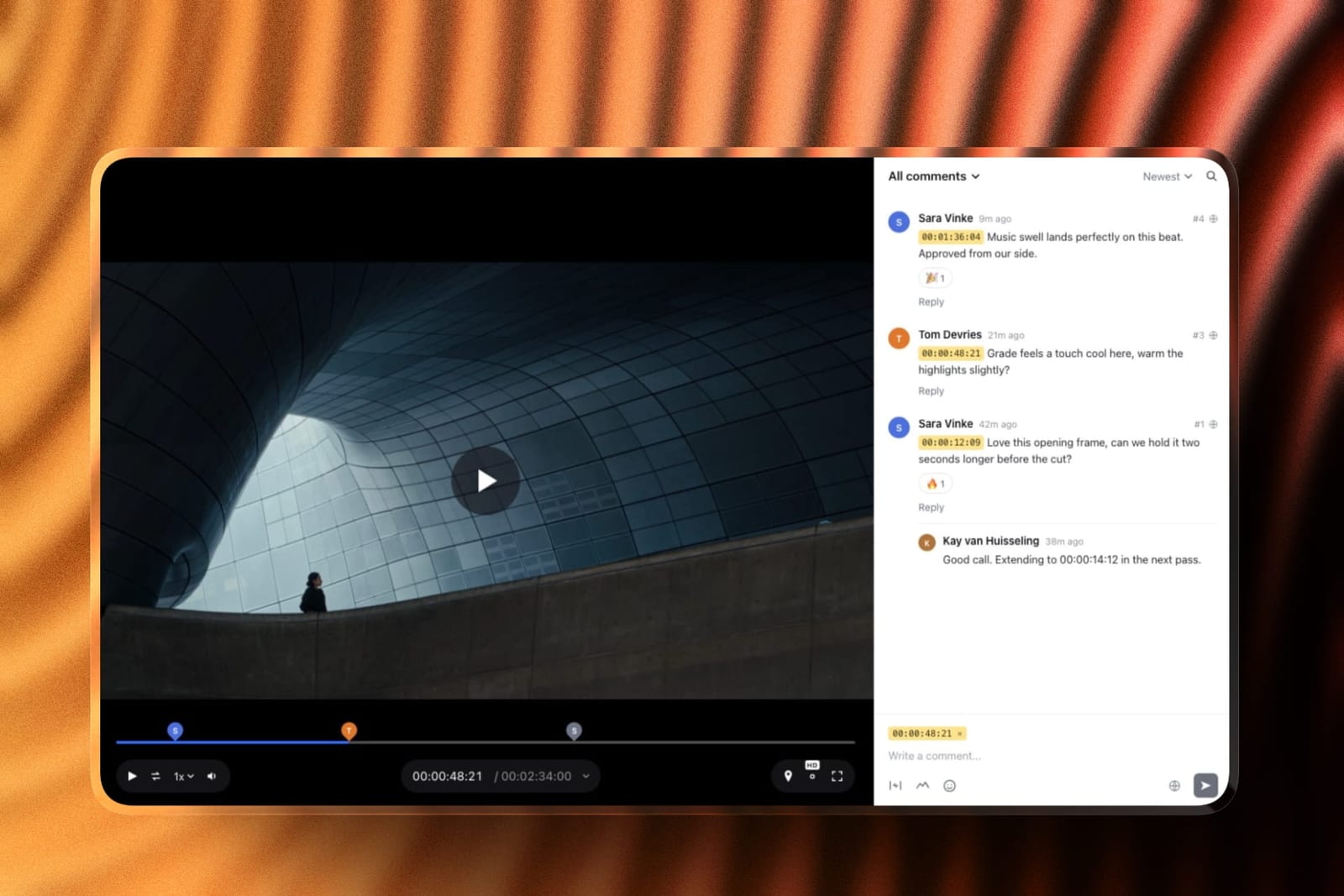
Framekit is an AI website builder that also runs Frame.io-style video review, and for animators the review half is the part to know about.
Export the animatic or a work-in-progress pass, send a link, and the client or director comments at the exact frame and can draw over the picture, which is the natural way to give notes on a pose or an arc.
Versions stack, so the notes on pass two stay put when pass three goes up, and each cut can be marked approved or needing changes. Reviewers need no account, every review feature is on the free plan, and a cut can run up to two hours.
When the film is finished, the same account builds the portfolio: the reel, the individual films and a contact route on a domain you control, plus a store for digital downloads such as brushes or rigs, though not courses.
It is not an animation tool and will not hold raw project files. Motion designers may want our portfolio guide for motion designers.
What We Left Out of This Comparison and Why
Four programs animators regularly ask about are missing from the ranked list, and the reason in three of the four cases is that we could not verify their current prices at source, which is the standard we hold this guide to.
Callipeg is a well-regarded iPad frame-by-frame app whose site states that Callipeg Studio for desktop is a one-time purchase, but publishes no price outside the app stores.
FlipaClip is the most-installed mobile animation app in the category and prices entirely through in-app purchase, which varies by store and region.
TVPaint Animation is a serious traditional program used in feature production, and its shop was unreachable during our checks. Animation Paper is currently distributed as a free beta with no published price for the final release.
None of those four are bad software and their absence is not a judgement on them. If any of them is your program, the useful comparison is against Krita for drawing feel and against Moho for rigging, which are the benchmarks the rest of this guide sets.
We also left out general video editors and motion tools that animate footage rather than drawings.
If that is closer to what you need, our comparisons of video editing software and colour grading software cover that side of the workflow, and our guides to screenwriting software and storyboarding software cover the two steps before any of it.
A Test You Can Run on Your Own Work This Week
Reading comparisons is a poor substitute for twenty minutes of drawing, and the free tier of this category means the real test costs nothing but an evening. Here is the version we would run if we were choosing today.
Install Krita and Pencil2D, both free. In each one, draw a ball bouncing four times across the screen, on twos, with the squash on contact. That is roughly twenty-four drawings and about half an hour of work once you know the program.
You are not judging the result, you are judging four things: whether the brush gave you the line you intended, whether extending a hold was easy, whether onion skinning showed you enough, and whether you wanted to keep going at the end.
If you finished both and preferred one clearly, you have your drawing program and you have spent nothing.
If you finished neither because redrawing the ball felt absurd, you are a rigging animator and should download the Moho trial next, because that instinct is telling you something real about how you want to work.
Then do the money. Write down how many shots your next project has, how many of them contain your main character, and how long the whole piece runs.
If the character appears in more than fifteen shots, price Moho Pro against the hours you would spend redrawing and the purchase almost always wins. If the answer is three shots and a minute of runtime, buy nothing.
The last step is the one people skip: export from whichever program you chose, at full resolution, as an image sequence, and confirm you can open the frames somewhere else.
Doing that once at the start tells you what your exit looks like before you have five years of work depending on the answer.
The Decision Guide
Take these in the order they appear and stop at the first that fits, because they are arranged so the earliest match is the strongest signal.
You have never animated and want to find out if you like it. Pencil2D, then Krita. Both free, both quick to start, and you will know within an evening whether the medium is for you.
You draw already and animation is the new part. Krita if you are not committed to another program, Clip Studio Paint EX if your illustration practice already lives there. Do not buy Clip Studio Paint PRO for animation, because its timeline stops at one second.
Your project has one character in many shots, or a client who will ask for revisions. Moho Pro at 399.99 dollars once. This is the single highest-value purchase in this guide for an independent animator and the payback is measured in the redraws you do not do.
You want to work in television or feature animation. Toon Boom Harmony, and get the student rate if you qualify because the gap between 20.55 euros and 147 euros monthly is the difference between learning it now and learning it later.
You animate interfaces, apps, or web products. Rive, and check which tier permits the export you need before you commit a project to it.
You need motion graphics, titles, or data-driven animation. Cavalry, which is now free for individuals and better at that job than any general animation program here.
You work on an iPad and want the shortest path to a finished film. Procreate Dreams at 12.99 dollars once.
Your animation needs to exist inside a 3D environment with a moving camera. Blender Grease Pencil, and budget several weeks for the interface before you judge the result.
You already own Adobe Animate and it is doing the job. Keep using it, plan an exit over the next year or two, and do not start anything new in it.
You draw more than you animate. Start from the drawing app instead: we tested ten Procreate alternatives on the same layered illustration, and five of them cost nothing.
Your work is motion graphics rather than character animation. That is a different shortlist again, and Cavalry leads it now that it is free: see the best After Effects alternatives.
Frequently Asked Questions
What is the best 2D animation software in 2026?
Krita is the best 2D animation software for most people in 2026, because it is free, its brush engine and onion skinning are genuinely professional, and there is no licence to lose.
If your work needs reusable rigged characters rather than drawings, Moho Pro at 399.99 dollars once is the better buy, and Toon Boom Harmony remains the standard in studio production.
Is Adobe Animate discontinued?
No. Adobe announced on 2 February 2026 that Animate would be discontinued, then reversed that decision two days later after public backlash and moved the program into maintenance mode instead.
Animate remains available to new and existing customers and continues to receive security updates and bug fixes, but it will not receive new features and no end date has been announced.
Is Cavalry really free now?
Yes, for individuals including commercial work. Canva acquired Cavalry's maker in February 2026 and version 2.7, released in April 2026, made the previously paid professional features free.
Enterprise deployment and single sign-on remain paid through Canva. Using the current version requires signing in with a free Canva account.
What is the best free 2D animation software?
Krita for hand-drawn work, OpenToonz if you want a traditional studio pipeline with an xsheet, Blender Grease Pencil if your drawings need to live in a 3D scene, and Cavalry for motion graphics.
All four are free for commercial use, and between them they cover most of what paid programs offer apart from Moho-grade character rigging.
Moho or Toon Boom Harmony: which should I buy?
Buy Moho Pro if you are an independent animator, because it is 399.99 dollars once and its smart-bone rigging is easier to learn.
Choose Harmony if you want studio employment or need to exchange project files with a production pipeline, accepting that it is subscription-only and that Harmony Premium costs more in a single year than Moho costs outright.
Does Clip Studio Paint PRO do animation?
Yes, but its animation timeline is capped at 24 frames, which is one second at standard frame rate. That makes PRO suitable for loops, tests, and animated stickers only.
Clip Studio Paint EX removes the cap, and it is the version to buy at 277 dollars perpetual if you intend to animate anything of length.
How much does Toon Boom Harmony cost?
Read from Toon Boom's own store in August 2026 from a European address, Harmony Essentials was 32 euros monthly or 266 euros yearly, Harmony Advanced was 81 euros monthly or 621 euros yearly, and Harmony Premium was 147 euros monthly or 1,191 euros yearly.
Student pricing was substantially lower, with Harmony Premium at 20.55 euros monthly.
Can I animate professionally without paying for software?
Yes. Several of the free programs here are used in commissioned work, and the finished frames carry no marker of what made them.
What you give up is not quality, it is pipeline compatibility with studios that standardise on Harmony, and the vendor support that a paid licence includes. For solo and small-team work, neither of those is usually the constraint.
What happens to my files if I stop paying for a subscription animation program?
Your exported videos and image sequences are yours permanently. Your editable project files become unopenable, because the program that reads them stops running.
That is the practical argument for perpetual licences and open formats, and the reason we recommend exporting a full-resolution image sequence of every finished shot alongside the project file regardless of which program you use.
Do I need a drawing tablet for 2D animation?
For frame-by-frame work, yes, and pressure sensitivity matters more than screen size. For rigging work in Moho, Synfig, or Rive you can get a long way with a mouse, because you are manipulating controls rather than drawing lines.
A tablet with a screen removes the hand-eye disconnect and is worth the money if you draw daily, and it is not a prerequisite for starting.
Is Procreate Dreams good enough for real animation?
For personal films, tests, animatics, and short pieces, yes, and at 12.99 dollars once it is the least risky purchase in this guide.
Its limits are the platform and the exit: it is iPad only and its project files do not open elsewhere, so it works as an origination tool rather than as a stage in a longer pipeline.
How should animators collect client notes on an animatic?
Send the animatic through a video review tool that pins each note to a frame and lets the reviewer draw over the picture.
Framekit's video review does this free with version stacks and approval statuses, and SyncSketch is the specialist choice for studio pipelines that review shots and sequences rather than a single cut.
Final Verdict: The Best 2D Animation Software in 2026
Krita wins for most people, and the reason is not that it is free.
It is that its drawing feel, onion skinning, and export are all professional, and nothing about a free open-source licence can be withdrawn from you at a vendor's convenience, which the February 2026 Animate episode made an unusually concrete concern.
Start there and spend your money on a tablet instead.
Where Krita loses, it loses completely. It has no bone rigging, so a project with one character across forty shots will grind you down, and no amount of drawing quality compensates for that.
Moho Pro at 399.99 dollars once is the fix, it is the best value purchase in the category, and its own trade-off is honest: the drawing tools are workmanlike and you will notice if you came from Krita or Clip Studio Paint.
Toon Boom Harmony is the right answer for a narrower group than its reputation implies. If you want a studio job or need to exchange files with one, nothing else will do.
If you are a solo creator, Harmony Premium costs more in one year than Moho costs forever, and the finished animation does not look better for it.
The wider picture is that this category got cheaper and less certain in the same twelve months.
Six of the twelve programs here now cost nothing, two of them because Canva bought them and stopped charging, while one of the most famous names in the field stopped receiving new features.
The reasonable response is to prefer tools you own or can compile, export image sequences of anything you care about, and spend the money you save on the part nobody else can do for you, which is the drawings.