Framekit templates
Start from a designer-made template
 Use template
 Use template
 Use template
 Use template
 Use template
 Use template
 Use template
 Use template
Two completely different products are sold under the name storyboarding software, and choosing between them without noticing that is why so many teams end up with a subscription they abandon.
One kind is a drawing tool, built for an artist who boards by hand and needs onion skinning, a camera, and a timeline.
The other kind is an approval tool, built for a producer who needs a client to look at twenty-four frames and say yes, and whose real product is the revision round rather than the drawing.
A storyboarding tool is software that arranges shot images in sequence with the script, shot description, and timing attached to each frame, so that a sequence can be reviewed, revised, and approved before anything is filmed or animated.
Whether it also helps you make the images is the question that splits the category in half.
Boords is the best storyboarding software for most teams because it runs the whole loop from frame to client sign-off and its Solo plan is 26 dollars a month billed yearly.
If you can draw and your board is going into an animation pipeline, Toon Boom Storyboard Pro is the professional tool instead.
Framekit is the pick when the board lives inside a pitch deck or treatment, because its Slides tool ships storyboard panels, shot cards and shot lists as ready-made elements and the animatic can go to the client for frame-accurate notes in the same account, though it has no drawing tools and no per-frame approval on the board itself.
Wonder Unit's Storyboarder does the drawing job for nothing.
Disclosure: Framekit is our product and we placed it third, for directors whose board is part of a pitch rather than a production document. We did not run the twenty-four frame test in it; its entry is written from Framekit's published features and plans, and each other review says where that tool beats it.
Something in this category changed in the past year that no comparison has picked up. The leading tools no longer meter seats, they meter generated images. Boords sells 250, 1,000, 2,000, or 3,000 AI images a month depending on tier.
Krock.io's free plan includes 50 AI tokens. Figma attaches an AI credit allowance to every seat type. The unit of account moved from people to frames, and that changes which plan you should be on.
We boarded the same twenty-four frame sequence in all seven competitors, a commercial spot with a product reveal, two camera moves, and one shot that had to be reordered after the first review.
Every price below was read on the vendor's own pricing page during the first week of August 2026, except where we say plainly that it was not.
Updated in September 2026: we added Framekit Slides and its video review, both launched after this guide first ran, and re-verified Framekit's plans against its live pricing page.
How We Tested 7 Storyboarding Tools, Plus Framekit
Boarding a sequence is easy to demonstrate and hard to finish, so we built the test around the part that consumes the week, which is the revision.
The sequence was a twenty-four frame commercial: an establishing wide, a product reveal, two camera moves that had to read as moves on a static frame, and a dialogue beat.
After the first pass we simulated a client note that reorders shots 9 through 14 and cuts two frames, which is the single most common thing that happens to a board and the thing that separates a tool from a folder of images.
Then we exported a PDF and an animatic with timing, because those are the two artefacts anyone actually receives.
Findings are labelled so you can weigh them. Where we say we boarded in it, we ran the full sequence and the revision on a paid or free account during July and August 2026.
Where a number is published, it was read on the vendor's own pricing page.
Where we call something secondary, the vendor does not publish it and the figure comes from third-party trackers, which we say explicitly rather than passing it off as verified.
Two limits worth stating plainly. We are not professional storyboard artists, so our judgement of the drawing tools rests on how the software behaves rather than on the quality of what we drew with it.
And the software review aggregators return errors to automated access, so this guide quotes no star ratings from them rather than repeating scores we could not open.
The camera-move test deserves a note because it is where cheap tools fail invisibly.
A push in or a pan has to be legible on a still frame, usually with an arrow overlay or a start-and-end frame pair, and a tool that offers neither forces the artist to draw the intent into the picture.
That is fine once and expensive across a hundred frames.
Why the Category Is Now Priced in AI Images
Until recently these tools charged for seats, which made sense when the scarce thing was a person who could draw. In 2026 the leading tools charge for generated images instead, and the shift is visible on the pricing pages rather than announced anywhere.
Boords sells its plans as monthly AI image allowances: 250 on Solo, 1,000 on Pro, 2,000 on Team, and 3,000 on Agency, with seat counts of one, five, ten, and thirty attached. Krock.io includes 50 AI tokens on its free plan.
Figma attaches an AI credit allowance to every seat type, including 500 credits a month on its cheapest Collab seat. The seat count still exists, and it is no longer the thing you run out of first.
Do the arithmetic on your own work and the implication is immediate. Our twenty-four frame sequence, boarded generatively with the usual three or four attempts per frame before one is usable, consumed between 70 and 100 images.
That is one sequence. Boords Solo at 250 images a month is therefore two or three sequences, not the unlimited allowance the seat count implies, and a team boarding weekly is on Pro at 1,000 before anyone has hired a second person.
The honest counterpoint is that generated frames are not a substitute for a storyboard artist and the tools do not claim they are.
What they are genuinely good at is the rough pass: getting a sequence legible enough to have the conversation, so that the artist draws the version that matters rather than the version that gets cut.
Used that way, the allowance is a budget for exploration and it is worth pricing deliberately.
In one lineCount the frames you board in a month, multiply by three or four attempts each, and buy the tier whose image allowance covers that rather than the one whose seat count matches your team.
The 8 Best Storyboarding Software Picks in 2026: Full Comparison
Two tables before the reviews. The first is the money as published; the second is what each tool actually does, because the drawing tools and the approval tools are barely competitors.
The real price table, read at source in August 2026
| Tool | Entry price | Next tier | AI allowance at entry | Source |
|---|---|---|---|---|
| Storyboarder | Free, open source | Same program | None | wonderunit.com |
| Figma and FigJam | Free Starter tier | Collab seat 3 dollars a month | 500 AI credits per seat | figma.com/pricing |
| Krock.io | Free, 1 user, 2 GB | Pro 10 dollars per user | 50 AI tokens on free | krock.io |
| MakeStoryboard | 12 dollars a month | Team 48 dollars a month | None published | makestoryboard.com |
| Boords | 26 dollars a month billed yearly | Pro 50 dollars a month | 250 images a month | boords.com |
| StudioBinder | Free tier available | Starter about 42 dollars a month | Not published | secondary sources |
| Toon Boom Storyboard Pro | 92 euros a month | 794 euros a year | None | shop.toonboom.com |
| Framekit Slides | Free, unlimited decks | Starter 9 dollars a month | Not metered per image | framekit.ai/pricing |
What each tool is actually built to do
| Tool | Draw in it | Generate frames | Client review and sign-off | Animatic with timing |
|---|---|---|---|---|
| Storyboarder | Yes, properly | No | No | Yes, basic |
| Figma and FigJam | Rough only | Yes, credit-metered | Comments, not approvals | No |
| Krock.io | No | Yes, token-metered | Yes, strong | Yes |
| MakeStoryboard | No | No | Yes, link and comments | No |
| Boords | Rough only | Yes, image-metered | Yes, the best here | Yes |
| StudioBinder | No | No | Yes, inside production docs | No |
| Toon Boom Storyboard Pro | Yes, professionally | No | Limited | Yes, excellent |
| Framekit | No, you supply frames | No | Deck by link; animatic gets frame-accurate video review | Via video review, not built from panels |
1. Boords: The Best Tool for Getting a Board Approved
Boords understands what most of its competitors do not, which is that the storyboard is a negotiating document.
Its whole design points at the moment a client looks at your frames and says something, and everything from the shareable link to the frame-level comments to the version history exists to make that moment survivable.
Pricing is published per tier with the AI allowance attached: Solo at 26 dollars a month billed yearly with 250 AI images and a single user, Pro at 50 dollars with 1,000 images and up to five users, Team at 85 dollars with 2,000 images and up to ten users, and Agency at 165 dollars with 3,000 images and up to thirty users, with the page showing a 33 per cent saving for yearly billing.
We boarded in itthe revision test is where Boords separates from the field. Reordering shots 9 through 14 was a drag, the numbering updated, the comments stayed attached to the frames they were written against rather than to positions, and the client link showed the new order without a re-share.
The standout detailthe animatic is generated from the same frames with per-frame timing, so the thing you send to check pacing is the same document you have been revising. Most tools make the animatic a separate export you regenerate and re-upload.
The honest gotchaSolo at 250 AI images a month is roughly two or three boarded sequences at realistic attempt rates, and it is a single user. A freelancer who boards weekly will be on Pro at 50 dollars a month, which is the honest price for this tool rather than the headline.
Skip it ifyou are a storyboard artist who draws every frame and needs real drawing tools. Boords is deliberately light there, and you will want Storyboard Pro or Storyboarder.
Verdict: The best storyboarding software for teams that have to get a client to approve something. It loses outright to Toon Boom on drawing and to Krock.io on price per seat.
2. Toon Boom Storyboard Pro: The Professional Drawing Tool
Storyboard Pro is what a professional storyboard artist in animation or feature production is likely to be using, and it is a drawing application first.
You board with real brushes, you set camera moves on the frame with keyframed pans and zooms, and the result carries timing that flows into the animation pipeline rather than stopping at a PDF.
It is subscription only.
Reading Toon Boom's own store in August 2026 from a European address returned Storyboard Pro at 92 euros a month, 794 euros a year, or 2,262 euros on a three-year plan, with student pricing far lower at 11.75 euros a month or 92.25 euros a year.
We boarded in itthe camera work is the reason to pay. A push in is an actual camera move on the frame with a start and end, so the animatic shows what the shot does rather than an arrow explaining it, and that difference is visible to a client immediately.
The standout detailthe board exports into an animation production pipeline as timing and layers rather than as flat images, which is why it is the standard where the board is the first stage of the film rather than a document about it.
The honest gotchathe price is studio-shaped.
Boords Solo is 312 dollars a year and Boords Pro is 600; Storyboard Pro is 794 euros, in a different currency and on a different scale, and there is no perpetual licence, so a year without work is a year you either pay through or lose access to your own project files.
Skip it ifyou cannot draw, or your board's only job is to be approved by a client and then thrown away. You would be buying an animation tool to make a PDF.
Verdict: The right choice when the board feeds a production rather than a conversation. Its client-review side is weak compared with Boords, and its price assumes you are billing for the work.

3. Framekit Slides: Best When the Board Lives Inside a Pitch

Framekit is an AI website builder whose Slides tool is made for the documents directors send before a job is awarded, and for a lot of commercial and music video work the storyboard is one of those documents rather than a standalone file.
Storyboard panels and rows, shot cards, a shot list, a coverage grid, moodboards and look cards are ready-made elements, so the board sits on the page after the approach and the references rather than in a separate tool with a separate link.
The AI writes and lays out slides from a description, and everything is editable by hand, with your own fonts and colours carried across every slide and speaker notes on each one. You present full screen, share a link, or export a PDF on every plan, including free.
The real numberdecks are unlimited on every plan and the free plan exports PDF, so a board-inside-a-treatment costs 0 dollars.
Starter at 9 dollars a month adds the template library, custom fonts and byline removal, and it is the same subscription as your website and client galleries.
Against Boords Solo at 26 dollars a month billed yearly, that is roughly a third of the price, for a different job.
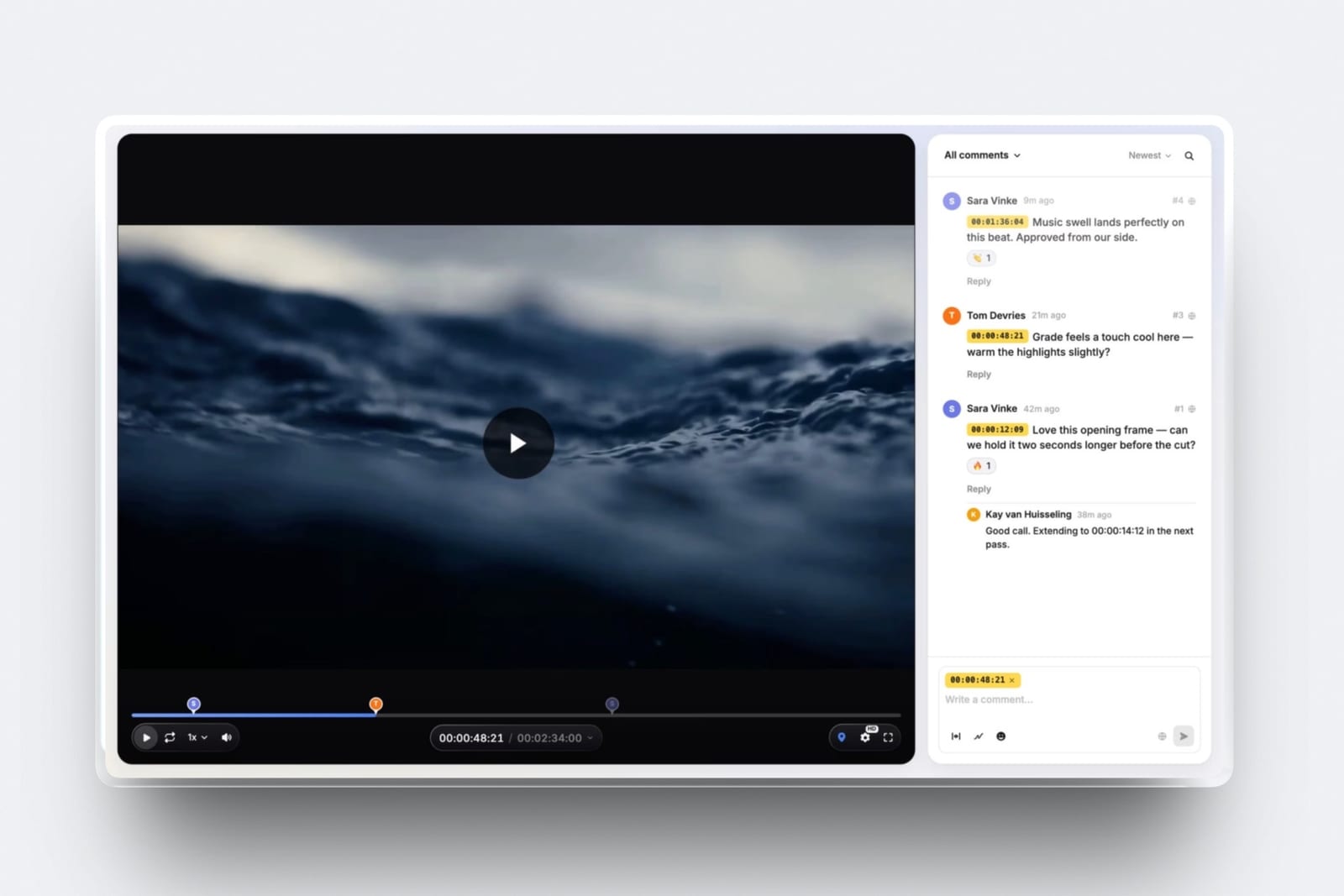
The standout detailthe animatic has somewhere to go. Framekit's video review is in the same account, so you can upload the animatic, send a link, and have the client leave notes pinned to the exact frame, with versions stacked as you revise. The board and its moving version travel together.
The honest gotchathere are no drawing tools and no frame generation, so the images come from wherever you make them.
There is no per-panel comment or approval on the board itself, and a reorder is an edit to the slide rather than a renumbering engine like Boords. Shared deck links have no password, and PowerPoint export on Pro is picture-based.
Skip it ifthe board is a production document that has to survive a dozen client reorders, or it feeds an animation pipeline. Boords and Storyboard Pro are built for those.
Verdict: the best choice when the storyboard is a chapter of a treatment or pitch deck rather than its own deliverable, and a poor substitute for Boords on a heavy revision round. See Framekit Slides.
4. StudioBinder: Storyboards Inside the Rest of the Paperwork
StudioBinder is production management first, with storyboarding as one module alongside script breakdowns, shot lists, schedules, and call sheets.
For a small production company the argument is consolidation: the board is attached to the shot list which is attached to the schedule, and nobody is reconciling three documents by hand.
We have to be careful about the money here, and the care is the point. StudioBinder's own pricing page did not render figures to us in August 2026.
Third-party trackers report a free tier plus Starter at about 42 dollars a month, Indie at about 85, Professional at about 127, and Studio at about 340, with roughly 15 per cent off for annual billing.
Those are secondary figures and we are labelling them as such rather than presenting them as verified.
We boarded in itthe board is competent and unremarkable on its own. What it does that nothing else here does is carry the shot numbering through into the shot list and call sheet, so a reordered board updates the documents the crew actually reads.
The standout detailshot list and storyboard are the same object viewed two ways, which removes the most common continuity error in small productions, where the board says one thing and the shot list says another.
The honest gotchayou are buying a production suite. If storyboarding is genuinely all you need, the price is several times what a dedicated tool costs and most of the product will go unused.
Skip it ifyou are a freelancer boarding for other people's productions. The scheduling half solves problems that belong to whoever hired you.
Verdict: The right answer when the board is one document in a production you are running. Check the price on their own site before committing, because we could not.
5. Krock.io: The Cheapest Real Seats, and Review Built In
Krock.io comes at storyboarding from media review rather than from drawing, and that origin gives it the most generous seat model in this comparison.
Its pitch is unlimited reviewers on every plan, which for an agency sending boards to a client with six stakeholders is a materially different proposition from per-seat pricing.
We boarded in itthe review experience is the strongest part. Frame-level comments, version stacking, and the fact that a reviewer needs no seat meant the revision round involved no licence admin at all, which is a real cost most tools ignore.
The standout detailbecause it is a media review platform underneath, the same workspace handles the board, the animatic, and later the actual cut. For a small studio that removes an entire tool from the stack.
The honest gotchathere is no drawing. Krock.io organises and reviews images, and the images have to come from somewhere else, which for a non-drawing team means the AI tokens or a stock library.
Skip it ifyou want the board and the drawing in one place. This is the review layer, not the creation layer.
Verdict: The best value per seat in the category and the best free tier for reviewers. It loses to Boords on the boarding experience itself and to Storyboard Pro on everything creative.

6. MakeStoryboard: The Cheapest Fixed Price in the Category
MakeStoryboard does one job and prices it plainly, which in a category drifting toward metered allowances is worth something on its own.
Its Individual plan is 12 dollars a month with space for ten storyboards, custom fields, PDF export, link sharing, commenting, and password protection, and its Team plan is 48 dollars a month with ten seats included and 6.64 dollars per extra person, unlimited storyboards, versioning, and a 50 MB per-image upload ceiling.
We boarded in ituploading drawn frames and attaching shot descriptions was quick and the PDF came out clean and print-ready, which is the artefact most clients still ask for. The reorder in our revision test worked, though the interface makes it more manual than Boords does.
The standout detailpassword protection on a shared board is included at the entry tier rather than held back for a business plan, which matters more than it sounds when the board is for an unannounced product.
The honest gotchathe ten-storyboard limit on Individual is a real ceiling for anyone working across several projects, and moving to Team means buying ten seats whether or not you have ten people.
Skip it ifyou need the board and the animatic in one place, or you need generated frames. This tool assumes the images already exist.
Verdict: The cheapest predictable price for a board that has to be shared and commented on. It has no AI, no animatic, and no drawing, and it is honest about all three.
7. Wonder Unit Storyboarder: Free, and Built by People Who Board
Storyboarder is free and open source, made by a studio for its own use, and it is the answer for anyone who can draw and has no budget. You draw frames with a small, deliberately limited toolset, set shot type and dialogue per panel, and play the result back as a timed animatic.
We boarded in itthe restricted brush set is a feature. Boarding is about staging and legibility rather than rendering, and a tool that gives you six brushes gets a sequence out faster than one that gives you sixty.
The standout detailit exports to editing and animation formats rather than only to PDF, so a board made here can go into a timeline rather than into an email, which for a short film is the difference between a document and a stage of production.
The honest gotchadevelopment has been slow and there is no client review layer at all. Sharing means exporting and sending a file, and a revision round means doing that again with a version number in the filename, which is exactly the problem Boords sells against.
Skip it ifthe board's job is to be approved by someone outside your team. The review loop is the entire missing half.
Verdict: The best free storyboarding software and a genuinely good drawing tool. It stops precisely where the client does.
8. Figma and FigJam: The Tool Your Team Already Pays For
A large share of storyboarding in agencies and design studios happens in Figma, not because it is a storyboarding tool but because everyone already has it and a frame grid with comments attached is most of what a board needs.
Treating that as a legitimate answer rather than a workaround is more useful than pretending otherwise.
The seat model is what makes it viable. Figma's Professional plan is 16 dollars a month for a full seat, 12 for a dev seat, and 3 for a collab seat, each with an AI credit allowance attached, and there is a free Starter tier.
A producer or client who only needs to look and comment sits on a 3 dollar collab seat, which is the cheapest reviewer access in this comparison other than Krock.io's free reviewers.
We boarded in ita component-based frame with slots for image, shot number, description, and duration took twenty minutes to build and then made every subsequent board fast. Comments are pinned to frames and resolve properly, which covers the review loop adequately.
The standout detailbecause the board lives beside the rest of the campaign's design work, the frames can pull real assets, real type, and real product renders rather than approximations, which for advertising boards removes an entire round of notes.
The honest gotchathere is no animatic, no timing, and no shot numbering that updates when you reorder. Our revision test was the worst here: renumbering after the reorder was manual and we got it wrong once.
Skip it iftiming matters. A board without an animatic cannot answer whether the sequence plays, and for anything with a duration that question arrives eventually.
Verdict: The right answer when a design team already lives in Figma and the board is a document rather than a stage of production. It is the wrong answer the moment pacing is the question.
What a Storyboard Is Actually For, and Why That Decides the Tool
Boards do three different jobs on three different kinds of project, and almost every bad software choice in this category comes from buying for one job while doing another.
On a commercial or a client film, the board is a contract. Its purpose is to get agreement on what will be shot before money is spent, and its audience is people who are not filmmakers.
What matters is that it is legible, shareable, commentable, and versioned, because the board will change three times and everyone must be looking at the same version. That is Boords, Krock.io, MakeStoryboard, or StudioBinder.
On an animated production, the board is the film's first draft. Timing, staging, camera moves, and shot lengths are decided here and carried forward, and the board's output is production data rather than a document.
That is Storyboard Pro, or Storyboarder on a short with no budget.
On a personal or unfunded project, the board is a thinking tool and nobody else will ever see it. What matters is speed and how little the software asks of you before you can draw, which is why the free options win outright and paying anything is usually a mistake.
The failure mode in each direction is specific. Buying a drawing tool for a client job leaves you emailing PDFs and losing track of notes. Buying an approval tool for an animated production leaves you rebuilding timing in another program.
Buying anything at all for a personal project usually means paying for a review loop with one participant.
In one lineDecide whether your board is a contract, a first draft, or a thinking tool, and the eight options collapse to two.

The Revision Round Is the Product
Every tool here can show images in order. The difference between them appears the first time somebody says move shot 11 to before shot 9 and cut the two after it, and that difference is worth more than any feature list.
Four things have to survive a reorder. The numbering has to update, so that the board and the shot list still agree. Comments have to stay attached to their frames rather than to positions, or every note becomes about the wrong shot.
The shared link has to keep working, so the client is not chasing a new URL. And the previous version has to remain viewable, because half the time the note gets reversed and somebody has to prove what the original was.
Boords did all four without intervention. Krock.io did all four with slightly more clicking. MakeStoryboard handled numbering and comments and made the reorder more manual than it should be.
Figma failed on numbering, and our manual renumbering introduced an error we did not catch until the export.
Storyboarder and Storyboard Pro handle reordering well within the program and have no client link at all, so the revision loop happens outside the software entirely.
That is the whole case for the approval tools, and it is a stronger case than it looks.
A board of twenty-four frames that goes through three rounds of notes involves roughly seventy small decisions, and the cost of a tool that loses five of them is a reshoot conversation.
If your board is a contract, buy for this and treat everything else as secondary.
For the broader version of the same problem after the shoot, our comparison of video review and approval tools covers the same loop on moving footage.
Generated Frames Are for the Rough Pass, Not the Board
The AI image allowances in this category are the most-marketed feature and the most misunderstood, so it is worth being precise about what they are good for.
They are good at getting a sequence legible fast.
When you need to know whether a sequence reads, whether the shot order works, and whether the client's idea survives contact with a picture, a rough generated frame answers that in seconds and a drawn frame answers it in twenty minutes.
Used for exploration, the allowance is genuinely valuable and it is why the pricing moved.
They are bad at consistency, which is the one thing a storyboard needs most.
The same character across twenty-four frames, the same room from three angles, the same product held the same way: these are exactly what generative image tools are weakest at, and every tool here inherits that weakness.
Our sequence needed three or four attempts per frame and still drifted, which is where the 70 to 100 images per sequence figure comes from.
The practical workflow that emerged is a two-pass one. Generate the rough sequence, get agreement on order and staging, then have the frames that survive drawn properly, whether by you or by an artist.
That reverses the usual economics: the artist draws twelve frames that matter instead of twenty-four that might, and the client has already agreed to the shape.
The budgeting consequence follows directly. Your image allowance is a rough-pass budget, not a production budget, and the tier you need is set by how many sequences you explore a month rather than by how many people are on your team.
Count sequences, multiply by roughly eighty, and buy accordingly.
Animatics, Timing, and the Question a Still Board Cannot Answer
A still board answers what happens. It cannot answer whether the sequence plays, and that question always arrives, usually late and usually from someone who has just watched it for the first time.
An animatic is the board with durations attached, played back in order, ideally against a scratch voiceover or a music bed.
It is the cheapest possible version of the film and it routinely kills shots that looked essential on paper, which is exactly what pre-production is for.
In our test, three of the twenty-four frames turned out to be redundant only once the sequence had timing.
Support splits cleanly. Boords, Krock.io, Storyboarder, and Storyboard Pro will produce a timed playback. MakeStoryboard, Figma, and StudioBinder will not, in the sense that matters. If your work has a duration and a soundtrack, that division is more important than price.
Storyboard Pro is the strongest here by a distance because its timing is production data rather than a preview, so the animatic becomes the edit's first assembly rather than a file somebody watches once.
For animation that is not a nicety, it is the reason the program costs what it does.
If you are working in that direction, our guide to 2D animation software covers what happens to the board next.
One practical note whichever tool you use. Cut the animatic against real audio as early as you can, even a phone recording of someone reading the script.
Timing decisions made against silence are almost always wrong, and they are wrong in the expensive direction, because a sequence that feels fine silent runs long the moment there are words in it.
What It Costs a Freelancer and a Small Studio Over a Year
Monthly prices hide the shape of this category, particularly where reviewers are concerned, so here is the annual figure for two realistic cases at published rates.
| Setup | Solo freelancer, one seat | Five-person studio with client reviewers |
|---|---|---|
| Storyboarder | 0 dollars | 0 dollars, no review layer |
| Krock.io | 0 dollars on the free tier | 600 dollars, reviewers free |
| MakeStoryboard | 144 dollars | 576 dollars, ten seats included |
| Figma Professional seats | 192 dollars for one full seat | 336 dollars for one full and four collab |
| Boords | 312 dollars on Solo | 600 dollars on Pro, five users |
| StudioBinder | About 504 dollars on Starter | About 1,020 dollars on Indie |
| Toon Boom Storyboard Pro | 794 euros | 3,970 euros for five seats |
| Framekit Slides | 0 dollars on free, 108 dollars on Starter | 228 dollars on Pro, one account, reviewers free |
Two things fall out.
The first is that reviewer pricing dominates at studio scale: Krock.io at 600 dollars covers five users and unlimited client reviewers, while a per-seat tool that charges for the people who only look at the board costs far more for the same work.
Check how your vendor prices someone who never edits, because that is most of the people who will open your board.
The second is that Storyboard Pro is in a different market. At 794 euros for one seat it costs more than any other tool here costs for five, and that is correct rather than unfair: it is a production tool for people who bill for boarding.
If your board is a document, you are not its customer.
The free column is worth taking seriously too. Storyboarder plus a shared cloud folder costs nothing and works, and Krock.io's free tier gives you one seat with unlimited reviewers, which is a functioning review loop at no cost.
The reason to pay in this category is versioning, numbering that survives a reorder, and an animatic, and if you do not need those three, do not.
Where the Board and the Finished Film Get Seen
A board is a working document, and the work that comes out of it is what gets you hired again, so directors, animators and storyboard artists who get repeat work keep somewhere a producer can see sequences, finished films and a plain account of what they did on each one.
The same Framekit account that holds a Slides board also builds that site: Framekit is an AI website builder that generates a complete site from a short description of your work, which for a boarding artist means a page per project with board excerpts, the finished sequence and the credit, on a domain that is yours.
Board panels are unusually good portfolio material because they show your thinking rather than only the result.
Where it does not compete: it will not run a per-panel client approval loop, so if you need boards with frame-level comments and numbering that survives reorders, Boords or Krock.io is what you want.
For a fuller treatment aimed at this audience, see our guide to website builders for storyboard artists.
What We Left Out of This Comparison and Why
Four tools that come up regularly are missing from the ranked list, in each case because we could not read a price on the vendor's own site, which is the standard this guide holds itself to.
Milanote is widely used for boards and moodboards and its pricing page did not resolve for us.
FrameForge is the serious previsualisation tool for directors who want accurate lenses and camera positions, and its store returned nothing usable. Plot is a newer boarding tool whose site did not respond.
StoryboardThat publishes a detailed free tier, capped at two storyboards a week with watermarked downloads and a three-cell layout, but its paid prices rendered as placeholders rather than figures when we read the page, so we are not quoting them.
None of those four are bad software and their absence is not a judgement on them. If one of them is your tool, the useful comparisons are against Boords for the approval loop, Storyboard Pro for drawing and timing, and Krock.io for reviewer cost.
We also excluded screenwriting and editing tools, which sit either side of this stage.
If that is closer to what you need, our guides to screenwriting software and video editing software cover them.
A Test You Can Run on Your Next Project
Every tool here has a free tier or a trial, so the honest test costs nothing and takes an evening, and it should be run on a real sequence rather than a demo.
Take six frames from something you are actually making. Put them into two candidate tools, add shot numbers, descriptions, and durations, and share each one with a colleague.
Then do the thing that matters: ask them to comment on three frames, reorder two of the six, and delete one.
Check afterwards whether the numbering is right, whether the comments are still on the frames they were written about, and whether the link you already sent still shows the current version.
Then export. Produce the PDF and, if the tool offers one, the animatic, and look at both on a phone, because that is where a client will open them. A board that is illegible at phone size will generate notes about legibility rather than about the work.
Last, count. Board one sequence generatively if the tool offers it, and count how many images you actually consumed getting frames you would show someone. That number, multiplied by the sequences you make in a month, is the tier you need, and it is almost never the entry one.
The Decision Guide
Work down this list and stop at the first line that matches, because they are ordered by how strongly each signal should override the others.
You draw, and the board feeds an animated production. Toon Boom Storyboard Pro. The camera moves and the timing data are the product, and nothing else here produces them.
You draw, and there is no budget. Wonder Unit's Storyboarder, free, plus a shared folder for sending versions.
Your board has to be approved by a client. Boords, on Solo at 26 dollars a month if you board a couple of sequences a month and Pro at 50 if you board weekly.
Your board is a chapter of a treatment or pitch deck, not a standalone file. Framekit Slides, free to start, with the animatic sent through its video review for frame-accurate notes.
Your board has to be approved by a client and there are many reviewers. Krock.io, where reviewers are free on every plan including the free one.
You want a fixed, predictable price and no metering. MakeStoryboard at 12 dollars a month, accepting the ten-storyboard ceiling and no animatic.
You are running the whole production, not just the board. StudioBinder, so the board, shot list, schedule, and call sheet stay in agreement. Verify its current price yourself.
Your team already lives in Figma and the board is a document. Stay there, put clients on 3 dollar collab seats, and accept that you have no animatic.
You only need to think. Any free option. Paying for a review loop with one participant is the most common waste in this category.
Once the boards are locked, the schedule and call sheets are the next problem: we priced that field in the best call sheet apps for film production, where one tool gives the whole toolset away free.
Frequently Asked Questions
What is the best storyboarding software in 2026?
Boords is the best storyboarding software for most teams in 2026, because it runs the full loop from frame to client sign-off and its Solo plan is 26 dollars a month billed yearly.
Toon Boom Storyboard Pro is the professional choice when the board feeds an animated production, Framekit Slides is the pick when the board lives inside a pitch deck or treatment, and Wonder Unit's Storyboarder is the best free option for anyone who draws.
Framekit vs Boords: which should a director use for storyboards?
Boords is better when the board itself goes through client revision rounds, because its numbering survives reorders and comments stay pinned to frames.
Framekit Slides is better when the board is part of a treatment or pitch deck, because storyboard panels, shot lists and moodboards are elements in the same deck, it is free to start, and the animatic can get frame-accurate notes through Framekit's video review.
What is the best free storyboarding software?
Wonder Unit's Storyboarder, which is free, open source, and built by a studio for its own boards, with real drawing tools and a timed animatic.
Krock.io's free tier is the better free choice if you need client review, because it includes one user with unlimited reviewers, and Figma's free Starter tier works for a board that is a document rather than a stage of production.
How much does Boords cost?
Boords publishes Solo at 26 dollars a month billed yearly with 250 AI images and one user, Pro at 50 dollars with 1,000 images and up to five users, Team at 85 dollars with 2,000 images and up to ten users, and Agency at 165 dollars with 3,000 images and up to thirty users.
The page shows a 33 per cent saving for yearly billing.
Do I need to be able to draw to make a storyboard?
No. Four of the seven tools we boarded in assume you cannot, and either generate frames, arrange images you supply, or use stock and photographic references.
What a board needs is legibility and correct staging, not rendering, and a clear stick-figure board communicates better than a beautiful one that hides the camera position.
What is an animatic and do I need one?
An animatic is the storyboard played back with a duration on each frame, ideally against scratch audio, so you can see whether the sequence plays rather than only what happens in it.
If your work has a runtime and a soundtrack, you need one, and it will usually remove shots that looked essential on the page.
Which storyboarding tools include AI image generation?
Boords meters AI images by tier at 250, 1,000, 2,000, and 3,000 a month. Krock.io includes 50 AI tokens on its free plan. Figma attaches an AI credit allowance to each seat type, including 500 credits a month on a 3 dollar collab seat.
Storyboarder, MakeStoryboard, StudioBinder, and Toon Boom Storyboard Pro do not generate frames.
How many AI images does one storyboard actually use?
In our twenty-four frame test, between 70 and 100, because consistency is the weak point and most frames need three or four attempts before one is usable.
Budget roughly eighty images per sequence, count the sequences you explore monthly, and pick the tier from that rather than from your team size.
Is Toon Boom Storyboard Pro worth the price?
If you board professionally for animation, yes, because its camera moves and timing become production data rather than a preview.
Reading Toon Boom's own store from a European address in August 2026 returned 92 euros a month or 794 euros a year, which is more for one seat than most tools here cost for five, and that price assumes you are billing for the work.
Can I use Figma or FigJam for storyboards?
Yes, and many agencies do, because a component-based frame with slots for image, shot number, description, and duration takes twenty minutes to build and clients can sit on a 3 dollar collab seat to comment.
The limits are real: no animatic, no timing, and shot numbers that do not update when you reorder frames.
What happens to my board when the client asks for a reorder?
That is the test that separates these tools. Numbering has to update, comments have to stay attached to their frames rather than to positions, the shared link has to keep working, and the previous version has to remain viewable.
Boords and Krock.io handled all four in our test; Figma failed on numbering and we introduced an error fixing it by hand.
Final Verdict: The Best Storyboarding Software in 2026
Boords wins for most people because it is built around the only part of storyboarding that reliably goes wrong, which is the revision round.
Numbering that survives a reorder, comments pinned to frames rather than positions, a link that stays current, and an animatic generated from the same document are worth more than any drawing feature to a team whose board has to be approved by someone who is not a filmmaker.
Where it loses is worth stating plainly. Its drawing tools are deliberately light, so a storyboard artist will find them thin.
Its Solo plan at 250 AI images a month is two or three sequences rather than an open allowance, which means the honest freelance price is Pro at 50 dollars a month, not the 26 on the headline.
And for anyone with many client reviewers, Krock.io's free-reviewer model is simply cheaper for the same work.
Toon Boom Storyboard Pro remains the right answer for a narrower group than its reputation suggests. If your board carries timing and camera moves into an animation pipeline, nothing else here does that job.
If your board is a PDF that gets approved and then thrown away, you would be buying a production tool to make a document, and 794 euros a year is a lot to pay for that.
Framekit Slides earns third place for a specific reader: the director whose board is a chapter of a pitch.
It puts storyboard panels, shot lists and moodboards in one deck and sends the animatic through frame-accurate video review in the same account, but Framekit is not for heavy per-panel revision rounds or animation pipelines, and it has no drawing tools.
The broader change is the one to take away. This category used to charge for people and now charges for generated frames, which means the tier you need is set by how much you explore rather than by how many of you there are.
Count sequences, not seats, buy the plan that covers your rough passes, and keep the drawing budget for the frames that survive the first review.