Framekit templates
Start from a designer-made template
 Use template
 Use template
 Use template
 Use template
 Use template
 Use template
 Use template
 Use template
In February 2026 a lot of editors opened an email they were not expecting.
CapCut, the free-feeling app that had quietly become the default for short-form video, moved its Pro plan from roughly $9.99 a month to $19.99, and its annual plan from about $77.99 to $179.99.
Existing annual subscribers rolled onto the new rate. Nothing about the software changed. The bill went up by around 130 percent on annual billing, and the work already inside it stayed exactly where it was.
That is the fault line running through the best video editing software in 2026. On one side are subscriptions, where the price is a decision someone else makes every year.
On the other is a small group of applications you buy once, including the tool most professional colourists in the world use, whose free version finishes actual feature films.
The gap between those two positions is now larger than the gap between any two editors' feature lists.
So we cut the same film ten times and priced the outcome over five years.
A video editing tool is software that assembles, trims, colour-corrects, and exports video from multiple clips into a finished deliverable, and in 2026 the meaningful differences between the good ones are licensing model, export ceilings, and which formats they accelerate rather than raw capability.
DaVinci Resolve is the best video editing software in 2026 for almost everyone, because the free version is a full professional application rather than a demo and Studio is a $295 one-time purchase, but its interface is genuinely harder to learn than Premiere Pro's and it demands more of your machine.
Final Cut Pro is the better pick on a Mac at $299.99 once, Premiere Pro remains the right answer if you collaborate with other editors, and Descript is a different and better tool if your video is mostly people talking.
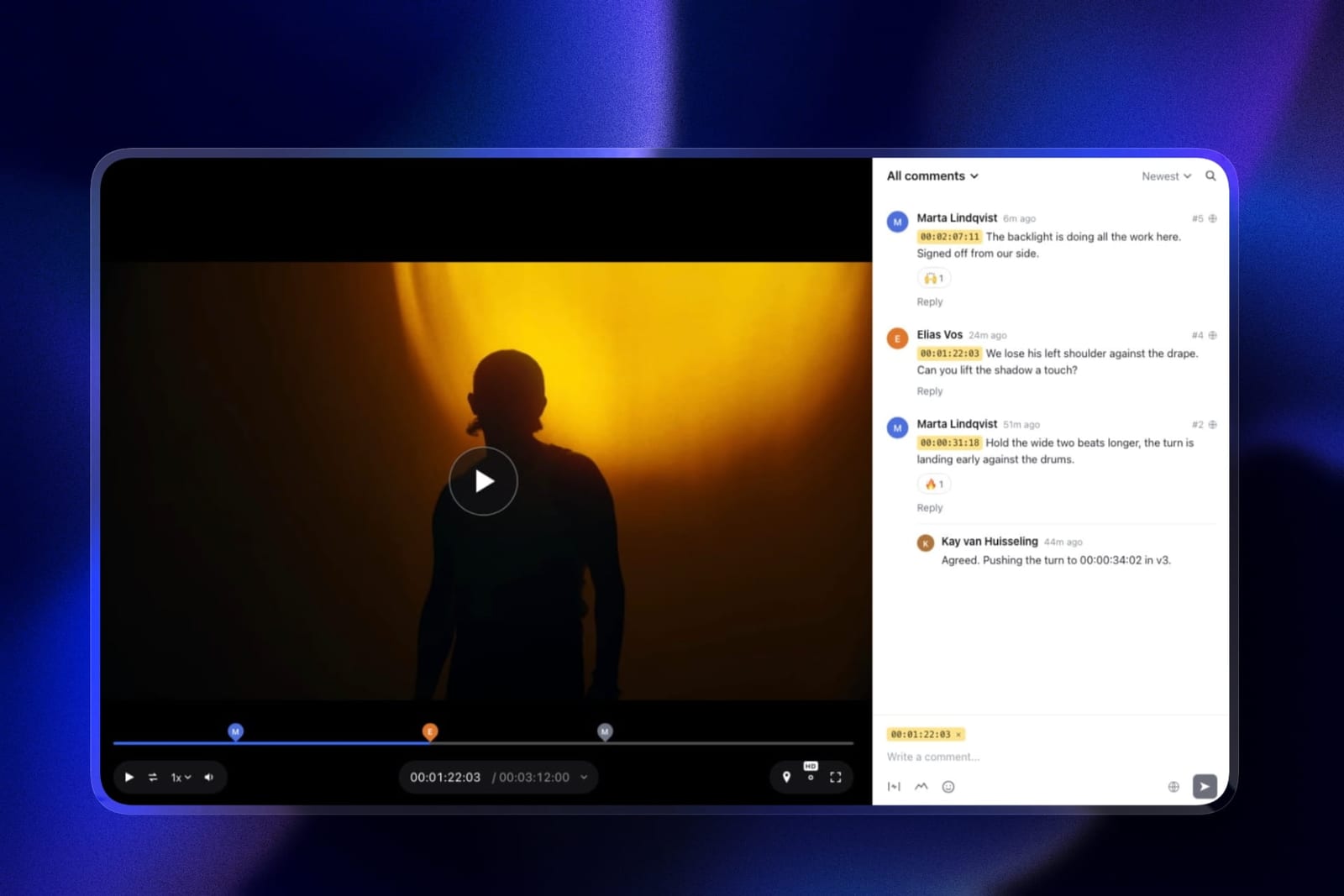
Updated in September 2026: we re-verified Framekit's plans and rewrote the section on what happens after the edit, because Framekit now includes timestamped video review and client galleries alongside the website; editor prices are as checked in August 2026.
How We Cut the Same Film in Every Tool
Rather than compare specification sheets, we edited one real deliverable in every application: a four-minute wedding highlight film built from 62 clips shot on two cameras, one recording in a LOG profile that needed grading and one in standard colour, cut to a licensed music bed, with 14 subtitle cards, a 4K H.265 master, and a vertical 9:16 social version cut down to 55 seconds.
Same footage, same music, same edit decisions, on fresh installs in August 2026.
That project was chosen because it exposes the four things editors actually get stuck on. Two cameras with different colour profiles find out whether the tool can match footage without a plugin.
LOG footage finds out what the free tier will let you grade. A 4K H.265 export finds out whether your hardware is accelerated or whether you are about to lose an evening.
And a vertical recut from a horizontal timeline is the single most common 2026 task that older editing software handles badly.
Three levels of confidence appear in the entries below. Anything we describe as cut, exported, or hit we did ourselves on this project.
Anything described as listed or published came off the vendor's own page in August 2026 and we are reporting rather than testing it.
Anything described as reported comes from consistent third-party accounts, which is the honest label for Adobe and CapCut pricing here, because both companies block automated checks of their own pricing pages and we will not present a scraped figure as a verified one.
Three applications we own outright: DaVinci Resolve Studio, Final Cut Pro, and LumaFusion. Four we ran free because free is a genuine product: DaVinci Resolve, Kdenlive, Shotcut, and Clipchamp. Three we ran on trials or short subscriptions, and their entries say so.
Weighting, so you can argue with it: cost over five years 25 percent, capability ceiling 20 percent, performance on ordinary hardware 20 percent, learning curve 20 percent, export and delivery options 15 percent.
Five-year cost carries the most weight because that is the horizon on which a $295 purchase and a $22.99 subscription stop looking similar, and because most editors underestimate how long they keep an editor once they have learned it.
In one linewe cut the same four-minute two-camera wedding film with LOG footage and a vertical recut in ten applications in August 2026, and weighted five-year cost above every other factor.
By the Numbers
Ten applications, one film, one deliverable set. The figures below are the ones that changed our ranking, and the most important of them is a price change rather than a feature.
- $0 buys a professional editor three times over: DaVinci Resolve, Kdenlive, and Shotcut are all free, and Clipchamp exports 1080p free without a watermark.
- $295 is DaVinci Resolve Studio as a one-time purchase, against $275.88 a year for Premiere Pro on a reported $22.99 monthly annual plan.
- $299.99 is Final Cut Pro, one time, on the Mac App Store.
- 130 percent is roughly the annual increase CapCut Pro is reported to have applied, from about $77.99 to $179.99 a year.
- 60 minutes a month is Descript's free media allowance, and free local exports are capped at 720p.
- $29.99 is LumaFusion once, plus $19.99 each for four separate one-time in-app modules, plus an optional Creator Pass at $9.99 a month or $69.99 a year.
- 3 of 10 are one-time purchases in a meaningful sense: DaVinci Resolve Studio, Final Cut Pro, and LumaFusion.
- 32K at 120fps is DaVinci Resolve Studio's ceiling, against Ultra HD 3840 by 2160 at 60fps on the free version.
- $1,379.40 is what five years of Premiere Pro costs at the reported annual rate, against $295 for Resolve Studio.
The Full Comparison Table
Prices below came off the vendor's own page in August 2026 unless the row says reported, which applies to Adobe, CapCut, and Filmora, all of which block automated checks or publish promotional pricing that changes weekly.
Five-year cost assumes one seat and no promotional discount.
| Tool | Best for | Entry price | Licence | Five-year cost |
|---|---|---|---|---|
| DaVinci Resolve | Almost everyone, free or paid | Free, Studio $295 | One-time | $0 or $295 |
| Adobe Premiere Pro | Collaborating with other editors | $22.99/mo reported | Subscription | About $1,379 |
| Final Cut Pro | Mac editors who want speed | $299.99 | One-time | $299.99 |
| Descript | Talking heads and interviews | Free, then $16/user/mo yearly | Subscription | About $960 |
| CapCut | Short-form social video | Free, Pro $19.99/mo reported | Subscription | About $900 |
| LumaFusion | Editing on an iPad | $29.99 plus modules | One-time plus IAP | $29.99 to $109.95 |
| Filmora | Beginners who want templates | $69.99/yr reported | Both | About $350 |
| Kdenlive | Free, open source, no account | Free | Open source | $0 |
| Shotcut | Free and truly cross-platform | Free | Open source | $0 |
| Clipchamp | Quick 1080p cuts in a browser | Free, Premium $11.99/mo | Subscription | $0 to $719 |
The last column is the only one that separates these tools decisively. Two of them cost more over five years than a used camera body. Three of them cost nothing at all and one of those three is what the other seven are measured against.
1. DaVinci Resolve: The Best Video Editing Software Overall
Resolve won because the free version is not a reduced edition of a professional application, it is the professional application with a specific and published list of features withheld.
Our two-camera wedding film, LOG grade included, was finished entirely on the free version.
The subtitles, the music sync, the vertical recut, the 4K H.265 master: all of it, at no cost, in the same software used to finish theatrical features.
The real number: Resolve Studio is $295 as a one-time purchase, not a subscription. The free version supports up to 60fps at Ultra HD 3840 by 2160.
Studio raises that to 120fps at 32K, and adds the DaVinci Neural Engine with facial recognition, Super Scale uprezzing and speed warp, 45 extra Resolve FX including AI noise reduction and de-interlacing, stereoscopic 3D, Dolby Vision and HDR10+ grading, immersive 3D audio including Dolby Atmos, multiple GPU support for 10-bit professional formats, a remote scripting API, and full-screen playback on a second monitor.
That list is the honest answer to "do I need Studio". If you deliver above UHD, need AI noise reduction on high-ISO wedding footage, or grade in HDR, buy it. Our film needed exactly one of those, the noise reduction, and we bought Studio for it. Nothing else on the list applied.
The standout detail nobody puts in a comparison: because it is one purchase rather than a rental, Resolve Studio breaks even against a subscription editor inside fourteen months and then stops costing anything.
Over the five-year horizon we used, that is $295 against a reported $1,379.40 for Premiere Pro, and the software you own keeps opening your old projects when you stop paying attention to it.
The gotchathe learning curve is real and it is front-loaded, because Resolve is four applications wearing one interface.
Edit, Fusion, Color, and Fairlight are each deep enough to be a career, and a new editor opening it for the first time will find Premiere Pro friendlier for a fortnight.
It is also the most hardware-hungry application here; on a laptop with integrated graphics, expect to work in proxies.
Skip it ifyou edit on a modest machine and mostly cut talking-head videos. Resolve is enormous, and Descript will finish that job faster.
Verdict: Free is the correct starting point for every reader of this article, and $295 once is the correct upgrade when a specific Studio feature blocks you. On five-year cost against capability, nothing else here is close.
Once the film is finished it needs somewhere to live; our guide to website builders for filmmakers covers the delivery end.
2. Adobe Premiere Pro: Still the Right Answer for Collaboration
Premiere Pro is not the best value in this comparison and it remains the correct choice in a specific and common situation: when other people touch your timeline.
Project sharing, an assistant who preps selects, a colourist who wants an XML, an agency that sends you a Premiere project rather than footage.
In that world the industry default is the right answer and the cost of being different is higher than the subscription.
The real number needs a caveat we will repeat: Adobe's pricing pages block automated verification, so the following are reported figures from third-party trackers in 2026 rather than numbers we read at the source.
The Premiere Pro single app plan is reported at $22.99 a month on an annual plan billed monthly, $21.99 a month prepaid annually, and $34.49 a month with no commitment, with Creative Cloud All Apps reported at $59.99 a month and a student rate reported at $19.99.
Confirm at checkout.
At the reported annual rate that is $275.88 a year, or about $1,379.40 over five years, against $295 once for Resolve Studio. Premiere Pro has to be worth roughly $1,084 more over five years, and for a solo wedding filmmaker it is not.
For an editor who is sent Premiere projects by clients, it obviously is, because the alternative is a conversion step on every job.
The standout detail: the ecosystem rather than the editor.
After Effects, Audition, and the Frame integration mean the round trip between motion graphics and edit is shorter than any equivalent path in this comparison, and if your work involves title sequences or graphics that is a real time saving rather than a marketing claim.
The gotchayou are renting access to your own project files. Stop paying and the .prproj on your disk becomes a file you cannot open, which is a materially different position from every one-time purchase here. Export project XMLs from finished jobs while you still have a subscription.
Skip it ifyou work alone and always will. The collaboration advantage is the entire justification for the price, and a solo editor is paying a group rate for a single seat.
Verdict: Worth a reported $275.88 a year only if other people open your timelines. If nobody does, this is the most expensive way to do a job Resolve does free.
3. Final Cut Pro: The Fastest Edit on a Mac, Bought Once
Final Cut Pro is the fastest tool in this comparison on Apple hardware and it is not particularly close.
Our 62-clip timeline scrubbed without proxies, the magnetic timeline made the vertical recut genuinely quick rather than merely possible, and the H.265 export finished while other applications were still analysing.
On an Apple silicon machine, the optimisation shows in every operation.
The real number: $299.99 on the Mac App Store as a one-time purchase, with the listing showing version 12.3 released on 30 June and requiring macOS 15.6 or later.
That single number covers every future update within the version, which historically has meant years of feature releases without a further charge.
Against the reported Premiere Pro annual cost, Final Cut breaks even in about thirteen months and then costs nothing.
Against Resolve Studio at $295, it is effectively a tie on price, and the choice becomes a genuine preference question rather than a financial one: magnetic timeline and speed against Resolve's colour and audio depth.
The standout detail: the App Store listing shows no free trial, which is unusual for a $299.99 professional purchase and worth planning around. Apple has historically offered a trial through its own site rather than the App Store, so look there before buying blind.
The gotchaMac only, permanently, and its project format is the least portable in this comparison. Sending a Final Cut library to a collaborator on Windows is not a conversation you can have, and XML round trips lose more than they do between Premiere and Resolve.
Skip it ifyou use Windows, you collaborate outside the Apple ecosystem, or you grade seriously. Resolve's colour page has no equivalent here.
Verdict: The best Mac editing experience available and a fair one-time $299.99. Choose it over Resolve for speed and simplicity, and against it if colour or audio is your craft.
4. Descript: A Different Tool That Beats All of Them at One Job
Descript does not belong in a timeline-editor comparison and it earns its place because for a large share of the video creatives actually make, it is simply the right tool.
It transcribes your footage and then lets you edit the video by editing the text.
Cutting the interview segments of our wedding film, the parts where people talk, took a fraction of the time it took anywhere else, because deleting a sentence deletes the clip.
The real number: Descript offers a free tier with 60 minutes of media a month, 100 one-time AI credits, local exports capped at 720p, and web-link exports capped at one hour.
Hobbyist is $16 per user per month billed annually or $24 monthly. Creator is $24 annually or $35 monthly. Business is $50 annually or $65 monthly, and Enterprise is custom.
That 720p cap on free local exports is the specific line to know. The free tier is a genuine way to evaluate the workflow and cannot deliver a client-quality file, which is a clean and honest place to draw a paywall.
The standout detail: filler word removal that actually works.
On a 14-minute interview, removing every "um" and "you know" took one checkbox and produced a cut that did not sound edited, which is the kind of thing that takes an hour in a normal timeline and is never worth the hour.
The gotchait is not an editor for anything visual. Music-driven montage, multi-camera cutting on rhythm, and colour work are all either painful or impossible, and our four-minute highlight film could not have been finished here.
Skip it ifyour video is driven by images rather than speech.
Verdict: The best tool in this comparison for interviews, tutorials, podcasts on camera, and anything where the edit follows the words, at $192 a year on Hobbyist. Not a replacement for a timeline editor and not trying to be.
5. CapCut: The Default for Short Form, and the Price Just Doubled
CapCut earned its position honestly.
The vertical 55-second recut of our wedding film went together faster here than anywhere else, because the whole application is built around the assumption that the output is vertical, captioned, and going to a feed today.
Auto-captions were accurate enough to need only light correction, and the template library genuinely saves time rather than making everything look identical.
The real number is the one that changed. CapCut Pro is reported to have moved from about $9.99 a month to $19.99, and from about $77.99 a year to $179.99, with existing annual subscribers rolling onto the new rate around February 2026.
That is close to a 130 percent increase on annual billing.
We could not verify these figures at the source because CapCut's pricing pages did not respond to our checks, and the numbers are consistent across multiple independent trackers, so we are reporting them as such rather than as verified.
The free tier remains substantial and is why most people are here.
What the increase changes is the calculation for anyone who upgraded for one feature: at a reported $179.99 a year, CapCut Pro now costs more annually than Final Cut Pro costs once, and more than half of what Resolve Studio costs forever.
The standout detail: the free tier's auto-caption quality is better than several paid tools here, and captions are the single highest-value automation in short-form video. If captions are why you were considering Pro, test whether free already does what you need.
The gotchathe ownership question. This is a free-to-start social editing tool owned by a large platform company, your projects live in its cloud, and the last twelve months demonstrated that the terms can change substantially without the software changing at all.
Skip it ifyou deliver client work. Not because it cannot, but because building a paid workflow on a tool that repriced by 130 percent in one step is a business risk rather than a software preference.
Verdict: Still the fastest way to make a vertical video and no longer cheap. At a reported $179.99 a year, treat the free tier as the product and the Pro tier as a serious purchase decision.
6. LumaFusion: A Full Editor That Fits in a Bag
LumaFusion is the only tool in this comparison that let us cut the wedding film on a train.
It is a genuine multi-track editor on iPad, iPhone, Android, and ChromeOS, with real keyframing, colour controls, and audio mixing, and it handled a 62-clip 4K timeline on an iPad without the experience feeling like a compromise.
The real number, and it needs reading carefully: LumaFusion is $29.99 as a one-time purchase.
Four separate one-time in-app purchases are listed at $19.99 each: Speed Ramping and Keyframing, Multicam Studio, FCPXML Export, and the CoreMelt PaintX plug-in. A Creator Pass subscription is listed at $9.99 monthly or $69.99 yearly.
So the honest price is between $29.99 and $109.95 depending on which modules you need, and the FCPXML export module at $19.99 is the one most professional users will end up buying, because it is what lets an iPad rough cut become a Final Cut or Resolve timeline back at the desk.
The standout detail: that FCPXML round trip is the reason to take LumaFusion seriously as a professional tool rather than a travel toy. Cutting selects on location and finishing at home is a workflow, and $49.98 buys the whole thing permanently.
The gotchathe modular pricing is easy to misjudge. The headline is $29.99 and the working configuration for a professional is closer to $70, which is still excellent value and is not what the App Store listing leads with.
Skip it ifyou have a desktop and never edit away from it. There is no advantage here you cannot get better on a computer.
Verdict: The best mobile editor by a wide margin and a legitimate professional tool at $29.99 plus $19.99 for FCPXML export. Buy the modules deliberately rather than all at once.
7. Filmora: Templates, Beginners, and a Perpetual Licence With an Asterisk
Filmora is built for the editor who wants a finished-looking result without learning grading, keyframes, or audio mixing, and it does that job well.
Our wedding film came out of Filmora looking like a template, which is a criticism in a professional context and exactly the point for someone making a montage for a family member.
The real number is reported rather than verified, because Wondershare's store blocked our checks and its pricing is heavily promotional: the annual plan is reported at $69.99 with frequent discounts as low as $39.99, and a perpetual plan at $99.99 for Windows and $109.99 for Mac.
The important asterisk, consistently reported, is that the perpetual licence does not include future major version upgrades, so Filmora 15 would be a further discounted purchase rather than a free update.
That asterisk is the difference between a perpetual licence and a one-time purchase, and it is worth being precise about, because it is the reason Filmora's $99.99 is not comparable to Final Cut's $299.99. One buys the software; the other buys this version of the software.
The standout detail: the AI and template features are aimed squarely at speed for non-editors, and for a photographer who shoots occasional video and does not want a second craft, that is a legitimate purchase rather than a compromise.
The gotchaheavy discounting means the price you see depends on when you look, and several features that feel included are separately monetised through effect and asset packs.
Skip it ifyou intend to become good at editing. Filmora's ceiling arrives quickly and everything above it is somewhere else.
Verdict: A reasonable purchase for occasional video at a reported $69.99 a year, with the perpetual option worth less than it appears because major upgrades are excluded.
8. Kdenlive: The Serious Free Editor Nobody Talks About
Kdenlive is a mature, open-source, multi-track editor that has been developed for two decades, runs on Linux, Windows, and macOS, and costs nothing with no account, no cloud, and no telemetry-driven upsell.
Our wedding film was cut here without hitting a wall, and while the colour tools are not Resolve's, the editing itself was unremarkable in the best sense.
The real number is zero, permanently, with no paid tier and no feature withheld. Kdenlive is free software in the licence sense as well as the price sense, which means nobody can raise its price, restrict its export, or discontinue it in a way that takes your projects with it.
The standout detail: proxy editing and effect handling on modest hardware. On the same laptop where Resolve required constant proxy management, Kdenlive was comfortable, which makes it the better free choice for anyone editing on a machine that is not new.
The gotchastability across major releases has historically been the community complaint, and while our testing was uneventful, the honest advice with any open-source editor is to save often and keep a version you know works.
Skip it ifyou need advanced colour grading, motion graphics, or to exchange projects with other editors professionally.
Verdict: The best free editor for older hardware and the most durable licence in this comparison. If Resolve is too heavy for your machine, this is the answer rather than a paid subscription.
9. Shotcut: Free, Cross-Platform, and Deliberately Plain
Shotcut is the other serious open-source option and it differs from Kdenlive mainly in temperament: fewer features, fewer surprises, wide format support through FFmpeg, and an interface that has never tried to be beautiful.
It cut the film competently and taught us nothing new, which for a free tool is a compliment.
The real number is zero, with no account and no tier structure, on Windows, macOS, and Linux.
Its format support is the practical standout, because it will open things that better-known editors refuse, which makes it genuinely useful as a utility even if it is not your main editor.
The standout detail: it is the best free tool here for the unglamorous job of transcoding, trimming, and fixing an awkward file that another application will not accept. Keep it installed for that reason alone.
The gotchathe interface will slow you down on a long edit. Panels and workflow are less refined than Kdenlive's, and on a 62-clip timeline that difference accumulates.
Skip it ifthis is your primary editor and you edit daily. Kdenlive is the better free desktop choice for volume work.
Verdict: Free, dependable, and worth installing as a second tool even if you edit elsewhere. Not the one to build a working practice on.
10. Clipchamp: The One Already on Your Windows Machine
Clipchamp is Microsoft's browser-based editor, it is already present on Windows, and it exports 1080p free without a watermark, which is a more generous free tier than several paid tools in this comparison offer.
For quick cuts, screen-recording trims, and simple social videos, it removes the entire question of what to install.
The real number is reported rather than verified, as Microsoft's pricing lives across support pages rather than a single fetchable table: the free plan includes unlimited 1080p exports with no watermark and basic stock content, and Premium is reported at $11.99 a month adding 4K export, premium filters and effects, and stock content.
Premium features are reported to be included with personal and family Microsoft 365 subscriptions, which means a large number of people already have it and do not know.
That last point is the practical one. If you pay for Microsoft 365, check whether Clipchamp Premium is already included before subscribing to anything in this article for casual video work.
The standout detail: no watermark on the free 1080p export. In a category where free tiers routinely brand your output, that alone puts Clipchamp ahead of several tools people pay for.
The gotchait is a browser editor with browser limits. Long timelines, heavy 4K footage, and complex grading are all outside its comfort zone, and our four-minute two-camera film was near the top of what felt reasonable.
Skip it ifyou are producing client work or editing anything longer than a few minutes.
Verdict: Genuinely useful, genuinely free at 1080p, and probably already paid for if you have Microsoft 365. Not a professional editor and not pretending to be.
One-Time Purchase Against Subscription, Over Five Years
This is the calculation the category avoids making, and it is the one that should decide most purchases, because video editors are tools people keep for a decade rather than a year. Here is the arithmetic at one seat, using the figures above and no promotional discounts.
Buy once and the total is fixed. DaVinci Resolve free is $0 over five years. Resolve Studio is $295. Final Cut Pro is $299.99. LumaFusion with the FCPXML module is $49.98. Kdenlive and Shotcut are $0.
Six of the ten options in this article have a five-year cost under $300 and four of them are free.
Subscribe and the total compounds. Premiere Pro at the reported $22.99 a month on an annual plan is $275.88 a year and about $1,379.40 over five years. Descript Hobbyist at $16 a month billed annually is $192 a year and $960 over five.
CapCut Pro at a reported $179.99 a year is about $900 over five. Clipchamp Premium at a reported $11.99 a month is about $719 over five, unless Microsoft 365 already covers it.
The break-even points are worth memorising because they are shorter than people expect. Resolve Studio at $295 pays for itself against Premiere Pro in about thirteen months. Final Cut Pro does the same in about thirteen months.
After that, every additional month on the subscription is money the one-time buyer keeps.
There is a real counter-argument and it deserves stating. Subscriptions include continuous updates, and Adobe ships codec support and format compatibility quickly, which matters if you receive footage from cameras released last month.
One-time purchases can stagnate, and Filmora's perpetual licence explicitly excludes major version upgrades.
The honest framing is that you are buying update velocity, not the software, and you should decide whether your work needs that velocity.
In one lineResolve Studio at $295 and Final Cut Pro at $299.99 both break even against Premiere Pro in about thirteen months, after which a subscription costs roughly $276 a year for update velocity you may not need.
What Free Video Editors Actually Refuse to Do
Free is unusually meaningful in this category compared with any other software we compare, and the reason is that the ceilings are placed at genuinely professional levels rather than at the point where work begins.
Knowing exactly where each one stops saves you from buying capability you already have.
DaVinci Resolve free stops at Ultra HD 3840 by 2160 at 60fps, and withholds the Neural Engine features, 45 Resolve FX including AI noise reduction and Super Scale, stereoscopic 3D, Dolby Vision and HDR10+, immersive 3D audio, multi-GPU support for 10-bit professional formats, and the remote scripting API.
Everything a wedding, corporate, or documentary editor does daily is in the free version.
Clipchamp free stops at 1080p and, unusually, does not watermark. Descript free stops at 60 minutes of media a month and caps local exports at 720p, which is the one free tier here that cannot produce a deliverable. CapCut free remains capable and is the tier most of its users should stay on given the reported price increase. Kdenlive and Shotcut do not stop at all, because there is no paid tier to withhold anything for.
The practical consequence is a recommendation we would give without hesitation: no reader of this article should pay for video editing software until they have hit a specific named wall in DaVinci Resolve free.
Not until they have used it for a month, not until they feel like a professional. Until a particular feature they need is behind the $295.
In one lineDaVinci Resolve free stops at UHD 60fps and withholds AI noise reduction, HDR grading, and multi-GPU support, and nothing else in a normal wedding, corporate, or documentary workflow is missing from it.
Hardware, Codecs, and the Thing That Actually Slows You Down
The most common reason an editor feels slow is not the software.
It is a mismatch between the codec your camera records and what your machine can accelerate, and every application in this comparison is affected differently by it, which is why editors give contradictory advice about which one is fastest.
The pattern is consistent enough to be useful. Final Cut Pro on Apple silicon is the fastest configuration in this comparison for H.264 and H.265 footage, because Apple's media engines and its own software are designed together.
DaVinci Resolve is the most GPU-dependent, so it is exceptional on a machine with a strong discrete graphics card and disappointing on a thin laptop with integrated graphics.
Premiere Pro sits between the two and is the most forgiving of mixed and unusual footage. Kdenlive and Shotcut are the least demanding and will run acceptably on hardware the others reject.
The single highest-value habit, and it is free in every application here: transcode to proxies before you cut, and switch back to the original media only for the grade and the export.
Our 62-clip two-camera timeline was comfortable on modest hardware with proxies and unusable without them, in three of the four applications we tried it in.
Editors who have never done this frequently believe they need a new computer when they need a checkbox.
The second habit is to match your export codec to your delivery rather than to your instinct.
A 4K H.265 master is the right file to keep and the wrong file to email; a 1080p H.264 is the right file for a client review and the wrong file to archive.
Every tool here does both, and choosing wrongly is the most common cause of a delivery that takes three attempts.
In one linetranscode to proxies before cutting and match the export codec to the delivery, because in three of four applications we tested, proxies were the difference between a comfortable timeline and an unusable one on ordinary hardware.
The Fifteen-Minute Test to Run Before You Buy Anything
Do this with your own footage rather than a sample file, because it answers the only question that matters.
Install DaVinci Resolve free, import ten clips from your actual camera, cut a one-minute sequence, apply a basic grade, and export a 1080p H.264 and a 4K H.265. Note three things while you do it.
First, whether playback stutters before you make proxies, because that tells you whether your bottleneck is the software or the hardware.
Second, whether any feature you reach for is greyed out, because that is the specific list that justifies the $295 Studio purchase and nothing else does.
Third, how long the 4K export took relative to real time, because that number, on your machine, predicts your working life better than any benchmark.
If nothing was greyed out and nothing stuttered with proxies on, you have your editor and it costs nothing.
The Decision Guide
Work down these in order and stop at the first one that fits. The ranking says which application is strongest; this says which one you should install tonight, and for most readers those are different answers.
Begin with collaboration. Do other people open your project files? If yes, Premiere Pro at a reported $22.99 a month, and stop reading, because being different from your collaborators costs more than the subscription. If no, continue.
Is your video mostly people talking to camera? If yes, Descript, free to evaluate at 60 minutes a month and $16 a user per month billed annually to deliver above 720p. Add a timeline editor from below for anything visual. If no, continue.
Do you edit primarily on an iPad or phone? If yes, LumaFusion at $29.99, plus $19.99 for the FCPXML export module if the rough cut needs to finish on a desktop. If no, continue.
Are you on a Mac with Apple silicon, and is speed what you want most? If yes, Final Cut Pro at $299.99 once. If you would rather have colour and audio depth than raw speed, DaVinci Resolve instead. If no, continue.
Is your machine older or running integrated graphics? If yes, Kdenlive, free, which was comfortable on hardware where Resolve required constant proxy management. Shotcut as a second tool for awkward formats. If no, continue.
Everyone else starts here. Install DaVinci Resolve free. Use it until a specific feature is greyed out, then decide whether that feature is worth $295 once. Most editors reading this will need AI noise reduction eventually and nothing else on the Studio list.
Any branch. Is the output a vertical social video and nothing else? CapCut free is still the fastest tool for that job.
Treat Pro at a reported $179.99 a year as a real purchase decision rather than an obvious upgrade, given it is reported to have roughly doubled.
Any branch. Do you pay for Microsoft 365? Check whether Clipchamp Premium is already included before you buy anything for casual editing.
Where Framekit Fits After the Edit
None of the ten editors above handles the two jobs that follow export: getting notes from a client who does not own your software, and delivering the approved film somewhere better than a file transfer link.
That is where Framekit sits, and it is our product, so weigh this section accordingly; it is not an editor and it is not ranked above.
Framekit is an AI website builder that also runs Frame.io-style video review and client galleries in the same account.
You upload the cut from Resolve or Premiere, send a link, and the client comments at the exact frame, draws on the picture, and marks the version approved or needing changes, without making an account.
Version two and its notes stay in the stack when version three goes up. Every review feature is on the free plan; cuts can be up to 500MB on free and 2GB on Pro at $19 a month.
After approval, the final file goes into a branded client gallery with PIN-protected downloads, videos are never watermarked, and the finished film goes on your portfolio page. What it does not do: there is no Premiere or Resolve panel, so notes do not appear in your timeline.
If the problem is old footage rather than the edit itself, we tested nine AI video upscaling tools and found the best value hiding inside Resolve Studio.
Frequently Asked Questions
What is the best free video editing software in 2026?
DaVinci Resolve is the best free video editing software, because the free version is a complete professional application rather than a limited edition, supporting up to 60fps at Ultra HD 3840 by 2160 with full editing, colour, audio, and effects pages.
Kdenlive is the better free choice on older or integrated-graphics hardware, Shotcut is the most format-tolerant, and Clipchamp exports 1080p free with no watermark, which several paid tools do not.
Is DaVinci Resolve Studio worth $295?
Resolve Studio is worth $295 if you need any of a specific list: resolutions or frame rates above UHD 60fps, the Neural Engine features including AI noise reduction and Super Scale, the 45 additional Resolve FX, stereoscopic 3D, Dolby Vision or HDR10+ grading, immersive 3D audio, multi-GPU support for 10-bit professional formats, or the remote scripting API.
For most wedding, corporate, and documentary work the free version is sufficient, and the usual reason people eventually buy Studio is noise reduction on high-ISO footage.
DaVinci Resolve vs Premiere Pro: which should I choose?
Choose Premiere Pro if other people open your project files, and DaVinci Resolve otherwise. Premiere is reported at $22.99 a month on an annual plan, about $1,379 over five years, while Resolve is free or $295 once for Studio.
Premiere's advantages are the Adobe ecosystem, fast codec support, and being the industry exchange format.
Resolve's advantages are cost, the best colour tools in the category, and the fact that a one-time purchase keeps opening your projects after you stop paying.
Did CapCut really double its price?
CapCut Pro is reported to have moved from about $9.99 a month to $19.99, and from about $77.99 a year to $179.99, with existing annual subscribers rolling onto the new rate around February 2026, which is close to a 130 percent increase on annual billing.
We could not verify these figures at CapCut's own source because its pricing pages did not respond to automated checks, but the numbers are consistent across multiple independent trackers.
The free tier remains substantial and is where most users should stay.
Which video editing software is a one-time purchase?
Three in this comparison are meaningfully one-time purchases: DaVinci Resolve Studio at $295, Final Cut Pro at $299.99 on the Mac App Store, and LumaFusion at $29.99 plus optional $19.99 modules.
Filmora sells a perpetual plan reported at $99.99 for Windows and $109.99 for Mac, but that licence is reported to exclude future major version upgrades, so it buys this version rather than the software.
Kdenlive and Shotcut are free and open source with no purchase at all.
Is Final Cut Pro better than DaVinci Resolve on a Mac?
Final Cut Pro is faster on Apple silicon and simpler to learn, and DaVinci Resolve is deeper on colour and audio.
They cost almost the same once, $299.99 against $295 for Studio, so the decision is a preference rather than a budget question. Choose Final Cut if you cut a lot of material quickly and value the magnetic timeline.
Choose Resolve if grading is part of your craft, if you work with collaborators outside the Apple ecosystem, or if you want the free version to prove the point first.
What can I do with Descript's free plan?
Descript's free plan gives 60 minutes of media a month and 100 one-time AI credits, with local exports capped at 720p and web-link exports capped at one hour.
That is enough to evaluate the text-based editing workflow properly and not enough to deliver client work, which is a clean place to draw the line.
Hobbyist is $16 per user per month billed annually or $24 monthly, and that is the first tier that exports at usable quality.
What happens to my projects if I stop paying for Premiere Pro?
Your project files remain on your disk and you lose the software that opens them, which is the defining difference between a subscription and a one-time purchase in this category.
Before ending an Adobe subscription, export XMLs or EDLs of any project you may need to revisit, since those can be imported into DaVinci Resolve and other editors with most of the edit intact, though effects, titles, and colour work will not survive the trip.
Do I need a powerful computer to edit video in 2026?
Less than you think, if you use proxies.
Transcoding your footage to low-resolution proxy files before you cut, then switching back to the original media for the grade and export, is free in every application here and was the difference between a comfortable timeline and an unusable one on modest hardware in three of the four editors we tested.
DaVinci Resolve is the most GPU-dependent tool in this comparison, Final Cut Pro is the best optimised for Apple silicon, and Kdenlive is the most comfortable on older machines.
Which editor is best for making vertical social video?
CapCut is still the fastest tool for vertical social video, because the entire application assumes vertical, captioned output going out the same day, and its free auto-captions are better than several paid alternatives.
For editors already working in a timeline, Final Cut Pro's magnetic timeline made our horizontal-to-vertical recut the quickest of the desktop applications.
Clipchamp is a reasonable free browser option for short vertical clips at 1080p with no watermark.
Is Filmora's perpetual licence really a one-time purchase?
Not in the way Final Cut Pro's is.
Filmora's perpetual plan is reported at $99.99 for Windows and $109.99 for Mac, and it is consistently reported to exclude future major version upgrades, so moving to a subsequent major release requires a further discounted purchase.
That makes it a licence for this version rather than for the software, and it is the main reason we do not treat it as comparable to Resolve Studio at $295 or Final Cut Pro at $299.99.
Export settings matter more to your delivered file than the editor you chose, which is why we priced nine video compression tools and found the best one is free and beats everything paid.
No edit sounds finished without effects, and our comparison of nine sound effects libraries found the constraint is finding the right sound rather than owning enough of them.
How do I get client feedback on an edit without Frame.io?
Upload the export to a review tool that lets clients comment at a timecode without an account.
Framekit's video review does this on every plan including free, with drawing on the frame, version stacks and approval statuses, and the approved cut can then be delivered in a client gallery from the same account.
Frame.io is still the choice if you need notes inside the Premiere timeline.
Final Verdict
DaVinci Resolve is the best video editing software in 2026, and the reason is unusual for a software recommendation: the correct version for most readers costs nothing.
The free edition is the same application used to finish theatrical work, with a published and knowable list of features held back, and none of those features are required for wedding, corporate, documentary, or social work.
When one of them eventually is, Studio is $295 once rather than $276 a year.
Where Resolve loses is real. Its learning curve is the steepest here, because it is four professional applications sharing an interface, and a new editor will find Premiere Pro friendlier for the first fortnight.
It is the most hardware-hungry tool in this comparison and it is a poor fit for a thin laptop with integrated graphics, where Kdenlive is the better free answer.
It is not for anyone whose collaborators send Premiere projects, and it is the wrong tool entirely for talking-head video, where Descript finishes the same job in a fraction of the time.
The honest summary after cutting the same film ten times: install Resolve free and do not pay anyone until it stops you. If it stops you on colour or noise, pay Blackmagic $295.
If you are on a Mac and want speed above depth, pay Apple $299.99.
Pay Adobe only if other people open your timelines, pay Descript if your video is speech, and treat CapCut Pro at a reported $179.99 a year as the serious purchase it has now become rather than the casual upgrade it used to be.
And keep the last step in view, because it is the one editors skip.
The film is not the deliverable to a future client, the page it lives on is, whether that is a filmmaker website that books work or a portfolio that gets clients from search.
Related readingThe best color grading software, transcription tools for video editors, and video review and approval tools.
Also in this series2D animation software, AI video generators, AI video clipping tools, live streaming software, and creative tools you can buy once.
Once the tools are chosen, the harder question is what to charge, and how much to charge for video editing prices work by source-to-finish ratio.