Framekit templates
Start from a designer-made template
 Use template
 Use template
 Use template
 Use template
 Use template
 Use template
 Use template
 Use template
Your director hands you twenty hours of interview footage for a brand documentary and wants a paper edit by Friday.
You drop the first sit-down, sixty-two minutes with two speakers and a fridge humming in the background, into one of the per-minute transcription tools most video editors reach for first. The checkout page quotes $123.38 for the human tier.
You flinch, switch to the AI tier, and it drops to $15.50. Then you do the multiplication nobody does at the start of a project: twenty hours a month, every month, for a year.
That is 14,400 minutes of media a year. At Rev's published human rate of $1.99 a minute, transcribing it costs $28,656. On the same vendor's AI subscription it costs $305.88.
Same footage, same editor, same deadline, and a gap of roughly ninety-four times between the two lines on the invoice.
Transcription tools for video editors are sold three incompatible ways - per minute, per hour of media, and per seat per month - and which one you sign up for, far more than which brand you choose, decides what your year costs.
The transcript is cheap. Trusting it is what costs money.
A transcription tool for video editors is software that converts spoken dialogue in your footage into timecoded text you can search, correct, and export as a caption file your edit system reads - and in the best cases, edit the video directly by cutting the text.
Framekit, which we make, is where the finished film and its transcript end up: a portfolio page on a domain you own, with client video review in the same account for the notes round before it.
It transcribes nothing at all, so the tool that makes the transcript comes from the ranking below.
The best transcription tool for video editors in 2026 is Descript, because it is the only tool here where the transcript is the timeline - you delete a sentence and the footage goes with it - and it exports both caption files and an editable timeline back to Premiere, Final Cut, Resolve, or Pro Tools.
The honest trade-off: Descript charges by media hours and has no human-accuracy tier, so a court-admissible or broadcast-compliance transcript still has to go somewhere else.
Adobe Premiere Pro's built-in Speech to Text is the better value if you already subscribe (unlimited transcription at no extra cost, now running on-device), DaVinci Resolve Studio does the same for a single $295 purchase, and Rev is the pick when you genuinely need a human at $1.99 a minute.
Full disclosure: Framekit is our own product and it does not transcribe anything, so it is deliberately not in this ranking - it gets one clearly labelled section near the end about where finished films and their transcripts live, and nothing more.
How We Compared These Transcription Tools
Transcription looks like a single commodity until you put ten tools side by side and find they are pricing four different products: a text file, a caption file, a searchable archive, and an editing surface.
We compared each on five criteria, and every one gets its own section below.
Cost per hour of media. Not the headline monthly price. What one hour of interview footage actually costs to transcribe on the cheapest plan that will realistically hold your volume, at both the AI tier and the human tier where one exists.
Export and NLE compatibility. Whether the tool hands you SRT and VTT, whether it hands you a timecode-accurate format your edit system reads as timing rather than as a subtitle list, and whether burn-in is available anywhere in the chain.
Accuracy and the human tier. Every vendor on this page claims something in the high nineties. We treat those as vendor claims, not findings, and use published human-tier pricing as the honest proxy for how big the real gap is.
Confidentiality and training policy. Whether your media is used to improve the vendor's models, whether there is an opt-out, and whether you have to email someone to use it.
For NDA'd client footage this is the question that matters most, and it is the one almost every roundup skips.
Text-based editing and speaker labels. Whether cutting the text cuts the picture, and whether the tool can tell your director from your subject without you hand-labelling four hundred paragraphs.
To keep it comparable we ran the same job through every tool: a sixty-two-minute two-camera documentary interview, two speakers, one stretch of overlapping speech, an air-conditioning hum on the wide mic, and three proper nouns the machine has no business knowing.
That clip is the test artifact for the whole guide, and the twenty-hours-a-month editor is the carried example for every cost figure below.
Three kinds of finding, kept separate. Measured: we ran the interview through Descript, Premiere Pro, DaVinci Resolve Studio, Sonix, Otter, and a local Whisper build, judging transcripts, speaker labels, and exports by hand. Verified: every price, plan limit, export format, and training policy, checked against each vendor's own pages in August 2026. Community sentiment: recurring reviewer complaints, labelled as such.
We previewed Rev, Happy Scribe, Trint, and Riverside on trials rather than paid seats. Trint publishes no public pricing page, so its numbers are third-party and flagged as unverified throughout.
What Comparing Ten Transcription Tools Showed
Opinions in this category are cheap, so here are the extractable figures behind the ranking, each verified against a vendor page in August 2026 unless marked otherwise.
- 3 of 10 transcribe entirely on your own machine with the network off: Premiere Pro's on-device model, DaVinci Resolve Studio, and self-hosted Whisper.
- 2 of 10 sell a human-accuracy tier: Rev at $1.99 a minute and Happy Scribe from about 1.75 euros a minute.
- Both price human work at roughly 8 times their own machine rate - $1.99 against $0.25 at Rev, 1.75 euros against 0.20 euros at Happy Scribe. That ratio, not any accuracy percentage, is the honest measure of the gap.
- 9 of 10 export SRT, but only 4 export a format an edit system reads as timeline data rather than a subtitle list.
- 1 of 10 states plainly on a security page that none of your data is used for training: Sonix.
- 2 of 10 train on customer audio by default and make you find the opt-out: Otter and Rev.
- The cheapest viable route to 240 hours a year is $0 marginal on an NLE you already hold; the most expensive is roughly $1,200 on Trint Advanced.
- Only 3 of 10 do real text-based editing, where deleting a word removes the frames: Descript, Premiere Pro, and DaVinci Resolve Studio.
The 10 Best Transcription Tools for Video Editors in 2026: Full Comparison
How the ratings work: each tool is scored on the five criteria above, weighted by what actually costs an editor money and sleep - cost per hour of media 25%, export and NLE compatibility 25%, accuracy and human tier 20%, confidentiality and training policy 20%, text-based editing and speaker labels 10%.
Export weight sits level with cost on purpose. A transcript that will not come back into your timeline as timing is a document, not an edit tool, and you pay that difference in conform time on every project.
So Descript's 9.2 is not five perfect scores: it takes top marks on editing and exports and loses ground on confidentiality and on having no human tier. Premiere Pro's 9.0 is the mirror image. Nothing here scored a 10 across the board.
| Tool | Best For | Pricing Model | AI Cost Per Hour At 20 hrs/mo | Human Tier | Our Rating |
|---|---|---|---|---|---|
| Descript | Text-based editing | Per seat, media hours | $1.20 | No | 9.2/10 |
| Premiere Pro Speech to Text | Editors already on Adobe | Bundled with the NLE | $0 marginal | No | 9.0/10 |
| DaVinci Resolve Studio | One purchase, no subscription | One-time licence | $0 after purchase | No | 8.8/10 |
| Rev | When you need a human | Per minute or per seat | $1.27 | Yes, $1.99/min | 8.6/10 |
| Sonix | Multi-language archives | Per hour or per seat | $2.29 | No | 8.3/10 |
| Whisper and MacWhisper | Confidential client footage | One-time or free | $0.29 in year one | No | 8.1/10 |
| Happy Scribe | EU data residency | Per seat plus per minute | $2.95 | Yes, from 1.75 euros/min | 7.9/10 |
| Trint | Newsroom teams | Per seat, unverified | About $5.00 | No | 7.2/10 |
| Otter.ai | Cheapest raw text | Per seat, minutes | $1.00 | No | 7.0/10 |
| Riverside | Transcripts from recordings | Per seat, bundled | $1.20 | No | 6.6/10 |
Annual cost at 20 hours of interview footage a month
| Tool | Cheapest viable plan | Annual cost | Per hour | Why not cheaper |
|---|---|---|---|---|
| Whisper via MacWhisper | One-time, about $69 | $69 in year one, then $0 | $0.29 | Your own hardware and setup time |
| Otter.ai Business | $19.99/seat/mo annual | $239.88 | $1.00 | Pro caps at 1,200 min and 10 imports |
| Premiere Pro | $22.99/mo single app | $275.88, or $0 if you already pay | $1.15 | You are buying an NLE, not a transcriber |
| Descript Creator | $24/seat/mo annual | $288 | $1.20 | Hobbyist gives 10 media hours, then $2/hr |
| Riverside Pro | $24/mo annual | $288 | $1.20 | Only useful if Riverside made the recording |
| DaVinci Resolve Studio | $295 one-time | $295 in year one, then $0 | $1.23 | Free Resolve cannot transcribe |
| Rev Essentials | $25.49/seat/mo annual | $305.88 | $1.27 | English and Spanish only at this tier |
| Sonix Advanced | $50/mo, $550/yr | $550 | $2.29 | Core covers only 5 hours a month |
| Happy Scribe Business | About $59/mo annual | About $708 | $2.95 | Pro covers 600 min, half your volume |
| Trint Advanced | About $100/seat/mo | About $1,200 | About $5.00 | Starter caps at 7 files a month |
| Rev, human tier | $1.99 per minute | $28,656 | $119.40 | This is the number to know |
| Happy Scribe, human tier | From 1.75 euros per minute | About 25,200 euros | About 105 euros | Subscriber discount is about 5% |
1. Descript: Best Overall for Video Editors
Our rating: 9.2/10
Descript is the only tool in this ranking where the transcript is not a document about the footage - it is the footage. Delete a sentence in the text and the corresponding frames leave the timeline.
For an interview-driven edit, that collapses the slowest part of the job, which is not cutting, it is finding.
Running our sixty-two-minute two-hander through it, what mattered was the ten minutes afterwards. Speaker Detective plays a sample of each voice, you name it once, and from then on the director and the subject are separate filterable rows.
Deleting every filler word across the interview is one command. Building a radio cut of the best twelve answers was a text selection, and it exported as an XML timeline into Premiere with the cuts intact.
The real numberDescript prices in media hours, not transcription minutes, so the meter runs on everything you upload whether or not you transcribe it.
Our editor needs the Creator plan at $24 a seat a month on annual billing, which covers 30 media hours: $288 a year, or $1.20 per hour used.
The downgrade is a trap - Hobbyist at $16 a month includes 10 hours and bills the extra 10 at about $2 each, landing at roughly $432 a year.
The detail nobody writes aboutDescript exports a timeline, not just captions. Alongside SRT and VTT it will hand back a sequence to Premiere Pro, Final Cut, Pro Tools, Logic, Audition, and Reaper.
That is the difference between "here is a subtitle file, now conform it" and "here is your rough cut". It is the single most valuable export in this entire comparison and almost no per-minute transcription service offers it.
The gotcha that bites in week threethe free plan gives one media hour a month and watermarks exports, so it is a demo rather than a working tier, and every collaborator is another full seat. A three-person post team on Creator is $864 a year.
Community sentiment is consistent on one more point: reviewers report crashes and lost work often enough that Descript should never be your only copy of anything.
Skip it ifyou need a certified or human-verified transcript. Descript has no human tier at any price, so legal, broadcast-compliance, and archival work still has to go to Rev or Happy Scribe.
What reviewers say elsewhereDescript holds roughly 4.6 out of 5 across more than 800 verified G2 reviews, with reviewers praising the text-based editing and repeatedly flagging stability.
Verdict: Descript is the best transcription tool for video editors in 2026 because it is the only one that turns the transcript into an editing surface and then gives the edit back to your NLE. Pay for Creator, keep your masters somewhere else, and accept that anything needing a human signature goes elsewhere. If you are assembling a wider AI stack for post, our best AI tools for filmmakers guide covers what pairs with it. Visit Descript
2. Premiere Pro Speech to Text: Best Value If You Already Subscribe
Our rating: 9.0/10
The cheapest transcription tool for most working editors is the one already installed.
Premiere Pro has transcribed sequences natively since 2021, there is no per-minute meter, no hour cap, and no separate subscription, and in April 2026 Adobe and Speechmatics moved the recognition model on-device so the audio never leaves your machine.
On our sixty-two-minute interview the workflow is three clicks in the Text panel: Transcribe Sequence, pick the language, go. Speaker labels come back automatically and are editable in place.
Because the transcript is attached to the sequence rather than an uploaded file, searching a phrase moves the playhead to the frame, and Text-Based Editing lets you cut the sequence from the transcript.
The real numberPremiere Pro single app runs $22.99 a month on an annual plan, which is $275.88 a year - but the marginal cost of transcription is $0, because you were paying that anyway to edit.
Against Sonix at $550 a year or Happy Scribe Business at about $708 for the same 240 hours, the editor who transcribes inside Premiere is saving between $275 and $925 a year for a transcript that is good enough for most interview work.
The detail nobody writes aboutPremiere's caption export list is the widest here by a distance - SCC, MCC, XML, STL, SRT, DFXP, W3C TTML, SMPTE-TT, and EBU-TT.
If a broadcaster has asked for a format you have never heard of, this is almost certainly the tool that writes it, and burning captions into the picture on export is native.
Editors on other tools routinely round-trip through Premiere just to hit the deliverable spec.
The gotcha that bites in week threethe transcript belongs to the project. It is not a searchable archive you can query across two years of interviews, and handing a producer the transcript means exporting a file rather than sharing a link.
Teams needing a research database buy Sonix or Trint on top, which is fine if you budget for it.
Skip it ifyou are on Final Cut or Resolve and have no reason to pay Adobe, or you need a cloud transcript library with permissions and comments.
Verdict: If you already subscribe, stop shopping. Premiere Pro's Speech to Text is unlimited, on-device, and writes more caption formats than any paid service here; the only real reasons to buy something else are a multi-project archive or a human tier. If the site around your finished work is the weak link, see our best website builder for video editors guide. Visit Adobe Premiere Pro
3. DaVinci Resolve Studio: Best One-Time Purchase
Our rating: 8.8/10
Resolve Studio is the answer for editors who refuse to rent software.
Transcription and text-based editing are built into the Studio licence, the processing runs on the DaVinci Neural Engine on your own machine, and after the purchase every hour of transcription for the rest of the machine's working life costs nothing.
Right-click a clip in the Media Pool, choose Audio Transcription, and Resolve writes a transcript you can edit from on the Cut page.
On our test interview the transcript was serviceable rather than exceptional and the overlapping-speech section came back messier than Descript's, but the text-based edit worked as advertised and the subtitle track lives natively in the timeline.
The real numberDaVinci Resolve Studio is $295 as a one-time purchase, and free Resolve cannot transcribe at all - transcription and text-based editing are Studio-only.
For our twenty-hours-a-month editor that is $295 in year one, or $1.23 an hour, and $0 an hour in every year after. Against Sonix Advanced at $550 a year, Resolve pays for itself inside seven months and then keeps paying.
The detail nobody writes aboutyou can pull the network cable out and it still transcribes.
That is not a marketing line, it is a testable property, and for security-cleared facilities, embargoed corporate footage, and unreleased film projects it removes the entire vendor-training question rather than answering it.
Only Premiere's on-device model and self-hosted Whisper can make the same claim.
The gotcha that bites in week threethe free version's transcription gap catches people constantly. Editors who learned Resolve on the free build assume the feature is there, quote a job on that basis, and then hit the Studio paywall.
There is also no human tier, no shareable transcript library, and no browser access, so collaborators need Resolve installed to read anything.
Skip it ifyou are a Premiere or Final Cut editor with no plan to switch, or you need to send a producer a link rather than a file.
Verdict: DaVinci Resolve Studio is the best-value transcription tool over a three-year horizon and the strongest confidentiality story of any commercial product here, at the cost of a transcript that is competent rather than exceptional and locked inside one application. If you are weighing the whole Blackmagic stack, our best AI tools for filmmakers roundup puts it in context. Visit DaVinci Resolve
4. Rev: Best When You Actually Need a Human
Our rating: 8.6/10
Rev is the tool you buy for the twenty minutes of your project that cannot be wrong.
It sells both tiers under one account - machine transcription at a low per-minute rate, and human transcription by a vetted transcriptionist who has signed an NDA - so you can route the throwaway interview to the machine and the on-camera legal statement to a person without opening a second vendor relationship.
We previewed rather than paid for a seat, so treat our workflow read as lighter here.
The real numberRev's published rates are $0.25 a minute for AI and $1.99 a minute for human transcription, with a free plan of 45 AI minutes a month, Essentials at $25.49 a seat a month on annual billing for 5,000 AI minutes, and Pro at $47.99 for 10,000 verbatim minutes.
Our editor fits inside Essentials at $305.88 a year, or $1.27 an hour. The same 240 hours at the human rate is $28,656.
The detail nobody writes aboutEssentials is English and Spanish only. One Portuguese or Arabic interview and you are not paying $305.88 a year, you are paying $575.88 on Pro for the 37-plus language tier. That near-doubling is triggered by a single clip and appears nowhere in the headline price.
The gotcha that bites in week threeRev trains its own speech models on customer audio.
Its help documentation describes anonymised use of customer data to improve its proprietary speech recognition, with opt-out for Enterprise and Unlimited subscribers or by emailing support.
If your contract has a confidentiality clause about third-party processing, read it before the first upload.
Skip it ifeverything you cut is internal or social content. Paying human rates on footage nobody will ever litigate is the most common way editors waste money in this category.
Verdict: Rev is the right tool for the small fraction of your footage that has to be correct, and the wrong tool for the rest. Use the AI subscription as your default and the human tier as a scalpel. If your delivery loop is the bottleneck rather than the transcript, see our best video review and approval tools guide. Visit Rev
5. Sonix: Best Searchable Multi-Language Archive
Our rating: 8.3/10
Sonix is the tool that treats your transcripts as a library rather than a by-product.
Every file you have run through it stays searchable, the browser editor is the best of the pure transcription services, and the pricing is honest in a way this category mostly is not: a flat $10 an hour, pay as you go, no seat required.
On our test interview Sonix produced the cleanest speaker separation of the cloud services we measured, and its custom dictionary makes correcting proper nouns quick.
Where it falls down for an editor is the exit: DOCX, PDF, TXT, SRT, and VTT, which is fine for captions and useless for conforming a timeline.
The real numberSonix charges $10 an hour pay as you go, with Core at $25 a month for 5 hours, Advanced at $50 a month for 20 hours, and Pro at $80 a month for 40 hours.
Twenty hours a month maps exactly onto Advanced at $550 a year, or $2.29 an hour. Pay as you go for the same 240 hours would be $2,400, so the subscription saves $1,850.
The detail nobody writes aboutSonix is the only tool here that states flatly on its security page that none of your data processed through Sonix is used for training purposes, that files stay accessible after your subscription ends, and that employees cannot access your audio without written consent.
For NDA'd footage that paragraph is worth more than a feature list.
The gotcha that bites in week threetranslation is billed at the same rate as transcription. Translating 240 hours into a second language is another $2,400 at pay-as-you-go rates, and editors on multi-language deliverables routinely budget the transcript and forget the identical second bill.
Skip it ifyou want to cut from the transcript. Sonix has no text-based editing and no timeline export, so it sits alongside your NLE rather than feeding it.
What reviewers say elsewhereSonix rates around 4.7 out of 5 on Trustpilot across more than a thousand reviews, consistently praised for editor quality and for support.
Verdict: Sonix is the best pick when the transcript is research rather than an edit, and its no-training policy makes it the safest cloud option for confidential footage. It loses to Descript and the NLEs on anything involving a timeline. Visit Sonix
6. Self-Hosted Whisper and MacWhisper: Best for Confidential Footage
Our rating: 8.1/10
Whisper is OpenAI's speech recognition model, released under the MIT licence in September 2022, and it is the reason the floor price of transcription collapsed.
The weights are downloadable, commercial use is permitted, and once the model is on your drive there is no meter, no upload, and no vendor holding a copy of your client's footage.
Most editors should not run it from a terminal. MacWhisper wraps it in a normal Mac application with drag-and-drop, batch queues, speaker labels, and export to TXT, SRT, and VTT.
We ran the sixty-two-minute interview through a local large-v3 build: competitive with the paid cloud services on clean sections, weaker on overlapping speech, and completely unbothered by being offline.
The real numberMacWhisper Pro is a one-time purchase of about 59 euros, roughly $69, and includes future updates - after which 240 hours a year costs $0.29 an hour in year one and $0 in every year after. Against Trint's roughly $1,200 a year that is a difference of more than $1,100 annually.
The gotcha that bites in week threespeaker labels are not native to Whisper. MacWhisper adds diarisation, but a raw self-hosted build gives you an unbroken wall of text with no idea who is talking, and bolting on a separate diarisation model is a real engineering afternoon.
Batch jobs also tie up the machine you edit on.
Verdict: Self-hosted Whisper is the honest zero-cost baseline every paid tool on this page is competing against, and MacWhisper makes it usable without a terminal. It loses on collaboration and on speaker labels out of the box, and wins outright on cost and confidentiality. Visit OpenAI Whisper
7. Happy Scribe: Best for EU Data Residency and Format Depth
Our rating: 7.9/10
Happy Scribe is the European answer, and for editors delivering into EU broadcast and public-sector work that matters more than any feature.
It is incorporated in Ireland, stores data in EU data centres, is SOC 2 Type II compliant, and sells both machine and human transcription like Rev does.
Where it separates from the rest of the cloud services is the export list. Free and Basic give TXT, SRT, PDF, and DOCX; Pro and Business unlock more than fifteen formats including VTT, STL, XML, Final Cut XML, and EDL.
Those last two are timeline data, not subtitle text, which puts Happy Scribe in a very small group.
The real numberHappy Scribe's pay-as-you-go AI rate is 0.20 euros a minute, with human-made transcription from 1.75 euros a minute and about a 5% discount for Business subscribers.
Plans include 120 minutes a month on Basic, 600 on Pro, and 6,000 on Business, so 1,200 minutes a month overshoots Pro and needs Business at roughly $59 a month annual, about $708 a year, or $2.95 an hour.
The human tier on 240 hours is about 25,200 euros.
The detail nobody writes aboutHappy Scribe supports more than 150 languages on the AI tier and 65-plus on the human tier, the widest coverage here, which is why multilingual documentary teams land on it rather than Rev, whose Essentials tier stops at English and Spanish.
The gotcha that bites in week threethe format depth you came for is gated. Sign up on Basic and you cannot export VTT, Final Cut XML, or EDL at all. Its policy language on anonymised machine-learning use is also less categorical than Sonix's flat no, so read it if the footage is sensitive.
Verdict: Happy Scribe is the pick for EU data residency, the widest language coverage here, and the deepest export list outside the NLEs, at roughly a third more than Sonix for the same volume. It is not for the editor who just needs cheap SRT files. Visit Happy Scribe
8. Trint: Best for Newsroom Teams, Worst Pricing Transparency
Our rating: 7.2/10
Trint was built for journalists and it shows: a strong collaborative editor, Story Builder for assembling quotes, live transcription, and an Adobe Premiere plugin that pushes transcripts and subtitles into the timeline so you can click a word and jump to the frame.
Its nine export formats include EDL, Premiere XML, Avid DS, and STL, which is real editorial tooling.
It also has the most opaque pricing in this comparison, and that is a scored fault rather than a footnote. Trint publishes no public pricing page in August 2026; the plans page requires an account. Everything below is third-party and unverified.
The real numberthird-party trackers put Starter at roughly $80 a seat a month with a hard cap of 7 files, and Advanced at roughly $100 a seat a month for unlimited files.
At that Advanced figure our editor pays about $1,200 a year, roughly $5.00 an hour - the most expensive route here, and more than four times Descript for a tool that cannot cut picture.
Starter's 7-file cap is a file count, not a minute pool, and does not roll over, so a documentary shoot exhausts it in a week.
The gotcha that bites in week threethere is no permanent free plan, only a short trial, and Trint's public documentation is thin on whether customer media is used to improve its models. We could not verify a statement either way, which for NDA'd footage should count against it until they publish one.
Verdict: Trint is a capable newsroom tool with export depth most services lack, undermined by pricing you cannot check before talking to sales. For a team of five journalists it earns its place; for one documentary editor it does not. Visit Trint
9. Otter.ai: Cheapest Raw Text, Weakest Editor Fit
Our rating: 7.0/10
Otter is the cheapest way to turn twenty hours of talking into readable text, and it is shaped entirely around meetings rather than footage. On our test interview the transcript was solid and speaker separation was good.
The problem was everything after: no VTT, no timeline format, SRT on paid plans only, and no route back into a sequence except as text.
On our test interview the transcript was solid and the speaker separation was good. The problem was everything after: no VTT, no timeline format, SRT only on paid plans, and no way to bring anything back into a sequence except as text.
The real numberOtter's Business plan is $19.99 a user a month on annual billing with unlimited minutes, so $239.88 a year, or $1.00 an hour - the cheapest subscription route here.
Pro at $8.33 a month annual looks cheaper at $99.96 a year, but caps at 1,200 minutes a month, which is exactly twenty hours with no headroom, limits conversations to 90 minutes, and allows only 10 file imports a month.
The detail nobody writes aboutthe free plan gives 300 minutes a month, caps conversations at 30 minutes, allows three file imports in total rather than monthly, and does not export SRT at all. It is the least usable free tier here for anyone working with footage.
The gotcha that bites in week threeOtter trains on de-identified user data by default, with the opt-out buried in account settings rather than being the starting position.
Otter has also been the subject of a US class action alleging recording without all-participant consent, ongoing as of 2026. For NDA'd client footage that combination is why it sits at nine.
Verdict: Otter is the cheapest per hour and the worst fit for an edit bay. Buy it for searchable text at a dollar an hour and nothing else, and change the training setting before any client footage goes near it. Visit Otter.ai
10. Riverside: Transcripts Only If Riverside Made the Recording
Our rating: 6.6/10
Riverside is a remote recording platform that includes transcription, which is a different product from a transcription tool that accepts your footage.
If you record remote interviews it captures locally at each end, gives you separate tracks, and hands back a transcript and captions on the way out. For an editor handed a drive shot on set it is close to irrelevant.
The real numberRiverside's Pro plan is $24 a month on annual billing, $288 a year, with 15 hours a month of separate track downloads and unlimited AI transcription; Grow is $34 a month annual for 20 hours.
At twenty hours a month you are on Grow at $408 a year. The limit that binds is track downloads, not transcription minutes, which is the opposite of every other tool here.
The gotcha that bites in week threeit does not solve the general problem. Footage from a camera card, an archive tape, or someone else's shoot still has to go through a real transcription tool, so Riverside ends up as a second subscription rather than a replacement for the first.
Verdict: Riverside earns tenth place honestly - an excellent remote recorder with capable transcription attached, and a poor transcription tool for an editor working from delivered footage. If you are choosing where finished films go, our best Vimeo alternatives guide is more relevant. Visit Riverside
What an Hour of Transcription Actually Costs
In one linethe per-minute rate is what you notice and the pricing model is what you pay, because the same 240 hours a year lands anywhere between $0 and $28,656 depending only on whether you bought minutes, hours, seats, or a licence.
The headline number is never the number. Four pricing models are in play and they behave differently as volume grows.
Per-minute pricing, which Rev and Happy Scribe use pay as you go, is linear and unforgiving: 240 hours at Rev's $0.25 a minute is $3,600 a year with no volume relief.
Per-hour pricing, Sonix's $10 an hour, reaches $2,400 for the same footage.
Per-seat pricing with an included pool - Descript, Otter, Rev, Happy Scribe, Trint - is flat until you hit the pool and then reverts to per-minute overage, which is where surprise bills come from.
A one-time licence, Resolve Studio at $295 or MacWhisper at about $69, is the only model where cost per hour falls as you work more.
Hold the twenty-hours-a-month editor still and watch what that does. On Sonix pay as you go they pay $2,400 a year; on Sonix Advanced, $550 for identical footage, a $1,850 difference created by clicking a different button at signup.
On Descript Hobbyist they pay $432 because half their hours bill as overage; on Creator, $288. On Premiere Pro they pay nothing extra, because the tool was already in the budget.
Here is the same footage at three volumes, using each tool's cheapest viable route:
| Hours of media per year | Premiere Pro or Resolve Studio | Descript | Sonix | Rev AI | Rev human |
|---|---|---|---|---|---|
| 60 hours (5 hrs/mo) | $0 marginal, or $295 once | $192 on Hobbyist | $300 pay as you go | $900 pay as you go | $7,164 |
| 240 hours (20 hrs/mo) | $0 marginal, or $295 once | $288 on Creator | $550 on Advanced | $305.88 on Essentials | $28,656 |
| 600 hours (50 hrs/mo) | $0 marginal, or $295 once | $600 on Business | $960 on Pro | $305.88 on Essentials | $71,640 |
The free tiers deserve their own sentence, because that is where budgeting goes wrong. Descript free gives one media hour a month and watermarks the export.
Otter free gives 300 minutes with a 30-minute conversation cap, three imports total, and no SRT. Rev free gives 45 AI minutes a month. Happy Scribe free is a ten-minute trial. Sonix gives 30 minutes with no card.
None survive one documentary interview, and the only genuinely free routes to 240 hours a year are self-hosted Whisper and an NLE you already pay for.
The Real Accuracy Gap Between AI and Human Transcription
In one lineignore every accuracy percentage on every pricing page and look at what each vendor charges for a human instead, because Rev and Happy Scribe both price human transcription at roughly 8 times their own machine rate and that ratio is the only accuracy figure either company has actually put money behind.
Every tool in this comparison claims accuracy in the high nineties. Rev states 99% on its human tier, Sonix states 99%, Happy Scribe states 99% on human-made transcription.
These are vendor claims, not measurements, and they are measured on the vendor's choice of audio, which is never your air-conditioned hotel room with a subject who mumbles and a director who interrupts.
We are not going to pretend we can adjudicate them.
What we can do is read the prices, because pricing reveals what a vendor privately believes. Rev charges $0.25 a minute for a machine and $1.99 for a person, about 8 to 1. Happy Scribe charges 0.20 euros against 1.75 euros, about 8.75 to 1.
Two companies with different cost bases, markets, and currencies arrived at nearly the same multiple, and that is a far better measure of the gap than the distance between 99% and 98%.
Now translate that into your day. The practical cost of AI-tier accuracy is not the error rate, it is your correction time.
On our sixty-two-minute test the machine transcripts were broadly usable and consistently wrong in the same four places: proper nouns, overlapping speech, numbers, and trailed-off sentence ends.
Fixing those took between fifteen and thirty minutes per hour of media.
If you bill $60 an hour and spend twenty minutes per hour correcting, your $1.20-an-hour Descript transcript actually costs about $21 an hour - which is still roughly five times cheaper than Rev's human tier at $119.40, and which means the tools that cut correction time are worth more than the ones shaving cents off a per-minute rate.
The rule that followssend the machine everything, and send a human only where an error has a consequence you cannot absorb.
On a documentary that is usually the on-camera legal statement, the archive interview you cannot reshoot, and the foreign-language section where you cannot tell whether the machine is wrong.
Call it three hours out of 240: at Rev's $1.99 a minute that is $358 a year on top of a $306 subscription, under $700 total for a project that would have cost $28,656 if you had sent everything to a person.
Which Caption Files Your Edit System Actually Reads
In one lineSRT is universal and almost useless for conforming, VTT is a web format, and the only exports that save you real time are the ones your NLE reads as timeline data - EDL, Final Cut XML, Premiere XML, or a native sequence - which just four of these ten tools produce.
Editors get burned here constantly, because exports SRT appears on every feature list and tells you almost nothing. An SRT is a list of text blocks with start and end times, which your NLE imports as a subtitle track.
That is exactly right for captions and exactly wrong when what you wanted was your selects laid out on a timeline.
That second job needs an EDL, a Final Cut XML, a Premiere XML, or a native sequence, and it is the difference between an afternoon of conforming and a coffee.
There is a second trap in the deliverable spec. Broadcasters and platforms ask for formats consumer tools do not write - SCC and MCC for legacy 608 and 708 caption tracks, STL for EBU workflows, SMPTE-TT and EBU-TT for compliance.
Premiere Pro writes all of them; most paid services here write two.
| Tool | SRT | VTT | Timeline format your NLE reads | Burn-in | Speaker labels |
|---|---|---|---|---|---|
| Descript | Yes | Yes | Yes, sequences to Premiere, Final Cut, Pro Tools, Audition | Yes | Yes, Speaker Detective |
| Premiere Pro | Yes | Via TTML and XML | Native, captions are a timeline track | Yes, on export | Yes, editable in Text panel |
| DaVinci Resolve Studio | Yes | Yes | Native subtitle track and text-based edit | Yes, on delivery | Yes |
| Rev | Yes | Yes | No, plus a Premiere plugin for subtitles | Via your NLE | Yes |
| Sonix | Yes | Yes | No, DOCX, PDF, TXT only beyond captions | No | Yes, strongest of the cloud services |
| Whisper and MacWhisper | Yes | Yes | No, though word-level JSON is scriptable | Via your NLE | Only with MacWhisper or an add-on |
| Happy Scribe | Yes | Pro and Business only | Yes on Pro and Business, Final Cut XML, EDL, STL, XML | Yes | Yes |
| Trint | Yes | Yes | Yes, EDL, Premiere XML, Avid DS, STL | Via your NLE | Yes |
| Otter.ai | Paid plans only | No | No | No | Yes |
| Riverside | Yes | Yes | No, captions and separate tracks | Yes | Yes |
One more piece of fine print: portability of the transcript itself. Sonix states that your files stay accessible after your subscription ends.
Descript, Otter, and Riverside gate exports behind an active plan, so the transcripts you produced during a paid month become read-only or unreachable when you stop paying.
Export everything before you cancel anything, and if you are moving large transcript and caption bundles to a client, our best WeTransfer alternatives guide covers the handoff.
Is Your Client's Footage Training Someone's Model
In one linethree of these ten tools never see your footage at all because they run on your machine, one states flatly that it does not train on your data, two train by default with an opt-out you have to go find, and for the rest you should assume nothing and read the contract before you upload NDA'd material.
This is the question that decides whether you can use a tool on real client work, and it is missing from nearly every roundup in this category.
Uploading a confidential interview to a cloud service makes a copy of your client's material on a third party's infrastructure, and in several cases contributes it to a training corpus.
If your production contract has a confidentiality clause, that may already be a breach.
Here is where the ten sit, verified from vendor documentation in August 2026 where a public statement exists.
Never leaves your machine. DaVinci Resolve Studio processes transcription on the DaVinci Neural Engine locally - disconnect the network and it still works.
Adobe moved Premiere Pro's Speech to Text to an on-device Speechmatics model in April 2026, and Adobe states publicly that it does not train generative AI models on customer content. Self-hosted Whisper has no vendor in the loop at all.
Two of those three you may already own.
States it does not train on your data. Sonix's security page says that none of your data processed through Sonix is used for training purposes, that employees cannot access your audio without written consent, and that deleted audio and transcripts are wiped.
That is the clearest public commitment among the cloud services, and it is why Sonix is the one we would put confidential footage through if it had to go to a cloud tool.
Trains by default, opt-out available. Rev's help documentation describes anonymised use of customer data to train its proprietary speech models, with opt-out for Enterprise and Unlimited subscribers or by emailing support.
Otter trains on de-identified user data by default with the opt-out sitting in account settings. In both cases the default is the wrong way round for professional work, and in both cases you can fix it in five minutes if you know to look.
Read it yourself. Descript describes an opt-in posture for in-house AI training, contractual bars on sub-processors, and a Share Data With Descript setting you can disable.
Happy Scribe is EU-hosted and SOC 2 Type II compliant, though its language on anonymised machine-learning use is less categorical than Sonix's.
Trint and Riverside publish no clear statement we could verify, which for NDA'd footage should count against them.
The practical rulebefore the first upload on a paying job, find the training setting, turn it off, and note the date. If the contract is tight enough that you cannot risk being wrong, transcribe in Resolve Studio, in Premiere, or with a local Whisper build, and the question stops existing.
Run This Test On Your Own Footage
Before you subscribe to anything, take the worst-sounding interview you have ever been handed - room tone, two people talking over each other - and run its first ten minutes through the free tier of your top two candidates and through whatever is already inside your NLE.
Time how long it takes to correct each transcript to the point where you would let a producer read it.
Multiply that by your own hourly rate, add the tool's cost per hour from the table above, and multiply by the hours of media you handled last year. That total, not the monthly price, is what the tool costs you.
The Decision Guide
Most editors buy on the monthly price and regret it on the export, so ask these questions in order and stop at the first branch that describes you. The answer is almost always earlier in the list than people expect.
Start here: does your footage sit under an NDA or an embargo that makes uploading it to a third party a contractual problem?
- Yes. Then you are choosing between three tools and no others. Use DaVinci Resolve Studio at $295 once, Premiere Pro's on-device Speech to Text if you already subscribe, or a self-hosted Whisper build via MacWhisper at about $69. All three transcribe with the network off. Stop here; nothing in the cloud is worth the clause.
- No, or the client has approved cloud processing. Go to the next question.
Do you already pay for Premiere Pro or own DaVinci Resolve Studio?
- Yes, and I mostly need captions, search, and a paper edit. Use what you own. Transcription is unlimited, the marginal cost is $0, and Premiere writes more caption formats than any paid service here. Stop here unless the next question changes your mind.
- Yes, but I build interview cuts from the transcript all day. Go to the next question anyway, because Descript may still be worth $288 a year to you.
- No, I am on Final Cut or something else. Go to the next question.
Is the transcript an editing surface or a document?
- An editing surface, where I cut the piece by cutting the text. Choose Descript on Creator at $24 a seat a month. It is the only tool here that turns text edits into picture edits and exports the result as a timeline.
- A document I search, quote, and translate across many projects. Choose Sonix at $50 a month for 20 hours, for the archive, the custom dictionary, and the plain no-training policy - or Happy Scribe if you need EU data residency or an EDL.
- A caption file and nothing more. Choose the cheapest thing that exports SRT: your NLE, a local Whisper build, or Otter Business at $19.99 a month.
Does any of your material need a human transcriptionist?
- Yes, for legal, broadcast compliance, or archive. Add Rev at $1.99 a minute for those clips only, on top of whichever AI tool you chose. Three hours a year of human work costs about $358; sending everything to a human at twenty hours a month costs $28,656.
- Yes, and it is in a language other than English or Spanish. Use Happy Scribe's human tier, which covers 65-plus languages, or budget for Rev's Pro plan at $47.99 a seat a month.
- No. Then the AI tier plus your own correction pass is correct, and the saved money should go on better location sound.
Are you also the one recording the interviews remotely?
- Yes, and they are all remote. Riverside at $24 to $34 a month bundles recording, separate tracks, and unlimited transcription into one bill, which beats paying for a recorder and a transcriber separately.
- No, footage arrives on a drive. Riverside solves nothing for you.
Also in this seriesAI video translation tools, which prices the step after the transcript, where the same footage is dubbed into another language.
The Page Where the Finished Film Lives
Every tool above produces text, and almost all of that text dies inside a project folder. The one place a transcript keeps earning after delivery is the page where the finished film actually sits, because a video player is opaque to a search engine and a transcript is not.
Framekit is an AI website builder for filmmakers, photographers, and creators, and the reason it belongs in a transcription guide is narrow and specific: it gives you a page you own where the film, its captions, and its full transcript can sit together on your own domain.
Publish the piece with the transcript underneath it and you have converted sixty-two minutes of unreadable audio into a few thousand words of indexable, quotable text about your actual work.
That is the part Google can rank and the part ChatGPT, Claude, and Perplexity can cite when someone asks who shoots documentary work in your city. A film embedded on a platform page gives all of that to the platform.
The mechanics are ordinary and they matter. Captions raise completion rates for viewers watching without sound.
A transcript on the page gives a search engine the vocabulary of your work - the client names, the subject matter, the locations - rather than a filename.
And because the page sits on your domain rather than a video host's, the traffic it earns compounds into your site.
Our guide to how to SEO a portfolio website covers how that text gets found, and the best website builders for filmmakers compares where the work should live.
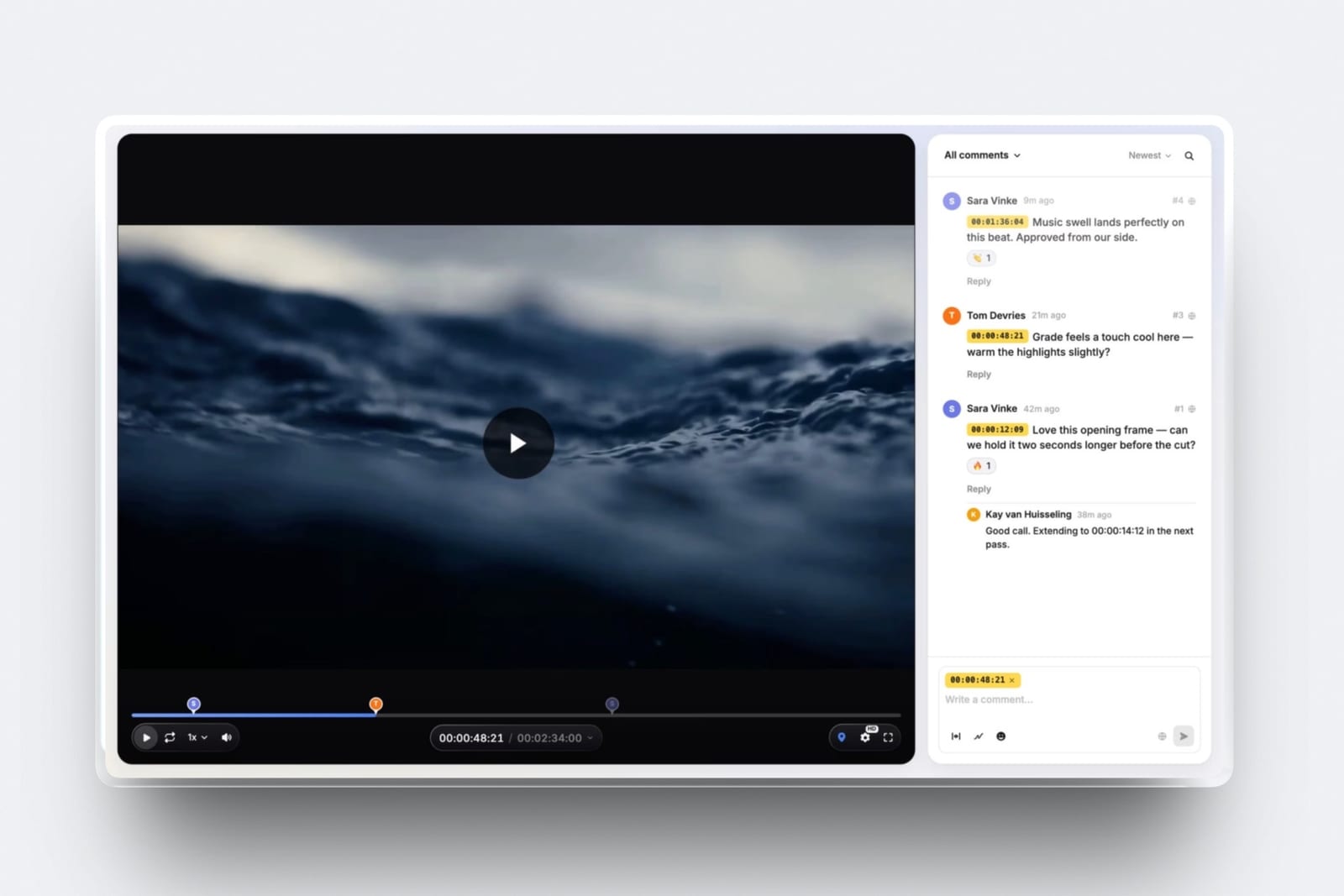
Before publication there is the review round, and Framekit covers that too: its video review lets a client comment at the exact frame without an account, so the notes arrive with timecodes you can match against the transcript.
Framekit does not transcribe anything, and that is why it is not ranked above (its review features were re-verified in September 2026). Use Descript, Premiere Pro, or Resolve for the transcript.
Frequently Asked Questions
What is the best transcription tool for video editors in 2026?
Descript is the best transcription tool for video editors in 2026, because it is the only tool in this comparison where editing the transcript edits the footage, and it exports both caption files and an editable timeline back to Premiere Pro, Final Cut, Pro Tools, and Audition.
The Creator plan costs $24 a seat a month on annual billing and covers 30 media hours, which is $288 a year for a twenty-hours-a-month editor.
The trade-off is that Descript has no human-accuracy tier at any price, so compliance and legal transcripts still go to Rev.
How much does transcription cost per hour of video?
Transcription costs between $0 and about $120 an hour of media in 2026, depending entirely on the pricing model. Self-hosted Whisper and an NLE you already own cost $0 in marginal terms.
Cloud AI subscriptions land between $1.00 an hour on Otter Business and $2.95 on Happy Scribe Business at twenty hours a month, with Sonix pay as you go at a flat $10 an hour.
Human transcription is a different category: Rev charges $1.99 a minute, which is $119.40 an hour, and Happy Scribe charges from 1.75 euros a minute.
Is Premiere Pro's built-in transcription good enough to replace a paid service?
For most interview and caption work, yes.
Premiere Pro's Speech to Text is included in the $22.99-a-month subscription with no minute cap, generates editable speaker labels, supports text-based editing, and since April 2026 runs on-device so the audio never leaves your machine.
It writes more caption formats than any paid service here. The two reasons to buy something else are a searchable archive across many projects and a human-verified transcript, which only Rev and Happy Scribe sell.
Descript vs Rev: which should a documentary editor buy?
Buy Descript as your default and Rev as your exception. Descript costs $288 a year for twenty hours of media a month and turns the transcript into an editing surface.
Rev costs $305.88 a year on Essentials for the same volume, produces text rather than an edit, and is the only one of the two selling human transcription at $1.99 a minute.
The efficient combination is Descript for the 237 hours that only need to be searchable and Rev's human tier for the three that must be right, which totals under $700 a year.
Which transcription tools do not use my footage to train their models?
DaVinci Resolve Studio, Premiere Pro's on-device model, and self-hosted Whisper never send your footage anywhere, so the question does not arise.
Among cloud services, Sonix states on its security page that none of your data processed through Sonix is used for training.
Rev trains its proprietary speech models on anonymised customer data with opt-out for Enterprise and Unlimited subscribers or by email, and Otter trains on de-identified data by default with the opt-out in account settings.
Trint and Riverside do not publish a statement we could verify.
Does the free tier of any transcription tool work for real client footage?
Barely. Otter's free plan gives 300 minutes a month but caps conversations at 30 minutes, allows three file imports in total rather than monthly, and does not export SRT at all.
Descript free gives one media hour a month and watermarks exports. Rev free gives 45 AI minutes a month, Happy Scribe free is a ten-minute trial, and Sonix gives 30 minutes with no card required.
A single sixty-two-minute documentary interview exhausts every one of them, so the only genuinely free routes to real volume are self-hosted Whisper and an NLE you already pay for.
Which transcription tools export a file my NLE reads as a timeline rather than subtitles?
Four of the ten. Descript exports full sequences to Premiere Pro, Final Cut, Pro Tools, Logic, and Audition. Premiere Pro and DaVinci Resolve Studio produce native timeline data because the transcript lives in the project.
Happy Scribe exports Final Cut XML, EDL, STL, and XML on Pro and Business, and Trint exports EDL, Premiere XML, and Avid DS. Sonix, Otter, Rev, Riverside, and a raw Whisper build give caption formats, not conform data.
How accurate is AI transcription compared to a human transcriptionist?
Every vendor claims something around 99%, and those are vendor claims measured on the vendor's choice of audio rather than yours.
The more honest signal is what the vendors charge: Rev prices human transcription at $1.99 a minute against $0.25 for AI, and Happy Scribe at 1.75 euros against 0.20 euros, so both independently value human accuracy at roughly 8 times the machine rate.
In practice, AI transcripts of real interview audio need fifteen to thirty minutes of correction per hour of media, concentrated in proper nouns, numbers, and overlapping speech.
What happens to my transcripts if I stop paying for the service?
It depends on the vendor, and you should assume the worst. Sonix states that your files remain accessible after your subscription ends, which is the exception rather than the rule.
Descript, Otter, and Riverside gate exports behind an active plan, so transcripts produced during a paid month become read-only or unreachable once you cancel.
Transcripts made in Premiere Pro or DaVinci Resolve Studio live inside your project file and are unaffected by any subscription state, and a local Whisper transcript is a file on your own drive. Export everything before you cancel anything.
Which transcription tool is cheapest for 20 hours of interview footage a month?
Ignoring tools you already own, self-hosted Whisper through MacWhisper is cheapest at about $69 as a one-time purchase, which works out to $0.29 an hour in year one and nothing afterwards.
Among subscriptions, Otter Business is cheapest at $239.88 a year, or $1.00 an hour, though it exports the least. Descript Creator at $288 and Rev Essentials at $305.88 cost slightly more and do considerably more.
The most expensive publicly discussed route is Trint's Advanced seat at roughly $1,200 a year.
Can I burn captions into the video, or do I only get a separate file?
Burn-in is available in Premiere Pro, DaVinci Resolve Studio, Descript, Happy Scribe, and Riverside, all of which render caption text into the picture on export.
Rev, Sonix, Trint, Otter, and Whisper hand you a caption file only, so burn-in happens in your NLE afterwards. If your spec calls for open captions on the master plus separate sidecars, doing both inside Premiere Pro is least error-prone.
Final Verdict
After pricing ten tools against the same 240 hours a year, the pattern is that this category sells four different products under one word, and most editors overpay because they bought the wrong one rather than the wrong brand.
Descript is the best transcription tool for video editors in 2026, because the transcript is the timeline.
For $288 a year it collapses the slowest part of interview-led post, labels your speakers, and gives the cut back to your NLE as a sequence rather than a subtitle file. Nothing else in this comparison does all three.
Where Descript loses: it has no human-accuracy tier at any price, so legal, broadcast-compliance, and archival transcripts still have to go to Rev at $1.99 a minute or Happy Scribe from 1.75 euros.
It also charges by media hours rather than transcribed minutes, so uploads you never transcribe still burn your allowance, and every collaborator is a full seat.
If you already pay for Premiere Pro, Descript is a genuine upgrade to your workflow and a genuine second bill, and plenty of editors should decline it.
Premiere Pro's Speech to Text is the best value in the category and probably already installed. DaVinci Resolve Studio is the best three-year purchase at $295 once. Rev is the scalpel for the three hours a year that must be right.
Sonix is the searchable archive with the clearest no-training policy. Self-hosted Whisper is the zero-cost baseline every paid tool here is really competing against.
Whichever you buy, the discipline is the same: machine-transcribe everything, human-transcribe almost nothing, export before you cancel, and turn off the training setting before the first upload on a paying job.
If the deliverable is burned-in captions rather than a transcript, that is a different field with different economics: see the best video captioning tools.
For more, read our best AI tools for filmmakers, the best website builder for video editors, our guide to the best video review and approval tools, and if you send large caption and transcript bundles to clients, the best WeTransfer alternatives.
For the wider income picture, 11 ways to make money as a video editor ranks every stream by how many people stand between you and the budget.