Framekit templates
Start from a designer-made template
 Use template
 Use template
 Use template
 Use template
 Use template
 Use template
 Use template
 Use template
A brand film gets reviewed twice and delivered. A single animated shot gets reviewed at blocking, at spline, at polish, after a lighting pass, after comp, and then again because the arc of an arm reads wrong at 24 frames per second and nobody can explain that in a sentence.
That is the difference this whole category misses. Most video review tools model a timeline: one asset, a few versions, a client at the end.
Animation models a shot: hundreds of assets, dozens of versions each, and an internal reviewer who needs to draw the correction rather than describe it.
The tools that understand this are recognisably different.
They have per-item status, they compare two versions side by side as a default rather than a feature, their drawing tools are real brushes instead of a red pen, and the good ones talk to a production tracker so a note becomes a task.
In September 2026 we re-verified Framekit's capabilities and moved it up one place, since it now draws on the frame, though the ranking at the top did not change.
A video review tool for animation studios is a platform where supervisors draw corrections directly on frames, every shot carries its own version stack and status, and feedback connects to the production tracking system the studio already runs.
The best video review tool for animation studios in 2026 is SyncSketch, because it was built for drawover review rather than adapted into it, with customisable sketching brushes, 3D model support, per-item status management and ShotGrid and Jira integration on Enterprise.
Frame.io is the strongest general alternative with a 3D asset viewer and range-based comments, and Krock.io is the value pick at 10 dollars per user with a storyboard tool.
Framekit, ranked seventh, draws with a pen and shapes but has no brushes, 3D, side-by-side compare or tracker link, so it belongs at the client-facing edge of a studio.
Full disclosure: Framekit is our own product and it ranks seventh of nine here. Its drawing is a fixed pen and shape set rather than sketching brushes, and it has no 3D support, comparison viewer, drawing export or tracker integration, which are the things an animation pipeline runs on. Six tools on this page are better for a studio than ours and we say which in each entry.
How We Tested 9 Tools for Animation Review
We ran a shot-based workflow rather than a film: twelve shots from one sequence, each carried through blocking, spline and polish, with a supervisor drawing corrections on frames and an animator working from those drawings.
Then we added a lighting pass on four of them to see how each tool handled a second department reviewing the same shot. August 2026, fresh accounts.
The question that separated the field was not whether a tool could draw. Seven of nine can. It was whether a drawing could reach an artist who was not in the review session, which is how animation notes actually travel.
Measured means we ran the twelve shots. Verified means the figure was read at the vendor's own published pricing or documentation page and linked inline.
Enterprise integrations were read from published material rather than tested, since none carries a self-serve tier.
Why the shot is the unit, and why that changes the tooling
If your unit is a timeline, you need version stacks on one asset and a client who signs off at the end. If your unit is a shot, you need three things almost no general review tool provides.
Per-item status. Twelve shots at three stages is thirty-six states to track, and a comment thread does not tell you which shots are approved. Default comparison. "Is this better than the previous version" is asked on every shot at every stage, which makes A/B compare a primary interface rather than a menu item. An exit path for the drawing. The supervisor who drew the note is rarely the artist who fixes it, and often not in the same country, so the annotation has to travel.
What Animation Review Actually Requires
Every figure below was read at the vendor's own published pricing or documentation page in August 2026 and tested against the same twelve-shot sequence.
- 7 of 9 tools support drawing on the frame. The two that do not, Kollaborate and Vimeo, as far as published material confirms, are unsuitable for animation review regardless of their other merits.
- 1 of 9 offers customisable sketching brushes rather than a fixed pen: SyncSketch, on its Team tier at 19 dollars per user.
- 1 of 9 exports a review session as a document an artist can open without an account: SyncSketch, as a PDF with screenshots and annotations.
- 2 of 9 publish 3D asset support: SyncSketch on Team, and Frame.io, which lists a 3D asset viewer in its plan comparison.
- 1 of 9 publishes production-tracker integration: SyncSketch, with ShotGrid and Jira plus a Python API on Enterprise at 36 dollars per user.
- The cheapest tool with real drawover for a five-person studio is SyncSketch Indie at 540 dollars a year, ahead of Krock.io at 600 and Frame.io Pro at 900.
- SyncSketch publishes academic pricing, which matters for studios that also run training programmes or take interns from a specific school.
| Tool | Drawover | 3D support | Per-shot status | Tracker integration | Five-person studio, 1 year |
|---|---|---|---|---|---|
| SyncSketch | Yes, custom brushes | Yes, on Team | Status management | ShotGrid, Jira on Enterprise | 540 dollars on Indie |
| Frame.io | Yes | 3D asset viewer | Status per asset | No | 900 dollars on Pro |
| Krock.io | Yes | Not published | Yes | No | 600 dollars |
| ReviewStudio | Yes | No | Approval management | API on Advanced | 720 dollars on Pro |
| Dropbox Replay | Yes, live shared | No | Versions | No | From 600 dollars plus storage |
| Wipster | Yes | No | Comments as tasks | No | 1,197 dollars on Team |
| Framekit | Yes, pen and shapes | No | Four statuses per asset | No | 108 dollars on Starter |
| Kollaborate | No | No | Basic | No | 300 dollars |
| Vimeo | Not confirmed | No | Status per video | No | About 228 euros |
Jump to the decision tree if you already know whether you need tracker integration.
The Best Video Review Tools for Animation Studios in 2026
Ranked on how well each models a shot rather than a timeline, since that single structural difference decides more than any price here. The first four get full reviews.
1. SyncSketch: Built for This
SyncSketch is the only tool in this comparison that was designed for drawover review from the start rather than adapted toward it, and using it next to general review platforms makes the difference immediate. Team at 19 dollars per user monthly billed yearly adds 3D model support, customisable sketching brushes, no upload or user cap, and media management with QuickReview.
The real numberIndie is 9 dollars per user per month billed yearly with up to 15 users, 50GB storage and 100GB of uploads, so a five-person studio pays 540 dollars a year.
That is the cheapest genuine drawover in this comparison, and it is 360 dollars less than Frame.io Pro for the same five people.
The standout detailthe PDF summary, and in animation it matters more than anywhere else. A session exports as a document containing screenshots, annotations and comments, which you send to an animator who was not in the review and has no account.
Every other tool here requires the recipient to log in and find the note. This one produces an artifact that survives the session, the subscription and the studio's choice of software.
The gotchathe free Light tier is under 1GB of storage with a 2GB monthly upload allowance, which cannot hold a working sequence.
Treat it as an evaluation account rather than a free plan, and note that the Enterprise tier at 36 dollars per user is where ShotGrid and Jira integration, SSO and the Python API live.
Skip it ifyou cut live-action commercials alongside animation. The whole product assumes shot-based iteration, and a brand film with two rounds of general notes uses none of it.
Verdict: the correct default for any animation, VFX or games studio, and the only tool here whose interface assumes your unit of work is a shot rather than a timeline.
2. Frame.io: Best General Alternative
Frame.io is not animation-native and it is the strongest general tool by a distance, which makes it the right answer for studios doing mixed work.
Annotations are on every tier including free, comments are frame-accurate and range-based, and the plan comparison lists a 3D asset viewer alongside version stacks and a comparison viewer.
The real numberPro is 15 dollars per member per month with 2TB included plus 2TB per additional member, so five people cost 900 dollars a year against SyncSketch Indie's 540.
The standout detailrange-based comments are underrated for animation. A note on an arc or a piece of easing applies across a span of frames rather than one instant, and a tool that anchors only to a single frame misrepresents it.
Frame.io, Dropbox Replay and Framekit are the tools here that model a range.
The gotchathere is no production-tracker integration at any published tier, so notes stay in Frame.io and someone transcribes them into your tracker. In a studio running ShotGrid that is a real recurring cost that SyncSketch Enterprise removes.
Skip it ifyour reviews are drawover-first and your artists work from sketches. SyncSketch's brushes are better and its export is better.
Verdict: the right choice for a studio whose work spans animation and live action, and the wrong one if the pipeline is pure animation with a tracker at its centre.
3. Krock.io: Best Value With Drawing
Pro is 10 dollars per user per month with unlimited team size and from 2TB, with unlimited reviewers on every plan, 4K playback named explicitly, and review across video, image, audio and PDF.
The real number600 dollars a year for five people with 2TB, sitting between SyncSketch Indie and Frame.io Pro on price and offering considerably more storage than either at that level.
The standout detailthe storyboard tool is included, which no other platform in this comparison offers. For a studio that boards internally before animating, having boards and shot review in one account removes a tool rather than adding one.
The gotcha3D asset support is not published, and there is no tracker integration, so it covers the review half of an animation pipeline and none of the production-management half.
Verdict: the value pick, and a genuinely good one for smaller studios who board and animate but do not run a formal tracker.
4. ReviewStudio: Best Free Drawover
Unlimited users and unlimited guests on a free 5GB tier with drawing, versioning, compare mode, present mode and approval management.
Pro is 12 dollars per user annually with 25GB per user, and Advanced at 20 dollars adds workflow automations and API access with a five-user minimum.
The standout detailpresent mode on the free tier lets one supervisor drive playback while a room of artists watches, which is close to how an animation dailies session actually runs and is a paid feature almost everywhere else.
Verdict: the best way for a small studio to run real drawover reviews at no cost, with 5GB as the binding constraint rather than any missing feature.
5. Dropbox Replay: Best Live Session
Replay supports drawing on the frame with colour and stroke control, commenting on a range, and live sessions where everyone sees each other's cursors and drawings in real time, with no Dropbox account needed for reviewers.
Verdict: the closest thing here to a shared dailies room, and the bundled entitlement on paid Dropbox plans is four file uploads in total, which a twelve-shot sequence exhausts immediately. Budget the add-on from 10 dollars a month.
6. Wipster: Notes as Tasks
Team is 19.95 dollars per user monthly with 250GB to start, with pinpoint annotation, Premiere Pro and After Effects extensions, side-by-side version comparison, and comments that become checkable tasks.
Verdict: the After Effects extension is genuinely relevant to motion and 2D animation pipelines, and at 1,197 dollars a year for five people it is the most expensive drawover option here.
7. Framekit: For the Client Edge, Not the Pipeline

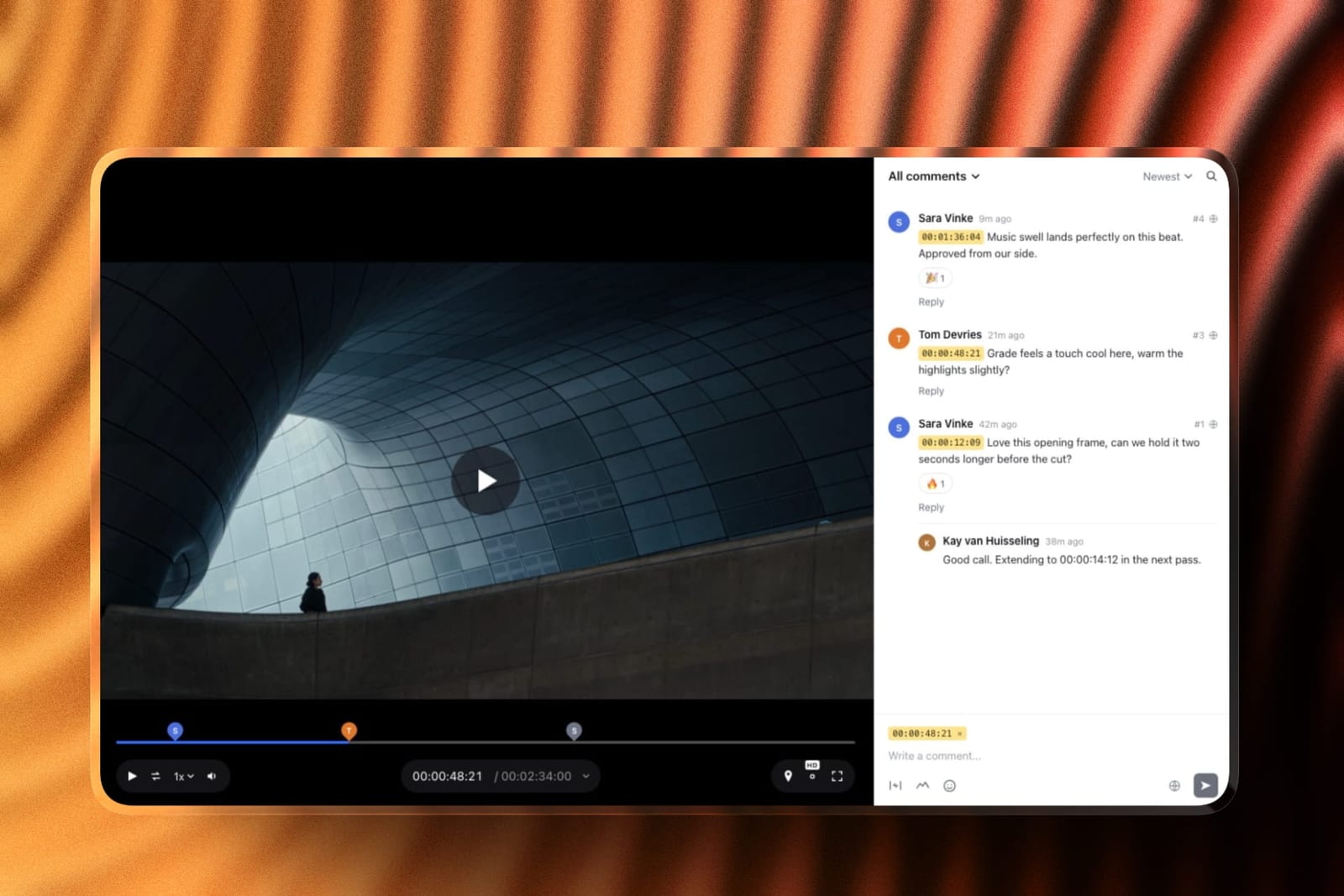
Framekit is an AI website builder with video review built in, and in an animation studio it belongs at the point where a finished sequence leaves the building, not in dailies.
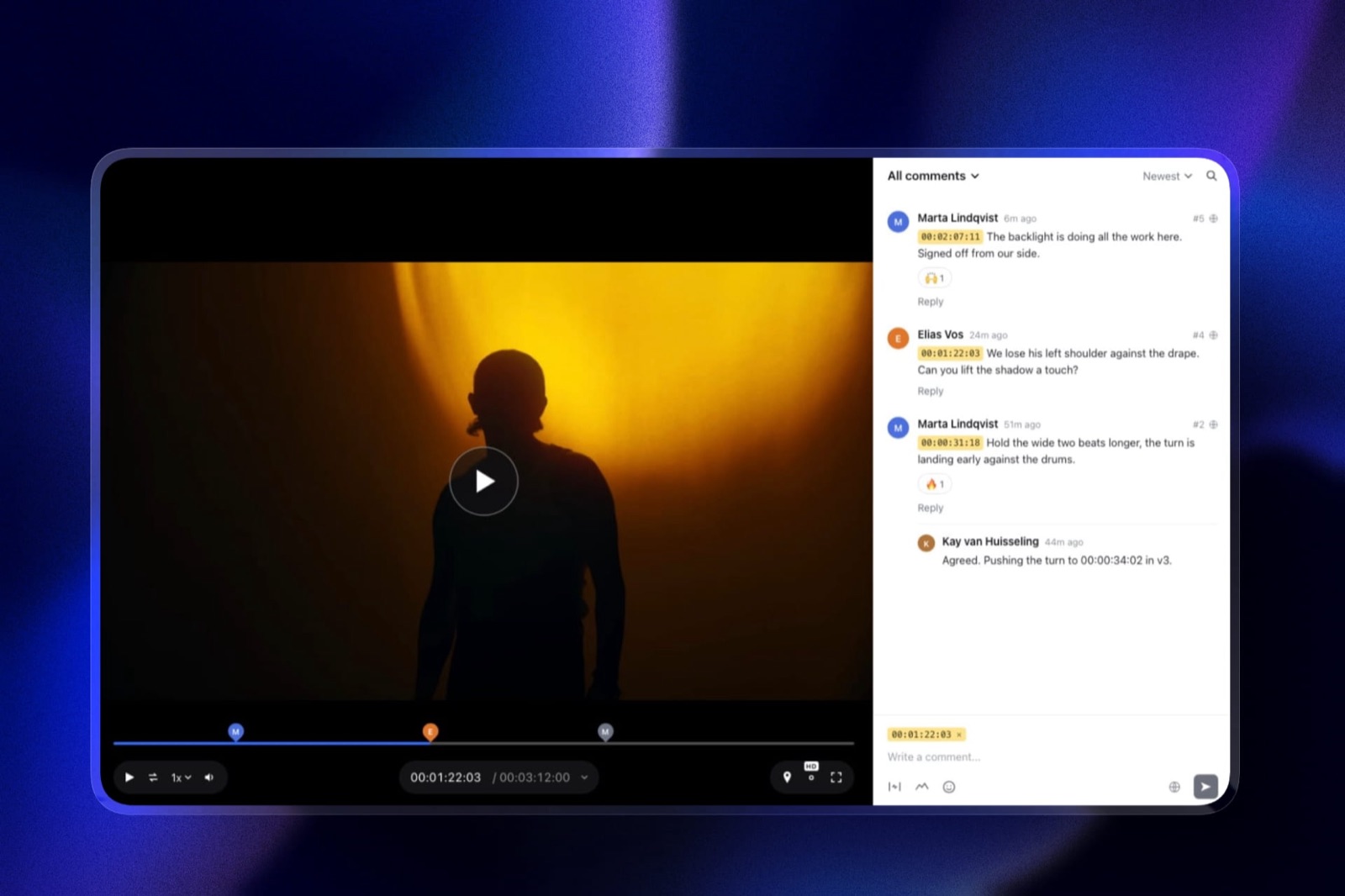
It does draw now: reviewers mark the paused frame with a freehand pen, arrows, lines, boxes and circles, and a comment can span an in-and-out range, which suits a note about easing across twenty frames better than a single-frame pin.
The shot-level machinery is thinner. Each video carries one of four statuses, needs review, in progress, approved or needs changes, and new renders stack as versions with their notes kept.
But the pen is a fixed tool set rather than sketching brushes, there is no side-by-side comparison, no 3D, no PDF export of a session and no ShotGrid or Jira link, so a supervisor's drawing stays inside Framekit until an artist logs in to find it.
The real number108 dollars a year on Starter against SyncSketch Indie's 540 for five people, with clients commenting as free guests. The price gap reflects two different jobs rather than a bargain.
The standout detailthe commissioning client's view. A branded page with your studio's logo and type, a password and an expiry date on every plan, and your showreel site on the same account, which is how a finished spot or a pitch sequence should reach a brand.
The honest gotchaan artist who missed the review has to open Framekit to see the drawing, which does not scale past a small team.
Skip it ifyou need it for internal shot review. SyncSketch, Frame.io or Krock.io will serve the pipeline far better.
Verdict: ranked seventh, above the two tools here that cannot draw at all, and useful for the client-facing edge of a studio: sending a finished sequence or pitch reel for sign-off on a branded page.
8. Kollaborate: Cheap, No Drawing
Twelve published tiers from 7 dollars a month for 30GB to 539 dollars for 10TB, flat per account, with unlimited projects and unlimited bandwidth.
Verdict: excellent storage economics and no annotation at all, which rules it out for animation review while leaving it useful as a delivery layer alongside something else.
9. Vimeo: Hosting, Not Shot Review
Standard at 19 euros a month billed annually covers 5 users and 4TB, with review and collaboration tools included and timestamped comments confirmed in Vimeo's own material.
Verdict: drawing support is not confirmed anywhere in its published documentation, and without drawover it cannot serve an animation review. Useful as a place to publish the finished piece, which is a different job.
Where a Drawing Has to Go Next
In one linethe supervisor who draws the note is almost never the artist who fixes it, so the value of an annotation in animation depends entirely on whether it can leave the review session.
This is the requirement that separates animation from every other genre in this series. In client review, the person receiving the note is the person who made the file, and the note only has to survive a browser tab.
In animation, a supervisor reviews twelve shots in a dailies session and those notes go to eight different artists, several of whom were not present and some of whom are in another timezone.
Three exit paths exist across this comparison. A document: SyncSketch's PDF summary, with screenshots, annotations and comments, which anyone can open. A tracker task: SyncSketch Enterprise's ShotGrid and Jira integration, plus its Python API, which turns a note into a tracked item in the system the studio already runs. A printed comment list: Frame.io lets you download and print comments with annotation thumbnails on every tier including free.
Everything else in this comparison keeps the drawing inside its own interface, which means an artist has to log in, find the shot, find the version and find the note.
That is workable for a five-person studio and it does not scale, and it is the single strongest argument for SyncSketch over a cheaper general tool.
The test you can rundraw a note in whatever you use now, then try to get it to an artist who has no account. Whatever that takes is your real per-note cost, multiplied by every note in every dailies session.
What Animation Studios Overpay For
In one linestudios routinely buy general video review platforms and then rebuild shot tracking in a spreadsheet, which costs more in a month than the animation-native tool costs in a year.
The pattern is consistent. A studio picks a well-known review tool because it is well-known, discovers it models one timeline rather than a hundred shots, and compensates with a spreadsheet listing shot names, versions and approval states.
That spreadsheet is maintained by hand, drifts from the review tool immediately, and becomes the thing everyone actually trusts.
Price that honestly. SyncSketch Indie is 540 dollars a year for five people with per-item status management included. Frame.io Pro is 900 for the same five with status per asset but no shot-level structure above it. Wipster Team is 1,197.
If the cheaper animation-native tool removes the spreadsheet, it wins on both axes at once, which is unusual in this category and is the reason it ranks first here rather than a general tool with a bigger name.
The counter-argument is real and worth stating. If your studio does animation and live action, one tool across both is worth paying for, and Frame.io is the better single answer even though SyncSketch is the better animation answer.
Which Tool Fits Your Animation Pipeline? A Decision Tree
Work through these in order and stop at the first yes. The first question rules out three of the nine outright, so start there rather than with price.
- Do supervisors draw corrections on frames? Then Kollaborate and Vimeo are out, and Framekit only suits simple pen-and-shape notes. Continue with the tools that draw.
- Do you run ShotGrid or Jira? SyncSketch Enterprise at 36 dollars per user, which is the only published tracker integration here.
- Do notes go to artists who were not in the session? SyncSketch, for the PDF summary, or Frame.io, which prints comments with annotation thumbnails.
- Do you review 3D assets as well as rendered frames? SyncSketch on Team, or Frame.io's 3D asset viewer.
- Do you also cut live action? Frame.io, as the one tool that serves both well.
- Do you board internally before animating? Krock.io, whose storyboard tool removes a separate product.
- Do you run dailies as a live session? Dropbox Replay for shared cursors, or ReviewStudio's present mode on its free tier.
- Do you need to send a finished sequence to a commissioning client? Framekit at 9 dollars a month for a branded page with drawing and approvals, used alongside whichever pipeline tool you picked above. Our website builders for motion designers guide covers the portfolio side.
Frequently Asked Questions
What is the best video review tool for animation studios in 2026?
SyncSketch is the best video review tool for animation studios in 2026, because it was built for drawover review rather than adapted into it, with customisable sketching brushes and 3D model support on its Team tier at 19 dollars per user, per-item status management, and ShotGrid and Jira integration plus a Python API on Enterprise.
Indie at 9 dollars per user is the cheapest genuine drawover in this comparison.
Which review tools integrate with ShotGrid?
SyncSketch, on its Enterprise tier at 36 dollars per user per month billed yearly, which publishes ShotGrid and Jira integration alongside a Python API, SSO and self-hosted data on AWS S3.
No other tool in this comparison publishes production-tracker integration, so studios running a tracker either choose SyncSketch or accept that someone transcribes notes into it by hand.
Do animation studios need drawover, or are timestamps enough?
Drawover is essential rather than optional in this discipline.
An animation note is usually about an arc, an easing curve, a silhouette or a spacing problem across frames, none of which can be expressed in a sentence with a timecode attached.
That is why Kollaborate and Vimeo, which have no confirmed drawing tool, are unsuitable for animation review regardless of their price or storage, and why Framekit's fixed pen and shapes rank below the brush-based tools.
What is the cheapest review tool with real drawing for a studio?
SyncSketch Indie at 9 dollars per user per month billed yearly, which is 540 dollars a year for five people and includes up to 15 users, 50GB storage, 100GB of uploads, A/B comparison and status management.
Krock.io at 10 dollars per user is 600 dollars for five with 2TB, and Frame.io Pro is 900. ReviewStudio's free tier includes drawing on 5GB if cost is the binding constraint.
Can a review tool handle 3D assets?
Two publish support. SyncSketch adds 3D model support on its Team tier at 19 dollars per user, alongside customisable sketching brushes and a collaborative whiteboard. Frame.io lists a 3D asset viewer in its plan comparison.
Krock.io does not publish 3D support, and the remaining tools in this comparison are 2D video review only.
How do notes reach an artist who missed the session?
Three ways exist across this comparison and most tools offer none of them. SyncSketch exports a PDF session summary with screenshots, annotations and comments that anyone can open without an account.
SyncSketch Enterprise turns notes into ShotGrid or Jira items. Frame.io lets you download and print comments with annotation thumbnails on every tier including free. Everywhere else, the artist must log in and find the note.
Is Frame.io good for animation?
It is the best general tool and not the best animation tool. Frame.io offers annotation on every tier, range-based comments that suit notes about arcs and easing, version stacks, a comparison viewer and a 3D asset viewer.
What it lacks is shot-level structure above the asset and any production-tracker integration, so studios running ShotGrid end up transcribing. Choose it if you also cut live action.
Framekit vs SyncSketch for an animation studio: which should we use?
SyncSketch for the pipeline, Framekit for the client. SyncSketch has sketching brushes, 3D support on Team, A/B comparison, a PDF session export and ShotGrid and Jira integration on Enterprise.
Framekit has a pen, arrows and shapes, range comments, four approval statuses and version stacks on a branded client page for 9 dollars a month, but no brushes, 3D, comparison viewer or tracker link. It ranks seventh here for that reason.
What is the difference between animation review and video review?
The unit of work. Video review models one timeline with a few versions and a client at the end.
Animation review models a shot, with dozens of versions across blocking, spline, polish, lighting and comp, and internal reviewers who draw corrections.
That difference drives three requirements general tools rarely have: per-item status, comparison as a primary interface, and a way for a drawing to leave the session.
Are there free tools suitable for animation review?
ReviewStudio's free tier is the best option, with unlimited users and unlimited guests on 5GB including drawing, versioning, compare mode, present mode and approvals.
SyncSketch's free Light tier includes the real drawing tools but only under 1GB of storage with a 2GB monthly upload allowance, so it works as an evaluation account rather than a working plan for a sequence.
Does SyncSketch offer academic pricing?
Yes, SyncSketch publishes academic pricing and states that a large share of its user base is academic, with the toolset adapted for educational contexts.
That is relevant for studios that run internship or training programmes alongside production, or that recruit from a specific school and want incoming artists already familiar with the review environment.
Should we run dailies live or asynchronously?
Both patterns are supported and the tool choice differs.
For live dailies, Dropbox Replay's sessions show every participant's cursor and drawing in real time, and ReviewStudio's present mode lets one supervisor drive while a room observes, on its free tier.
For asynchronous review across timezones, SyncSketch's PDF export and Frame.io's printable comment list matter far more than any live feature.
Final Verdict
SyncSketch is the best video review tool for animation studios in 2026 because it is the only one whose structure matches the work.
Per-item status handles thirty-six states across twelve shots, A/B comparison is a primary interface rather than a menu item, the brushes are real drawing tools rather than a red pen, and the PDF export is the only reliable way in this comparison to get a supervisor's drawing to an artist who was not in the room.
Frame.io is the better single purchase for a studio doing animation and live action together, and Krock.io is the value pick for smaller studios who board internally and do not run a formal tracker.
Where Framekit loses, and why an animation studio should not use it for dailies. Framekit draws with a fixed pen and shapes rather than brushes, and has no 3D support, no comparison viewer, no drawing export and no tracker integration.
In a discipline where the drawing is the note and has to reach an artist who was not in the room, six tools on this page do the job better, which is why Framekit ranks seventh of nine.
It is a better fit for the branded client-facing page for a finished sequence, a job at the edge of the pipeline rather than in it.
If you are currently running a general review tool alongside a shot-tracking spreadsheet, the spreadsheet is the symptom. An animation-native tool is usually cheaper than the one you are already paying for.
Related readingthe 12 best video review tools, the best video annotation tools, post-production collaboration tools, and website builders for motion designers.
Competitor prices were read at each vendor's published pricing page in August 2026, Framekit's were checked again in September 2026, and all were priced for a five-person studio, since per-user rates and flat account rates are not comparable at their headline figures.