Framekit templates
Start from a designer-made template
 Use template
 Use template
 Use template
 Use template
 Use template
 Use template
 Use template
 Use template
Two editors cannot open the same Premiere project. That is a storage and project-locking problem. Your colourist cannot find the approved v4 among nine files named final. That is an asset management problem.
Your client left a note saying "the middle drags". That is a review problem. Your assistant is waiting six hours for a 400GB transfer. That is a bandwidth problem.
Post-production collaboration is the name given to all four, and almost every team buys a tool for one of them and expects it to solve the other three.
It will not, and the tools themselves are surprisingly honest about this once you read their pricing pages side by side. LucidLink sells you a filesystem. Postlab sells you project locking. Iconik sells you a catalogue.
Frame.io sells you review. They overlap at the edges and they are not substitutes.
A post-production collaboration tool is software that lets more than one person work on the same footage, project or cut without sending files back and forth, by sharing storage, locking projects, cataloguing media or collecting timestamped feedback in one place.
Framekit sits at the client-facing end of that list, taking frame-accurate notes on a cut and then handing over the finished masters in a delivery gallery, which is the job a two-person studio runs into long before it needs any of the other three.
The best post-production collaboration tool in 2026 depends on which of the four jobs you have.
Frame.io is the best overall review layer, with Camera to Cloud and Premiere Pro and Final Cut panels. LucidLink at 7 dollars per member a month is the best shared storage and usually the real bottleneck.
Framekit, ranked second, is the best client-facing layer for a small studio: frame-accurate comments, drawing, version stacks, approvals and final delivery galleries at one flat price, though it is not a pipeline tool.
Postlab is the best project collaboration for teams sharing Premiere, Final Cut, Resolve or Avid timelines.
Full disclosure: Framekit is our own product, ranked second here and not first. It does one of the four jobs on this page, client review, plus final delivery, and it does not do shared storage, project locking or media asset management at all. Frame.io beats it on NLE panels and Camera to Cloud, and LucidLink, Postlab and Iconik solve problems it does not touch.
How We Tested 13 Post-Production Collaboration Tools
The test scenario was a two-editor documentary cut: 1.2TB of source material, a Premiere Pro project both editors needed to touch in the same week, a colourist joining in week three, and a director reviewing rough cuts remotely.
That scenario deliberately spans all four jobs, because a single-job test makes every tool look either brilliant or useless.
We placed each tool against the four jobs rather than scoring them on one scale. Shared storage: can two people work from the same media without copying it. Project collaboration: can two people open, lock and hand off the same timeline safely. Asset management: can someone find the right file in six months without asking you. Client review: can an outsider leave a timestamped note and approve a cut.
Measured means we ran it.
In September 2026 we re-verified Framekit's review and delivery features against the shipped product and re-ranked it from seventh to second; its entry describes documented behaviour and plan limits, not a timed test. Verified means we read it at the vendor's own pricing or documentation and linked it, which covers every custom-priced enterprise tier below and the storage-performance claims we had no way to reproduce fairly.
Where a capability is sold as an add-on rather than a plan, we say so, because that is where budgets break.
The four jobs, and why buying the wrong one hurts
The expensive mistake in this category is buying a review tool to fix a storage problem.
A team that cannot share media will not be helped by better commenting, and the symptoms look similar from the outside: work is slow, people are waiting, files are duplicated. Diagnose before you shop.
If your team's complaint is "I am waiting for a transfer", buy storage. If it is "I do not know which file is current", buy asset management. If it is "we cannot both edit", buy project collaboration.
Only if it is "the notes are chaotic" do you buy review, and review is the cheapest of the four by a wide margin, which is part of why it gets bought first.
What Thirteen Tools Actually Do
Every figure below was read at each vendor's own published pricing page in August 2026.
- 13 tools, and only 3 do more than one of the four jobs properly: Frame.io, Iconik and Dropbox.
- The cheapest real shared storage here is LucidLink Starter at 7 dollars per member a month with 100GB per member pooled across the workspace.
- The only tool that lets two editors safely share a Premiere Pro, Final Cut, Resolve or Avid project is Postlab, at 129 dollars per activation for the standard tier and 189 for Pro.
- Media asset management starts free for a Collaborator seat on Iconik and reaches 120 dollars a month for a Power User, which is the widest per-seat spread in this comparison.
- 2 of 13 offer Camera to Cloud style on-set ingest: Frame.io, on every plan including free.
- Client review is the cheapest job on this page: Framekit at 9 dollars a month flat, Wipster at 9.95, against 27 dollars per member for LucidLink Business storage.
- 0 of 13 do all four jobs. Anyone claiming a single tool replaces your pipeline is selling one layer of it.
| Tool | Shared storage | Project collaboration | Asset management | Client review | Entry price |
|---|---|---|---|---|---|
| Frame.io | Mounted storage | No | Partial, collections | Yes, best in class | Free, then 15 dollars per member |
| Framekit | No | No | No, but delivers finals in client galleries | Yes, with drawing, versions and approvals | Free, then 9 dollars a month |
| LucidLink | Yes, real-time filesystem | Enables it | No | No | 7 dollars per member |
| Postlab | Bring your own | Yes, four NLEs | No | No | 129 dollars per activation |
| Iconik | Hybrid, connects yours | No | Yes | Desktop player on higher tiers | Free browse, 65 dollars standard |
| Wipster | No | No | No | Yes, with NLE extensions | 9.95 dollars a month |
| SyncSketch | No | No | Media management on Team | Yes, drawover | Free, then 9 dollars per user |
| Dropbox Replay | Yes, Dropbox | No | Basic | Yes, add-on | Add-on from 10 dollars a month |
| ReviewStudio | No | No | No | Yes | Free, then 12 dollars per user |
| Filestage | No | No | Project structure | Yes, approval chains | Free, then 199 dollars a month |
| Ziflow | No | No | Proof organisation | Yes, 1,200 file types | Free, then 199 dollars a month |
| Vimeo | Hosting only | No | Video library | Yes, on paid tiers | About 8 euros a month |
| Kollaborate | Yes, tiered storage | No | Basic | Yes | 7 dollars a month |
Not sure which job you have? The decision tree diagnoses it in four questions.
The Best Post-Production Collaboration Tools in 2026: Our Rankings
Ranked on how completely each tool solves the job it is actually for, not on breadth, because breadth in this category is usually a sign that something is being done badly.
Framekit ranks second because the client-facing job is the one every team has, including teams too small to need shared storage. The first five get full reviews.
1. Frame.io: Best Review Layer
Frame.io is the closest thing this category has to a default, and the reason is that it solves the review job completely and then reaches one step in each direction. Camera to Cloud is on every plan including free, so footage moves from a supported camera or recorder into a project during the shoot.
At the other end, the Premiere Pro and Final Cut panels bring client notes into the timeline as markers.
The real numberPro is 15 dollars per member per month with 2TB included plus 2TB per additional member, and mounted storage of 250GB. For our two editors plus a colourist that is 540 dollars a year and 6TB.
The standout detailmounted storage is the part most comparisons skip, and it is what makes Frame.io partially a storage product. It is capped separately from your project storage, 250GB on Pro and 500GB on Team, so treat it as a working set rather than a media drive.
The gotchait does not solve project collaboration. Two editors still cannot open one Premiere project through Frame.io, and teams discover this after buying it to fix exactly that complaint.
Skip it ifyour problem is that people are waiting on transfers. Buy LucidLink first and add review later.
Verdict: buy it for review and on-set ingest, which it does better than anything here. Do not buy it expecting a pipeline.
2. Framekit: Best Client-Facing Layer for Small Studios

Framekit is an AI website builder with video review and client galleries built in, and in a post pipeline it owns one job completely: everything the client sees.
The director or brand manager opens a branded link with no account, comments at the exact frame or across an in and out range, draws on the picture, and moves each cut from Needs review to Approved.
When the film is locked, the same account delivers the masters, stills and behind-the-scenes photos in a client gallery with favourites and PIN-protected downloads.
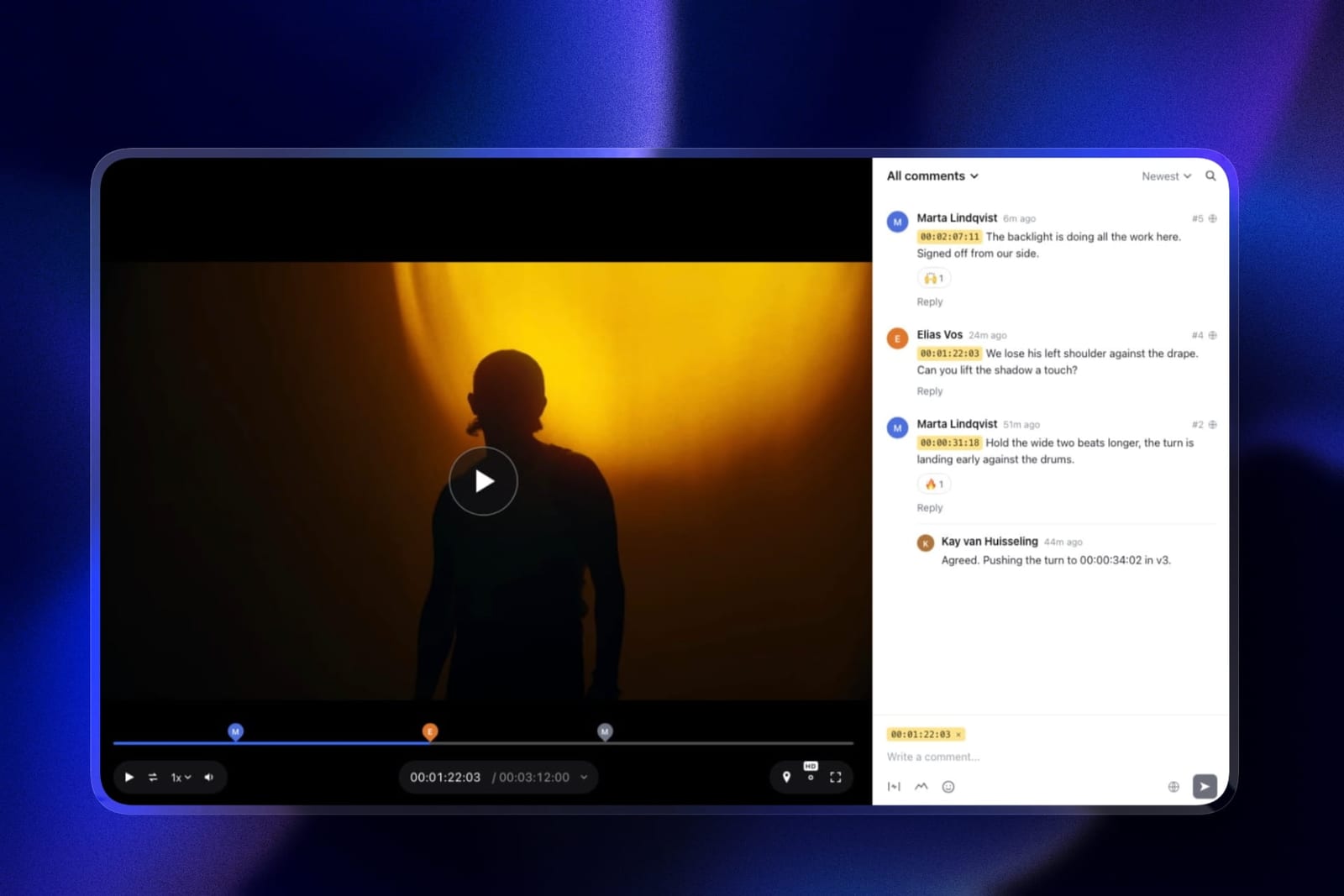
The real numberreview projects and galleries are unlimited on every plan, and the price is per account.
Pro at 19 dollars a month gives 300GB of pooled storage, 150GB of it video and a 2GB per-file cap, and because reviewers comment as guests, the director, the producer and any client reviewers in our documentary scenario cost 228 dollars a year combined.
Starter at 9 dollars a month covers a solo editor with guests.
The standout detailversion stacks keep every cut with its own notes and status. Upload the week-four cut on top of week three and the director's notes on week three stay attached to week three, which is where most "I already told you that" arguments in a documentary edit start.
The honest gotchait does none of the other three jobs. No shared filesystem, no project locking, no media catalogue, no NLE panel and no Camera to Cloud.
If your two editors are fighting over a Premiere project, Framekit changes nothing about that, and Postlab plus LucidLink is what you need underneath it.
Review files are also capped at 2 hours each, so a 150-minute assembly has to go up in parts.
Skip it ifyour reviewers are internal editors who want notes as timeline markers, where Frame.io's panels do more, or your complaint is waiting rather than feedback.
Verdict: the best way for a small studio to put review, approval and final delivery in front of clients at one flat price, and the right second purchase after storage. It is the end of the pipeline, not the pipeline.
3. LucidLink: Best Shared Storage
LucidLink is a filesystem rather than a sync tool, which is the distinction that matters: media appears as a mounted volume and streams on demand, so an editor scrubs a file that has never been downloaded in full.
For a two-editor documentary sitting on 1.2TB of rushes, this is the tool that removes the waiting.
The real numberStarter is 7 dollars per member per month with 100GB per member pooled across the workspace, extra storage at 7 dollars per 100GB.
Business is 27 dollars per member with 400GB per member and extra storage at 8 dollars per 100GB.
For 1.2TB across three people on Business you are at roughly 81 dollars a month for seats and paying for storage above the pooled 1.2TB allowance.
The standout detailstorage is pooled across the workspace rather than allocated per person, so one editor holding the bulk of the media does not need their own oversized plan.
Egress is included in the AWS storage cost, which removes the transfer-fee surprise that makes raw cloud buckets hard to budget.
The gotchathis is infrastructure, not workflow. There is no review, no comments, no approval and no catalogue. Teams that buy LucidLink still buy something else, and the honest way to budget it is as a line item alongside a review tool rather than instead of one.
Verdict: the purchase that recovers the most hours on this page for any team where more than one person touches the same media, and the one most likely to be diagnosed correctly only after a year of pain.
4. Postlab: Best Project Collaboration
Postlab solves the single problem that no review tool touches: two editors and one timeline.
It supports Final Cut Pro, Adobe Premiere Pro, DaVinci Resolve and Avid Media Composer, plus After Effects, Photoshop and Illustrator, and it handles the checkout, locking and versioning of the project file itself.
The real numberpricing is unusual for this category.
Project Rental is 29 dollars a month for short-term work, the standard tier is 129 dollars per activation including an Arctic license, and Pro is 189 dollars per activation and adds event locking, shared licenses and a local license server option.
Per activation rather than per month is a meaningfully different commitment from everything else on this page.
The standout detailit is storage-agnostic and works with NAS, SAN and certified cloud providers including LucidLink, Box, Dropbox and Synology Drive.
The intended architecture is Postlab for the project plus LucidLink for the media, and those two together cost less than a mid-tier seat-based suite while solving two jobs properly.
The gotchafour NLEs is broad coverage and it is still a compatibility question. Confirm your exact versions before committing a job, because project-file collaboration is the most version-sensitive thing in this entire comparison.
Verdict: if your complaint is "we cannot both edit", this is the answer and nothing else here is. Pair it with storage.

5. Iconik: Best Media Asset Management
Iconik is a catalogue, and it is the tool for the moment a colourist joins in week three and cannot find the approved cut.
It indexes media across cloud and on-premise storage rather than requiring you to move it, which is why it fits over an existing pipeline instead of replacing one.
The real numberthe seat spread is the widest here. A Collaborator seat is free, a Browse User is 9 dollars a month, a Standard User 65 dollars, and a Power User 120 dollars.
A team of two Power Users and six free Collaborators is a very different bill from eight Standard seats, and getting that mix right is most of the buying decision.
The standout detailthe desktop player for frame-accurate review sits on the Professional and Enterprise tiers rather than Starter, which is a clear statement that Iconik regards review as a feature of asset management rather than the reverse.
The gotchaProfessional and Enterprise are custom-priced, and the AI features, SSO and automation capacity most teams eventually want all live there.
Verdict: buy it when finding things has become the bottleneck, which is usually at around the third year of accumulated projects rather than at the start.
6. Wipster: Best Review for a Solo Editor in Adobe
Light is 9.95 dollars a month with 50GB for one person, with pinpoint annotation and Premiere Pro and After Effects extensions that bring client notes next to the timeline. Comments become checkable tasks.
Verdict: the cheapest route to annotated feedback that reaches an Adobe project. It solves one job, cheaply, and makes no pipeline claims.
7. SyncSketch: Best for Animation and VFX Review
Indie is 9 dollars per user monthly billed yearly with 50GB and up to 15 users; Team at 19 dollars adds 3D model support, custom brushes and media management.
The PDF summary exports a session with screenshots and annotations for artists who were not in it.
Verdict: the right review layer for shot-based work. Its media management is real but modest, so it complements a catalogue rather than replacing one.
8. Dropbox Replay: Storage That Reviews
Dropbox genuinely does two jobs, storage and review, which is rare here.
Replay adds frame-accurate comments, drawing and live sessions as an add-on from 10 dollars a month, and the bundled entitlement on paid plans is four file uploads.
Verdict: the most convenient two-job tool if Dropbox is already your storage, and neither job is done as well as by the specialist above it.

9. ReviewStudio: Best Free Review Seats
Unlimited users and guests on a free 5GB tier with versioning, compare mode, present mode and approvals. Pro is 12 dollars per user annually; Advanced carries a five-user minimum.
Verdict: the cheapest way to give a large group real review seats. No pipeline function whatsoever.
10. Filestage: Review Structured as Approval
Starter at 199 dollars a month with 10 members, reviewer groups, due dates and version comparison. Built for getting many stakeholders to sign off in order.
Verdict: a workflow product wearing a review product's clothes. Correct for marketing departments, oversized for an edit suite.
11. Ziflow: Review Across Every File Type
Over 1,200 file types and workflow stages as the pricing axis, from 199 dollars a month on Standard. The free tier keeps review history 60 days.
Verdict: for campaigns where the cut is one deliverable among many. Redundant if everything you make is video.
12. Vimeo: Review Attached to Hosting
Starter at about 8 euros a month includes review and collaboration tools with 2TB and one user; Standard at 19 euros covers five users and 4TB. The same file that a client reviews becomes the embed on your site.
Verdict: sensible if you already host there and you want the review and the published video to be one asset. Not part of a pipeline.
13. Kollaborate: Storage and Review on a Granular Ladder
Twelve published tiers from 7 dollars a month for 30GB up to 539 dollars for 10TB, with unlimited projects and unlimited bandwidth throughout, and flat account pricing rather than per seat.
Verdict: genuinely good value for storage plus review at a matched size, and the interface shows its age in front of clients.
Where the Money Actually Goes in a Post Pipeline
In one linereview is the cheapest of the four post-production jobs and the one teams buy first, while storage is the most expensive and the one that was actually causing the delay.
Price the documentary scenario properly. Three people, 1.2TB. Review costs 9 dollars a month on Framekit or 45 on Frame.io Pro. Project collaboration costs 129 dollars once on Postlab.
Storage on LucidLink Business is 27 dollars per member, so 81 dollars a month plus overage, which is roughly 972 dollars a year before any media exceeds the pooled allowance.
Asset management on Iconik, with one Standard seat and two free Collaborators, is 780 dollars a year.
Storage and asset management are between ten and twenty times the cost of review, and they are the two jobs teams defer. That ordering is backwards relative to where the hours go.
An editor waiting on a transfer is idle at their full rate; a director confused by an untimestamped note costs one message.
The test you can runfor one week, log every time someone on your team waits. Note whether they were waiting for a file, for a project to be free, for someone to find something, or for a decision. Whichever column fills up is the tool you should buy, and for most teams it is not the review column.

What No Single Tool Does
In one linenone of these thirteen tools covers all four jobs, and the combinations that work are cheaper than the suites that claim to.
The working architectures we saw are consistent. A small team runs LucidLink for media, Postlab for projects, and a cheap review layer such as Framekit or Wipster for the client.
A larger team runs Frame.io for review and on-set ingest, with LucidLink underneath and Iconik over the top once the archive grows.
A marketing department that does not edit runs Filestage or Ziflow alone, because approval is genuinely their only job.
What does not work is buying the most expensive single product and expecting coverage. Filestage at 199 dollars a month does not help two editors share a timeline. Frame.io at 15 dollars per member does not catalogue three years of archive.
LucidLink does not collect a client's notes.
The category name is the problem. Post-production collaboration describes an outcome, not a product, and every vendor here sells one layer of it while the marketing implies the whole stack.
Which Post-Production Problem Do You Actually Have? A Decision Tree
Work through these in order and stop at the first yes, because they are ordered by how much idle time each problem creates rather than by how often the corresponding tool gets recommended.
- Is anyone waiting on file transfers? LucidLink. Storage first, always, because waiting is the most expensive failure mode.
- Do two people need the same timeline? Postlab, which covers Premiere Pro, Final Cut, Resolve and Avid.
- Does anyone struggle to find the current version of anything? Iconik, starting with free Collaborator seats and one Standard user.
- Do you shoot and want footage in the cloud during the shoot? Frame.io, where Camera to Cloud is on every plan including free.
- Do you work in After Effects and want notes in your project? Wipster at 9.95 dollars a month.
- Is your work animation, VFX or 3D? SyncSketch.
- Is your only real problem that client feedback is chaotic? Framekit, free or 9 dollars a month, with drawing and approvals included, or Frame.io if you want the notes as timeline markers.
- Do more than ten people approve in sequence? Filestage or Ziflow.
- Do you need a portfolio, delivery galleries and treatment decks alongside review? Framekit, since they share one account and one storage pool. Our filmmaker website builders guide covers the portfolio half.
Frequently Asked Questions
What is the best post-production collaboration tool in 2026?
There is no single best one, because the category covers four separate jobs. Frame.io is the best client review layer and the only one with Camera to Cloud on a free plan.
LucidLink at 7 dollars per member a month is the best shared storage. Postlab is the only tool here that lets two editors safely share a Premiere Pro, Final Cut, Resolve or Avid project. Iconik is the best media asset management.
Can two editors work on the same Premiere Pro project?
Only with Postlab, which handles checkout, locking and versioning of the project file across Final Cut Pro, Premiere Pro, DaVinci Resolve and Avid Media Composer.
No review tool in this comparison does this, including Frame.io, and it is the most common reason a team buys review software and remains unhappy afterwards.
Do I need shared storage or a review tool first?
Shared storage, if anyone is waiting on transfers. An idle editor costs their full rate, while an ambiguous client note costs one message.
Storage is also ten to twenty times more expensive than review here, which is precisely why teams defer it and buy the cheap tool instead. Diagnose by logging what people wait for over one week.
How much does LucidLink cost for a small team?
LucidLink Starter is 7 dollars per member per month with 100GB per member pooled across the workspace, and Business is 27 dollars per member with 400GB per member pooled, with extra storage at 7 and 8 dollars per 100GB respectively.
Three people on Business is 81 dollars a month plus any storage above the pooled 1.2TB. Egress is included in the AWS storage cost.
What is the difference between media asset management and cloud storage?
Storage holds files and makes them reachable; asset management catalogues them so someone can find the right one without asking you. LucidLink is storage.
Iconik is asset management, and it indexes media across both cloud and on-premise storage rather than requiring you to move it. Most teams need storage from day one and asset management around year three.
Does Framekit replace a post-production pipeline?
No. Framekit does one of the four jobs on this page, client review, plus final delivery in client galleries, and offers no shared filesystem, no project locking, no media catalogue, no NLE panel and no on-set ingest.
It is the client-facing endpoint at the end of a pipeline, from free or 9 dollars a month flat with unlimited review projects, and LucidLink, Postlab and Iconik solve problems it does not touch.
Can I combine these tools, or should I pick one suite?
Combining is both cheaper and more capable, and it is what working teams actually do. The common architecture is LucidLink for media, Postlab for projects, and a low-cost review layer for the client.
Larger teams add Frame.io for review and on-set ingest and Iconik over the top as the archive grows. No tool in this comparison covers all four jobs.
Which post-production tools support Avid and DaVinci Resolve?
Postlab supports Final Cut Pro, Premiere Pro, DaVinci Resolve and Avid Media Composer for project collaboration. Frame.io's editorial panels cover Premiere Pro and Final Cut Pro. Wipster's extensions cover Premiere Pro and After Effects.
If Avid or Resolve is your editing platform, Postlab is the only project-collaboration option here and your review tool choice is separate from it.
What does Camera to Cloud actually do?
It moves footage from a supported camera or recorder into a cloud project during the shoot, so an editor can begin cutting before the drive arrives.
Frame.io includes it on every plan including the free 2GB tier, which is unusual generosity for a feature this operationally significant. No other tool in this comparison offers an equivalent on a free plan.
How much should a small post house budget in total?
For three people on 1.2TB, a realistic annual figure is roughly 972 dollars for LucidLink Business storage, 129 dollars once for Postlab, and between 108 and 540 dollars for review depending on whether you choose Framekit or Frame.io Pro.
That lands between about 1,200 and 1,650 dollars a year for a pipeline that covers three of the four jobs, with asset management deferred.
Is Frame.io enough on its own?
For a solo editor or a small team whose only pain is client feedback, yes.
For any team where two people touch the same media or the same timeline, no, because Frame.io provides mounted storage capped at 250GB on Pro and no project locking at all.
Teams regularly buy it to fix a collaboration complaint it was never designed to address.
What is the cheapest way to collaborate on video with a client?
Client review is the cheapest of the four jobs.
Framekit is 9 dollars a month flat with unlimited review projects and no per-reviewer charge, Wipster Light is 9.95 dollars a month, and ReviewStudio's free tier gives unlimited users and guests on 5GB.
None of those addresses storage, projects or cataloguing, so treat the figure as the price of the client-facing layer only.
Final Verdict
Frame.io is the best single post-production collaboration tool in 2026 if you can only buy one, because review plus Camera to Cloud plus NLE panels covers more of a real workflow than any other individual product.
But the more useful conclusion is that you should probably not buy only one.
LucidLink for media at 7 dollars per member, Postlab for projects at 129 dollars once, and a cheap review layer is a better pipeline than any single purchase at any price on this page.
Framekit is the best client-facing layer for a small studio, because review with drawing, version stacks, approvals and delivery galleries sit on one flat-priced account the client never has to sign up to.
Where Framekit loses, and who it is not for. Framekit does not do shared storage, project collaboration or asset management, so it is not for teams whose editors are waiting on transfers, fighting over a timeline, or unable to find the approved cut.
Those are three of the four jobs, and LucidLink, Postlab and Iconik are the better answers. It also has no NLE panel, so editors who want notes as markers are better served by Frame.io.
Budget it as one line in a pipeline rather than as the pipeline.
Diagnose the waiting before you shop. The tool that fixes the loudest complaint is rarely the one that recovers the most hours.
Related readingthe 12 best video review tools, the best video annotation tools, client approval software compared, and website builders for filmmakers.
Also worth reading: video review for production companies and Dropbox Replay alternatives.
Revision history is compared separately in video versioning and revision tools.
Prices and capabilities above were read at each vendor's published pricing page in August 2026, and Framekit's were re-verified in September 2026.
Postlab is sold per activation rather than per month and Iconik's Professional and Enterprise tiers are custom-priced, so treat both as quotes to confirm rather than list prices.