Framekit templates
Start from a designer-made template
 Use template
 Use template
 Use template
 Use template
 Use template
 Use template
 Use template
 Use template
Six weeks after a broadcast spot airs, the brand manager who approved it has left the company, and their replacement says the legal disclaimer was never signed off. You know it was. You remember the call.
What client approval software gives you at that moment is either a timestamped record naming a person, a version and a moment, or an email thread and a bad afternoon.
Most tools in this category call that record "approved" and show a green tick. Two of the ten below produce something you could put in front of a lawyer.
Client approval software is a platform that routes a deliverable to named reviewers, collects their decisions against a specific version, and stores the resulting sign-off as a retrievable record of who approved what and when.
The best client approval software in 2026 is PageProof, because it is the only tool here that combines unlimited reviewers with a full audit and compliance export, and adds digital signing for verified approvals on Enterprise.
Ziflow is the strongest workflow alternative with multi-stage routing and electronic signatures.
Framekit, ranked third, is the best value for video: approvals are bound to each version, logged with a server timestamp and exportable as a CSV on the free plan, though it approves video only and signs nothing.
Filestage is the best fit for marketing approval chains.
Full disclosure: Framekit is our own product and it ranks third on this page, not first, because it approves video only and has no electronic signature or routing. It moved up from seventh in September 2026 once we re-verified that its approval log exports. For regulated or multi-format work, PageProof and Ziflow are better than ours, and each review says where a tool beats us.
How We Tested 10 Client Approval Tools
The test deliverable was a 45-second broadcast commercial requiring sign-off from three people with different stakes: a brand manager approving the creative, a legal reviewer approving an on-screen disclaimer, and an agency producer approving delivery.
Two versions, because approval only means something when there is more than one thing that could have been approved. Fresh accounts, August 2026.
We scored on evidence rather than on convenience. Attribution: does the record name a person, or just say approved. Version binding: is the approval fixed to the exact version reviewed, or does it float to the latest file. Sequence: can approvals be required in an order, so legal reviews before delivery. Retrievability: can you export the record, and does it survive after the subscription ends.
Measured means we approved something and then went looking for the record.
In September 2026 we re-verified Framekit's approval statuses, activity log and export against the shipped product and re-ranked it; its entry describes the product's documented behaviour rather than a timed test. Verified means we read it in the vendor's own pricing or documentation and linked it, which covers every enterprise tier here, since digital signing and compliance export are consistently sold above the published plans.
The difference between an approval and a record of an approval
Every tool on this page can show a green tick. The tick is a state, not evidence.
What turns it into evidence is four properties: it names a human, it is bound to a version hash or version number, it carries a timestamp the platform generated rather than one a user typed, and you can get it out of the platform.
Filestage calls the strong version of this verified approval and puts it on Enterprise. PageProof calls it digital signing and puts it on Enterprise. Ziflow calls it electronic signatures and puts it on Enterprise.
That consistency across three independent vendors tells you exactly where the industry thinks the line is.
What Ten Approval Tools Can Actually Prove
Every figure below was read at the vendor's own published pricing page in August 2026.
- 3 of 10 offer an electronic or digital signature on approval, all of them only on Enterprise tiers with unpublished prices: PageProof, Ziflow and Filestage.
- 2 of 10 publish a distinction between a basic audit and a full compliance export: PageProof and Ziflow.
- 4 of 10 support multi-stage approval routing, where one group must approve before the next is asked.
- The cheapest tool here whose approval history exports is Framekit, on its free plan, as a CSV activity log rather than a signed audit trail, and for video only.
- The most expensive entry price is PageProof Team at 249 dollars a month, and it is the only one of the expensive tools that includes unlimited reviewers, unlimited proofs and unlimited versions with no seat maths at all.
- 1 of 10 refuses video entirely on its cheapest plan: GoVisually Lite has no video or GIF support, which is easy to miss when the plan is otherwise a reasonable price.
- 0 of 10 guarantee your approval record outlives your subscription, which is why the export column matters more than the signature column.
| Tool | Entry price | Approval routing | Audit record | Signature | Unlimited reviewers |
|---|---|---|---|---|---|
| PageProof | 249 dollars a month | Automated workflows, reminders | Basic, full export on Enterprise | Digital signing on Enterprise | Yes |
| Ziflow | Free, then 199 dollars a month | 1 stage free, 2 to 3 paid, unlimited on Enterprise | 1-year trail on Pro | Electronic signatures on Enterprise | Yes |
| Framekit | Free, then 9 dollars a month | One status per version, video only | Activity log with CSV export, every plan | No | Yes, as guests |
| Filestage | Free, then 199 dollars a month | Reviewer groups, due dates | Review reports on Business | Verified approval on Enterprise | Yes |
| Frame.io | Free, then 15 dollars per member | Status per asset | Comment export | No | Yes |
| ReviewStudio | Free, then 12 dollars per user | Approval management, checklists on Advanced | Basic reporting on Pro | No | Yes |
| GoVisually | 16 dollars per user | 1 approval checklist on Lite | Project archival on Pro | Not published | 15 on Lite, unlimited on Pro |
| Wipster | 9.95 dollars a month | Comments become checkable tasks | No | No | Yes |
| Dropbox Replay | Add-on from 10 dollars a month | Review and approve, versions | No | No | Yes |
| Email and PDF | Free | None | The thread itself | A typed name | Yes |
Skip to the decision tree if you already know whether your work is regulated. The reviews come first.
The Best Client Approval Software in 2026: Our Rankings
Ranked on the strength of the record each tool produces rather than on how pleasant the approval button is to press, because every tool here has a pleasant button. The top four get full reviews.
1. PageProof: Best Approval Record
PageProof is priced and built as though the approval is the product and the review tooling exists to support it, which is the reverse of everything else here. Team is 249 dollars a month or 2,499 dollars a year, Team Plus is 399 dollars a month, and both include unlimited reviewers, unlimited proofs and unlimited versions of any file type with no per-seat arithmetic.
The real numberunlimited reviewers at a flat 249 dollars a month is cheaper than Filestage Starter at 199 dollars a month the moment you exceed its ten included members, and PageProof does not sell seats in bundles of five the way Filestage and Ziflow both do.
The standout detailthe audit distinction is published rather than hidden.
Team and Team Plus get a basic audit that tracks key proof activity; Enterprise gets a full audit and compliance export described as built for accountability, plus digital signing for verified approvals.
Most vendors leave you to discover on a sales call that the record you assumed you were buying is a tier above.
The gotchathe two features that make this the best tool on the page, digital signing and full compliance export, are both on Enterprise, which has no published price.
So the honest version of this ranking is that PageProof has the best approval record available in the category and you cannot find out what it costs without talking to someone.
Skip it ifyou are a freelancer or a small studio. 249 dollars a month is 2,988 dollars a year, and if nobody has ever disputed an approval with you, you are buying insurance against a risk you do not carry.
Verdict: the strongest evidence in the category and the clearest published thinking about what evidence means. Priced for organisations where a disputed sign-off costs more than the subscription.
2. Ziflow: Best Multi-Stage Approval Routing
Ziflow models approval as a sequence, which is the thing most tools flatten. Workflow stages are the pricing axis: one stage on the free Personal tier, two on Standard at 199 dollars a month, three on Pro at 329 dollars a month, unlimited on Enterprise.
If your legal reviewer must sign before your delivery producer is even asked, this is what you are buying.
The real numberPro at 329 dollars a month includes 20 users and an audit trail retained for one year. Enterprise adds electronic signatures and an audit trail kept for the life of the account.
The standout detailover 1,200 supported file types means the same approval workflow covers the commercial, the key art, the packaging dieline and the print ad, with one record spanning all of them.
For a campaign rather than a single deliverable, that is a genuinely different proposition from any video-first tool.
The gotchathe free tier retains review history for 60 days. An approval you can no longer retrieve is not an approval record, so treat free Ziflow as unusable for anything you might need to prove.
Verdict: the best routing engine here, and the tool to choose when approval is a process with an order rather than a single yes. Its evidence is a tier weaker than PageProof's and its workflow is a tier stronger.
3. Framekit: Best Approval Record for Video Under 10 Dollars

Framekit is an AI website builder with video review and client approval built in, and it earns third place on this page for a reason the old version of this review missed: its approvals leave a record you can take with you.
Each cut in a version stack carries its own status, Needs review, In progress, Approved or Needs changes, set by the client on a branded review page with no account.
Every change lands in an activity log with who set it, the email they gave if you switched on the email gate, which video it applied to, and a server-written date, and the log exports as a CSV.
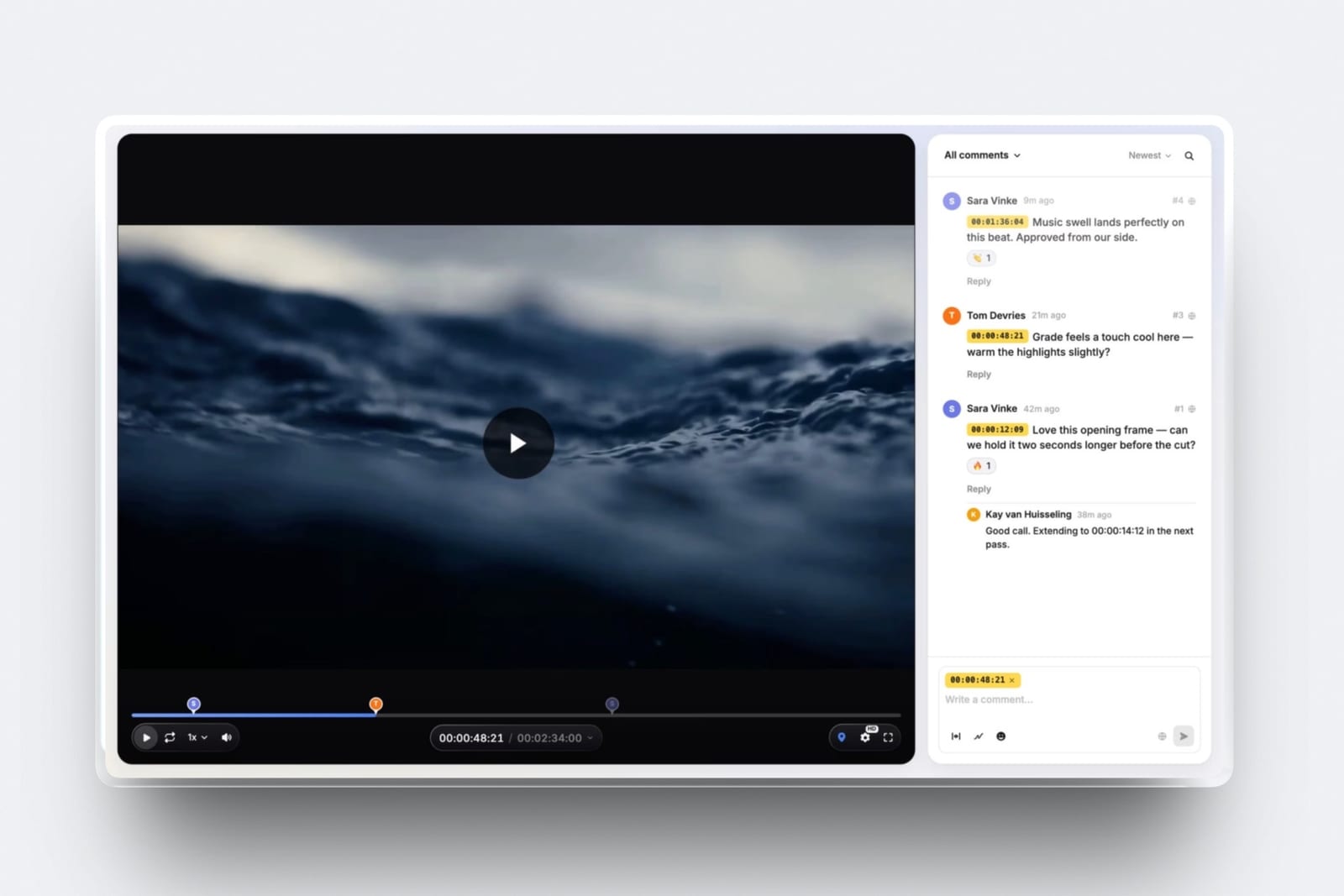
The real number0 dollars. Approvals, version stacks, the activity log and its CSV export are on the free plan, with unlimited review projects.
Starter at 9 dollars a month adds your own domain on the review page and removes the Framekit badge, which matters when the page is what a brand manager forwards to legal.
The standout detailversion binding is structural rather than a setting. Upload v3 and it becomes a new asset in the stack with its own status, so an approval set on v2 stays on v2. That is the quiet failure the proof section below describes, and Framekit does not have it.
The honest gotchathe identity behind an approval is whatever the reviewer typed. A name, or an email if the gate is on, neither verified.
There is no electronic signature, no compliance export, no sequenced routing and no reviewer groups, and Framekit approves video only, so the key art, the dieline and the disclaimer PDF in the same campaign need another tool.
Skip it iflegal reviews your deliverables in a fixed order, a sign-off carries contractual weight, or half of what you approve is print. PageProof, Ziflow and Filestage cover those.
Verdict: the strongest approval record available at no cost for video, and the right tool for a freelancer or studio whose current record is a text message. The wrong tool the moment approval becomes a legal question rather than a project one.

4. Filestage: Best Marketing Approval Chain
Filestage organises approval around reviewer groups rather than individuals, which suits the way marketing departments actually work: creative reviews, then brand, then legal, each as a group with its own due date. Starter is 199 dollars a month with 10 members and 1TB; Business at 329 dollars a month adds automations, project templates, review reports and webhooks.
The real numbermembers are added in bundles of five, so growing from 10 people to 11 costs the same as growing to 15. Budget in blocks, not in headcount.
The standout detailreview reports on the Business tier turn the approval history into something you can hand to a client as a summary of the process, which is a different artifact from an audit log and often the more useful one commercially.
The gotchaverified approval is an Enterprise feature. On Starter and Business, an approval is a state change by a logged-in user, which is fine internally and thin as evidence.
Verdict: the best tool for getting eleven people to say yes in the right order. Buy Enterprise if the yes needs to be provable, and something else entirely if there are three of you.
5. Frame.io: Best Approval for Video Teams in Adobe
Frame.io approaches approval as asset status rather than as a workflow, and for a post-production team that is often the correct shape.
Each asset carries a status, version stacks keep every cut, and comments and annotations can be downloaded and printed so the feedback that led to an approval is exportable even though the approval itself is not signed.
The real number15 dollars per member per month on Pro, so the three approvers in our test cost 540 dollars a year, and external clients approve as guests without a seat.
The gotchathere is no audit trail or signature at any published tier. Frame.io will tell you an asset is approved and will not tell you, in an exportable form, that a named person approved that exact version at a specific time.
Verdict: the best approval experience for people who live in an edit, and the wrong tool if the reason you want approval software is that someone once denied approving something.
6. ReviewStudio: Best Free Approval Management
Approval management, task management and versioning are all on the free Starter tier alongside unlimited users and guests on 5GB, which makes this the most capable free approval tool in the comparison.
Checklists and workflow automations arrive on Advanced at 20 dollars per user annually with a five-user minimum.
Verdict: the right place to start if you have never used approval software and want to learn what you actually need before paying. The five-seat minimum on the tier with the real workflow features is the catch.

7. GoVisually: Best for Packaging and Compliance Work
GoVisually is aimed squarely at consumer packaged goods, and its top tier is unusual enough to be worth knowing about: a compliance suite from 499 dollars a month that runs automated checks against more than twenty regulatory frameworks, reviews marketing claims, and verifies barcodes and print readiness.
The gotcha, and it is severe if you skim the pricing pageLite at 16 dollars per user per month has no video or GIF support at all. Video arrives on Pro at 33 dollars per user with a three-user minimum, so the real entry price for approving a commercial here is 99 dollars a month.
Verdict: excellent for label and packaging approval where regulatory checking is the actual work. A strange and expensive choice for video, and disqualified at its cheapest tier.
8. Wipster: Approval as a Finished Checklist
Wipster turns comments into tasks you check off, so approval emerges from having resolved everything rather than from a separate ceremony. Light is 9.95 dollars a month for one person with 50GB, and the Premiere Pro and After Effects extensions bring the outstanding items next to your timeline.
Verdict: a good model for solo editors who think in terms of remaining work rather than sign-off gates. Not an evidence tool, and it does not claim to be.
9. Dropbox Replay: Approval Attached to Storage
Replay adds review and approval to files already sitting in Dropbox, with versions and live sessions, as an add-on starting at 10 dollars a month.
The bundled entitlement on paid Dropbox plans is four file uploads, which is the cap that decides whether this is viable for you.
Verdict: convenient if Dropbox is already your storage, and thin as an approval system. The record is a state in a file browser.
10. Email and a PDF: What Most Freelancers Actually Do
A cut goes out as a link, the client replies "looks great, approved", and that email is the record. It is free, it names a person, it carries a server timestamp, and it is admissible in a way a green tick in a cancelled subscription is not.
The gotchait is not bound to a version. "Approved" in an email refers to whatever the client believed they were watching, and when there are three cuts in the thread, that is precisely the ambiguity you needed software to remove.
Verdict: better evidence than most people assume and worse process than any tool here. Keep the emails even after you buy something, because they are the only record that survives you cancelling.
What Actually Counts as Proof
In one linean approval becomes evidence only when it names a person, binds to a specific version, carries a platform-generated timestamp and can be exported, and most tools on this page satisfy two of those four.
Run your own situation through those four properties. A green tick with no name fails attribution.
A tick that moves to the newest file fails version binding, and this is the most common quiet failure in the category, because it feels correct right up until someone uploads v3 after the client approved v2.
A date the user typed fails timestamp integrity. And a record locked inside a platform fails retrievability the day you stop paying, which is the failure nobody plans for.
PageProof and Ziflow are the only two tools here that publish a distinction between a basic activity log and a full exportable compliance record, and both put the strong version on Enterprise.
Framekit sits one step below on every published plan: its log binds each status to a version and a server time and exports, and its attribution is a typed name or email rather than a verified identity.
Filestage's verified approval sits in the same place. Three independent vendors drawing the same line in the same spot is the clearest signal available about what the cheap tiers do not give you.
The test you can runapprove something today, then cancel your trial, then try to retrieve the record. Whatever you can still produce after the account closes is what your approval evidence actually is.
Where Approval Software Gets Priced Strangely
In one linethe price of approval software tracks the cost of a disputed sign-off in your industry rather than the complexity of the software, which is why a broadcast agency pays 249 dollars a month for the same green tick a freelancer gets for nine.
Look at the spread. Framekit records a version-bound client approval, with an exportable log, for nothing on its free plan and 9 dollars a month once you want your own domain on the page. Wipster does approval-by-checklist for 9.95.
Frame.io does asset status for 15 dollars per member.
Then the price jumps an order of magnitude to Filestage and Ziflow at 199 dollars a month and PageProof at 249, and the features that appear at that price are routing, reporting and audit rather than anything the reviewer sees.
That gap is not margin, it is risk transfer. The expensive tools are sold to organisations where a pharmaceutical claim, a financial disclaimer or a packaging regulation makes an unprovable approval genuinely dangerous.
If none of those describe your work, the expensive half of this page is solving a problem you do not have, and the honest recommendation is the cheap half.
The inverse is also true and worth stating plainly. If a client's approval has ever been the subject of an argument about money, the difference between 9 dollars and 249 dollars a month is one afternoon of a lawyer's time, and you should stop reading the cheap column.
How to Choose Client Approval Software: A Decision Tree
Work through these in order and stop at the first yes, because each question eliminates more of the field than the one below it and the sequence matters more than any individual feature comparison.
- Is your work regulated, or does approval carry contractual weight? PageProof Enterprise for digital signing and full compliance export, or Ziflow Enterprise for electronic signatures. Nothing cheaper produces evidence.
- Must approvals happen in a fixed order, with one group before the next? Ziflow, priced by workflow stages, or Filestage with reviewer groups.
- Do more than ten people approve, with no seat maths? PageProof, which includes unlimited reviewers at a flat rate rather than in bundles of five.
- Is approval mostly about packaging, labels or regulatory claims? GoVisually, and note that video needs the Pro tier at three users minimum.
- Is your work video, with approval as a status on a cut? Frame.io.
- Are you a freelancer or studio approving video, and need the client's yes recorded against the right cut? Framekit, free or 9 dollars a month, with the activity log exported to your own files. ReviewStudio's free tier if the work is not only video.
- Do you need approval, a portfolio, client galleries and pitch decks on one bill? Framekit, since they share one account. Our client gallery platforms guide covers the photo delivery half.
Frequently Asked Questions
What is the best client approval software in 2026?
PageProof is the best client approval software in 2026, because it includes unlimited reviewers, proofs and versions at a flat 249 dollars a month, publishes a clear distinction between basic audit tracking and a full compliance export, and offers digital signing for verified approvals on Enterprise.
Ziflow is the best alternative for multi-stage routing and Filestage for marketing approval chains.
Which approval tools provide an electronic signature?
Three, and all of them only on Enterprise tiers with unpublished pricing. PageProof offers digital signing for verified approvals, Ziflow offers electronic signatures, and Filestage offers verified approval.
On every published plan across all ten tools in this comparison, an approval is a state change by a logged-in user rather than a signed document.
Does a green approval tick count as legal proof?
Not on its own. An approval becomes usable evidence when it names a person, is bound to the specific version reviewed, carries a timestamp the platform generated rather than one a user typed, and can be exported from the system.
Most tools satisfy the first two. The export requirement is the one that fails most often, because a record locked in a platform disappears when the subscription does.
What is the cheapest client approval software?
Framekit is the cheapest tool here that records a version-bound client approval with an exportable log, free on every plan with unlimited review projects and no per-approver charge, for video only.
Wipster Light at 9.95 dollars a month treats approval as a completed task checklist. ReviewStudio's free tier includes approval management with unlimited users on 5GB, which is the cheapest option of all if free is a requirement.
Can I require approvals to happen in a specific order?
Yes, on four of these tools, and it is the main thing the expensive tier buys. Ziflow prices this directly as workflow stages: one on free, two on Standard, three on Pro, unlimited on Enterprise.
Filestage uses reviewer groups with due dates. PageProof includes automated workflows and reminders on every plan. Framekit, Wipster, Frame.io and Dropbox Replay all treat approval as a single step.
What happens to my approval records if I cancel?
Nothing on this page guarantees they survive. Approval history lives inside each platform, so cancelling generally means losing the searchable record of who approved what.
This is the strongest practical argument for the tools that publish an export, PageProof and Ziflow, and the reason email approvals remain worth keeping even after you buy software, since your mail archive outlives any subscription.
Does Framekit have an audit trail?
A basic one. Framekit logs every approval status change with the reviewer's typed name, their email if the email gate is on, the video version and a server-written date, and the log exports as a CSV on every plan.
It is not a compliance record: identities are not verified, there is no electronic signature and no multi-stage routing.
For regulated work or approvals with contractual weight, PageProof, Ziflow and Filestage Enterprise are built for that and Framekit is not.
Which approval tool works for both video and print?
Ziflow supports over 1,200 file types, making one approval workflow cover a commercial, key art, packaging and print ads together. Filestage supports all file types on every tier including free.
ReviewStudio handles all formats with compare mode. GoVisually is print and packaging first and does not support video at all on its cheapest plan, which is the most commonly missed limitation in this category.
How much does client approval software cost?
The range is unusually wide because it prices risk rather than features.
Framekit is 9 dollars a month flat, Wipster 9.95, Frame.io 15 dollars per member, ReviewStudio 12 dollars per user annually, GoVisually 16 dollars per user with video only at 33.
Then it jumps: Filestage and Ziflow at 199 dollars a month, PageProof at 249, and GoVisually's compliance suite from 499 dollars a month.
Do clients need an account to approve something?
Usually not. PageProof, Ziflow, Filestage and ReviewStudio all advertise unlimited external reviewers who work by link.
Framekit treats every client as a guest by design and can optionally require an email address or a password before the page opens.
Requiring an account is the single most common reason an approval request goes unanswered, so test it with a real client before you commit.
Is there free client approval software?
Yes, three of them, with real limits. ReviewStudio's free tier is the most capable, with approval management, versioning and unlimited users on 5GB.
Ziflow's free Personal tier includes one workflow stage but retains review history for only 60 days, which disqualifies it as a record.
Framekit's free plan includes client approval, version stacks and the exportable activity log on unlimited review projects, with 3GB of its 10GB pooled storage available for video and a Framekit badge on the page.
What is the difference between review software and approval software?
Review software collects feedback; approval software records a decision. Most tools do both, and the split shows in what they price. Frame.io, Wipster and Framekit price review capability and treat approval as a status.
PageProof, Ziflow and Filestage price the approval, and their expensive tiers add routing, audit and signatures rather than better commenting. Which category you are shopping in determines which half of this page to read.
Final Verdict
PageProof is the best client approval software in 2026 for anyone whose sign-off might be questioned, because it is the only tool here that publishes both a flat unlimited-reviewer price and a genuine compliance export, with digital signing on top.
Ziflow is the better buy if approval in your organisation is a sequence rather than a decision, and Filestage if your reviewers arrive in groups with deadlines.
Framekit is the best value on this page for anyone approving video: a status bound to each version, a log with server timestamps that exports as a CSV, and a branded page the client uses without an account, all on the free plan.
Where Framekit loses, and who it is not for. Framekit will not give you an electronic signature, does not verify who approved, offers no multi-stage routing and approves video only.
It is not for regulated work, not for approvals with contractual weight, and not for campaigns where the print and packaging need sign-off too. PageProof and Ziflow beat it on evidence and routing, which is why it ranks third.
Buy evidence if you are exposed. Buy a recorded decision if you are not. The mistake is buying 249 dollars a month of compliance tooling for a job nobody will ever dispute, and the more expensive mistake is the opposite.
Related readingthe 12 best video review tools, the best free video review tools, the best video annotation tools, and client portal tools for creatives.
For the in-house side see corporate video teams, and for multi-format sign-off see creative proofing tools.
Plan prices and feature tiers above were read at each vendor's published pricing page in August 2026.
Enterprise capabilities such as digital signing and compliance export are quoted from those pages and were not tested, since none of them carry a published price or a self-serve trial.