Framekit templates
Start from a designer-made template
 Use template
 Use template
 Use template
 Use template
 Use template
 Use template
 Use template
 Use template
Ziflow supports over 1,200 file types, and that single number explains both why people buy it and why they leave.
It is a proofing platform in the print and packaging tradition, where a proof might be a dieline, a label with regulated claims, or a poster going to press, and where the tools that matter are colour separation, measurement, spellcheck and barcode verification.
Then a marketing team starts making video, starts looking for Ziflow alternatives, and discovers that the same platform charges 199 dollars a month on Standard with 15 users, that workflow stages are the pricing axis, and that the free tier deletes review history after 60 days.
So they go shopping, and most of what they find are video review tools that cannot proof a print file at all.
Framekit's figures were re-verified in September 2026, when we also re-ranked the list for the growing group of Ziflow teams whose proofing has turned almost entirely into video.
A Ziflow alternative is a proofing or review platform that collects markup and routes it to an approval, and the useful way to sort them is by which tradition they come from: print and packaging, where the tooling is about ink and accuracy, or video, where it is about timecodes.
The best Ziflow alternative in 2026 is Filestage for teams that want the same multi-format approval workflow, at the same 199 dollars a month with all file types on every tier.
Approval Studio is the closest print-native alternative from 60 dollars a month, with colour separation, a barcode scanner and an on-screen ruler.
Framekit ranks third for one specific reader, the team whose Ziflow work became mostly video: it reviews video only, and one producer's account from 19 dollars a month on Pro lets every stakeholder comment free.
PageProof at 249 dollars gives unlimited reviewers with a published audit record.
Full disclosure: Framekit is our own product and we rank it third, for video-led teams only. It proofs no print formats at all: no colour separation, no preflight, no measurement, no spellcheck, no image or PDF proofing. Anyone whose work goes to press should read Filestage and Approval Studio above us and ignore our entry.
How We Tested 9 Ziflow Alternatives
We ran a genuinely mixed campaign, because testing only video would have flattered half the field and only print would have flattered the other.
The job was a folding-carton dieline with a regulated ingredients panel, a set of static ads, and a 45-second video, all reviewed by a designer, a brand manager and a legal reviewer across two rounds. August 2026, fresh accounts.
Then we asked one question of every tool that matters more than any feature list: what happens when you upload the file type it was not built for. The answers ranged from full support to outright refusal, and that is where the real differences live.
Measured means we uploaded the files and marked them up. Verified means the figure was read at the vendor's own published pricing page and linked.
Enterprise tiers at Ziflow, PageProof and Filestage carry no published price and no self-serve trial, so their capabilities are quoted rather than tested.
What print proofing needs that video review has never heard of
This is the distinction the whole category blurs. Proofing a print file needs colour separation, to check what each ink plate carries.
It needs measurement, so a reviewer can confirm a bleed or a safety margin. It needs spellcheck, because a typo on a print run of 40,000 cartons is a recall rather than a revision.
It needs barcode verification, because an unscannable code stops a product at retail. And it needs deep zoom, often far past 100%, to inspect a trap or a hairline.
Video review tools have none of those and do not pretend to. Their equivalents are timecodes, frame-accurate marks, version stacks and playback speed.
A tool from one tradition cannot substitute for a tool from the other, and buying on price without noticing which tradition you are in is the most expensive mistake available here.
What the Alternatives Actually Cover
Every figure below was read at the vendor's own published pricing page in August 2026, and each tool was tested against the same mixed campaign rather than a single deliverable.
- Ziflow Standard is 199 dollars a month with 15 users and 1TB, Pro is 329 dollars with 20 users and 2TB, and workflow stages are the explicit pricing axis: one free, two on Standard, three on Pro, unlimited on Enterprise.
- Filestage matches Ziflow's entry price at 199 dollars a month and includes 10 users rather than 15, so Ziflow gives more people for the same money.
- The cheapest genuinely print-native alternative is Approval Studio Lite at 60 dollars a month, roughly a third of Ziflow Standard, with 5 users and 5GB.
- 4 of 9 alternatives carry real print tooling such as colour separation, barcode checking or measurement: Approval Studio, GoVisually, ReviewStudio and Filestage.
- 1 of 9 supports no video at all on its entry tier: GoVisually Lite at 16 dollars per user, which makes Pro at 33 dollars with a three-user minimum the real starting price for mixed work.
- 2 of 9 publish a distinction between an activity log and an exportable compliance record: PageProof and Ziflow itself.
- The free tiers split cleanly: Ziflow's keeps review history 60 days, Filestage's allows 1 active project and 5 files a month, ReviewStudio's gives unlimited users on 5GB with no time limit.
| Alternative | Entry price | Print tooling | Video review | Workflow stages |
|---|---|---|---|---|
| Filestage | Free, then 199 dollars a month | All file types, compare mode | Yes | Reviewer groups, due dates |
| Approval Studio | 60 dollars a month | Colour separation, barcode, ruler, spellcheck | Yes | Task assignment, automation on Enterprise |
| Framekit | Free, then 9 dollars a month per account | None, video only | Yes, with drawing and versions | Approval statuses, no stages |
| PageProof | 249 dollars a month | All file types | Yes | Automated workflows on every tier |
| GoVisually | 16 dollars per user, video from 33 | Barcode, QR, print-ready checks, compliance AI | Only from Pro | Approval checklists |
| ReviewStudio | Free, then 12 dollars per user | All formats, colour separation, compare | Yes | Automations on Advanced |
| Krock.io | Free, then 10 dollars per user | Image and PDF review | Yes, 4K | No |
| Frame.io | Free, then 15 dollars per member | Document markup, stills | Yes, best in class | No |
| Kollaborate | 7 dollars a month | Basic | Yes | No |
Jump to the decision tree if you already know which tradition your work belongs to.
The Best Ziflow Alternatives in 2026: Our Rankings
Ranked for the two kinds of team that actually leave Ziflow. Teams that still proof print get the first two places, because that is the workload Ziflow is bought for and the one most alternatives quietly fail.
Teams whose proofing turned into video get the third, and everything after is ordered by how much of Ziflow it replaces. The first four get full reviews.
1. Filestage: The Closest Like-for-Like
Filestage is the most direct swap, priced at the same point and built for the same buyer. Starter is 199 dollars a month with 10 members and 1TB, Business is 329 dollars with 3TB, and all file types are supported on every tier including the free one.
The real numberat 199 dollars Ziflow Standard includes 15 users and Filestage Starter includes 10, so on seats alone Ziflow is the better value and you should be clear about what you are gaining by moving. Both sell additional seats in bundles of five.
The standout detailreview reports on the Business tier turn an approval history into a summary you hand to a client. Ziflow's equivalent is an audit trail, which is built for compliance rather than for showing a client that their process ran properly.
Those are different artifacts and the Filestage one is more commercially useful.
The gotchathe free tier is shaped as a departmental demo. 10 team members and unlimited reviewers, and then 1 active project and 5 new files a month, which three rounds on a single job will exhaust.
Skip it ifyour reason for leaving Ziflow was price. This is the same price for fewer seats.
Verdict: the right move for a team that wants Ziflow's shape from a different vendor, particularly if reviewer groups suit your organisation better than sequenced stages. Not a saving.
2. Approval Studio: Best Print-Native Alternative at a Real Price
Approval Studio is the alternative most likely to be unfamiliar and most likely to fit, because it is built in the print and packaging tradition rather than adapted into it. Lite is 60 dollars a month for 5 users and 5GB with 23 or more supported formats, Pro is 160 dollars, Pro XL is 300 dollars for 15 users and 30GB, and annual billing saves 10%.
The real numberLite at 60 dollars a month is 720 dollars a year against Ziflow Standard's 2,388, and it keeps compare modes, zoom and annotation. The catch is that the spellchecker, on-screen ruler and barcode scanner cost extra on Lite and are included from Pro at 160 dollars.
The standout detail1000% zoom and colour separation, alongside a barcode scanner. That combination is the actual work of packaging proofing, and it is why a video review tool at a fifth of the price is not a substitute no matter how good its commenting is.
Video review is supported too, which makes this one of the few genuinely both-tradition tools here.
The gotchathe tier structure hides the real price. If you proof packaging, you need the barcode scanner and the ruler, which means Pro at 160 dollars a month rather than the advertised 60.
Skip it ifyour work is mostly video with occasional stills. You would be paying for ink tooling you never open.
Verdict: the best value on this page for genuine print and packaging proofing, at roughly two thirds of Ziflow's price once you account for the Pro tier you will actually need.
3. Framekit: Best If Your Ziflow Work Became Mostly Video

Framekit is an AI website builder with video review built in, and it proofs nothing that goes to press. No colour separation, no preflight, no measurement, no spellcheck, no barcode verification, and no image or PDF proofing at all.
Against a platform with 1,200 file types that is a different product, and we rank it third only for the reader who has already noticed that their Ziflow account is now a place where cuts get reviewed.
For that reader the numbers are hard to ignore. Ziflow Standard is 2,388 dollars a year for 15 users.
Framekit Pro is 19 dollars a month, 228 dollars a year, with 150GB of video inside a 300GB pool and a 2GB per-file cap, and brand managers, legal reviewers and clients all comment as guests without accounts, so they never count at all.
What it does not have is internal review seats: one producer's account does the uploading, which fits a video-led team with one or two people running review and not a department of fifteen.
For a campaign video the loop covers the basics well: a brand manager can leave range comments and draw a box around a logo lock-up, a legal reviewer can reply in the thread, and v2 stacks on v1 with every note kept.
Each cut carries a status, needs review, in progress, approved or needs changes, and an activity log records who commented, approved and downloaded.
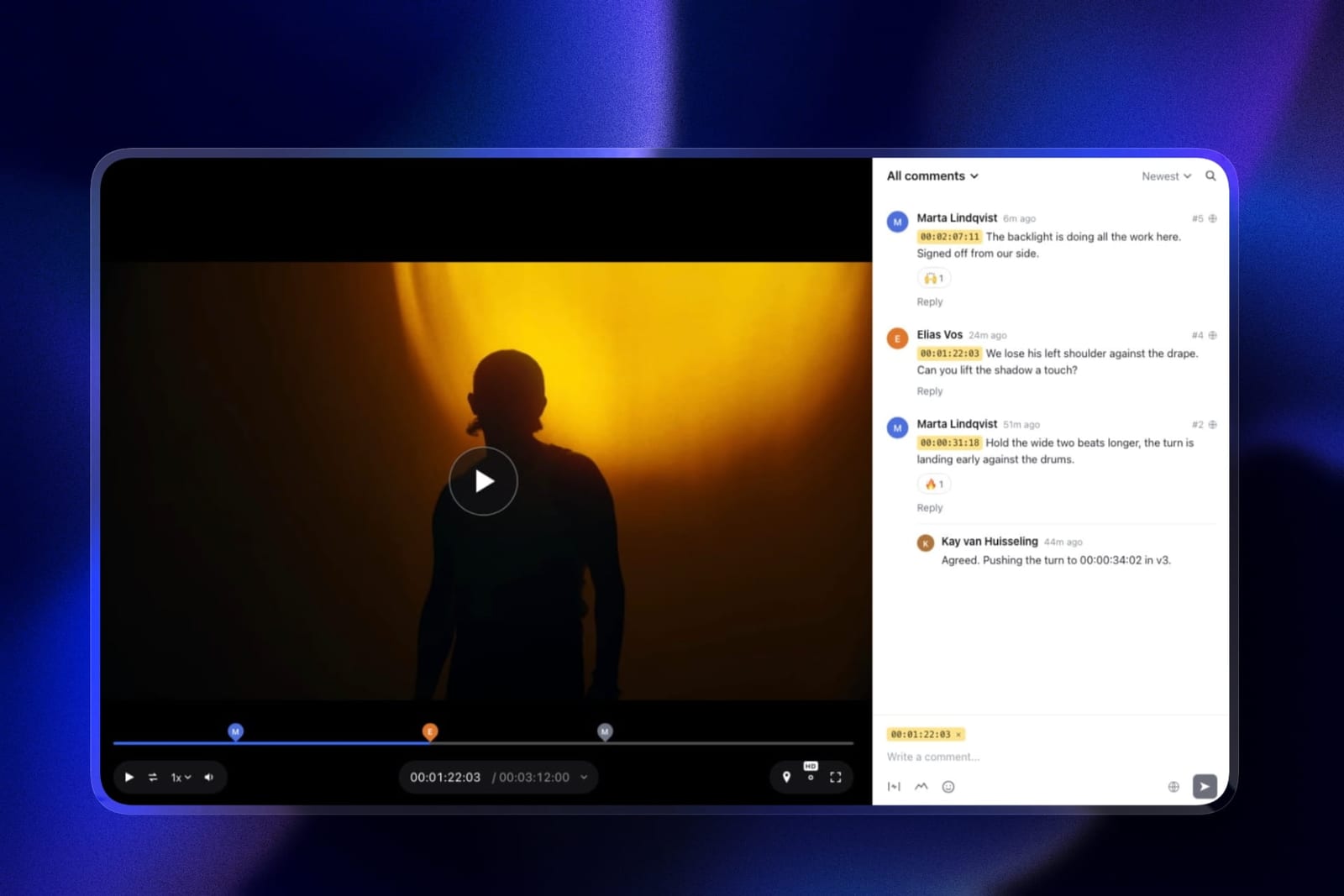
The standout detailinternal notes. Comments posted from your account can be set to Team, so an internal note sits on the same frame as the client's and the client never sees it. Password, email gate and link expiry are included on every plan.
The honest gotchathere are no workflow stages, reviewer groups or sequenced approvals, and no exportable audit trail or e-signature. If legal must sign off before the brand manager is asked, Framekit cannot enforce that order.
Skip it ifanything you proof goes to print, your approvals are regulated, or several people on your side need to upload. Approval Studio, GoVisually, PageProof and Frame.io exist for you.
Verdict: a sensible, low-cost landing for a video-led marketing team run by one producer, at under a tenth of Ziflow Standard's price. The wrong tool the moment a dieline shows up.

4. PageProof: If the Record Matters More Than the Stages
Team is 249 dollars a month or 2,499 a year with unlimited reviewers, unlimited proofs and unlimited versions of any file type, with automated workflows and reminders on every tier.
The real number249 dollars flat against Ziflow's 199 for 15 users. PageProof is more expensive until you exceed 15 people, at which point it stops moving and Ziflow starts charging in packs of five.
The standout detailit publishes the difference between a basic audit that tracks proof activity and a full audit and compliance export, and adds digital signing for verified approvals on Enterprise.
Ziflow's own equivalent, electronic signatures with an audit trail kept for the life of the account, also sits on an unpublished Enterprise tier, so the two are directly comparable and PageProof is clearer about where the line falls.
Verdict: the alternative for regulated work where the approval must be provable and the number of reviewers is large. Not a cost saving at small scale.
5. GoVisually: The Compliance Specialist
GoVisually goes further into the packaging tradition than Ziflow itself. Lite is 16 dollars per user per month with 15 active projects, Pro is 33 dollars per user with a three-user minimum, and a CPG compliance suite starts from 499 dollars a month, running automated checks against more than twenty regulatory frameworks, reviewing marketing claims, and verifying barcodes and print readiness.
The gotcha, and it is the one to catch before you buyLite supports no video or GIF at all. For a team leaving Ziflow because it wanted to handle video better, the cheap tier is not merely limited, it is disqualified. Video starts at Pro, so the real entry price for mixed work is 99 dollars a month at the three-user minimum.
Verdict: the strongest tool here if regulatory checking is the actual job. A trap if you skim the pricing page and buy Lite for a workload that includes video.
6. ReviewStudio: Best Free Multi-Format Option
Unlimited users and unlimited guests on a free 5GB tier covering all file formats, with versioning, compare mode, present mode and approval management.
Pro is 12 dollars per user annually and Advanced, at 20 dollars, adds colour separation, checklists and workflow automations with a five-user minimum.
Verdict: the best free landing spot for mixed work, and the tool whose paid tier gets closest to Ziflow's capability at a fraction of the price. The five-seat minimum on Advanced is the same trap in miniature.

7. Krock.io: Storage-Led, Video-First
Pro is 10 dollars per user per month with unlimited team size and from 2TB, reviewing video, image, audio and PDF with 4K playback named explicitly and unlimited reviewers on every plan.
Verdict: covers four media types cheaply and none of the print tooling. Right if your mixed workload is media rather than press.
8. Frame.io: If the Move Is Toward Video in Adobe
Pro is 15 dollars per member per month with 2TB, frame-accurate range comments, drawn annotation, version stacks, document markup and Premiere Pro and Final Cut panels.
Verdict: the deepest video tool in this comparison, with editing-software panels and document markup Framekit lacks, and no substitute for a proofing platform. Ranked below Framekit only because a video-led team with one producer pays far less there; for a team of Adobe editors who each upload, Frame.io is the better buy.
9. Kollaborate: Cheapest, Least Suited
Twelve published tiers from 7 dollars a month for 30GB to 539 dollars for 10TB, flat per account, unlimited projects and unlimited bandwidth throughout.
Verdict: the cheapest way to keep reviewing media, with no print tooling and an interface that looks its age. Listed last because it replaces the least of what Ziflow does.
What 1,200 File Types Is Really Worth
In one linethe file-type count is a proxy for a tradition, not a feature, and the question is not how many formats a tool opens but whether it has the inspection tools that make opening them useful.
Any tool here will display a PDF. Displaying it is not proofing it.
What separates the print-tradition platforms is what you can do once it is open: separate the plates, measure a margin, run a spellcheck across the copy, scan the barcode, and zoom far enough to inspect a trap.
Approval Studio and GoVisually publish those tools explicitly. ReviewStudio has colour separation on Advanced. Frame.io, Krock.io, Framekit and Kollaborate have none of them.
So a comparison that ranks by supported formats produces nonsense. Kollaborate will happily show you a packaging PDF and cannot tell you anything about it.
Ziflow's 1,200 formats matter because of the tooling behind them, and an alternative claiming similar breadth without similar tooling is offering you a viewer.
The test you can runtake the last file that went to press and try to verify its barcode and separate its plates in the tool you are considering. If you cannot, you are looking at a video review tool with a PDF viewer attached, whatever its pricing page says.

Where Ziflow's Free Tier Fails and Everyone Else's Does Not
In one lineZiflow's free Personal tier keeps review history for 60 days, which makes it the only free plan in this comparison that deletes the record of what was approved.
This deserves naming because it is unusual and easy to miss. On the free Ziflow tier you get 2 users, 2GB, unlimited proofs, unlimited reviewers, one workflow stage and 1,200 file types, which reads as remarkably generous. Then the review history rolls off after 60 days.
Compare the others. ReviewStudio's free tier keeps everything on 5GB with unlimited users. Framekit's free tier keeps everything on 10GB, 3GB of it video, with unlimited projects.
Filestage's free tier keeps everything and instead restricts you to 1 active project and 5 files a month. Krock.io's free tier keeps everything on 2GB for one user.
Three of those constrain how much you can do.
Ziflow's constrains how long what you did survives, which is the one restriction that cannot be worked around by being organised, and it is disqualifying for anything you might be asked about later.
If you are on free Ziflow and treating it as a record, you do not have one.
Which Ziflow Alternative Fits You? A Decision Tree
Work through these in order and stop at the first yes. The first question splits the page in half and everything after it is refinement.
- Does anything you proof go to press? Then you need print tooling, and only Approval Studio, GoVisually, ReviewStudio Advanced and Filestage qualify. Everything else on this page is a viewer.
- Are your approvals regulated, with claims or barcodes to verify? GoVisually, and budget the compliance suite from 499 dollars a month if the checking must be automated.
- Do you need packaging tools at a small-team price? Approval Studio Pro at 160 dollars a month, which includes the barcode scanner, ruler and spellchecker that Lite charges extra for.
- Must approvals be provable, with more than fifteen reviewers? PageProof at 249 dollars flat.
- Do you want Ziflow's shape from another vendor? Filestage at 199 dollars, remembering it includes 10 seats against Ziflow's 15.
- Is your work moving from print toward video? Frame.io at 15 dollars per member, or Krock.io at 10 dollars per user for more storage.
- Did you only ever use it for video, with one producer uploading? Framekit, from 9 dollars a month with every reviewer a free guest. If several editors upload, Frame.io. ReviewStudio's free tier if you want print formats too.
- Do you need a free tier that keeps your history? ReviewStudio or Framekit, not Ziflow.
Frequently Asked Questions
What is the best Ziflow alternative in 2026?
Filestage is the closest like-for-like Ziflow alternative, at the same 199 dollars a month with all file types on every tier, though it includes 10 users where Ziflow includes 15.
Approval Studio from 60 dollars a month is the best print-native alternative with colour separation, a barcode scanner and an on-screen ruler.
Framekit is the best value for video-led teams run by one producer, from 9 dollars a month with free guest reviewers, and PageProof at 249 dollars is the choice when the approval record has to be provable.
Is there a cheaper alternative to Ziflow with print tooling?
Yes. Approval Studio Lite is 60 dollars a month for 5 users and 5GB with compare modes, zoom and annotation, roughly a third of Ziflow Standard's 199 dollars.
The spellchecker, on-screen ruler and barcode scanner cost extra on Lite and are included from Pro at 160 dollars, so for packaging work budget 160 rather than 60.
Which Ziflow alternatives support video?
Filestage, Approval Studio, PageProof, ReviewStudio, Krock.io, Frame.io, Framekit and Kollaborate all support video review.
GoVisually is the exception and the one to watch: its Lite tier at 16 dollars per user supports no video or GIF at all, with video starting on Pro at 33 dollars per user with a three-user minimum.
What does Ziflow's free plan actually give you?
2 users, 2GB, unlimited proofs, unlimited reviewers, one workflow stage and support for 1,200 file types, which is generous. The limitation is retention: review history is kept for 60 days and then removed.
That makes it the only free plan in this comparison where the record of what was approved expires, so it cannot serve as evidence of anything.
What is the difference between print proofing and video review?
They are different traditions with different tooling. Print proofing needs colour separation, measurement, spellcheck, barcode verification and deep zoom, because an error reaches 40,000 printed units.
Video review needs timecodes, frame-accurate marks, version stacks and playback control. Neither substitutes for the other, and a tool that opens a PDF is not proofing it unless it can inspect it.
Framekit vs Ziflow: can Framekit replace Ziflow?
Only if your Ziflow work became video. Framekit has no colour separation, preflight, measurement, spellcheck or barcode verification, and it does not proof images, PDFs or print formats.
For video it has frame-accurate comments, drawing, version stacks, approval statuses and internal team notes, and one account at 19 dollars a month on Pro lets every reviewer comment free, against Ziflow Standard's 199 dollars for 15 users.
It has no internal review seats, workflow stages or exportable audit trail.
Which alternative has the best approval audit trail?
PageProof publishes the clearest distinction, with a basic audit tracking proof activity on Team and Team Plus and a full audit and compliance export plus digital signing on Enterprise.
Ziflow itself offers a one-year audit trail on Pro and a permanent one with electronic signatures on Enterprise. Every other alternative here records approvals as a state change with no exportable trail.
Is Filestage cheaper than Ziflow?
No, they are the same headline price and Ziflow includes more people. Both entry tiers are 199 dollars a month, with Ziflow Standard covering 15 users and Filestage Starter covering 10.
Both upper tiers are 329 dollars, with Ziflow Pro at 20 users and 2TB and Filestage Business at 3TB. Move for the workflow model rather than for savings.
How many workflow stages do I actually need?
Count the groups that must approve in sequence. Most creative teams need one or two, which the free and Standard Ziflow tiers cover.
Three stages, on Ziflow Pro at 329 dollars a month, suits a team where creative, brand and legal each gate the next.
Unlimited stages sit on Enterprise with no published price, and if routing is genuinely why you are buying, that is the tier you will be quoted.
Can I replace Ziflow with a free tool?
Only for mixed media work without press output.
ReviewStudio's free tier is the strongest option, with unlimited users and unlimited guests on 5GB across all formats, keeping approval management, versioning, compare mode and present mode, and it retains your history rather than expiring it.
It lacks the colour separation that arrives on its Advanced tier, so it does not cover packaging.
Which tool is best for packaging and label approval?
GoVisually if regulatory checking is the work, since its compliance suite runs automated checks against more than twenty regulatory frameworks and verifies barcodes and print readiness, from 499 dollars a month.
Approval Studio if you want the inspection tools at a smaller price, with colour separation, a barcode scanner, an on-screen ruler and 1000% zoom included from its 160 dollar Pro tier.
What happens to my Ziflow proofs if I downgrade?
On paid tiers your history persists with the subscription; on the free Personal tier it is retained for 60 days regardless.
Nothing in this comparison can import Ziflow's proof history or its audit trail, so export anything you may need before downgrading or cancelling.
On Pro the audit trail covers one year, which is worth extracting rather than assuming it will be there later.
Final Verdict
Filestage is the best Ziflow alternative in 2026 for teams that want the same multi-format approval workflow from a different vendor, though at 199 dollars for 10 seats against Ziflow's 15 it is a lateral move rather than a saving.
Approval Studio is the better answer for anyone whose work genuinely goes to press, at 160 dollars a month for the tier that includes the barcode scanner, ruler and spellcheck, which is a third less than Ziflow for tooling that is at least as deep.
The most useful thing on this page is not a recommendation, it is a test: if you cannot separate plates and verify a barcode in the tool you are considering, you are not looking at a proofing platform, whatever its file-type count says.
For a team whose Ziflow account has become a video review tool run by one producer, Framekit is the value pick: Pro at 19 dollars a month with free guest reviewers, under a tenth of Ziflow Standard, with drawing, versions and approval statuses.
Where Framekit loses, and who should not consider it. Framekit is not a proofing platform.
It has no colour separation, preflight, measurement, spellcheck, barcode checking, image or PDF proofing, internal review seats, workflow stages or exportable audit trail.
Anyone whose work reaches a printing press should not be reading our entry at all, and every print-tradition tool here beats us outright on that job. We rank third only for teams whose print half has gone quiet.
Work out which tradition you are in before you compare a single price. Almost every bad decision in this category comes from comparing a packaging platform to a video tool as though they were competing.
Related readingthe best Filestage alternatives, client approval software compared, the 12 best video review tools, and the best video annotation tools.
Prices and capabilities were read at each vendor's published pricing page in August 2026, with Framekit's plans re-verified in September 2026, and tested against one deliberately mixed campaign containing a packaging dieline, static ads and a video, because a single-format test would have favoured one tradition unfairly.