Framekit templates
Start from a designer-made template
 Use template
 Use template
 Use template
 Use template
 Use template
 Use template
 Use template
 Use template
A campaign is almost never one thing. It is a 45-second film, a printed poster with a regulated claim on it, a landing page, and eleven static ads at different aspect ratios.
Four deliverables, four different kinds of feedback, and in most agencies four different review processes held together by email.
The obvious fix is one proofing tool across all of it, and the obvious fix turns out to be both cheaper and worse. Cheaper, because a single multi-format platform costs less than stacking specialists.
Worse, because every specialist beats the generalist at its own medium, and no tool in this comparison is good at all four.
So the real question is not which creative proofing tool is best. It is which of your four deliverables you are willing to review in a tool that is merely adequate at it.
A creative proofing tool is a platform that collects markup and approvals on creative work across formats, so a video, a print file, a web page and a set of static assets can move through one review process rather than four.
The best creative proofing tool in 2026 is Filestage, at 199 dollars a month with all file types supported on every tier including free, because it is the strongest generalist across the widest range of deliverables.
Ziflow at the same price handles over 1,200 file types with deeper print tooling, Framekit is the pick for a small studio whose campaign is led by a film, with frame-accurate film review and a client gallery for the stills free to start, but no print or live web review.
ReviewStudio's free tier covers all formats with unlimited users, and MarkUp.io is the only tool here that reviews a live website.
Full disclosure: Framekit is our own product and it ranks third here on a narrow claim, not on breadth: it proofs film deeply, handles stills only as client picks with notes, and has no print or web review at all, so on breadth alone nine tools here would outrank it. We judged it on the same four deliverables as the others and link to every one.
We re-verified every price in this guide in September 2026 and moved Framekit from tenth to third for film-led studios, because its client galleries now let clients pick stills into named lists with a note on each image, alongside video review, in one account.
How We Tested 12 Creative Proofing Tools
We built one campaign with four genuinely different deliverables and pushed all four through every platform: a 45-second film, a folding-carton poster proof with an ingredients panel, a live landing page on a staging URL, and eleven static ads sized for different placements.
Two rounds, reviewed by a designer, a brand manager and a legal reviewer. August 2026, fresh accounts.
Then we compared two ways of paying for it: one generalist platform, against a stack of three specialists each best in class for its medium. The result was the opposite of what most agencies assume.
Measured means we uploaded all four deliverables and marked them up. Verified means the figure was read at the vendor's own published pricing page and linked inline. Enterprise tiers carry no published price and were not tested.
The four kinds of review a campaign needs
Timeline review. Video and motion, where feedback is about timing and needs a timecode. Frame.io and the video specialists own this.
Print review. Packaging, posters and anything going to press, where the tools that matter are colour separation, measurement, spellcheck and barcode verification. Approval Studio, GoVisually and Ziflow live here.
Static design review. Ads, key art and social assets, where drawing on the image and comparing versions is most of the job. Almost every tool handles this competently, which is why it rarely drives a decision.
Live web review. A landing page, where the thing being reviewed is a URL that changes rather than a file. Exactly one tool in this comparison does it, and its absence everywhere else is the biggest gap in the category.
What Consolidation Actually Costs
Every figure below was read at the vendor's own published pricing page in August 2026 and priced against the same four-deliverable campaign, so the generalist and specialist routes are compared on identical work rather than on headline rates.
- A stack of three specialists, Frame.io Pro for video at 180 dollars, Approval Studio Pro for print at 1,920 and MarkUp.io for web at 948, comes to 3,048 dollars a year.
- One generalist, Filestage Starter or Ziflow Standard at 2,388 dollars a year, is 660 dollars cheaper and covers three of the four deliverables adequately.
- Neither approach covers all four well: the generalists cannot review a live website, and the specialist stack has no shared approval record across media.
- 1 of 12 tools reviews a live web page: MarkUp.io, at 79 dollars a month with unlimited users and 500GB.
- 4 of 12 carry real print tooling such as colour separation or barcode checking: Approval Studio, GoVisually, ReviewStudio and Ziflow.
- 2 of 12 support range-based comments, which matter for the video deliverable: Frame.io and Dropbox Replay.
- 2 of 12 cannot mark up a still image at all: Kollaborate, and Framekit, which handles stills only as gallery picks with a typed note per image.
| Tool | Video | Print tooling | Static design | Live web | Price per year |
|---|---|---|---|---|---|
| Filestage | Yes | Compare mode, all types | Yes | No | 2,388 dollars |
| Ziflow | Yes | 1,200+ types | Yes | No | 2,388 dollars |
| ReviewStudio | Yes | Colour separation on Advanced | Yes | No | Free, then 144 per user |
| PageProof | Yes | All file types | Yes | No | 2,988 dollars |
| MarkUp.io | Basic | Some file types | Yes | Yes, live URLs | 948 dollars |
| Krock.io | Yes, 4K | Image and PDF | Yes | No | 120 dollars per user |
| Approval Studio | Yes | Colour separation, barcode, ruler | Yes | No | 1,920 dollars |
| GoVisually | Only from Pro | Barcode, QR, print-ready checks | Yes | No | 1,584 dollars on Pro |
| Frame.io | Yes, best in class | Document markup | Yes | No | 180 dollars per member |
| Framekit | Yes, frame-accurate with drawing | No | Gallery picks with notes, no markup | No | Free, or 108 dollars flat |
| Wipster | Yes | No | Limited | No | 119.40 dollars |
| Kollaborate | Yes | No | No | No | 84 dollars flat |
Jump to the decision tree if you already know which deliverables dominate your work.
The Best Creative Proofing Tools in 2026
Ranked on how much of a real campaign each one can carry, since breadth is the entire premise of this category, with one exception we flag openly: Framekit sits third for the film-led studio rather than on breadth, because it carries the film better than any generalist here and the stills only as selections.
The first five get full reviews.
1. Filestage: Best Generalist
Filestage is the most complete answer to a mixed campaign, and the reason is unglamorous: all file types are supported on every tier including the free one, with reviewer groups, due dates, version comparison and team-only comments from Starter at 199 dollars a month with 10 members.
The real number2,388 dollars a year, which is 660 dollars less than a three-specialist stack and covers video, print files and static design in one approval process with one record.
The standout detailthe shared approval record across media is worth more than any individual feature here and is the thing a specialist stack cannot reproduce.
When a campaign's film, poster and ads all sign off in one system, you can answer "was the campaign approved" rather than "was each piece approved somewhere".
The gotchait cannot review a live web page, so your landing page still goes through screenshots or a separate tool. On a campaign with a digital destination, that is one of four deliverables outside the system.
Skip it ifyour print work involves regulated claims or press-critical colour. Filestage displays print files competently and does not inspect them the way Approval Studio or GoVisually do.
Verdict: the best single purchase for an agency running mixed campaigns, on the condition that you accept adequate rather than excellent on both the video and print ends.
2. Ziflow: Widest Format Coverage
Standard is 199 dollars a month with 15 users and 1TB, Pro is 329 dollars with 20 users and 2TB, supporting over 1,200 file types with workflow stages as the explicit pricing axis.
The real numberidentical entry price to Filestage with five more users included, and materially better print handling.
The standout detail1,200 file types is not marketing padding when your campaign includes a dieline, an EPS and a press-ready PDF alongside the film. This is the generalist that leans furthest toward print without becoming a print-only tool.
The gotchathe free Personal tier retains review history for 60 days, so it cannot serve as a campaign record.
Verdict: the better generalist if your campaigns skew toward packaging and print, and the same price as Filestage, which makes the choice unusually clean.
3. Framekit: Best for Film-Led Studios That Also Deliver Stills

Framekit is an AI website builder with video review, client galleries, Slides and a digital store in one account, and it earns a top-three place here on a narrower claim than the two tools above it: for a small studio whose campaigns are led by a film, it carries the film better than any generalist on this page and handles the stills handoff in the same account, free to start.
Mapped onto our four-deliverable campaign, the film is the part Framekit handles fully: reviewers comment at the exact frame without creating accounts, draw on the picture and set an approved or needs-changes status, and a v2 stacks on v1 with the round-one notes kept.
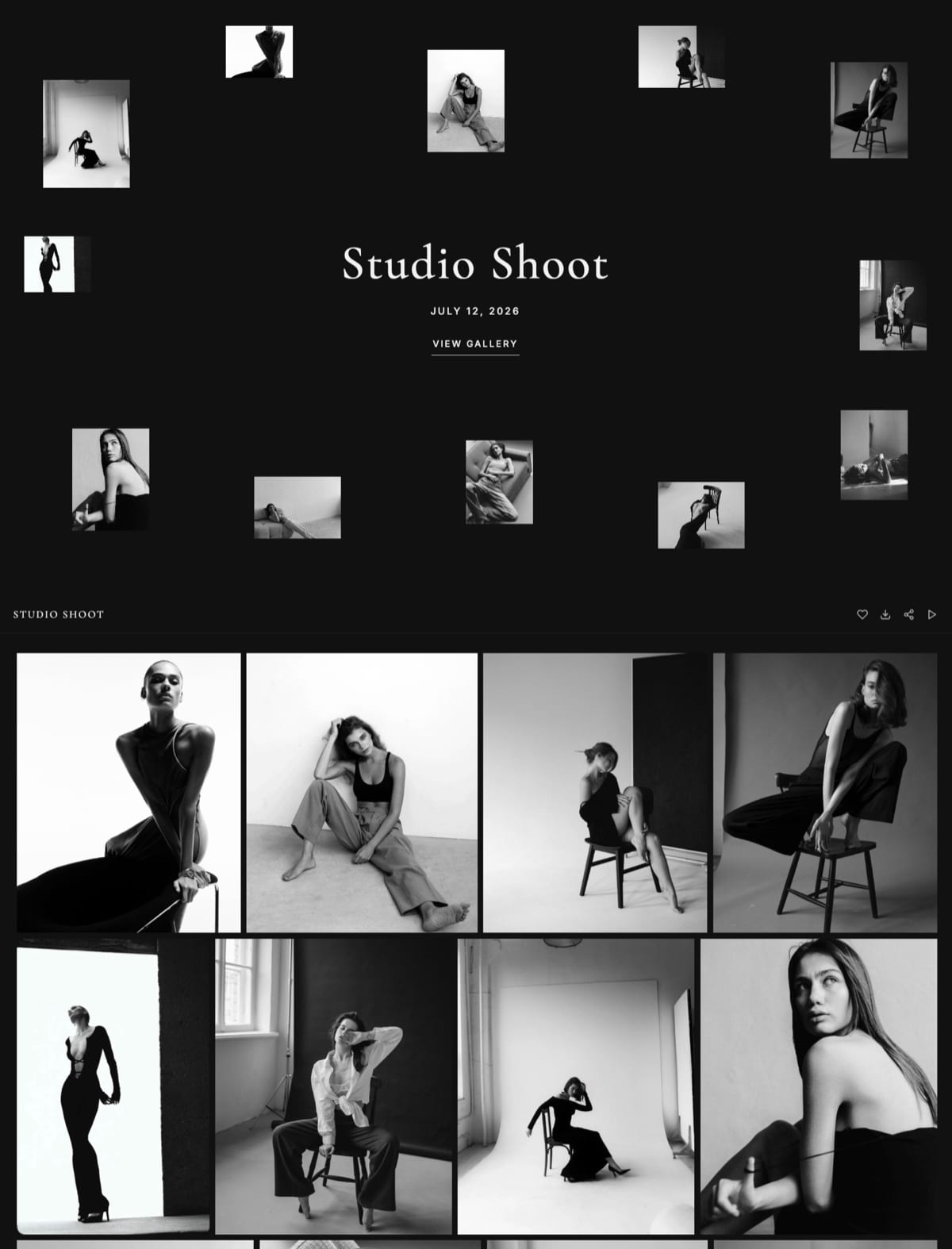
Static ads go into a client gallery instead, where a client hearts picks into a named list, types a note against each image and sends the list back.
The real number0 dollars for both halves, because the core review and gallery features ship on the free plan with 10GB of pooled storage. Starter at 9 dollars a month, 108 a year, adds your own domain and removes our badge, about a twenty-second of Filestage.
The standout detailthe film review page and the stills gallery carry the same logo and fonts and can sit on your own domain beside your portfolio site, and a campaign deck built in Framekit Slides can match them. It is also the account that hosts the portfolio site the client found you on.
The honest gotchaa gallery note is text attached to a favourite, not markup.
Nobody can draw on a still, there is no version compare for the ads, no print handling of any kind, no colour separation or preflight, and no live web review, so the poster proof and the landing page in a campaign like ours have nowhere to go.
Skip it ifprint or regulated packaging is a real share of your output, or your approvals run across several stakeholders who need one audit record. Filestage, Ziflow or ReviewStudio's free all-format tier covers more of that campaign than we do.
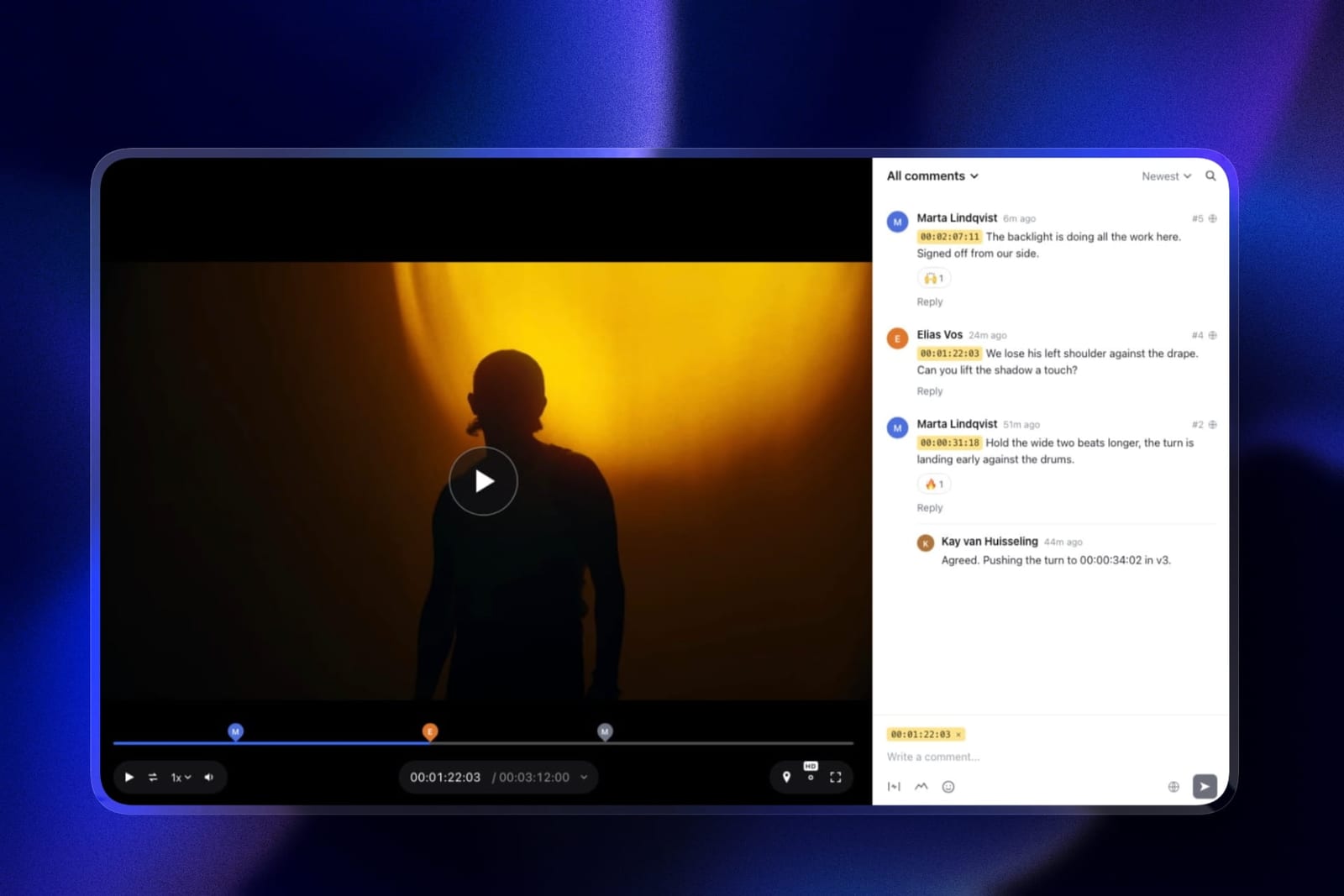
Verdict: the right tool when the film is the campaign and the stills are selections rather than proofs, and the wrong one the moment a print file needs sign-off. Third for that studio, and much lower on breadth alone.
4. ReviewStudio: Best Free Multi-Format
Unlimited users and unlimited guests on a free 5GB tier across all file formats, with versioning, compare mode, present mode and approval management.
Pro is 12 dollars per user annually and Advanced at 20 adds colour separation, client and project teams and workflow automations with a five-user minimum.
The real numberfree for all four media types minus live web, which no free tier anywhere matches. Advanced at a five-user floor is 1,200 dollars a year.
Verdict: the way to find out whether consolidation suits you before committing 2,388 dollars to it. Colour separation on Advanced makes it the only tool here that reaches real print tooling from a free starting point.
5. MarkUp.io: The Only Live Web Review
MarkUp.io covers the deliverable everything else on this page ignores. Pro is 79 dollars a month with unlimited users, 1 workspace and 500GB, supporting over 30 file types including websites, PDFs, slides, images and videos.
The real number948 dollars a year with unlimited users, which is less than half the generalist platforms and the only route to reviewing a landing page as a live URL rather than as a screenshot.
The standout detailreviewing a live page rather than an image of one is a genuinely different capability. A screenshot cannot show a hover state, a responsive breakpoint or a form validation message, and those are exactly the things clients comment on.
Every other tool in this comparison forces you to flatten the web deliverable into a picture first.
The gotchavideo review is present rather than strong. There are no range comments, no editorial integrations and none of the timeline depth that the video specialists offer, so a campaign whose film needs detailed timing feedback is not well served here.
Skip it ifyour campaigns have no digital destination, in which case you are paying for the one feature that distinguishes it.
Verdict: the missing piece rather than the whole answer. For agencies whose work ends on a web page, pairing this with a generalist is more sensible than expecting either to cover everything.
6. PageProof: Best Shared Record
Team is 249 dollars a month or 2,499 a year with unlimited reviewers, unlimited proofs and unlimited versions of any file type, with automated workflows on every tier and a published distinction between a basic audit and a full compliance export on Enterprise.
Verdict: the strongest approval record across mixed media, at 2,988 dollars a year, and the only generalist with no seat arithmetic at all. Choose it when the campaign's sign-off might be questioned later.
7. Krock.io: Cheapest Multi-Format
Pro is 10 dollars per user per month with unlimited team size and from 2TB, reviewing video, image, audio and PDF with 4K playback named explicitly, unlimited reviewers on every plan and a storyboard tool.
Verdict: four media types at a twentieth of the generalist price, without workflow routing or print inspection. Remarkable value for a small studio and not a substitute for a proofing platform at agency scale.
8. Approval Studio: Best Print Specialist
Pro is 160 dollars a month for five or more users with a spellchecker, on-screen ruler and barcode scanner, plus colour separation and 1000% zoom, with video review supported alongside.
Verdict: the deepest print tooling here at a third less than Ziflow, and it belongs in a specialist stack rather than as your only system.

9. GoVisually: Compliance Specialist
Pro is 33 dollars per user with a three-user minimum, with a compliance suite from 499 dollars a month running automated checks against more than twenty regulatory frameworks and verifying barcodes and print readiness.
The gotchaLite at 16 dollars per user supports no video or GIF at all, which disqualifies the cheap tier for any campaign containing a film.
Verdict: for regulated packaging work specifically. Its automated claim checking is something no generalist attempts.
10. Frame.io: Best Video, Narrow Otherwise
Frame.io is the tool every other entry here is measured against on the video deliverable and the narrowest of the serious options on everything else: Pro is 15 dollars per member per month with 2TB, with frame-accurate range comments, drawn annotation, version stacks, document markup and editorial panels.
Verdict: the video specialist in any stack, at 180 dollars a year per person. Document markup covers stills and PDFs adequately and it is not a proofing platform for print.
11. Wipster: Video With Limited Stills
Light is 9.95 dollars a month with 50GB for one person, with annotation, Premiere Pro and After Effects extensions and comments that become tasks. It handles image annotation alongside video.
Verdict: a video tool with a modest stills capability, and no print or web review. A specialist rather than a proofing platform.
12. Kollaborate: Video Delivery Only
Kollaborate prices storage rather than seats or formats, across twelve published tiers from 7 dollars a month for 30GB up to 539 dollars for 10TB, flat per account, with unlimited projects and unlimited bandwidth on every one of them.
Verdict: excellent storage economics for video and no multi-format proofing at all. Listed last for this specific purpose.
The Consolidation Math
In one lineone generalist platform is about 660 dollars a year cheaper than three specialists and reviews every individual medium worse, which makes this a question about which compromise you can absorb rather than a question about money.
Price both approaches properly. The specialist stack: Frame.io Pro for video at 180 dollars a year, Approval Studio Pro for print at 1,920, and MarkUp.io for web at 948. Total 3,048 dollars, and each medium is reviewed by a tool built for it.
The generalistFilestage Starter or Ziflow Standard at 2,388 dollars a year, covering video, print files and static design in one process with one approval record, and leaving the live web page outside the system.
So consolidation saves 660 dollars and costs you: range-based comments on the film, real colour separation and barcode checking on the print file, and live web review entirely. Whether that is a good trade depends on which of those you actually use.
The pattern we saw is that agencies overestimate how much depth they need on the media they produce least.
A shop making one printed piece a quarter does not need barcode verification; a shop making one film a quarter does not need range comments.
Consolidation is usually correct, and it is correct for a boring reason, which is that most agencies are lopsided rather than balanced.
The test you can runcount last year's deliverables by medium. If one medium is more than about 70% of the total, buy the specialist for that medium and handle the rest in whatever it also does. If the split is genuinely even, buy the generalist.

The Gap Nobody Fills
In one linelive web review is missing from eleven of the twelve tools here, and it is the deliverable most campaigns now end on.
This is the most surprising finding of the test. Every platform in this comparison handles video, most handle print files, all handle static images, and exactly one reviews a live URL.
Yet a landing page is the destination of an enormous share of the campaigns these tools exist to approve.
The workaround everyone uses is a screenshot, and it fails in specific ways.
A static image cannot show a hover state, a responsive breakpoint, a scroll behaviour, a form validation message or a loading state, which are precisely the things clients notice and comment on.
So the web deliverable gets reviewed twice: once as a flattened picture inside your proofing tool, and once informally over email when the real page goes to staging.
MarkUp.io at 948 dollars a year with unlimited users is the only tool here that closes that, and its video review is correspondingly shallow.
That leaves most agencies with a genuine two-tool answer rather than a one-tool answer, which is not what this category's marketing suggests.
If you take one action from this article, it is worth checking how your landing pages currently get approved. In most agencies the answer is that they do not, formally, and that is where the late-stage change requests come from.
Should You Consolidate? A Decision Tree
Work through these in order and stop at the first yes, since the shape of your output matters far more than any feature comparison above.
- Is one medium more than about 70% of your output? Buy that specialist and handle the rest in whatever it also does. Frame.io for video, Approval Studio for print, MarkUp.io for web.
- Do your campaigns end on a live web page? MarkUp.io at 79 dollars a month is the only tool here that reviews a URL, and you will likely pair it with something else.
- Is your print work regulated or press-critical? Approval Studio for inspection tooling at 160 dollars a month, or GoVisually if claims need automated checking.
- Is your split genuinely even across video, print and static? Filestage or Ziflow at 199 dollars a month, and take Ziflow if print is the heavier half.
- Might a campaign approval be disputed later? PageProof at 249 dollars flat with unlimited reviewers and a published audit distinction.
- Are you a small studio wanting multi-format cheaply? Krock.io at 10 dollars per user for video, image, audio and PDF.
- Do you want to test consolidation before paying? ReviewStudio's free tier covers all formats with unlimited users on 5GB.
- Is the film the campaign, with stills as picks rather than proofs? Framekit, free to start, with frame-accurate film review and a client gallery for the stills, or Frame.io if you need editing-app panels. Our client approval software comparison covers the sign-off side.
Frequently Asked Questions
What is the best creative proofing tool in 2026?
Filestage is the best creative proofing tool in 2026, at 199 dollars a month with all file types supported on every tier including free, plus reviewer groups, due dates and version comparison.
Ziflow costs the same, includes 15 users rather than 10 and handles over 1,200 file types with better print support.
ReviewStudio's free tier covers all formats with unlimited users if you want to test consolidation first, and Framekit is the free pick for a small film-led studio.
Is one proofing tool cheaper than several specialists?
Yes, by about 660 dollars a year. A specialist stack of Frame.io for video at 180 dollars, Approval Studio for print at 1,920 and MarkUp.io for web at 948 totals 3,048 dollars annually.
A single generalist such as Filestage or Ziflow is 2,388 and covers three of those four deliverables, leaving live web review outside the system.
Which proofing tool reviews live websites?
MarkUp.io, and it is the only one in this comparison. Pro is 79 dollars a month with unlimited users, 1 workspace and 500GB, supporting over 30 file types including live websites alongside PDFs, slides, images and videos.
Every other tool here requires you to flatten a web page into a screenshot, which cannot show hover states, breakpoints or validation messages.
What do I lose by consolidating onto one tool?
Three specific things. Range-based comments on video, which only Frame.io and Dropbox Replay offer and which matter for timing feedback.
Real print inspection such as colour separation, barcode verification and measurement, which Approval Studio, GoVisually and Ziflow provide and Filestage does not. And live web review, which only MarkUp.io does.
Whether those losses matter depends entirely on your output mix.
Can I proof video and print in the same tool?
Yes, on several.
Ziflow supports over 1,200 file types, Filestage supports all file types on every tier including free, ReviewStudio handles all formats with colour separation on Advanced, and Approval Studio does print inspection with video review alongside.
The one to check is GoVisually, whose 16 dollar Lite tier supports no video or GIF at all.
Does Framekit do creative proofing?
Only partly. Framekit proofs film deeply, with frame-accurate comments, drawing, version stacks and approvals on every plan, and handles stills through client galleries where clients pick images into lists and type a note on each.
It has no markup on stills, no print handling, no colour separation and no live web review, so it ranks third here for film-led studios only.
How do agencies usually approve landing pages?
Informally, and that is the problem. Since eleven of twelve tools here cannot review a live URL, the web deliverable is typically flattened into a screenshot for the formal process and then discussed over email once it reaches staging.
That gap is where late-stage change requests come from, because a screenshot cannot surface the behaviours clients actually react to.
Which is better, Filestage or Ziflow?
Both are 199 dollars a month at entry and the choice is structural. Ziflow includes 15 users against Filestage's 10, supports over 1,200 file types and prices workflow stages explicitly, which suits print-heavy campaigns.
Filestage's model is the reviewer group, with deadlines attached and a private team lane available from its cheapest paid plan. Take Ziflow if print is the heavier half of your output.
Is there a free creative proofing tool?
ReviewStudio's free tier is the strongest, covering all file formats with unlimited users and unlimited guests on 5GB, including versioning, compare mode, present mode and approval management.
Filestage's free tier supports all file types but caps you at 1 active project and 5 new files a month. Ziflow's free tier retains review history for only 60 days.
How much print tooling do I actually need?
Less than most agencies assume, unless print is a large share of your output.
Colour separation, barcode verification, spellcheck and measurement matter enormously for packaging and press work and are close to irrelevant for a poster that will be printed once at a local shop.
Count last year's press-bound deliverables before paying a premium for inspection tooling.
Should a small studio consolidate?
Usually yes, and cheaply. Krock.io at 10 dollars per user covers video, image, audio and PDF with unlimited reviewers, which is four media types at a twentieth of what the agency platforms cost.
The generalist platforms at 199 dollars a month are priced for coordination across many stakeholders rather than for format breadth alone, so a small studio is paying mostly for workflow it will not use.
What is the difference between proofing and video review?
Proofing is format-agnostic and approval-led, built around getting many media types through a defined process with a record. Video review is timeline-led, built around timestamped feedback on a moving image.
Tools from the proofing tradition handle video adequately and rarely offer range comments or editorial integrations, and tools from the video tradition usually cannot inspect a print file at all.
Final Verdict
Filestage is the best creative proofing tool in 2026 for an agency running mixed campaigns, because all file types on every tier plus reviewer groups and due dates covers three of four deliverables in one process with one approval record, for 660 dollars a year less than a specialist stack.
Ziflow is the better choice when print is the heavier half of your work, at the same price with more users and more formats.
MarkUp.io at 948 dollars a year is the only way to review a live web page, and most agencies will end up pairing it with something rather than replacing anything.
Where Framekit loses. Framekit is not a print or web proofing tool.
It does not draw on stills, handle print files, separate colour or review a live page, so on a four-deliverable campaign it covers the film fully and the ads only as selections.
If print, packaging or a formal cross-media audit record matters to you, Filestage, Ziflow or ReviewStudio is the better fit, and Framekit ranks third only for the small studio whose campaign is the film.
The most useful thing you can do before buying anything is count last year's deliverables by medium. Most agencies discover they are far more lopsided than they assumed, and lopsided shops should buy a specialist rather than a platform.
Related readingthe best Ziflow alternatives, the best Filestage alternatives, client approval software compared, and the 12 best video review tools.
Prices were read at each vendor's published pricing page in August 2026 and tested against one four-deliverable campaign containing a film, a print proof, a live landing page and eleven static ads, because a single-format test cannot show what consolidation costs.