Framekit templates
Start from a designer-made template
 Use template
 Use template
 Use template
 Use template
 Use template
 Use template
 Use template
 Use template
Read the Dropbox plan table carefully and one line does most of the damage. Under video tools, creative review and approvals with Dropbox Replay is listed as four file uploads, live review, versions and video collaboration.
Not four projects. Not four a month. Four uploads, on Plus, Standard and Advanced alike.
A single job with an original cut and three rounds of revisions is four files. So the Replay you believed came with your Dropbox subscription is a sample, and past it Replay is an add-on starting at 10 dollars a month on top of storage you are already paying for.
That is the structural problem with bundled review, and it is not unique to Dropbox. When review is an add-on to a storage product, the review half is always the thinner half, because it was never what you were being sold.
This list was updated in September 2026: Framekit's plans were re-verified, and it was re-ranked after Framekit added drawing on the frame and moved to a shared storage pool.
A Dropbox Replay alternative is a platform that hosts a cut and collects timestamped feedback as its primary product rather than as an attachment to cloud storage, priced on review capability instead of on gigabytes.
The best Dropbox Replay alternative in 2026 is Framekit, because it replaces the review half with no upload counter: frame-accurate comments, drawing, version stacks and client approval for guests without accounts, at 9 dollars a month, less than the Replay add-on alone.
The trade-off is that Framekit is not a sync client and caps one file at 3GB, so Krock.io at 10 dollars per user with 2TB is the pick if you want storage and review from one vendor, and Frame.io is the deeper tool for Premiere Pro editors.
Full disclosure: Framekit is our own product and we rank it first, on published features and prices, with every alternative linked. Replay keeps one thing we do not have, live sessions with shared cursors, and Dropbox holds and syncs masters in a way no review tool here does.
How We Tested 10 Dropbox Replay Alternatives
We reproduced the workflow Replay is genuinely good at, then pushed it past the bundled limit on purpose.
A 2.1GB graded commercial, an original plus three revision rounds, so four files exactly, reviewed by two clients who had no account with any vendor.
Then a fifth file, which is where the bundled entitlement ends and the real pricing question begins. August 2026, fresh accounts, tested from a European connection where Dropbox served euro pricing.
Measured means we uploaded and reviewed. Verified means the figure was read at the vendor's own published pricing page and linked inline.
What you are really replacing
Replay is two products fused, and most people leaving it only need one of them. The storage half holds masters and syncs them, which Dropbox does well and which no review tool on this page replicates.
The review half does frame-accurate comments, drawing on the frame with colour and stroke control, versions and live sessions where participants see each other's cursors, with no Dropbox account required for reviewers.
Work out which half you are replacing before you compare a single price, because the answers do not overlap.
What Review Costs Once It Is Not an Add-On
Every figure below was read at the vendor's own published pricing page in August 2026 and priced for the same four-file job plus a fifth.
- The Replay entitlement bundled into paid Dropbox plans is four file uploads in total, which one job with three revision rounds exhausts.
- Past that, Replay is an add-on from 10 dollars a month, on top of Dropbox Plus at 9.99 euros, Standard at 12 euros per user, or Advanced at 18 euros per user.
- A realistic Dropbox plus Replay bill for one person is therefore around 20 euros a month, roughly 240 a year, of which the review half is 120.
- The cheapest standalone review here is Framekit at 9 dollars a month flat, then Krock.io at 10 dollars per user, then Wipster at 9.95 dollars for one person.
- Krock.io includes from 2TB on its 10 dollar Pro tier, which is more storage than Dropbox Plus at 9.99 euros, with review included rather than added.
- 7 of 10 alternatives include drawn annotation, which Replay has: Framekit, Frame.io, Krock.io, ReviewStudio, SyncSketch, Wipster and Filestage.
- 0 of 10 offer live review with shared cursors, which is the one Replay feature nothing here matches.
| Alternative | Review price | Storage included | Annotation | Live shared session |
|---|---|---|---|---|
| Framekit | Free, then 9 dollars a month | 10GB free, 50GB Starter, 300GB Pro, pooled | Yes | No |
| Krock.io | 10 dollars per user | From 2TB | Yes | No |
| Frame.io | 15 dollars per member | 2TB on Pro | Yes | No |
| Wipster | 9.95 dollars a month | 50GB | Yes | No |
| ReviewStudio | Free, then 12 dollars per user | 5GB free, 25GB per user | Yes | Present mode |
| SyncSketch | 9 dollars per user | 50GB on Indie | Yes, brushes | Presentation mode |
| Kollaborate | 7 dollars a month | 30GB to 20TB | No | No |
| Vimeo | About 8 euros a month | 2TB | Not confirmed | No |
| Filestage | 199 dollars a month | 1TB | Yes | No |
| Google Drive | Free | 15GB | No | No |
Jump to the decision tree if you already know which half you are replacing.
The Best Dropbox Replay Alternatives in 2026: Our Rankings
Ranked on how well each one replaces what most Replay users actually lose, which is the review half, while keeping the storage half honest in every entry, because a review tool that leaves your masters homeless has replaced only part of Replay. The first four get full reviews.
1. Framekit: Best Overall Dropbox Replay Alternative

Framekit is an AI website builder with video review built in, and it fits the answer this page reaches most often: keep Dropbox for your masters, drop the Replay add-on, and put review somewhere that never counts uploads.
At 9 dollars a month on Starter, Framekit costs less than the Replay add-on it replaces, and review projects have no count limit on any plan.
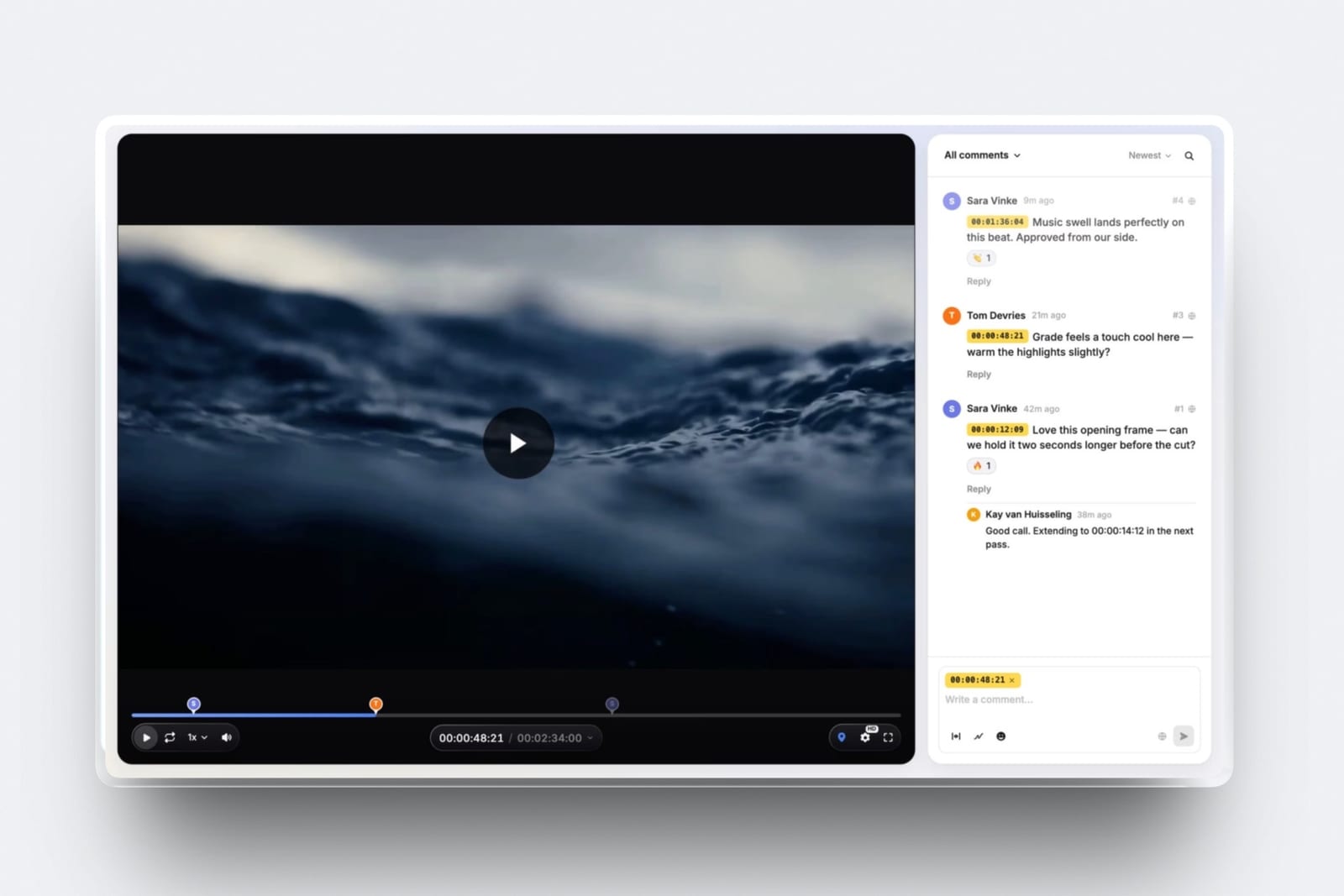
The review half keeps most of what Replay does.
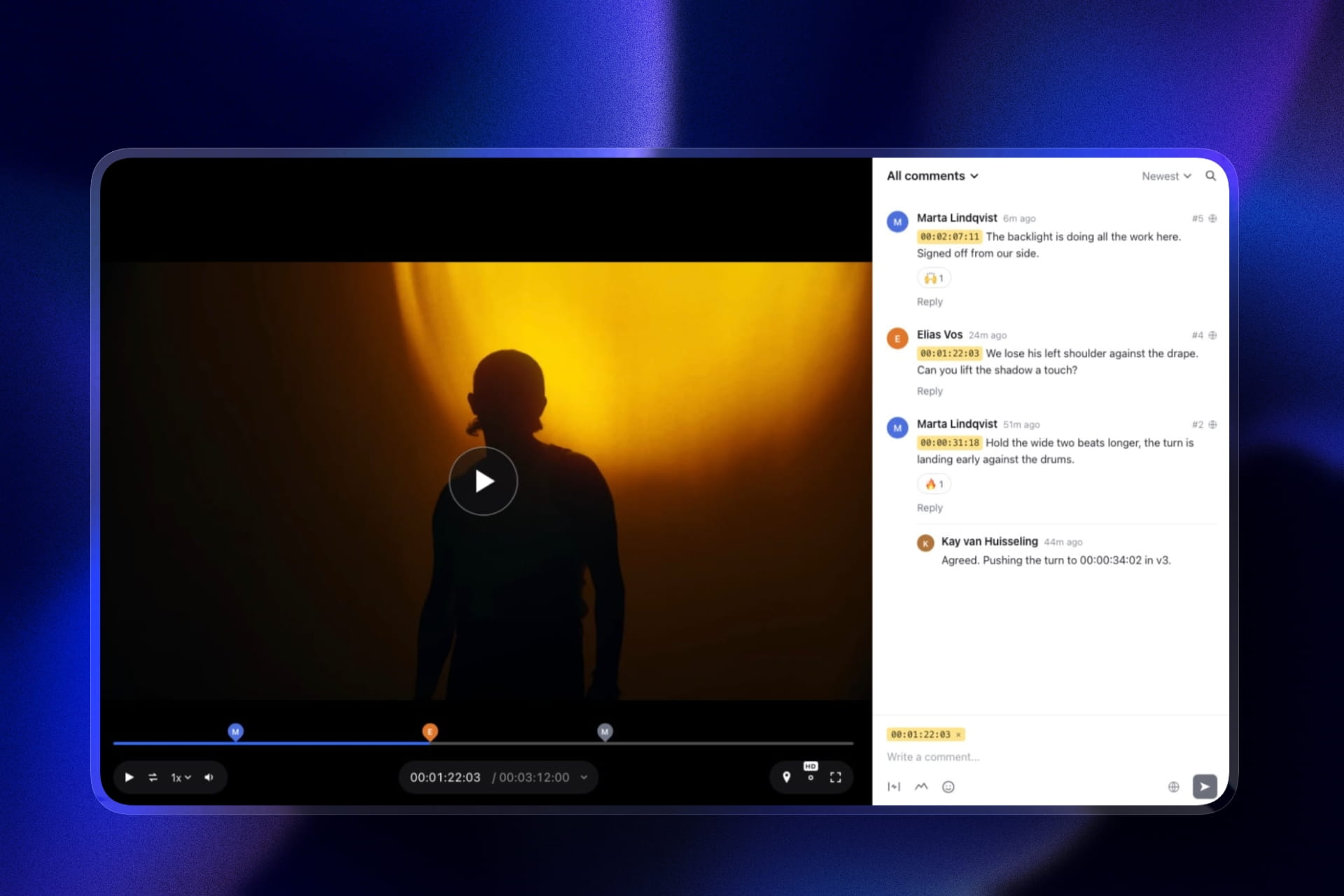
Clients comment at the exact frame or across a range, draw with a pen, arrows, lines, boxes and circles, reply in threads and react, all without an account, just as Replay reviewers need no Dropbox login.
New cuts stack as versions with the old notes kept, and each carries a status: needs review, in progress, approved or needs changes.
The real numberStarter's 50GB pool allows 15GB of video with a 1GB per-file cap, Pro at 19 dollars allows 150GB with 2GB per file, and Business at 39 dollars allows 750GB with 3GB per file. A 2.1GB export like our test commercial therefore needs Business, or a lighter re-export for Pro.
The standout detailthe client-facing page. A password, an email gate, an expiry date with a reminder and a download switch are on the free plan, and the page carries your logo, type and colours, on your own domain from Starter. Replay's review screen is Dropbox's, not yours.
The honest gotchano live sessions with shared cursors, and no sync client. Framekit holds review exports and final deliveries, not a working archive on a collaborator's desktop, so if Dropbox was your archive you keep paying for it.
Skip it ifyou run review calls where several people draw at once. Replay is still the only tool here that does that.
Verdict: the best replacement for the review half of Replay, with a better client page and no upload ceiling, for less than the add-on. Pair it with the Dropbox plan you already have.
2. Krock.io: Closest Structural Replacement
Krock.io is the alternative that most resembles what you had, because it is the only one here that pairs serious storage with review at a price close to a consumer cloud plan. Pro is 10 dollars per user per month with unlimited team size and from 2TB, extra terabytes at 10 dollars a month, and unlimited reviewers on every plan including free.
The real number2TB at 10 dollars per user against Dropbox Plus's 2TB at 9.99 euros, except that Krock.io includes review rather than charging an add-on for it.
Replacing Dropbox plus Replay at roughly 20 euros a month with Krock.io at 10 dollars is a genuine halving, and the file count is unlimited rather than four.
The standout detailreview covers video, image, audio and PDF in one account, with 4K playback named explicitly on Pro. Replay handles video, images and PDFs too, so this is one of the few alternatives that does not narrow your file types on the way out.
The gotchathe free tier is 1 user on 2GB, which is an evaluation account, and the tier above Pro jumps to an Enterprise plan from 400 dollars with 100 users included. There is very little in between, so a mid-size team has one obvious choice and no ladder.
Skip it ifyour files genuinely need to live in Dropbox because collaborators sync them to their desktops. Krock.io is a review platform with storage, not a sync client.
Verdict: the most complete replacement on this page and the one that removes the four-file ceiling without introducing a new bill. The storyboard tool is a bonus neither Replay nor Frame.io offers.
3. Frame.io: The Deeper Review Tool
If you liked Replay's review and found it shallow, Frame.io is the upgrade.
Comments are frame-accurate and range-based so a note can cover several seconds, annotation is on every tier including free, and the comment set downloads and prints with annotation thumbnails while the Premiere Pro and Final Cut panels bring notes into the timeline.
The real numberPro is 15 dollars per member per month with 2TB included plus 2TB per additional member, so one person pays 180 dollars a year against roughly 240 for Dropbox plus Replay, with a substantially better review tool and no sync client.
The standout detailCamera to Cloud on the free plan, moving footage from a supported camera into a project during the shoot. Replay has no equivalent and neither does anything else here.
The gotchafree is 2GB with 2 projects and 2 members, so unlike Replay there is no useful free landing spot, and the client-facing controls you would want, passphrase protection, share expiry and disabling downloads, all start at Pro.
Skip it iflive review sessions were the reason you used Replay. Frame.io is built for asynchronous review and does not replace a call where everyone draws at once.
Verdict: more review than Replay for less than Dropbox plus the add-on, provided you have somewhere else for your masters.

4. Wipster: Annotation Plus Adobe
Light is 9.95 dollars a month billed annually with 50GB for one person, with pinpoint annotation using shapes, arrows and freehand and Premiere Pro and After Effects extensions.
Comments become tasks you check off.
The real number119.40 dollars a year, half the Dropbox plus Replay figure, with 50GB rather than 2TB. That storage difference is the whole decision: enough for review exports, nowhere near enough for masters.
What reviewers say elsewhere4.8 out of 5 across 75 reviews on Capterra.
Verdict: keeps Replay's annotation and adds something Replay lacks entirely, which is feedback appearing next to an Adobe timeline. Team at 19.95 dollars per user makes it expensive as a group.
5. ReviewStudio: Best Free Replacement
Unlimited users and unlimited guests on a free 5GB tier, with drawing, versioning, compare mode, present mode and approvals across all file formats. Pro is 12 dollars per user annually with 25GB per user.
Verdict: the closest free equivalent to Replay's review half, and present mode is the nearest thing here to a live session, though one person drives rather than everyone drawing at once.
6. SyncSketch: If Your Work Is Shot-Based
Indie is 9 dollars per user monthly billed yearly with 15 users, 50GB and 100GB of uploads, and Team at 19 dollars adds 3D support and custom brushes.
Verdict: better drawing than Replay and a presentation mode for driven sessions. Built for animation and VFX, so a mismatch for live-action commercials.

7. Kollaborate: Cheapest Storage Ladder
Twelve published tiers from 7 dollars a month for 30GB to 539 dollars for 10TB, flat per account, with unlimited projects and unlimited bandwidth on every tier.
Verdict: the other genuine storage-plus-review option here, and the one that lets you match storage to your actual footage volume rather than jumping between fixed tiers. The interface is visibly dated.
8. Vimeo: If the Video Goes Public
Starter is about 8 euros a month billed annually with 1 user and 2TB, listing review and collaboration tools as included, with the reviewed file able to become a public embed.
Verdict: the same 2TB as Dropbox Plus for less money, with review included rather than added. Shallower review than Replay and no drawing confirmed in published material.
9. Filestage: Only If You Needed Workflow
Starter is 199 dollars a month with 10 members and 1TB, with reviewer groups, due dates, version comparison and password-protected links.
Verdict: roughly ten times the Dropbox plus Replay bill, and the only entry here that adds sequenced approval. Correct only if the four-file cap was not your real problem.
10. Google Drive: The Free Fallback
15GB free, links that work for anyone, and a comment box attached to the file rather than to the timeline.
Verdict: replaces Dropbox's storage half poorly at small scale and Replay's review half not at all. Listed so you can rule it out deliberately.
The Real Cost of Bundled Review
In one linereview bundled into a storage product is priced as a hook rather than as a feature, and the four-file entitlement is the clearest example of that anywhere in this category.
Follow the money on a single job. Dropbox Plus is 9.99 euros a month for 2TB. Your commercial plus three revision rounds is four files, which fits the bundled Replay entitlement exactly, and your fifth file does not.
Now Replay is an add-on from 10 dollars a month, so your real bill is around 20 euros for one person, of which half is review.
For that same 20 euros you could have Krock.io at 10 dollars with 2TB and unlimited files, or Frame.io at 15 dollars with 2TB and a considerably deeper review tool, or Framekit at 9 dollars plus keeping a cheap storage plan.
In every one of those, review is the product rather than the upsell, and none of them counts your uploads.
The general lesson generalises past Dropbox. Vimeo bundles review into hosting, and its review capability is identical from its cheapest tier to its most expensive, so paying more never improves it.
Dropbox bundles review into storage and meters it at four files. In both cases the bundled feature is there to make the main product stickier, and in both cases a standalone tool at a similar price does more.
The test you can runcount the files you uploaded for review last month, not the projects. If it is more than four, your bundled Replay was already exhausted and you were either paying the add-on or working around it.
What You Give Up Leaving Replay
In one linetwo Replay features have no equivalent anywhere on this page, and one of them is the reason some teams should not switch at all.
Live review with shared cursors. During a Replay live session, every participant sees the others' cursors and drawings appear in real time.
ReviewStudio's present mode and SyncSketch's presentation mode both let one person drive while others watch, which is a different and lesser thing.
If your review is a scheduled call where several people mark up together, nothing here replaces that and staying is defensible.
Storage that holds your masters. Every review tool on this page is sized for compressed exports. Frame.io's 2TB and Krock.io's 2TB come closest, but neither is a sync client that puts files on a collaborator's desktop.
Framekit caps individual files at 2GB on Pro and 3GB on Business, so a 2.1GB file like our test commercial needs Business and a larger master would be refused outright.
Against those, what you gain is straightforward: no upload counter, and review priced as a product. Whether that trade is worth it comes down to whether you ever ran a live session, and most teams we tested with had not.
Which Dropbox Replay Alternative Fits You? A Decision Tree
Work through these in order and stop at the first yes. The first two questions decide whether you should leave at all, which matters more here than which replacement you pick.
- Do you run live review sessions where several people mark up together? Stay on Replay. Nothing on this page reproduces shared-cursor live review.
- Do collaborators sync your masters to their desktops through Dropbox? Keep Dropbox for storage and swap only the Replay add-on, for Framekit at 9 dollars a month or Frame.io at 15.
- Do you want storage and review from one vendor? Krock.io at 10 dollars per user from 2TB, or Kollaborate if you want to match storage to footage volume precisely.
- Do you want the best review available? Frame.io at 15 dollars per member, with range-based comments and editorial panels.
- Do you work in After Effects? Wipster at 9.95 dollars a month.
- Do you want the most polished client-facing review page for the least money? Framekit, remembering the per-file cap of 1GB on Starter, 2GB on Pro and 3GB on Business.
- Do you want to stop paying entirely? ReviewStudio's free tier with unlimited users and guests on 5GB.
- Does the finished video go public from your own account? Vimeo Starter at about 8 euros, where the reviewed file becomes the embed. Our tools to send video to clients guide covers the transfer half of this decision.
Frequently Asked Questions
What is the best Dropbox Replay alternative in 2026?
Framekit is the best Dropbox Replay alternative in 2026 for most people, because it replaces Replay's review half with no monthly upload count, drawing, versions, approvals and guest comments without accounts, at 9 dollars a month, less than the Replay add-on.
Krock.io at 10 dollars per user is the best pick if you want storage from 2TB and review from one vendor, and Frame.io at 15 dollars per member is the deeper review tool for Premiere Pro editors.
Framekit vs Dropbox Replay: which is better for client review?
Framekit is better for asynchronous client review and Replay is better for live sessions.
Framekit has no upload counter, a branded page with a free password, email gate and expiry, drawing, versions and approval statuses, for 9 dollars a month.
Replay bundles only four uploads into paid Dropbox plans, then costs from 10 dollars a month on top of storage, but its live sessions with shared cursors and its sync-ready storage have no equivalent in Framekit.
How many videos can I review with Dropbox Replay?
The Replay entitlement bundled into paid Dropbox plans is listed as four file uploads, alongside live review, versions and video collaboration, on Plus, Standard and Advanced alike.
That is four files in total rather than four projects or four per month, so one job with three revision rounds uses all of them. Beyond that, Replay is an add-on starting at 10 dollars a month.
Is Dropbox Replay included in my Dropbox plan?
Partly, and the distinction matters. Paid Dropbox plans include a four-file Replay entitlement with live review, versions and video collaboration. Full Replay is a separate add-on from 10 dollars a month on top of your storage plan.
Treat the bundled version as a sample rather than as a feature you have already paid for.
What does Dropbox Replay cost in total?
For one person, Dropbox Plus is 9.99 euros a month for 2TB and the Replay add-on starts at 10 dollars, so a realistic combined bill is around 20 euros a month or roughly 240 a year.
Team plans are 12 euros per user for Standard and 18 for Advanced, with the Replay add-on on top. Half of that total is the review half, which is what the alternatives on this page replace.
Which alternatives support drawing on the frame like Replay?
Framekit, Frame.io, Krock.io, ReviewStudio and SyncSketch all support drawn annotation, as do Wipster and Filestage. Kollaborate does not offer a pen, and we could find no confirmation either way for Vimeo.
If your clients mark up frames, restrict the shortlist to tools that keep that capability rather than choosing on price alone.
Can any alternative do live review with shared cursors?
No. Replay's live sessions, where every participant sees the others' cursors and drawings in real time, have no equivalent among these ten alternatives.
ReviewStudio's present mode and SyncSketch's presentation mode both allow one person to drive playback while others observe, which is useful but not the same thing.
If live collaborative markup is central to your process, that is a genuine reason to stay.
Does Framekit store my master files?
No. Framekit's per-file caps are 500MB on free, 1GB on Starter, 2GB on Pro and 3GB on Business, and it rejects sources longer than two hours, so it holds review exports and final deliveries rather than masters, and it has no desktop sync.
If Dropbox was doing double duty as your archive, you will still need storage after switching, and the saving against Dropbox plus Replay is therefore smaller than the headline prices suggest.
Which alternative gives the most storage for the money?
Krock.io Pro at 10 dollars per user includes from 2TB with extra terabytes at 10 dollars a month, and Kollaborate publishes twelve flat-priced tiers up to 10TB for 539 dollars a month, letting you match storage to your actual footage volume.
Vimeo Starter is about 8 euros for 2TB. Frame.io Pro includes 2TB plus 2TB per additional member, which scales with team size rather than need.
Is there a free alternative to Dropbox Replay?
Yes. ReviewStudio's free tier is the strongest, with unlimited users and unlimited guests on 5GB including drawing, versioning, compare mode, present mode and approvals.
Framekit's free plan allows unlimited review projects on 10GB of storage, 3GB of it video, with drawing, password protection and expiry. Krock.io's free plan is one user on 2GB with unlimited reviewers.
Do reviewers need an account on these alternatives?
Mostly not, which is one thing Replay does well and the alternatives largely match. Replay requires no Dropbox account for reviewers. Framekit allows anonymous guest comments and can optionally require an email address or password.
Frame.io, Wipster, ReviewStudio and Krock.io all support external reviewers by link without buying them seats. Verify this before switching, since sign-up friction is the main reason review links go unanswered.
Should I keep Dropbox and just change my review tool?
Often yes, and it is the answer this page arrives at most frequently.
If collaborators sync files to their desktops or your masters genuinely need to live in Dropbox, keep the storage plan and drop only the Replay add-on, replacing it with Framekit at 9 dollars a month, Wipster at 9.95 or Frame.io at 15.
That removes the four-file ceiling while keeping the part of Dropbox that was actually working.
What happens to my Replay comments if I cancel the add-on?
Review history lives with the Replay subscription, as comment history does across this whole category, so export or screenshot anything you may need before cancelling.
None of the alternatives here can import Replay's comment threads or annotations. The practical approach is to finish open jobs on Replay and start new ones elsewhere rather than migrating mid-project.
Final Verdict
Framekit is the best Dropbox Replay alternative in 2026 because it replaces the half of Replay that runs out, the review, with no upload count, drawing, versions and a branded client page for 9 dollars a month, and it pairs with the Dropbox storage most people keep anyway.
Krock.io is the right choice if you want to replace both halves with one vendor, storage from 2TB and review for 10 dollars per user. Frame.io is the better choice if the review itself was the disappointment and you cut in Premiere Pro.
The most useful thing to take from this page is the bundling lesson rather than any single recommendation.
Review attached to a storage product is priced to make the storage stickier, which is why Dropbox meters it at four files and why Vimeo's review never improves no matter how much you pay.
Standalone tools at similar prices consistently do more.
Where Framekit loses, and who should not switch to it. Framekit does not run live sessions with shared cursors and is not a sync client for masters, and its per-file cap is 2GB on Pro and 3GB on Business, so a 2.1GB export needs Business.
Anyone using Dropbox as an archive will still pay for storage after switching to us, and anyone running live markup calls should simply stay on Replay.
If you only ever used Replay asynchronously and your uploads ran past four, almost everything on this page is cheaper and less restrictive than what you have.
Related readingthe 12 best video review tools, the best Frame.io alternatives, post-production collaboration tools, and the best free video review tools.
Competitor prices were read at each vendor's published pricing page in August 2026, and Framekit's plans were checked again in September 2026.
Dropbox served euro figures from our European connection and is quoted in euros for that reason rather than converted, so compare against your own local rates before budgeting.