Framekit templates
Start from a designer-made template
 Use template
 Use template
 Use template
 Use template
 Use template
 Use template
 Use template
 Use template
There are two completely different products hiding behind "I need to send this video to my client", and they are priced on opposite principles.
Transfer tools charge by volume: MASV is 25 cents a gigabyte, so a 400GB rushes drive costs 100 dollars to move once.
Review tools charge by seat or by account: Frame.io is 15 dollars per member a month, Framekit is 9 dollars flat, and both would refuse that 400GB outright.
Almost everyone buys one and needs the other. You buy the transfer tool, the client watches the file, and replies "the middle drags" with no timecode. Or you buy the review tool, try to send the graded master, and hit a per-file cap at 2GB.
This guide was updated in September 2026: Framekit's plans and caps were re-verified after its storage moved to one pool shared by site, galleries and reviews, and the ranking was redone with that change in.
A tool to send video to clients is a service that moves a file or hosts a watchable link on your behalf, and they fall into two categories: transfer services that move large files quickly and expire the link, and review platforms that host a watchable cut and collect timestamped feedback on it.
Very few products do both well, and the two are priced so differently that comparing them on price alone is meaningless.
The best tool to send video to clients in 2026 is Framekit for most freelancers and small studios, because one account sends the cut as a branded review link the client comments on at the exact frame without signing up, then delivers the approved film in a downloadable client gallery, free to start and 9 dollars a month flat on Starter.
The trade-off is file size: Framekit caps one file at 3GB, so MASV at 25 cents a gigabyte is the right tool for masters and rushes, and Frame.io is the better pick when notes must land inside Premiere Pro.
Full disclosure: Framekit is our own product and we rank it first; its entry describes shipped features and published limits, and we link to every other tool. It is not a transfer service: per-file caps of 500MB free, 1GB on Starter, 2GB on Pro and 3GB on Business make it wrong for camera originals, where MASV, Dropbox and LucidLink all beat it, and Frame.io beats it on editing-software panels.
How We Tested 12 Ways to Send Video to Clients
We sent the same job twice through every tool, because the two-product problem only shows up when you try both halves. First, a 41GB folder of camera originals to a colourist, which is a transfer job with no feedback attached.
Second, a 1.4GB graded review export to a client who needed to leave notes on it, which is a review job where transfer speed barely matters. August 2026, fresh accounts, tested from a European connection.
Scoring was on four things. Ceiling: the largest single file the tool accepts. Cost shape: whether you pay by gigabyte, by seat, or a flat account fee, because that determines which job it suits. What the client does: whether they download, watch, or comment. Retention: how long the link lives before it expires.
Measured means we sent it. Verified means the figure came from the vendor's own published pricing page and is linked.
One note on completeness: WeTransfer's pricing page did not render its plan data in either of our fetchers on the test date, so we describe its mechanism rather than quoting numbers we could not confirm, and our WeTransfer alternatives comparison covers that product in detail.
The two products, and the test that tells them apart
Ask what the client does with the file. If they download it, open it in their own software, and reply by email, you have a transfer problem and you should buy by the gigabyte.
If they watch it in a browser and tell you what to change, you have a review problem and you should buy by the account.
The tools that try to do both, Dropbox and Kollaborate most notably, do the first well and the second adequately, and nothing here does both excellently.
What Twelve Tools Cost to Move a Video
Every figure below was read at the vendor's own published pricing page in August 2026, and each one is stated for the same two jobs: a 41GB folder of camera originals and a 1.4GB graded review export.
- The only tool here priced purely by volume is MASV, at 25 cents a gigabyte pay-as-you-go, dropping to between 19 and 23 cents on an annual subscription.
- MASV includes 15GB of transfers free every month with no card and no seat fee, which is the most generous no-commitment transfer allowance in this comparison.
- Moving our 41GB folder once costs about 10.25 dollars on MASV pay-as-you-go and is impossible on every dedicated review tool here, all of which cap individual files well below that.
- The largest single file any review platform in this comparison accepts is 3GB, on Framekit Business.
- 5 days of free storage is included on every MASV upload, after which it is 7 cents a gigabyte a month, which is the clearest published expiry-versus-storage split in the category.
- Review platforms cost between 9 and 15 dollars a month for unlimited sends; transfer platforms cost nothing monthly and everything per gigabyte. At 41GB a week, transfer is the expensive half.
- 0 of 12 tools do both jobs well. Buying one and expecting the other is the single most common mistake in this category.
| Tool | What it is | Largest single file | Cost shape | Client leaves notes |
|---|---|---|---|---|
| Framekit | Review plus delivery galleries | 3GB on Business, 500MB free | Free, then 9 dollars a month flat | Yes, timestamped, with drawing |
| MASV | Transfer | Very large, volume priced | 25 cents per GB, 15GB free monthly | No |
| WeTransfer | Transfer | Plan dependent | Subscription tiers | No |
| Dropbox | Storage and transfer | Very large | 12 euros per user per month | Yes, with Replay add-on |
| Google Drive | Storage | 15GB free tier total | Free, then Workspace | Yes, but not timestamped |
| LucidLink | Shared filesystem | No practical cap | 7 dollars per member | No |
| Frame.io | Review | Storage limited, 2TB on Pro | 15 dollars per member | Yes, best in class |
| Wipster | Review | Storage limited, 50GB | 9.95 dollars a month | Yes, with annotation |
| Vimeo | Hosting and review | 2TB on Starter | About 8 euros a month | Yes, on paid tiers |
| ReviewStudio | Review | 5GB free total | Free, then 12 dollars per user | Yes |
| Kollaborate | Storage and review | Tier dependent, 30GB to 20TB | 7 dollars a month flat | Yes |
| YouTube unlisted | Hosting | Very large | Free | No timecodes |
Not sure which half you need? The decision tree settles it in three questions.
The Best Tools to Send Video to Clients in 2026: Our Rankings
Framekit ranks first because the job most readers have is the one it covers end to end: a cut that needs notes, revised cuts, then a finished film the client keeps. The rest are ranked within the job each one is for, and the first four get full reviews.
1. Framekit: Best Overall for Sending Cuts and Finished Films

Framekit is an AI website builder with video review and client galleries in the same account, and that pairing is why it leads a list about sending video to clients. Most freelancers do not send one thing.
They send a cut that needs notes, two or three revised cuts, and then the finished film the client downloads and keeps. Framekit handles all three under one login, at one address, on one bill.
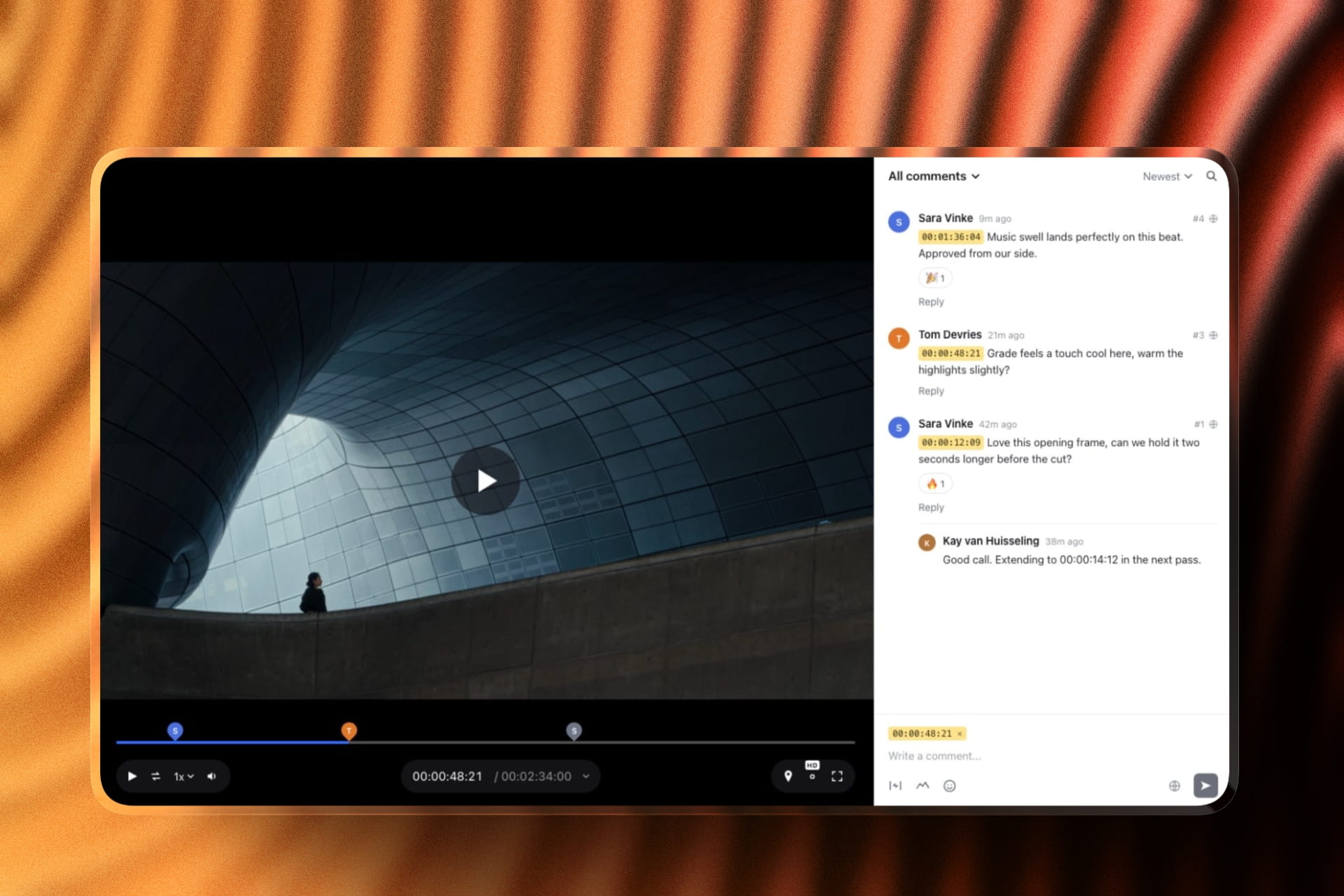
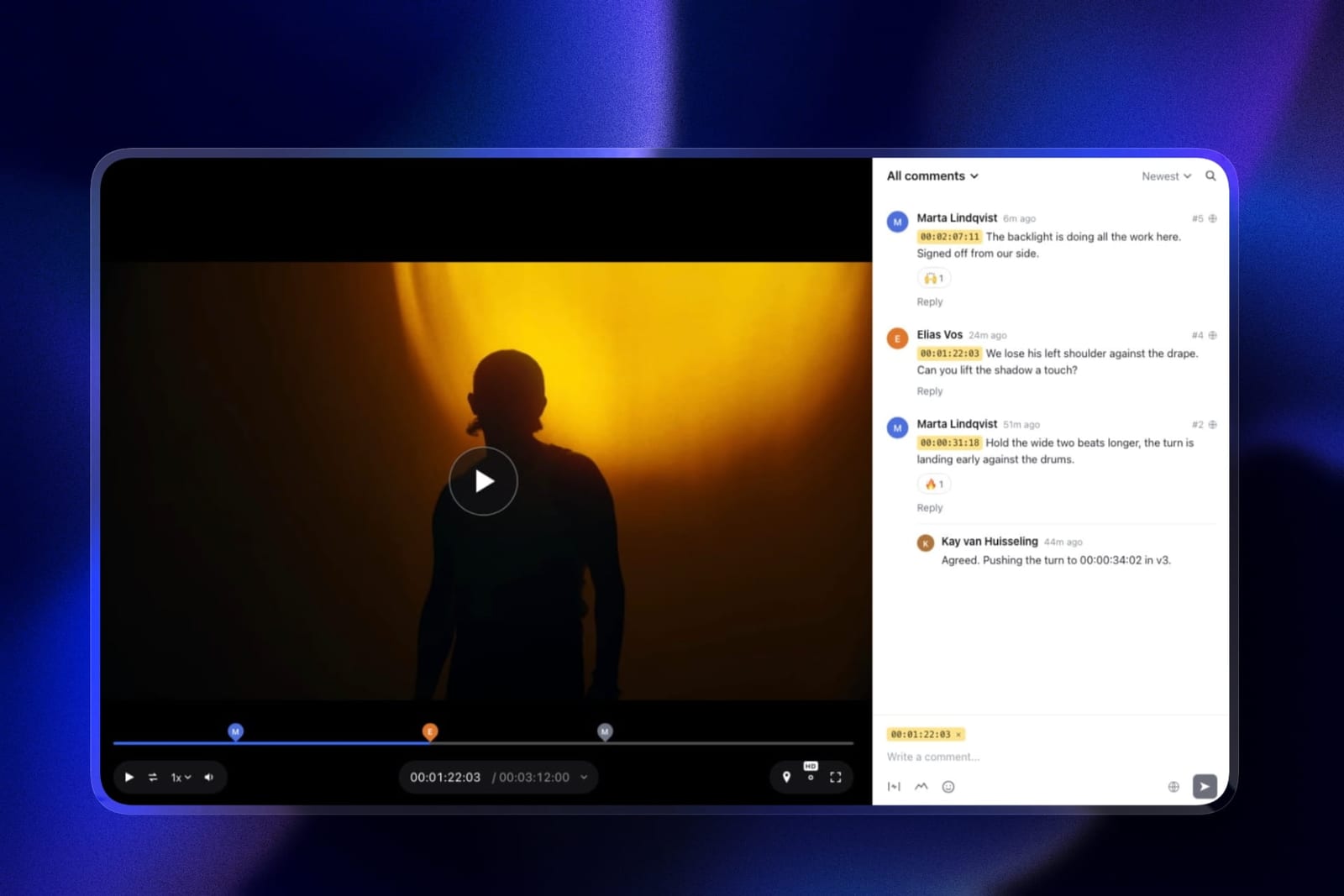
A cut goes out as a review link. The client presses play, pauses and types, and each note becomes a timecode chip that seeks the player, with a pen, arrows and boxes for "move this title" notes and threaded replies underneath.
A new version stacks on the old one with its notes still attached, and the client can mark it approved from the same page. Nobody needs an account.
The approved film then goes into a client gallery beside the stills from the same shoot, one link, downloadable in full, and gallery videos are never watermarked.
The real number9 dollars a month on Starter buys 50GB of storage shared across your site, galleries and reviews, of which 15GB can be video. That is room for ten rounds of a 1.4GB review export.
Free gives 10GB, 3GB of it video, with a 500MB per-file cap, which is enough to run the whole flow on a real short before paying.
The standout detailthe privacy controls clients ask about are on the free plan: a password, an email gate before the page opens, an expiry date with a reminder, and a switch that turns downloads on or off.
Frame.io keeps passphrases and expiry for its paid tier.
There is also a Team visibility on comments you post from your account, so a note to yourself, a grade reminder for the colourist, say, sits on the same cut and the client never sees it.
The honest gotchasize. One file can be 500MB on free, 1GB on Starter, 2GB on Pro and 3GB on Business, and sources over two hours are rejected. A 41GB folder of camera originals cannot go through it at all.
There are no Premiere Pro or Resolve panels either, so notes are read in the browser rather than on your timeline.
Skip it ifmost of what you send is masters and rushes going to colourists and editors. MASV is built for that and Framekit is not.
Verdict: the best single place to send a client the video they will watch, comment on and keep. Pair it with MASV for the day a 40GB folder has to move.
2. MASV: Best for Sending Large Files
MASV is built for exactly the job that breaks every other tool on this page: moving a very large amount of video to someone else, once, quickly, without either party subscribing to anything.
There are no per-seat fees at all, which for a freelancer sending to a colourist twice a year is the entire argument.
The real number25 cents a gigabyte pay-as-you-go after 15GB free each month, falling to between 19 and 23 cents on an annual subscription with monthly allowances from 250GB to 5TB priced between 58 and 973 dollars a month.
Our 41GB folder costs about 10.25 dollars to send once at the pay-as-you-go rate, and about 6.50 dollars on the cheapest annual rate.
The standout detailthe storage model is published as a separate line rather than buried. Every upload includes 5 days of free storage, after which it is 7 cents a gigabyte a month.
That is unusually honest, and it lets you calculate the cost of a client who takes three weeks to download something, which is a real and normally invisible expense.
The gotchait does not do review. Your client downloads the file and tells you what they think however they normally would, which is usually an email with no timecodes. If the reason you are sending the video is to get notes, MASV solves the wrong half.
Skip it ifyou send the same small review export weekly. At 1.4GB a week you are inside the free 15GB allowance, and a flat-rate review tool gives you feedback collection for a similar total.
Verdict: the correct tool for masters, rushes and anything a client opens in their own software, and the pricing model that matches the job. Pair it with a review tool rather than choosing between them.
3. Frame.io: Best for Notes That Land in Premiere Pro
If the point of sending the video is a conversation that continues inside your editing software, Frame.io is the deepest answer here.
The client watches in a browser, leaves frame-accurate and range-based comments, draws on the frame, and the notes come back into your timeline through the Premiere Pro and Final Cut panels.
The real numberPro is 15 dollars per member per month with 2TB included, so sending is effectively unlimited within your storage rather than metered per transfer.
Against MASV, the crossover is roughly 60GB a month: below that MASV is cheaper, above it Frame.io's flat storage wins, and Frame.io gives you the feedback for free.
The standout detailshare controls are the part that matters when you are sending to a client rather than a colleague.
Passphrase protection, share link expiry, disabling downloads and custom-branded shares all start at Pro, which means the free plan's shares are open links you would not send to a brand.
The gotchafree is 2GB with 2 projects and 2 members, which is a demo rather than a sending plan.
Verdict: the deepest review tool here, especially for Adobe and Apple editors, and adequate rather than good at the transfer half because storage is a ceiling rather than a pipe.
4. Dropbox: Best If You Need Both and Will Accept Compromise
Dropbox genuinely does both jobs, which almost nothing here does.
Files transfer at scale, and Replay adds frame-accurate comments, drawing and live sessions as an add-on from 10 dollars a month on top of a plan that starts at 12 euros per user per month for teams.
The gotchathe Replay entitlement bundled into paid Dropbox plans is listed as four file uploads. Four, in total, not four a month as far as the plan table states.
One job with three rounds exhausts it, so the honest way to budget Replay is as a paid add-on rather than as something included.
Verdict: the most convenient answer if your files already live in Dropbox, and a compromise on both halves. Buy the add-on knowingly rather than assuming the bundled entitlement covers you.

5. LucidLink: Best When the Client Is Really a Collaborator
Worth including because a lot of "sending video to a client" is actually sending it to a colourist, a sound mixer or a second editor, and for those people you should not be sending anything at all.
LucidLink mounts shared media as a filesystem that streams on demand, so the file is simply there.
The real numberStarter is 7 dollars per member per month with 100GB per member pooled across the workspace; Business is 27 dollars per member with 400GB per member pooled.
Egress is included in the AWS storage cost, which removes the transfer-fee surprise that makes raw cloud buckets hard to budget.
Verdict: the right answer for a recurring collaborator and the wrong one for a one-off client, who will not install a filesystem to watch your cut.
6. Vimeo: Send Once, Publish the Same File
Starter is about 8 euros a month billed annually with 2TB and one user, and lists review and collaboration tools as an included feature. Standard at 19 euros covers five users and 4TB.
The standout detailthe file the client reviews can become the embed on your website without a second upload, which no dedicated review or transfer tool here can do.
Verdict: good value if the same video has a public life after approval. The free tier is hosting only, with review tools starting on paid.
7. Wipster: Review Link With Notes That Reach Adobe
Light is 9.95 dollars a month with 50GB for one person, with pinpoint annotation and Premiere Pro and After Effects extensions. Comments become tasks you check off.
Verdict: the value pick if you work in After Effects and want the client's notes beside your timeline. Storage-limited like every review tool, so not a transfer route.
8. WeTransfer: The Default Everyone Knows
The name most clients recognise, which genuinely matters: a link they have seen before gets opened. The model is a size-capped transfer with an expiring link, paid tiers raising the cap and extending retention.
The gotchaexpiry is the whole design. A client who opens the email three weeks late finds nothing, and there is no timestamped feedback at any tier.
Since its pricing page would not render its plan data for us on the test date, we are not quoting figures here; our WeTransfer alternatives guide covers the specifics.
Verdict: fine for one-off delivery to someone who will download it promptly. Not a review tool and never claimed to be.

9. Google Drive: Free, Universal, Ambiguous
15GB free, a link that works for anyone, and a comment box, which is more than most paid tools give away. Your client almost certainly already has an account, and that alone removes the most common reason a link goes unopened.
The gotchacomments attach to the file rather than the timeline, so the note reads "around 1:12" and you scrub to discover they meant 1:19. That ambiguity is paid in revision rounds rather than dollars, and one extra round costs more than a year of any review tool here.
Verdict: the best free way to move a moderate file and a poor way to collect a decision.
10. ReviewStudio: Most Free Reviewer Seats
ReviewStudio gives away unlimited users and unlimited guests on a free 5GB tier, with versioning, compare mode, present mode and approval management included rather than held back.
Pro is 12 dollars per user annually and Advanced is 20 with a five-user minimum.
Verdict: send to a large group for nothing. 5GB total is the ceiling, so it is a review tool with a small pipe.
11. Kollaborate: Flat Storage With Review Attached
Twelve published tiers from 7 dollars a month for 30GB up to 539 dollars for 10TB, flat per account rather than per seat, with unlimited projects and unlimited bandwidth on every tier.
Verdict: unusually good value for storage plus review at a matched size, with an interface your client will notice is old.
12. YouTube Unlisted: Free and Uncontrolled
Free, unlimited in volume, plays on any device your client owns, and needs no account or install from them, which is a genuinely low barrier that nothing else on this page matches.
The gotchaunlisted is not private, there is no password, no expiry, no download control and no timecodes on comments, and the grade you approved gets re-encoded into one you did not.
Verdict: acceptable for a rough cut to a friend. Wrong for client work under NDA and wrong whenever the grade is the point.
What It Actually Costs to Move a Terabyte
In one linetransfer is priced by volume and review is priced by access, so the cheaper option flips entirely depending on whether your bottleneck is gigabytes or people.
Price a year of realistic work. A wedding filmmaker sending one 1.4GB review export a week moves about 73GB a year.
On MASV that fits inside the free 15GB monthly allowance almost every month and costs close to nothing, but collects no feedback. On Framekit Starter it is 108 dollars a year with unlimited timestamped notes from unlimited reviewers.
Now a documentary team shipping 41GB of rushes to a colourist four times a year. That is 164GB, about 41 dollars on MASV pay-as-you-go, and impossible on every review platform in this comparison.
There is no seat count at which Frame.io or Framekit becomes able to accept a 41GB file.
The two curves never cross, because they measure different things. That is why the recommendation in this category is almost always two tools rather than one, and why the combined bill is usually smaller than a single product that claims to cover both.
The test you can runadd up last year's outgoing video by gigabytes, then count how many people needed to comment on it. If the gigabytes number is large and the people number is small, buy transfer. If it is the reverse, buy review.
Most freelancers discover both numbers are modest, which is why the cheap end of both columns is usually correct.

What Your Client Actually Sees
In one linethe difference between a link that gets watched and one that gets ignored is almost entirely about what happens in the first five seconds, and transfer tools and review tools fail differently there.
A transfer link asks the client to download something. That means waiting, storage on their machine, and opening a player they may not have. Every step is a chance for the link to go unanswered, and a client who has to download a 1.4GB file to give you a note usually does not.
A review link asks them to press play. No account on the good ones, no install, and the comment box is on the same screen as the video.
Framekit, Frame.io, Wipster, ReviewStudio and Vimeo all work this way, and it is the single biggest reason review tools get better response rates than transfer tools for feedback.
The exception is the professional collaborator. A colourist wants the file, not a stream, and sending them a review link instead of the master is the mirror image of the same mistake.
Transfer or Review? A Decision Tree
Work through these in order and stop at the first yes, because the first question eliminates more of this page than the other two combined.
- Will the client open the file in their own software? You need transfer. MASV at 25 cents a gigabyte, or Dropbox if they already use it. Stop here.
- Is the file over 3GB? No review platform in this comparison accepts it. Transfer it, and send a smaller review export separately if you need notes.
- Do you need timestamped feedback? Framekit if you want frame-accurate notes, drawing, version stacks and a branded page with no per-seat price. Frame.io if the notes must arrive inside Premiere Pro or Final Cut. Wipster if you work in After Effects.
- Do more than five people need to comment? ReviewStudio's free tier, or Framekit, since neither charges per reviewer.
- Is the recipient a recurring collaborator rather than a client? LucidLink, and stop sending anything.
- Does the same video get published afterwards? Vimeo, so the reviewed file becomes the embed.
- Does the approved film need a proper handover, with the stills from the same shoot? Framekit's client galleries hold photos and videos in one downloadable link, in the same account as your reviews. Our client gallery platforms guide covers the stills half.
Frequently Asked Questions
What is the best tool to send video to clients in 2026?
Framekit is the best tool to send video to clients for most freelancers and small studios in 2026, because the same account sends a cut as a review link with frame-accurate comments, keeps every version with its notes, and delivers the approved film in a downloadable client gallery, free to start and 9 dollars a month on Starter.
For files over 3GB, such as masters and rushes, MASV is the better tool at 25 cents a gigabyte.
Framekit vs MASV: which should I use to send video to a client?
Use Framekit when the client needs to watch and respond, and MASV when they need the file itself. Framekit hosts a playable, branded link with timestamped comments and approval, capped at 3GB per file on Business.
MASV moves files of almost any size at 25 cents a gigabyte after 15GB free each month, and collects no feedback. Many editors use both: Framekit for cuts and finals, MASV for the occasional master.
What is the best way to send a large video file to a client?
MASV is the best way to send large video files, at 25 cents a gigabyte pay-as-you-go with 15GB free every month and no per-seat fees, dropping to between 19 and 23 cents a gigabyte on an annual subscription.
Every dedicated review platform in this comparison caps individual files well below the size at which this matters, with the highest ceiling being 3GB on Framekit Business.
What is the largest file I can send through a video review tool?
3GB, on Framekit's Business plan, which is the highest published per-file cap among the review platforms here. Framekit allows 500MB on free, 1GB on Starter and 2GB on Pro, and rejects source files longer than two hours.
Frame.io, Wipster and ReviewStudio limit total storage rather than per-file size, so a very large single file will consume a plan rather than be refused outright.
How much does it cost to send 100GB of video?
About 25 dollars on MASV pay-as-you-go after the free 15GB monthly allowance, or roughly 19 to 23 dollars on an annual MASV subscription. Storage beyond the included 5 free days is 7 cents a gigabyte a month.
On seat-priced review tools the question does not apply, because they cap file size rather than charging by volume and would refuse the transfer.
Can I send video and collect feedback in one tool?
Partly, on Dropbox and Kollaborate, and not excellently anywhere. Dropbox moves large files and adds frame-accurate review through the Replay add-on from 10 dollars a month, with only four file uploads bundled into paid plans.
Kollaborate combines flat-rate storage from 7 dollars a month with review. Most working setups use a transfer tool and a review tool separately, and the combined bill is usually lower than a single product covering both.
Does Framekit work for sending master files to a colourist?
No. Framekit's per-file caps are 500MB on free, 1GB on Starter, 2GB on Pro and 3GB on Business, and it rejects sources over two hours, so a typical camera-original folder or graded master will not upload.
Use MASV or Dropbox for that, and use Framekit for the watchable review export that the client comments on.
How long do sent video links stay live?
It varies by model and it is the most commonly overlooked detail. MASV includes 5 days of free storage per upload and then charges 7 cents a gigabyte a month. WeTransfer is built around expiring links, with paid tiers extending retention.
Review platforms keep the file as long as it is inside your storage allowance, and Framekit, Frame.io and Ziflow all let you set a deliberate expiry date on a share.
Do clients need an account to watch or comment?
Not on most review tools. Framekit allows anonymous guest comments by default and can optionally require an email address or password first.
Frame.io, Wipster and ReviewStudio all support external reviewers by link without buying them seats. Dropbox Replay explicitly does not require a Dropbox account to leave feedback.
Requiring sign-up is the most common reason a link goes unanswered.
Is WeTransfer good enough for client video?
For one-off delivery to someone who will download it promptly, yes, and its familiarity genuinely helps get links opened.
It is not a review tool at any tier, so the client's response arrives as an email without timecodes, and its expiring links mean a slow client finds nothing. Our WeTransfer alternatives comparison covers its current plans in detail.
What is the cheapest way to send video to clients?
If the client only needs to watch and comment, ReviewStudio's free tier with unlimited users on 5GB, or Framekit's free plan with no cap on review projects and 10GB of storage, 3GB of it video, both cost nothing.
If the client needs the actual file, MASV's 15GB free monthly allowance covers a surprising amount of routine delivery before any charge applies.
Should I send a master or a review export?
A review export, almost always. A 1.4GB H.264 at 1080p is watchable on any device, uploads to any review platform, and gives the client everything they need to judge pacing, structure and grade direction.
Send the master only to someone who will work on it, and use a transfer tool priced by the gigabyte to do it.
Why do transfer tools not have timestamped comments?
Because they are solving a different problem and pricing it differently. Transfer is metered by volume and optimised for speed to one recipient; review is priced by access and optimised for a conversation between several people.
Building the second into the first would mean storing files long enough to discuss them, which conflicts with the expiring-link model that makes transfer cheap.
What happens if my client cannot open the video?
This is the strongest practical argument for review platforms over transfer for client work.
A review link plays in a browser with no download and no codec question, while a transfer link hands over a file that may need software the client does not have.
If you must send a file, send an H.264 MP4 rather than ProRes or a camera original, because that is the format that opens everywhere.
Final Verdict
Framekit is the best tool to send video to clients when what you send is a cut, a revision and a finished film, which describes most freelance and small-studio work.
One account covers the review link, the version history, the approval and the final download, free to start and 9 dollars a month on Starter, with no charge per reviewer.
MASV is the best tool when sending is literally the job, at 25 cents a gigabyte with 15GB free monthly. Frame.io is the pick when notes must land in your editing software.
Where Framekit loses, and who should not use it. Framekit is not a transfer tool.
Its per-file cap tops out at 3GB and it rejects sources over two hours, so it will not move a master, a rushes folder or a long assembly, and MASV, Dropbox and LucidLink all beat it outright at that job.
It also has no Premiere Pro, Final Cut or Resolve panel, which makes Frame.io a better fit for an editor who wants notes on the timeline. If most of your sending is to colourists and second editors, start with MASV or LucidLink, not us.
Work out which half of the problem you have before you look at a single price. The two halves are priced on different axes, and a comparison that puts them in one table, including the one above, is only useful once you know which column you are reading.
Related readingthe 12 best video review tools, the best WeTransfer alternatives, post-production collaboration tools, and the best free video review tools.
If the video is a reel rather than a deliverable, see showreel hosting platforms.
If whose logo appears on the page matters, see white label client review tools.
Competitor figures above were read at each vendor's published pricing page in August 2026, with one stated exception: WeTransfer's plan data did not render for us on the test date and is described by mechanism rather than by number.
Framekit's plans, storage and per-file caps were re-verified against its live pricing page in September 2026.