Framekit templates
Start from a designer-made template
 Use template
 Use template
 Use template
 Use template
 Use template
 Use template
 Use template
 Use template
Nothing on this page costs enough to matter. The most expensive sensible option for one person is 180 dollars a year. The cheapest is nothing. Against a freelance day rate, the entire category rounds to a rounding error.
What matters is the round you did not bill for. A client writes "the middle feels slow", you guess, you export, you are wrong, and you spend most of a day on a revision nobody agreed to and nobody is paying for.
That single day, at almost any freelance rate, costs more than every tool in this comparison combined for a year.
So the question for a freelance editor is not which video review tool is cheapest. It is which one removes the specific ambiguity that keeps costing you days.
Framekit's prices below were re-verified in September 2026, and the ranking was redone after it added drawing on the frame and a larger shared storage pool.
A video review tool for freelance editors is a platform that hosts your cut, gives a client a link that needs no account, and attaches every comment to an exact timecode so a note lands on a frame rather than in a paragraph.
The best video review tool for freelance editors in 2026 is Framekit, because it removes the ambiguities that cause unbilled rounds on every plan including free: frame-accurate comments, drawing on the frame, notes you tick off, unlimited concurrent projects and client links that need no account, from 9 dollars a month, alongside the portfolio site that wins the next job.
The trade-off is that notes stay in the browser, so Wipster at 9.95 dollars is the better pick if you want them inside Premiere Pro or After Effects, and Frame.io at 15 dollars per member is the answer for Final Cut.
Full disclosure: Framekit is our own product and we rank it first, based on what it ships rather than a test we ran on it, with every other tool linked. Wipster and Frame.io both put client notes into your editing software and we do not, which is the one ambiguity we leave in place.
How We Tested 12 Tools for Freelance Editors
We ran a freelancer's month rather than a studio's project: four jobs live at once, at different stages, each with two or three versions, roughly 12GB of review exports, and clients who would not create an account for anything.
Then we counted the friction points that turn into unbilled work, which is the only measure that matters at this scale.
Three ambiguities cause almost all of it. When a note applies, which timestamps fix and email does not. Where in the frame, which only annotation fixes.
And what happened to it, which is the note you forgot because it was in a thread rather than on a list.
Measured means we ran the four jobs. Verified means the figure was read at the vendor's own published pricing page and linked inline.
Why project count matters more than storage for a freelancer
Studios run out of gigabytes; freelancers run out of slots. Four jobs live at once is normal freelance practice, and it is also exactly where several of these tools stop. Frame.io's free tier allows two projects.
Filestage's free tier allows one active project and five new files a month.
If you are juggling four clients, a tool that caps projects will force you to delete a finished job, which deletes its comment history and its approval record with it, at the precise moment a client asks what they signed off on.
What a Freelance Editor Actually Pays
Every figure below was read at the vendor's own published pricing page in August 2026 and priced for one person running four concurrent jobs, which is the workload that separates these tools far more sharply than storage does.
- The whole viable range for one editor is 0 to 180 dollars a year. Against a single unbilled day at a typical freelance rate, every option here is inside the noise.
- 4 of 12 tools cap concurrent projects on their entry or free tier, which is the constraint that actually bites a freelancer: Frame.io at 2 free, Filestage at 1 active, Krock.io free at 1 user, GoVisually Lite at 15 active.
- 3 of 12 allow unlimited review projects on a free plan: Framekit, ReviewStudio and Kollaborate on paid.
- Only 1 tool at a solo price puts client notes into an editing application: Wipster, at 9.95 dollars a month, covering Premiere Pro and After Effects.
- The cheapest paid option is Kollaborate Basic at 7 dollars a month for 30GB, then Framekit Starter at 9, then Wipster Light at 9.95.
- 5 of 12 let a client comment with no account at all, which is the single biggest determinant of whether a review link gets answered.
- 0 of 12 cost enough for price to be the deciding factor for a working freelancer.
| Tool | One editor, 1 year | Concurrent projects | Annotation | Notes reach your NLE |
|---|---|---|---|---|
| Framekit | Free, or 108 dollars | Unlimited, even free | Yes, pen and shapes | No |
| Wipster | 119.40 dollars | Unlimited | Yes | Premiere Pro, After Effects |
| Frame.io | 180 dollars | Unlimited on Pro, 2 free | Yes | Premiere Pro, Final Cut |
| SyncSketch | 108 dollars | Unlimited | Yes, brushes | No |
| Krock.io | 120 dollars | Unlimited | Yes | No |
| ReviewStudio | Free, then 144 dollars | Unlimited | Yes | No |
| Kollaborate | 84 dollars | Unlimited | No | No |
| Vimeo | About 96 euros | Unlimited | Not confirmed | No |
| Dropbox Replay | From 120 dollars plus storage | Four bundled uploads | Yes, live | No |
| MASV | Pay per GB, 15GB free monthly | Not applicable | No | No |
| Google Drive | Free | Unlimited | No | No |
| Loom | Free, then 216 dollars | 25 videos free | No | No |
Jump to the decision tree if you already know which ambiguity is costing you.
The Best Video Review Tools for Freelance Editors in 2026
Ranked on how much unbilled work each one removes for a single editor, not on feature count, because a freelancer's constraint is time rather than capability. The first four get full reviews.
1. Framekit: Best Video Review Tool for Freelance Editors

Framekit is an AI website builder with video review built in, and for a freelancer it goes after all three ambiguities this page is about.
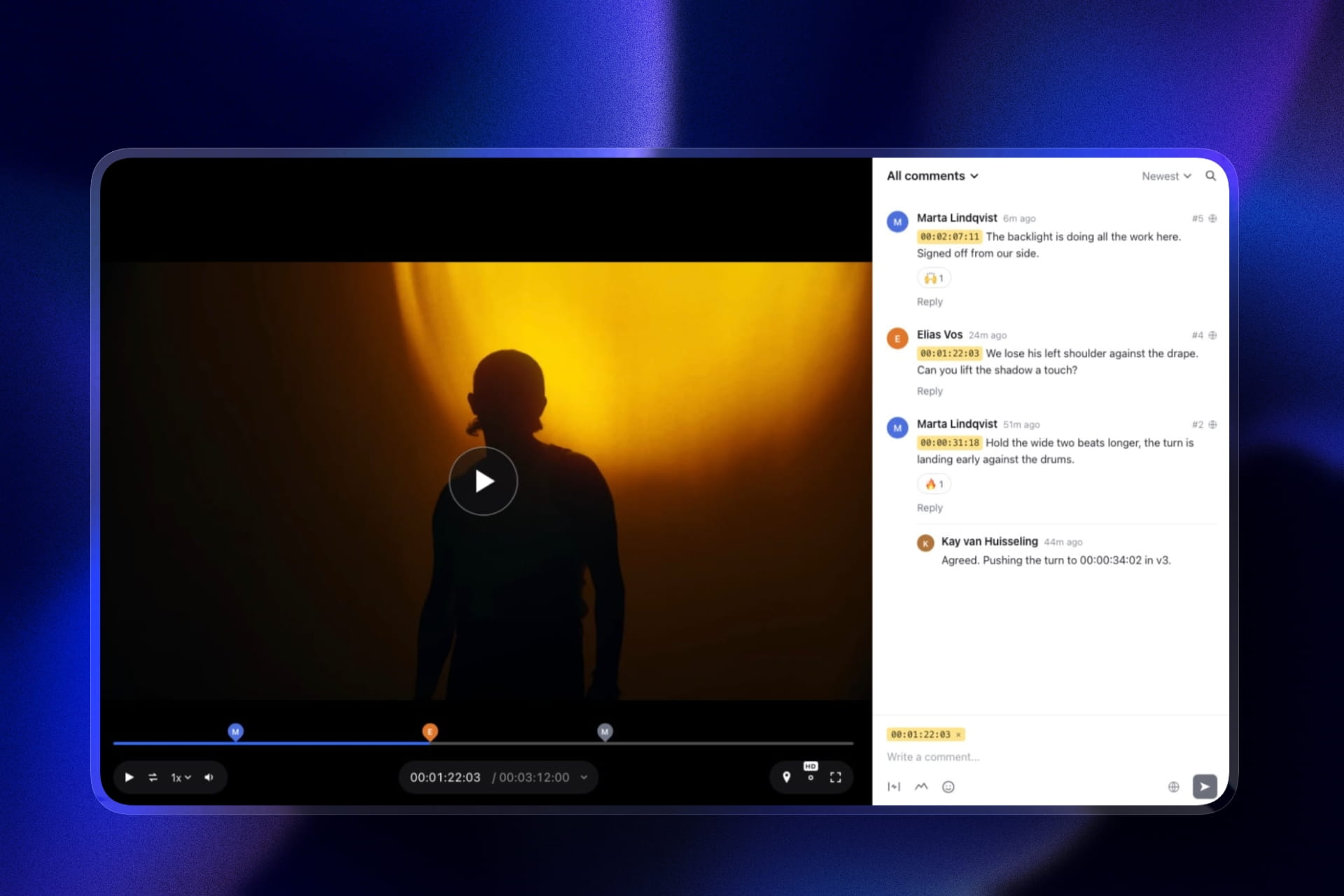
When: every comment pins to a frame or an in-and-out range, shown as a timecode chip that jumps the player there. Where: clients draw with a pen, arrows, lines, boxes and circles on the paused frame.
What happened to it: each note can be ticked complete, the sidebar filters to unresolved, and finished notes sink out of the way, so v3 goes out without a forgotten note from v1.
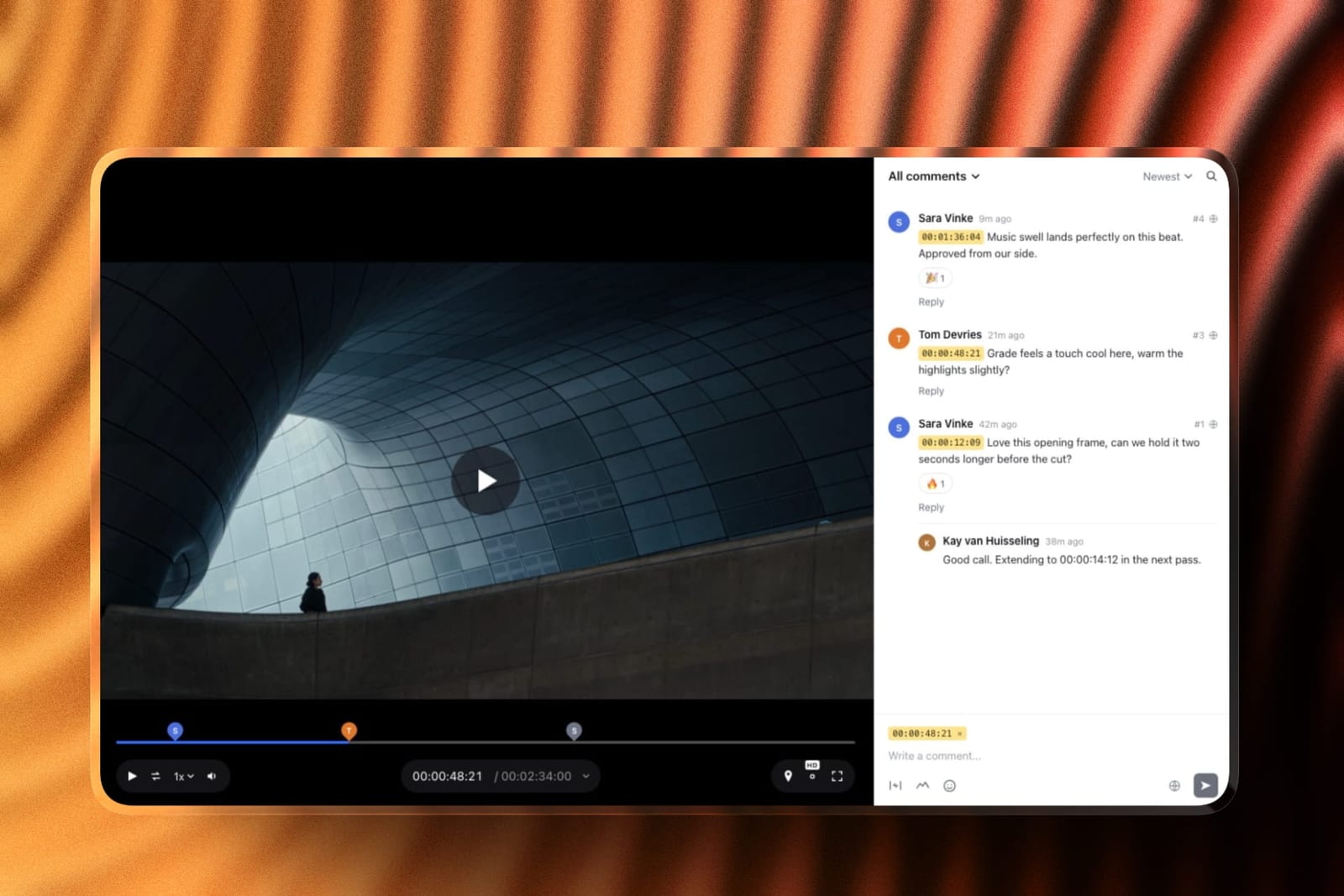
Review projects have no count limit on any plan, which covers the four-jobs-at-once norm on the free tier, and clients comment as guests with no account and no charge per person.
New cuts stack on the old ones with their notes kept, and the client sets the status to approved or needs changes on the page, which gives you a dated record when "one small change" arrives three weeks later.
The real numberfree is 10GB of storage with 3GB of video and a 500MB per-file cap. Starter at 9 dollars a month, 108 a year, is a 50GB pool with 15GB of video and a 1GB cap, room for roughly twelve 1.2GB exports live at once.
The standout detailthe client-facing controls are free. A password, an email gate, an expiry date with a reminder and a download switch come on every plan, where Frame.io keeps passphrases and expiry for Pro at 180 dollars a year.
And the review page sits on the same account as your portfolio site and client galleries, so the client who approves the cut is one click from your reel.
The honest gotchano Premiere Pro, After Effects or Final Cut panel. You read notes in a browser and jump to each timecode yourself. On a forty-note round that is real minutes, and Wipster's extension exists to remove them.
Skip it ifretyping notes into your timeline is the thing that costs you days. Wipster or Frame.io fixes that; Framekit does not.
Verdict: the best all-round review tool for a freelance editor, because it closes the when, where and what-happened gaps on every plan including free and puts your portfolio one click away. Pick Wipster instead only if the Adobe panel is the point.
2. Wipster: Best for Adobe Editors
Wipster is one of very few platforms in this category that sells a genuine individual plan rather than a team plan you happen to be alone on, and for a freelance editor that shows up in the price and in what is included at it. Light is 9.95 dollars a month billed annually with 50GB, unlimited projects and unlimited sharing.
The real number119.40 dollars a year, and it includes pinpoint annotation with shapes, arrows and freehand drawing plus the Premiere Pro and After Effects extensions.
Frame.io charges 180 dollars a year for the equivalent combination. No other tool at a solo price does both.
The standout detailcomments become tasks you check off as you complete them. This sounds like project-management garnish and turns out to be the feature freelancers miss most when they leave.
With forty notes across three versions and four clients running simultaneously, the difference between a comment thread and a checklist is whether you deliver having missed something, and a missed note is exactly the unbilled round this article is about.
The gotchathe pricing inverts the moment you are not alone. Team is 19.95 dollars per user monthly, so three people cost 718.20 dollars a year, more than Frame.io Pro for the same three. If you are planning to bring on an assistant, budget for leaving.
Skip it ifyou cut in Final Cut Pro. The extensions cover Premiere Pro and After Effects only, and Frame.io is the tool that covers Final Cut.
What reviewers say elsewhere4.8 out of 5 across 75 reviews on Capterra, a high score on a smaller sample than the category leaders.
Verdict: the best value for a working freelance editor in Adobe, because it removes both the where-in-the-frame ambiguity and the retyping, at a price below Frame.io, its closest rival for that job.
3. Frame.io: The Upgrade
Pro is 15 dollars per member per month with 2TB, frame-accurate range-based comments so a note can span several seconds, drawn annotation, version stacks, a comparison viewer, and panels for both Premiere Pro and Final Cut Pro.
The real number180 dollars a year for one person, about 61 dollars more than Wipster Light, buying Final Cut support, range comments and forty times the storage.
The gotchathe free tier caps you at 2 projects and 2 members, which for a freelancer running four jobs is unusable, and the client-facing share controls all start at Pro. So Frame.io is a paid tool for freelancers with no meaningful free option.
Verdict: the correct choice for a freelance editor in Final Cut, and the better tool generally. Worth the extra 61 dollars if you use either thing it adds.
4. SyncSketch: If You Cut Animation
Indie is 9 dollars per user monthly billed yearly with 50GB, 100GB of uploads and up to 15 users, which is the same storage as Wipster Light for slightly less.
The standout detailthe PDF summary exports a review session with screenshots, annotations and comments as a document anyone can open. For a freelancer passing notes to a motion designer or a sound editor who has no account anywhere, that artifact saves a conversation.
Verdict: better drawing than anything else at this price and built for shot-based work. A mismatch if you cut live action.
5. ReviewStudio: Best Free Option
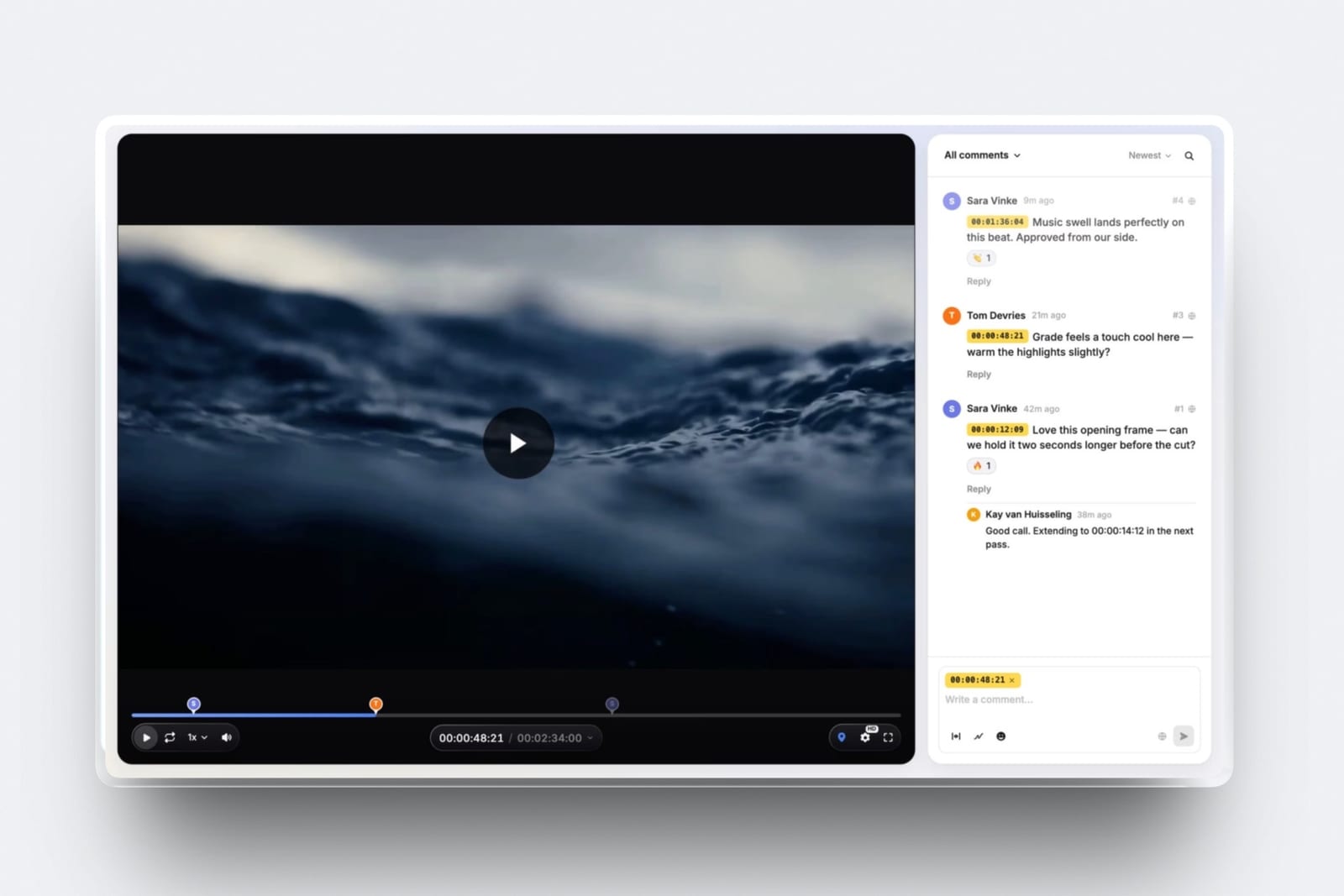
ReviewStudio hands a solo editor unlimited users and unlimited guests on a free 5GB tier, with drawing, versioning, compare mode, present mode and approval management included rather than reserved for a paid plan, which is more than most vendors give away at any price.
Verdict: the most capable free plan for a freelancer who wants annotation without paying. 5GB is tight across four concurrent jobs, which is the constraint rather than features.
6. Krock.io: Most Storage
Pro is 10 dollars per user monthly with unlimited team size and from 2TB, unlimited reviewers on every plan, 4K playback named explicitly, and review across video, image, audio and PDF.
Verdict: roughly Wipster's price for forty times the storage, without the Adobe extensions. The answer if you keep hitting a ceiling rather than an ambiguity.
7. Kollaborate: Cheapest Paid
Basic is 7 dollars a month or 60 dollars a year for 30GB, with unlimited projects and unlimited bandwidth, and the individual tiers explicitly carry no team members, which is honest packaging for a solo buyer.
Verdict: the lowest paid price here. Dated interface, which matters when a new client sees it.
8. Vimeo: If Your Work Goes Public
Starter is about 8 euros a month billed annually with 1 user and 2TB, review and collaboration tools included, and the reviewed file can become the public embed without a second upload.
Verdict: good value if your finished work streams from your own account. A shallow review tool bought for its hosting.
9. Dropbox Replay: If Your Files Are Already There
Replay adds drawing on the frame and live sessions with shared cursors to storage you may already be paying for, with no account needed for reviewers, sold as an add-on from 10 dollars a month rather than as a plan of its own.
The gotchathe bundled entitlement on paid Dropbox plans is four file uploads in total, which one job with three rounds exhausts.
Verdict: convenient if Dropbox is already your storage. Do not adopt Dropbox for it.
10. MASV: For Delivering the Master
Included because half a freelancer's sending is not review at all. 25 cents a gigabyte with 15GB free every month and no seat fees, with 5 days of free storage per upload and 7 cents a gigabyte a month after.
Verdict: not a review tool and the right answer when a colourist needs the actual file. Pair it with one of the tools above rather than choosing between them.
11. Google Drive: The Default You Should Leave
15GB free, links that work for anyone without an account, and a comment box that attaches to the file rather than to a point on the timeline, which is the entire problem in one sentence.
Verdict: this is where the unbilled rounds come from. It is on this list so you can see the cost of staying, not as a recommendation.
12. Loom: The Inverse Tool
Loom gives 25 videos per person at 5 minutes each on the free plan with up to 50 members, and Business at 18 dollars per user removes both limits, which is genuinely useful for a purpose almost opposite to this article's.
Verdict: excellent for you explaining something to a client and wrong for collecting notes. A client who sends a 5-minute Loom about your 4-minute cut has handed you a transcription job.
What an Unbilled Round Actually Costs
In one lineone revision round you did not agree to costs more than every tool on this page combined for a year, which makes this the rare software decision where price should not enter your thinking at all.
Do the arithmetic with your own numbers rather than mine. Take your day rate.
A round caused by an ambiguous note usually costs somewhere between half a day and a full day once you include re-reading the feedback, guessing, re-exporting, re-uploading and waiting for the client to look again.
Multiply by the number of times that happened last year.
Now compare that figure to the range on this page, which runs from nothing to 180 dollars.
For almost every working freelancer the tooling cost disappears against a single incident, and the correct decision rule is not "which is cheapest" but "which removes the ambiguity that actually recurs in my work".
That is why the ranking turns on ambiguity rather than on the 95 cents between Framekit and Wipster.
Framekit leads because it removes the when, where and what-happened gaps on every plan including free; Wipster is second because its Adobe extension removes the retyping, which for some editors outweighs everything else.
The test you can rungo through your last ten jobs and mark each round as billed or unbilled, then note what caused each unbilled one. If the answer is mostly "I misread where they meant", buy annotation.
If it is mostly "I missed a note", buy something you can tick through, Wipster's checklist or Framekit's unresolved filter. If it is mostly "I retyped forty notes", buy an editing-software panel.
If it is mostly "they replied by email with no timecode", any tool here fixes it and you should buy the cheapest.
What Freelancers Get Wrong When They Choose
In one linefreelancers consistently optimise for storage and price, which are the two constraints least likely to cost them money, and ignore project count and client friction, which are the two most likely.
Project count. Four live jobs is ordinary and four of these twelve tools cannot hold four on their entry tier.
Worse, on the ones that cap projects, freeing a slot means deleting a finished job along with its approval record, which is the one artifact you may need months later.
Client friction. A client who must create an account to leave a note frequently just replies by email instead, and you are back to prose feedback on a tool you are paying for.
Framekit allows anonymous guest comments by default, Dropbox Replay requires no account at all, and Frame.io, Wipster and ReviewStudio all support external reviewers by link.
Test this with a real client before committing, because it silently determines whether the tool works.
Storage. The constraint people shop for and the one least likely to bind. A freelancer's review exports are compressed; 50GB holds a lot of them.
If storage is genuinely your problem, you are probably trying to use a review tool as an archive, and MASV or a cheap cloud plan is the right fix instead.
Presentation. Underrated. A branded page at your own address reads differently to a new client than a generic vendor URL with someone else's logo on it, and on most tools removing that badge is the thing you are paying for.
Which Review Tool Fits Your Freelance Work? A Decision Tree
Work through these in order and stop at the first yes. They are ordered by how much unbilled work each issue causes, not by how prominent the feature is.
- Do you want client notes to appear inside Premiere Pro or After Effects? Wipster at 9.95 dollars a month.
- Do you cut in Final Cut Pro and want notes as markers? Frame.io. It is the only tool here that covers Final Cut.
- Do your clients need to show you where in the frame, or do you lose track of notes across versions? Framekit, with drawing and tick-off notes on every plan including free.
- Do you run more than two jobs at once? Not Frame.io free and not Filestage free. Framekit, Wipster, Kollaborate, Krock.io and ReviewStudio all allow unlimited projects.
- Is your work animation or motion? SyncSketch Indie at 9 dollars per user.
- Do you need to stop paying entirely? Framekit's free tier keeps drawing and has no project limit; ReviewStudio's keeps drawing with unlimited users on 5GB.
- Does a client need the actual master file? MASV, priced per gigabyte, alongside whatever you use for review.
- Do you also need a portfolio site that gets you the next job? Framekit, since the review and the site share one account. Our website builders for video editors guide covers that half.
Frequently Asked Questions
What is the best video review tool for freelance editors in 2026?
Framekit is the best video review tool for freelance editors in 2026, because it gives frame-accurate comments, drawing, tick-off notes, version stacks and unlimited concurrent projects on every plan including free, with client links that need no account, and Starter costs 9 dollars a month.
Wipster at 9.95 dollars a month is the better pick if you want client notes inside Premiere Pro or After Effects.
How much should a freelance editor spend on review software?
Very little, and the amount is not the decision.
The viable range for one editor is 0 to 180 dollars a year: Kollaborate Basic at 84, Framekit Starter at 108, SyncSketch Indie at 108, Wipster Light at 119.40, Frame.io Pro at 180, or free on ReviewStudio or Framekit.
Against a single unbilled revision day at a typical freelance rate, the entire range is inside the noise.
Is Frame.io worth it for one person?
Only if you use what it adds over cheaper tools. At 180 dollars a year Frame.io Pro gives you Final Cut Pro support, range-based comments spanning several seconds, 2TB and Camera to Cloud. If you cut in Final Cut, yes.
If you cut in Premiere Pro or After Effects, Wipster does the equivalent for 119.40 dollars, and the free Frame.io tier's 2-project cap makes it unusable for a freelancer juggling clients.
Which review tool lets clients comment without an account?
Framekit allows anonymous guest comments by default and can optionally require an email address or password first. Dropbox Replay explicitly requires no account to leave feedback including drawings.
Frame.io, Wipster and ReviewStudio all support external reviewers by link without buying them seats. This matters more than most features, because a client who has to sign up often replies by email instead.
How many projects can I run at once?
It varies sharply and it is the constraint most likely to bite a freelancer. Framekit allows unlimited review projects on every plan including free. Wipster, Kollaborate, Krock.io and ReviewStudio all allow unlimited on their paid tiers.
Frame.io's free tier caps at 2 projects and Filestage's at 1 active project with 5 new files a month, both of which are below normal freelance workload.
Do I need annotation, or are timestamps enough?
Timestamps are enough for notes about pacing, structure, music, copy and length, which is most feedback on a finished edit.
Annotation is necessary when the subject of a note is a region of the frame, which means motion graphics, VFX, compositing and titling.
Since most annotations arrive with a written comment attached anyway, the honest gain from drawing is narrower than the category implies.
What is the cheapest way to send a client a review link?
Free, on three tools. Framekit's free plan allows unlimited review projects on 10GB of storage, 3GB of it video, with a 500MB per-file cap, drawing, password protection, an email gate and link expiry.
ReviewStudio's free plan gives unlimited users and guests on 5GB with drawing. Krock.io's free plan is one user on 2GB. All three will carry a vendor badge on the page.
Should I use Google Drive for client review?
Not for paid work. Drive's comments attach to the file rather than to a timecode, so a client writes "around 1:12" and you scrub to find they meant 1:19.
That ambiguity is where unbilled revision rounds come from, and one such round costs more than any tool on this page for a year. Drive is a good file host and it is not a review tool.
Which tool works with Final Cut Pro?
Frame.io, and only Frame.io, among the tools in this comparison. Its editorial panels cover Premiere Pro and Final Cut Pro. Wipster covers Premiere Pro and After Effects.
If Final Cut is your editing platform and you want client notes to appear as markers in your timeline, Frame.io at 15 dollars per member is your single option.
Can I bill clients for extra revision rounds instead?
You can, and the tooling makes it enforceable rather than awkward.
A timestamped comment thread with versions and a recorded approval gives you a defensible record of what was agreed and when, which turns "this is a new request" from an argument into a reference.
That is a real secondary benefit of any tool here over an email thread, and it applies even on the free tiers.
Framekit or Wipster: which should a freelance editor pick?
Pick Framekit unless you want notes inside Adobe. Both give timestamped comments, drawing and versions.
Framekit adds unlimited projects and a password, email gate and expiry on its free plan, a 9 dollar Starter tier, and a portfolio site on the same account.
Wipster Light at 9.95 dollars a month has 50GB against Framekit Starter's 15GB of video, and its Premiere Pro and After Effects extensions stop you retyping notes, which Framekit cannot do.
What happens to my review history if I stop paying?
It stays inside the platform on every tool here, so a cancelled subscription generally means losing the searchable record of what was approved.
Frame.io and SyncSketch both allow you to export comments, Frame.io with annotation thumbnails and SyncSketch as a PDF session summary. Before cancelling anything, export or screenshot the approval on any job that might come back.
Final Verdict
Framekit is the best video review tool for freelance editors in 2026 because it removes the ambiguities that turn into unbilled rounds, when, where and what happened to a note, on every plan including free, holds every concurrent job without a project cap, and gives new clients a branded page beside your portfolio.
At 108 dollars a year on Starter that is a small fraction of one freelance day, which is the correct way to think about every price on this page.
Wipster is the right choice for Adobe editors who want notes inside Premiere Pro or After Effects, and Frame.io is the answer if you cut in Final Cut Pro.
Where Framekit loses, and who should not pick it. Framekit has no Premiere Pro, After Effects or Final Cut integration, so notes are read in the browser rather than on your timeline, and Starter's 15GB of video is less than Wipster Light's 50GB.
A freelancer who currently retypes forty notes a round into a timeline should buy Wipster or Frame.io instead.
The one recommendation that applies to every reader regardless of tool: stop using a file host for review. That is where the unbilled rounds come from, and any tool on this page, including the free ones, fixes it.
Related readingthe 12 best video review tools, the best Wipster alternatives, the best free video review tools, and tools to send video to clients.
Competitor prices were read at each vendor's published pricing page in August 2026, Framekit's were confirmed again in September 2026, and all were converted to annual figures for a single editor, since headline monthly rates and per-user rates are not comparable at freelance scale.