Framekit templates
Start from a designer-made template
 Use template
 Use template
 Use template
 Use template
 Use template
 Use template
 Use template
 Use template
Everyone told you the portfolio PDF was dead, and then an agency emailed asking for one, with a file size limit, by Friday. It is not dead.
It is the format creative directors still use to review twenty candidates on a plane, and it is the format most creatives build badly, because nobody explains the two things that decide whether it works.
Those two things are file size and image quality, and they pull in opposite directions. Export for quality and the file bounces off a mail server. Export for size and your work arrives soft, banded, and grey where it should be black.
The PDF opened. The work did not survive.
A portfolio PDF is a fixed-layout document containing a selected body of work, sized to be emailed or uploaded to an application form, and designed to be read without you present.
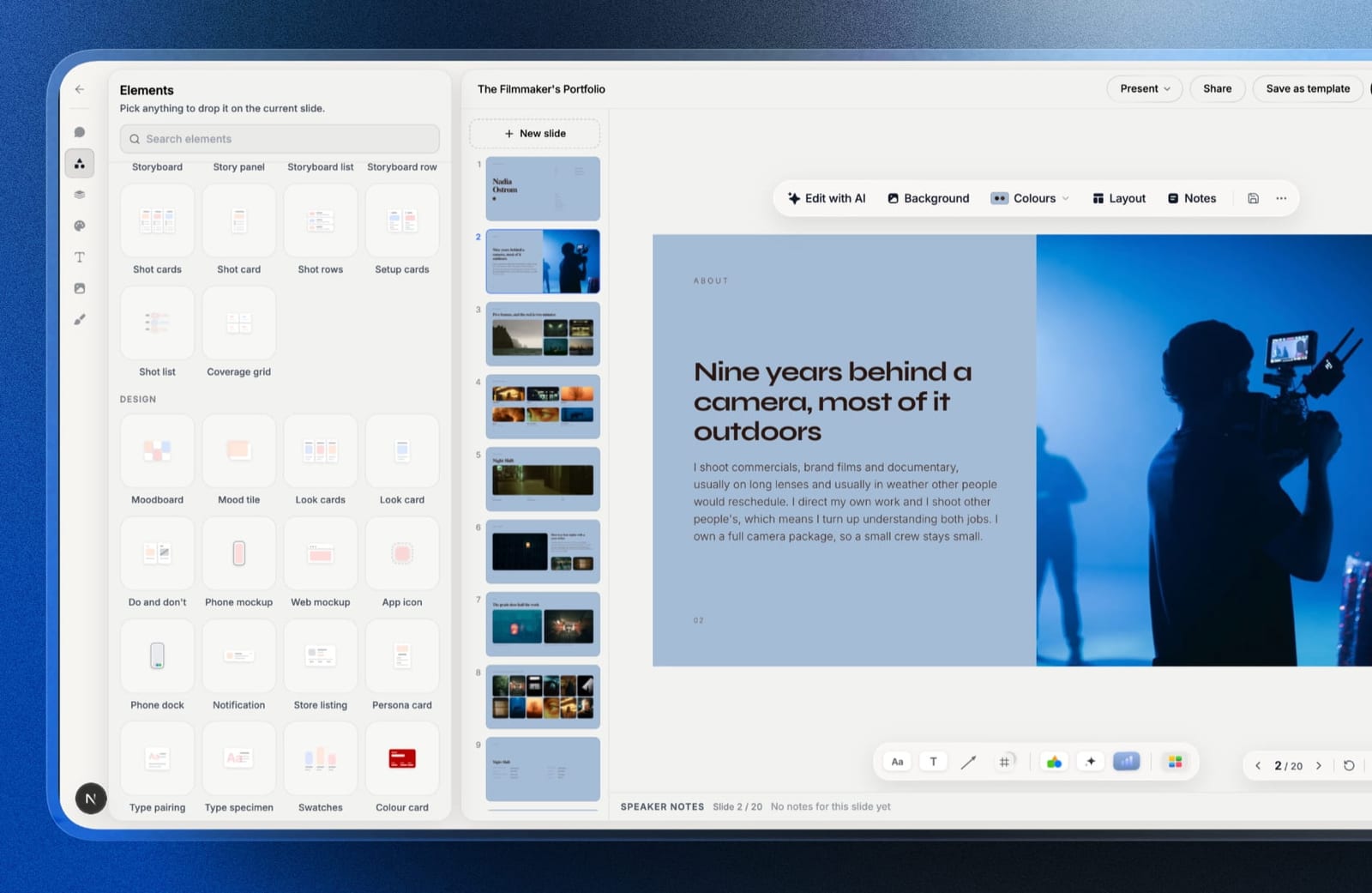
Framekit is an AI website builder for creatives that includes Slides, a deck editor with PDF export on every plan, so it can build the portfolio PDF and also host the version that stays current after the file is sent.
To make a portfolio PDF that works, keep it to 12 to 20 pages, export images at 150 to 200 DPI in sRGB rather than at print resolution, target a finished file under 10MB so it clears every mail server, embed or outline your fonts, put your name and contact on the first and last page, and name the file with your name rather than portfolio-final-v3.
Build it in InDesign or Affinity Publisher if you need control over compression, and in Canva if you do not. Send a link alongside it, because the PDF ages the moment it lands.
The tool advice below was re-verified on 19 September 2026, when we corrected our own line about Framekit, which used to say it had no PDF export.
What a Portfolio PDF Is Actually For
A portfolio PDF exists because a reviewer wants to look at twenty candidates in one sitting, offline, without opening twenty browser tabs and waiting for each one to load. That is a genuinely good reason and it explains every rule below.
It also tells you what the document is not. It is not your complete body of work, it is not a case study, and it is not a substitute for a site. It is a curated argument that you can do the specific thing being hired for, compressed into something readable in about four minutes.
The most common mistake is treating it as an archive. Forty pages of everything you have ever made reads as an inability to judge your own work, which is precisely the skill being assessed.
In one linethe reviewer is deciding whether to look you up properly, so the PDF's job is to earn the second click rather than to contain everything, which is why editing matters more than completeness.
Step 1: Decide the Cut Before You Open Anything
Pick the work first, in a folder, before you touch a layout tool. Twelve to twenty pages is the working range, and the count that matters is projects rather than pages: six to eight projects, two to three pages each.
Choose against the job rather than against your own preferences. If the role is packaging, the packaging work leads even if the editorial work is better, because a reviewer is matching evidence to a brief rather than admiring range.
Cut anything you would feel the need to explain. In a document read without you, an explanation you cannot give is a weakness you cannot defend.
In one linedecide the selection in a folder before any layout happens, because choosing while designing produces a document that keeps growing and never quite finishes.
Step 2: Get the Image Settings Right
Image settings are where most portfolio PDFs are won or lost, and the whole thing is mechanical rather than a matter of taste, which means four specific settings decide whether your work arrives looking like your work.
Resolution. Export images at 150 to 200 DPI at the size they appear on the page. Print resolution of 300 DPI doubles your file size for a document that will be read on a screen, and 72 DPI looks soft on any modern display.
Colour space. Use sRGB, not CMYK and not Adobe RGB or Display P3.
A wide-gamut image sent to a reviewer on a standard monitor renders duller than it looked on your machine, and CMYK in a screen document shifts unpredictably. Convert before you place, not on export.
Compression. JPEG at high quality rather than maximum. The difference between quality 80 and quality 100 is usually invisible on screen and can be half the file size.
Blacks. Check your darkest images after export at 100%. Compression damages shadow detail first, which is why a graded photograph looks fine at a glance and muddy where it matters.
In one line150 to 200 DPI in sRGB at high-but-not-maximum JPEG quality is the combination that keeps a portfolio sharp and small, and getting it wrong is the single most common reason work arrives looking worse than it is.

Step 3: Keep It Under 10MB
Pick a target before you build, because it changes decisions. Under 10MB clears essentially every mail server and every application form. Under 5MB is better.
The limits are real and specific. Gmail caps a message at 25MB and converts anything larger to a Drive link, Outlook.com stops at 20MB, and corporate mail servers are frequently configured lower than either.
An application portal will often cap at 10MB with no explanation of why your upload failed.
If you are over target, in order: reduce page count, then reduce image dimensions, then reduce JPEG quality. Reducing quality first is the instinct and the worst option, because it damages the work rather than the container.
In one linetreat 10MB as a hard design constraint rather than an export setting, because a portfolio that bounces is worse than a portfolio with four fewer pages.
Step 4: Handle Type Properly
Two things go wrong with type in an exported PDF, both of them silently, and both are avoidable with a setting you check once rather than a habit you have to maintain across every document.
Fonts that are not embedded substitute on the reviewer's machine, so your carefully set captions arrive in something else.
Every serious layout tool embeds fonts by default when the licence permits it; check the export settings rather than assuming, and outline the type if the licence forbids embedding.
Type set too small to read on a laptop is the other one. Captions at 7pt look elegant at full size on your 27-inch display and are illegible at the zoom level a reviewer actually uses.
Set body text at 10pt or larger and check it at 100% on a laptop screen before sending.
In one lineembed your fonts and set captions at 10pt or above, because a document read at a smaller zoom than you designed at will lose every detail you were proud of.
Step 5: Structure the Document So It Can Be Skimmed
The structure below is ordered against how reviewers actually read a portfolio in a pile rather than how a designer would prefer to present one, which are different things and produce different documents.
Page one: your name, your discipline, and one line on what you do. Not a logo animation, not a mission statement. The reviewer should know what you are within three seconds.
Pages two onward: the work, strongest first. Not chronological. The best project leads because a reviewer may stop at page four.
One line of context per project. What it was, who it was for, what your role was. Your role especially, because collaborative work with an unclear contribution is discounted.
Final page: contact details and a link. Email, site, and where to see more. This page gets screenshotted more than any other.
In one linelead with your strongest project rather than your most recent one, because the document is being skimmed and the last page most people reach is page four.

Step 6: Name and Send It Properly
The last three decisions are small, unglamorous, and disproportionately responsible for whether a portfolio gets read at the other end, because they all affect what happens after the file leaves your machine.
The filename is part of the document. Use your name and discipline: something like ana-ruiz-graphic-design-portfolio.pdf.
A reviewer downloading twenty files named portfolio.pdf into one folder will lose yours, and portfolio-final-v3-REALLY-FINAL.pdf tells them something you did not intend.
Send a link alongside. The PDF is a snapshot and it starts ageing immediately. A link means the reviewer who opens it in three months sees current work.
Check it on a phone. A meaningful share of first opens happen there. Two-page spreads and small captions both fail on a phone, which is an argument for single-page layouts.
In one linename the file after yourself rather than after the document, because it is the only piece of metadata that survives being downloaded into a folder with nineteen others.
Which Tool to Build It In
The tool matters far less for its layout features than for how much control it gives you over the export, because compression and colour handling are the settings that decide whether the work arrives intact.
| Tool | Cost | Control over export | Best for |
|---|---|---|---|
| Affinity Publisher | Free | Full, including compression and colour | Anyone wanting print-grade control for nothing |
| Adobe InDesign | ~$276/yr | Full | Designers already in the Adobe ecosystem |
| Canva | Free, or $144/yr Pro | Limited, presets only | Speed, when you do not need fine control |
| Figma | $36/yr Collab seat and up | Moderate | Designers already working in Figma |
| Keynote | Free on Apple devices | Limited | Quick, image-led portfolios on a Mac |
| Google Slides | Free | Minimal | Zero-budget, plain output |
| Framekit Slides | Free, or $84/yr Starter | Limited, one-click export | An image-led portfolio deck that is also a share link |
Two notes. Affinity's applications are now free following Canva's acquisition of Serif, which puts full control over PDF export, compression, and colour management at no cost, and makes it the strongest recommendation here for anyone willing to learn it.
And Canva's PDF export applies its own compression with no settings to adjust, which is fine for most work and a real limitation for anything where shadow detail carries the image.
In one lineif your work depends on image quality, use a tool that lets you set the compression yourself, and Affinity Publisher is now the free way to do that.
The Mistakes That Get Portfolios Rejected
Five failures come up repeatedly in the way reviewers describe the portfolios they discard, and none of them are about the quality of the work itself, which is what makes them worth checking before you send anything.
Too long. Forty pages reads as an inability to edit. Twelve well-chosen pages reads as judgement.
Unclear role. Group projects presented without your specific contribution are treated as somebody else's work.
No contact details. A surprising number of portfolios contain no email address anywhere, because the sender assumed the covering email would always travel with the file. It does not once the file is forwarded.
A file that will not open. Exotic export settings, corrupted transparency, or a 90MB file that times out. Open your own export on a machine that is not yours before sending.
Work that is not the work being hired for. Range is a liability when a reviewer is matching evidence to a brief.
In one linefour of these five are editing and process failures rather than design failures, which means they are fixed by decisions made before the layout starts.

Where the PDF Stops Working
A PDF is a snapshot of your portfolio on the day you exported it, and that is the trade you accept for a document that works offline in a review pile. Two months later it shows work you have surpassed, and every reviewer holding it sees the old version.
We build Framekit, so read this as a disclosed interest rather than neutral advice. Framekit Slides has portfolio deck templates, your own fonts and colours on every slide, and PDF export on every plan, so it can make this document.
What it does not give you is page-layout control or compression settings, and we have not run its export through the file-size and shadow-detail checks in this guide, so if shadow detail carries your work, Affinity Publisher remains the better tool and you should check any Slides export against the 10MB target yourself.
The narrow point is that the PDF should carry a link to something current, because the reviewer who liked page four will look you up, and what they find should be better than what they were sent.
A Slides deck is also a share link you can keep editing, which makes it one way to provide that current version.
In one linesend both, treating the PDF as the thing that gets read and the page as the thing that stays true.
Frequently Asked Questions
How many pages should a portfolio PDF be?
A portfolio PDF should be 12 to 20 pages, containing six to eight projects at two to three pages each.
Reviewers commonly stop around page four, so the count matters less than the order, and a longer document tends to read as an inability to edit rather than as a deeper body of work.
What file size should a portfolio PDF be?
Aim for under 10MB and ideally under 5MB. Gmail caps a message at 25MB and switches to a Drive link above that, Outlook.com stops at 20MB, corporate mail servers are often lower, and application portals frequently cap uploads at 10MB without explaining the failure.
What resolution should images be in a portfolio PDF?
Export images at 150 to 200 DPI at the size they appear on the page, in sRGB.
Print resolution of 300 DPI roughly doubles file size for a document read on screen, while 72 DPI looks soft on modern displays, and CMYK or wide-gamut colour shifts unpredictably on a reviewer's monitor.
Should a portfolio be a PDF or a website?
A portfolio should be both, because they do different jobs.
The PDF works offline in a review pile and is what agencies still request, while the site stays current, can be found in search, and shows better work than whatever was in the file you sent three months ago.
Send the PDF and put a link on the last page.
What is the best free tool for making a portfolio PDF?
Affinity Publisher is the strongest free option, offering full control over compression, colour management, and export settings following Canva's acquisition of Serif.
Canva's free tier is faster to use and applies its own compression with no adjustable settings, which is fine unless shadow detail carries your images.
Framekit Slides also exports a PDF on its free plan, with templates made for portfolio decks but no compression settings.
How should you name a portfolio PDF file?
Name it with your name and discipline, such as ana-ruiz-graphic-design-portfolio.pdf, because reviewers download many files into one folder and a file called portfolio.pdf will be lost.
Version numbers and words like final in the filename are visible to the recipient and read poorly.
What should be on the first page of a portfolio PDF?
The first page should carry your name, your discipline, and one line describing what you do, so a reviewer knows what they are looking at within three seconds. Cover pages with only a logo or an abstract image waste the position that decides whether page two gets opened.
Why do my images look worse in the exported PDF?
Compression damages shadow detail first, which is why a graded image looks acceptable at a glance and muddy in the darks.
Export at high rather than maximum JPEG quality, convert to sRGB before placing images rather than on export, and check your darkest pages at 100% zoom after exporting.
Do agencies still ask for portfolio PDFs?
Many agencies and studios still request a portfolio PDF because it lets a reviewer assess a group of candidates offline in one sitting without opening a browser tab per person.
The request usually comes with a file size limit, which is why building to a size target rather than exporting and hoping is the practical approach.
Should you include personal work in a portfolio PDF?
Include personal work when it demonstrates the specific capability being hired for, and cut it when it only demonstrates range.
Reviewers are matching evidence to a brief, so a self-initiated project that shows exactly the right skill is stronger than a client project that does not.
The Bottom Line
A portfolio PDF is a mechanical document with two settings that decide it: images at 150 to 200 DPI in sRGB, and a finished file under 10MB. Get those right and the rest is editing, which is where the actual judgement lives.
Twelve well-chosen pages with your role stated clearly and your contact details on the last page will out-perform forty pages of everything.
The trade-off worth naming is that every PDF starts ageing the moment you export it, and there is no version of this document that solves that. The reviewer who liked it will look you up, so the last page's link is doing as much work as any project in the file.
Framekit Slides will build this document and export it as a PDF on any plan, but without page-layout control or compression settings, so for image quality at its most demanding, Affinity Publisher, now free, is the better tool.
The one thing we would insist on is that the link on your last page points at something you have updated more recently than the PDF.
Related reading: our guides to what makes a good photography portfolio, the best case study templates for designers, how many photos a portfolio should have, and portfolio mistakes costing creatives clients.
Mail attachment limits cited here come from the providers' published documentation as read in August 2026, and corporate mail servers apply their own lower limits set by administrators.