Framekit templates
Start from a designer-made template
 Use template
 Use template
 Use template
 Use template
 Use template
 Use template
 Use template
 Use template
Two completely different products get sold under the same phrase, and buying the wrong one is the most common mistake in this category.
The first kind puts a poll on screen while forty people are in a room or on a call, and dies the moment the session ends. The second kind makes a document that responds when somebody reads it alone at midnight, and has no live component at all. Neither can do the other's job.
Work out which room you are in before you look at a single price.
An interactive presentation tool is software that turns a one-way presentation into a two-way one, either by collecting live audience input during a session or by building a document the reader can navigate, filter and respond to on their own.
Framekit is not one of them and is not ranked here, but its Slides editor is where a lot of creatives build the image-led deck the poll runs beside, on the same account that publishes their portfolio site.
For live audience interaction, the best interactive presentation tool in 2026 is Mentimeter, because its polling, word clouds and quizzes are the most reliable at scale and it integrates cleanly with slides you already have.
For interactive documents read without you, Storydoc is the strongest, because the reader can explore and you get section-level read data back.
Slido is the pick when your sessions run in Teams or Webex, Genially is best for interactive content you publish rather than present, and Prezi still owns non-linear presenting for the people it suits.
Full disclosure: Framekit is our own product. Its Slides deck editor has no live audience features and no read analytics, so it is not ranked below; a short section near the end explains where it fits alongside the tools that are.
How We Tested These
We ran the same forty-minute session through every live tool: a short presentation with three polls, one word cloud, one ranked question and an open question with moderation, in front of a test audience of thirty on a video call.
For the document tools we built the same twelve-section interactive document and sent it to readers.
Reliability at audience scale. Polls that lag or drop responses in front of a live audience are worse than no polls, and this is where the tools separate most.
Setup friction for the presenter. How long from a plain deck to a working interactive session, including whatever the audience has to do to join.
What the audience has to do. Codes, links, apps, accounts. Every step loses a proportion of the room.
Pricing unit. Per presenter, per participant, or per account, which changes the cost by an order of magnitude depending on how your organisation actually presents.
Whether it works when nobody is live. The split that defines this category.
Three kinds of finding, kept apart. Measured by hand: running the sessions, joining as an audience member, and building the interactive documents.
Verified from published sources: pricing against vendors' own pages in August 2026, with a caution where published rates vary. Reported as sentiment: recurring reliability complaints, flagged as such.
On 19 September 2026 we re-verified the Framekit details in this guide, which now reflect its Slides deck editor rather than only its website builder, and we read it through again on 20 September 2026; the rankings and competitor prices are unchanged from the August test.
What Running the Same Session 8 Times Showed
- The category splits cleanly: 5 of 8 are live-audience tools and 3 of 8 build documents that respond when read alone. Only Genially straddles both, and it does the second better.
- Audience join friction ranged from a link with one click to a code typed into a separate site, and the difference in participation across our thirty-person tests was visible every time.
- Pricing units differ more than prices do. Per-presenter pricing is cheap for an organisation with two presenters and expensive for one with twenty, and the reverse is true of participant-capped plans.
- Published pricing for two of these vendors varies noticeably between their own regional pages and third-party listings, so budget from the vendor's page for your region rather than from a comparison table.
- Free tiers are real in this category. Four of the eight run a genuinely usable free plan with a participant or question cap rather than a watermark.
- Not one of the live tools produces anything useful for a deck sent by email, which is the mistake people make when they buy the wrong half of this category.
The 8 Best Interactive Presentation Tools in 2026
How the ratings work: reliability at scale 30%, audience friction 25%, feature depth 20%, pricing model 15%, and setup speed 10%. Reliability dominates because a failed poll in front of a live audience costs more credibility than a missing feature ever does.
Mentimeter leads at 9.0 while scoring 4 on asynchronous use, because it does nothing at all for a document read alone. Storydoc scores 10 on asynchronous and 2 on live use. The two leaders in this list cannot substitute for each other.
| Tool | Kind | Best for | Free plan | Typical cost | Our rating |
|---|---|---|---|---|---|
| Mentimeter | Live | Reliable polling at scale | Yes, capped | About $12 to $15 per presenter a month | 9.0/10 |
| Storydoc | Async | Documents read without you | Trial | $237.60 a year | 8.7/10 |
| Slido | Live | Teams and Webex sessions | Yes, capped | From about $10 to $17.50 a month | 8.5/10 |
| Genially | Async | Interactive content you publish | Yes | From about $12.50 per user a month | 8.2/10 |
| Prezi | Live | Non-linear presenting | Limited | About $84 a year | 7.6/10 |
| Figma Slides | Live | Design teams running workshops | Yes | $192 a year per seat | 7.3/10 |
| Canva | Live | Light polling inside an existing deck | Yes | $144 a year | 7.0/10 |
| Kahoot | Live | Training and education | Yes | Published plans | 6.7/10 |
Prices checked against each vendor's published pages during August 2026. Published rates for the live tools vary by region and plan more than in most categories, so confirm on the vendor's own page before budgeting.
Live tools versus interactive documents
This is the distinction that should decide your purchase, and vendors in both halves market themselves with the same word.
| Live audience tools | Interactive documents | |
|---|---|---|
| The moment they work | During a session | Whenever the reader opens it |
| What you get back | Responses in the room | Read data over days |
| Typical use | Workshops, all-hands, training | Sales decks, proposals, reports |
| Examples | Mentimeter, Slido, Kahoot | Storydoc, Genially |
| Useless for | An emailed deck | A room full of people |
1. Mentimeter: Best Reliable Polling at Scale
Our rating: 9.0/10
Mentimeter is the most dependable live-audience tool we tested, and reliability is the entire game here.
With thirty people responding at once, results updated cleanly, nothing dropped, and the word cloud built without the stutter that makes an audience lose interest in a visualisation.
Setup was also the fastest. Adding three polls, a word cloud and a ranked question to an existing session took under fifteen minutes, and the audience joined with a code or a link without installing anything.
Best forWorkshops, all-hands sessions and training where a poll failing in front of the room is the thing you cannot afford.
Key features:
- Polls, word clouds, ranked questions, quizzes and open text with moderation
- Results that update live without visible lag at real audience sizes
- Audience joins by link or code with no app or account
- Export of session results for follow-up
- Integrations that let it run alongside slides you already have
The real numberpaid presenter plans are commonly listed from about $12 to $15 per presenter a month on annual billing, with higher tiers above that. Published rates vary by region, so confirm on Mentimeter's own pricing page for your market before budgeting a team.
The standout detailopen-text moderation actually works under pressure. In a thirty-person test with deliberately unhelpful responses, holding submissions for approval before display was quick enough to use live, which is the feature that makes open questions safe in front of a client.
The gotchathe pricing unit is presenters, and organisations underestimate how many people present. If twelve people at your company run sessions, this is a per-seat cost twelve times over, and a participant-capped competitor may be cheaper.
What reviewers say elsewhereMentimeter rates strongly across G2 and Capterra for ease of use, with pricing at team scale the recurring criticism.
Skip it ifyour presentations are sent rather than presented, because nothing here helps a document read alone.
Verdict: Mentimeter is the best live interactive presentation tool in 2026 and the one to choose when a failure in the room is the risk you are managing. Visit Mentimeter
2. Storydoc: Best Documents Read Without You
Our rating: 8.7/10
Storydoc is the strongest tool in the other half of this category. It builds a scrolling, interactive document a reader explores on their own, and returns section-level read depth and dwell time per recipient, which is information no live tool can give you.
For sales decks, proposals and reports that are read at midnight by someone who was never in a meeting with you, that combination is the point. Our twelve-section document told us which sections readers actually finished, which changed what we would put on page one.
Best forSales decks, proposals and reports read asynchronously by people you will not speak to.
Key features:
- Interactive scrolling documents with embedded video and live content
- Section-level read depth and dwell time per recipient
- Personalised versions per reader without rebuilding
- Lead capture and integrations with sales systems
- Mobile rendering designed for scrolling rather than adapted to it
The real numberStorydoc Starter is $237.60 a year and Pro is $432 a year, per Storydoc's pricing page, which makes it the most expensive individual plan in this comparison.
The gotchathere is no fixed-page PDF, because the format has no pages. Anyone who archives documents or prints them for a meeting hits this, and the exported compromise is not what you built.
Skip it ifyou need live audience interaction, because Storydoc has none, or your recipients expect an attachment.
Verdict: Storydoc wins the asynchronous half of this category outright and is irrelevant to the live half. Buy it for what happens after you send, not during. Visit Storydoc
3. Slido: Best for Teams and Webex Sessions
Our rating: 8.5/10
Slido's advantage is where it lives.
Owned by Cisco and integrated deeply with Webex and Microsoft Teams, it puts polls and audience questions inside the meeting tool people are already in, which removes the second-screen problem that costs every other live tool some participation.
Feature depth is slightly behind Mentimeter and the audience question moderation is genuinely good, particularly for large all-hands sessions where the questions matter more than the polls.
Best forOrganisations running sessions inside Teams or Webex, especially large internal meetings with audience Q and A.
Key features:
- Deep integration with Webex and Microsoft Teams
- Audience Q and A with upvoting and moderation
- Polls, quizzes and word clouds inside the meeting
- Analytics on participation after the session
- Free tier that covers small sessions
The real numberpaid tiers are commonly listed from about $10 to $17.50 a month for entry plans with participant caps, rising substantially for larger audiences, and Slido bills annually rather than monthly on standard plans.
Published figures vary between sources, so confirm on Slido's own pricing page.
The gotchathe participant caps are the real pricing mechanism, not the monthly figure. A plan sized for 100 participants stops being adequate the first time you run a company all-hands, and the step up is steep.
Skip it ifyour sessions do not run in Teams or Webex, because the integration is most of the reason to prefer it.
Verdict: Slido is the right choice when the meeting platform decides the tool, which inside large organisations it usually does. Visit Slido
4. Genially: Best Interactive Content You Publish
Our rating: 8.2/10
Genially is the most flexible tool here for building interactive content that lives somewhere rather than happening at a moment: clickable infographics, guided reports, training modules and presentations with branching paths.
It straddles both halves of this category and is clearly better at the published half. As a live presenting tool it is workable; as a way to make a report that a reader explores, it is the most capable option short of building a website.
Best forInteractive reports, training material and infographics that get published and revisited.
Key features:
- Clickable, animated interactive content of many kinds
- Branching navigation rather than a fixed slide order
- Templates for reports, training and presentations
- Publishing to a link or embedding in a site
- Free plan that covers real work with a public-content requirement
The real numberpaid plans begin around $12.50 per user a month on the entry tier, per Genially's published pricing, with higher tiers adding privacy and team features. The free plan requires content to be public, which is the limit that matters.
The gotchathe free plan publishes your content publicly. For anything containing client information or unreleased material that is disqualifying, and it is the single most common reason people upgrade unexpectedly.
Skip it ifyou need live audience polling, because that is not what this is good at.
Verdict: Genially is the best tool here for interactive content with a shelf life, and a middling choice for a live room. Visit Genially
5. Prezi: Best Non-Linear Presenting
Our rating: 7.6/10
Prezi's zooming canvas remains genuinely different: instead of slides in order, you move around a map, which suits presenters who explain relationships rather than sequences. For the people it suits, nothing else does this.
For everyone else it is a distinctive format with a real cost, because audiences unfamiliar with it spend attention on the movement rather than the argument.
Best forPresenters whose content is a structure rather than a sequence, and who present live and often.
Key features:
- Zooming, non-linear canvas rather than ordered slides
- Prezi Video, which puts your content beside you on a call
- Templates built around the zooming format
- Presenter notes and a path you can deviate from live
- A long track record and a familiar brand
The real numberPrezi Standard is about $84 a year on annual billing, which is the cheapest paid plan in this comparison and the first tier that makes your work private.
The gotchathe free tier makes your presentations public, which for client work is not an option. The cheapest genuinely usable plan is the paid one, and that is the honest price.
Skip it ifyour content is a sequence, which most business presentations are.
Verdict: Prezi is a strong tool for a narrow use case and a distraction for a broad one. See our best Prezi alternatives if the format has stopped helping. Visit Prezi
6. Figma Slides: Best for Design Teams Running Workshops
Our rating: 7.3/10
Figma Slides includes live polls and an interactive presenting mode, and for a design team already in Figma that is enough interactivity for most internal workshops without adding another subscription or another login for the audience.
It is not competing with the dedicated tools on depth. The polling is basic, there is no audience Q and A worth the name, and nothing here is built for an audience of two hundred.
Best forDesign teams running internal workshops and design reviews inside a tool they already pay for.
Key features:
- Live polls inside the presenting mode
- Decks built from the same components as the design work
- Comments from participants during and after
- Free tier that covers occasional use
- No extra tool for the audience to learn
The real numberFigma Professional is $16 per full seat a month on annual billing, $192 a year, per Figma's pricing page, and viewers are free.
The gotchathe interactivity is a feature rather than a product, and teams that adopt it for a large session find the ceiling quickly, usually on audience size or on the absence of moderated questions.
Skip it ifyour sessions are external or large, because both are outside what this was built for.
Verdict: a reasonable convenience for design teams and not a substitute for a dedicated live tool. Visit Figma
7. Canva: Best Light Polling Inside an Existing Deck
Our rating: 7.0/10
Canva's presenting mode includes light interactive features and a live Q and A, which for a team already building decks in Canva removes the need to bolt on another tool for a single poll.
Depth is the limitation. This is interactivity as an added feature on a design product, not a polling platform, and anyone running regular interactive sessions will outgrow it quickly.
Best forTeams already in Canva who want one or two interactive moments in an otherwise standard deck.
Key features:
- Light interactive elements inside the presenting mode
- Live Q and A during a presentation
- The deepest template and asset library of any tool here
- Free plan that covers a complete deck
- No second tool for the audience to join
The real numberthe free plan covers presenting. Pro is $18 a month or $144 billed annually, per Canva's published pricing, and the interactive features are not the reason to upgrade.
The gotchathere is no meaningful audience data afterwards. You get the interaction in the room and nothing to analyse later, which for training or research sessions is the part you actually wanted.
Skip it ifaudience responses are data you need to keep.
Verdict: fine for a poll inside a deck you were making anyway, and not a tool for running interactive sessions. Visit Canva
8. Kahoot: Best for Training and Education
Our rating: 6.7/10
Kahoot is the most energetic tool here and the most narrowly suited. Its game-show format, with timers, points and a leaderboard, genuinely works for training, onboarding and education, where competition raises attention.
In a client or executive setting it usually does not land. The format carries a tone that is hard to separate from the content, and a leaderboard in a board presentation reads as a misjudgement of the room.
Best forTraining sessions, onboarding and education where energy and recall are the goals.
Key features:
- Game-show format with timers, points and leaderboards
- Strong recall and engagement in training contexts
- Large library of existing content to adapt
- Reporting on participant performance
- Free tier for basic use
The real numberKahoot runs a free tier for basic use with paid plans above it that differ substantially between education and business licensing. Check the plan matrix on Kahoot's own site, because business and school pricing are separate structures.
The gotchathe tone is not adjustable. You cannot turn off the fact that it feels like a quiz show, and in the wrong room that undermines otherwise serious content.
Skip it ifthe audience is a client, an executive team, or anyone who did not come to be entertained.
Verdict: excellent inside training and misplaced almost everywhere else in business presenting. Visit Kahoot
Which Half of This Category Do You Need?
In one linealmost every disappointed buyer in this category bought a live tool for an asynchronous problem, or the reverse, and no feature comparison saves you from that mistake.
You need a live tool if people are in a room or on a call at the same time as you, and the value is in what they say back during the session. Mentimeter, Slido and Kahoot all die the moment the session ends, and that is fine because the session was the point.
You need an interactive document if the reader opens your material alone, possibly weeks later, and you want them to explore rather than scroll and you want to know what they read.
Storydoc and Genially are built for that and have no live component worth the name.
You need both, occasionally, and almost nobody needs both at once. The workable pattern is a live tool for workshops and a document tool for anything sent, at roughly $150 to $400 a year combined depending on team size.
The test that settles it. Ask whether the interactivity has to happen while you are watching. If yes, live. If it does not matter when it happens, asynchronous, and you should be buying read data rather than polls.
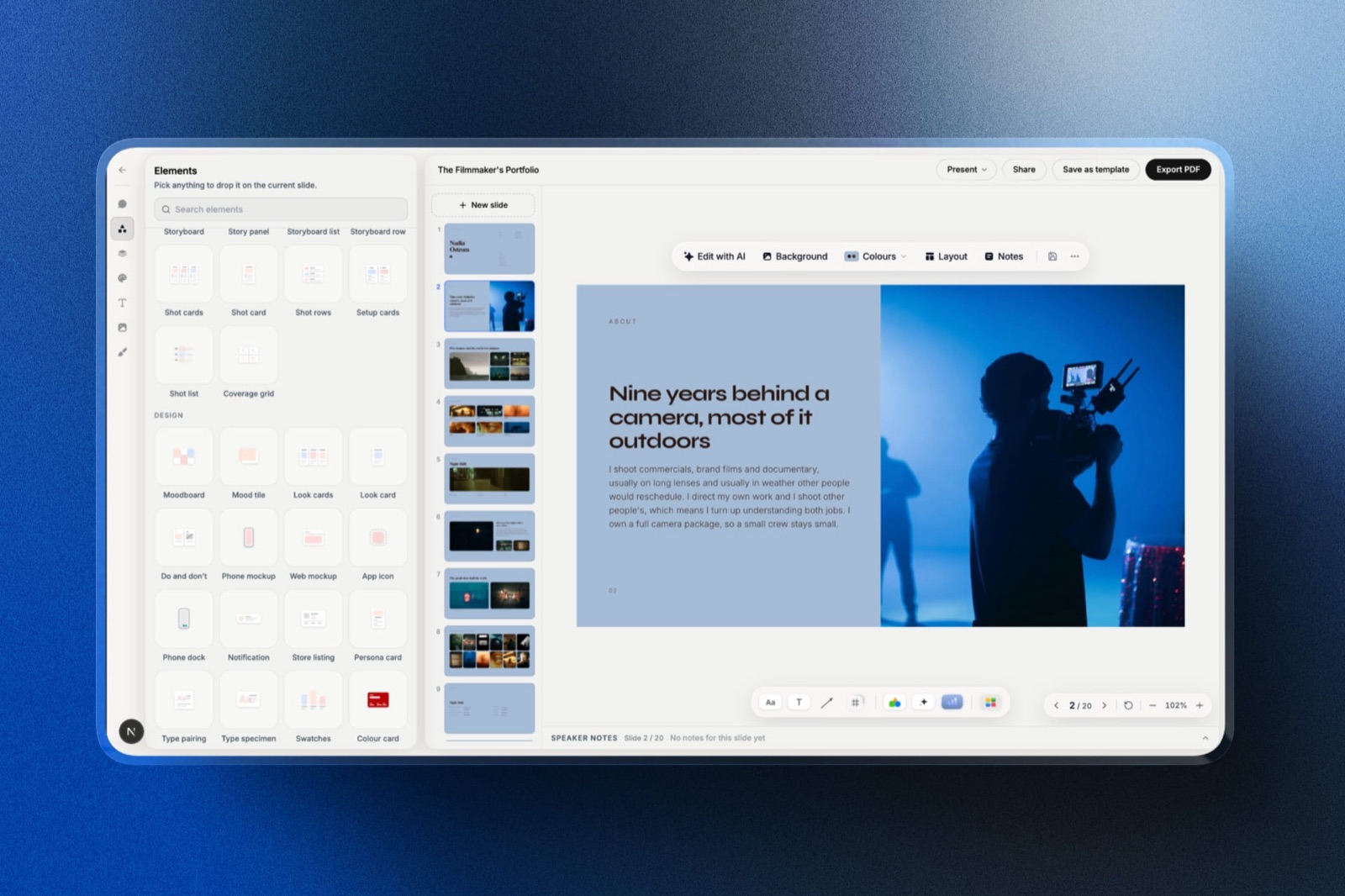
Where Framekit Fits: The Deck Around the Poll
In one lineFramekit is not an interactive presentation tool and is not ranked here, but its Slides editor is a sensible place to build the image-led deck that a live poll or an interactive document sits beside, especially for creatives.
Framekit is an AI website builder whose account includes Slides, a deck editor for treatments, lookbooks, portfolio and pitch decks.
It has no polls, quizzes, word clouds or audience questions, and no per-recipient read data, so none of the live or asynchronous jobs above belong to it.
What it does do is the deck itself.
The AI drafts and lays out slides from a description and up to 12 reference images, YouTube and Vimeo clips play on the slide, and you can present from a new tab on a second screen while the editor stays on your laptop.
For a live session, the practical pattern is to build the visual deck there, put your Mentimeter or Slido join code on a slide, and run the interaction in that tool.
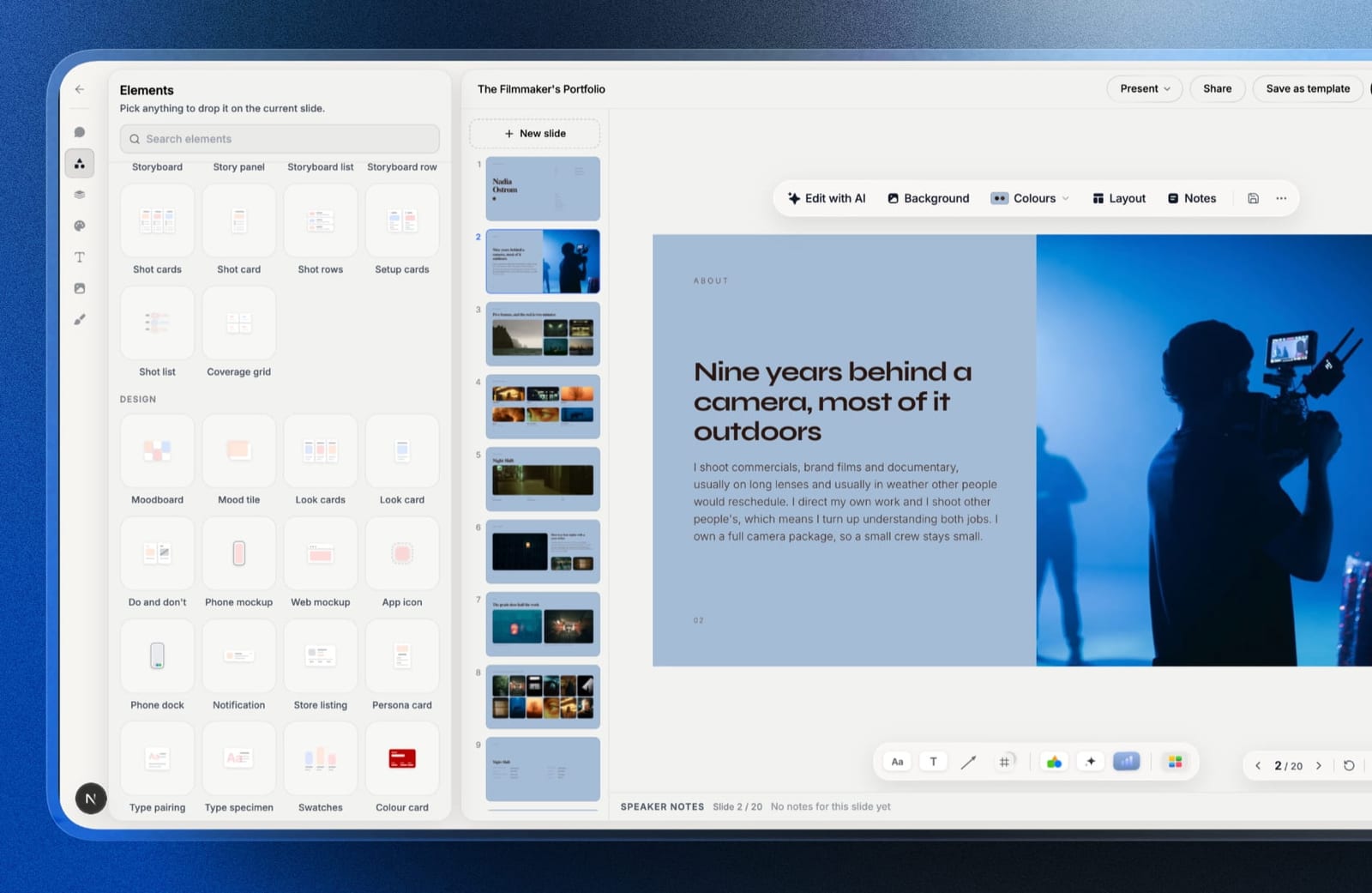
The free plan includes the AI writer, unlimited decks, a share link and PDF export; paid plans from $84 a year add your own fonts and the template library.
How to Choose an Interactive Presentation Tool: A Decision Tree
In one lineanswer these in order and stop at your first yes, because the first yes decides which half of the category you are shopping in.
1. Is there a live audience? If no, go to question five. If yes, continue.
2. Do your sessions run in Teams or Webex? Slido, for the integration, and price it on participant caps rather than the monthly figure.
3. Is the session training or education? Kahoot, and use the format deliberately rather than by default.
4. Anything else live? Mentimeter, and count how many people at your organisation actually present before committing to per-presenter pricing.
5. Is the material sent and read alone? Storydoc at $237.60 a year if you want read data per recipient.
6. Is it published content people return to? Genially from about $12.50 per user a month, and note that the free tier makes content public.
7. Do you only need one poll inside a deck you already make? Canva or Figma Slides, whichever you already pay for, and do not buy a dedicated tool for it.
Interactivity only survives if the deck reaches people intact, which is the subject of our guide to how to share a presentation online.
Frequently Asked Questions
What is the best interactive presentation tool in 2026?
The best interactive presentation tool in 2026 depends on which half of the category you need. For live audiences, Mentimeter is the most reliable at real audience sizes and the fastest to set up.
For documents read without you, Storydoc is the strongest, because readers can explore and you get section-level read data per recipient.
Slido is the best choice inside Teams or Webex, and Genially is best for interactive content you publish.
Is there a free interactive presentation tool?
Yes, four of the eight tested run genuinely usable free plans rather than watermarked demos: Mentimeter and Slido both cap questions or participants, Genially is free if your content can be public, and Canva includes light interactive presenting at no cost.
The free limits that bite are participant caps on the live tools and the public-content requirement on Genially.
Mentimeter vs Slido: which is better?
Mentimeter for feature depth and reliability, Slido when your sessions run inside Teams or Webex.
Mentimeter handled thirty simultaneous responses without lag and offers a wider set of question types; Slido removes the second-screen problem by living inside the meeting platform and has better audience Q and A with upvoting.
If your organisation is on Webex, that integration usually outweighs Mentimeter's feature advantage.
Do interactive presentations actually improve engagement?
In live sessions, reliably yes, and the mechanism is attention rather than novelty: an audience that expects to be asked something stays present differently from one that expects to watch.
What matters more than the tool is question quality, because three well-chosen polls beat ten decorative ones. For asynchronous documents the effect is different, measured in read depth rather than participation.
How much do interactive presentation tools cost?
Between $0 and about $432 a year for one person, and pricing units vary more than prices. Live tools generally charge per presenter, commonly $12 to $18 a month, which multiplies with the number of people at your organisation who present.
Document tools charge per seat, with Storydoc at $237.60 to $432 a year. Free tiers are genuinely usable in this category.
Can I add polls to an existing PowerPoint or Google Slides deck?
Yes. Mentimeter and Slido both integrate with existing decks so you can keep your slides and add interactive moments rather than rebuilding, which is the normal way these tools get adopted.
Canva and Figma Slides include light polling natively if you already build decks there. Rebuilding an entire deck inside a polling tool is rarely necessary.
What happens to audience responses after a session?
On the dedicated live tools you keep them: Mentimeter and Slido both export session results for follow-up analysis, which for research and training sessions is the point of running them.
Canva's light polling gives you the moment and nothing afterwards, which is worth knowing before you use it for anything you need to report on.
Are interactive documents better than PDFs for sales?
For anything you want data about, yes, and for anything that gets archived or printed, no.
An interactive document returns section-level read data and lets the reader explore, which a PDF cannot; a PDF forwards reliably, prints, and survives corporate networks that block unfamiliar domains.
Many teams send an interactive link and keep a PDF ready on request.
Does Prezi still make sense in 2026?
For presenters whose content is genuinely a structure rather than a sequence, yes, and for most business presenting, no.
The zooming canvas is a real differentiator when you are explaining how parts relate, and a distraction when you are working through points in order.
Prezi Standard at about $84 a year is also the cheapest paid plan in this comparison, and the free tier makes work public.
Can I use Framekit Slides for an interactive presentation?
Framekit Slides can build and present the deck, but it has no interactive features of its own.
There are no polls, quizzes or audience questions and no per-recipient read data, so pair it with Mentimeter or Slido for a live session, or use Storydoc when you need to know what a reader explored.
What Framekit adds is the design side: AI-drafted, image-led slides with playable video embeds, a share link and PDF export, free to start.
Final Verdict
Mentimeter is the best interactive presentation tool in 2026 for live audiences, because reliability under thirty simultaneous responses is the thing that actually matters in a room and it was the most dependable tool we tested.
Storydoc is the best for material read without you, and the two are not alternatives to each other in any sense.
Before comparing features, settle which half of the category you are in, because that single decision explains almost every disappointed review these products receive.
Where Framekit losesFramekit does not do interactive presenting: it has no polling, quizzes, audience questions or per-recipient read data, so every tool ranked above is the better fit for the interaction itself. It only covers the deck the interaction sits beside.
Keep reading: our best presentation software roundup, the best Prezi alternatives comparison, and the best sales deck software guide.