Framekit templates
Start from a designer-made template
 Use template
 Use template
 Use template
 Use template
 Use template
 Use template
 Use template
 Use template
A photographer's pitch has an unusual property: the argument is made entirely by the images, and the software sits between those images and the person deciding. Every other profession can afford a presentation tool that softens a picture. You cannot.
Which is why the right question here is not which tool has the best templates. It is which tool does the least damage.
A presentation tool for photographers is software used to pitch commercial work, present a concept, or show selects to a client, where the deciding factor is how faithfully it reproduces photographs rather than how many slide layouts it offers.
The best presentation tool for photographers in 2026 is Framekit, because one account covers every route a pitch takes: an AI-drafted deck in Slides you can present or export as a PDF, a published page for emailed pitches where texture has to survive, and client galleries for the delivery.
The trade-off is that slides are fixed 16:9 and Keynote still handles large images better in the room. Apple Keynote is the pick for presenting in person on a Mac, Canva is the fastest route to a designed PDF, and Milanote is where the concept should be worked out first.
Full disclosure: Framekit is our own product and it is ranked first below, so weigh that. Its Slides editor is scored from published features rather than from our eighteen-slide build, and we mark it below Keynote on in-room image handling; only its published-page route went through our texture test.
How We Tested These for Photographic Work
We built the same pitch in every tool: eighteen slides for a food and drink brand campaign, with eleven full-bleed frames, three tight product details where surface texture is the argument, a two-page treatment section, a budget summary and a contact page.
Then we checked the output on a calibrated display and on a phone.
Image fidelity. What each tool did to a dark frame with fine texture, which is where compression damage concentrates and where most tools quietly lose you the job. This carries 35% of the score.
Full-bleed handling. Whether an image can genuinely fill the frame without the tool inserting margins or resampling it awkwardly.
Delivery. What the client has to do to see it, and what happens to the file on the way.
Revision cost. Photographers swap frames constantly, and we measured what it takes to replace three images after the deck exists.
Cost. Priced for a working photographer pitching perhaps eight jobs a year rather than for an agency.
Three kinds of finding, kept apart. Measured by hand: building the eighteen slides, exporting or publishing, and comparing a dark textured frame against the original at full size.
Verified from published sources: pricing against each vendor's own pages in August 2026, with Framekit re-verified on 19 September 2026, when we moved it from second to first because it now ships the Slides deck editor with PDF export.
Reported as sentiment: recurring complaints about specific tools, flagged where mentioned.
What Building the Same Pitch 6 Times Showed
- Only 2 of 6 delivered our three texture-detail frames without visible softening: Keynote presenting live, and a published page. Every PDF route softened them to some degree.
- The damage concentrated exactly where it hurts: dark frames with fine surface detail. Bright, flat product shots survived every route, which is why the problem is easy to miss when you check an export quickly.
- 3 of 6 cost nothing for a photographer pitching eight jobs a year: Keynote, Google Slides and Framekit's free plan.
- Replacing three frames after the deck existed took under five minutes in every tool except the ones requiring a re-export and a re-send, where the real cost is the second email rather than the edit.
- Not one of these tools is colour-managed in a way a print photographer would call accurate, which is a limit of the category rather than of any one product.
The 6 Best Presentation Tools for Photographers in 2026
How the ratings work: image fidelity 35%, delivery 20%, full-bleed handling 20%, revision cost 15%, and cost 10%. Fidelity dominates for the obvious reason: a tool that softens your work is arguing against you while you present.
Framekit leads at 9.1 while scoring 7 on in-room image handling against Keynote's 10, and 4 on editable export, because its PowerPoint file is pictures.
Keynote scores 3 on sending, its weakest criterion, because a Keynote file sent to a client on Windows is a problem rather than a deliverable.
| Tool | Best for | Texture survives | Cost | Revise after sending | Our rating |
|---|---|---|---|---|---|
| Framekit | Decks, sent pitches and delivery in one | Yes, as a published page | $0 to $7 a month | Yes | 9.1/10 |
| Apple Keynote | Presenting in the room | Yes, live | $0 | No | 9.0/10 |
| Canva | A designed PDF, fast | Mostly | $0 to $12 a month | No | 8.4/10 |
| Milanote | Working out the concept | Working quality | $0 to $10 a month | Yes | 8.0/10 |
| Pitch | Knowing the client opened it | Mostly | About $10 a month | Yes | 7.6/10 |
| Google Slides | A free collaborative draft | No | $0 | Yes | 6.9/10 |
Prices confirmed against each vendor's published plans during August 2026. Confirm before committing.
1. Framekit: Best Overall for Photographers Who Pitch

Our rating: 9.1/10
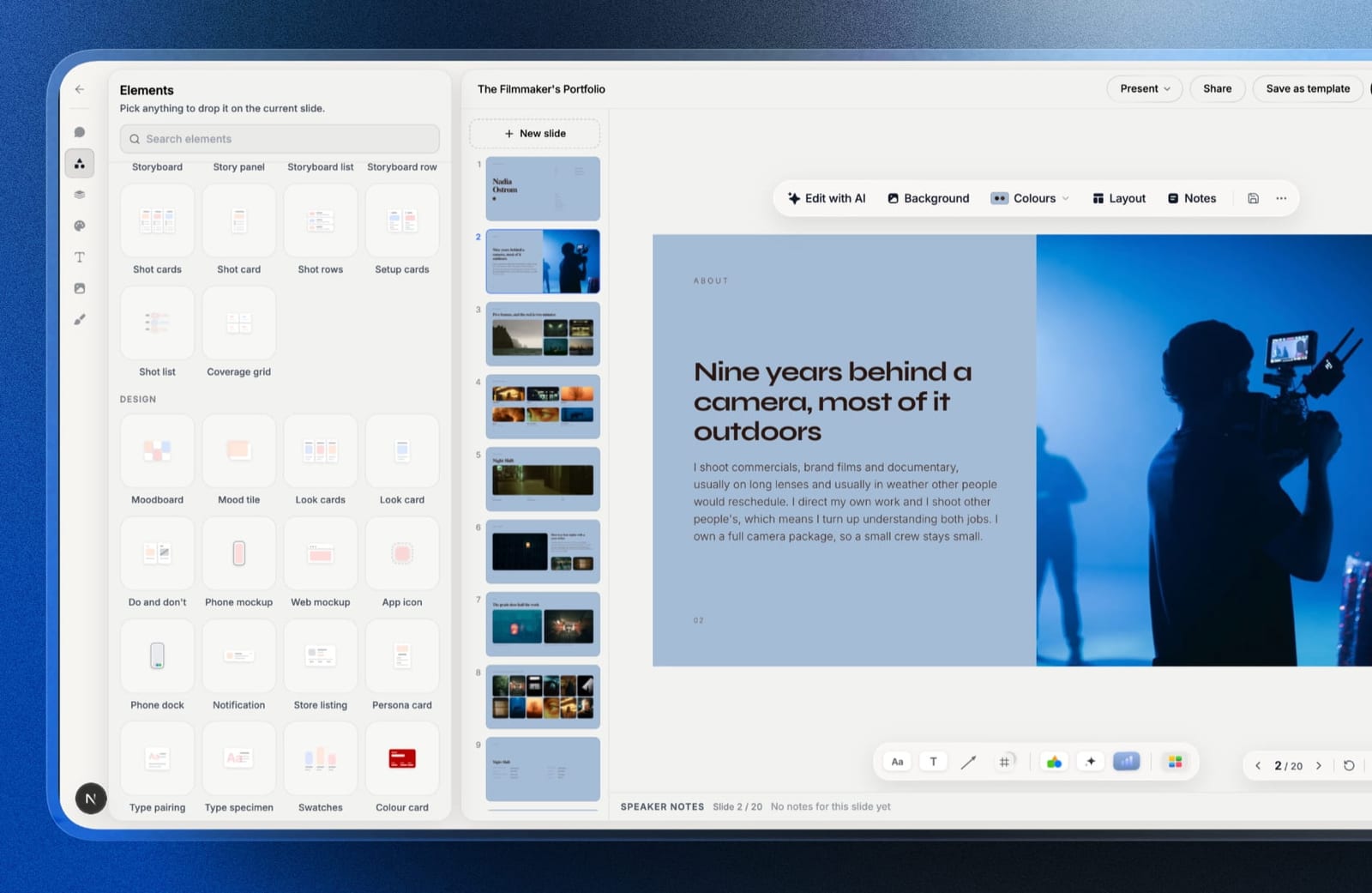
Framekit is an AI website builder whose account now includes Slides, a deck editor, which means it covers every route a photographer's pitch takes rather than one of them.
Build the deck in Slides, present it full screen, send it as a link, or export a PDF on any plan when a producer insists on a file.
When texture is the whole argument, publish the pitch as a page on your own domain instead: in the original test a published Framekit page was the only sending route that kept our three dark detail frames from softening.
Slides is shaped around image-led work rather than business content.
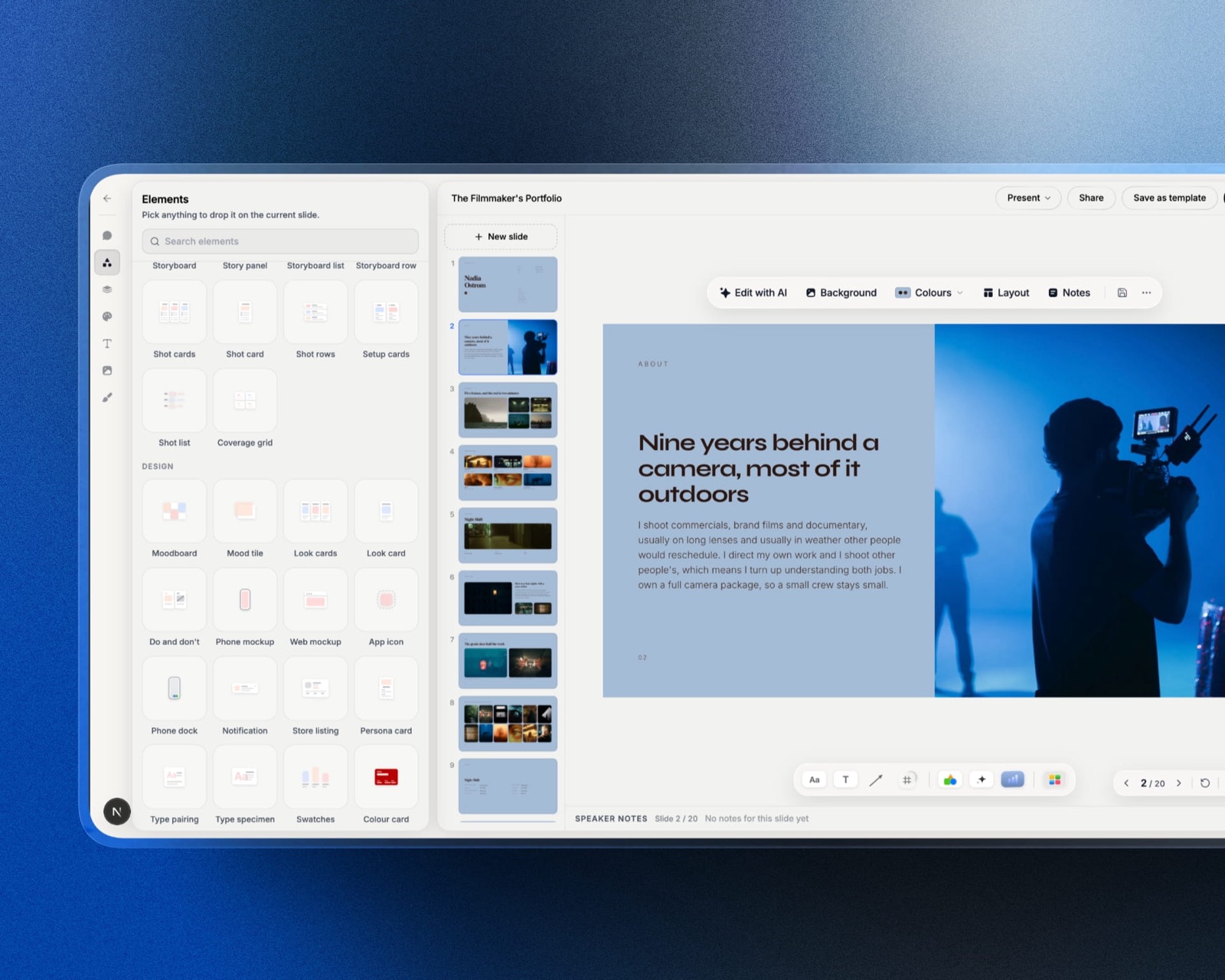
You attach up to 12 frames to the prompt, describe the campaign, and the AI lays out full-bleed and grid pages that you then adjust by hand; look cards, moodboards, shot lists and swatches are ready-made elements, and your own fonts carry across every slide on paid plans.
Best forCommercial, food, product and brand photographers who both present and send pitches, and who want the deck, the portfolio and client delivery in one account.
The real numberthe free plan covers the AI writer, unlimited decks, a share link and PDF export, with no card.
Starter at $84 a year on annual billing adds your own fonts, the template library, a custom domain for the portfolio and removal of the Framekit byline, which is $60 a year less than Canva Pro.
The standout detailthe selects go out from the same place as the pitch. Once the job is won, client galleries on every plan deliver the finished photos and video with favourites, watermarks and PIN-protected downloads, so the client never meets a second platform.
The gotchaslides are fixed 16:9, so a portrait frame sits with space either side, the same limit Pitch has, and we have not run our dark-texture test on the Slides share link or its PDF, only on a published page.
PowerPoint export is Pro-only and picture-based, and a deck link has no password.
Skip it ifyou present on a Mac in the room most of the time, where Keynote handles large images best and costs nothing, or the pitch is a confidential campaign that needs a password.
Verdict: The most complete kit here for a working photographer: a designed deck for the meeting, a page for the emailed pitch, and galleries for the delivery, from one account and free to start.
2. Apple Keynote: Best for Presenting in the Room
Our rating: 9.0/10
Keynote handles photographs better in the room than any other tool in this comparison, and for a photographer that single fact outweighs most feature lists.
Our three texture-detail frames looked, on a calibrated display in presentation mode, essentially like the files we imported. Nothing else we built in managed that.
Full-bleed images fill the frame properly, the typography is better than any other free option, and licensed brand fonts work without a subscription, which matters for photographers presenting under a studio identity.
Best forMac-based photographers who pitch in person, over a screen share, or at a portfolio review.
Key features:
- The best large-image handling in this comparison, with no visible resampling
- Free on every Mac, iPhone and iPad with nothing gated
- Licensed brand fonts supported without a subscription
- Rehearsal display and presenter notes that are genuinely the best here
- PDF export that preserves typography accurately
The real number$0, permanently, with no trial and no credit meter. For a photographer pitching eight jobs a year, that is the entire software budget for this category, against $144 a year for the nearest paid alternative.
The standout detailthe difference is visible in presentation mode rather than in the editor. Compare the same dark frame in Keynote's presentation view and in an exported PDF from any tool here, and the gap is obvious on anything better than a laptop screen.
The gotchaeverything after the room. Sending a Keynote file to a client on Windows means exporting, and the export is where you rejoin every other tool's compression problem. The tool that protects your images best is also the one that protects them only while you are present.
Skip it ifyour pitches are sent rather than presented, which for a growing share of commercial work they now are.
Verdict: Keynote is the best presentation tool for photographers in the room and among the weakest for anything sent. Present with it, send something else. Visit Keynote
3. Canva: Best Designed PDF, Fast
Our rating: 8.4/10
When a producer asks for a PDF, and many still do, Canva is the fastest way to produce one that looks considered. Templates handle the layout, type looks intentional, and image reproduction is better than its reputation suggests.
Our texture frames came out softened but less so than we expected, and clearly better than the free document tools. For a photographer without layout software and a deadline this week, it is the sensible choice.
Best forPhotographers who need a good-looking PDF pitch quickly with no layout application.
Key features:
- Templates that produce a presentable eighteen-slide pitch quickly
- Free plan that completes the whole document
- Reliable PDF export at usable quality
- Brand kit on Pro for studios with a fixed identity
- Browser-based, so a producer can be invited to comment
The real numberthe free plan finishes the pitch. Pro is $18 a month or $144 billed annually, about $12 a month, per Canva's published pricing, and the feature that usually forces the upgrade is uploading a licensed typeface.
The gotchafile size and the compression decision it forces. An eighteen-slide pitch with eleven full-bleed frames exports large, and the compression you apply to email it is where your grading goes. Link the file from cloud storage instead of attaching it.
Skip it ifthe surface texture in your work is the argument, because a PDF is the format least kind to it.
Verdict: Canva is the right tool for the PDF half of the job and should be the default for any photographer who does not own a layout application. See our best Canva alternatives for presentations if the limits bite. Visit Canva
4. Milanote: Best for Working Out the Concept
Our rating: 8.0/10
Before a pitch is a pitch it is forty references and three competing ideas, and Milanote is the best tool here for that stage. The infinite canvas lets directions sit side by side until one wins, which a slide-based tool actively prevents.
It is not a deliverable. A client receiving a Milanote board reads process rather than proposal, and the board carries no timing or structure that a commercial pitch needs.
Best forThe concept stage, before the pitch has a shape.
Key features:
- Infinite canvas with free arrangement and layering
- Images, notes, links and video in one space
- Share links a collaborator can comment on without an account
- Web clipper for gathering references quickly
- Templates aimed at creative planning
The real numberPro is $9.99 per person a month billed annually, about $120 a year, per Milanote's published plans. The free tier allows 10 file uploads, which a pitch with eleven full-bleed frames exhausts before you have finished one direction.
The gotchathat upload limit makes it impossible to evaluate on a real job. Budget for the month you are concepting rather than concluding the tool is more limited than it is.
Skip it ifthe concept is settled, because the value is entirely in the deciding.
Verdict: Milanote is the first hour of a pitch and never the last. See our best mood board tools comparison for how it sits in the wider workflow. Visit Milanote
5. Pitch: Best for Knowing the Client Opened It
Our rating: 7.6/10
Pitch earns its place for one reason: when you send a pitch to three agencies at once, it tells you which one opened it and how far they read. For a photographer chasing work rather than fielding it, that is genuinely actionable.
Image handling is competent rather than exceptional, and the landscape slide format constrains a portrait-heavy pitch in ways photographers notice.
Best forPhotographers pitching several jobs simultaneously who want to know where to follow up.
Key features:
- Per-recipient link activity showing who opened it and how far
- Genuine link expiry and revocation
- Fast editor for swapping frames between sends
- Clean PDF export for producers who insist on a file
- Workspace pricing rather than per-seat charging
The real numberPitch Plus is around EUR 120 a year, so roughly $10 for the month in which you pitch, per Pitch's pricing page.
The gotchathe format is landscape slides, and photographic work is frequently portrait. Our portrait frames sat in a landscape frame with dead space on either side, which is exactly what a photographer spends their career avoiding.
Skip it ifyour work is predominantly portrait or square, because the frame will fight you on every slide.
Verdict: Pitch is the tracking answer rather than the image answer. Useful when knowing changes what you do next. Visit Pitch
6. Google Slides: Best Free Collaborative Draft
Our rating: 6.9/10
Google Slides is free, reliable and the easiest place to build a pitch with a producer or an agent commenting alongside you. For the drafting stage it is genuinely useful.
For photographic work it is the weakest tool here on the criterion that matters most. Our texture frames came out visibly softer than from any other route, which for a photographer is close to disqualifying as a delivery format.
Best forDrafting a pitch with someone else before it is designed or delivered.
Key features:
- Free permanently with nothing gated
- The most reliable simultaneous editing in this comparison
- Comment threads usable without an account
- Cleanest .pptx export of any tool here
- Version history deep enough to recover old work
The real number$0 on personal accounts, or $7 per user a month on a company domain through Google Workspace Business Starter, per Google's published pricing.
The gotchaimage compression on export was the worst here on dark, textured frames. Draft in it if you like; do not deliver from it.
Skip it ifthe deck is going to a paying client, which is the point at which the image quality starts costing you.
Verdict: Google Slides is a drafting tool for photographers and a poor delivery format. Use it for the words, not the pictures. Visit Google Slides
What Compression Costs a Photographer
In one linethe compression pass applied to get a deck under an email limit damages exactly the frames you worked hardest on, and almost nobody inspects the result before sending.
The pattern is consistent. Flat, bright product shots survive every route in this comparison intact.
Dark frames with fine surface texture, shallow depth-of-field falloff and subtle grading do not, and those are the frames that demonstrate why a client should hire you rather than someone cheaper.
Why it happens. A pitch with eleven full-bleed frames exports large. Mail systems reject large attachments. So you re-export smaller, and the smaller export throws away exactly the high-frequency detail that texture is made of.
Three ways around it. Present live, where Keynote protects the files. Publish a page, where no document exists to compress. Or link the PDF from cloud storage rather than attaching it, which preserves the export at the cost of a download step.
Run this on yourself. Open the last pitch PDF you sent, find the darkest textured frame in it, and view it at full size next to the original export from your editing software.
Whatever difference you see is what the client saw, and it was the only version of your work they had.
How to Choose: A Short Decision Guide
In one linework down in order and stop at the first yes, because delivery format decides more here than any feature.
1. Are you presenting in person or over a screen share? Keynote, at $0, and export a PDF as the leave-behind.
2. Is the pitch sent by email and does texture carry the argument? Publish it as a Framekit page, so no document compression step exists; build it in Framekit Slides if you also present it or need a PDF.
3. Has the producer asked for a PDF? Canva, and link the file from cloud storage rather than attaching it.
4. Are you pitching several agencies at once? Pitch, for the read data, unless your work is mostly portrait.
5. Is the concept still unsettled? Milanote, and pay for the month rather than fighting the 10-upload free tier.
6. Are you drafting with an agent or producer? Google Slides for the writing, then rebuild for delivery.
Frequently Asked Questions
What is the best presentation software for photographers?
The best presentation software for photographers in 2026 is Framekit, because its Slides editor, published pages and client galleries cover presenting, sending and delivery from one free-to-start account.
For presenting in person on a Mac, Apple Keynote reproduces large images with the least visible damage of any tool tested and costs nothing. Canva is the fastest route to a designed PDF when a producer requires a file.
Why do my photos look worse in a presentation?
Because the export step compresses them, and the damage concentrates in dark frames with fine texture rather than in bright, flat images.
A deck with eleven full-bleed frames exports large, mail systems reject large attachments, and the smaller re-export discards the high-frequency detail that texture is made of.
Present live, publish a page, or link the file from cloud storage instead of attaching it.
Should I send a PDF or a link to a client?
A link if image quality carries your argument, and a PDF when the client's process requires a file. A link has no size limit and no compression step, can be updated after sending, and opens with no download.
A PDF forwards reliably and survives corporate networks that block unfamiliar domains, at the cost of a compression decision you have to make before sending.
Is Keynote better than PowerPoint for photographers?
Yes on a Mac, for image handling and typography, and the gap is visible on dark textured frames in presentation mode. Keynote is also free, whereas Microsoft 365 Personal is $99.99 a year.
PowerPoint's advantage is the file format, since a client's internal team can edit a .pptx, and for photographers that advantage rarely outweighs the image quality difference.
What resolution should images in a photography pitch be?
Around 2,000 to 3,000 pixels on the long edge for screen delivery, and the more important discipline is inspecting the delivered file rather than perfecting the source. Most pitch image problems happen at export rather than at capture.
Open the final PDF or published page at full size and compare your darkest textured frame against the original before anything goes out.
How many images should a photography pitch include?
Between twelve and twenty for a commercial pitch, with a small number of texture or detail frames rather than a uniform run of hero shots. Our test build used eighteen slides with eleven full-bleed frames and three detail images.
Producers read pitches quickly, and a tighter edit that shows a specific point of view beats a longer one that shows range.
Can I use my portfolio website as a pitch deck?
Yes, and for sent pitches it is the highest-fidelity route available, because the images are served for display rather than embedded in a document.
A published page also lets you swap a frame after the producer has the link, which a file cannot.
Framekit is an AI website builder that generates such a page from a description, and its Slides editor builds the matching deck with PDF export on every plan; neither is a print-accurate layout tool.
Framekit vs Keynote: which is better for a photography pitch?
Keynote is better for presenting in person on a Mac, because it handles large images best and costs nothing; Framekit is better for everything around the meeting.
Framekit Slides drafts the deck with AI, shares it as a link and exports a PDF on every plan, a published Framekit page carries an emailed pitch without document compression, and client galleries deliver the final work, all from $0 or $84 a year.
Do clients care how a photography pitch looks?
They care about the images and they notice the failures around them: a softened frame, a portrait image sitting in a landscape box with dead space, or a link that will not open on a phone.
Nobody has ever hired a photographer because of a slide template. Presentation matters as a way of not undermining the work, which is a lower bar and one that surprisingly many decks miss.
What is the cheapest way for a photographer to present work?
Free, on three of the six tools tested. Keynote costs nothing on a Mac and handles images best, Google Slides is free and best for drafting, and a free-plan published page costs nothing to send.
The paid options worth considering are Canva Pro at $144 a year for brand fonts and Milanote at about $120 a year for the concept stage.
Should a pitch include pricing?
Include a budget summary rather than a full quote, and put the detail in a separate document.
A pitch is arguing that you are the right photographer, and a detailed line-item budget in the middle of that argument shifts the conversation to cost before the case is made.
One slide with a range and what it covers is usually enough at pitch stage.
Final Verdict
Framekit is the best presentation tool for photographers in 2026, because it is the one account that handles the pitch deck, the emailed pitch page and the final delivery.
Apple Keynote remains the best for presenting in the room, because it does the least damage to the images your case rests on and costs nothing, and for pitches that travel by email a published page beats any document, because a document is the thing that forces the compression decision.
The pattern worth taking away is that this category's real variable is not features, it is how many times your files get re-encoded between your editing software and the client's screen. Every step you remove is quality you keep.
Where Framekit losesFramekit is not a print-accurate layout tool, its slides are 16:9 only, and it does not password-protect a deck link or export an editable .pptx. Keynote is the better fit for presenting in person, InDesign-class software for print, and Milanote for working out the concept.
Keep reading: our best film treatment software comparison, the best lookbook software guide, and the best client gallery platforms roundup.