Framekit templates
Start from a designer-made template
 Use template
 Use template
 Use template
 Use template
 Use template
 Use template
 Use template
 Use template
Wix has over 250 million users. Framekit is the newer, design-first challenger. On paper, this comparison seems unfair.
But when we built identical websites on both platforms, one loaded fast and felt responsive. The other was noticeably sluggish, especially on mobile.
Market share does not equal product quality, and after testing design output, performance, ease of use, and total cost, the results tell a different story than the user numbers suggest.
This Framekit vs Wix comparison breaks down exactly where each platform wins, where each falls short, and which one makes sense for your specific situation.
Framekit is the AI website builder built for creative professionals, and the free plan needs no credit card.
A website builder is a tool that lets you create a website without writing code, and Framekit and Wix are two of the most established. This comparison weighs them on the things that actually decide a creative site.
In the Framekit vs Wix comparison, Framekit is the better choice for most creators because it delivers stronger design, fast-loading pages, and flat pricing that starts with a free plan and a $9 Starter tier instead of ever-rising subscriptions.
Wix wins if you need a specific app from its large marketplace. For design quality, speed, and long-term value, start free at https://framekit.ai.
What Is the Difference Between Framekit and Wix?
Framekit and Wix solve the same problem, building a website without code, but they approach it from opposite directions.
Framekit is an AI builder focused on design quality and speed, generating professionally structured pages from a prompt.
Wix is a general-purpose platform built around template breadth and a large app marketplace, trading some polish and performance for that range.
How does each platform build a site?
Framekit is an AI website builder for creative professionals. Its AI is trained by senior designers, so it generates real layout, hierarchy, spacing, and type, then keeps every new section consistent automatically.
Wix is a general-purpose builder with a huge template library and a drag-and-drop editor, plus an ADI mode that assembles a starter site. Wix optimizes for breadth and an app marketplace; Framekit optimizes for design quality and speed.
Who is each builder best for?
Framekit fits photographers, filmmakers, designers, and other creators whose website is a conversion asset, where design quality and load speed directly affect bookings.
Wix fits businesses that need specific operational apps, like restaurant ordering or class scheduling, and are willing to trade some performance and visual polish for that ecosystem.
The Quick Verdict
If you want the short answer before the detailed breakdown:
Choose Framekit ifDesign quality, site performance, and long-term cost matter most. Flat pricing that starts free, with a $9 Starter tier that adds a custom domain and removes branding, keeps costs low while delivering professional, designer-quality results.
Choose Wix ifYou need specific third-party app integrations from its marketplace, or you want to test its free tier before committing.
Now let's examine why.
Head-to-Head Comparison Table
| Category | Framekit | Wix | Winner |
|---|---|---|---|
| Design Quality | 8.4/10 | 4.9/10 | Framekit |
| Performance | Very fast | Variable | Framekit |
| Ease of Use | Easy | Easy | Tie |
| App Integrations | Core, focused | 500+ apps | Wix |
| Free Tier | Yes (branded) | Yes (branded + ads) | Tie |
| 5-Year Cost | $540 (Starter) | $1,020+ | Framekit |
| Template Quality | Designer-trained AI | Mixed quality | Framekit |
| Learning Curve | 30-60 min | 30-60 min | Tie |
| Mobile Performance | Very fast | Variable | Framekit |
| SEO Features | Built-in SSR | Basic tools | Framekit |
How Do Framekit and Wix Compare on Design Quality?
This is where the two platforms diverge most dramatically. Framekit generates designer-quality layouts that stay consistent as the site grows, scoring 8.4 out of 10 in our blind designer evaluation.
Wix relies on a large template library where quality varies widely, and it averaged 4.9 out of 10 in the same test. For a site that has to convert visitors, that gap is decisive.
What is Framekit's design approach?
Framekit's AI is trained by senior designers, so it generates real layout, hierarchy, spacing, and type rather than dropping content into a generic template. The platform prioritizes quality over quantity.
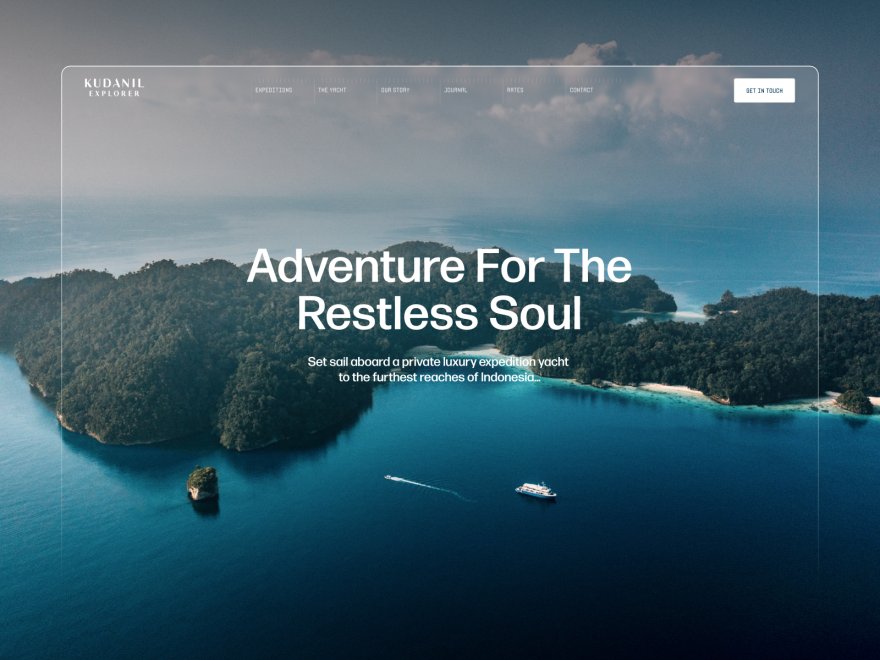
The AI understands visual hierarchy, typography pairing, and whitespace. When you add new sections, they automatically inherit your site's design system. Colors, fonts, spacing, and style stay consistent without manual adjustment.
You can even upload a Pinterest or Instagram screenshot and get a matching design direction. We showed Framekit sites to professional designers for blind evaluation, averaging 8.4 out of 10.
What is Wix's design approach?
Wix offers 800+ templates across every category imaginable. Quantity is the priority. Some templates are excellent; many are dated or generic.
The Wix ADI (Artificial Design Intelligence) can generate sites automatically, but the output feels templated. Adding new sections often requires manual style matching, and design inconsistency grows as sites become more complex.
In the same blind evaluation with professional designers, Wix sites averaged 4.9 out of 10.
"A professionally designed site versus a generic one isn't subjective. It's the difference between converting a visitor and losing one." Kay, Founder of Framekit
Which builder wins on design?
Framekit wins decisively on design quality. If your website represents your business or creative work, this difference matters, because first impressions happen in seconds.
For more options, see our roundup of the best AI website builders for creatives.
Is Framekit Faster Than Wix?
Website speed directly affects user experience, conversion rates, and search rankings.
According to Google's Core Web Vitals research, sites that meet performance thresholds see meaningfully lower abandonment.
The performance gap between Framekit and Wix is wide enough to matter for real-world user experience.
How fast is Framekit?
Framekit is built for fast-loading, performance-optimized sites, so pages feel quick to load even with large galleries. Framekit achieves this through automatic image optimization, efficient code output, lazy loading, and server-side rendering, with no manual tuning required.
How fast is Wix?
Template-based builders like Wix can feel slower on image-heavy mobile pages. Wix loads significant JavaScript overhead on every page and prioritizes feature richness over performance optimization, so image-heavy pages can feel sluggish on mobile.
Why does the performance gap matter?
The performance difference isn't academic. It translates to:
- SEO impact: Google uses Core Web Vitals as ranking factors, so faster sites rank higher.
- User experience: more than half of mobile visitors abandon sites that take longer than three seconds to load.
- Conversion rates: each additional second of load time reduces conversions by roughly 7%.
Which builder wins on speed?
Framekit wins by a significant margin. If search rankings and user experience matter to your business, this gap is hard to ignore.
How do they handle an image-heavy site?
We built the same image-heavy portfolio on both platforms to see how they cope with galleries.
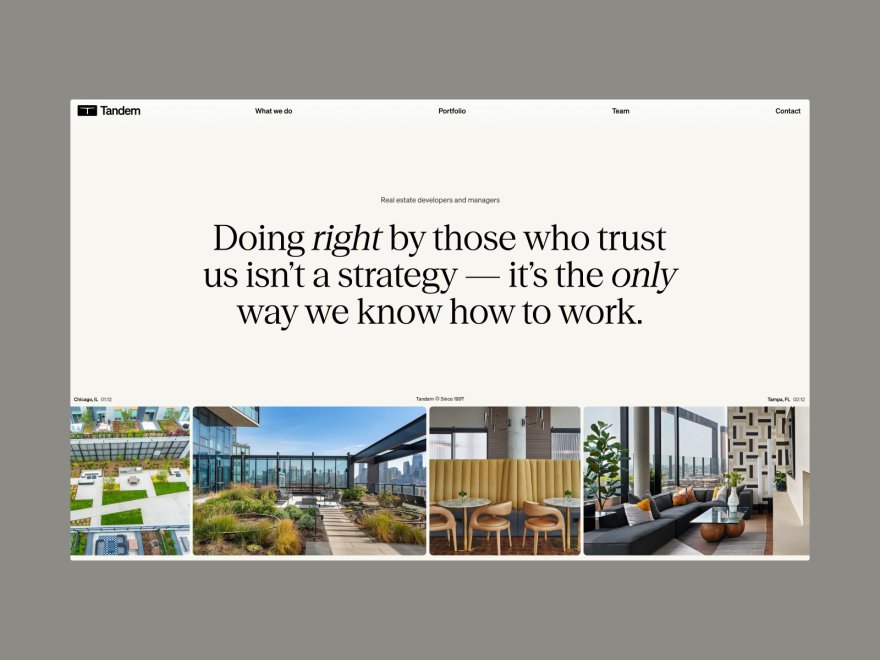
With the same content (about 40 high-resolution images, an about page, a contact form, and gallery pages), Framekit converted images to WebP automatically and stayed fast on mobile.
The Wix build required manual image optimization, felt noticeably slower on mobile, and the starter template felt generic despite the same high-quality photography.
For a builder ranked specifically for visual work, see our guide to the best Wix alternatives for website building in 2026.
How Do Framekit and Wix Pricing Compare?
The two builders run on fundamentally different business models. Wix charges a perpetual subscription, from $17 a month upward, that rises over time.
Framekit undercuts it: a genuinely free plan, then a $9 a month Starter tier that adds a custom domain and removes branding, so over five years a Framekit site can cost around half of a comparable Wix plan, and the price does not rise at renewal.
How is Wix priced?
Wix operates on perpetual subscriptions:
- Free: $0 (Wix ads, Wix subdomain, limited features)
- Light: $17/month ($204/year)
- Core: $29/month ($348/year)
- Business: $36/month ($432/year)
- Business Elite: $159/month ($1,908/year)
Annual billing reduces costs slightly, but you're still paying every year, forever. For context, see Wix pricing.
How is Framekit priced?
Framekit prices on flat monthly tiers that do not rise at renewal:
- Free: $0, no credit card (framekit.ai subdomain and a small Framekit badge)
- Starter: $9/month (custom domain, no Framekit branding)
- Pro: $19/month (cancel anytime; annual billing saves 20%)
- Business: $39/month (0% product fee)
Starter is the cheapest tier that adds a custom domain and removes Framekit branding. Annual billing saves 20%.
5-Year Cost Comparison
| Plan Level | Wix (5 Years) | Framekit Starter (5 Years) | Savings |
|---|---|---|---|
| Light | $1,020 | $540 | $480 |
| Core | $1,740 | $540 | $1,200 |
| Business | $2,160 | $540 | $1,620 |
Over a decade, the savings against Wix's mid-tier plans grow well past $2,000, because Framekit's plan price stays flat while Wix keeps billing every year.
Which builder wins on price?
Framekit wins for anyone planning to maintain their website long-term, because its $9 Starter tier stays flat while Wix keeps raising prices and billing every year. Wix only wins if you need short-term use or want to stay on its free tier indefinitely.
Is Framekit or Wix Easier to Use?
Both platforms target non-technical users and neither requires coding knowledge, so this is close to a tie.
In our testing, Framekit reached a publishable site in about 45 minutes because the AI handles the blank-canvas problem, while Wix took around 1 hour 20 minutes but gives you more granular manual control if you want it.
What is the Framekit editor like?
Framekit uses a visual editor with drag-and-drop functionality. The AI generates initial layouts from prompts, reducing the blank-canvas problem.
Key usability features:
- Intelligent section suggestions based on your content
- Automatic style matching when adding components
- Real-time preview across device sizes
- Contextual help within the editor
Average time to a publishable site in our testing: roughly 45 minutes.
What is the Wix editor like?
Wix offers two editing modes: Wix Editor (manual) and Wix ADI (AI-assisted). The Editor provides granular control. ADI automates initial setup.
Key usability features:
- Extensive drag-and-drop flexibility
- Element-level customization options
- Large template starting point library
- Guided setup wizard for beginners
Average time to a publishable site in our testing: about 1 hour 20 minutes.
Which builder wins on ease of use?
Tie, with a slight Framekit advantage. Both platforms are genuinely easy to use. Framekit's intelligent adaptation saves time during building and editing, while Wix's granular control appeals to users who want to adjust everything manually.
Does Wix Have More Apps and Integrations?
Yes, and this is Wix's strongest category. Wix offers 500+ apps covering booking, restaurant ordering, fitness scheduling, CRM, and more, so most operational business needs have a native add-on.
Framekit focuses on core website functionality and connects external tools for specialized needs, which is an honest limitation if your business depends on a rare integration.
What is in the Wix App Market?
Wix offers 500+ apps and integrations:
- Booking and scheduling systems
- Restaurant ordering and menus
- Fitness class management
- CRM and email marketing tools
- Payment processors
- Social media feeds
- Analytics and tracking
If you need specific business functionality, Wix probably has an app for it.
What integrations does Framekit have?
Framekit focuses on core website functionality:
- Contact forms
- Image galleries
- Social links
- Basic analytics
- Email capture
- Custom domain connection
For specialized business needs such as appointment booking or membership sites, Framekit requires connecting external tools. This is an honest limitation: the app marketplace is smaller than Wix's, so confirm any rare integration before migrating.
Which builder wins on integrations?
Wix wins clearly. If your business requires specific integrated functionality, like online booking, restaurant ordering, or fitness scheduling, Wix's app marketplace provides it natively.
Framekit works best for portfolio sites, business landing pages, and content sites without complex operational requirements.
Which Builder Is Better for SEO?
Framekit is the stronger choice for SEO. It ships server-side rendering, automatic sitemaps, structured data, and per-page controls with no configuration, and its fast-loading pages support better rankings.
Wix provides capable SEO tools too, but they need more manual setup and slower base performance works against you.
What SEO features does Framekit include?
Framekit ships SEO essentials with no configuration: server-side rendering for faster indexing, automatic sitemaps, JSON-LD structured data, per-page SEO controls, clean URLs, and mobile-first responsive output.
Combined with fast-loading, performance-optimized pages, sites get healthy performance signals out of the box.
What SEO features does Wix include?
Wix requires more manual configuration: an SEO Wiz guided setup, custom meta titles and descriptions, image alt text, sitemap submission tools, and basic structured data. The tools are capable, but slower base performance works against ranking.
Which builder wins on SEO?
Framekit wins. Its fast-loading, performance-optimized pages support better search rankings, server-side rendering improves crawlability, and automatic optimization removes the technical burden.
Should You Choose Framekit or Wix?
The data makes Framekit's advantages clear in design quality, performance, and long-term cost, but the right choice depends on your priorities.
Choose Framekit if...
Framekit makes the most sense for:
Creative professionals who need portfolio sites that showcase their work beautifully. Design quality directly impacts client perception.
Small business owners who want a professional online presence at a low, predictable cost. The $9 Starter plan adds a custom domain and removes branding without the annual price creep of most builders.
Anyone prioritizing performance who understands that site speed affects both user experience and search rankings.
Long-term thinkers who calculate total cost of ownership rather than monthly price tags.
Users who value design and want their website to look like it was built by a professional agency, not assembled from generic templates.
Choose Wix if...
Wix makes the most sense for:
Businesses needing specific integrations that exist in the Wix App Market. If you need native appointment booking, restaurant ordering, or fitness scheduling, Wix provides it.
Users wanting maximum flexibility who enjoy granular control over every element and don't mind spending extra time on manual adjustments.
Short-term projects where the subscription model works fine because you only need the site temporarily.
Those prioritizing app ecosystem over design quality and performance metrics.
Frequently Asked Questions
Is Framekit better than Wix?
In the Framekit vs Wix comparison, Framekit is better for most creators because it produces stronger design, faster pages, and lower flat pricing that does not rise at renewal.
Framekit is built for fast-loading, performance-optimized sites, while template-based builders like Wix can feel slower on image-heavy mobile pages. Wix is the better pick only when you need a specific app from its larger marketplace.
Can I migrate from Wix to Framekit?
Yes. There is no automatic migration, but rebuilding on Framekit typically takes one to two hours, and the AI does most of the layout work. Most users report their Framekit site looks better than their original Wix site.
How much does Framekit cost compared to Wix?
Framekit is free at $0 on a framekit.ai subdomain with a small badge. Its Starter plan is $9 a month and adds a custom domain plus branding removal, undercutting Wix's cheapest Light plan at $17. Pro is $19 and Business is $39, and none of these prices rise at renewal.
Does Framekit have a cheaper long-term cost than Wix?
Yes. On the Starter tier, Framekit is $540 over five years and the price stays flat. Wix Light reaches $1,020 over the same period and its mid-tier Core plan passes $1,700, so the gap widens the longer you keep the site.
Which platform is better for e-commerce?
Wix has more built-in e-commerce features. For simple product sales either works, but for a large catalog with complex inventory, a dedicated platform may serve you better than either builder.
Can I use my own domain with both?
Yes. Both Framekit and Wix support custom domain connections on paid plans, and both include SSL.
Framekit vs Wix: Final Verdict
Framekit wins the Framekit vs Wix comparison overall for users who prioritize design quality, site performance, and long-term cost efficiency.
The numbers tell the story:
- Design Quality: Framekit 8.4/10, Wix 4.9/10
- Performance: Framekit very fast, Wix variable on image-heavy pages
- 5-Year Cost: Framekit $540 on Starter, Wix $1,020+
Wix's 250 million users reflect marketing budget and brand awareness, not product superiority.
The platform works adequately for many use cases, but "adequate" isn't the standard when your website matters to your business or creative career.
If you need specific integrations from Wix's app marketplace, that ecosystem provides genuine value, so choose Wix when those apps are essential to operations.
For everyone else prioritizing professional results, fast performance, and financial efficiency, Framekit delivers more value.
If you're still weighing options, read our Framekit vs Squarespace design and performance comparison and, for studios, our Framekit vs Webflow comparison for agencies.
Build your first site. Most users complete a professional website in under an hour, on flat pricing that starts free: framekit.ai.
_Recently updated for 2026: both products' plan pricing and free-tier terms checked on their own pages._