Framekit templates
Start from a designer-made template
 Use template
 Use template
 Use template
 Use template
 Use template
 Use template
 Use template
 Use template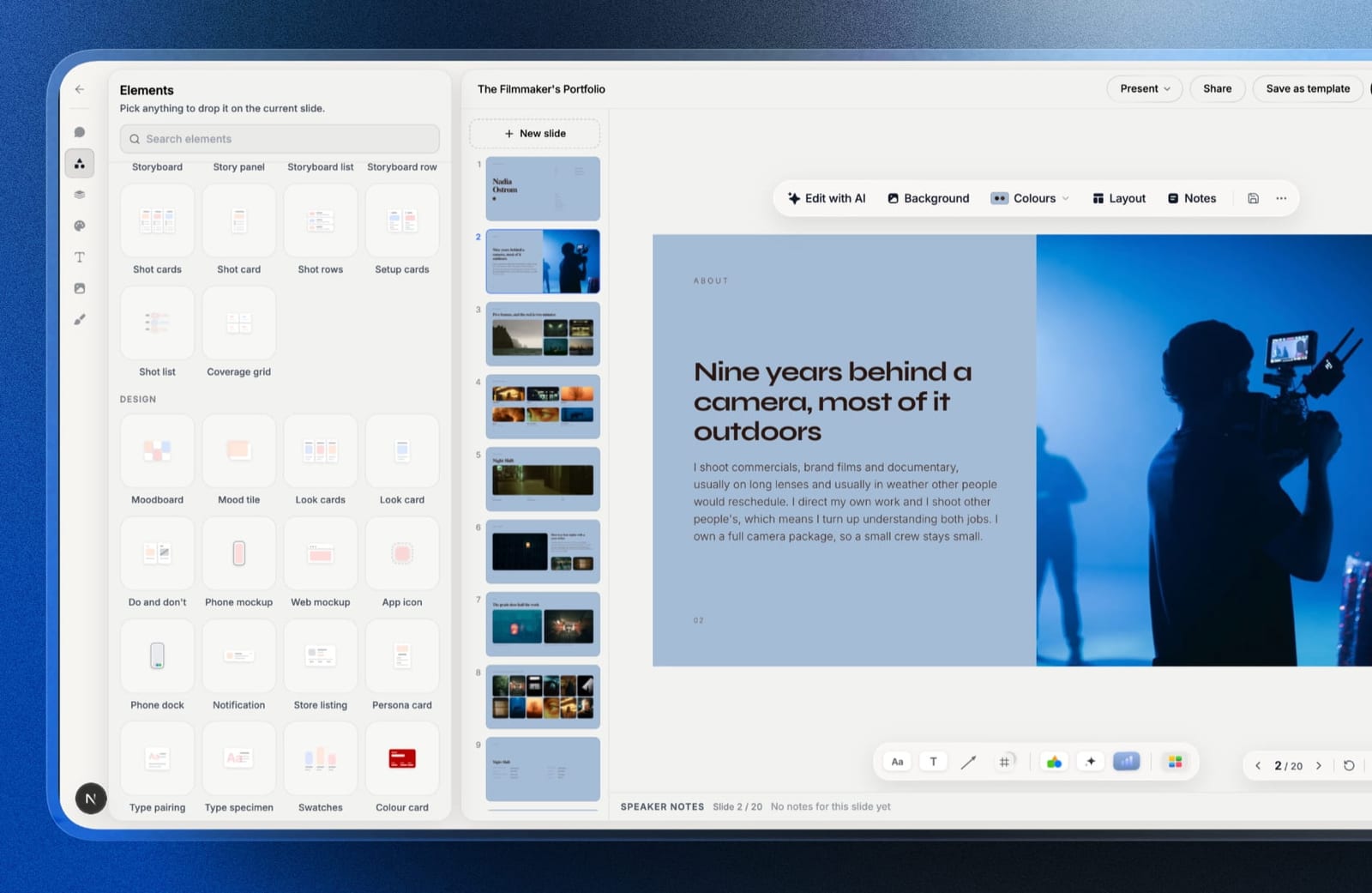
Adobe Express is unusually generous where most free tiers are stingy, and unusually restrictive in a place almost nobody checks before committing.
The exports are clean, with no watermark, which puts it ahead of Visme, Piktochart, and Venngage immediately. Then you use the AI a few times and hit a wall.
Twenty-five generative credits a month on the free plan. Not twenty-five images a day, twenty-five operations a month across generative fill, text effects, and image generation combined. If AI is why you opened the tool, that is about a Tuesday.
Clean exports, metered magic.
A design app for marketing assets is a tool for producing social posts, flyers, short documents, and video clips from templates, aimed at people who need output quickly rather than at people who design for a living.
The best Adobe Express alternative in 2026 is Canva, because its template library is several times larger, its free tier is not credit-metered in the same restrictive way, and Magic Switch reformats a finished design across aspect ratios in a way Express has no equivalent for.
The honest trade-off is that Canva's generative features are also metered and its asset licensing is tied to your subscription staying active.
Affinity Designer is now free if you want real design control rather than templates, Framekit is the pick for photographers, filmmakers and designers whose Express output is mostly decks, lookbooks and media kits, and Photopea is the best free browser editor.
Framekit is an AI website builder that also includes Slides, a deck tool for treatments, lookbooks and portfolio decks, alongside client galleries, video review and a store.
In September 2026 we re-verified Framekit's plans and features and added it as a tenth entry, since its deck tool did not exist when this guide was first written; competitor limits are as read in August 2026.
Full disclosure: Framekit is our own product and ranks third below, for deck-shaped work only; it has no social-format templates, no image editing, no video and no PNG export, so Canva, Affinity and Photopea all beat it for the social posts and flyers most people use Express for.
How We Tested These Adobe Express Alternatives
We produced the same asset set in every tool: a nine-post social campaign in three aspect ratios, a two-page flyer, an animated story, and one image requiring a generated background extension.
The carried scenario is a solo marketer at a small studio producing roughly forty assets a month.
Free tier reality. Watermarks, export limits, and specifically how AI usage is metered, since this is where Express stops.
Template depth, searched against three real briefs rather than counted.
Asset licensing. What happens to designs containing premium stock, fonts, or generated images when a subscription lapses. This is the question almost nobody asks and the one with consequences.
Reformatting. How long nine posts across three ratios actually takes.
Cost, at published annual rates, for one person and for two.
Three kinds of claim, kept apart.
Ours by hand in August 2026: the nine asset sets, the reformatting timings, the export checks, and the credit-exhaustion tests; Framekit, added in September 2026, is described from its product features and is not in the counts below.
From published sources: every price and limit, linked where the figure carries weight. From other people: recurring themes in public reviews, marked as sentiment.
What Producing the Same Campaign Nine Ways Showed
The differences that mattered were about metering and licensing rather than about drawing tools, and both only reveal themselves after a few weeks of real use.
- 7 of 9 free tiers export without a watermark. Adobe Express is one of them, which is genuinely a point in its favour.
- 6 of 9 meter generative AI by credits. The allowances ranged from 25 a month to several thousand.
- 3 of 9 are fully free with no metering of any kind, and two of those are professional applications rather than template tools.
- Nine posts across three ratios took between 11 and 47 minutes depending on whether the tool reformats intelligently.
- 4 of 9 restrict access to designs containing premium assets once you stop paying.
- Cost for one person ranged from $0 to $240 a year.
Adobe Express Alternatives Compared
The weighting: template depth and speed 25%, free tier usefulness 25%, licensing clarity 20%, design control 20%, cost 10%.
Free tier and licensing together carry 45%, because this is a category people adopt on a free plan and get caught by later.
Framekit would score near the bottom on template depth for social and print formats, which it does not have; it ranks third only for deck-shaped work, and its row shows the gaps.
| Tool | Free exports clean | AI metering | Reformat across ratios | Cost / year |
|---|---|---|---|---|
| Adobe Express | Yes | 25 credits/month free | Manual | $119.88 (Premium) |
| Canva | Yes | Credit-metered | Magic Switch, automatic | $144 (Pro) |
| Affinity Designer | Yes, free outright | None, no AI | Manual | $0 |
| Framekit Slides | PDF only, with a small byline on free share links | Credit-metered, larger budget on paid plans | Not applicable, 16:9 decks only | $0 to $228 |
| Photopea | Yes | None | Manual | $0, ad-supported |
| Figma | Yes | Limited | Manual, auto-layout helps | $36 to $192 |
| VistaCreate | Watermark on some assets | Credit-metered | Semi-automatic | Paid tiers |
| Piktochart | Watermarked | Credit-metered | Manual | $120 |
| Venngage | Watermarked | Credit-metered | Manual | $120 |
| GIMP | Yes, free outright | None | Manual | $0 |
1. Canva: The Best Adobe Express Alternative
Best foralmost anyone leaving Express, unless you left because of the credits.
Canva does everything Express does and more of it.
The template library is several times deeper against the same search, the mobile app is better, and Magic Switch reformatted our nine posts into three aspect ratios in eleven minutes against forty-one minutes of manual work in Express, because it reflows the layout rather than scaling it.
The real numberCanva Pro is $18 a month or $144 a year, against Adobe Express Premium at $9.99 a month, or $119.88 a year with no annual discount. Canva is the more expensive of the two, and the extra $24 buys a materially larger library.
The gotchaCanva's generative features are also credit-metered, so if you left Express because you ran out of AI you will run out here too, on a different schedule. Its premium assets are also licensed through your subscription, so designs using them become restricted if you cancel.
Skip it ifheavy generative use is the reason you are switching.
What reviewers say elsewhereCanva holds a 4.7 out of 5 across more than 6,000 reviews on Capterra, with template range the most cited strength.
Verdict: the straightforward upgrade for template-led work, at a slightly higher price and with the same metering problem in a different shape.
2. Affinity Designer: Best Free Real Design Tool
Best forpeople who have outgrown templates and do not want a subscription.
Affinity's applications are now free following Canva's acquisition of Serif, which puts a professional vector and layout toolset at zero cost.
Our flyer came out better here than anywhere else, with real typographic control and no metering of anything.
The real numberfree, permanently, with no account requirement, no credits, and no subscription that can lapse and lock your files.
The standout detailnothing you make is licensed through a subscription. Files open forever, which is the opposite of the arrangement every template tool here offers.
The gotchano template library worth the name, no AI, no social scheduling, and a real learning curve. For someone producing forty templated assets a month it is slower, not faster.
Skip it iftemplates are the reason you use Express.
Verdict: the strongest free option and a different kind of tool. Choose it if you want control; stay with a template app if you want speed.
3. Framekit: Best for Creatives Whose Express Output Is Decks

Best forphotographers, filmmakers and designers who opened Adobe Express to make a pitch deck, a lookbook, a treatment, a media kit or a portfolio PDF, rather than a feed of social posts.
Adobe Express will make a deck, and it is not what the tool is shaped for.
Framekit Slides is: templates laid out for treatments, lookbooks, portfolio and campaign decks, and ready-made elements a general design app does not have, including shot lists, storyboard panels, moodboards, colour swatches, type specimens, phone and web mockups and charts.
Describe a slide and the AI writes and lays it out in the deck's style, then every element stays editable by hand, and your own fonts and colours carry across every slide.

The real number$0 for unlimited decks, the AI writer, a share link and PDF export.
Starter at $9 a month, or $84 a year billed annually, adds the template library, your own uploaded fonts, and removes the "Made with Framekit" badge from shared decks, which is $36 a year less than Express Premium.
The standout detailthe deck is a link that updates in place. Fix a typo after sending and everyone holding the link sees the corrected version, and the deck sits in the same account as your portfolio site, client galleries and video review.
The gotchait only makes 16:9 decks. There are no social-post sizes, no flyers, no image editing, no video editing, and no PNG or JPEG export; the .pptx export (Pro) is picture-based.
Its AI is also credit-metered, with a larger monthly budget on paid plans, so it does not escape the metering this page warns about.
Skip it ifExpress is your social content factory. Canva is the direct replacement for that.
Verdict: the best Adobe Express alternative for the specific creative who was using it to make decks, lookbooks and media kits, and not an alternative at all for social posts. Pair it with Canva's free tier if you need both.

4. Photopea: The Best Free Browser Editor
Best forediting images and PSDs without installing or paying for anything.
Photopea runs in a browser, opens PSD, XD, Sketch, and Figma files, and offers a Photoshop-shaped feature set for free. For the image-editing half of what people use Express for, it is remarkable that it exists.
The real numberfree and ad-supported, with an inexpensive paid tier that removes the ads.
The gotchait is an image editor, not a design app. No templates, no brand kit, no social sizes, no scheduling, and no AI generation.
Skip it ifyou need templates and layouts rather than image editing.
Verdict: the best free image editor in a browser, covering a slice of Express rather than replacing it.
5. Figma: Best If You Have Outgrown Templates
Best forpeople whose complaint about Express is that it will not let them do what they can picture.
Figma gives real constraints, components, and auto-layout, so a nine-post campaign built as components propagates a change across all nine instantly, which is a different and better model than reformatting each one.
The real numbera Collab seat is $3 a month billed annually, which is $36 a year, and a Full seat with design-file editing is $16 a month, or $192.
The gotchano template marketplace at Express's scale, no social scheduling, no video, and no print output. It is a design tool that assumes you are a designer.
Skip it ifyou are not one.
Verdict: the highest ceiling here at the lowest paid price, for people who want to build rather than fill in.
6. VistaCreate: Closest Template-Tool Match
Best forpeople who want Express's shape from a different vendor.
VistaCreate is the most direct like-for-like: template-led, social-first, with a large asset library and animation support. Our campaign came together at roughly Express's speed with a comparable result.
The real numberVistaCreate offers a free tier with watermarking on some premium assets and paid plans above it; check current pricing on their site.
The gotchathe free tier's asset restrictions are less clear than Express's, and it is the tool in this comparison where we most often started a design and then discovered an element required an upgrade.
Skip it ifyou want to know the limits before you start rather than after.
Verdict: a competent parallel to Express with murkier free-tier boundaries.

7. Piktochart: Best for Data-Led Assets
Best formarketers whose assets are mostly charts and infographics.
Piktochart's templates assume a dataset rather than a photograph, which for reports, infographics, and anything where the argument is a number makes it a materially better starting point than anything in Express's library.
The real numberPiktochart Pro is $10 per member a month billed annually, which is $120 a year, undercutting both Express Premium and Canva Pro.
The gotchathe free tier watermarks exports, so the real entry price is $120, and the library is much narrower than Express's outside data-led formats.
Skip it ifyour assets are photographic.
Verdict: cheaper than Express and narrower, and the right pick when the content is numbers.
8. Venngage: Best for Business Documents
Best forteams producing recurring business documents rather than social posts.
Venngage's library leans toward reports, one-pagers, timelines, and org charts, and its templates arrive carrying a real document structure rather than a decorated page, which is most of the work on a recurring business document.
The real numberStandard is $10 a month billed annually, so $120 a year, with the Team plan at $24 per user a month, which is where HTML and PowerPoint export live.
The gotchaexport format is tied to tier, so a solo user on Standard is limited to PNG and PDF. Check which export you need before choosing a plan.
Skip it ifyour output is social and photographic.
Verdict: effective for business documents at the same price as Piktochart, with an export gate worth reading carefully.
9. GIMP: Free and Unmetered
Best forpeople who want a permanent free image editor with no account.
GIMP is free, open source, works offline, and imposes no credits, no subscription, and no licensing conditions on anything you produce with it, which over several years is a genuinely different proposition from every template tool here.
The gotchano templates, an interface many find awkward, and no social sizes or brand kit. It is a raster editor and nothing else.
Verdict: free forever and a poor Express replacement for anyone who came for templates.
Or Stay: Adobe Express Itself, on Premium
Staying is not an alternative, which is why it sits outside the numbered list, but for people whose only problem is the free plan's credit ceiling it is often the cheapest fix of all.
Worth stating plainly: if the free plan's twenty-five credits are your complaint, the fix may be the paid plan rather than a new tool. Premium raises the allowance substantially and keeps everything you already know.
The real numberAdobe Express Premium is $9.99 a month, which is $119.88 a year with no annual discount, and Teams starts at $4.99 per licence a month for the first year, renewing at $7.99, with a two-seat minimum.
Firefly Pro at $19.99 a month bundles Express Premium with a much larger generative allowance.
The gotchaswitching tools to escape credit metering usually fails, because six of the nine tools we tested meter AI in some form, and Framekit does too. Only the non-AI tools escape it entirely.
Verdict: the honest answer for a subset of readers, and worth checking before paying a different vendor for the same limitation.

The Two Things to Check Before You Switch
Two properties of this category only become visible after a few weeks of real use, and both of them decide whether the tool still suits you in month six, which is why they are worth checking before the price is.
Generative credits are the new free-tier limit. The old restriction in this category was a watermark; the new one is a monthly credit allowance.
Express gives 25 free credits a month, and every credit-metered tool here has an equivalent ceiling at a different height.
If AI is central to how you work, compare the allowances rather than the prices, and consider a tool with no AI at all.
Asset licensing outlives the subscription question. Designs containing premium stock, premium fonts, or generated images are usually licensed through your active subscription.
Cancel, and those specific designs can become restricted, which is a different thing from losing access to the app. Affinity, Photopea, and GIMP have no such condition; every template tool here does in some form.
In one linecompare credit allowances and cancellation terms rather than monthly prices, because those are the two things that decide whether the tool still works for you in month six.
The Assets That Should Not Be Remade
A single flagged section here, covering the one thing we make. A large share of what gets produced in a tool like Express is the same asset remade: the services graphic, the rate card image, the "what we do" carousel, rebuilt each quarter because the numbers moved.
Framekit is an AI website builder for creators and studios, and the narrow point is that an asset you rebuild every quarter because its content changed is a page pretending to be an image.
Text on a page updates in a minute and can be found in search; text baked into a JPEG has to be remade and cannot.
The same logic applies to a rate card or capabilities deck: shared as a Framekit Slides link, one edit reaches everyone holding it.
The limits, plainly: Framekit has no templates for social formats, no image editing, no video editing, and no export to PNG or JPEG. For the social posts and flyers most people make in Express, it is not an alternative to the tools above.
Which Adobe Express Alternative Should You Choose?
The right answer depends on whether you are leaving for templates, for control, or for the credit ceiling, so work down these questions in order.
1. Do you want more and better templates? Canva, and expect the same credit metering in a different shape.
2. Did you run out of AI credits? Check Adobe Express Premium or Firefly Pro first, because most alternatives meter AI too.
3. Have you outgrown templates? Affinity Designer, free, or Figma at $36 a year on a Collab seat.
4. Were you mostly making decks, lookbooks, treatments or media kits? Framekit Slides, free to start, with production elements built in and a share link that updates in place.
5. Do you mainly edit images? Photopea, free in a browser, or GIMP offline.
6. Are your assets charts and infographics? Piktochart at $120 a year.
7. Are they business documents? Venngage, checking which export your tier includes.
8. Do you want nothing metered and nothing licensed through a subscription? Affinity, Photopea, or GIMP, all free.
9. Do you rebuild the same asset every quarter? Make it a page or a deck link instead of an image.
Frequently Asked Questions
Is Adobe Express free, and what are its limits?
Adobe Express has a genuinely free plan that exports without a watermark and includes over 100,000 templates and 5GB of storage, which is more generous than Visme, Piktochart, or Venngage.
Its main restriction is 25 generative credits a month, covering generative fill, text effects, and image generation combined.
What is the best Adobe Express alternative?
Canva is the best all-round alternative, with a substantially deeper template library and Magic Switch, which reformatted nine social posts across three aspect ratios in 11 minutes against 41 minutes of manual work.
It costs $144 a year against Express Premium's $119.88 and meters its generative features in a similar way.
Affinity Designer is the best free tool for real design control, and Framekit Slides is the best alternative for creatives who used Express mainly for decks, lookbooks and media kits.
Adobe Express vs Framekit: which is better for a pitch deck or lookbook?
Framekit is better for a creative pitch deck or lookbook, because its Slides templates are laid out for treatments, lookbooks and portfolio decks, it has shot list, storyboard and moodboard elements, and the deck shares as a link that updates in place, free to start.
Adobe Express is better for everything around the deck, such as social posts, flyers, short videos and quick image edits, none of which Framekit makes.
Is Canva better than Adobe Express?
Canva is better than Adobe Express for template depth, reformatting across aspect ratios, and mobile editing, and it costs about $24 a year more.
Adobe Express is better if you are already inside the Adobe ecosystem and want Firefly generation and Creative Cloud asset access without a second subscription.
What happens to my designs if I cancel a subscription?
Designs containing premium stock, premium fonts, or generated images are generally licensed through your active subscription, so those specific designs can become restricted after cancellation even though your account remains.
Affinity, Photopea, and GIMP attach no such condition, since nothing in them is licensed per subscription.
Which design tools do not limit AI by credits?
Affinity Designer, Photopea, and GIMP have no generative AI and therefore no credit metering at all.
Six of the nine tools we tested meter AI by credits with allowances ranging from 25 a month to several thousand, so switching tools to escape a credit ceiling usually just moves it.
What is the best free Adobe Express alternative?
Affinity Designer is the best free alternative for real design control, being a professional application now available at no cost, and Photopea is the best free browser-based image editor.
Canva's free tier is the closest free match for template-led work and exports without a watermark.
Is Adobe Express Premium worth it?
Adobe Express Premium at $9.99 a month, or $119.88 a year, is worth it if your only complaint about the free plan is the 25-credit generative allowance, since most alternatives meter AI too.
It is poor value if what you actually want is a bigger template library, where Canva is the stronger purchase.
Which alternative is cheapest for a small team?
Adobe Express Teams starts at $4.99 per licence a month for the first year with a two-seat minimum, renewing at $7.99, which is the cheapest paid team option here. Figma Collab seats at $36 a year each are cheaper still if the team designs rather than fills in templates.
Can you use Adobe Express files in Photoshop or Illustrator?
Adobe Express connects to Creative Cloud libraries so assets, brand kits, and fonts move between them, which is the main structural advantage of staying inside Adobe.
Alternatives export standard formats, and Photopea will open PSD, XD, Sketch, and Figma files directly, which covers most interchange needs.
Should recurring marketing assets be images or web pages?
An asset you rebuild every quarter because its content changed, such as a services graphic or a rate card, is usually better as a page, since text on a page updates in a minute and can be found in search while text baked into an image has to be remade each time.
Assets designed for social feeds genuinely need to be images.
Final Verdict
Canva is the alternative most Adobe Express users should move to, and the reason is template depth plus Magic Switch rather than any single feature. The nine-post reformat took a quarter of the time, and over forty assets a month that difference is the whole argument.
If you are leaving because of the credit ceiling, be careful: six of the nine tools we tested meter AI, and so does Framekit, so the switch may simply relocate the wall.
The genuinely unmetered options are Affinity Designer, Photopea, and GIMP, and all three are free, and none of them are template tools.
For a photographer, filmmaker or designer whose Express output was mostly decks, Framekit is the third pick: templates made for treatments and lookbooks, production elements built in, and a deck link that updates in place, free to start.
Where Framekit losesFramekit is not a social or marketing asset tool.
It has no social-format templates, no flyers, no image or video editing, and no PNG or JPEG export, so anyone replacing Express for social content is a better fit for Canva, and anyone who wants unmetered design control is better served by Affinity Designer.
Before switching, check two things rather than the price: the generative credit allowance, and what happens to designs containing premium assets if you stop paying.
Related reading: our roundups of the best Canva alternatives, the best free graphic design software, the best Photoshop alternatives, and the best InDesign alternatives.
Prices and free-tier limits here were read from published vendor documentation in August 2026. Credit allowances in this category change more quietly and more often than headline prices do.