
Framekit templates
Start from a designer-made template
 Use template
 Use template
 Use template
 Use template
 Use template
 Use template
 Use template
 Use template
If you already live in Figma, Figma Slides feels like someone finally built a presentation tool for people who understand constraints. Auto-layout in a deck. Real components, so the client logo changes once.
A live prototype embedded in slide fourteen that you can actually click during the meeting.
Then the client asks for the file, and the reason people start looking for Figma Slides alternatives becomes obvious in about four seconds.
The .pptx export flattens components into static groups, turns your embedded prototypes into screenshots, and hands over a deck that is competent and completely inert. Everything that made it good does not travel.
A Figma Slides alternative is a presentation tool that offers designer-grade layout control - components, consistent spacing, type systems - without requiring the whole team to learn a design application, and ideally without destroying that structure the moment the deck is exported.
The best Figma Slides alternative in 2026 is Canva, because it is the only tool that keeps a real shared brand system while producing exports that survive intact on a machine that has never seen your fonts, and it does not require the recipient to understand auto-layout.
The honest trade-off is a lower design ceiling: nothing here gives you the layout precision Figma does.
Pitch is the pick if component reuse across many decks is the point, Google Slides if the deck has to be free and editable by anyone, Keynote still has the best motion of any tool on this page, and Framekit Slides is the pick for small design studios that present and send rather than hand over, free to start, with the trade-off that its PowerPoint export is picture-based and not editable.
Full disclosure: Framekit is our own product. It shipped Slides after this guide was first written and now ranks third: ahead of the free and AI tools for a design studio, behind Canva and Pitch because its .pptx export is picture-based and it has no components. We reviewed it from its features and published pricing rather than the same rebuild.
Re-verified on 19 September 2026 for Framekit's features and prices; competitor pricing is as read in August 2026.
How We Tested These Figma Slides Alternatives
We rebuilt the same deck nine times: a twenty-four-slide UX case study with a component-driven header used on eighteen slides, six embedded interactive prototypes, four before-and-after image comparisons, a research findings section with three charts, and a closing recommendations slide.
The carried scenario is a three-person product design studio presenting this to a client, then sending it to a stakeholder group of nine.
Structural control. Does the tool have components, auto-layout equivalents, or shared styles, or is it a stack of independent slides that drift apart over time?
What survives export. We exported each rebuild to .pptx and PDF and opened them on a Windows machine with none of our fonts installed, noting every visible difference.
Interactive content. Whether prototypes, embeds, and clickable demos work in the live deck and what happens to them when the deck is sent.
Learning cost for non-designers. We asked a colleague who does not use Figma to make one new slide in each tool, and timed it.
Cost for three people a year, at annual rates, since the studio in our scenario has one senior designer and two people who mostly edit copy.
Three kinds of claim, separated. Hands-on: the nine rebuilds, the export opens, the non-designer test, and the interactive-content checks.
Sourced: every price and seat rule, taken from vendor pricing pages in August 2026 and linked where the figure matters. Sentiment: recurring themes in public reviews, always labelled as reviewer opinion rather than as our measurement.
What Nine Rebuilds Showed
The category divides on one axis that no marketing page mentions: whether the structure you build survives leaving the tool. That single question reordered our ranking twice during testing.
- 3 of 9 have genuine reusable components rather than templates. Figma Slides is one of the three.
- 6 of 9 produced a .pptx that opened with no visible change on a font-less Windows machine. Figma Slides did not.
- 2 of 9 kept an interactive prototype interactive after sharing. Figma Slides is one, and only inside Figma.
- Our non-designer took 4 minutes to build a usable slide in Canva and 19 minutes in Figma Slides.
- Annual cost for three people ran from $0 to $1,440.
- 1 of 9 is free and open source, and it is the one nobody in this category writes about.
Figma Slides Alternatives Compared
Weighting: structural control 25%, export fidelity 25%, ease for non-designers 20%, cost 20%, interactive content 10%.
Export fidelity carries a full quarter because it is the specific thing Figma Slides is worst at, and it is the reason most people arrive at this page.
It is also Framekit's weakest criterion: we score it 3 out of 10 there, because its .pptx keeps the look but not editable text, against 8 for ease and 9 for cost.
| Tool | Real components | .pptx export quality | Non-designer friendly | Cost, 3 people / year |
|---|---|---|---|---|
| Figma Slides | Yes | Poor, flattens | No | $108 (Collab seats) |
| Canva | Brand Kit | Strong | Yes | $900 (Teams) |
| Pitch | Yes | Good | Yes | ~EUR 540 |
| Google Slides | No | Native | Yes | $0 |
| Gamma | Partial | Poor | Yes | $324 |
| PowerPoint | Slide masters | Native | Yes | $199.99 (Family) |
| Keynote | No | Loses motion | Yes | $0 on Apple devices |
| Beautiful.ai | Slide library | Good | Yes | $1,440 (Team) |
| Slidev | Yes, via code | PDF and PNG only | No | $0 |
| Framekit Slides | No, shared deck theme | Picture-based, Pro and up | Yes, AI writes slides | $180 (Pro, 3 members) |
1. Canva: The Best Figma Slides Alternative Overall
Best fordesign studios whose decks have to be handed to clients who will edit them.
Canva is the compromise that actually holds. Brand Kit is not as rigorous as Figma components, but it locks fonts, colours, and logos across a team, and our header change propagated correctly across eighteen slides.
The gap in precision is real and smaller than you expect once you are working at slide scale rather than interface scale.
What it wins on outright is the handover. The same twenty-four-slide deck exported to .pptx and opened on a Windows machine with no fonts installed, and the only visible change was one image crop.
The client's marketing lead edited three slides and sent it back, which is the entire workflow that Figma Slides cannot support.
The real numberCanva Pro is $18 a month or $144 a year for one person. For our three-person studio, Canva Teams is $25 per user a month, which is $900 a year against three Figma Collab seats at $108.
That is an eightfold difference, and it is the strongest argument for staying in Figma if nothing ever needs to leave.
The standout detailour non-designer built a usable slide in four minutes with no instruction. In Figma Slides the same person took nineteen minutes and produced something with inconsistent padding. If more than one person in your studio touches decks, that gap compounds every week.
The gotchainteractive prototypes do not exist here. You embed a video or a GIF of the prototype, or you link out to it, which for a UX case study is a genuine loss of the thing that makes the case.
Skip it ifclicking through a live prototype in the room is the point of your deck.
What reviewers say elsewhereCanva sits at 4.7 out of 5 across more than 6,000 reviews on Capterra, with export reliability and template range the most frequently praised.
Verdict: the right answer whenever the deck leaves your studio in a form someone else must open. Eight times the price at three seats, and the export alone can justify it.
2. Pitch: Best for Component Reuse Across Many Decks
Best forstudios producing the same shape of deck for a different client every month.
Pitch is the closest philosophical match to Figma Slides in this comparison. It has real shared components, a proper template system, and a library structure that assumes you will make forty decks rather than one.
Our rebuild reused the case study header as a component and swapping the client name updated it everywhere, which is exactly the Figma behaviour people are reluctant to give up.
The real numberPitch is per seat at EUR 10 for Plus, EUR 15 for Team, and EUR 20 for Business. Three people on Team is roughly EUR 540 a year. PowerPoint export starts on Plus, and the advanced links that carry analytics start on Team.
The standout detailadvanced links let you send the same deck to nine stakeholders and see which of them opened it and which slides they stayed on. For a studio whose recommendation deck goes to a committee, knowing that the finance lead only read the pricing section is genuinely actionable.
The gotchathe free tier's basic links carry no analytics at all, which several reviewers describe as an unpleasant surprise after signing up. If tracking is why you are considering Pitch, budget for Team from the start.
Skip it ifyou make three decks a year. The component system is overhead without volume.
Verdict: the most direct replacement for what Figma Slides does structurally, with export that actually works and a per-seat price that scales with your team rather than your usage.
3. Framekit Slides: Best for Design Studios That Present and Send

Best forsmall design studios whose case-study decks are presented live or sent as a link and a PDF, and who want Figma-level polish without asking copy editors to learn auto-layout.
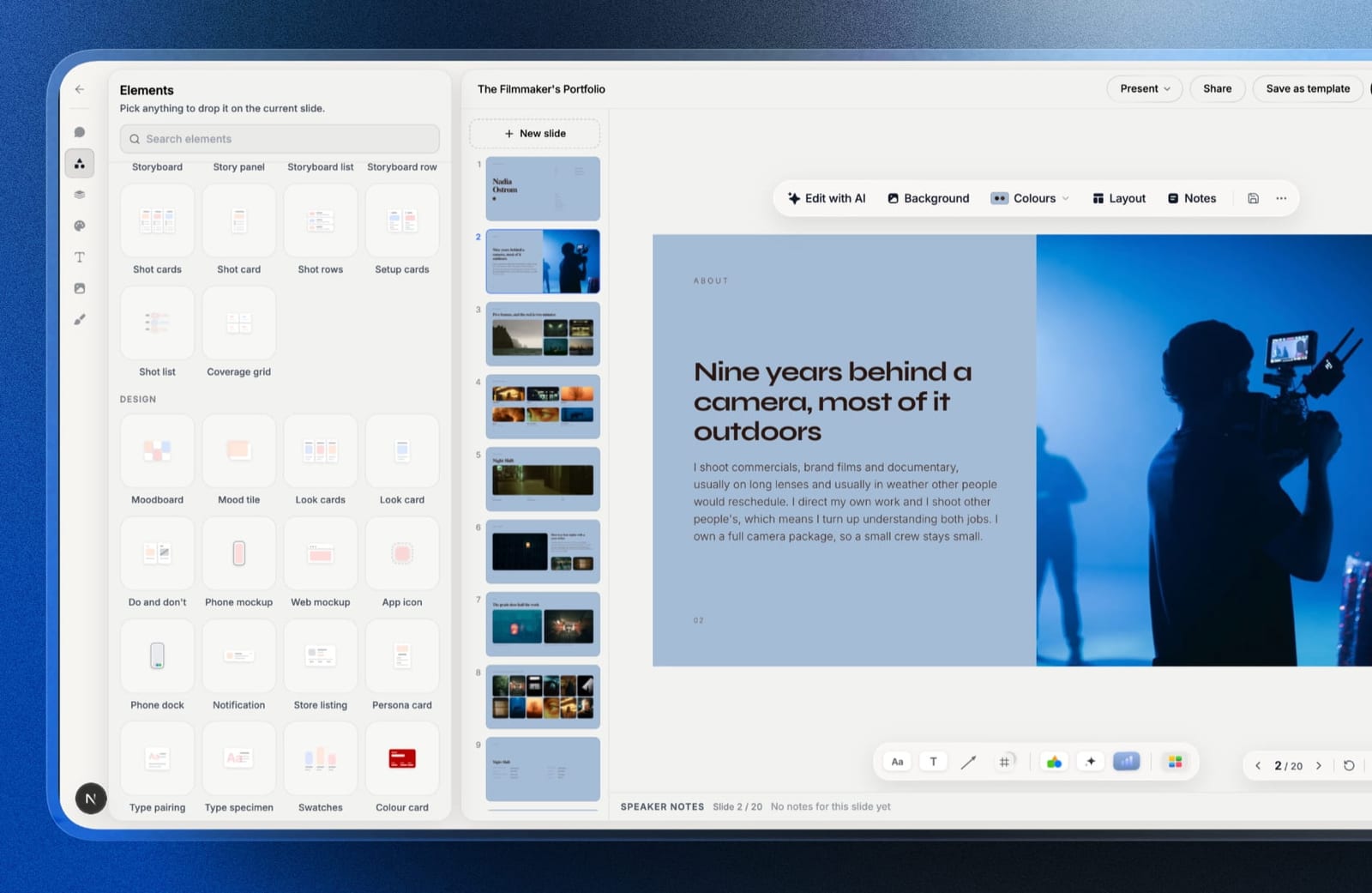
Framekit is an AI website builder that now ships Slides, a deck editor in the same account as your portfolio site, client galleries, video review and a digital-product store.
For a design studio that last part is the pitch: the UX case study you present on Thursday and the case study page on your site share one set of fonts, colours and images, and live under one login.
We did not put Framekit through the same twenty-four-slide rebuild as the other eight; this review is based on what Slides ships and what its plans cost. On paper it covers most of what the non-designers in our scenario need.
You describe a slide and the AI writes and lays it out, then everything is editable by hand; your own fonts and colours apply across every slide on paid plans; mockup elements frame screens in phone and browser windows; and a YouTube or Vimeo walkthrough placed on a slide plays inside the shared link and in present mode, which is the nearest thing here to an embedded prototype without being one.
The real number$180 a year for the three-person studio, because Framekit Pro at $15 a month billed yearly includes three team members and PowerPoint export. That is $72 more than three Figma Collab seats and $720 less than Canva Teams.
The free plan has unlimited decks, the AI slide writer, presenting, link sharing and PDF export.
The standout detailSlides has no component system, but it does have a theme: fonts and colours are set once for the deck, so the header drift that pushes teams toward components is smaller than in a plain slide tool.
The gotchathis is the same wall you are leaving Figma Slides to escape. The .pptx export (Pro and up, up to 60 slides) turns each slide into a picture with speaker notes attached, so the look survives but a client cannot edit a word.
There is no live co-editing, no real components, and no embedded interactive prototype.
Skip it ifanyone outside your studio needs to edit the deck. Canva or PowerPoint, ranked first and sixth, keep the structure editable; we do not.
Verdict: the best pick here for a studio that presents and sends and never hands over the editable file, and the wrong one if handover is why you are leaving Figma. Try it free at framekit.ai/slides.

4. Google Slides: Best Free Alternative
Best fordecks that need to be editable by a client, a contractor, and a stakeholder on three different operating systems.
There is no design argument for Google Slides against Figma. There is a very strong logistics argument. Our rebuild took thirty minutes, looked plain, opened everywhere, and let all nine stakeholders comment without an account or a licence.
For the specific job of circulating a deck, nothing here is better.
The real numberfree at any seat count. Google Workspace Business Starter at $7 per user a month adds a company domain and admin controls, which is $252 a year for three, and is optional.
The gotchano components. The header on eighteen slides is eighteen separate headers, and after two rounds of client revisions three of them had drifted. This is the exact problem Figma Slides was built to solve, and Slides does not solve it.
Skip it ifconsistency across a long deck matters more than distribution.
Verdict: the free floor and a genuinely reasonable answer for circulated decks. You give up every structural advantage of Figma and you gain the ability to hand the file to anyone.
5. Gamma: Best AI-First Alternative
Best forthe case study you have to write up tonight for a meeting tomorrow.
Gamma built a structurally sensible twenty-four-section draft from a research summary in about two minutes, which meant the design work started from something rather than nothing. For a studio whose bottleneck is writing rather than layout, that is the right kind of help.
The real numberGamma Plus is $108 a year per person, so three people cost $324. The free plan is credit-limited rather than feature-limited, so evaluation is honest.
The gotchathe .pptx export is the worst of the nine, worse even than Figma's. Card-based layouts do not map onto slide geometry, so exports arrive with text overflowing frames. If Figma's export was your complaint, this is not the fix.
Skip it ifthe export is the reason you are reading this page.
Verdict: fast and web-native, and it shares Figma Slides' core weakness rather than solving it. Use it upstream of whichever tool produces the deliverable.
6. Microsoft PowerPoint: Best Export Fidelity
Best forstudios whose decks are opened inside client organisations rather than by individual clients.
The reason to consider PowerPoint after Figma is unglamorous and hard to argue with: it is the format, so there is no export step and nothing to lose in translation.
Fonts embed properly, slide masters give a workable approximation of components, and the Morph transition does more motion work than most designers expect.
The real numberMicrosoft 365 Personal is $99.99 a year and Family is $199.99 for up to six people, which makes our three-person studio $199.99 a year, or about $67 per person. PowerPoint for the web is free with a Microsoft account.
The gotchaslide masters are not components. They control layout inheritance, not content, so a logo lockup used on eighteen slides is still eighteen copies unless you put it on the master, and any per-slide variation breaks the inheritance immediately.
Skip it ifyour studio's work is judged partly on the craft of the deck itself. PowerPoint's ceiling is lower than Figma's by a wide margin.
Verdict: the pragmatic answer when decks live inside client companies. You lose the design ceiling and you never lose anything in export, which for some studios is the better trade.
7. Keynote: Best Design Quality on a Mac
Best forMac-only studios who present live and rarely hand over the file.
Keynote's motion is still the best on this page and it is not close. Magic Move rebuilt our before-and-after comparison sequence in about ninety seconds, and it looked better than the Figma version.
The typographic defaults are also the most tasteful of the nine, which for a studio presenting its own craft is worth something real.
The real numberfree with any Apple device, and free in a browser at iCloud.com for anyone with an Apple Account, including Windows users.
The gotchathe export problem is the same one you have with Figma, differently shaped. Magic Move does not survive a .pptx export, sequential builds flatten into a single slide, and fonts substitute silently rather than failing visibly. You have swapped one lossy handover for another.
Skip it ifanyone on your team or your client's team is on Windows and needs to edit.
Verdict: the best-looking result on this page and the same portability problem you already have. Correct only if you present in the room and send a PDF afterwards.
8. Beautiful.ai: Best for Teams Without a Designer
Best forthe studio's third and fourth hires, who make decks and are not designers.
Beautiful.ai enforces what Figma merely enables. Our non-designer built a slide in six minutes and it was indistinguishable in quality from the ones the designer built, which is a result no other tool on this page produced.
The real numberPro is $144 a year for one person, and Team is $40 per user a month, which is $1,440 a year for three. That is the most expensive option in this comparison and thirteen times the cost of three Figma Collab seats.
The gotchathere is no arbitrary positioning. Our before-and-after comparison, which relies on precise offset overlaps, could not be reproduced and had to become a conventional two-column layout. For a design studio this constraint will chafe constantly.
Skip it ifyou are a design studio. The whole product is built to prevent the thing you are good at.
Verdict: the wrong tool for designers and the right tool for the people around them. Priced as though every seat is a designer, which is the flaw.
9. Slidev: Best Open-Source Alternative
Best fordesign engineers and technically-minded studios who want decks in version control.
Almost nobody covers this in comparisons like ours, which is a shame, because for a specific kind of studio it is the best answer here. Slidev is a free, open-source presentation framework where slides are Markdown, styling is CSS, and components are actual components.
Our rebuild lived in a Git repository, diffed properly on review, and the header component was genuinely one definition used eighteen times.
The real numberzero, at any team size, forever. There is no seat model, no tier gate, and nothing to cancel.
The standout detailbecause a Slidev deck builds to a static site, you can host it on your own domain, which means the deck you present and the link you send are literally the same artefact. Interactive components stay interactive after sharing, which only one other tool here manages.
The gotchathere is no .pptx export. You get PDF, PNG, and a hosted site, and the learning curve assumes comfort with a terminal, a package manager, and Markdown. A client cannot edit it and never will.
Skip it ifanyone on your team would not describe themselves as technical.
Verdict: free, structurally the closest thing to Figma's rigour, and unusable by most studios. If your team ships code, try it before paying anyone.
What Actually Breaks When a Figma Slides Deck Is Exported
Four specific things, and which of them you care about determines your replacement. This is the section we could not find anywhere when we started.
Components become groups. The header used on eighteen slides exports as eighteen independent groups. Change the client name after export and you change it eighteen times.
Auto-layout becomes fixed positions. Every spacing rule you set becomes absolute coordinates, so any text edit in the client's copy breaks the alignment rather than reflowing it.
Prototypes become images. Embedded interactive prototypes export as static screenshots of their first frame, which for a UX case study removes the evidence.
Variables and modes do not travel. If you built a light and dark version of the deck using Figma variables, the export contains whichever mode was active and no way to switch.
In one linethe exportable value of a Figma Slides deck is roughly a well-designed static PDF, so if a .pptx that someone else edits is part of your delivery, the structure you build in Figma is work you will do twice.
What Three Seats Cost Across the Category
The seat math is unusual here because Figma Slides is bundled with the cheapest seat Figma sells, which makes it very hard to beat on price and very easy to beat on portability.
| Tool and tier | 3 people / year | Structure that survives export |
|---|---|---|
| Google Slides | $0 | None to survive |
| Slidev | $0 | All of it, but no .pptx exists |
| Keynote | $0 on Apple devices | Layout yes, motion no |
| Figma Slides (Collab seats) | $108 | Almost none |
| Microsoft 365 Family | $199.99 | All of it; it is the native format |
| Framekit Pro | $180 | The look, not editable text |
| Gamma Plus | $324 | Little |
| Pitch Team | ~EUR 540 | Most of it |
| Canva Teams | $900 | Most of it |
| Beautiful.ai Team | $1,440 | Most of it |
Run this on your own deck library. Count how many decks from the last year were handed over as an editable file rather than presented and PDF'd.
If the answer is zero, stay in Figma Slides on $3 Collab seats, because nothing here beats that price and the export weakness costs you nothing. If the answer is most of them, the $108 you are saving is costing you a rebuild every time.
Which Figma Slides Alternative Fits You?
Work down and stop at the first yes.
1. Does anyone outside your studio need to edit the deck? If yes, Canva or PowerPoint. Everything else on this page loses structure on the way out.
2. Do you make the same shape of deck repeatedly for different clients? If yes, Pitch, budgeting for the Team tier if you want the link analytics.
3. Does your team ship code and use Git? If yes, try Slidev before you pay for anything. It is free and structurally closest to what you like about Figma.
4. Is the deck circulated to a large stakeholder group for comment? If yes, Google Slides. Commenting without accounts beats every design consideration at that point.
5. Do non-designers on your team make decks that look like it? If yes, Beautiful.ai, accepting the price and the loss of arbitrary positioning.
6. Are you Mac-only and presenting live? If yes, Keynote, which still has the best motion here.
7. Is the deck presented or sent as a link and PDF, never handed over, and do non-designers need to make slides? If yes, Framekit Slides, where the AI lays out slides and the deck sits next to your portfolio site.
8. Is the deck really a portfolio piece you will send for the next two years? Then publish it as a case study page on your own site and stop maintaining a file.
Frequently Asked Questions
Is Figma Slides free?
Figma Slides is included on Figma's free Starter plan with file limits, and on paid plans it comes with any seat type, including the Collab seat at $3 a month billed annually.
That makes it the cheapest paid presentation tool with real components in this comparison, at $36 a year per person.
Does Figma Slides export to PowerPoint properly?
Figma Slides exports to PowerPoint, but the export flattens components into static groups, converts auto-layout into fixed coordinates, and replaces embedded interactive prototypes with screenshots of their first frame.
The result opens correctly and is not editable in any structured way, so treat the export as a visual archive rather than a working file.
What is the best free alternative to Figma Slides?
Google Slides is the best free Figma Slides alternative for circulated decks, because it costs nothing at any team size and lets anyone comment without an account.
Slidev is the best free alternative for technical teams, since it is open source, uses real components, and builds to a static site you can host yourself.
Canva vs Figma Slides: which should a design studio use?
A design studio should use Figma Slides when decks stay inside the studio and are presented live, because the layout control and $3 Collab seats are unmatched.
It should use Canva when decks are handed to clients as editable files, because Canva's exports survive intact while Figma's flatten completely.
Can you keep an interactive prototype in a shared deck?
Figma Slides keeps embedded prototypes interactive only for viewers opening the deck inside Figma, and Slidev keeps interactive components working because it builds to a real web page.
Every other tool in this comparison converts interactive content to video, an image, or an external link when the deck is shared.
How much does Figma cost for a three-person studio?
A three-person studio can run Figma Slides for $108 a year using three Collab seats at $3 a month billed annually, since Collab seats include full editing in FigJam and Slides.
If one person also needs design-file editing, that seat becomes a Full seat at $16 a month, taking the total to about $264 a year.
Which presentation tool has real components like Figma?
Figma Slides, Pitch, and Slidev are the three tools with genuine reusable components that update everywhere at once.
Canva's Brand Kit and Beautiful.ai's shared slide library achieve similar consistency through locked assets and approved layouts rather than true component instances, and Google Slides and Keynote have neither.
Is Slidev worth using for client presentations?
Slidev is worth using for client presentations only if your team is comfortable with Markdown, a terminal, and version control, in which case it offers component-level structure, a hosted output on your own domain, and a total cost of zero.
It has no PowerPoint export and no path for a client to edit the deck.
Should a UX case study be a deck or a web page?
A UX case study should be a web page when it is sent repeatedly to prospects, because a page can be indexed, updated in place, and rendered identically for everyone.
It should be a deck when it is walked through live with a specific client, where pacing and a presenter's narration carry the argument. Framekit holds both in one account, a portfolio site for the page and Slides for the deck.
Is Framekit Slides a good Figma Slides alternative?
Framekit Slides is a good Figma Slides alternative for small design studios that present decks or send them as a link and PDF, because the AI lays out slides for non-designers, the free plan has unlimited decks, and Pro includes three team members for $180 a year.
It is a poor one if clients need an editable file, since its PowerPoint export turns each slide into a picture, and it has no components.
Final Verdict
Canva is the alternative most studios should pick, and the reason is the export rather than the editor.
If your decks are handed over, Canva's structure survives and Figma's does not, and that is worth the eightfold price difference at three seats. Pitch is the better pick for studios producing decks at volume with reusable components.
Framekit Slides is the pick for a small studio that presents and sends, wants non-designers producing decks that look designed, and would rather the deck lived next to its portfolio site.
And if your team is technical, Slidev deserves an afternoon before you pay anyone anything, because it gets closer to Figma's rigour than any commercial tool here and costs nothing.
Where Framekit losesFramekit Slides does not solve the export problem that brings most people here. Its .pptx export is picture-based, it has no components and no live co-editing, and it cannot embed an interactive prototype.
If the client edits the deck after you, Canva, Pitch or PowerPoint is the better fit.
The most useful thing to know before switching is that Figma Slides is the cheapest real-component tool available, at $36 a year. If nothing you make ever needs to leave, there is no reason to move at all.
Related reading: our comparison of the best Figma alternatives, the best presentation tools for creative agencies, the best presentation software, and our guide to how to present design work to clients.
Everything priced above comes from vendor pricing pages read in August 2026. Figma in particular restructured its seat types recently, so confirm which seat includes Slides before you buy for a team.