Framekit templates
Start from a designer-made template
 Use template
 Use template
 Use template
 Use template
 Use template
 Use template
 Use template
 Use template
The moment most people start looking for Canva alternatives is not a design problem. It is a download.
You spend forty minutes making a price list, you hit export, and the asset comes out with a watermark, or the crown icon appears next to the only photo that worked, or you discover your free plan allows three downloads a month and you used two of them on drafts.
That experience is the whole market. Canva is genuinely good, and it is a funnel, and the best Canva alternatives in 2026 mostly compete on where they put the wall rather than on what they can draw.
One of them has no wall at all and is made by professionals for professionals, and it costs nothing, which is the least-known fact in this entire category.
We made the same twelve assets in eleven tools to find out where each one stops you.
A Canva alternative is a template-driven design tool that lets a non-designer produce finished marketing assets, social graphics, documents, and presentations without a professional editor, and the ones worth switching to differ mainly in export limits, per-seat cost, and whether the output is yours to use commercially.
Adobe Express is the best Canva alternative overall in 2026 at $9.99 a month, because its free tier is genuinely usable and its stock and font libraries are the closest match to Canva's, but its 300MB upload ceiling will annoy anyone working with video.
Affinity is now free and is the best choice if you can design without templates, and Framekit is the pick if what you mostly make in Canva is pitch decks, treatments and lookbooks, because its Slides tool writes and lays out a deck from a description and sits in the same account as your website, though it does not make social graphics at all.
VistaCreate is the best value for a small team at 10 euro a month for up to 10 seats, and Photopea is the best free browser editor if what you actually need is Photoshop.
Disclosure: Framekit is our product and we placed it third, for decks and the site they point at rather than for the social half of the kit, which it cannot make. Its entry is written from Framekit's published features and plans rather than from our twelve-asset build, and every other review says where that tool beats it.
Updated in September 2026: we added Framekit Slides, which launched after this guide first ran, and re-verified Framekit's plans against its live pricing page; competitor figures are as read in August 2026.
How We Tested These Canva Alternatives
We built one real deliverable in every tool rather than scoring feature lists: a launch kit for a photographer's print sale, containing six Instagram posts at 1080 by 1350, two vertical stories, an A4 price list as a PDF, an email header, a 3-slide pitch deck, and one resized version of the lead graphic for a website banner.
Twelve assets, same copy, same three photographs, same two brand colours, built from scratch on a fresh account in August 2026.
That kit was chosen because it crosses every boundary these tools draw. Six near-identical social posts test resizing and brand kits. A PDF price list tests whether document export is free or paid.
A pitch deck tests whether the tool handles presentations at all. And twelve assets in one sitting tests the download cap, which is where most free tiers actually end.
Findings are labelled three ways. Measured means we did it in the product, including exporting all twelve assets, hitting a limit, and cancelling a paid plan to see what happened to the files. Verified means we read it on the vendor's own pricing page in August 2026 and are reporting rather than testing it. Community sentiment means users report it consistently and we did not reproduce it.
Two vendors, Canva itself and Adobe, block automated checks of their pricing pages, so their figures here are third-party and clearly marked as such.
Four tools we paid for: Adobe Express Premium, Visme Starter, Piktochart Pro, and Snappa Pro. Four we used entirely free because free is the real product: Affinity, Photopea, Penpot, and Desygner.
Three we ran on free tiers to their ceilings, which is the most informative kind of test in this category.
The rubric, published so you can disagree: export freedom 25 percent (watermarks, download caps, file formats), template and asset quality 20 percent, brand consistency tools 20 percent, real cost at three seats 20 percent, learning curve 15 percent.
Export freedom leads because in this category the product is not the canvas, it is the finished file, and a tool that will not hand it over has not done the job.
In one linewe built the same twelve-asset print sale launch kit in eleven tools on fresh August 2026 accounts, weighted export freedom highest, and marked every price we could not read at the vendor's own source.
By the Numbers
Eleven tools, twelve assets, one kit. These are the extractable facts that reshaped our shortlist, and three of them are download limits that no comparison table normally shows.
- 2 PNG downloads is Piktochart's entire free monthly allowance, the tightest export cap in this comparison.
- 3 downloads per month is Snappa's free ceiling, the second tightest.
- $0 is the full price of Affinity, Photopea, Penpot, and Desygner's three-user workspace.
- 10 seats for 10 euro a month is VistaCreate Pro, which is the cheapest per-person price in this comparison by a wide margin at 1 euro per seat.
- 300MB is Adobe Express's file upload ceiling, which matters for video and high-resolution work.
- 25 generative AI credits a month is Adobe Express's free allowance, against 60 on Piktochart free and 10 on Visme free.
- 80 AI credits come with Pixlr Plus at 1.99 euro a month annually, the cheapest paid plan here.
- 3 users are included in Desygner's free workspace, which is the most generous free multi-user offer in this comparison.
- 1 tool repriced itself out of this category during our research: Simplified now starts at $59 a month.
The Full Comparison Table
Every figure below was read off the vendor's own pricing page in August 2026 except Canva's and Adobe's, whose pages block automated checks and whose entries say so.
Where a vendor publishes in euros we have kept euros rather than converting at a rate that will be wrong by the time you read this.
| Tool | Best for | Free tier | Entry paid price | Offline |
|---|---|---|---|---|
| Adobe Express | Closest all-round Canva swap | 100k templates, 25 AI credits | $9.99/mo, third-party figure | No |
| Affinity | Professional work, no templates | Free, full toolset | Free | Yes |
| VistaCreate | Small teams on a budget | 100k templates, 10GB, 1 seat | 10 euro/mo up to 10 seats | No |
| Photopea | Browser Photoshop, free | Free, ad supported | Optional ad removal | No |
| Pixlr | Cheapest paid photo editing | Ad-supported basics | 1.99 euro/mo yearly Plus | No |
| Visme | Presentations and infographics | 500MB, 10 AI credits | $12.25/mo yearly Starter | No |
| Piktochart | Reports, data, and charts | 2 PNG downloads, 60 AI credits | $10/mo yearly Pro | No |
| Penpot | Real design work, open source | Free up to 8 editors | $7 per user/mo Unlimited | No |
| Snappa | Fast, simple social graphics | 3 downloads per month | $10/mo yearly Pro | No |
| Desygner | Free workspace for 3 people | 3 users, 100 projects, 5GB | $19 per user/mo Business | No |
| Figma Buzz | Teams already paying for Figma | Unlimited drafts | $3/mo Collab seat | No |
| Framekit Slides | Pitch decks, treatments, lookbooks, plus the website | Unlimited decks, AI writer, PDF export | $9/mo Starter, includes the site | No |
Framekit is listed last in the table because it covers two of the twelve assets rather than all of them: the pitch deck and the page the campaign lands on.
The free-tier column is the one to read as a monthly allowance rather than as a feature list.
Two PNG downloads and three downloads a month are not free plans in any working sense; they are a demonstration that ends before your first real project does.
1. Adobe Express: The Closest Thing to a Direct Swap
Adobe Express is the only tool here that a Canva user can move into without changing how they work.
The template browser is organised the same way, resizing a post into a story is one click, the brand kit behaves as expected, and the twelve-asset launch kit came out of it in roughly the same time it took in Canva.
Nothing about the transition required learning a new idea, which for a busy freelancer is the entire proposition.
The real number needs a sourcing caveat.
Adobe's pricing pages did not respond to our automated checks, so unlike most figures in this article these come from third-party trackers in 2026 rather than from Adobe directly: Premium at $9.99 a month or $99.99 a year, which is presented as a 17 percent saving against $119.88 of monthly billing, and Firefly Pro at $19.99 a month bundling Express Premium with 4,000 monthly generative credits and Photoshop on web and mobile.
Confirm at checkout.
The free tier is where Express earns its ranking, and the reported figures are substantial: over 100,000 templates, access to a million or more royalty-free Adobe Stock assets, 4,000 or more fonts, and 25 generative AI credits a month.
That is a working free tier rather than a trial, and it exports without a watermark, which is the specific complaint that sent most readers here.
The gotchaa 300MB file upload ceiling. For static graphics that is irrelevant. For anyone dropping in a short video clip or a high-resolution scan it is a wall you meet without warning, and Express is otherwise the tool you would want for exactly that work.
Skip it ifyou want to own the files. Express is a cloud product from a company whose entire history is subscriptions, and nothing you make in it lives on your disk in an editable form.
Verdict: The best like-for-like Canva replacement at a reported $9.99 a month, with a free tier good enough that many readers will never pay. Budget for the upload ceiling if video is involved.
2. Affinity: Free, Professional, and Nothing Like Canva
Affinity is the most interesting entry on this list and the one that does not belong in a comparison of template tools, which is exactly why it deserves second place.
In March 2024 Canva acquired Serif, the company behind Affinity Designer, Photo, and Publisher.
On 30 October 2025 those three products became one application, and Canva made the professional toolset free. No watermark, no trial, no download cap.
The real number is that there is not one. The full vector, pixel, and layout toolset costs nothing and requires a free Canva account to download and activate.
The AI features sit behind a Canva subscription, and we could not verify that subscription's price at the source because Canva's pricing page blocks automated checks, so treat any figure you see for it, including the $18 a month and 120 to 144 dollars a year that third parties report, as unconfirmed.
The standout detail: the twelve-asset kit built in Affinity is the only version of it that lives on a local disk in an editable format. Every other tool in this comparison holds the editable original on someone else's server.
For a freelancer who may be asked to change the price list eighteen months from now, that is a different kind of asset.
The gotchaand it is a large one for the audience reading this. Affinity has almost no template library and no beginner scaffolding. It assumes you know what a bleed is.
Someone who chose Canva because design is not their job will not be happier here, and pretending otherwise is how bad recommendations get made.
Skip it ifyou need templates, or you need three colleagues editing the same file at once. Affinity has neither.
Verdict: The best free design software of any kind in 2026, and a poor Canva alternative for a non-designer. If you can design and you only used Canva because it was convenient, this replaces it and costs nothing.
3. Framekit Slides: Best for Decks and the Page They Point At

Framekit is an AI website builder, and its Slides tool is the answer for the reader whose Canva account is really a presentation account: pitch decks, film treatments, lookbooks, portfolio and campaign decks.
You describe the deck, the AI writes and lays out the slides, and everything stays editable by hand, with your own fonts and colours applied across every slide and speaker notes on each one.
What makes it different from Canva's presentation side is the element library, which is built for creative work rather than for corporate slides: shot lists, shot cards, storyboard panels, moodboards, look cards, a coverage grid, phone and web mockups, colour swatches, type specimens and charts.
The templates follow the same brief, treatments and lookbooks rather than quarterly reviews.
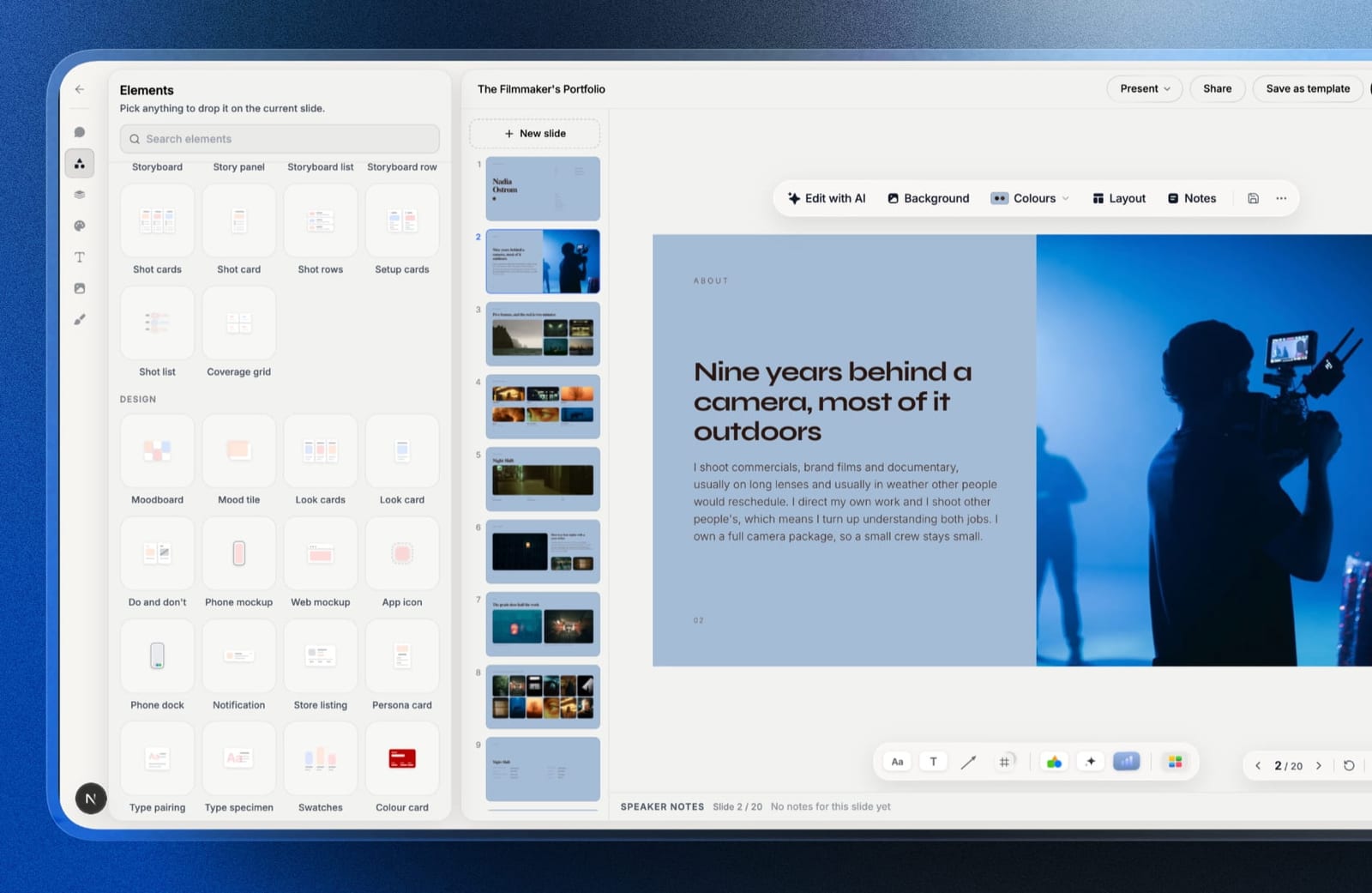
The real numberdecks are unlimited on every plan, and presenting full screen, sharing as a link and PDF export are all free.
Starter at $9 a month, or $7 billed yearly, unlocks the template library, custom fonts and removal of the Framekit byline, and it is the same subscription that runs your website, galleries and store.
Against Visme Starter at $147 a year for presentations alone, that is $84 a year for the deck and the site together.
How it scores on our rubricstrong on export freedom, since PDF is free with no download cap, and on brand consistency, since fonts and colours are set once for the whole deck.
Weak on templates and assets for this particular kit, because it has none for Instagram posts, stories or an A4 price list, which is why it sits third rather than first.
The gotchait is a deck tool, not a graphic design tool. Social posts, stories and print documents need something else on this list.
PowerPoint export starts on Pro and is picture-based, so slides arrive as images rather than editable text, with a 60-slide ceiling. There is no password on a shared deck link, no live multi-cursor co-editing, and no offline app.
Skip it ifmost of what you make is social graphics, or a client needs an editable PowerPoint back. Adobe Express and Visme are better there.
Verdict: the best Canva alternative for creatives whose real output is decks, and especially for anyone who would otherwise pay separately for a presentation tool and a website. Pair it with Adobe Express or VistaCreate for the social half. See Framekit Slides.
4. VistaCreate: Ten Seats for Ten Euro
VistaCreate is the value answer in this comparison and the margin is not close.
Its Pro plan is 10 euro a month for up to 10 seats, or 77 euro a year, which works out to 1 euro per person per month for a team of ten. Every competitor here prices per seat.
For a studio of four, that difference is roughly 400 euro a year.
The real number beyond the price: Pro gives 200,000 or more templates, 170 million or more photos, videos, and vectors, unlimited brand kits, unlimited storage, social media scheduling, AI tools, a sticker maker, one-click resizing, version history, and HD download.
The Starter plan is 0 euro a month for one seat and still includes 100,000 templates, a million photos, videos, and vectors, one brand kit, 10GB of storage, AI tools, the resizer, version history, and HD download.
That free tier is the third most generous in this comparison after Affinity and Photopea, and unlike Piktochart or Snappa it does not cap downloads. The twelve-asset kit came out of the free plan complete.
The standout detail: built-in social scheduling on Pro means the launch kit went from design to scheduled posts without a second subscription. For a solo creative currently paying separately for a scheduler, that is a real consolidation rather than a checkbox.
The gotchathe template aesthetic is a step behind Canva and Adobe Express. Things are usable rather than beautiful, and a designer's eye will find the defaults dated in a way that costs editing time.
Skip it ifthe look of the templates is what you are buying. This is a value purchase, and it looks like one.
Verdict: The cheapest credible option here by a distance at 10 euro a month for ten seats. Buy it for a small team; be honest with yourself about the template quality.
5. Photopea: Photoshop in a Browser Tab, for Nothing
Photopea is on this list because a meaningful share of what people open Canva for is not layout, it is one specific image edit: remove a background, fix a horizon, composite two frames.
Photopea does those in a browser, for free, with a PSD-compatible layers model, and it opens Photoshop files, Sketch files, XD files, and Figma files without an account.
The real number is zero, funded by ads in the interface with an optional paid tier to remove them. There is no download cap, no watermark, and no export restriction, which makes it the least restricted free tool in this entire comparison alongside Affinity.
The standout detail: it opens and saves PSD with layers intact. If a client sends you a layered Photoshop file and you do not have Photoshop, this is the free answer, and it is the only one in this article.
The gotchait is a Photoshop clone, which means it has a Photoshop learning curve. There are no templates and no brand kit, and the interface is dense enough that a non-designer will bounce off it in ten minutes.
Skip it ifyou need to produce twelve on-brand assets rather than edit three images.
Verdict: Not a Canva replacement and the best free image editor on the web. Keep it in a pinned tab regardless of what else you choose.
6. Pixlr: The Cheapest Paid Plan in This Comparison
Pixlr sits between Photopea and Canva: more editor than layout tool, more approachable than Photoshop, and priced low enough that the decision barely registers.
The three photographs in our launch kit were cleaned up here faster than anywhere else, and the AI background removal handled a print on a textured wall without the halo that usually gives it away.
The real number: Pixlr sells Plus at 2.49 euro a month or 1.99 euro billed annually, Premium at 9.99 euro monthly or 7.99 annually, Ultra at 24.99 monthly or 19.99 annually, and Ultra MAX at 49.99 monthly or 39.99 annually, all with a 20 percent annual saving.
Plus includes 80 monthly AI credits and Premium includes 1,000. Credits are valid for one month during a subscription period rather than rolling over.
At 1.99 euro a month annually, Plus is the cheapest paid plan in this entire comparison, roughly a fifth of Adobe Express Premium, and for a creative whose real need is ad-free editing with a modest AI allowance it is difficult to argue with.
The standout detail: the credit expiry. Pixlr states plainly that credits are valid for one month, which is more honest than the vendors who let you assume otherwise, and it is the reason to buy Plus and not Premium unless you genuinely use AI weekly.
The gotchathe free tier is ad-supported and the ads are intrusive enough to be a real cost in attention. Treat free Pixlr as a trial and budget the 24 euro a year.
Skip it ifyou need multi-page documents or presentations. Pixlr is an image tool with layout bolted on.
Verdict: The best cheap editor here at 1.99 euro a month annually. Buy Plus, ignore the higher tiers unless AI is a daily habit.
7. Visme: When the Asset Is a Presentation or an Infographic
Visme is the tool that took our 3-slide pitch deck seriously.
Every other template tool in this comparison treats presentations as a shape you can make; Visme treats them as the product, with data widgets, chart types that update from a spreadsheet, and animation that does not look like a transition preset from 2011.
The deck came out of Visme looking like it had been made by someone who does this professionally.
The real number: Visme Starter is $12.25 per person per month billed annually, which is $147 a year, and Pro is $24.75 per person per month or $297 a year.
Enterprise is custom for 10 or more users. Student pricing is $48 a year and educator pricing is $96 a year, which are unusually clear discounts.
The free Basic plan gives unlimited projects, 500MB of storage, up to 50 slides or pages per project, 10 AI credits a month, and downloads limited to JPG, PNG, and PDF, with a Visme logo applied and premium assets restricted.
The standout detail: 50 slides or pages per project on the free tier is a genuinely high ceiling for anyone making documents rather than social posts, and PDF export is included free, which Piktochart charges for.
The gotchathe branding on free exports. Visme's free plan applies its own logo, so the free tier is for drafting and internal work, not for anything a client sees.
Skip it ifyour output is mostly square social graphics. You would be paying $147 a year for infographic and presentation depth you never touch.
Verdict: The best presentation and infographic tool in this comparison at $147 a year. Overkill and overpriced for social-first work.
8. Piktochart: Reports and Data, With the Tightest Free Cap Here
Piktochart is built for the moment a creative has to produce something that looks like a report: a case study, a proposal, a year-in-review for a retainer client.
It turns a spreadsheet into a chart that fits a brand palette without any of the fighting that involves in a general design tool, and the A4 price list in our kit came out cleanest here.
The real number, and it is the one to know: Piktochart's free plan allows 2 PNG downloads, alongside unlimited visual projects, 60 AI credits, and 1GB of storage.
Pro is $10 per user per month billed annually at $120 a year, with unlimited PNG downloads, 500 AI credits, five million or more premium icons, illustrations and 3D graphics, and 100GB of storage.
Business is $17 per user per month or $204 a year and adds unlimited PNG, PDF, and PPT downloads, a brand kit, 1,000 AI credits, and 250GB. Education is $39 per user per year and nonprofit is $60.
Two downloads a month is the tightest free tier in this comparison and it is worth being explicit about what that means: you can design as much as you like and take almost nothing away.
Note also that PDF and PowerPoint export sit on Business at $204 a year rather than Pro, which is a meaningful detail for anyone whose deliverable is a document.
The standout detail: 60 AI credits on the free plan is more than double Adobe Express's 25 and six times Visme's 10, which is an odd generosity from the most restrictive downloader here.
The gotchathe export tiering. If your work is PDFs, you are on the $204 plan, not the $120 one, and the pricing page does not lead with that.
Skip it ifyou are not making data-driven documents. Everything Piktochart is good at is a niche most creatives visit twice a year.
Verdict: Excellent for reports and proposals at $120 a year, $204 if you need PDF export. The free plan is a demonstration rather than a plan.
9. Penpot: Free, Open Source, and a Real Design Tool
Penpot is included because a portion of people searching for Canva alternatives do not want an easier Canva, they want to stop using a template tool entirely.
Penpot is a genuine interface and graphic design application, it is open source, you can run it on your own server, and its hosted free tier is more generous than most paid plans here.
The real number: Penpot's Professional plan is $0 per user per month for up to 8 team members with unlimited viewers, 10GB of storage, unlimited design files, plugins, multiplayer editing, comments, inspect mode, and 7 days each of autosaved versions and deleted-file recovery.
Unlimited is $7 per user per month and Enterprise is $25.
The standout detail: eight editors at zero. A four-person studio can run its entire graphic design workflow on Penpot for nothing, with real collaboration, which no other tool in this comparison offers at that seat count.
The gotchathere are no marketing templates. Penpot gives you a canvas and professional tools, and the twelve-asset kit took roughly three times longer here than in Adobe Express because every layout was built rather than adapted.
Skip it ifyou cannot design from scratch, or your value from Canva is speed rather than control.
Verdict: The best free tool here for people who can design and want ownership. The wrong tool entirely for people who came to Canva to avoid designing.
10. Snappa: Simple, Fast, and Capped at Three Downloads
Snappa does less than everything else in this comparison and does it without friction. Pick a size, pick a template, change the words, export.
There is no learning curve worth naming and no feature you will fail to find, because there are very few features. For a creative who only needs social graphics and finds Canva cluttered, that restraint is the product.
The real number: Snappa's free Starter plan allows 3 downloads per month. Pro is $15 a month or $10 a month billed yearly, and Team is $30 a month or $20 billed yearly.
The Team plan covers multiple users, which puts it in the same range as Adobe Express per person while doing considerably less.
The standout detail: at $120 a year, Snappa Pro costs the same as Piktochart Pro and roughly the same as Adobe Express Premium, while offering a fraction of the scope. That is a hard case to make in 2026 and we are not going to make it for them.
The gotchathree downloads a month on free is a demonstration, and the paid tier is priced as though the market had not moved since 2019.
Skip it ifprice matters at all. VistaCreate does more for a tenth of the per-seat cost.
Verdict: Genuinely pleasant and hard to justify. Choose it only if simplicity is worth $120 a year to you personally.
11. Desygner: Three Free Users, No Trial Countdown
Desygner's pitch is unusual and worth taking seriously: a free workspace with three users, no credit card, and no trial timer.
For a two or three person studio that only needs occasional marketing assets, that is a complete free system rather than a sampler, and the twelve-asset kit went through it without meeting a wall.
The real number: Desygner offers 3 core apps, a million or more free templates, and 3 users in the free workspace, with up to 100 projects, 20 AI credits a month, and 5GB of storage.
Business is $19 per user per month with unlimited projects, 100 AI credits per user, 100GB of storage, advanced automation, and API access.
Team 100 is $333 a month flat for up to 100 users with 2,500 pooled AI credits and 1TB, and annual billing is advertised as 20 percent off without the exact annual figures being published.
The standout detail: Team 100 at $333 flat works out to $3.33 per person at full capacity, which is the second-best per-seat economics in this comparison after VistaCreate. It is aimed at franchises and distributed teams rather than studios, but the maths is the maths.
The gotchaat $19 per user, the Business plan is the most expensive per-seat option among the general-purpose tools here, roughly double Adobe Express. The free tier is the good deal and the first paid tier is not.
Skip it ifyou are one person. There is nothing here that Adobe Express or VistaCreate does not do better or cheaper for a solo user.
Verdict: The best free multi-user workspace in this comparison. Stay on the free tier; the jump to $19 per user is poor value.
12. Figma Buzz: The Option Teams Already Own
Figma Buzz is the Canva-shaped part of Figma, and almost nobody who already pays for Figma realises they have it. It is templated asset creation with brand controls, aimed exactly at the marketing work Canva does, and it is included on the seat type most studios have spare.
The real number: on Figma's Professional plan a Collab seat is $3 a month and includes full access to FigJam, Figma Slides, and Figma Buzz, plus view and comment rights in design files.
A full seat is $16 and a Dev seat is $12. On Organization those three are $55, $25, and $5 billed annually, and on Enterprise $90, $35, and $5. The free Starter plan gives unlimited drafts and 150 AI credits a day up to 500 a month.
The standout detail: a studio with one designer on a full Figma seat can add a marketing person on a $3 Collab seat and give them templated, brand-locked asset creation for $36 a year.
Against Canva or Adobe Express at roughly $120 a year, that is the cheapest legitimate route in this comparison for anyone already inside Figma.
The gotchait only makes sense as an add-on. Buying into Figma solely for Buzz means paying for a professional design platform to use its marketing corner, which is backwards.
Skip it ifyour studio does not already pay Figma. On its own this is not a Canva alternative, it is a reason to check your existing bill.
Verdict: The best-value option in this article for teams already on Figma, at $3 a month per person, and irrelevant to everyone else.
The Tool That Repriced Itself Out of This List
We shortlisted twelve and one did not make it, for a reason that is more useful to know than another ranked entry would have been, because the same thing is happening across this category.
Simplified was on our list as an all-in-one design and content tool with a well-regarded free tier.
When we checked its pricing in August 2026, the plans were Starter at $79 a month billed annually or $59 monthly, Pro at $99 annually or $119 monthly, and Business at $199 annually or $239 monthly, with the free offering described as a trial giving full Starter access including 5 campaigns, 100,000 AI words, and 100 AI designs.
That is not a Canva alternative any more. It is an AI marketing platform that happens to contain a design tool, priced for a marketing department.
We are flagging it because the pattern is broad: several tools that entered this category as cheap design apps have repositioned around AI content generation and repriced accordingly, and a comparison article that quotes their 2023 pricing is actively misleading.
Check the current pricing page of anything you were recommended more than a year ago before you sign up.
In one lineSimplified now starts at $59 a month and has repositioned as an AI marketing platform, which is the clearest current example of a design tool repricing itself out of the creative market.
Where the Free Tiers Actually Stop You
Free plans in this category are not free versions of the product. They are demonstrations with the exit blocked, and the block is placed in a different spot by every vendor.
Knowing which spot you will hit is worth more than comparing paid prices, because the block is what decides when you pay.
Download caps are the harshest and the least visible. Piktochart allows 2 PNG downloads on free. Snappa allows 3 downloads a month. You can design a hundred assets and take two of them home.
This is the single most effective conversion mechanic in the category and it is why both tools feel unusable within a week.
Watermarks and branding are the second lever. Visme applies its own logo to free exports, so anything client-facing needs a paid plan. Adobe Express, notably, does not watermark free exports, which is a large part of why it ranks first here.
Format restrictions are the quiet one. Visme free limits downloads to JPG, PNG, and PDF. Piktochart puts PDF and PowerPoint export on Business at $204 a year rather than on Pro at $120.
If your deliverable is a document rather than an image, check which tier your file format lives on before you compare monthly prices.
Asset and credit limits are the mildest. Adobe Express gives 25 generative AI credits a month free, Piktochart gives 60, Visme gives 10, Desygner gives 20.
None of these will stop you finishing a project; they will just make the premium stock photo you wanted unavailable.
No cap at all applies to four tools here: Affinity, Photopea, Penpot, and VistaCreate's free Starter plan, which is the only template-driven tool in this comparison whose free tier let our twelve-asset kit out the door complete and unbranded.
In one linethe free plans that actually work are Affinity, Photopea, Penpot, and VistaCreate Starter, and the ones that stop you hardest are Piktochart at 2 downloads and Snappa at 3 a month.
What Three Seats Actually Cost
Per-seat pricing is where this category quietly separates, and the spread between the cheapest and most expensive credible option is larger than in any other software comparison we run.
Here is what a three-person studio pays per year for a working plan, using the figures verified above.
VistaCreate Pro is 10 euro a month for up to 10 seats, so three people cost 120 euro a year, or 77 euro if paid annually. That is the floor.
Figma Buzz on Collab seats is $3 a month each, so three people cost $108 a year, though only if you already pay for Figma. Penpot is $0 for up to 8 editors. Desygner is $0 for 3 users on the free workspace.
In the middle, Adobe Express Premium at a reported $99.99 a year each is roughly $300 for three. Piktochart Pro at $120 each is $360, and $612 if you need Business for PDF export. Snappa Pro at $120 each is $360 for considerably less capability.
At the top, Visme Starter at $147 each is $441 a year, Visme Pro at $297 each is $891, and Desygner Business at $19 per user monthly is $684.
The conclusion that falls out of this is uncomfortable for most of the paid tools.
For a small creative team, the correct answer is almost always VistaCreate at 77 euro a year for everyone, Penpot at nothing, or Figma Buzz at $3 a head if you are already inside Figma.
The tools charging $120 to $300 per person per year are competing on template quality against a tool charging 1 euro per seat per month, and template quality is not worth a 10x multiple.
In one linethree seats cost 77 euro a year on VistaCreate, $108 on Figma Collab seats, $0 on Penpot or Desygner free, and between $300 and $891 on everything else.
Commercial Rights, Stock Assets, and the Thing to Check Before You Sell Anything
This is the section that matters most for creatives selling products, and it is the one every comparison article omits.
The templates and stock assets inside these tools come with licence terms, and those terms differ in ways that can make a design you sell a problem rather than a product.
The general shape is consistent enough to state as a rule. Using a template to make marketing for your own business is fine everywhere.
Using a template as the basis for a product you sell, a preset pack cover, a template you resell, a print you list, is where the terms diverge sharply, and several platforms prohibit redistribution of their stock assets as part of a product that competes with them.
Three specific things to check before you build a sellable product in any of these tools.
First, whether the stock photography licence permits use in items for sale, which is usually a different clause from the general commercial-use clause.
Second, whether the template itself can form the basis of a derivative work you distribute, which is frequently prohibited outright.
Third, whether AI-generated elements carry different terms from human-made stock, because in 2026 they usually do and the terms are newer and less tested.
The safe pattern for anyone selling digital products is to use these tools for marketing and to build the product itself from assets you own or licensed separately.
Affinity and Photopea are the two tools here where that is straightforward, because neither supplies a stock library that could contaminate the output.
If you are selling presets, templates, or prints, our guides to pricing digital products and selling digital products from your own site cover the commercial side properly.
In one linetemplate and stock licences usually permit marketing your own business and usually restrict building a product you sell, so make sellable products from assets you own and use these tools for the marketing around them.
The Ten-Minute Test to Run Before You Switch
Do this with your own last month rather than with a demo. Count three things.
First, how many finished files you exported, because that number against Piktochart's 2 and Snappa's 3 free downloads tells you immediately whether their free tiers are real for you.
Second, how many people in your business need to make something, because that number times $120 is what most of these tools cost and times 1 euro is what VistaCreate costs.
Third, how many of your exports were documents or presentations rather than images, because PDF and PowerPoint export sit on higher tiers at Piktochart and are restricted on free Visme.
If the third number is zero and the second is above two, VistaCreate at 77 euro a year for ten seats ends the search. If the third number is high, price Visme or Piktochart Business properly before comparing them to anything else.
The Decision Guide
Stop at the first branch that describes you. The ranked order answers which tool is best overall; this answers which one is yours, and in this category those differ for most readers because the deciding factor is what you export rather than what you draw.
Start here. Can you design without templates? If yes, Affinity is free and better than anything on this list at making a finished thing, and Photopea is free for image work. You can stop here. If no, continue.
Are there two or more of you? If yes, VistaCreate Pro at 10 euro a month for up to 10 seats is almost certainly the answer, unless you already pay for Figma, in which case add Collab seats at $3 a month each. If no, continue.
Is your output mostly social graphics and simple documents? If yes, Adobe Express, free if the reported 25 AI credits and no-watermark export are enough, or a reported $9.99 a month if not. If no, continue.
Is your output mostly pitch decks, treatments or lookbooks, and do you also need a website? If yes, Framekit Slides, free to start with PDF export, $9 a month for templates and custom fonts on the same plan as the site. If no, continue.
Is your output mostly data presentations or infographics? If yes, Visme Starter at $147 a year, and note that free Visme applies its own logo so it cannot be used client-facing. If no, continue.
Is your output mostly reports, proposals, or anything data-heavy? If yes, Piktochart Pro at $120 a year, or Business at $204 if you need PDF and PowerPoint export, which most report work does. If no, continue.
Is your real need one image edit rather than a layout? If yes, Photopea free, or Pixlr Plus at 1.99 euro a month annually if the ads bother you. Both are cheaper than anything else here and better at the actual task.
Any branch. Are you building something you intend to sell? Do not build it from platform templates or platform stock. Use Affinity or Photopea with assets you own, and keep the template tools for the marketing around the product.
Any branch. Are you on a tool you chose more than a year ago? Check its current pricing page today. Simplified now starts at $59 a month, and it is not the only one that moved.
Where Your Website Fits In
Every tool in this comparison makes assets that point somewhere, and the destination is where the launch kit either converts or does not: six Instagram posts and a price list exist to move someone from a feed to a page where they can see the work properly and buy something or book something.
That destination is the other half of what Framekit does, and it is our product, so weigh this section accordingly.
Framekit is an AI website builder for photographers, filmmakers, designers, and illustrators, and the same account that holds the Slides deck produces the page the launch kit drives traffic to: a portfolio, a store for presets, templates and other digital downloads, and client galleries, all on your own domain.
The practical connection is direct. The six social posts are the campaign, and the campaign needs a landing point that loads on a phone, states the price, and takes payment.
Plans start at $0 with a 5 percent fee on product sales, Pro is $19 a month with a 3 percent fee, and Business is $39 a month with no transaction fee, which is the cheaper option once digital sales pass $780 a month.
The store sells digital downloads only, so physical prints need a lab or a print-on-demand service alongside it.
If your assets are better than the page they point at, the design tool is not the thing to change.
If what you actually need is layers and masks rather than templates, that is a different shortlist: see the best Photoshop alternatives, where the top pick now costs nothing.

Frequently Asked Questions
What is the best free Canva alternative in 2026?
Affinity is the best free Canva alternative for anyone who can design without templates, because Canva made the full professional Affinity toolset free on 30 October 2025 with no watermark and no download cap.
For template-driven work, VistaCreate's free Starter plan is the best option, offering 100,000 templates, a million photos, videos, and vectors, one brand kit, 10GB of storage, and HD download with no export limit.
Photopea is the best free choice if what you actually need is image editing.
Is Adobe Express better than Canva?
Adobe Express is the closest direct replacement for Canva and it is better in one specific way that matters: its free tier exports without a watermark.
Third-party trackers report Premium at $9.99 a month or $99.99 a year, with the free plan including over 100,000 templates, a million or more Adobe Stock assets, 4,000 or more fonts, and 25 generative AI credits a month.
Its weakness is a 300MB file upload ceiling, which becomes a wall for video and high-resolution work.
Which Canva alternative is cheapest for a team?
VistaCreate Pro at 10 euro a month for up to 10 seats, or 77 euro a year, which is 1 euro per person per month at full capacity and by far the cheapest credible option here.
If your team already pays for Figma, Collab seats at $3 a month each include Figma Buzz and are cheaper still per person.
Penpot is $0 for up to 8 editors, and Desygner's free workspace includes 3 users with 100 projects and 5GB with no trial countdown.
What are the download limits on free design tools?
Piktochart's free plan allows 2 PNG downloads, and Snappa's allows 3 downloads per month, which are the two tightest caps in this comparison.
Visme's free plan does not cap downloads but applies its own logo and limits formats to JPG, PNG, and PDF.
Adobe Express, VistaCreate Starter, Affinity, Photopea, and Penpot all allow unlimited free export without watermarks, which is the main reason they rank where they do.
Is Affinity really free, and is it a Canva replacement?
Affinity is genuinely free.
Canva acquired Serif in March 2024, unified Affinity Designer, Photo, and Publisher into one application released on 30 October 2025, and made the professional toolset available at no cost, with AI features behind a Canva subscription.
It is not a Canva replacement for a non-designer, because it has effectively no marketing template library and assumes professional knowledge.
It is the best free design software available and the wrong recommendation for someone who chose Canva to avoid designing.
Can I use Canva or its alternatives for products I sell?
Usually not for the product itself.
Template and stock licences across these platforms generally permit marketing your own business and generally restrict using platform stock or templates as the basis of a product you distribute or resell, and AI-generated elements typically carry newer and stricter terms.
The safe pattern is to build sellable products from assets you own or licensed separately, using Affinity or Photopea, and to use template tools only for the marketing around them.
Which Canva alternative is best for presentations?
For creative decks, pitch decks, film treatments and lookbooks, Framekit Slides is the best Canva alternative, because the AI writes and lays out the deck, it ships shot list, storyboard and moodboard elements, and PDF export is free on every plan.
For data-heavy presentations and infographics, Visme is better, at $12.25 per person per month billed annually, which is $147 a year, though its free plan applies a Visme logo.
Figma Slides, included with a $3 Figma Collab seat, is the cheapest option if your team already pays for Figma.
Framekit vs Canva for pitch decks: which should a creative use?
Framekit Slides is the better choice for a filmmaker, photographer or designer whose decks are treatments, lookbooks and portfolio pitches, because its elements and templates are built for that work and the deck sits in the same account as the website.
Canva is better if the same person also makes social graphics and print documents every week, because Framekit does not make those at all.
Does any Canva alternative work offline?
Affinity is the only tool in this comparison that runs fully offline as a desktop application with local files, which is a direct consequence of it being a professional editor rather than a browser product.
Every other tool here, including Adobe Express, VistaCreate, Photopea, Pixlr, Visme, Piktochart, Penpot, Snappa, Desygner, Figma Buzz, and Framekit Slides, requires a connection. If offline capability matters, the shortlist has one entry.
Piktochart vs Visme: which should I pick?
Pick Piktochart for reports, proposals, and data-heavy documents, and Visme for presentations and infographics.
Piktochart Pro is $120 a year but PDF and PowerPoint export sit on Business at $204, which is the detail that decides it for most document work.
Visme Starter is $147 a year with PDF export included even on free, though free exports carry a Visme logo. If you need both, Visme covers more of Piktochart's ground than the reverse.
Do I need to pay for a design tool at all in 2026?
Probably not. Four tools in this comparison are free with no export cap and no watermark: Affinity, Photopea, Penpot, and VistaCreate's Starter plan.
A solo creative running VistaCreate free for templated social work and Photopea for image editing has a complete system at $0 with no ceiling that ordinary use will meet.
Pay only when you need a specific thing those cannot do, which usually means team seats, presentation depth, or document export.
What happened to Simplified?
Simplified repositioned from a design tool into an AI marketing platform and repriced accordingly.
Its plans in August 2026 are Starter at $79 a month billed annually or $59 monthly, Pro at $99 annually or $119 monthly, and Business at $199 annually or $239 monthly, with the free offering described as a trial of full Starter access.
It is no longer competitive as a Canva alternative for individual creatives, and it is a good reason to re-check the current pricing of any tool you were recommended more than a year ago.
Final Verdict
Adobe Express is the best Canva alternative in 2026 for most people, because it is the only tool here that a Canva user can move into without relearning anything, and because its free tier exports without a watermark, which is the specific grievance that starts most of these searches.
At a reported $9.99 a month it is priced where it should be.
Where Adobe Express loses is worth stating plainly. Its 300MB upload ceiling is a real wall for video and high-resolution work.
It is a cloud product, so nothing you make lives on your disk in an editable form, and Adobe is not a company with a history of making leaving easy.
For a small team it is poor value against VistaCreate, which gives ten seats for 10 euro a month against Express's roughly $100 per person per year.
And for anyone who can actually design, it is the wrong purchase entirely, because Affinity is free and better.
The honest summary after twelve assets in eleven tools, plus Framekit for decks: if you can design, use Affinity and Photopea and pay nothing. If you cannot and you are alone, use Adobe Express.
If there are two or more of you, use VistaCreate at 10 euro a month for the whole team. If you already pay Figma, add $3 Collab seats and stop shopping.
If most of your Canva work is decks, Framekit Slides replaces that part and puts the deck in the same account as your site, though Framekit is not for social graphics or print documents and will not replace Canva for them.
The $120-to-$300-per-person tools in the middle of this list are competing on template polish against a 1 euro per seat product, and for most creative businesses that is not a trade worth making.
And keep the destination in view. Design assets are traffic; a site is where traffic converts.
Whether that means a portfolio that gets clients or a store that sells your digital products, the tool that makes the poster is not the thing that makes the sale.
For logo and identity work specifically, a template editor is the wrong category altogether, and the best Illustrator alternatives covers what to use instead.
Related readingThe best AI tools for designers, how to price digital products, and social media schedulers for creatives.
Also in this seriesFigma alternatives, presentation software, and AI image upscalers.
Since Affinity became free for individuals, the free end of this category has changed completely, and the 11 best free graphic design software covers what that now buys you.