
Framekit templates
Start from a designer-made template
 Use template
 Use template
 Use template
 Use template
 Use template
 Use template
 Use template
 Use template
The demo showed you a one-click upsell. The pricing page showed you $79 a month. Those two things are on different plans, and nobody mentions it until you go looking for the toggle.
That gap is the whole problem with choosing checkout tools for selling digital products: the feature that made you open the tab is frequently not on the plan you were quoted.
And because digital products carry no unit cost, every point of fee and every abandoned cart comes straight out of margin.
A checkout tool is the software between "I want this" and "here is your file": the payment form, the order bump, the upsell after the card clears, the email that chases an abandoned cart.
It is not the same thing as a payment processor, which only moves money. The processor decides what a sale costs. The checkout decides how large the sale is.
We priced nine of them against the same 500 orders, and then checked which features were actually included at the price quoted.
Framekit is the best checkout for most creators selling digital products in 2026, because it is the cheapest option here that also hosts the product page, delivers the file and pays straight into your own Stripe account: $541.50 on 500 orders of a $49 product on the $39 Business plan, against Gumroad's $2,700 for identical sales.
The trade-off is that it has no order bumps or one-click upsells, so if raising order value is the point, SamCart Pro at $199 a month is the strongest dedicated cart - not the $79 Core plan, which lacks them.
Stripe Checkout is $39 cheaper if you already handle delivery, Lemon Squeezy is the pick with the tax handled, and Podia fits beside courses.
How We Compared and Weighted These Checkout Tools
Checkout comparisons go wrong when the platform fee and the processing fee get quoted as one number, so here is the basis for everything below.
- Verified from primary sources: every platform fee, processing rate and plan price was read from the vendor's own published pricing in September 2026, with platform and processing fees kept separate throughout.
- Assessed hands-on: what a buyer sees at payment, whether file delivery happens automatically, and whose branding appears in the flow.
- Not assessed: enterprise contracts and negotiated rates, which are not available to the creatives this guide is for.
The weighting: what you keep on a sale carries the most weight, then who owns the customer relationship afterwards, then how much setup the tool demands.
Under the opposite weighting, where having tax filed for you is the priority, Lemon Squeezy or Paddle wins and Framekit places fourth, since we are not a merchant of record. No load times or performance scores appear anywhere in this guide.
Disclosure: Framekit is our product and it ranks first here on cost and delivery, not on order-value features, where it scores lowest of the paid carts. We priced it against the same 500 orders as the other eight, we link to every vendor, and the reviews below say where SamCart, Payhip and Stripe beat us.
In September 2026 we re-verified Framekit's fees and checkout behaviour against the shipped product and added it to the ranking; the other tools' prices were read in August 2026 and are dated in place.
How We Priced This
One product, one volume, every tool: a $49 template pack sold 500 times in a month, or $24,500 in gross sales. Every number below is that same month.
Card processing is charged separately by most of these tools.
We have used the standard European card rate of 1.5% plus EUR 0.25 that Stripe published to us during testing, converted at 1.08 for comparison, because that is the rate we could actually verify.
Two caveats matter and both are real: Stripe and Shopify both serve pricing by country, so your rates will differ, and where a tool bundles processing into its own percentage we count it once rather than twice.
Three grades of claim below:
- Read at the vendor's own pricing page during the first week of August 2026. Plan prices, percentages and the feature-gating table are all this.
- Built a checkout and clicked through it. We created a product, configured a bump where the plan allowed it, and ran the buyer flow on Stripe Checkout, Lemon Squeezy, Payhip and Gumroad.
- Could not verify. ThriveCart's pricing sits behind a login and did not render for us, so its entry is deliberately thin and says so.
By the numbers:
- $2,197 a month separates the cheapest and most expensive tool here on identical sales.
- 5.4x is the multiple between them, for a buyer experience that is broadly similar.
- 3 of 9 put order bumps or one-click upsells on a higher tier than their advertised entry price.
- 3 of 9 do not offer upsells at any price, Framekit among them.
- 2% is what Shopify charges on its entry plan for the crime of using a payment provider that is not Shopify's.
- $0 is what Stripe Checkout costs as software, and $39 is what it costs to add a store and file delivery around the same processing on Framekit Business.
- 50 cents is the fixed fee that turns a 5% platform into a 6% platform at a $49 price point.
The Rubric
Five criteria, weighted. Cost leads, but not by as much as it might, because the entire argument for buying a cart rather than using a free one is that it increases order value - and a tool that adds $6 to an average order is worth more than one that saves 2%.
| Criterion | Weight | What it covers |
|---|---|---|
| Total cost on 500 orders | 30% | Plan fee plus processing plus any percentage |
| Order-value features, at the price quoted | 25% | Bumps, upsells, cross-sells, and which tier they are on |
| Recovery | 20% | Abandoned cart, failed payment retries, dunning |
| Buyer experience | 15% | Wallets, mobile behaviour, fields required, localisation |
| Delivery and ownership | 10% | File delivery, whose domain, whose customer record |
The 25% on order-value features is weighted at the price quoted rather than at the price available, deliberately. A feature you can only reach by tripling your plan is not a feature of that plan.
What 500 Orders of a $49 Product Actually Costs
Every row below is the same month: 500 orders of the same $49 template pack, or $24,500 gross, run through that tool's published pricing with card processing added separately unless the tool bundles it. The last column is the one that changes the ranking.
| Tool | Plan | Software cost | Processing | Total | Bumps and upsells included? |
|---|---|---|---|---|---|
| Stripe Checkout | Free | $0 | $502.50 | $502.50 | No |
| Framekit | Business, $39, 0% fee | $39 | $502.50 | $541.50 | No |
| Podia | Shaker, $84 | $84 | $502.50 | $586.50 | No |
| Payhip | Pro, $99 | $99 | $502.50 | $601.50 | Yes |
| Shopify | Basic, about $31 | $31 | $600.50 | $631.50 | Via apps, extra |
| SamCart | Core, $79 | $79 | $860.50 | $939.50 | No, Pro only |
| SamCart | Pro, $199 | $199 | $860.50 | $1,059.50 | Yes |
| Lemon Squeezy | 5% + 50c | $1,475 | Included | $1,475 | Limited |
| Payhip | Free plan, 5% | $1,225 | $502.50 | $1,727.50 | Yes |
| Framekit | Free plan, 5% | $1,225 | $502.50 | $1,727.50 | No |
| Gumroad | 10% + 50c | $2,700 | Included | $2,700 | Limited |
| ThriveCart | Not published | Not published | Not published | Not published | Reported yes |
There are two ways to read that table, and the second one is the interesting one.
The first reading is that percentage pricing loses badly at this volume. Gumroad costs $2,700 to process the same $24,500 that Stripe Checkout handles for $502.50, a difference of $2,197 a month or $26,364 a year. That is not a fee, it is a hire.
The second reading is the one the table cannot show you. Neither Stripe Checkout nor Framekit has an order bump.
If a bump converts at 20% on a $19 add-on - a conservative figure for a well-matched offer - then across 500 orders it adds roughly $1,900 in revenue. SamCart Pro costs $557 a year more than SamCart Core and unlocks exactly that feature.
The cheap column is only cheap if you were never going to use the expensive column's features.
In one lineprice the cart against the revenue it adds, not only against the fee it charges, and check which tier the revenue-adding features are actually on.
1. Framekit: Best Overall Checkout for Creators

Framekit is an AI website builder for photographers, filmmakers and designers, and one of its five tools is a store that sells digital downloads.
As a checkout it is the store and the cart in one: a product page, a payment form, instant file delivery, and a direct buy link for every product that you can paste into a bio or an email when you have no site at all.
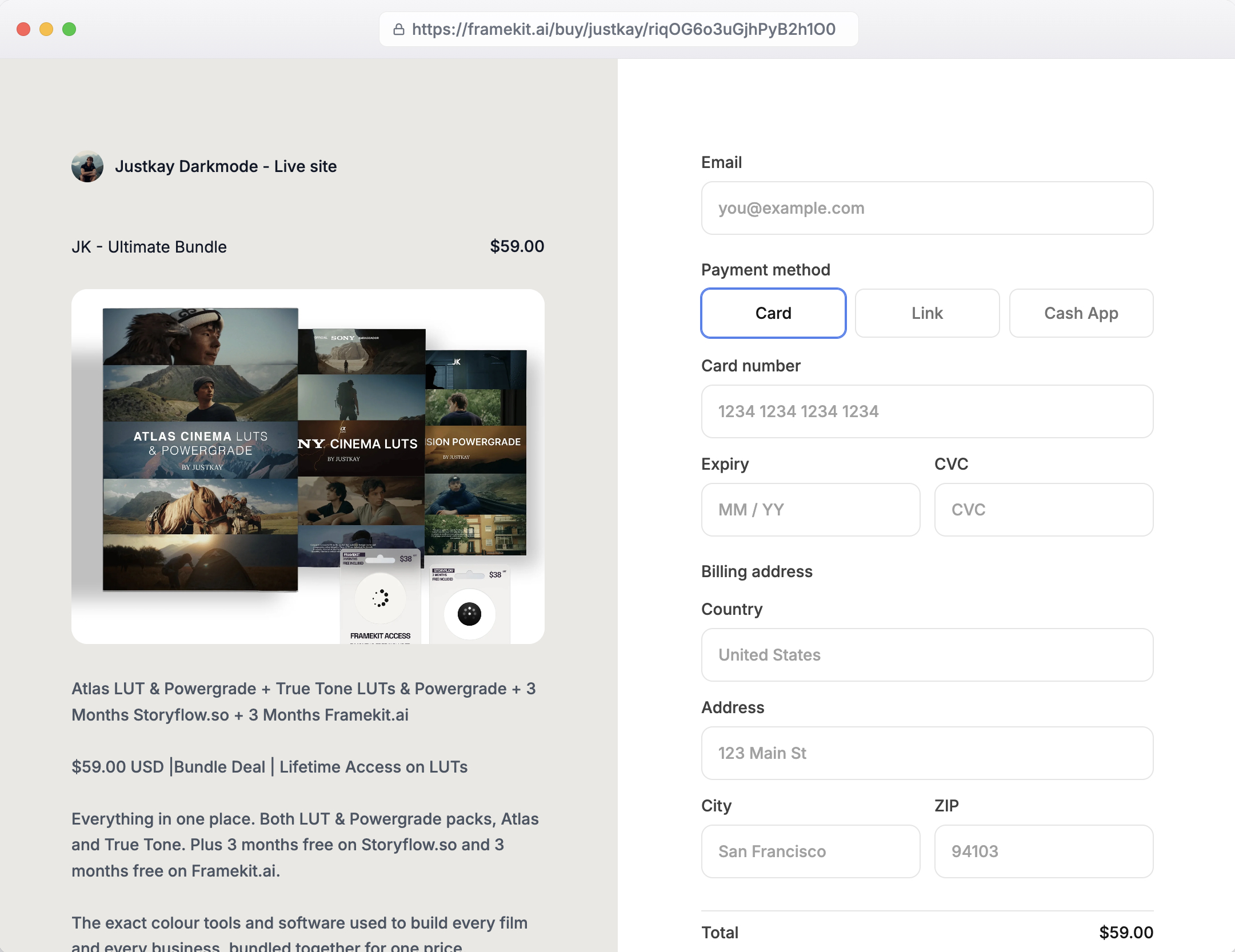
Setting up a product means connecting a Stripe account, uploading the files and setting a price.
The buy button on your site opens a Framekit-hosted checkout page carrying your name and logo, the payment form is Stripe's own Payment Element offering whichever payment methods you have switched on in Stripe, and the charge lands directly in your own Stripe account.
The buyer gets the file the moment payment clears, on a download page they can bookmark and return to.
The real numberon Business at $39 a month the Framekit fee is 0%, so our 500-order month costs $541.50: the plan plus the same $502.50 of processing Stripe Checkout charges. That is $39 more than a bare Stripe link and $2,158.50 less than Gumroad.
On the Free plan the 5% fee makes the same month $1,727.50, and the crossover to Business is $780 a month in sales, which is 16 orders at $49.
The standout detailthe same product has a direct buy link that works with no website at all, and a Framekit site around it if you want one, so the Instagram bio link and the portfolio page sell through the same checkout and the same order list. Discount codes arrive on Pro.
The honest gotchathe checkout page lives on Framekit's domain rather than yours, with a small Powered by Framekit line under your logo, the same trade Stripe Checkout makes.
There are no order bumps, no one-click post-purchase upsells, no checkout A/B testing and no abandoned-cart emails, which are the features the dedicated carts below are bought for.
It sells one-off digital downloads only, with no subscriptions, and it is not a merchant of record, so VAT is yours. Framekit also keeps its fee when you refund a sale on the 5% and 3% plans.
Skip it ifyou have a second product ready for an order bump (SamCart Pro or Payhip Pro), or your buyers are abroad and you want the tax handled (Lemon Squeezy).
Verdict: the best default for a creator whose products stand alone: nearly Stripe's price, with the store and delivery Stripe does not give you. Leave when you have a bump to sell. See the Framekit store.
2. Stripe Checkout: Best Value If You Already Deliver Files
Stripe Checkout and Payment Links are free software. You build a hosted checkout or a shareable payment URL, and Stripe charges you nothing for the tool - only the card processing that you would pay anyway.
For a creator selling a handful of digital products, that is difficult to argue with.
The real number$502.50 on our 500-order month, all of which is processing at the European card rate Stripe published to us of 1.5% plus EUR 0.25. The software line is zero.
The nearest option in this guide is $39 more, and nothing else is within $84 of it.
The standout detailPayment Links need no website at all. You create a link, put it in a bio or an email, and you are selling.
The checkout arrives with wallet buttons, address collection you can switch off, and localisation already handled, which is a better buyer experience than several tools here that charge $79 a month.
The honest gotcha, and it is the reason this is a value pick rather than a features pick: there is no order bump and no post-purchase one-click upsell in the way a dedicated cart means those words.
You can build adjacent behaviour with more Stripe primitives and some development, and if you were going to do that you would not be reading a comparison of checkout tools.
For a creator, the honest summary is that the cheapest option in this guide is also the one that will not raise your average order value.
Skip it ifincreasing order value is the reason you are shopping. You will spend the savings and more on the revenue you did not capture.
What reviewers say elsewhereStripe's G2 profile rates the developer experience and documentation at the top of the category, with support responsiveness the recurring complaint.
Verdict: the cheapest checkout here for anyone who already has file delivery sorted. Start here if you do, and only leave when you have a specific second product to attach to the first.
3. SamCart: Best Dedicated Cart, at the Right Tier
SamCart is the most complete purpose-built checkout in this comparison, and the one that best understands that a cart's job is to make the order bigger rather than merely to complete it.
The real numberCore is $79 a month and Pro is $199, both with 25% off annual billing, both with unlimited pages, products and checkouts. SamPay processing is 2.9% plus 30 cents. On our 500-order month, Core totals $939.50 and Pro totals $1,059.50.
The honest gotcha, and it is the single most important sentence in this guide: one-click upsells and order bumps are Pro features, not Core features. So are A/B testing, the affiliate centre and Subscription Saver.
The $79 plan buys you a good-looking checkout with cart abandonment and a courses app, and none of the things the category is famous for.
If you are buying SamCart, you are buying the $199 plan; budget accordingly rather than discovering it in week two.
The standout detailthe difference between the two plans is $120 a month, and a single order bump converting at 20% on a $19 add-on across 500 orders is roughly $1,900 in additional revenue.
That is not a close decision - it is the clearest example in this guide of a feature paying for its own tier several times over, which is precisely why gating it feels sharp.
Skip it ifyou sell one product with nothing to attach to it. You would be paying $199 a month for an upsell you have nothing to put in.
What reviewers say elsewhereSamCart's G2 listing is strongest on conversion features and templates, with pricing the most common criticism, which matches the tier structure above.
Verdict: the best cart here and the one whose pricing page most needs reading twice. Buy Pro or buy something else.
4. Payhip: Best Value With Real Features
Payhip is a store, a checkout and a delivery mechanism in one, and it connects to your own Stripe or PayPal account rather than holding your money.
The real numberthe free plan takes 5%, Plus is $29 a month and takes 2%, and Pro is $99 a month with no transaction fee.
At our volume the free plan costs $1,727.50 and Pro costs $601.50, a difference of $1,126 a month - so anyone doing real volume on the free plan is paying $13,512 a year for the privilege of not upgrading.
The standout detailupsells, cross-sells and coupons are available without a $199 tier, which is a pointed contrast with the dedicated carts. For a creator who wants order-value features without cart-software pricing, this is the cheapest route to them in this guide.
The honest gotchathe checkout is competent rather than exceptional. It converts, it looks fine, and it is not going to win a design comparison against SamCart. You are trading polish for about $450 a month at this volume.
Skip it ifyour brand is the product. Payhip's storefront is functional and generic in equal measure.
Verdict: the best cost-to-capability ratio in this guide. Move to Pro earlier than feels comfortable, because the free plan's 5% is quietly enormous at volume.
5. Podia: Best Beside Courses
Podia's checkout is one part of a creator platform that also runs courses, downloads, memberships and email, and its value case rests entirely on whether you want those other parts.
The real numberMover is $42 a month with 5% transaction fees, Shaker is $84 with none and Earthquaker is $150 with none. At 500 orders, Shaker's $84 plus processing totals $586.50, the second cheapest option here.
The standout detailremoving the transaction fee entirely at $84 makes Podia's cost flat as volume grows. At 1,000 orders it is still $84 in software while Lemon Squeezy would be $2,950.
The honest gotchathere are no true one-click post-purchase upsells, and the email subscriber caps - 100 on Mover, 500 on Shaker, 1,000 on Earthquaker - bite well before anything else does. A 500-order month generates more than 500 email addresses.
Skip it ifthe checkout is all you need. You are buying a platform and using a tenth of it.
Verdict: strong economics, mediocre cart features, excellent if the courses are real.
6. Shopify: Best Cart, Wrong Shape for Files

Shopify's checkout is genuinely one of the best-converting on the internet, refined across an enormous volume of transactions. It is also built for boxes, and that shows the moment your product is a file.
The real numberon the page served to us, Basic is EUR 29 a month or EUR 22 billed annually, Grow is EUR 82, and Advanced is EUR 384, with online card processing at 1.9% plus EUR 0.25 on Basic. At our volume that is roughly $631.50 all in.
The honest gotcha, and it is a big oneuse any payment provider other than Shopify Payments and Basic adds a 2% transaction fee on top, falling to 1% on Grow and 0.6% on Advanced. On $24,500 of monthly sales that penalty is $490 a month on Basic.
It is a charge for not using their processor, and it is the most aggressive version of that pattern in this guide.
The second gotchadigital delivery needs an app. Shopify does not deliver files natively in the way the rest of this list does, so the real stack is a plan plus a downloads app plus, if you want them, an upsell app - and each of those is a subscription.
The $631.50 above is the floor, not the total.
Skip it ifyou sell only digital products. You are inheriting a physical-goods checkout, complete with shipping-address logic you have to switch off.
Verdict: the strongest checkout in the world attached to the wrong problem. Right if you sell prints alongside presets; wrong if you only sell presets.
7. Lemon Squeezy: Best With Tax Included
Lemon Squeezy is a checkout and a merchant of record in one, which means that buying it settles two problems at once: you stop building a cart, and you stop being the party legally responsible for collecting and filing VAT on international sales.
Whether that bundle is good value depends entirely on whether you had the second problem.
The real number5% plus 50 cents per transaction, with processing inside that rate. On our 500-order month that is $1,475, which is nearly three times Stripe Checkout's total.
The standout detailthe 50 cents is a smaller share of a $49 product than of a $9 one, so this is the price point at which Lemon Squeezy looks reasonable rather than punitive. The effective all-in rate here is 6%, against roughly 10% on a $10 product.
The honest gotcha$1,475 a month buys VAT compliance, delivery and a checkout.
Whether that is a good trade depends entirely on whether you would otherwise be registering for VAT in several jurisdictions - if you would, it is a bargain, and if you sell only domestically, it is a large fee for a checkout.
Skip it ifall your buyers are in your own country. The compliance you are paying for is not doing anything.
Verdict: priced as a bundle and only sensible as a bundle. Buy it for the tax, and treat the checkout as included.
8. Gumroad: Fastest Setup, Highest Cost
Gumroad remains the quickest route from a file to a working checkout, and at 500 orders a month it is also comfortably the most expensive way to take a payment in this guide.
The real number10% plus 50 cents per sale, which on our month is $2,700 against Stripe Checkout's $502.50. The gap is $2,197 a month, or $26,364 a year, for the same 500 customers buying the same file.
The honest gotchathe 30% Discover rate applies to sales Gumroad sends you, which is defensible as a marketing fee and is worth separating from the base 10% when you do your own arithmetic. Mixing the two is how people end up quoting an average rate that describes nobody.
Skip it ifyou are past a few hundred dollars a month and your traffic is your own. This is the clearest upgrade decision in the whole category.
Already on Gumroad and doing volume? Gumroad's fees explained works through the arithmetic, and the best Gumroad alternatives covers where sellers move.
Verdict: an excellent first checkout and a very expensive tenth one. At 500 orders a month it is costing you a part-time salary.
9. ThriveCart: Reported Strong, Unverifiable Here
ThriveCart is a well-established cart with a long-standing following among course sellers, built around sales funnels, order bumps, one-click upsells and a built-in affiliate centre.
It belongs in this comparison on reputation and product scope, and it is the only entry here whose price we could not confirm.
The real numberwe could not get one. ThriveCart's pricing page redirected to a login screen and did not render plan details to us, so unlike every other entry in this guide there is no figure here we can stand behind.
Its model is a one-off perpetual licence rather than a monthly subscription, which is unusual in this category and is the main reason people choose it, but we are not going to publish a price we did not read at the source.
The standout detailthe perpetual-licence model inverts the economics of everything else here. A cart you buy once and keep gets cheaper every year you use it, where SamCart Pro costs $2,388 a year forever.
Skip it ifyou need to compare total cost precisely before committing, which given the above is difficult to do from public information.
Verdict: worth requesting current pricing directly, and worth treating any figure you read in a comparison article - including the absence of one here - with appropriate caution.
The Feature Gate Is the Real Pricing Page
Three of the nine tools here advertise a price that does not include the features the category is famous for. This is not dishonest - the tiers are published - but it is the single most common reason a cart costs more than expected.
In one linefind the tier your must-have feature is on before you compare any prices, because the entry plan is frequently not the plan you are buying.
| Feature | Where it actually sits |
|---|---|
| Order bumps | SamCart Pro at $199, not Core at $79. Payhip includes them. Stripe Checkout and Framekit have none. |
| One-click post-purchase upsells | SamCart Pro. Not available on Stripe Checkout, Framekit or Podia. Shopify needs an app. |
| A/B testing the checkout | SamCart Pro only |
| Affiliate centre | SamCart Pro. Payhip and Gumroad include basic affiliate tooling. |
| Cart abandonment recovery | SamCart Core includes it. Most others, Framekit included, require an email tool. |
| Discount codes | Framekit from Pro at $19. Payhip, SamCart and Lemon Squeezy include coupons. |
| Native file delivery | Everything here except Stripe Checkout and Shopify, both of which need something else. |
The practical consequence is that the comparison you should be running is not "which of these is cheapest" but "what does the plan that has my three must-have features cost".
For a creator who genuinely wants bumps and upsells, that shortlist is SamCart Pro at $199 or Payhip Pro at $99, and the $100 difference buys polish and A/B testing.
The test to run before you buy any of this
- Write down the second product. An order bump needs something to bump. If you cannot name the $19 add-on right now, every upsell feature in this guide is worth nothing to you and you should buy on price.
- Multiply your monthly orders by your price. Then apply each tool's percentage. Anything above about 300 orders a month makes flat pricing win decisively.
- Estimate the bump conservatively. A well-matched add-on converting at 15% to 25% is normal. At 500 orders and a $19 add-on, 20% is $1,900. Compare that to the tier difference, not to the whole plan cost.
Where Carts Actually Lose You Money
In one linethe checkout loses more revenue to friction and failed payments than it does to fees, and neither shows up on the pricing page.
Fields you do not need. A digital product requires an email address and a payment method. Every additional field costs completions.
Shopify's checkout asks for a shipping address by default because it was built for parcels, and switching that off is a configuration step people forget.
No wallet buttons. Apple Pay and Google Pay remove the part of mobile checkout where someone types sixteen digits one-handed. Stripe Checkout, SamCart and Shopify all support them.
If your buyers are arriving from a phone, this is the highest-value setting in the whole guide.
The redirect. A checkout that leaves your domain at the moment of payment asks the buyer to trust a second brand. It still converts, and we have not measured how much worse, but the cost is invisible because you never see the people who stopped.
Failed payments on subscriptions. If you sell anything recurring, the retry logic matters more than the fee. SamCart's Subscription Saver is a Pro feature; most of the rest rely on whatever the processor does by default.
Refund fees. Refunding a sale returns the buyer's money and not your transaction fee, on every percentage-based tool here whose policy we could find, Framekit's 5% and 3% plans included.
At a 5% refund rate on 500 orders, that is 25 refunds a month costing you the fee on each.
None of the carts above will produce an invoice against a purchase order, which is the one document a corporate buyer needs.
That job has its own tools, priced in our comparison of ways to sell to businesses.
Decision Guide
This is ordered by the question that actually decides the answer, which in this category is not budget but whether you have a second product to sell alongside the first. Everything else follows from that. Work down and stop at the first yes.
1. Can you name the $19 add-on you would put in an order bump?
No: use Framekit if you also need the product page and file delivery, on the free plan at 5% until you pass $780 a month and on Business at 0% after that. Use a bare Stripe Checkout if you already deliver files some other way.
Either way, every upsell feature in this guide would go unused.
Yes: continue.
2. Is your budget under $100 a month?
Yes: Payhip Pro at $99, which includes upsells and cross-sells without cart-software pricing.
3. Do you want the best-converting dedicated cart and will you use A/B testing?
Yes: SamCart Pro at $199. Not Core - Core does not have the features you are buying it for.
4. Do you sell internationally and want VAT handled?
Yes: Lemon Squeezy at 5% plus 50 cents, which is reasonable at $49 and painful below $15.
5. Do you also sell physical products?
Yes: Shopify, using Shopify Payments to avoid the 2% third-party penalty, plus a downloads app for the files.
6. Do you sell courses or memberships alongside the files?
Yes: Podia on Shaker at $84, watching the email subscriber cap rather than the order count.
7. Do you need to be selling this afternoon with no site?
Yes: Gumroad or a Stripe Payment Link. Gumroad is faster and costs $2,197 more a month at 500 orders, so set the volume at which you will move before you start.
Frequently Asked Questions
These are the questions that come up once the checkout is live and you are looking at the gap between what you sold and what arrived.
What is the best checkout tool for selling digital products in 2026?
Framekit is the best checkout tool for most creators selling digital products in 2026, because on its $39 Business plan it takes 0% and adds the product page, file delivery and an on-site payment form, so 500 orders of a $49 product cost $541.50 against Gumroad's $2,700.
It has no order bumps or one-click upsells, so if raising average order value is your goal, SamCart Pro at $199 a month is the strongest dedicated cart and Payhip Pro at $99 is the cheapest route to the same features.
Framekit vs Stripe Checkout: which should I choose?
Choose Stripe Checkout if you already have a way to deliver files, and Framekit if you do not. On 500 orders of a $49 product, Stripe Checkout costs $502.50 in processing and Framekit Business costs $541.50, the same processing plus $39.
The $39 buys a product page, instant delivery, a bookmarkable download page and a store on your own site; both host the payment step on their own domain, and neither offers order bumps.
What is the difference between a checkout tool and a payment processor?
A payment processor moves the money and a checkout tool decides how large the order is. Stripe, PayPal and Paddle are processors: they authorise the card and settle the funds.
SamCart, ThriveCart and Payhip are checkouts: they add order bumps, upsells, cart recovery and product delivery on top of a processor. Most creators need both, and several tools in this guide bundle them.
Does SamCart include order bumps on its cheapest plan?
No. One-click upsells and order bumps are on SamCart's Pro plan at $199 a month, not on Core at $79. A/B testing, the affiliate centre and Subscription Saver are also Pro features.
This is the most consequential feature gate in the category, because bumps and upsells are the main reason people buy a dedicated cart rather than using a free checkout.
Are order bumps actually worth paying for?
Usually yes, if you have a second product to offer. A well-matched add-on converting at 15% to 25% is normal, so at 500 orders a month a $19 bump at 20% adds about $1,900 in revenue.
Against the $120 a month difference between SamCart's Core and Pro plans, that pays for itself many times over. If you cannot name the add-on, the feature is worth nothing and you should buy on price instead.
How much does Shopify charge for digital products?
On the pricing served to us, Basic is EUR 29 a month with online card processing at 1.9% plus EUR 0.25, but two extras apply to digital sellers.
Using any processor other than Shopify Payments adds a 2% transaction fee on Basic, falling to 1% on Grow and 0.6% on Advanced.
And Shopify does not deliver files natively, so you also need a digital downloads app, which is a separate subscription.
Stripe Checkout vs SamCart: which should I choose?
Choose Stripe Checkout if you sell single products and SamCart if you sell bundles. Stripe Checkout is free software with excellent buyer experience and no order bumps or post-purchase upsells.
SamCart Pro is $199 a month and is built entirely around raising order value. At 500 orders of a $49 product the cost difference is about $557 a month, which one well-converting bump would recover.
Do checkout tools refund their fee when I refund a customer?
No, on every percentage-based tool here whose policy we could find published. The buyer gets the sale price back and you do not get the transaction fee back, because the card networks charge it at the moment of the sale.
At a 5% refund rate on 500 orders that is 25 refunds a month whose fees you absorb, which is an argument for flat-fee tools that most comparisons never make.
Which checkout converts best?
We did not run a conversion test and will not publish a number, but the mechanics that matter are knowable: wallet buttons like Apple Pay and Google Pay remove the worst part of mobile checkout, every unnecessary form field costs completions, and a checkout that redirects to another company's domain asks the buyer to trust a second brand at the worst moment.
Stripe Checkout, SamCart and Shopify all handle wallets well.
Do I need a checkout tool if my store already has one?
Usually not. Framekit, Payhip, Podia, Gumroad and Lemon Squeezy all include checkout, delivery and payment in what you already pay.
A dedicated cart earns its place when you want a specific feature the store lacks - post-purchase upsells and checkout A/B testing being the two that most commonly justify it.
What is the cheapest way to sell a digital product?
A Stripe Payment Link, which costs nothing as software and only card processing per sale. You get a shareable URL with wallet support and no monthly fee.
What you do not get is file delivery, so you either email the file manually or pair it with something that handles delivery, which is covered in the best digital product delivery tools.
Can I use a checkout tool with my own website?
Yes, and it is the most common setup once a creator has a real site. SamCart, Payhip, Stripe Checkout and ThriveCart are all designed to sit behind your own pages, handling only the payment step.
The question worth asking is whether the buyer stays on your domain through the payment or gets redirected, because that redirect is a real if unmeasurable cost.
Is ThriveCart's one-off licence better than a monthly plan?
Arithmetically it can be, and we could not verify the current price to tell you where the crossover sits. A cart you buy once gets cheaper every year, against SamCart Pro at $2,388 a year indefinitely.
ThriveCart's pricing page did not render for us, so request current pricing directly rather than trusting any figure in a comparison article.
The Verdict
Framekit wins on the two criteria most creators are actually deciding on, cost and whether the file gets delivered. $541.50 on Business against Gumroad's $2,700 for the same 500 orders is not a close call, and it is only $39 more than a bare Stripe Checkout that leaves delivery to you.
It wins with an asterisk the size of the page, though.
Neither Framekit nor Stripe Checkout will raise your average order value, and the entire reason dedicated carts exist is that raising average order value is usually worth more than saving on fees.
If you have a second product, SamCart Pro is the strongest tool here and Payhip Pro is the cheapest way to the same capability. If you do not have a second product, buying either is spending $99 to $199 a month on a feature you cannot use.
Where Framekit losesFramekit does not have order bumps, one-click post-purchase upsells, abandoned-cart emails or checkout A/B testing, which are exactly the features the dedicated carts are bought for.
If those are your requirement, SamCart or Payhip is the better fit and this ranking says so. It is also not for anyone selling subscriptions or wanting the VAT handled, where Lemon Squeezy is the better fit.
What we do instead is put the portfolio, the product pages, the checkout and the file delivery in one account, with the money landing in a Stripe account that belongs to you.
Verdict: no second product, use Framekit, or a bare Stripe Checkout if delivery is already solved. A second product, buy Payhip Pro at $99 or SamCart Pro at $199 - and read which tier the feature is on before you read the price.
Plan prices, processing rates and the feature-tier table here were read from each vendor's published pricing page during the first week of August 2026, except ThriveCart, which is flagged in place as unverified.
Stripe and Shopify both serve pricing by country, so confirm your own rates before modelling.
Related readingthe best payment processors for digital products, the best digital product delivery tools, what it costs to sell digital products online, how to price digital products, and website builders to sell digital products.