Framekit templates
Start from a designer-made template
 Use template
 Use template
 Use template
 Use template
 Use template
 Use template
 Use template
 Use template
Full disclosure: Framekit is our own product and it is ranked third below rather than first, because two platforms here beat it for selling community access, which is what most people used Whop for.
Before you leave Whop over the fees, do the arithmetic. We did, and it does not say what most comparison articles say it says.
Whop's own fee documentation publishes payment processing at 2.7% plus 30 cents for domestic cards. That is cheaper than Stripe's standard US rate and dramatically cheaper than Gumroad.
If you are switching platforms because you read that Whop is expensive, you may be about to move to something that costs you more.
A Whop alternative is any platform that sells access, memberships or digital products directly to your audience: a storefront, a checkout, delivery, and some way of gating what the buyer paid for.
There are good reasons to leave Whop and they are structural rather than arithmetic, which is what this guide is actually about.
Payhip is the best Whop alternative for most creators selling digital products in 2026, because it connects to your own Stripe or PayPal account instead of holding your money, and its $99 Pro plan takes no cut of sales at all.
Circle is the better move if what you sold on Whop was a community, at $89 a month on annual billing plus 2%.
Framekit is the pick if the store should live on your own site beside your portfolio, with the money landing in your own Stripe account and a 0% fee on its $39 plan, and Lemon Squeezy is the one to choose if you want VAT handled for you.
But read the fee section below first - on published rates, Whop is not the expensive option, and the reasons to leave are about control rather than cost.
We rank our own product third in this guide. Framekit does not host communities or gate a Discord, which is what a large share of Whop sellers actually need, and two platforms below serve that better than we do.
In September 2026 we re-verified Framekit's entry against its current pricing page and removed a file-size limit it no longer publishes; the other vendors' figures are dated August 2026 in place.
How We Priced This
Everything here is measured against $3,000 a month in sales of a $29 digital product, or about 103 orders. Where a platform uses your own payment processor rather than its own, we have added card processing at 2.9% plus 30 cents, which is the standard rate Podia publishes on its pricing page.
The claims come in three grades:
- Read at the vendor's own documentation during the first week of August 2026. Whop's fee schedule, and every plan price for Payhip, Circle, Lemon Squeezy, Podia, Skool, Sellfy, Gumroad and Kajabi.
- Built and clicked through. We created a product and walked the buyer flow on Payhip, Lemon Squeezy, Gumroad and Framekit.
- Could not verify. Stan Store's pricing page did not resolve for us, so its entry says so and carries no figures.
One correction we are making in public, because it matters: a companion guide of ours earlier described Whop's fees using third-party reports, because Whop's marketing pages did not render a fee table.
Whop's developer documentation does publish one, and it is the source used here.
Where third-party sources report a separate platform commission on top of processing, we could not find that stated in the fee documentation we reached, so we have not included it in the arithmetic and we flag it where it matters.
By the numbers:
- 2.7% plus 30 cents is Whop's published domestic card processing rate.
- $15 is Whop's published dispute fee, charged per dispute.
- 4% plus $1.00 is what Whop charges for an instant bank payout, against $2.50 for next-day ACH.
- 2% is Whop's published charge per transaction when it collects and remits tax for you.
- $351.50 is what Gumroad would take from the same $3,000 month.
- $156.90 is the cheapest total in this guide on that month.
- $194.60 separates the cheapest and most expensive option here.
The Rubric
We scored on five criteria, weighted for the specific decision this guide is about, which is not choosing a first platform but leaving one you have already built a business on. That changes what matters: migration cost and control of your funds outrank a point of commission.
| Criterion | Weight | What it covers |
|---|---|---|
| Total cost on $3,000 a month | 25% | Plan fee, platform cut and card processing together |
| Control of funds and customers | 25% | Whose balance, whose buyer list, whose domain |
| Fit for what you were selling | 20% | Access, community, files, courses |
| Migration cost | 20% | What breaks, what you have to rebuild, who you lose |
| Payout terms | 10% | Speed, rails, fees to get money out |
Control is weighted level with cost because it is the actual reason most people leave a platform of this kind, and because cost turns out to be a weaker argument here than the category assumes.
What $3,000 a Month Costs on Each
Every row is the same month: roughly 103 orders of a $29 product, or $3,000 gross. Card processing at 2.9% plus 30 cents is added for platforms that use your own payment account, and left inside the rate for platforms that bundle it.
| Platform | Plan and cut | Platform cost | Processing | Total | You keep |
|---|---|---|---|---|---|
| Framekit | Business, $39, 0% | $39 | $117.90 | $156.90 | $2,843.10 |
| Sellfy | Starter, $39, 0% | $39 | $117.90 | $156.90 | $2,843.10 |
| Whop | Published processing only | $0 | $111.90 plus $2.50 payout | $114.40 | $2,885.60 |
| Payhip | Pro, $99, 0% | $99 | $117.90 | $216.90 | $2,783.10 |
| Podia | Shaker, $84, 0% | $84 | $117.90 | $201.90 | $2,798.10 |
| Kajabi | Entry, $89 | $89 | $117.90 | $206.90 | $2,793.10 |
| Lemon Squeezy | 5% + 50c, processing included | $201.50 | Included | $201.50 | $2,798.50 |
| Circle | Professional, $89 + 2% | $149 | $117.90 | $266.90 | $2,733.10 |
| Payhip | Free plan, 5% | $150 | $117.90 | $267.90 | $2,732.10 |
| Gumroad | 10% + 50c | $351.50 | Included | $351.50 | $2,648.50 |
| Stan Store | Not verified | Not published | Not published | Not published | Not published |
Whop comes out on top of that table, and we are not going to pretend otherwise just because this is an article about leaving it.
On its published payments schedule alone, Whop keeps more of a $3,000 month than any alternative here, because there is no monthly plan fee in the documentation we read and the processing rate is below what most competitors charge.
Anyone who arrived at this article expecting the fee argument to justify the move should sit with that for a moment.
The honest qualifications, in both directions.
Whop's schedule is a menu rather than a single rate: tax collection and remittance is an additional 2% per transaction, billing automation is 0.5%, orchestration is 0.8% and affiliate processing is 1.25%.
Turn several of those on and the picture changes materially.
Third-party sources also report a separate platform commission that we could not find stated in the documentation, and if that applies to your account it adds roughly $90 to this month.
In one lineif your reason for leaving Whop is the fee, check your own invoice against the published schedule first, because the headline arithmetic favours staying.
So Why Leave Whop at All?
If the fee argument is weak, the case for moving has to stand on something else. Having read the fee schedule and built stores on the alternatives, there are four real reasons, and none of them is a percentage.
In one lineyou leave Whop for control of the payout, the customer and the storefront, not to save money on the transaction.
The payout menu is where the money actually goes. Next-day ACH costs $2.50 per payout, which is trivial. An instant bank deposit costs 4% plus $1.00, and a Venmo or crypto payout costs 5% plus $1.00.
A creator taking weekly instant payouts on a $3,000 month is paying roughly $121 a month for speed - which is more than the entire platform cost of most alternatives in this guide.
This is a settings problem before it is a platform problem, and it is worth fixing before you migrate anywhere.
The add-on percentages compound. Tax collection at 2%, billing automation at 0.5%, orchestration at 0.8% and affiliate processing at 1.25% are individually reasonable and collectively significant.
A seller with tax, billing and affiliates enabled is at 4.55% in add-ons on top of 2.7% processing, which puts the all-in rate above 7% and changes every comparison in the table above.
Your storefront is a Whop page. Buyers see Whop's branding, Whop's domain and Whop's other sellers.
That is a marketing asset when you are starting and a leak when you are established, because you paid to introduce your customer to a catalogue that includes your competitors.
The gate depends on someone else's platform. A large share of Whop products gate access to a Discord or Telegram. That means your product depends on two companies you do not control, and a policy change at either one changes what you sell.
1. Payhip: Best Overall Alternative
Payhip is the closest like-for-like replacement for a Whop seller whose product is files rather than a room: a storefront, checkout, delivery and VAT handling, connected to your own payment account.
The real numberthe free plan takes 5%, Plus is $29 a month at 2%, and Pro is $99 a month with no transaction fee.
On our $3,000 month, Pro plus your own processing totals $216.90 and the free plan totals $267.90 - so the $99 plan is cheaper than the free one at this volume, by $51 a month.
The standout detailthe money never enters a Payhip balance. Sales settle into your own Stripe or PayPal account and Payhip invoices you separately. After a platform that holds your funds and offers you a menu of payout speeds, that structure is the single biggest change in how your business feels.
The honest gotchathe storefront is functional rather than distinctive. If your Whop page was doing real design work for you, Payhip will feel like a downgrade in presentation even as it upgrades your control.
Skip it ifwhat you sold was community access. Payhip does not gate a Discord and does not pretend to.
What reviewers say elsewherePayhip's Capterra listing is consistently strong on simplicity and value, with design flexibility the recurring request.
Verdict: the default move for a Whop seller with digital products. You give up some polish and you take back your funds.
2. Circle: Best If You Sold a Community
If your Whop product was access to a group, the honest replacement is not a store, it is a community platform - and Circle is the strongest one.
The real numberProfessional is $89 a month on annual billing with a 2% transaction fee, Business is $199 with 1%, members unlimited on both. On our test month that is $149 plus processing.
The standout detailthe community lives on your own subdomain with your own branding, rather than inside a marketplace. You also stop depending on Discord's policies for the thing your customers are paying for, because the discussion is inside the product you are selling.
The honest gotchaCircle charges for staff, not members. Professional includes 3 admins and 10 moderators, with extras at $10 and $20 a month respectively. A community large enough to need moderators has a bill that grows in a place the pricing page does not emphasise.
Skip it ifyour members will not move. Migrating a community is harder than migrating a store, because you are asking people to change a daily habit rather than a bookmark.
Verdict: the right destination if the product was people. Budget for the migration to cost you members rather than money.
3. Framekit: Best for Selling From Your Own Site

Framekit is an AI website builder for photographers, filmmakers, designers and other creators, and its store is one of five tools in the account, beside client galleries, video review and Slides.
Its relevance to a Whop seller is specific: it puts the products on your own site, next to the work that convinces people to buy, and it answers the same complaint Payhip does, because the money never sits in a platform balance.
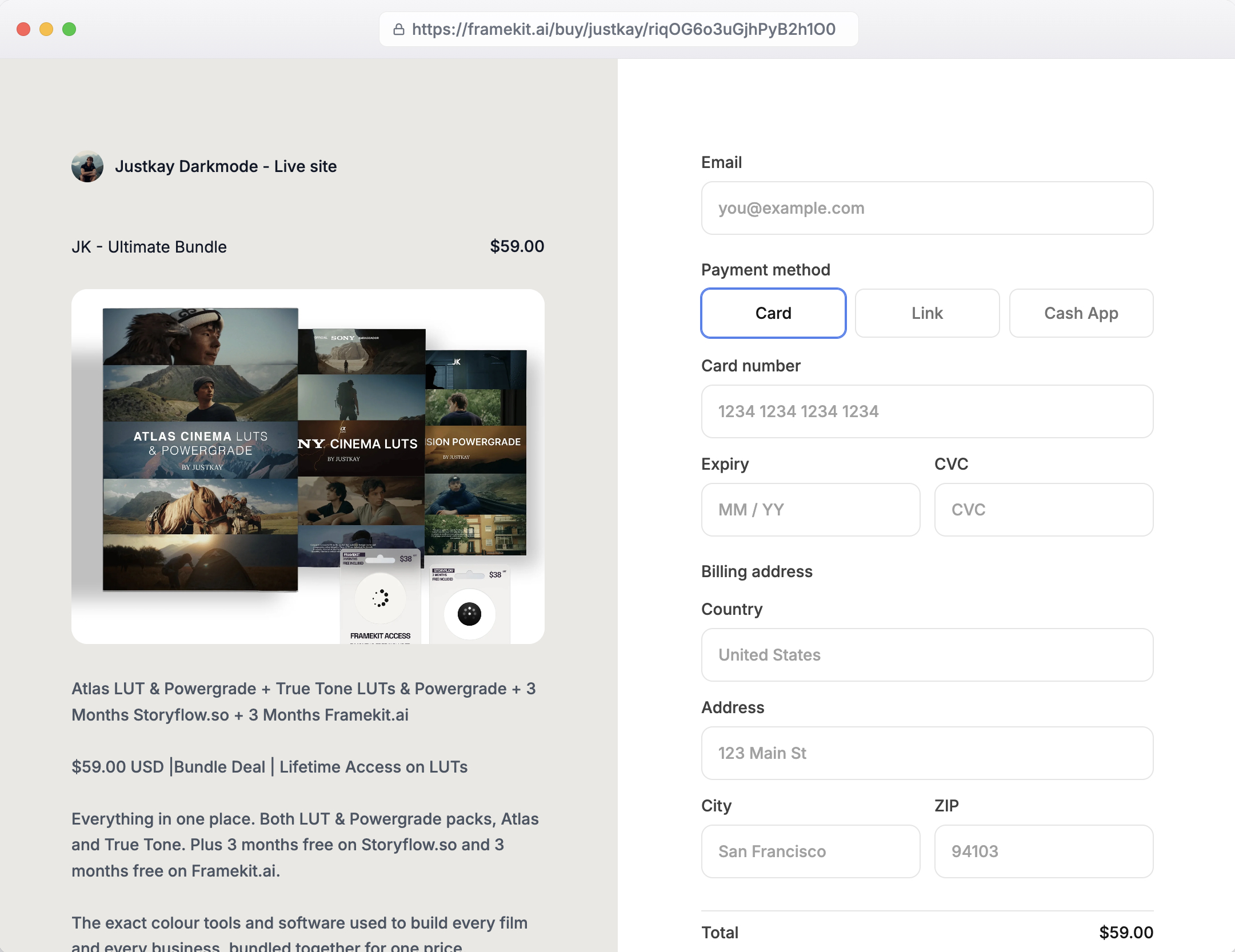
Each sale is a direct charge on your own connected Stripe account, so payouts run on Stripe's schedule rather than ours.
Every product also gets a direct buy link that opens a hosted checkout under your name and logo, which you can drop into a Discord announcement or a bio exactly as you did with a Whop link.
The buyer gets the file instantly and can come back for it later, and free products work as lead magnets.
The real numberthe transaction fee is 5% on Free and Starter, 3% on Pro at $19 a month and 0% on Business at $39 a month, with card processing on top.
On our $3,000 month, Business totals $156.90 including processing - the joint cheapest alternative in this guide, and $60 a month less than Payhip Pro for the same structure.
The crossover where the flat plan beats the percentage is $780 a month in sales, which is $39 divided by 5%.
The standout detailthe portfolio and the store are one site. For a photographer selling presets or a filmmaker selling LUTs, the thing that sells the product is the work sitting next to it, and on Whop that work lives somewhere else entirely.
The honest gotcha, and it is why this is third rather than first: Framekit does not host communities, does not gate a Discord, and does not run subscriptions or recurring memberships.
If your Whop product was access to a group, this is the wrong tool and Circle or Skool is the right one.
It has no affiliate programme either, which Whop sellers often lean on, it keeps its fee on refunded sales on the 5% and 3% plans, and it is not a merchant of record, so tax is yours.
Skip it ifyou need discovery. Whop has a marketplace and a website has search engines, which is slower and yours.
Verdict: the best fit for a Whop seller whose real business is a body of creative work with products attached, and the wrong fit for a community operator. See how the Framekit store works.
4. Lemon Squeezy: Best With Tax Handled
Lemon Squeezy acts as the merchant of record, which means it becomes the legal seller of your product rather than a service you use to sell it.
The practical effect is that VAT and sales-tax registration, collection and filing stop being your obligation and become the platform's, on every sale in every country.
The real number5% plus 50 cents per transaction with processing included, so $201.50 on our test month.
The standout detailcompare that against enabling Whop's own tax collection and remittance, which its documentation prices at 2% per transaction on top of 2.7% processing. The two arrangements end up closer than the headline rates suggest, and Lemon Squeezy's version includes the storefront.
The honest gotchaat a $29 price the 50-cent fixed fee is 1.7 points on its own, so the effective rate is about 6.7%. On cheaper products it gets worse quickly.
Skip it ifall your buyers are domestic and you are already registered where you live.
Verdict: the efficient choice for an international seller, and the arithmetic is closer to Whop's tax option than most comparisons admit.
5. Podia: Best All-in-One
Podia covers digital downloads, courses, memberships and email in one subscription, which suits a Whop seller whose catalogue had grown in several directions at once.
The real numberMover is $42 a month with 5% transaction fees, Shaker is $84 with none and Earthquaker is $150 with none. Shaker plus processing is $201.90 on our test month.
The standout detailremoving the transaction fee entirely at $84 means the cost stops tracking your revenue. At $10,000 a month Podia is still $84 while a 5% platform would be $500.
The honest gotchathe email subscriber caps of 100, 500 and 1,000 by plan are the real ceiling, and a Whop audience you are migrating will breach them quickly.
Skip it ifyou only sell files. You are paying for a course platform.
Verdict: good if your Whop store had become several businesses. Overkill if it had not.
6. Skool: Cheapest Community Replacement
Skool is the low-cost answer for a community that does not need much structure, and it has taken a meaningful share of exactly the audience Whop serves.
The real numberHobby is $9 a month with a 10% transaction fee and Pro is $99 a month with 2.9%, both with unlimited members.
The standout detailthose two plans cross over at $1,268 a month in revenue. Our $3,000 month is well past it, so Pro is the correct plan and Hobby would cost you an extra $211 a month.
The honest gotcha10% on the Hobby plan is a higher rate than anything Whop publishes. A creator moving from Whop to Skool Hobby to save money would be moving to a more expensive arrangement, which is the kind of thing a fee-led comparison article will not tell you.
Skip it ifyou need design control or a public, indexable presence.
Verdict: the cheapest way to run a small paid community, on the $99 plan rather than the $9 one at any real volume.
7. Sellfy: Best Flat-Fee Store
Sellfy is a straightforward storefront that takes no percentage of your sales at all, connecting to your own Stripe or PayPal account so the money settles where you control it.
Its pricing is flat by plan, which makes it one of the few options here whose cost does not track your revenue.
The real numberStarter is $39 a month billed monthly or $29 yearly, Business is $79 or $59, Premium is $159 or $119, all at 0% transaction fees. On our test month Starter plus processing is $156.90, joint cheapest here.
The honest gotchathe plans cap annual sales at $10,000, $50,000 and $200,000.
Our $3,000 a month is $36,000 a year, which is past Starter and into the $79 Business plan - so the joint-cheapest figure above is only available to sellers doing less than we modelled.
That is the kind of detail that decides a migration and it is two clicks deep on the pricing page.
Skip it ifyour revenue is growing fast. You will change tiers on revenue rather than on need.
Verdict: genuinely flat-fee within a band, and the band is narrower than the headline.
8. Gumroad: Fastest to Launch, Most Expensive to Stay
Gumroad is the quickest way to have something selling again after leaving a platform, and at this volume it is comfortably the most expensive option here.
The real number10% plus 50 cents per sale, which is $351.50 on our $3,000 month against Whop's $114.40. A Whop seller moving to Gumroad to escape fees would triple them.
The honest gotchathe 30% Discover rate applies to buyers Gumroad brings you, which is a marketing fee rather than a platform fee and should be assessed separately.
Skip it ifyou have any volume. This is the clearest example in the guide of a move that costs money.
Already comparing on cost? Gumroad's fees explained works through the arithmetic in detail.
Verdict: a fine landing pad for a week and an expensive home for a year.
9. Kajabi: Best for Course-Led Businesses
Kajabi is a full creator business platform aimed at noticeably higher price points than the rest of this guide, built for businesses where a community or membership is attached to a substantial course rather than to a set of downloads.
It is the largest product here and the one most likely to be overkill.
The real numberentry pricing is $89 a month, or $71 billed annually, with the next tier at $179 or $143. At $89 plus processing that is $206.90 on our test month.
The honest gotchathe fit question rather than the price. A Whop seller selling $29 products will use a fraction of what Kajabi is built for, and the funnels and marketing apparatus are the majority of what you would be paying for.
Skip it ifthe products are cheap and simple.
Verdict: right if your Whop business was really a course business. Otherwise an expensive mismatch.
10. Stan Store: Could Not Verify
Stan Store is a link-in-bio storefront popular with creators who sell directly from a social profile rather than from a website, and it comes up often as a destination for people leaving Whop.
It is included here because it belongs in the consideration set, not because we can price it.
The real numberwe do not have one. Stan Store's pricing page did not resolve for us during testing, returning a store-level placeholder rather than company pricing, so unlike every other entry here there is no figure we can stand behind.
Any specific price you read in a comparison article was not verified against Stan Store's own page today.
Skip it ifyou need to compare total cost before committing, which from public information is currently difficult.
Verdict: worth requesting current pricing directly, and worth treating third-party figures with caution - including the absence of one here.
What Migrating Actually Costs
In one linethe expensive part of leaving is not the setup, it is the customers who do not follow you, and the number depends entirely on what you were selling.
Three different migrations hide behind the phrase "Whop alternative", and they are not equally hard.
Moving a file store is an evening. Export your product list, re-upload, repoint your links, and keep the old checkout live for a fortnight so nobody buying mid-transition is stranded. You lose nothing except the marketplace traffic.
Moving a subscription is a real cost. Stored card details do not transfer between processors without a formal agreement, so every subscriber has to re-enter payment details.
Expect to lose a share of them, weighted toward the least engaged. This is the single biggest reason people stay on platforms they have outgrown.
Moving a community is the hardest of the three. You are asking people to change where they show up daily. The technique that works is running both for a month with all new activity in the new place, so the old room dies of quiet rather than being closed.
Whatever you move, export first: buyer emails, purchase history, active subscriptions and join dates. That access ends when your account does.
The Payout Setting That Costs More Than Your Platform
In one lineon Whop's published schedule, taking instant payouts costs roughly ten times what next-day payouts cost, and it is a toggle rather than a plan.
This deserves its own section because it is the largest recoverable cost we found in this entire comparison, and it does not require changing platforms at all.
Whop's documentation prices next-day ACH payouts at $2.50 each. An Instant Bank Deposit is 4% plus $1.00, Venmo is 5% plus $1.00, and crypto is 5% plus $1.00. A bank wire is $23.
On our $3,000 month, four weekly instant payouts cost approximately $124, against roughly $10 for four next-day ACH transfers.
That is a $114 monthly difference, or $1,368 a year, for having the money one day sooner - and it is more than the annual cost of several platforms in this guide.
The same principle applies wherever you land. Before you migrate for cost reasons, check what payout speed you selected, because it is frequently the largest line on the bill and the easiest to change.
Sellers arriving here from a community-first product usually shortlisted Skool as well. We priced that side separately in our Skool alternatives guide, where the gating question is what happens to your members when you leave.
Decision Guide
This is ordered by what you were actually selling on Whop, because that determines the answer far more than budget does: a community and a file store need genuinely different destinations, and moving one to the other is the most common mistake in this migration.
Work down and stop at the first yes.
1. Was the product access to a Discord, Telegram or group?
Yes: Circle at $89 a month on annual billing plus 2% if you want it properly branded and independent, or Skool Pro at $99 if you want it cheap and simple. Do not move a community to a file store.
2. Was the product files, templates, presets or downloads?
Yes: Payhip Pro at $99 with no cut, or Framekit at $39 on Business if the store should sit on your own site beside your work, paying into your own Stripe account.
3. Do you sell internationally and want tax handled?
Yes: Lemon Squeezy at 5% plus 50 cents. Compare it against simply enabling Whop's own 2% tax option before you move.
4. Had your Whop store become courses plus community plus downloads?
Yes: Podia on Shaker at $84, or Kajabi at $89 if courses are the main event.
5. Are you leaving purely because of fees?
Check your last invoice against Whop's published schedule first. If you are on instant payouts, changing that setting will save you more than most of the moves in this guide.
6. Do you need to be selling again this week with no setup?
Gumroad, accepting that it costs $237 a month more than Whop at this volume.
Frequently Asked Questions
These are the questions that come up when someone is midway through deciding whether to move, which is when the fee arithmetic and the migration cost start pulling in opposite directions.
What is the best Whop alternative in 2026?
Payhip is the best Whop alternative for most creators selling digital products in 2026, because it connects to your own Stripe or PayPal account rather than holding your funds, and its $99 Pro plan takes no percentage of sales.
Circle at $89 a month on annual billing plus 2% is the better move if what you sold was community access, and Framekit is the pick if the store should live on your own domain alongside your portfolio.
Is Whop expensive?
Not on its published payments schedule. Whop's own fee documentation lists domestic card processing at 2.7% plus 30 cents, which is lower than Stripe's standard US rate and far lower than Gumroad's 10% plus 50 cents.
What makes a Whop bill large is usually the add-ons and the payout method: tax collection and remittance is an additional 2% per transaction, and instant payouts cost 4% plus $1.00 against $2.50 for next-day ACH.
What are Whop's fees exactly?
Whop's documentation publishes 2.7% plus 30 cents for domestic cards, an additional 1.5% for international cards and 1% for currency conversion. Disputes are $15 each.
Payouts are $2.50 for next-day ACH, 4% plus $1.00 for instant bank deposit, 5% plus $1.00 for Venmo or crypto, and $23 for a bank wire.
Optional services are priced separately: 2% for tax collection and remittance, 0.8% for orchestration, 0.5% for billing automation and 1.25% for affiliate processing.
Will I save money leaving Whop?
Often not, and that is the uncomfortable finding of this guide. On $3,000 a month of sales, Whop's published processing costs about $114 while Gumroad would cost $351.50 and Payhip's free plan $267.90.
The alternatives that beat it - Framekit and Sellfy at about $157 - do so by tens of dollars rather than hundreds. If cost is your only reason to move, check your payout settings before you check the alternatives.
Payhip vs Whop: which keeps more?
Whop keeps more on published rates at $3,000 a month, at roughly $114 in fees against Payhip Pro's $216.90 including your own card processing.
Payhip's advantage is structural rather than financial: sales settle into your own Stripe or PayPal account instead of a platform balance, so you control the payout schedule and the funds are not sitting inside somebody else's system.
Can I move my Whop members to another platform?
You can move the list and usually not the payments.
Member emails and purchase history export, but stored card details cannot transfer between processors without a formal agreement, so recurring members have to subscribe again on the new platform. Expect to lose a share of them.
Run both platforms in parallel for a month rather than cutting over in a day.
What is the best Whop alternative for selling community access?
Circle, at $89 a month on annual billing plus a 2% transaction fee with unlimited members, because it hosts the community itself rather than gating a Discord you do not control.
Skool at $99 a month on its Pro plan is the cheaper option with less structure. Both remove the dependency on a third-party chat platform's policies, which is a risk most Whop community sellers carry without pricing it.
Does Framekit replace Whop?
Only for part of what Whop does.
Framekit sells digital products from your own website and does not host communities, gate a Discord or run recurring memberships, which is why this guide ranks it third and ranks Circle above it for community sellers.
If your Whop product was files sold to an audience that found you through your work, Framekit fits; if it was a room, it does not.
How much does it cost to sell digital products without a platform cut?
Between $39 and $99 a month for the plans that genuinely take nothing per sale: Framekit's Business plan at $39, Sellfy's Starter at $39 within its $10,000 annual sales cap, Podia's Shaker at $84 and Payhip's Pro at $99.
Card processing is separate on all of them and is unavoidable everywhere. The crossover against a 5% platform fee arrives at roughly $780 a month in sales.
Should I use instant payouts?
Rarely. On Whop's published schedule an instant bank deposit costs 4% plus $1.00 against $2.50 for next-day ACH.
Taking four instant payouts a month on $3,000 of sales costs roughly $124 against about $10 for next-day, a difference of $1,368 a year for one day of speed.
Use instant payouts for genuine cash-flow emergencies rather than as a default setting.
Does Whop handle sales tax?
It can, for an additional 2% per transaction according to its fee documentation.
That is a real service and worth comparing against a merchant-of-record platform: Lemon Squeezy charges 5% plus 50 cents all-in, which includes the storefront, the checkout and the tax handling together.
Enabling Whop's tax option on top of 2.7% processing puts you at 4.7% before any other add-ons.
What happens to my products if Whop bans my account?
Your storefront and your access-gating stop working, and any balance is held pending review.
This is a risk on every platform in this guide that holds funds, which is the practical argument for structures like Payhip's and Framekit's where sales settle into your own processor account.
The mitigation that always works is an exported customer list held outside the platform, updated on a schedule.
Is there a free Whop alternative?
Payhip's free plan and Gumroad both cost nothing monthly and take 5% and 10% respectively, so "free" means paying per sale instead of per month. At $3,000 a month those cost $150 and $300 in platform fees.
A $39 flat plan is cheaper than either above roughly $780 in monthly sales, which is the arithmetic worth doing before choosing a free tier.
The Verdict
Payhip wins this guide because it fixes the thing that actually motivates people to leave Whop, which is that a platform holds your money and decides how fast you can have it.
At $99 a month with no cut and settlement into your own Stripe account, it changes the structure rather than shaving the rate.
The finding we did not expect, and the one worth taking away, is that Whop is not the expensive platform its reputation suggests.
Its published processing is 2.7% plus 30 cents, and on a $3,000 month that is cheaper than every alternative here except two, both of which beat it by tens of dollars rather than hundreds.
What makes Whop bills large is the payout method and the optional percentages, and both are settings you can change without migrating anywhere.
Where Framekit losesFramekit does not host communities, does not gate a Discord and does not run recurring memberships, which is what a large share of Whop sellers are actually paying for.
Circle and Skool are the better fit for those sellers, which is why they are ranked above us here. Framekit is also not the tool for anyone who needs an affiliate programme or wants VAT handled, where Lemon Squeezy is the better fit.
Verdict: move for control, not for cost. If your product is files, Payhip or Framekit. If it is a community, Circle or Skool. And if the reason you are reading this is a bill that felt too big, open your payout settings before you open a competitor's signup page.
Whop's fee schedule was read from its own developer documentation during the first week of August 2026, and every plan price here came from the vendor's published pricing page in the same week. Stan Store is flagged in place as unverified.
Fee schedules of this kind change often, so confirm the two or three numbers your decision turns on.
Related readingthe best payment processors for digital products, the best ways to get paid selling digital products, the best membership platforms for creators, the best zero-commission selling platforms, and what it costs to sell digital products online.