Framekit templates
Start from a designer-made template
 Use template
 Use template
 Use template
 Use template
 Use template
 Use template
 Use template
 Use template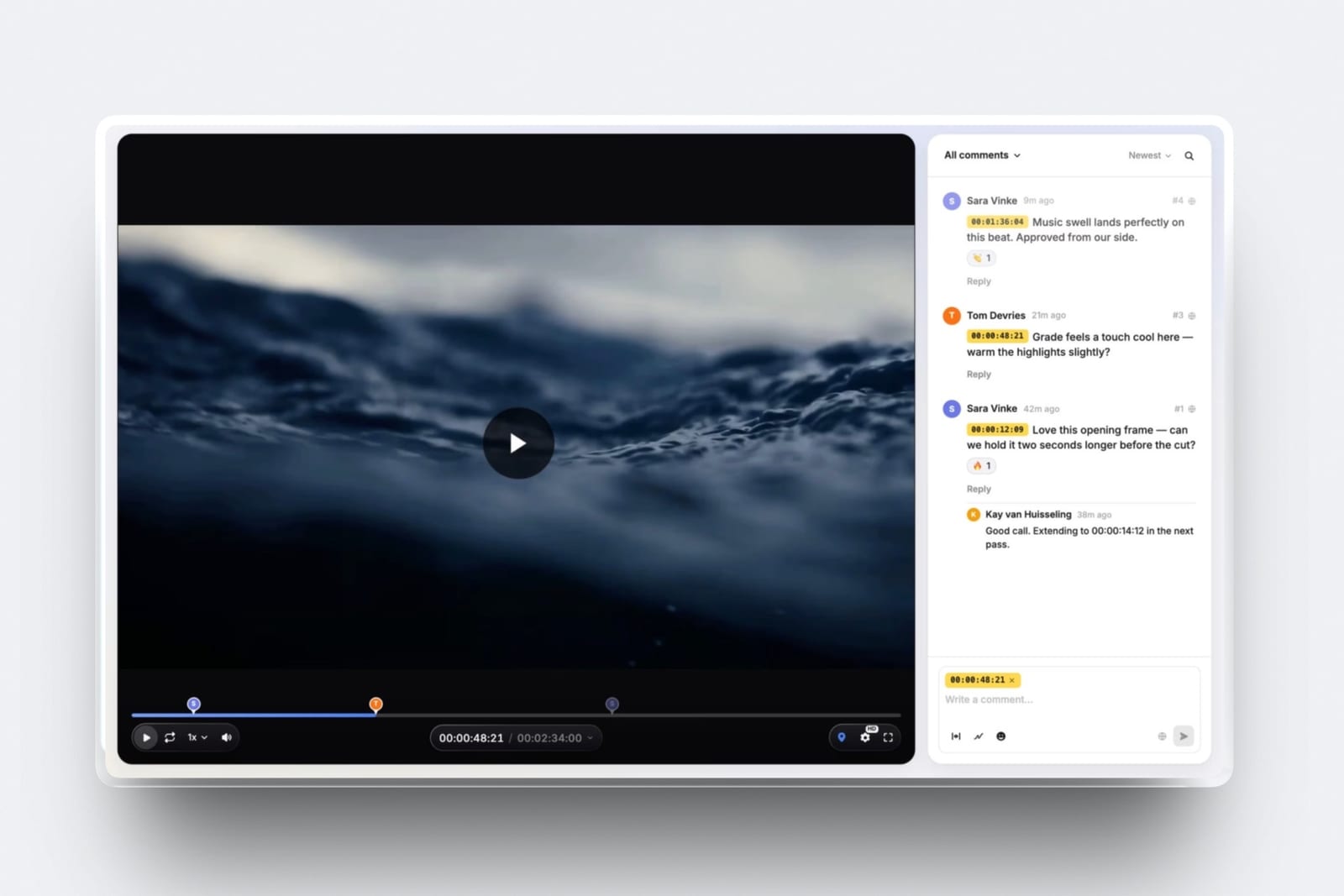
The moment that sends people looking for Loom alternatives is almost always the same one. You are four minutes and forty seconds into explaining something genuinely complicated, you are getting to the part that matters, and the recording stops.
Loom's free plan caps each video at five minutes. It also caps you at twenty-five videos per creator.
Neither limit is unreasonable for a free product, and both of them land precisely at the point where the tool stops being a novelty and starts being part of how you work, which is of course the design.
Five minutes is not a limit. It is a sales pitch.
A screen recording tool is software that captures your screen and camera together and publishes the result as a shareable link rather than a video file, so a walkthrough can be watched without a download, a meeting, or a scheduling email.
Framekit does the adjacent job rather than this one. Its video review takes a cut that already exists and collects notes at the exact frame, so it records nothing itself and is not ranked below.
The best Loom alternative in 2026 is Screen Studio, because it produces recordings that look edited without any editing, using automatic zoom, smoothed cursor motion, and proper framing, and it costs $108 a year on annual billing against Loom Business at $180 per creator.
The honest trade-off is that it is a Mac application with no free tier and no viewer-side workspace.
Vidyard is the best free option and allows 30-minute recordings where Loom allows five, Descript is the pick when the recording genuinely needs editing, and OBS Studio is free forever if you are willing to configure it.
Full disclosure: Framekit is our own product and it is not ranked below, because it does not record anything. It appears once, in a marked section about video feedback and where finished walkthroughs should end up.
In September 2026 we re-verified what Framekit's video review does and does not do and rewrote that section; competitor prices are as checked in August 2026.
How We Tested These Loom Alternatives
We recorded the same twelve-minute walkthrough in every tool: a screen share of a design file with a camera bubble, three moments where the cursor needed to be followed closely, one section requiring a mistake to be cut out, and a hand-off at the end with a link sent to five people including one on a phone.
Recording limits. What each free tier actually allows, in minutes and in videos, since this is the specific thing that pushes people off Loom.
How the output looks. Whether the raw recording is presentable, or whether it needs work before you would send it to a client.
Editing. How hard it is to remove a mistake without re-recording the whole thing, which we timed.
Sharing. Whether viewers need an account, whether a transcript is included, and what happens to the link if you stop paying.
Cost per creator, at published annual rates, with a note on whether viewers consume a seat.
Three kinds of claim, kept separate. Ours by hand in August 2026: the nine recordings, the edit timings, the five-recipient sends, and the mobile playback checks.
From published sources: every price and free-tier limit, linked where the figure matters. From other people: recurring complaints in public reviews, always labelled as sentiment rather than as our finding.
What Recording the Same Walkthrough Nine Times Showed
The results were much less about features than about two things: what the free tier lets you finish, and how much work the raw recording still needs.
- 6 of 9 allow recordings longer than ten minutes on their free tier. Loom's free cap is five.
- 2 of 9 produced a recording we would have sent to a client without editing anything.
- Removing one mistake took between 20 seconds and 9 minutes depending on the tool, which over a year is the largest hidden cost in this category.
- 3 of 9 are free with no meaningful cap at all, and one of those is open source.
- Cost per creator ranged from $0 to $288 a year, and only two tools charge viewers anything.
- 4 of 9 include an automatic transcript, which matters more than expected because it makes a recording skimmable.
Loom Alternatives Compared
The weighting: output quality without editing 25%, free-tier usefulness 20%, editing speed 20%, sharing and transcripts 20%, cost 15%.
Output quality leads because the entire promise of this category is replacing a meeting, and a recording that needs twenty minutes of tidying has not replaced anything.
| Tool | Free tier limit | Looks finished raw | Editing | Cost per creator / year |
|---|---|---|---|---|
| Loom | 5 min, 25 videos | Fair | Trim only | $180 (Business) |
| Screen Studio | None, paid only | Excellent | Timeline, fast | $108 (annual) |
| Vidyard | 30 min, 5 videos/mo | Fair | Trim only | Paid tiers above free |
| Descript | Limited free | Good | Best in class | From about $144 |
| Tella | Trial only | Very good | Good | From about $180 |
| Canva | Yes, generous | Good | Basic | $144 (Pro) |
| Zight | Yes, limited | Fair | Basic | From about $120 |
| Veed | Yes, watermarked | Good | Good, browser | From about $144 |
| OBS Studio | Unlimited, free | Poor without setup | None built in | $0 |
| Built-in recorders | Unlimited, free | Poor | Minimal | $0 |
1. Screen Studio: The Best Loom Alternative Overall
Best foranyone whose recordings are seen by clients rather than only by colleagues.
Screen Studio is the only tool here where the raw recording looked like someone had edited it.
It automatically zooms toward whatever you click, smooths the cursor path so it stops jittering, and frames the camera properly, all without you doing anything.
Our twelve-minute walkthrough came out of it looking like a produced product video.
That difference compounds. A Loom recording is a document. A Screen Studio recording is closer to marketing, which changes what you can use it for.
The real numberScreen Studio is $29 a month, or $9 a month billed annually, which is $108 a year, and there are no feature tiers - every plan includes the full toolkit including 4K export, auto-zoom, transcripts, and custom backgrounds.
Against Loom Business at $180 per creator a year, it is cheaper and better looking.
The standout detailthe automatic zoom is genuinely the feature, not a gimmick. On our three cursor-following moments it produced exactly the framing a video editor would have chosen, which is the single most time-consuming thing to do by hand.
The gotchait is a Mac application with no free tier, no browser version, and no viewer workspace. There is no team library, no comment threads, and no Windows client, so a mixed-platform team cannot standardise on it.
Skip it ifanyone on your team is on Windows, or you need a shared library with comments.
Verdict: the best-looking output in this comparison for less than Loom charges, and deliberately narrow. Buy it for client-facing recordings rather than as team infrastructure.
2. Vidyard: The Best Free Loom Alternative
Best forpeople whose only complaint about Loom is the five-minute wall.
Vidyard's free plan flips Loom's limits around in exactly the way that helps. Recordings can run up to 30 minutes rather than five, with five recorded videos a month and a library cap of twenty-five.
If you make a small number of long explanations, that is a straight upgrade for nothing.
The real numberfree at 30 minutes per recording and 5 recordings a month, with paid tiers above it. Loom's free tier gives you 25 videos of at most 5 minutes.
The gotchathe monthly recording count is the trade. Five a month suits a consultant sending a weekly update and does not suit a support team recording six answers a day, which is where Loom's shape is better.
Skip it ifyou record often and briefly. The limits are the wrong way round for you.
Verdict: the correct free choice for long, infrequent recordings, and the wrong one for high volume. Read your own usage before switching.
3. Descript: Best When the Recording Needs Editing
Best foranyone who re-records because trimming is too fiddly.
Descript edits video by editing its transcript. Delete a sentence in the text and it disappears from the video.
Removing our deliberate mistake took twenty seconds against nine minutes in the slowest tool here, and it also strips filler words across the whole recording in one click.
The real numberDescript offers a limited free tier and paid plans starting in the region of $12 to $19 a month depending on billing, so roughly $144 a year and up. Check the current tiers on their pricing page, since the structure has changed more than once.
The standout detailthe transcript is not a bonus feature, it is the interface. For anyone who habitually restarts a recording after a stumble, this single mechanic removes the reason to.
The gotchait is a heavier application than a screen recorder, with a real learning curve, and it is overkill if you send raw walkthroughs and never touch them.
Skip it ifyou never edit. You are paying for the one thing you will not use.
Verdict: the fastest editing in this comparison by a wide margin, and the most tool to learn. Worth it the moment re-recording becomes a habit.

4. Tella: Best for Creator-Style Videos
Best forpeople making polished explainers rather than quick internal messages.
Tella runs in the browser and treats a recording as a sequence of clips with backgrounds, layouts, and transitions, so a walkthrough can be assembled rather than performed in one take.
Our recording came out looking closest to Screen Studio's, from a browser and on any operating system.
The real numberTella's paid plans start in the region of $15 to $19 per user a month, so roughly $180 a year and up, with a trial rather than a free tier.
The gotchano free plan means you cannot evaluate it on real work without paying, which for a tool whose value is aesthetic is a genuine friction.
Skip it ifyour recordings are disposable. The production features are wasted on a two-minute answer.
Verdict: Screen Studio's polish in a browser, at a higher price and without a free tier. The right pick for Windows users who want the same look.
5. Canva: Best If You Already Pay For It
Best forteams who already have Canva and have not noticed it records.
Canva's Present and record puts your camera over a playing design and produces a shareable link, and its standalone screen recorder covers the general case. For a team already paying for Canva, the marginal cost of stopping a separate Loom subscription is zero.
The real numberincluded with Canva's free tier and with Canva Pro at $144 a year. If Canva is already in the stack, this is the cheapest change available.
The gotchathe recording tools are a feature rather than the product. There is no library with view analytics per recipient, no comment threads at timestamps, and the editing is basic.
Skip it ifyou need a searchable library of recordings.
Verdict: worth checking before you renew anything, and not a reason to adopt Canva on its own.
6. Zight: Best for Quick Annotated Captures
Best forpeople whose recordings are mostly ten-second clips and annotated screenshots.
Zight, formerly CloudApp, is built around speed rather than production. Capture, annotate with an arrow, and the link is on your clipboard before you have finished thinking about it. For support answers and quick feedback it is faster than Loom.
The real numberZight has a free tier with limits and paid plans starting in the region of $10 a month. Check current pricing directly, since third-party listings disagree.
The gotchalonger recordings are not what it is for, and the output is plain. A twelve-minute walkthrough in Zight is a twelve-minute screen capture.
Skip it ifyour recordings routinely pass five minutes.
Verdict: the fastest capture-to-link loop here, aimed at a shorter format than Loom.

7. Veed: Best Browser Editor With Subtitles
Best forrecordings that need burned-in subtitles for social or for accessibility.
Veed records in the browser and its subtitle generation is the strongest here, producing accurate captions you can style and burn into the video. For anything that will be watched without sound, that is the deciding feature.
The real numberVeed has a free tier that watermarks exports, with paid plans starting in the region of $12 a month. Confirm the current tier on their pricing page.
The gotchathe free tier's watermark rules it out for client work, so the real entry price is the first paid plan.
Skip it ifcaptions do not matter to you.
Verdict: the best captions in this comparison, on a browser editor that does everything else adequately.
8. OBS Studio: The Best Free and Open Source Option
Best forpeople who record often, want no limits, and do not mind configuring software.
OBS is free, open source, has no recording length limit, no video count limit, no watermark, and no account. It records at whatever quality your machine can produce, and it will do that forever without asking for anything.
The real numberzero, permanently, on Mac, Windows, and Linux.
The gotchayou get a video file, not a link. There is no hosting, no transcript, no sharing, and no analytics, so you still need somewhere to put the file. It also requires real setup before the first recording, and the default output looks unprocessed.
Skip it ifthe shareable link is the reason you use Loom, which for most people it is.
Verdict: unlimited recording for nothing, and only half the job. Pair it with wherever you already host video.
9. Built-In Recorders: The Zero-Install Floor
Best forthe recording you need to make right now on a machine you do not control.
macOS records the screen with a keyboard shortcut and Windows has Game Bar and the Snipping Tool's recorder. Both are free, installed already, and have no limits.
The gotchano camera overlay worth using, no link, no transcript, and no editing beyond a trim. You are producing a file to attach or upload elsewhere.
Verdict: the honest floor. Good enough for a one-off, and the absence of a shareable link is why this category exists at all.
What Free Tiers Actually Allow
The free plans in this category are shaped very differently, and the shape matters more than the generosity. Here is what each one actually permits.
| Tool | Max recording length | Videos allowed | Watermark |
|---|---|---|---|
| OBS Studio | Unlimited | Unlimited | None |
| Built-in recorders | Unlimited | Unlimited | None |
| Vidyard | 30 minutes | 5 per month, 25 in library | None |
| Canva | Generous | Generous | None on export |
| Zight | Limited | Limited | None |
| Loom | 5 minutes | 25 per creator | None |
| Veed | Limited | Limited | Yes, on exports |
| Descript | Limited | Limited | Varies by plan |
| Screen Studio | No free tier | Not applicable | Not applicable |
| Tella | Trial only | Not applicable | Not applicable |
A test that takes five minutes. Open your Loom library and sort by length. If most of your recordings are under three minutes, the five-minute cap is not your problem and the free plan is fine indefinitely.
If your useful ones cluster at the cap, you are being cut off mid-explanation weekly, and Vidyard's thirty minutes solves that for nothing.
In one linechoose by the shape of your recording habit rather than by feature count, because a tool that allows five long videos a month and one that allows twenty-five short ones are solving completely different problems.

Where Framekit Fits: Feedback on a Cut, and the Recording You Keep Re-Sending
One marked section, and the only mention of anything we make. Framekit does not record your screen, so it replaces none of the nine tools above; it fits two jobs that often get done in Loom by default.
The first is feedback on video work. Filmmakers and editors regularly record a Loom talking over a cut, or ask a client to record one back, and the notes end up as timestamps typed into a transcript.
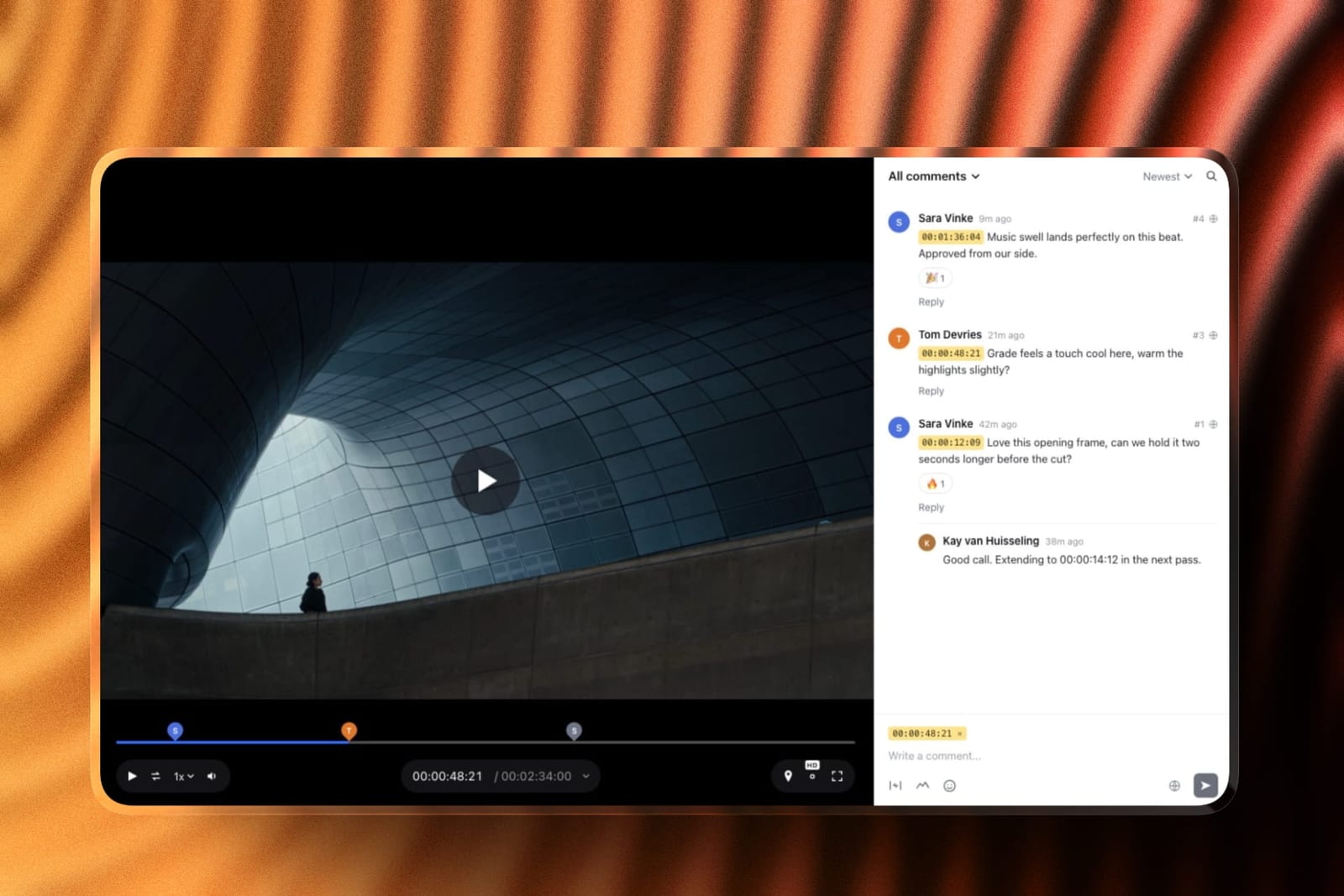
Framekit is an AI website builder that includes video review: upload the cut, share a link, and the client comments at the exact frame, draws on it, and marks the version approved or needs changes, with no account.
Upload v2 and v1 stays, with its notes. Every review feature is on every plan including free, for videos up to two hours.
The second is permanence. A process explainer you send to every new client has become a page, and embedded on your own Framekit site it can be found and linked rather than buried in a recording library.
The limits, plainly: no screen or camera recording, no editing or transcription, no library of walkthroughs, no viewer analytics, and review is for video only, not documents or designs. If you need a screen recorder, pick from the nine above.
Which Loom Alternative Should You Use?
The right tool depends on how long your recordings run, how often you make them, and whether a client sees them, so work down these questions in order and stop at the first yes.
1. Do clients watch your recordings? Screen Studio on a Mac, or Tella if you are on Windows. Both produce output that looks edited.
2. Is the five-minute cap your only complaint? Vidyard's free tier allows thirty minutes.
3. Do you re-record because trimming is painful? Descript, which edits video by editing the transcript.
4. Do you record many short clips a day? Zight, or stay on Loom, whose free shape suits exactly that pattern.
5. Do your videos need burned-in captions? Veed.
6. Are you already paying for Canva? Use what you have before buying anything else.
7. Do you want unlimited recording for nothing and already have somewhere to host? OBS Studio.
8. Is it a one-off on someone else's machine? The built-in recorder is already installed.
9. Have you recorded the same explanation more than five times? Publish it once instead.
Frequently Asked Questions
What is the best free Loom alternative?
Vidyard is the best free Loom alternative for long recordings, allowing up to 30 minutes per video against Loom's five-minute free cap, with five recordings a month and a 25-video library.
OBS Studio is free with no limits at all but produces a file rather than a shareable link, and built-in macOS and Windows recorders are unlimited and equally link-free.
What is Loom's free plan limit?
Loom's Starter plan is free with a five-minute cap on each recording, 25 videos per creator, up to 50 workspace members, and 720p video. Viewers never pay, which is one of the better aspects of Loom's model, and the recording cap is the limit most users hit first.
How much does Loom cost?
Loom Business costs around $15 per creator per month billed annually, which is $180 a year each, or roughly $18 billed monthly, with a Business plus AI tier above that. Loom charges per creator rather than per viewer, so people who only watch videos never consume a seat.
Which screen recorder produces the best-looking video?
Screen Studio produces the best raw output of the tools we tested, applying automatic zoom toward clicks, smoothing cursor motion, and framing the camera without any manual editing.
Tella is the closest browser-based equivalent and works on Windows, where Screen Studio does not run.
What is the fastest way to edit a screen recording?
Descript is by far the fastest, because it edits video by editing the transcript, so deleting a sentence of text removes it from the video. Removing one mistake took 20 seconds in Descript against up to nine minutes in tools that require timeline trimming.
Is Screen Studio worth it compared to Loom?
Screen Studio is worth it for client-facing recordings, costing $108 a year on annual billing against Loom Business at $180 per creator, and producing noticeably more polished output.
It is a Mac-only application with no free tier, no viewer workspace, and no comment threads, so it replaces Loom's output quality rather than its team features.
Do I need a paid plan to send screen recordings to clients?
You can send client recordings on free tiers from Vidyard, Canva, and Zight without a watermark, so a paid plan is not required.
Veed's free tier watermarks exports, which does rule it out for client work, and OBS and built-in recorders produce files you must host somewhere yourself.
Can you record screen videos longer than five minutes for free?
Vidyard's free plan allows recordings up to 30 minutes, and OBS Studio and the built-in macOS and Windows recorders have no length limit at all.
Loom's free plan stops at five minutes per recording, which is the specific constraint that sends most people looking for an alternative.
Does anyone charge viewers to watch a recording?
Loom, Vidyard, and most tools in this category charge per creator and let viewers watch for free, which is the correct model for asynchronous video.
Always confirm this before rolling a tool out, since a per-member price on a tool where most of the team only watches is the most common avoidable cost in this category.
When should a recording become a page instead?
A recording you have sent more than about five times has stopped being a message and become documentation, at which point embedding it on a page you own makes it findable, linkable, and updatable, rather than buried in a video library that only your team can search.
Should I use Loom to get client feedback on a video edit?
Loom is a clumsy way to get feedback on a video edit, because notes spoken over a screen recording have to be turned back into timecodes by hand.
A video review tool such as Framekit is built for it: the client comments at the exact frame, draws on it, and marks the version approved, with no account needed and every review feature on the free plan, though it only handles video and cannot record your screen.
Final Verdict
Screen Studio is the alternative most people should try if their recordings are seen by clients, because it is cheaper than Loom Business and produces output that looks edited when it is not.
Vidyard is the answer if the five-minute wall is your only complaint, since thirty minutes for free inverts exactly the limit that was bothering you. Descript earns its place the moment you notice yourself re-recording rather than trimming.
The honest counterweight to all three is that Loom's team features are better than any of them. A shared library, comment threads at timestamps, and viewers who never pay is a genuinely good shape for a company, and none of the tools here match it as infrastructure.
Where Framekit loseswe do not record, edit, or transcribe, and we have no walkthrough library, no camera overlay, and no viewer analytics, which is why we are absent from the ranking rather than placed in it. Every tool above beats us at recording.
Our argument is narrower: feedback on a cut belongs at the frame in a review tool, and the recording you have made six times belongs on a page.
If you check one thing before switching, sort your existing recordings by length. The shape of your habit decides this more cleanly than any feature comparison.
Related reading: our guides to the best screen recording tools for creators, the best presentation tools for remote teams, the best video hosting platforms, and the best transcription tools for video editors.
Prices and free-tier limits above were read from each vendor's published documentation in August 2026. Limits in this category change quietly and more often than headline prices, so re-check the cap before planning around it.