Framekit templates
Start from a designer-made template
 Use template
 Use template
 Use template
 Use template
 Use template
 Use template
 Use template
 Use template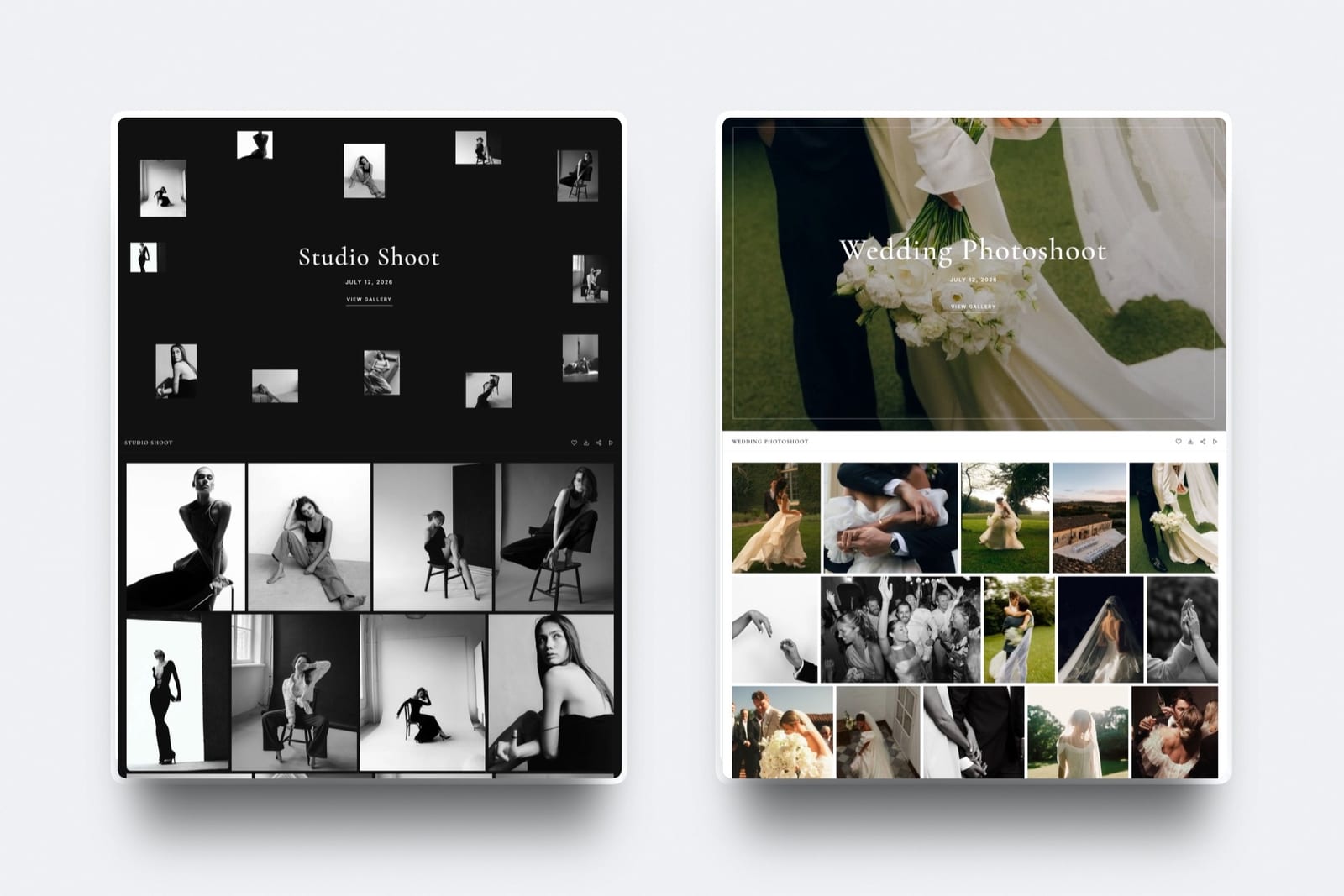
The most useful thing you can know about video hosting is that bandwidth is cheap and everything else is not.
Delivering ten hours of video to ten thousand viewers a month costs a few dollars at wholesale rates, and the platforms charging twenty times that are not delivering more video.
They are selling a player you do not have to build, analytics you do not have to instrument, and a seat for a colleague.
A video hosting platform is software that stores your video files, transcodes them into multiple qualities, and delivers them to viewers through an embeddable player, usually with some combination of analytics, access control, and branding attached.
The platforms differ far more in what surrounds the video than in the video itself.
Bunny Stream is the cheapest credible way to host video in 2026, at free encoding, storage from 0.01 dollars per gigabyte, and delivery from 0.005 dollars per gigabyte, which prices our test workload at about three dollars a month.
It gives you no analytics dashboard and no lead capture, so if you need marketing tooling rather than a video file on a page, Wistia at 79 dollars a month is doing a different job.
If your video goes to clients rather than an audience, Framekit is the pick: client galleries deliver photos and video together, cuts get frame-accurate review, and both share one storage pool with your website from 0 dollars, though it is not a public streaming host and has no per-viewer analytics.
Disclosure: Framekit is our product and we placed it third, for client delivery rather than public streaming. It was not part of our priced workload; its entry is written from Framekit's published features and plans, and the reviews around it say where each host beats it.
We defined one workload and priced it everywhere: ten hours of video stored, ten thousand views a month, three minutes watched per view, delivered at 1080p.
That is roughly 600 minutes stored and 30,000 minutes, or about 560 gigabytes, delivered every month. Every rate below was read on the vendor's own pricing page during the first week of August 2026.
Updated in September 2026: we added Framekit's client galleries and video review, which launched after this guide first ran, and re-verified Framekit's plans against its live pricing page.
One finding is worth flagging before the reviews, because it is the kind of thing a price comparison hides.
On at least one platform the published bandwidth allowance, rather than the price, is what disqualifies the entry plan for this workload, and you would only discover that after signing up.
How We Priced 8 Video Hosting Platforms
Comparing video hosts on features produces a table where everything has a tick, which is why every guide in this category reads the same. We priced one workload instead, because the money is where these platforms genuinely differ.
The workload is deliberately ordinary: ten hours of finished video, ten thousand views a month, an average of three minutes watched per view, delivered at 1080p.
That is a working filmmaker's portfolio and reel, a small course, or a company's video library.
Converted into the units vendors bill in, it is about 600 minutes stored, 30,000 minutes delivered, and roughly 560 gigabytes of traffic a month at a typical 1080p bitrate.
Those conversions matter, so here they are in the open.
We assumed about 2.5 megabits per second for 1080p delivery, which works out at roughly 18.75 megabytes per minute, and about 25 gigabytes of stored data for ten hours once multiple renditions are counted.
Your figures will differ with your bitrate and your rendition ladder, and the method is what we would like you to take rather than the exact answer.
Findings are labelled. Where a rate is published, it was read on the vendor's own pricing page or pricing documentation.
Where we say we ran it, we uploaded, embedded, and played back real footage on a free tier or trial during July and August 2026.
Where we describe what developers report, that is forum and documentation sentiment offered as signal rather than as proof.
Two honest limits.
We did not measure playback performance, because publishing speed comparisons for video delivery is a good way to be wrong in public and the differences between serious CDNs are not the thing that will decide this for you.
And we did not test at broadcast scale, so our notes on the infrastructure platforms are about their pricing model and developer experience rather than about running a million concurrent viewers.
What Ten Hours and Ten Thousand Views Actually Costs
This is the table the category does not publish. Every figure is derived from the vendor's own rates against the same workload, with the conversion shown so you can redo it with your own numbers.
| Platform | Pricing model | Cost for the test workload | What you get for it |
|---|---|---|---|
| YouTube | Free, ad-supported | 0 dollars | Their player, their branding, their recommendations |
| Bunny Stream | Per gigabyte | About 3 dollars a month | Player and API, no analytics suite |
| SproutVideo Seed | Per seat, flat | 12 dollars a month billed annually | Player, analytics, 2 team seats |
| Vimeo Starter | Per seat, flat | 12 dollars a seat a month | Player, 2 TB storage, review tools |
| Cloudflare Stream | Per minute | About 33 dollars a month | Player and API, no analytics suite |
| Dacast Starter | Per plan, capped | 39 dollars a month, but the cap fails | 2.4 TB a year is 200 GB a month |
| Wistia Business | Per plan, flat | 79 dollars a month billed annually | Analytics, lead capture, 3 users |
| Mux | Usage credits | Launch is 20 dollars a month for 100 in credit | Developer platform, no player UI to speak of |
| Framekit Pro | Per plan, flat | Not priced for public audiences; 19 dollars a month covers the ten hours as client delivery | Client galleries, video review, website, 150 GB of video |
Read the first and last rows together. The same ten hours reaching the same ten thousand viewers costs about three dollars at wholesale and seventy-nine on a marketing platform, and no viewer could tell the two apart.
That is not a criticism of the expensive option, because Wistia is selling lead capture and attribution rather than delivery. It is an argument for knowing which of the two you are actually buying.
The Dacast row is the one worth pausing on. Its Starter plan is 39 dollars a month and includes 2.4 terabytes of bandwidth a year, which is about 200 gigabytes a month against the 560 our workload needs.
The plan does not fail on price, it fails on the allowance, and you would find that out in week three. Its Scale plan at 165 dollars a month includes 24 terabytes a year, which comfortably covers it.
In one linePrice your real gigabytes before you compare monthly fees, because on at least one platform the bandwidth allowance rather than the price is what rules the entry plan out.
What Testing Eight Video Hosts Changed Our Minds About
We expected the split to be between cheap and expensive. It is actually between platforms that sell you a product and platforms that sell you a utility, and the two are priced on different axes entirely.
Utilities charge for what you use. Bunny Stream and Cloudflare Stream bill per gigabyte or per minute, so a video nobody watches costs almost nothing and a video that takes off costs proportionally more.
That model is honest and it is unnerving, because your bill is a function of your success and there is no ceiling on it by default.
Products charge for a seat or a plan. Vimeo, Wistia, SproutVideo, and Dacast bill a flat monthly figure with allowances attached, so your cost is predictable and your worst case is that you hit a cap.
That model is comfortable and it means light users subsidise heavy ones, which is why a portfolio with modest traffic pays the same as a channel with far more.
The second surprise was how much of the price is the analytics rather than the video.
Wistia at 79 dollars a month is not charging for 560 gigabytes, it is charging for heatmaps, lead capture forms inside the player, and a CRM integration that turns a watch into a record in your marketing stack.
If you use those, it is good value. If you embed a reel on a portfolio and never open the dashboard, you are paying for a department you do not have.
The third is that seats are the quiet cost, and the way they are described is not always clear.
Vimeo quotes every tier as a price per seat per month while its comparison table lists a user count for each plan, so confirm at checkout whether you are buying seats or a plan with a ceiling.
SproutVideo's Seed includes two team seats at 12 dollars a month on annual billing and Wistia's Business includes three at 79. If more than one person uploads, count the seats before you compare the headline.
The 9 Best Video Hosting Platforms in 2026: Full Comparison
The cost table sorts the field on money. This one sorts it on what you are actually buying, because a platform with no analytics is not a worse version of one that has them, it is a different product.
Published rates and what they include
| Platform | Published rate | Storage included | Bandwidth position |
|---|---|---|---|
| YouTube | Free | Effectively unlimited | Unlimited, in exchange for ads and recommendations |
| Bunny Stream | Encoding free, storage from 0.01 per GB, delivery from 0.005 per GB | Pay per GB | Pay per GB, no cap |
| Cloudflare Stream | 5 dollars per 1,000 minutes stored, 1 dollar per 1,000 minutes delivered | Pay per minute | Pay per minute, no cap |
| Mux | Pay as you go, Launch 20 dollars a month for 100 in credit, Scale 500 for 1,000 | Usage-based | Usage-based |
| SproutVideo | Seed 12, Sprout 35, Tree 72 dollars a month billed annually | Per plan | Stated as no usage caps |
| Vimeo | Starter 12, Standard 25, Advanced 75 dollars per seat a month | 2 TB, 4 TB, 7 TB | Not published as a hard figure |
| Dacast | Starter 39, Event 63, Scale 165 dollars a month billed annually | 500 GB, 250 GB, 2,000 GB | 2.4 TB, 6 TB, 24 TB a year |
| Wistia | Free, Business 79 dollars a month billed annually | 25 GB free, 250 GB+ on Business | Not published as a hard figure |
| Framekit | Free, Starter 9, Pro 19, Business 39 dollars a month | 3, 15, 150, 750 GB of video in a shared pool | Built for client links, not public audiences |
What each one is built for
| Platform | Player you control | Analytics depth | Lead capture | Needs a developer |
|---|---|---|---|---|
| YouTube | No | Basic, plus their metrics | No | No |
| Bunny Stream | Yes, plus API | Minimal | No | Some |
| Cloudflare Stream | Yes, plus API | Minimal | No | Some |
| Mux | API first | Engagement data via API | No | Yes |
| SproutVideo | Yes | Good | Yes, on higher tiers | No |
| Vimeo | Yes | Good | On Standard and above | No |
| Dacast | Yes | Advanced, live focused | Paywall on Event and above | No |
| Wistia | Yes | The deepest here | Yes, in the player | No |
| Framekit | Branded galleries and review pages | None per viewer | Optional email registration before viewing | No |
1. Bunny Stream: The Cheapest Credible Way to Host Video
Bunny Stream is the answer for anyone who has looked at a hosting bill and wondered what exactly they are paying for.
Its published rates are free encoding, storage from 0.01 dollars per gigabyte, and CDN delivery from 0.005 dollars per gigabyte on the volume network, with a one dollar monthly minimum.
Against our workload that is roughly three dollars a month, all in.
The contrast with the rest of the market is stark and it is on the vendor's own page: Bunny compares its rates against a traditional cloud provider at 0.02 dollars per minute for encoding, 0.02 per gigabyte for storage, and 0.085 per gigabyte for CDN.
Encoding in particular is the fee most people never notice until they re-upload a library.
We ran ituploading, transcoding, and embedding worked without a developer, which is not true of the other infrastructure options here. The included player is plain and configurable and it is a player rather than a starting point.
The standout detailthe CDN is priced by region, at 0.01 dollars per gigabyte for Europe and North America, 0.03 for Asia and Oceania, 0.045 for South America, and 0.06 for the Middle East and Africa, with a flat 0.005 volume tier available.
If your audience is concentrated, you can price it precisely rather than paying a blended rate.
The honest gotchathere is no analytics product. You get delivery data, not heatmaps, not attribution, not lead capture. If your video exists to generate marketing signal, this platform will not produce it and you will end up bolting something on.
Skip it ifyou need engagement analytics or forms inside the player. That is Wistia's job and Bunny does not attempt it.
Verdict: The best value in video hosting by a wide margin and the right default for portfolios, reels, and course video. It loses to Wistia and Vimeo on everything that happens after the play button.
2. Cloudflare Stream: Priced in Minutes, Simple to Reason About
Cloudflare Stream prices video the way it should probably always have been priced, in minutes rather than gigabytes, which removes bitrate from the conversation entirely.
The published rates are 5 dollars per 1,000 minutes stored, purchased in prepaid increments, and 1 dollar per 1,000 minutes delivered, billed after the fact.
Against our workload that is 3 dollars of storage and 30 of delivery, about 33 dollars a month. That is ten times Bunny and less than half of Wistia, and the reason to choose it over the cheaper option is the billing model rather than the total.
We ran itthe fact that a viewer watching in 4K and a viewer watching at 360p cost the same is genuinely useful for forecasting. You budget from watch time, which you can estimate, rather than from bandwidth, which you cannot.
The standout detailthe documentation states plainly that a live broadcast with no viewers costs nothing in delivery, and that the recording is what accrues storage. Vendors rarely put the zero case in writing, and it makes live-event budgeting far easier.
The honest gotchaat 1 dollar per 1,000 minutes delivered, a video that unexpectedly finds an audience costs real money with no ceiling. A million minutes delivered is a thousand dollars, and nothing in the default configuration stops that.
Skip it ifyou need a predictable monthly figure more than you need accurate unit economics. A capped plan is the safer instrument for a fixed budget.
Verdict: The clearest pricing model in the category and the easiest to forecast. It is materially more expensive per unit than Bunny and has the same absence of marketing analytics.
3. Framekit: Best for Video You Deliver to Clients

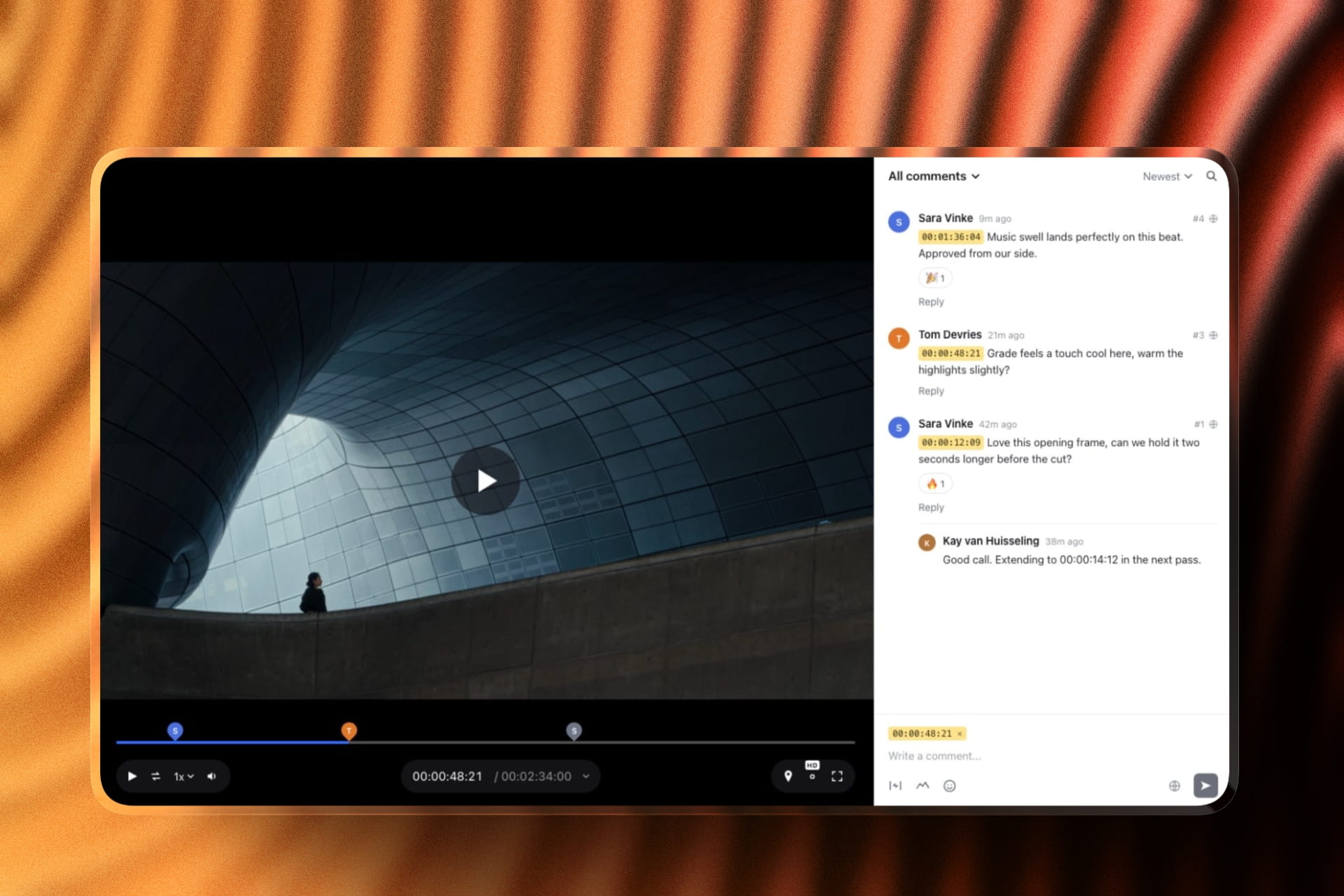
Framekit is an AI website builder, and for filmmakers and photographers it is also where client video goes: client galleries hold photos and videos together, videos are transcoded for smooth playback and never watermarked, and the same account runs Frame.io-style video review for cuts that are still being approved.
If your ten hours of video are deliverables rather than marketing, that is a different job from the rest of this list, and it is the one most filmmakers actually have.
The real numberstorage is one pool shared by your site, galleries and reviews, and the video share is 3 GB on free, 15 GB on Starter at 9 dollars, 150 GB on Pro at 19 and 750 GB on Business at 39.
Our ten hours, about 25 GB, fits on Pro, where single videos can be up to 2 GB in a gallery or a review. Galleries are unlimited on every plan.
The standout detailthe review and the delivery are the same place.
A client leaves notes pinned to the exact frame on version two, approves version three, and the final file then lands in a branded gallery with the stills, with PIN-protected downloads and optional email registration before viewing.
Vimeo covers review and hosting too; Framekit adds the gallery and the website on the same bill.

The honest gotchait is not a public streaming host. There are no per-viewer analytics, no heatmaps, no lead capture inside a player, no live streaming and no paywall, and the video share of storage is a hard allowance rather than pay-as-you-go.
If ten thousand strangers a month are the audience, Bunny Stream or Vimeo is the right tool.
Skip it ifyour video is marketing, a course or a channel. Wistia, Dacast and YouTube are built for audiences.
Verdict: the best choice here for filmmakers and photographers whose video goes to clients, because delivery, review and the site are one account from 0 dollars. For public audiences, pair it with a host from this list. See client galleries.

4. Vimeo: The Default, and Now Priced Per Seat
Vimeo remains the platform most filmmakers reach for, and its case is unchanged: a clean ad-free player, no recommendation algorithm pulling viewers to somebody else's work, review and collaboration tools, and a brand clients recognise.
Its published tiers are Starter at 12 dollars per seat a month with 2 TB of storage, Standard at 25 with 4 TB, and Advanced at 75 with 7 TB, plus Enterprise.
For our workload, Starter at 12 dollars a month is comfortably within its storage allowance and is the same money as SproutVideo. What separates the tiers is not delivery, it is branding, lead capture, and live events, which sit on Standard and Advanced respectively.
We ran itthe review and collaboration tooling is the part that earns its place for filmmakers, because sending a client a private link with frame-accurate comments removes a separate product from the stack.
The standout detailthe player is genuinely the best-behaved of the mainstream options for a portfolio, with no end-screen suggestions pulling a viewer to another director's reel, which is the specific reason people leave YouTube for it.
The honest gotchathe pricing page quotes every tier as a price per seat while the comparison table lists a user count per plan, and those two framings imply different bills for a team. Confirm what you are buying at checkout rather than from the headline.
Skip it ifyou want the cheapest delivery, or you want marketing attribution. Bunny is a tenth of the price and Wistia is far deeper on analytics.
Verdict: The safe, capable default for filmmakers and the one clients expect. It is neither the cheapest nor the most analytical, and it is the least likely to be wrong.
5. Wistia: You Are Paying for the Analytics, Not the Bandwidth
Wistia is a marketing platform that happens to host video, and reading it as a hosting bill misses the point entirely.
At 79 dollars a month for our workload, Wistia is the most expensive mainstream option here and roughly twenty-five times Bunny Stream. Nothing about the delivery justifies that, and the analytics might.
We ran itthe per-viewer heatmap, which shows exactly where individual viewers rewatched or dropped, is the feature nothing else here matches. For anyone iterating on a sales video or a course module, that is a different quality of information from an average view duration.
The standout detailforms and calls to action sit inside the player and feed a CRM, so a watch becomes a record rather than a number. The Automation Suite at 250 dollars a month extends that into lead scoring and campaign triggers, which is enterprise marketing tooling rather than video hosting.
The honest gotchathe free tier's 25 GB and single user make it an evaluation rather than a plan, and the jump to Business is 79 dollars. There is no small paid tier for someone who wants the analytics on a modest library.
Skip it ifyou do not open analytics dashboards. This is the most expensive way in this guide to put a video on a page, and it is excellent at a job you may not have.
Verdict: The best video analytics in the category and worth its price if video drives revenue you can trace. For a portfolio or a reel it is a large bill for features that will sit unused.
6. SproutVideo: The Best Flat Price With Real Analytics
SproutVideo is the option most people in this category have not heard of and the one that came closest to being our overall pick, because it sits exactly where the mainstream platforms leave a gap: a flat, low monthly price with genuine analytics and no usage anxiety.
Its published plans are Seed at 15 dollars a month or 12 billed annually with two team seats, Sprout at 45 or 35 with five seats, and Tree at 95 or 72, with the page showing savings of up to 34 per cent for annual billing and stating no usage caps on the plans.
We ran itthe analytics are a real product rather than a view counter, with engagement graphs, geography, and per-video breakdowns, at a fraction of what the equivalent costs on Wistia.
The standout detailtwo team seats are included at the entry tier, which quietly makes it cheaper than Vimeo for a two-person operation before any other consideration, and the plans are stated as having no usage caps.
The honest gotchait is a smaller vendor with less brand recognition, and for some client-facing work that matters more than it should. A director sending a private link to a studio may prefer the name the studio already knows.
Skip it ifyou need the marketing automation depth of Wistia, or the wholesale unit economics of Bunny. This is the sensible middle and it is genuinely good at being that.
Verdict: The best flat-rate value in video hosting and the pick for a small team that wants analytics without a Wistia bill. It loses on brand familiarity and on the very deepest attribution.

7. Dacast: Built for Live, and Watch the Bandwidth Cap
Dacast is a live streaming and OTT platform with video hosting attached, and the distinction matters because its plans are shaped around broadcast events rather than around a library that gets watched steadily.
This is where our workload found the trap. Starter's 2.4 terabytes a year is about 200 gigabytes a month, and our ten thousand views need roughly 560. The plan is not too expensive for the job, it is too small, and the tier that actually fits is Scale at 165 dollars a month.
We ran itthe live tooling is the reason to be here. Stream monitoring, scheduled simulive, a paywall, and pre-roll advertising are all present, and none of the general-purpose hosts in this comparison offer that combination.
The standout detailthe Event plan sells 6 terabytes upfront rather than annually, which is the correct shape for a one-off broadcast and unusual in a market that assumes recurring usage.
The honest gotchathe annual bandwidth allowance is the number that governs, and it is quoted per year while the price is quoted per month, which makes the two easy to compare wrongly. Divide the terabytes by twelve before you decide.
Skip it ifyour video is on-demand and your traffic is steady. You would be buying live infrastructure and then hitting a cap designed for a different pattern.
Verdict: The right platform for live events, paywalled broadcasts, and OTT, and the wrong one for a portfolio. Read the bandwidth allowance before the price.
8. Mux: Infrastructure for People Building a Product
Mux is a developer platform rather than a hosting product, and it belongs here because a growing number of creative businesses are building the video experience into their own site rather than embedding somebody else's player.
Its published model is pay as you go with usage credits, including a Launch plan at 20 dollars a month for 100 dollars in credit and a Scale plan at 500 dollars a month for 1,000 in credit.
That structure tells you who it is for. Buying credit at a discount is a purchasing decision made by someone with a forecast, and it does not suit a filmmaker who wants a reel on a page.
Developers reportthe API and the data product are the reasons teams choose it, particularly the engagement metrics exposed programmatically rather than through a dashboard. It is consistently described as the option you pick when video is part of the product rather than part of the marketing.
The standout detailthe credit model means committed spend is cheaper than pure usage, which inverts the usual small-user penalty: at Scale, 500 dollars buys 1,000 dollars of usage, a 50 per cent effective discount.
The honest gotchathere is no meaningful out-of-the-box player experience for a non-developer, and no analytics dashboard aimed at marketers. Without engineering time this is not a usable product.
Skip it ifnobody on your team writes code. That is not a criticism of Mux, it is the entire premise of it.
Verdict: The right choice when video is a feature of something you are building. Irrelevant for a portfolio, a reel, or a course you want online this week.
9. YouTube: Free, and You Pay in Attention
YouTube belongs in this comparison because it is the honest baseline and because a large number of people paying for hosting would be fine without it. Storage is effectively unlimited, delivery is unlimited, transcoding is free, and the whole thing costs nothing.
What you pay instead is control. The player carries YouTube branding, the end screen suggests other people's videos, and on an embedded reel that means a client can be one click from a competitor. The recommendation system is the product and your video is its inventory.
We ran itprivacy-unlisted embedding works, and for a portfolio the end-screen behaviour is the specific thing that pushes people to paid alternatives. Everything else about it is more capable than most paid options.
The standout detaildiscovery is a genuine feature rather than only a cost. A reel on YouTube can be found by someone who was not looking for you, which no platform in this guide can offer at any price.
The honest gotchayou are hosting your professional work on an advertising platform whose terms and layout can change without reference to you, and an embedded player is a surface you do not control.
Skip it ifthe video is client work under NDA, a paid course, or a portfolio piece where a competitor's thumbnail at the end would cost you the job.
Verdict: The correct answer for reach and the wrong one for control. Use it deliberately as a discovery channel and host the portfolio version somewhere you own the player.
Per Gigabyte Versus Per Seat, and When Each One Wins
The two pricing models in this category cross over at a specific point, and knowing roughly where that point is will make the decision for you.
Usage pricing wins when your traffic is low or spiky. A portfolio watched a few hundred times a month costs a few dollars on Bunny Stream and twelve on Vimeo Starter, and the gap widens as the fixed fee stays fixed.
A launch video that gets watched heavily for two weeks and then goes quiet costs you two weeks of traffic rather than a year of subscription.
Flat pricing wins when traffic is high and steady.
The crossover in our modelling lands around one to two terabytes of monthly delivery: below that, wholesale delivery is cheaper than any subscription; above it, a capped plan starts to look like insurance.
At ten terabytes a month, Bunny at volume rates is roughly fifty dollars, Cloudflare Stream is several hundred, and a flat plan with a large allowance is the calmer choice.
Two practical implications follow. First, if you are choosing today with low traffic, usage pricing is almost always cheaper and the risk is that success costs money, which is a good problem with a bad shape.
Second, if you go usage-based, set a billing alert on day one, because the failure mode is not a gradual increase, it is a video that gets shared somewhere.
There is a hybrid that most people miss. Host the library on usage pricing, and put the one video that might go viral on YouTube where delivery is free and discovery is a feature. That is not a compromise, it is using each platform for the thing it is actually good at.
In one lineBelow roughly one terabyte of monthly delivery, per-gigabyte hosting is cheaper than any subscription; above it, a capped plan starts buying you predictability.
What Storage Allowances Actually Mean for a Video Library
Storage is the number most people check first and it is rarely the one that binds, but the exceptions are worth knowing because they arrive suddenly.
Ten hours of finished 1080p video is roughly 25 gigabytes once multiple renditions are stored, which fits inside every paid plan here and inside Wistia's free 25 GB with nothing to spare.
The figure that breaks allowances is not finished video, it is masters. A single hour of 4K ProRes is enormous, and a platform storage allowance is not a backup destination for it.
Keep that distinction firm. Your hosting platform stores the delivery copy. Your masters live in your own backup, in a form you can re-upload from if a vendor disappears or you decide to move.
Conflating the two is how people end up with a hosting bill that behaves like a storage bill and an archive they cannot restore.
Vimeo's allowances are the most generous among the flat plans at 2 TB on Starter, 4 TB on Standard, and 7 TB on Advanced, which for finished video is effectively unlimited for an individual.
Dacast's are the tightest and the most confusing, because the storage figure and the annual bandwidth figure move independently between tiers: Event has more bandwidth and less storage than Starter.
The practical check takes a minute. Take your finished library in gigabytes, double it for growth over the next two years, and confirm it fits inside the plan you are considering.
Then separately confirm that your monthly delivery fits the bandwidth allowance, because those are two different tests and only one of them is usually mentioned in the marketing.
If protecting the masters is the part you have not solved, our guide to photo backup solutions covers the same discipline for image archives.
Where Hosted Video Should Actually Live
A hosting platform gives you a player and a URL, but it does not give you the page around the video, and for a filmmaker or a studio the page is what converts a viewer into an enquiry: the reel, the project pages, the credits, the client list, and a contact route that is not a social profile.
Framekit is an AI website builder that generates a complete site from a short description of your work, and it sits in the same account as the client galleries and video review described above.
The sensible split for most filmmakers is public video on a host from this guide, client deliveries and review rounds in Framekit, and the site tying the two together.
Where it does not compete: it is not a public streaming host, so if you need per-viewer heatmaps or a paywalled OTT channel then Wistia or Dacast is the right tool.
For the switching case specifically, our guide to Vimeo alternatives covers the same field from the perspective of leaving a platform you are already on.
What We Left Out of This Comparison and Why
Three names that come up regularly are absent, and the reason in each case is that we could not read a rate at source, which is the standard this guide holds itself to.
Vidyard returned an error to automated access, so we could not quote its plans.
Cloudflare's own plan overview page rendered no figures for us, though the Stream product documentation publishes its per-minute rates in full, which is what we used.
Frame.io is deliberately excluded because it is a review and approval platform rather than a hosting platform, and treating it as one would flatter neither product.
We also excluded general cloud object storage, meaning the approach of putting video files in a bucket and serving them directly.
It is cheap and it works, and it also means no transcoding, no adaptive bitrate, and one enormous file served to a viewer on a phone, which is a worse experience than any option in this guide.
If your question is really about client review rather than public delivery, our comparison of video review and approval tools is the right page, and if it is about producing the video in the first place, our guide to video editing software covers that stage.
A Test You Can Run on Your Own Numbers Today
The whole comparison above collapses into a single calculation you can run on your own analytics in about ten minutes, before you sign up for anything or trust a figure in this guide. Here is the version we would run.
Find your real numbers first. Open whatever analytics you have and get two figures: total minutes of video you host, and total minutes watched last month across everything.
If you have never hosted video, estimate views multiplied by average watch time, and be pessimistic about watch time because everyone overestimates it.
Then convert. Minutes watched multiplied by about 18.75 megabytes gives you gigabytes delivered at 1080p, which is the unit Bunny bills in. Minutes watched used directly is the unit Cloudflare Stream bills in.
Now price your actual month on both, and set the result against the flat plans at 12, 39, and 79 dollars.
Third, check the caps rather than the prices. For every flat plan you are considering, divide the annual bandwidth allowance by twelve and confirm your monthly gigabytes fit under it.
That single step is what would have caught the Dacast Starter problem in this guide before anyone paid for it.
Last, run the embed test. Put one real video on each shortlisted platform, embed it on a page you control, and open it on a phone.
Look at what appears when the video ends, whether the player carries branding you did not choose, and whether anything invites the viewer somewhere else.
That is the difference you will live with every day and it does not appear on any pricing page.
The Decision Guide
These are ordered so that the earliest match is the strongest signal about what you are actually buying, so read down the list and stop at the first line that describes your situation rather than weighing them all against each other.
You want the cheapest hosting that is genuinely good. Bunny Stream, at roughly three dollars a month for our workload, with a billing alert set on day one.
You want predictable pricing and real analytics without a large bill. SproutVideo Seed at 12 dollars a month billed annually, which includes two team seats.
Your video goes to clients as deliverables and review cuts, not to an audience. Framekit, with galleries and frame-accurate review in one account, 19 dollars a month on Pro for 150 GB of video.
You send private links to clients and want the name they recognise. Vimeo Starter at 12 dollars per seat a month, for the review tools and the clean player.
Video is how you generate and trace leads. Wistia Business at 79 dollars a month, and use the heatmaps or you are wasting the money.
You broadcast live, run events, or need a paywall. Dacast, and price the tier from the annual bandwidth allowance rather than the monthly fee.
Video is a feature of a product you are building. Mux, and expect to write code.
You want to be found by people who were not looking for you. YouTube, deliberately, as a discovery channel alongside a hosted portfolio version.
You want to reason about cost in watch time rather than bandwidth. Cloudflare Stream at 5 dollars per 1,000 minutes stored and 1 dollar per 1,000 delivered.
Also worth readingFrame.io alternatives, for the review stage that comes before delivery.
Publishing to YouTube as well? The best YouTube thumbnail makers covers the free native A/B test that judges on watch time rather than clicks.
Frequently Asked Questions
What is the best video hosting platform in 2026?
Bunny Stream is the best value video hosting platform in 2026, with free encoding, storage from 0.01 dollars per gigabyte, and delivery from 0.005 per gigabyte, which prices ten hours of video and ten thousand monthly views at about three dollars.
Vimeo Starter at 12 dollars a seat is the safer default for public client-facing video, Framekit is the pick when video is delivered to clients in galleries and reviewed before approval, and Wistia at 79 dollars is the right answer only if you use its analytics.
Framekit vs Vimeo for delivering video to clients?
Framekit is better when the delivery is part of a larger client job, because galleries put video and stills together, cuts get frame-accurate review first, and the website shares the same account and storage, from 0 dollars.
Vimeo is better when the same video also needs a public player, embed analytics and a brand clients recognise, from 12 dollars per seat a month.
How much does it cost to host 10 hours of video?
Between about 3 and 79 dollars a month for the same delivery, depending entirely on the pricing model.
On our workload of 600 minutes stored and 30,000 minutes delivered a month, Bunny Stream is about 3 dollars, Vimeo Starter and SproutVideo Seed are 12, Cloudflare Stream is about 33, Dacast needs its 165 dollar tier for the bandwidth, and Wistia Business is 79.
Is Vimeo still worth paying for?
For filmmakers sending private links to clients, yes.
Starter at 12 dollars per seat a month buys an ad-free player with no end-screen suggestions pulling viewers to other people's work, 2 TB of storage, and review tools with frame-accurate comments.
It is not the cheapest delivery and it is not the deepest analytics, and it is the least likely choice to be wrong.
What is the cheapest way to host video on a website?
YouTube is free if you accept their branding, their end screens, and their recommendations on your embed.
The cheapest way to host video you fully control is a per-gigabyte platform: Bunny Stream at free encoding, 0.01 dollars per gigabyte stored, and 0.005 per gigabyte delivered comes to a few dollars a month for a typical portfolio.
Should I use YouTube or a paid video host for my portfolio?
Use both, deliberately. YouTube is the only platform here where someone who was not looking for you can find your work, so it is a discovery channel.
A paid host gives you a player with no suggestions at the end, which matters on a portfolio page where a competitor's thumbnail could cost you the job.
How does Cloudflare Stream pricing work?
Cloudflare Stream charges 5 dollars per 1,000 minutes of video stored, purchased in prepaid increments, and 1 dollar per 1,000 minutes delivered, billed after use.
Because it is priced in minutes rather than gigabytes, a viewer watching in 4K and one watching at low quality cost the same, which makes forecasting from watch time straightforward.
What is the difference between video hosting and video review platforms?
A hosting platform delivers finished video to an audience through an embeddable player. A review platform such as Frame.io or Framekit's video review exists to collect timestamped feedback on work in progress from a small group.
They overlap in that both store video, and buying one for the other's job leaves you missing either the player or the comment thread.
Do video hosting plans have bandwidth limits?
Some do and the limit is often the binding constraint rather than the price. Dacast publishes 2.4 terabytes a year on Starter, which is about 200 gigabytes a month, less than a library with ten thousand monthly views needs.
SproutVideo states no usage caps on its plans, and the per-gigabyte platforms have no cap because you pay for what you use.
What happens to my videos if I switch hosts?
Your embed URLs break everywhere they appear, which is the real switching cost rather than the file transfer.
Before you commit to a platform, confirm you can download your original uploads in full quality, and keep your masters in your own backup so a migration is a re-upload rather than a recovery.
Plan on updating every page that carries an embed.
Is per-gigabyte pricing risky?
The risk is that success costs money without a ceiling, and it is real: at Cloudflare Stream's rate, a million minutes delivered is a thousand dollars.
The mitigation is a billing alert configured on the day you start, which every one of these platforms supports. Below roughly a terabyte of monthly delivery, usage pricing is cheaper than any subscription here.
What you upload decides a good deal of what you pay, since every host bills against storage and bandwidth, and our comparison of nine video compression tools covers how to make that file smaller before it ever reaches a host.
Final Verdict: The Best Video Hosting Platform in 2026
Bunny Stream wins on the number that most people never calculate.
Free encoding, storage from a cent a gigabyte, and delivery from half a cent means our ten hours and ten thousand views cost about three dollars a month, against twelve on the mainstream flat plans and seventy-nine on the marketing platform.
No viewer can tell the difference, because the difference is not in the video.
Where it loses is precise and it will rule it out for some people.
There is no analytics product, no lead capture, and no attribution, so if your video exists to generate marketing signal you will end up buying that separately and the saving evaporates.
It also asks slightly more of you at setup than a platform that hands you an embed code and a dashboard.
Vimeo remains the answer we would give a filmmaker who wants one decision and no further thought, at 12 dollars a seat with review tools and a player clients recognise.
SproutVideo is the quiet value pick at the same price with two seats and better analytics.
Framekit is the pick when the video is going to clients rather than an audience, because galleries and review share one account with your site; it is not for public streaming, and it does not offer viewer analytics.
Wistia is worth 79 dollars a month only if someone opens the heatmaps. Dacast is for live and its bandwidth allowance, not its price, is what to check.
The wider point is the one to carry away.
In 2026 the cost of moving video to a viewer is close to trivial, so nearly everything on your hosting bill is paying for something else: a player, a dashboard, a seat, a paywall, or a brand your client recognises.
Decide which of those you actually need, price the rest at wholesale, and the decision stops being about video at all.