
Framekit templates
Start from a designer-made template
 Use template
 Use template
 Use template
 Use template
 Use template
 Use template
 Use template
 Use template
A startup does not make one kind of deck. It makes four, and they have almost nothing in common. The fundraising deck is a story told to strangers who will read it without you.
The board update is a recurring document with the same slides and new numbers. The sales deck gets forwarded into companies that run on Microsoft. The all-hands is thrown together on a Thursday.
Most founders pick one presentation tool for all four, which is how you end up paying per seat for analytics on your all-hands and rebuilding your board update from scratch every quarter. The right answer for most startups is two tools, and knowing which two saves real money.
A startup deck is a persuasion document built for a specific audience - investors, a board, a customer, or a team - and the tool that suits one of those four audiences is usually the wrong tool for the other three.
The best presentation tool for startups in 2026 is Pitch, because it combines investor-grade templates, real shared components so a board update is updated rather than rebuilt, and per-recipient link analytics that tell you which investor actually read the traction slide.
The honest trade-off is per-seat pricing in euros, which gets expensive as a team grows, and no fundraising narrative to fill in.
Google Slides is the free answer that covers most of it, Gamma is the fastest route to a first draft, and DocSend is what you actually want for sending to investors.
Framekit Slides is the cheapest paid option once the whole team makes decks, at $372 a year for unlimited members, without investor tracking.
Full disclosure: Framekit is our own product. It has since shipped Slides and now ranks fifth, not higher, because it has no investor tracking and no shared components; Pitch, Google Slides, Canva and Gamma beat it for most startups. We reviewed it from its features and published pricing, not the same hands-on builds.
Re-verified on 19 September 2026 for Framekit's features and plan prices; competitor prices are as published in August 2026.
How We Tested These Presentation Tools for Startups
We built three real documents in every tool rather than one, because a startup's needs are not uniform.
A sixteen-slide seed deck, sent to a list of forty investors, with a traction chart, a competitive matrix, a team slide, and an ask.
A recurring board update, twelve slides, built once and then updated with a new quarter's numbers to see how much of it survived.
A sales deck, ten slides, exported to .pptx and opened inside a company that had none of our fonts.
Cost was priced for a four-person founding team and again for a fifteen-person company, because the per-seat maths changes the ranking between those two points.
One caveat: Framekit's entry in the counts below is its earlier website entry, from before Slides shipped.
Keeping the evidence honest: the thirty builds, the forty-investor test send, the quarterly-update rebuild, and the .pptx opens are ours, run in August 2026. Prices come from published vendor pricing, linked where a figure carries weight.
Recurring complaints we did not verify ourselves are described as reviewer sentiment.
What Building Three Startup Decks Ten Times Showed
Testing the recurring board update alongside the one-off seed deck is what separated these tools, and almost no comparison does it.
- 4 of 10 let you update a board deck rather than rebuild it, using real components or linked data.
- 3 of 10 report which specific investor opened the deck and how far they read.
- 6 of 10 produced a .pptx that opened cleanly inside a company with none of our fonts.
- Cost for four people ranged from $0 to $1,920 a year, and for fifteen people from $0 to $7,200.
- 2 of 10 have per-seat pricing that gets cheaper per head as you grow. The rest get more expensive linearly.
- One tool charges $90 per additional user per month above its included three seats, which is the sharpest seat cliff we found anywhere.
Presentation Tools for Startups Compared
The weighting: fit across the four deck types 25%, reuse for recurring decks 20%, investor tracking 20%, cost at fifteen people 20%, export quality 15%.
Reuse is weighted high because board updates are quarterly forever and fundraising is occasional, which is the opposite of how most founders choose.
| Tool | Free tier | Cost, 4 people / year | Cost, 15 people / year | Investor tracking |
|---|---|---|---|---|
| Pitch | 1-5 seats, no advanced links | ~EUR 720 | ~EUR 2,700 | Yes, Team tier |
| Google Slides | Yes, full | $0 | $0 | No |
| Canva | Yes, limited | $1,200 | $4,500 | Views only |
| Gamma | Yes, credit-limited | $432 | $1,620 | Yes |
| Slidebean | Yes, limited | $336 | $1,260 | Yes |
| DocSend | No, 14-day trial | $540 (Standard) | From $1,800 plus $90/user | Yes, deepest |
| Figma Slides | Yes, 3 files | $144 (Collab seats) | $540 | No |
| PowerPoint | Web only | $199.99 (Family, 6) | ~$1,500 (Business) | No |
| Beautiful.ai | No | $1,920 | $7,200 | Team tier only |
| Framekit Slides | Yes, unlimited decks | $372 (Business) | $372 (Business) | No |
Framekit's figures are its Business plan billed yearly, per Framekit's pricing page, because four people is one more than Pro's three included members.
It scores 0 out of 10 on investor tracking, its lowest mark, against 9 for cost at fifteen people.
1. Pitch: The Best Presentation Tool for Startups Overall
Best forstartups making all four deck types with a small team.
Pitch is the only tool here that handled the board update properly. The metrics slides became components with the shared brand elements, so the next quarter's update meant changing numbers rather than rebuilding a deck, and the version everyone had bookmarked updated with it.
The seed deck benefited from the other half of the product. Advanced links showed that eleven of our forty investors opened the deck, four read past slide six, and one forwarded it. That last signal is the one that changes what you do next, and no free tool gives it to you.
The real numberPitch is priced per seat at EUR 10 for Plus, EUR 15 for Team, and EUR 20 for Business. A four-person team on Team is roughly EUR 720 a year, and fifteen people is roughly EUR 2,700. PowerPoint export begins on Plus, advanced links on Team.
The standout detailadvanced links can be revoked and expired individually, so the deck you sent a fund that went quiet can be killed without touching the version three other funds are holding. During an active raise that is worth more than it sounds.
The gotchathe free plan's basic links carry no analytics at all, which several reviewers describe as an unwelcome discovery after signing up. If tracking is the reason you are here, the real price starts at Team.
Skip it ifyou have fifteen people and half of them open a deck twice a year. You are paying full seats for occasional readers.
What reviewers say elsewherePitch holds a 4.5 out of 5 across more than 100 reviews on G2, with template quality and collaboration the most cited strengths.
Verdict: the best single tool for a startup under about ten people, and the one whose price scales worst after that. Buy it for the board update as much as the raise.
2. Google Slides: The Best Free Option
Best foreverything that is not the fundraising deck.
Google Slides is free at any headcount, which for a fifteen-person company is a difference of several thousand dollars a year against every paid tool here.
Co-editing works, the all-hands takes ten minutes, and charts linked to Google Sheets refresh when the sheet updates, which makes a board update genuinely faster than rebuilding.
The real numberzero. Google Workspace Business Starter at $7 per user a month adds a company domain and admin controls, which is $1,260 a year for fifteen people and is optional.
The standout detailthe linked-Sheets chart is the cheapest solution to the recurring-deck problem on this page. Point the board deck's charts at your metrics sheet once and every quarter's update is a refresh.
The gotchano font embedding and no components. Your brand typeface substitutes silently on investor machines, and the logo lockup on twelve slides is twelve copies.
Skip it ifthe fundraising deck is your main use and you want to know who read it.
Verdict: the correct default for board updates, all-hands, and internal work, and a weak choice for the raise. Most startups should use it for three of the four deck types.
3. Canva: Best for Design Without a Designer
Best forpre-seed and seed startups where nobody can make a deck look credible.
Canva's argument for startups is that the seed deck is partly a signal of competence, and a deck that looks assembled undermines a story about execution.
Our seed deck looked noticeably better in Canva than in Google Slides, particularly the traction chart page and the team slide.
The real numberCanva Pro is $144 a year for one person, and Canva Teams is $25 per user a month, which is $1,200 a year for four people and $4,500 for fifteen. That scaling is the reason many startups keep one shared Pro seat.
The gotchathe charts are weak. Bar, line, pie, and simple scatter, with no secondary axis, which for a traction chart showing two metrics on different scales means building it elsewhere and pasting an image.
Skip it ifyour deck is metrics-heavy.
Verdict: the right pick when design credibility is the gap, and priced badly for a growing team. One shared Pro seat is how most startups actually use it.
4. Gamma: Best for the First Draft
Best forfounders who need a deck to exist before they can improve it.
Gamma produced a structurally credible sixteen-slide seed deck from a paragraph of context in about ninety seconds. Roughly two thirds of it was usable and the rest was generic, which is the correct trade when the alternative is a blank file at 11pm.
It also has analytics, which is unusual at this price, showing per-card dwell time on our test send.
The real numberGamma Plus is $108 a year per person, so four people cost $432 and fifteen cost $1,620. The free plan is credit-limited rather than feature-limited.
The gotchathe .pptx export is the weakest of the ten. Card layouts do not map onto slide geometry, so exports arrive with text overflowing frames. For a sales deck that lands in a customer's Microsoft environment, that is disqualifying.
Skip it ifyour decks have to become files.
Verdict: the fastest tool here and the worst at handover. Use it to draft the raise, then finish it somewhere else.
5. Framekit Slides: Cheapest Paid Option for a Growing Team

Best fordesign-conscious startups that want every employee able to make a good-looking deck, and that send the raise through a dedicated tracking tool rather than the deck tool itself.
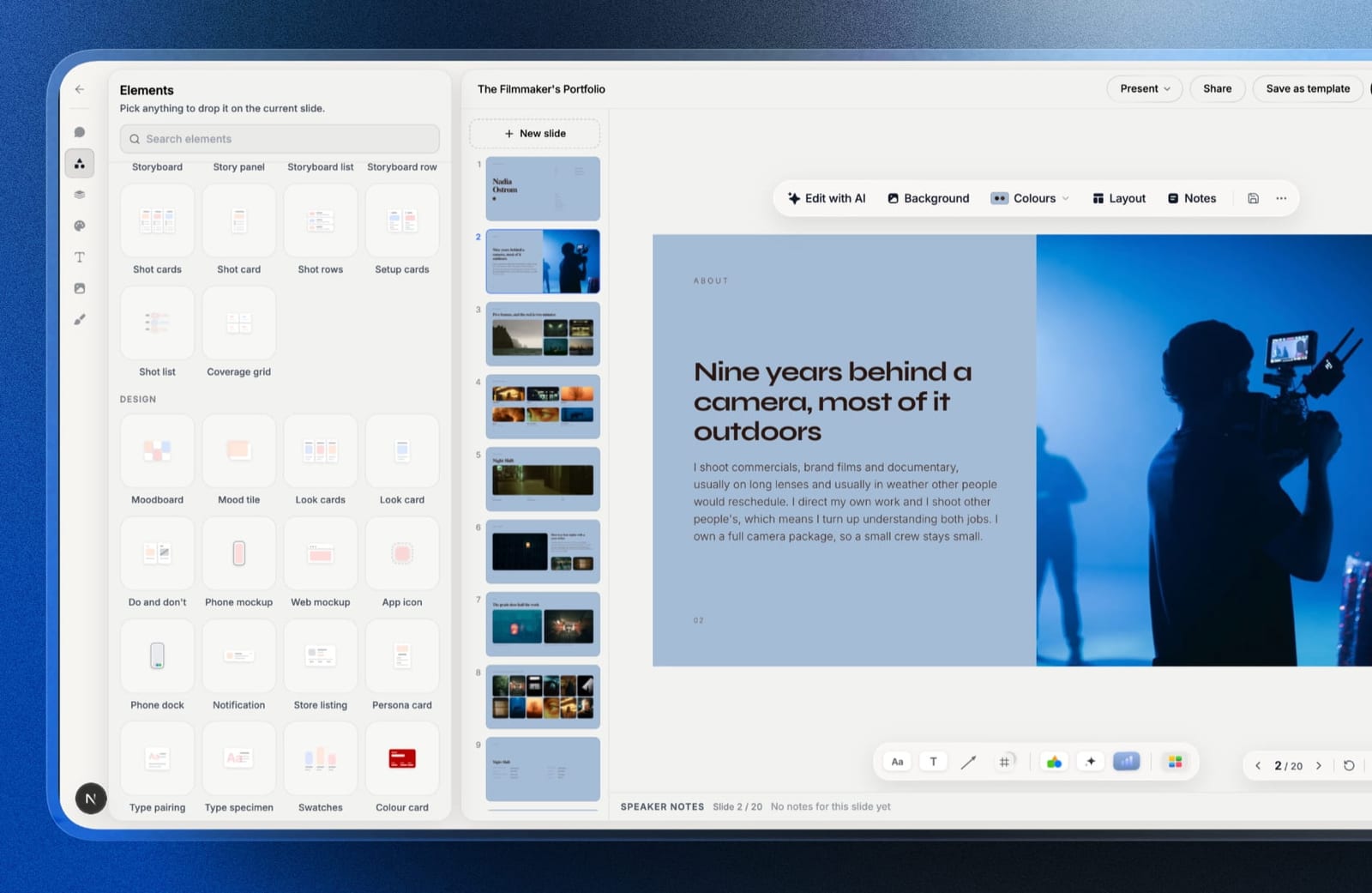
Framekit is an AI website builder that now ships Slides, a deck editor in the same account as your company website.
It ranks fifth, and the reason is a gap we would rather name than bury: Slides has no per-recipient analytics, which this page weights at a fifth of the score, and no shared components for the board update.
Our hands-on builds were done before Slides shipped, so this review is based on its shipped features and published pricing, not the same three-deck test.
What it gets right for a startup is the price curve and the first draft.
You describe a slide and the AI writes and lays it out, then everything is editable by hand, and charts import from a CSV or .xlsx export and stay editable, so next quarter's board update is a new metrics file dropped onto the same charts rather than twelve slides retyped.
Pitch-deck templates, your own fonts and colours, speaker notes and full-screen presenting are all there, and PDF export and link sharing are on the free plan.
The real number$372 a year at fifteen people. Framekit's Business plan, $31 a month billed yearly, has unlimited team members, against roughly EUR 2,700 for Pitch Team and $4,500 for Canva Teams at the same headcount.
Up to three people fit on Pro at $180 a year; the free plan has unlimited decks.
The standout detailthe deck and the company site live in one account, so the page investors look up after reading the deck can be updated with the same numbers the same afternoon.
The gotchathe .pptx export (Pro and up, 60 slides) turns each slide into a picture with speaker notes attached, so an enterprise buyer cannot edit your sales deck, and there is no live co-editing and no password on a deck link. For the raise, pair it with DocSend.
Skip it ifyour sales deck must be edited inside customer companies (PowerPoint), or you want tracking and components in one tool (Pitch).
Verdict: the cheapest way to put a whole growing team on a design-led deck tool, and not the tool to send a fundraise through on its own. Start free at framekit.ai/slides.
6. Slidebean: Best for Founders Who Need the Story
Best forfirst-time founders who do not yet know what belongs on slide six.
Slidebean is the only tool here with an opinion about content rather than layout. It gives you a fundraising structure and asks you to fill it, which is a different and often more useful kind of help than a blank canvas with good typography.
The real numberSlidebean Starter is $84 a year per user, so four people cost $336 and fifteen cost $1,260. The Accelerate tier with hands-on deck support is $99 a month, or $1,188 a year.
The gotchadesign control is the tightest on this page. You choose a template and live inside it, which is right for a first seed deck and constraining for a board deck you will use for three years.
Skip it ifyou already know your narrative.
Verdict: genuinely useful for a first raise and something you outgrow. Buy it for one round rather than as infrastructure.
7. DocSend: Best for Actually Sending to Investors
Best forthe raise itself, regardless of what you built the deck in.
DocSend is not a presentation tool and it is on this list because it is what experienced founders actually use for the sending half.
You upload the finished deck, send a unique link per investor, and get page-by-page analytics, plus the ability to require an email, add a passcode, disable downloads, and revoke access.
For a raise, that combination is more useful than any editor feature in this comparison.
The real numberDocSend Personal is $10 a month billed annually, or $15 monthly, for one user. Standard is $45 a month annually, and Advanced is $150 a month annually for three users. There is no free plan, only a fourteen-day trial.
The gotchaadditional users above the Advanced plan's three cost $90 per user per month, which is the steepest per-seat charge we found in any category on this blog.
For a fifteen-person company that wants everyone on it, the maths becomes absurd quickly, and the honest usage pattern is one or two seats for whoever sends.
Skip it ifyou are not raising. It does nothing for a board update or an all-hands.
Verdict: the correct tool for the send, paired with whatever you use for the build. One Personal seat at $120 a year is the version most founders should buy.
8. Figma Slides: Best Value for Product Teams
Best forstartups where the design lead already pays for Figma.
Figma Slides has real components, which puts it in a short list with Pitch and Canva for the board-update problem, and it is by far the cheapest of the three. Product screenshots come from the same file the product is designed in, so a deck and the app stop drifting apart.
The real numbera Collab seat is $3 a month billed annually, which is $36 a year. Four people cost $144 and fifteen cost $540, against Pitch Team's roughly EUR 2,700 for the same fifteen.
The gotchathe .pptx export flattens components into static groups and turns embedded prototypes into screenshots. Anything that leaves Figma loses its structure.
Skip it ifinvestors or customers routinely ask for the file.
Verdict: the best value on this page for product-led startups, and the weakest handover. At $36 a seat it is worth having regardless of what else you use.
9. Microsoft PowerPoint: Best for Enterprise Sales
Best forstartups selling into large companies.
When your sales deck lands in a company that runs on Microsoft, .pptx is the format that opens without a conversation, fonts embed properly, and nobody has to be told how to view it. For enterprise sales that friction removal is worth more than a better editor.
The real numberMicrosoft 365 Family is $199.99 a year for up to six people, which is roughly $33 each. For fifteen people, Microsoft 365 Business Standard is the appropriate plan and runs around $1,500 a year.
The gotchano components, no analytics, and co-authoring works only when everyone edits the shared OneDrive copy, which no feature enforces.
Skip it ifyou sell to other startups. You are buying compatibility with an ecosystem none of you use.
Verdict: cheap, universally compatible, and the least pleasant tool here to build in. Correct for enterprise sales motions and unnecessary otherwise.
10. Beautiful.ai: Best for Consistency as You Hire
Best forthe point where twelve people make decks and it shows.
Beautiful.ai enforces layouts rather than suggesting them, so the deck a new account executive builds in their second week looks like the deck the founder builds. Across our three documents this was the only tool where authorship was invisible.
The real numberPro is $144 a year for one person, and Team is $40 per user a month, which is $1,920 a year for four people and $7,200 for fifteen. That is the most expensive option here at both sizes.
The gotchaanalytics sit on Team rather than Pro, and there is no arbitrary positioning, so the one slide your designer wanted to break the grid on cannot be built.
Skip it ifcost matters, which for most startups it does.
Verdict: effective at a real problem and priced for companies that have stopped counting seats.
What Four Decks Cost a Startup Over Two Years
The trap in this category is buying one tool for four jobs. Here is what a four-person team pays over two years, and what the sensible combinations cost.
| Setup | 2 years, 4 people | Covers |
|---|---|---|
| Google Slides only | $0 | Everything except the raise, with no tracking |
| Google Slides plus DocSend Personal | $240 | Everything, plus real investor analytics |
| Figma Slides, 4 Collab seats | $288 | Product-led decks with real components |
| Framekit Business | $744 | AI-written decks, editable charts and the company site, any headcount |
| Slidebean Starter | $672 | A first fundraising narrative |
| Gamma Plus | $864 | Fast drafts with light analytics |
| Pitch Team | ~EUR 1,440 | Components, tracking, and templates in one |
| Canva Teams | $2,400 | Design quality and brand control |
| Beautiful.ai Team | $3,840 | Enforced consistency across the team |
The combination most founders should consider. Google Slides for the board update and the all-hands, because it is free and its linked charts make quarterly updates trivial.
One DocSend Personal seat at $120 a year for sending the raise, because per-investor analytics beat everything else in this list during a fundraise.
That is $120 a year total and covers more of a startup's real needs than any single $1,000 subscription here.
In one linethe expensive mistake is putting fifteen people on a per-seat presentation tool because two of them needed analytics during a six-week raise.
Which Presentation Tool Should Your Startup Use?
The right answer depends on which of the four deck types dominates your month and how many people actually build decks rather than read them, so work down these questions in order.
1. Are you actively raising and want to know who read what? DocSend, one seat, whatever you built the deck in.
2. Is the board update your most frequent deck? Google Slides with charts linked to your metrics sheet, or Pitch if you want components.
3. Does your sales deck land inside large companies? PowerPoint, for the format and font embedding.
4. Does nobody in the company make a credible-looking slide? Canva, on one or two shared seats.
5. Do you already pay for Figma? Add Collab seats at $36 a year and use Figma Slides for product decks.
6. Is this your first raise and you do not know the structure? Slidebean, for one round.
7. Do you need a deck tonight? Gamma.
8. Have you passed twelve people and deck quality varies wildly? Beautiful.ai, budgeting properly for it.
9. Will more than ten people make decks, and do you want them to look designed without per-seat pricing? Framekit Slides on Business at $372 a year, with DocSend for the raise.
10. Is the thing you keep updating actually your company page? Publish it once on your own site rather than rebuilding a slide about it.
Frequently Asked Questions
What is the best presentation tool for a startup in 2026?
Pitch is the best single presentation tool for startups, combining investor-grade templates, reusable components that make recurring board updates fast, and per-recipient link analytics on the Team tier at EUR 15 per seat per month.
For teams above about ten people the per-seat cost becomes the binding constraint, and Google Slides plus a single DocSend seat covers most of the same needs for $120 a year.
What do founders use to send pitch decks to investors?
Most experienced founders send fundraising decks through DocSend rather than as email attachments, because it gives a unique link per investor with page-by-page analytics, email capture, passcodes, download blocking, and the ability to revoke access.
DocSend Personal is $10 a month billed annually for one user, which is usually all a founder needs.
Is Google Slides good enough for a seed deck?
Google Slides is good enough for a seed deck's content and weaker on two things that matter during a raise: it cannot embed fonts, so your brand typeface substitutes silently on investor machines, and it offers no per-recipient analytics.
Pairing a Google Slides deck with a DocSend link solves the second problem for $120 a year.
How much do presentation tools cost a startup team?
Costs for a four-person team range from $0 on Google Slides to $1,920 a year on Beautiful.ai Team, with Pitch Team at roughly EUR 720 and Canva Teams at $1,200.
At fifteen people the spread widens to between $0 and $7,200 a year, which is why most startups end up running a free tool plus one or two paid seats rather than licensing everyone.
Which tool is best for a recurring board update?
Google Slides with charts linked to a Google Sheet is the cheapest way to make board updates a refresh rather than a rebuild, and Pitch is the best paid option because its components update across every slide at once.
Tools without components or linked data mean rebuilding the same twelve slides every quarter.
Does DocSend charge extra for additional users?
DocSend's Advanced plan includes three users and charges $90 per additional user per month beyond that, which is the steepest per-seat charge in this comparison. Most startups avoid it by keeping one or two seats for whoever sends documents rather than licensing the whole team.
Is Gamma good for pitch decks?
Gamma is good for producing a structurally credible pitch deck draft in under two minutes, and its per-card analytics are unusual at $108 a year.
Its PowerPoint export is the weakest in this comparison, with text overflowing frames, so decks that must become files should be finished in another tool.
Should a startup buy one presentation tool or two?
Most startups are better off with two: a free tool such as Google Slides for board updates, all-hands, and internal decks, and one or two paid seats of something specialised for the raise or for design quality.
Licensing an entire team on a per-seat presentation tool usually pays for analytics that two people use during a six-week window.
Which presentation tool has the best PowerPoint export?
Microsoft PowerPoint has no export problem because .pptx is its native format, and among the alternatives Canva and Pitch produce the cleanest exports.
Gamma and Figma Slides both degrade significantly, with Gamma overflowing text and Figma flattening components into static groups.
Does a startup need a website as well as a deck?
A startup needs both, because they do different jobs: the deck is sent to a specific audience and the site is found by everyone else, including investors who look up the company immediately after receiving the deck.
A site that has not been updated since launch undercuts a deck that claims momentum. Framekit keeps both in one account, the company site and Slides for decks.
Which presentation tool is cheapest for a fifteen-person startup?
Google Slides is the cheapest presentation tool for a fifteen-person startup at $0.
The cheapest paid option is Framekit Slides on the Business plan at $372 a year billed yearly with unlimited team members, followed by Figma Slides at about $540 on Collab seats, while Pitch Team costs roughly EUR 2,700 and Canva Teams $4,500.
Final Verdict
Pitch is the best single tool for a startup under about ten people, and the reason is the board update rather than the raise: components turn a quarterly rebuild into a quarterly edit, and the analytics happen to be there when you need them.
Above ten people the per-seat cost stops making sense, and the combination most founders should actually run is Google Slides for everything internal plus one DocSend seat for sending the raise, which is $120 a year.
Canva is worth one shared seat if design credibility is your gap. Figma Slides at $36 a seat is worth having if you already pay for Figma. Slidebean earns its place for a first-time founder and should be cancelled after the round.
Framekit Slides is the cheapest way to put a whole growing team on a deck tool that makes design-led slides, at $372 a year for unlimited members, as long as the raise itself goes out through DocSend.
Where Framekit losesFramekit Slides does not track which investor opened the deck, has no shared components for the board update, and its PowerPoint export is picture-based, so enterprise buyers cannot edit your sales deck.
For the raise use DocSend or Pitch, and for decks that live inside customer companies use PowerPoint; those are the better fit.
If you take one number away, take the $90. That is what an extra DocSend seat costs per month, and it is the clearest illustration of why licensing a whole team on a specialist tool is the expensive mistake in this category.
Related reading: our guides to the best pitch deck software, how to make a pitch deck, the best pitch deck templates, and the best sales deck software.
Pricing here reflects published vendor rates in August 2026. Per-seat structures in this category change frequently and additional-user charges are often listed separately from headline prices, so check both before committing a team.