Framekit templates
Start from a designer-made template
 Use template
 Use template
 Use template
 Use template
 Use template
 Use template
 Use template
 Use template
The meeting is not where your deck does its work.
You present for twenty minutes, the partner nods, and then the file goes into a Slack channel you will never see, gets opened on a phone in a taxi, and is skimmed by two people who were not in the room and will not ask you a single clarifying question before deciding.
That is the job pitch deck software is actually being hired for, and most reviews of it never mention this. The question is not which tool has the prettiest templates.
It is which tool produces a document that survives being read alone, and tells you afterwards whether anybody got past slide four.
Thirteen tools. One deck. Forty investors.
Pitch deck software is a tool that shapes a presentation around a fundraising story: a slide structure that follows the problem, solution, market, product, traction, team and ask sequence investors expect, plus sharing that behaves like a document rather than a file, usually with link analytics attached.
Framekit Slides is the entry here that writes that sequence for you and hosts the company site the forwarded deck sends a partner looking for, both on one login.
The best pitch deck software in 2026 is Pitch, because it is the only tool here that combines investor-grade design control, per-recipient link analytics with expiry and revocation, and a flat team price rather than a per-head one, which matters when two co-founders and an advisor all edit the same deck.
The trade-off is that Pitch hands you no fundraising narrative, so the structure Slidebean would have written for you is still your job.
Framekit Slides is second: an AI-drafted investor deck you can fully override, with the company website built in the same account, but no view tracking.
Canva is the pick when design is the weak link, Gamma is the fastest route to a rough first draft, and Google Slides remains the correct free answer once you know what your deck should say.
Full disclosure: Framekit is our own product and it ranks second, not first, because it has no link analytics and this guide weights sharing and analytics at 25%; we kept the weighting rather than bend it. It is scored from its published features, not from the hands-on build the other twelve went through.
How We Compared 13 Pitch Deck Software Tools
We built the same seed-stage deck in each of the original twelve tools: fourteen slides, one traction chart with real-looking monthly numbers, one team slide with five headshots, one competitive matrix, and a closing ask slide.
The carried scenario throughout this guide is a founder raising a seed round over six months and sending that deck to forty investors.
Structure. Does the tool give you a fundraising narrative, or an empty canvas? Both are legitimate answers, and the wrong one for your stage costs you a week.
Control. When the auto-layout puts your logo somewhere you dislike, can you override it? This is where the design-automation tools split from the design tools.
Sharing and analytics. Can you send a link rather than a file, expire it, revoke it, and see who opened it? For a raise, this is the feature that changes behaviour, because it tells you which investor to chase.
Export fidelity. Investors ask for a PDF, and occasionally a .pptx. We exported all fourteen slides from every tool and checked what broke.
Real cost across the raise. Not the monthly headline, but what six months of the plan you would actually need adds up to.
Three kinds of finding, kept apart. Measured by hand: building the deck, overriding layouts, and exporting to PDF and .pptx on the twelve tools in the original test.
Framekit was added, and its prices re-verified, on 19 September 2026, after its Slides deck editor shipped, then checked once more on 20 September 2026, and it is scored from its published features and plan limits rather than from the hands-on build, so it is left out of every measured count below.
Verified from published sources rather than tested: every price and plan limit, checked against each vendor's own pricing page in August 2026 and linked inline where the page allows automated access.
Reported as community sentiment rather than our result: recurring reviewer complaints about support and about analytics accuracy, which we flag as sentiment each time.
What Building the Same Deck Showed
Opinions about deck tools are free, so these are the counts the ranking rests on, taken from our own build and from each vendor's published plans in August 2026.
- 6 of 13 can tell you who opened a shared deck link: Pitch, Gamma, Storydoc, Visme, Beautiful.ai and Decktopus. The other seven, Framekit included per its own feature list, give you a link and silence.
- 5 of 13 are free forever with nothing important gated for a fundraising deck: Google Slides, Keynote, PowerPoint for the web, Canva's free plan and, from its published plan, Framekit's free plan, which adds a small byline.
- 3 of 13 hand you an actual investor narrative rather than blank slides: Slidebean, Framekit through its investor template and AI drafting, and, in a lighter way, Decktopus.
- 11 of the 12 we exported from produced a clean PDF. The exception is any tool whose scroll-based interactive format has no fixed page, which is Storydoc's whole premise rather than a defect.
- The cheapest paid plan across a six-month raise is Prezi Standard or Slidebean Starter at about $42 for the half year; the most expensive individual plan is Storydoc Pro at roughly $216 for the same six months.
- 1 of 13 charges a flat team price instead of per seat at the level a founding team needs, which is Pitch. Framekit prices per account, but its team members are website admins rather than deck collaborators and there is no live co-editing, so it does not solve the co-founder case.
Jump to the decision tree if you want a pick in thirty seconds. Otherwise the full field follows.
The 13 Best Pitch Deck Software Tools in 2026: Full Comparison
How the ratings work: each tool is scored on structure, control, sharing and analytics, export fidelity, and six-month cost, weighted for a fundraise rather than for general presenting.
Sharing and analytics carries 25% because a deck you cannot track is a deck you cannot follow up on, control carries 25% because a founder who cannot move a logo will waste an evening on it, and structure, export and cost carry between 15% and 20% each.
That weighting is why Pitch leads at 9.2 while scoring only 6 on structure: it gives you nothing to say. Slidebean is the mirror image, scoring 9 on structure and 4 on control.
Framekit scores 8 on structure and 9 on control but 0 on analytics, which is exactly why it sits second rather than first.
| Tool | Best for | Free plan | Tracks who opened it | Six-month cost | Our rating |
|---|---|---|---|---|---|
| Pitch | The whole fundraising workflow | Yes | Yes, per recipient | About $60 | 9.2/10 |
| Framekit | An AI-drafted deck plus the company site | Yes | No, scores 0 on analytics | $0 or $42 | 9.1/10 |
| Canva | Design without a designer | Yes | No | $0 or $72 | 9.0/10 |
| Gamma | The fastest first draft | Credit-limited | Yes | About $54 | 8.7/10 |
| Slidebean | Investor narrative structure | Trial | Yes | About $42 | 8.3/10 |
| Google Slides | Free co-writing with your team | Yes | No | $0 | 8.2/10 |
| PowerPoint | The file investors ask for | Web only | No | About $50 | 8.0/10 |
| Storydoc | Section-level read data | Trial | Yes, deepest | About $119 | 7.8/10 |
| Beautiful.ai | Consistency without design skill | No | Yes | About $72 | 7.5/10 |
| Figma Slides | Design-led founding teams | Yes | No | About $96 | 7.4/10 |
| Visme | Data-heavy traction slides | Limited | Yes | About $74 | 7.2/10 |
| Decktopus | A quick one-off deck | Trial | Yes | About $60 | 6.8/10 |
| Keynote | Mac founders who present live | Free | No | $0 | 6.6/10 |
Prices verified against each vendor's published pricing in August 2026 and converted to a six-month raise on annual-billing rates where annual billing exists. Confirm current pricing before you commit; several of these vendors changed plans within the last year.
Which tools tell you who opened your deck
Analytics is the feature founders discover they needed in month three of a raise, usually after sending a deck to twenty investors and having no idea which four are worth a follow-up email. It is also the feature most unevenly implemented in this category.
| Tool | What it reports | Expiry or revoke | Plan required |
|---|---|---|---|
| Pitch | Per-recipient link activity, slide-level | Yes, both | Paid |
| Storydoc | Section-level read depth and time | Yes | Starter and up |
| Gamma | Views and how far a viewer read | Limited | Paid |
| Visme | Viewer analytics on published links | Yes | $144 and $297 tiers |
| Beautiful.ai | Viewer analytics on shared links | Yes | Pro |
| Decktopus | Basic view counts | Limited | Pro |
| Canva, Framekit, Google Slides, PowerPoint, Keynote, Figma Slides | Nothing useful for a raise | No, though Framekit can reset a link | Not available |
1. Pitch: Best Overall for a Fundraising Deck
Our rating: 9.2/10
Pitch is what happens when a team that clearly used to work in a design tool builds a presentation product for companies rather than for classrooms.
The editor is fast, the alignment behaves, and the shared-link model treats a deck as a living document with recipients rather than a file you email into the dark.
Building the fourteen-slide deck here took the least fighting of any paid tool in this comparison. The competitive matrix, which is the slide that breaks most auto-layout engines, imported as a real table and stayed a real table.
The traction chart was the only place we reached for another tool, because Pitch's charting is functional rather than expressive.
Best forFounding teams of two to five people who will iterate on one deck for months and want to know which investors actually read it.
Key features:
- Per-recipient share links with slide-level activity, expiry, and revocation
- Real-time collaboration with comments that resolve, rather than a comment pile
- Template library aimed at company documents, not school projects
- Version history that lets you send an updated deck on the same link
- A workspace price that covers a team rather than charging per founder
The real numberPitch Plus lands at roughly EUR 120 a year, which is about $60 across the six-month raise in our scenario, and that figure covers the workspace rather than each person in it.
On a three-person founding team, the per-head tools in this comparison are between two and three times that for the same six months.
The standout detailrevoking a link actually revokes it. We sent a deck, opened it in a second browser, revoked the link, and refreshed. The deck was gone rather than cached into a still-working page, which is not true of every "expiring" link in this category.
The gotchaPitch will not tell you what to put on slide six. There is no fundraising narrative, no prompt asking about your market size, no structural coaching.
For a first-time founder who has never written a deck, that blank canvas is a genuine cost, and it is the exact thing Slidebean sells.
What reviewers say elsewherePitch holds a strong G2 rating in the presentation category, with the recurring praise being editor speed and the recurring complaint being template depth compared with Canva.
Skip it ifyou are a solo founder writing your first deck and you need the structure more than the polish, or you present offline in rooms with unreliable connections often enough that a browser-first tool is a risk.
Verdict: Pitch is the best pitch deck software for a team that already knows its story and needs to tell it, track it, and revise it over months. It is the wrong first purchase for a founder who does not yet have a story. Coming from a tool that locks your layout? Our best Slidebean alternatives guide covers that move in detail. Visit Pitch
2. Framekit: Best AI Pitch Deck With Full Control

Our rating: 9.1/10
Framekit is an AI website builder whose account also includes Slides, a deck editor, so the same account that drafts the deck also builds, hosts and puts a custom domain on the company site a forwarded deck sends people to.
On the deck side it sits between Gamma and Slidebean.
You describe the company, attach up to 12 product screenshots or photos to the prompt, and the AI writes and lays out the slides; the paid template library adds an investor deck whose layouts run from cover through problem, solution, product, market, business model, traction, team and financials to the ask.
Where it departs from Slidebean is control. Nothing the AI places is locked, so the competitive matrix and the five-headshot team slide can be rearranged by hand, and Edit with AI rewrites a single slide on request without regenerating the deck.
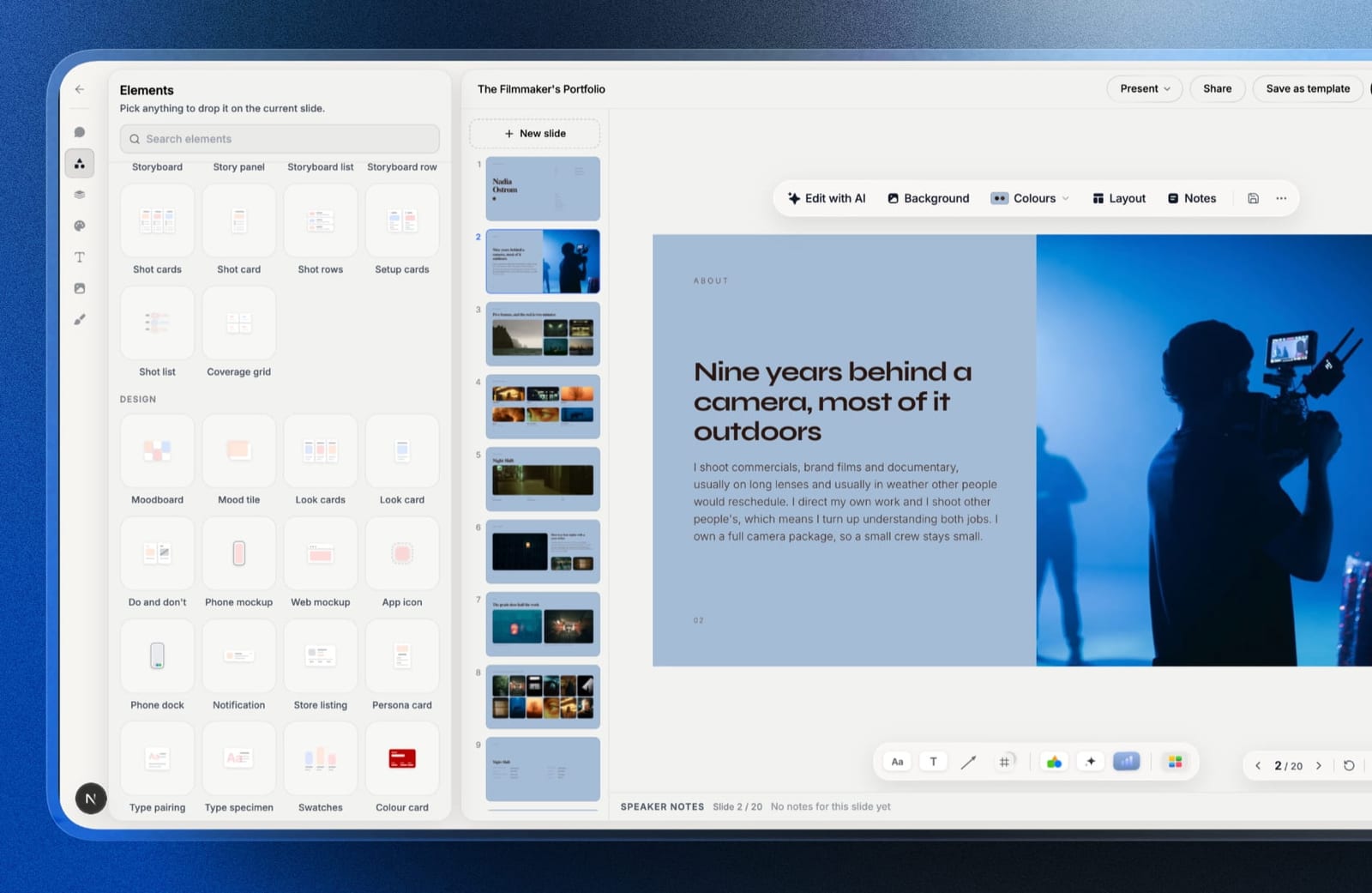
Best forSeed-stage founders on a warm investor list who want a structured first draft they can fully override, and whose website is still a placeholder.
The real numberthe free plan covers the AI writer, unlimited decks, a share link and PDF export, with no card.
Starter is $84 a year on annual billing, about $42 across the six-month raise, matching Slidebean Starter, and unlocks the template library, your own fonts and removal of the Framekit byline.
Pro, about $90 for the six months, adds .pptx export. It is priced per account, not per seat, and has no live co-editing, so it suits one person owning the deck.
The standout detailpresenting from a new tab. Drag it to the second screen in a partner meeting and keep the editor on your laptop; both read the same live deck, so a number you correct in the editor updates on the stage as you speak.
The gotchathere is no link analytics of any kind, the reason it is not first. Forty investors, zero read data.
The PowerPoint export is picture-based, so an institutional investor who wants to rework your slides gets images, there is no password on a shared link, and a deck caps at 40 slides.
Skip it ifyou are running a cold outbound raise and will chase based on who read to the ask, or your investors expect an editable .pptx. Pitch and PowerPoint are right for those.
Verdict: For a founder raising from people who already know them, this is the most complete kit here, because the deck and the site a partner checks next come from one account at one price. For a cold raise, pair a tracked link from Pitch with it or pick Pitch outright.
3. Canva: Best Design Without a Designer
Our rating: 9.0/10
Canva is the tool most founders should probably use and the one most fundraising advice is snobbish about.
The template library is the largest in this comparison by a distance, the editor is forgiving, and the output looks like someone was paid to make it, which is the actual bar a seed deck has to clear.
The fourteen-slide build was the fastest of any tool where we cared about the result. What slowed us down was the opposite of a limitation: too many good starting points, and an hour lost to comparing three template families before committing.
Best forFounders whose deck is currently ugly and whose main constraint is that nobody on the team can design.
Key features:
- The deepest template and asset library here, by a wide margin
- Free plan that covers a complete fundraising deck except brand fonts
- Clean PDF export, plus .pptx export with some layout drift on complex slides
- Browser-based co-editing that a non-technical advisor can join without training
- Brand kit on Pro for teams that already have a typeface and palette
The real numberthe free plan finishes a seed deck. Pro is $18 a month or $144 billed annually, about $12 a month, so roughly $72 across a six-month raise, and the single line that pushes most founders onto it is custom brand-font upload.
The gotcha.pptx export drifts on the slides you care most about. Our competitive matrix and the traction chart both needed manual repair after export, and if an investor asks for an editable file rather than a PDF, that repair is on you every time you revise.
What reviewers say elsewhereCanva's ratings across G2 and Capterra are among the highest in the category, with the consistent criticism being export fidelity rather than the editor.
Skip it ifan investor in your pipeline has already asked for an editable .pptx, or you need to know who opened your deck, because Canva gives you nothing on either count.
Verdict: Canva is the right answer for most first-time founders and the wrong answer for anyone whose process depends on tracking or on native PowerPoint files. Already on Canva and hitting the font wall? See our best Canva alternatives for presentations. Visit Canva
4. Gamma: Best AI First Draft
Our rating: 8.7/10
Gamma is the fastest way to turn a paragraph about your company into fourteen slides that are roughly in the right order.
Paste in your one-liner and a few bullet points about traction, and you get a structured draft in under a minute that is about 60% of the way to something sendable.
The remaining 40% is the whole job, and Gamma is honest enough about this that it puts a real editor behind the generated output rather than trapping you in the generation.
Where it consistently helped in our build was the middle of the deck, the market and product slides that founders overthink.
Best forFounders who write well but stall on structure, and anyone who needs a draft to react to rather than a blank first slide.
Key features:
- Text-to-deck generation that produces a coherent narrative order, not just styled bullets
- Editable output with real layout control after generation
- Link sharing with view data, including how far a viewer read
- Card-based format that adapts to a phone, which matters more than founders expect
- Export to PDF and .pptx
The real numberGamma Plus is $108 a year, roughly $54 across a six-month raise, which is the cheapest AI-first tool in this comparison. The free plan is credit-limited, and for a fundraise with redrafts, treat those credits as a trial rather than a plan.
The gotchagenerated decks share a family resemblance. If you have seen twenty Gamma decks, you can spot the twenty-first, and investors see a great many decks. Restyling the output is the difference between a draft that reads as yours and one that reads as generated.
Skip it ifyour deck is nearly finished and the problem is polish, because Gamma's value is concentrated entirely in the first draft.
Verdict: Gamma is the best first-draft engine in the category and a mediocre final-draft tool, which is a compliment if you use it for the first half of the job. Weighing it against the rest of the AI field? See our best Gamma alternatives and our best AI presentation makers. Visit Gamma
5. Slidebean: Best Investor Narrative Structure
Our rating: 8.3/10
Slidebean is the only tool in this comparison that has an opinion about what your deck should say.
It hands you a fundraising outline, tells you which slide comes next and why, and fills in the layout so you cannot spend three hours on a logo position. For a first-time founder, that is worth more than any design feature here.
The cost of that opinion is that you cannot argue with it. Slidebean's layout engine places your content, and the override options are narrow by design, which is exactly the complaint that sends experienced founders looking for alternatives.
Best forFirst-time founders who do not yet know what a seed deck contains and want the structure written for them.
Key features:
- Investor-oriented outlines that sequence the standard fundraising narrative
- Automatic layout that removes design decisions entirely
- View tracking on shared decks
- Financial modelling tools aimed at startups rather than at presenters
- An upper tier that is effectively consulting rather than software
The real numberSlidebean Starter is $84 a year on annual billing, about $42 across a six-month raise, and one of the two cheapest paid plans in this comparison.
The tier above it, Accelerate, is $99 a month, which is $1,188 a year, and what it buys is a pitch-writing team rather than more software.
The gotchathe jump from $84 a year to $99 a month is the steepest anywhere in this category, and it arrives at exactly the moment a founder decides the deck matters enough to get help with. Know before you subscribe that you are hiring people, not unlocking features.
Skip it ifyou have raised before, or you have a designer on the founding team, because the structure you are paying for is knowledge you already have and the layout lock will frustrate you within a week.
Verdict: Slidebean is the best purchase in this comparison for a first-time founder and the worst for a second-time one. Buy it for the outline, leave before you need the layout. Visit Slidebean
6. Google Slides: Best Free Tool for Co-Writing
Our rating: 8.2/10
Google Slides remains the most reliable way for three people to argue about slide nine at the same time. It is free, it never loses work, it opens on anything, and every investor and advisor you send it to already knows how to comment on it without an account conversation.
What it will not do is make your deck look considered. The default output reads as a document rather than a pitch, and closing that gap takes real design effort that the tool does not help with.
Best forFounding teams writing the deck together, and anyone whose first draft needs comments from five people before it needs a designer.
Key features:
- Genuinely free with no feature gate that affects a fundraising deck
- The most dependable simultaneous editing in this comparison
- Comment threads that advisors can use without learning a tool
- Clean .pptx import and export, with the least damage of any tool here
- Version history that goes back far enough to recover a deleted slide from weeks ago
The real number$0 on a personal account, permanently.
On a company domain, Google Workspace Business Starter is $7 per user a month on annual billing, per Google's published pricing, which is $42 per person across a six-month raise, and that buys email and storage rather than anything in Slides.
The gotchathere is no link analytics of any kind. You can see who edited, never who read, which means a Slides deck sent to forty investors gives you exactly as much follow-up intelligence as a printed one.
Skip it ifthe deck is going out cold to investors you have not met, because that is precisely the case where knowing who opened it changes what you do next.
Verdict: Google Slides is the correct place to write your deck and the wrong place to send it from. Draft here, then decide whether tracking is worth moving. For the wider free field, see our best free presentation software comparison. Visit Google Slides
7. Microsoft PowerPoint: Best for the File Investors Ask For
Our rating: 8.0/10
PowerPoint is still the file format of institutional finance. When a later-stage investor or a corporate development team asks for "the deck", a surprising number of them mean a .pptx they can edit, drop into an investment committee memo, and reformat without asking you.
The desktop application also remains the most capable presentation tool here in raw terms: real typography control, licensed font embedding, and offline reliability that browser-first tools cannot match in a basement conference room.
Best forFounders raising from institutional investors, and anyone who has already been asked for an editable file.
Key features:
- The native format that finance still runs on, with no conversion step
- Licensed brand-font embedding that browser tools charge for or refuse
- Offline presenting that does not depend on the venue's connection
- Designer suggestions that are genuinely useful on sparse slides
- A free web version that covers most of a deck
The real numberMicrosoft 365 Personal is $99.99 a year, about $50 across a six-month raise, and PowerPoint for the web is free if you can accept the reduced feature set. For a founder who already pays for Microsoft 365, the marginal cost of the best-supported format in fundraising is zero.
The gotchathe free web version drops exactly the features that make the desktop app worth using, including font embedding, and nothing in the interface warns you before a collaborator on the web version quietly flattens your typography.
Skip it ifyour investors are early-stage and read on phones, because a .pptx advantage is worth nothing there and the design ceiling of a default PowerPoint deck is low.
Verdict: PowerPoint is a compatibility decision rather than a design one, and it is the right decision more often at Series A than at pre-seed. If it is the tool you have and the tool you dislike, our best PowerPoint alternatives guide has the field. Visit Microsoft 365
8. Storydoc: Best for Knowing What Investors Actually Read
Our rating: 7.8/10
Storydoc gives up the slide as a unit and replaces it with a scrolling, interactive document, and in exchange it gives you the deepest reading analytics in this comparison.
You can see which section an investor stopped at, how long they spent on the traction numbers, and whether they ever reached the ask.
For a founder running a structured process across forty investors, that data genuinely changes behaviour. It tells you that eleven people opened the deck, six reached the team slide, and two read the whole thing twice, which is a follow-up list rather than a guess.
Best forFounders running a disciplined outbound raise who will act on read data rather than just collect it.
Key features:
- Section-level read depth and time-on-section per recipient
- Interactive elements, embedded video, and live-updating content
- Personalised versions of one deck per recipient
- Lead capture and integration with sales tooling
- Mobile rendering that is designed for scrolling rather than adapted to it
The real numberStorydoc Starter is $237.60 a year, which is about $119 across a six-month raise and the most expensive individual plan in this comparison; Pro is $432 a year, roughly $216 for the same period. That is between two and five times what most tools here cost for the raise.
The gotchathere is no clean fixed-page PDF, because there are no pages. When an investor asks you to email the deck as an attachment, and some still will, you are exporting a compromise of your own document.
What reviewers say elsewhereStorydoc rates well on G2 for engagement analytics, with the recurring criticism in reviews being price relative to conventional deck tools.
Skip it ifyour process involves attachments, printed leave-behinds, or investors who forward files rather than links, because the format fights all three.
Verdict: Storydoc is the right tool if read data is going to change what you do tomorrow, and an expensive novelty if it is not. Be honest about which you are. Visit Storydoc
9. Beautiful.ai: Best Consistency Without Design Skill
Our rating: 7.5/10
Beautiful.ai's premise is that you should not be allowed to make a badly spaced slide.
Its layouts adjust themselves as you add content, so a deck built by a founder with no design training comes out visually consistent from slide one to slide fourteen, which is a real and underrated outcome.
The premise is also the product's ceiling. When the engine's idea of the right layout differs from yours, the engine wins, and our competitive matrix ended up in a shape we did not choose and could not fully correct.
Best forSolo founders who cannot see spacing problems and want a deck that is tidy without learning why.
Key features:
- Layouts that re-balance automatically as content changes
- Viewer analytics on shared links
- A one-off project licence for founders who need a single deck
- Clean .pptx export on all paid plans
- Brand controls that hold across a whole deck
The real numberPro is $12 a month billed annually at $144, about $72 across a six-month raise, and there is a One-Time Project licence at $45, per Beautiful.ai's pricing page.
For a single fundraise, that $45 licence is the smartest purchase in this whole comparison.
The gotchatwo seats cost $960 a year against one seat at $144, a jump of about 6.7 times that arrives the moment a second co-founder wants to edit. For a two-founder company, that is a genuinely bad surprise discovered after the first deck.
Skip it ifthere are two of you, or you have strong opinions about layout, because you will pay a lot for the first and lose every argument about the second.
Verdict: Beautiful.ai is worth exactly $45 to a solo founder with one important deck and hard to justify beyond that. See our best Beautiful.ai alternatives for what to do at the two-seat cliff. Visit Beautiful.ai
10. Figma Slides: Best for Design-Led Founding Teams
Our rating: 7.4/10
Figma Slides is the obvious answer for a founding team that already lives in Figma, and close to pointless for one that does not.
If your product designs, your brand assets, and your component library are already in the file, building a deck beside them removes an entire export-and-reimport loop.
It is also the only tool in this comparison where the deck can pull directly from real product design work rather than from screenshots of it, which shows on the product slides in a way investors notice without knowing why.
Best forTeams with a designer co-founder and an existing Figma file full of the assets the deck needs.
The real numberFigma Professional is $16 per full seat a month on annual billing, which is $192 a year and about $96 across the six-month raise per seat, per Figma's pricing page.
That is only worth it if the seat is already justified by product work.
The gotchathere are no fundraising templates worth the name, and no analytics. Figma gives you a canvas and expects you to know what belongs on it, which is a fine trade for a design team and a poor one for anyone else.
Skip it ifnobody on the team opens Figma weekly already, because the learning curve costs more than the design gain on a fourteen-slide deck.
Verdict: Figma Slides is excellent for the small number of teams it is for and a bad recommendation for everyone else. Buy it as a side effect of already using Figma, never as a deck decision. Visit Figma
11. Visme: Best for Data-Heavy Traction Slides
Our rating: 7.2/10
Visme is a data-visualisation tool that grew a presentation product, and that origin shows in the only place it matters for a pitch: the traction slide.
Its charts are more expressive than anything else here, with live data connections and chart types that Canva and Pitch simply do not offer.
Everywhere else it is a slightly dated general-purpose design tool. The editor has more buttons than it needs, and the template aesthetic lags the category leaders by a noticeable margin.
Best forFounders whose case rests on numbers and who need charts that do more than plot a line going up.
The real numberVisme Starter is $147 a year, about $74 across a six-month raise, and analytics sits on the $144 and $297 tiers rather than the entry plan. The free plan puts a Visme logo on published work, which is not acceptable on an investor deck.
The gotchathe branding on free published work is on the document your investor sees, not on your editor. Founders discover this after sending, which is the worst possible moment.
Skip it ifyour traction slide is one line going up and to the right, because then you are paying for a charting engine to draw something Google Slides draws for free.
Verdict: Visme earns its price only when the numbers are doing the persuading. If your deck is a story with a chart in it rather than a chart with a story around it, buy something else. Visit Visme
12. Decktopus: Best for a Quick One-Off Deck
Our rating: 6.8/10
Decktopus is built for speed and for people who would rather answer questions than design slides.
It asks what your deck is for, who is watching, and what you want them to do, then produces a structured draft with speaker notes already written, which is a genuinely useful artefact for a founder who hates presenting.
It is less useful the longer you keep it. The editor's control is limited, the aesthetic is narrower than Gamma's, and a deck you will revise twenty times over a raise will feel constrained by month two.
Best forA founder who needs one decent deck by tomorrow morning and will not touch it again.
The real numberDecktopus Pro is $119.88 a year on annual billing, about $60 across a six-month raise, and $24.99 if you pay by the month, so the monthly rate is the expensive way to buy a tool you may only need for one deck.
The gotchathe monthly price is more than double the annual rate per month, which punishes exactly the one-off use case the product is best at. Buying annually for a single deck means paying for eleven months you will not use.
Skip it ifthe deck matters enough to iterate on, which for a fundraise it usually does.
Verdict: Decktopus is a good answer to a deadline and a poor answer to a raise. Use it for the internal update, not the investor meeting. Visit Decktopus
13. Apple Keynote: Best for Mac Founders Who Present Live
Our rating: 6.6/10
Keynote is the best pure presenting tool in this comparison and the worst pure sending tool, which is an awkward split now that most decks are read rather than presented.
On stage or across a table, its rehearsal display, transitions and typography beat everything else here, and it costs nothing on hardware you already own.
For a fundraise conducted over email, almost none of that helps. There is no link sharing worth the name, no analytics, and collaboration works properly only among people who all own Apple hardware.
Best forMac-based founders whose fundraising happens in person, at demo days, and on stage.
The real number$0, permanently, with no trial and no credit meter. Against Canva Pro at $144 a year for brand-font support, a Mac founder who presents live gets the feature that matters most to them for nothing.
The gotchasharing is where it falls apart. Sending a Keynote file to an investor on Windows means exporting, and the export loses the transitions and builds that were the reason you chose Keynote in the first place.
Skip it ifyour raise is remote, which in 2026 it mostly is.
Verdict: Keynote is the best tool here for the twenty minutes you are in the room and near-useless for the six months you are not. Present with it, send something else. Visit Keynote
What a Pitch Deck Tool Costs Across a Six-Month Raise
In one linethe software is not the expensive part of a raise, and choosing on price alone is how founders end up without analytics on the one deck that needed them.
Across our forty-investor scenario, the paid options in this comparison run from about $42 to about $216 for the whole six months.
The gap between the cheapest credible paid tool and the most expensive is roughly $174, which is less than one hour of the legal work the round will require.
| Tool and plan | Six-month cost | What the money buys |
|---|---|---|
| Slidebean Starter or Prezi Standard | About $42 | Structure, or a different presenting model |
| Framekit Starter | About $42 | An AI-drafted deck, the template library and the company site; no analytics |
| Gamma Plus | About $54 | The fastest first draft plus basic read data |
| Pitch Plus | About $60 | Analytics and a team price, not a per-seat one |
| Decktopus Pro | About $60 | A quick generated deck with notes |
| Canva Pro | About $72 | Brand fonts and the deepest asset library |
| Beautiful.ai Pro | About $72 | Automatic consistency, one seat only |
| Visme Starter | About $74 | Serious charting for a numbers-led deck |
| Figma Professional | About $96 | Design control, if the seat is already justified |
| Storydoc Starter | About $119 | The deepest read analytics available |
Run this on yourself. Look at your last raise, or your target list for this one, and count how many investors you sent a deck to and never heard from again.
If that number is above ten, the feature you are underbuying is analytics, not design, and the price difference between a tool with tracking and one without is about $20 across the raise.
The Deck Gets Forwarded. Then What?
In one linemost tools above optimise the twenty minutes an investor spends on your deck, and almost none address the twenty minutes they spend afterwards checking whether your company looks real.
A partner reads your deck on Tuesday, forwards it to two colleagues on Thursday, and one of them searches your company name before the Monday partner meeting. What they find is either a company or a placeholder, and that judgement is formed in about fifteen seconds, without you.
The second problem is staleness. A deck is a snapshot, and six weeks after you send it the traction slide says one thing and your reality says another. A shared link you can update, from Pitch, Gamma or Framekit, narrows that gap; an attached PDF cannot.
This is the job Framekit's website builder does alongside its deck editor: the same account publishes a company site on your own domain, so the traction number on the site can change the afternoon it changes, in the deck's fonts and colours.
Whatever you build the deck in, do not let the site be the placeholder.
The Fine Print Founders Discover Too Late
In one linefour details decide more fundraising outcomes than template choice, and none of them appear on a pricing page.
Link expiry that does not actually expire. Several tools here mark a link expired in your dashboard while a previously opened tab keeps rendering the deck from cache.
We tested revocation on every tool that claims it and found genuine, immediate revocation on Pitch and Storydoc.
Analytics that count you. Some viewer counts include your own opens, and one founder in ten discovers this after enthusiastically reporting to an advisor that a target investor read the deck four times.
Check whether your tool excludes the owner before you draw conclusions.
Font substitution on export. If you use a licensed brand font and export from a tool that does not embed fonts, the PDF an investor opens may be set in something else entirely.
Keynote, PowerPoint desktop and Figma handle this correctly; several browser-first tools do not.
Seat pricing at the moment you add a co-founder. Two tools here roughly double or worse when a second person needs to edit.
Beautiful.ai goes from $144 to $960 a year at two seats; Pitch charges for the workspace instead, which is why it leads this ranking despite giving you no structure.
How to Choose Pitch Deck Software: A Decision Tree
In one lineanswer these in order and stop at the first yes, because the first yes is the constraint that will actually decide your experience.
1. Have you written a seed deck before? If no, start with Slidebean at $84 a year for the outline, and plan to leave once you know the structure. The knowledge is the purchase, not the software.
2. Are you sending the deck cold to investors you have not met? If yes, you need link analytics, which narrows the field to Pitch, Storydoc, Gamma, Visme, Beautiful.ai or Decktopus.
Pitch is the pick unless read depth is worth $119 for the raise, in which case Storydoc is.
3. Are you raising from a warm list, and is your company site still a placeholder? If yes, Framekit Slides, which drafts the deck with AI and builds the site from the same account, starting free.
4. Is more than one person editing? If yes, avoid Beautiful.ai entirely and prefer Pitch, Google Slides, Canva or Figma Slides, all of which handle a second editor without a price cliff; Framekit has no live co-editing, so it suits a single deck owner.
5. Has an investor asked for an editable .pptx? If yes, build in PowerPoint or Google Slides, both of which produce a native-quality file. Canva and Gamma will export one, but you will repair it after every revision, and Framekit's export is pictures.
6. Is the deck genuinely ugly and is that the main problem? If yes, Canva, and use the free plan until brand fonts become the blocker.
7. Does your case rest on charts rather than on a story? If yes, Visme at $147 a year is the only tool here whose charting justifies its price.
8. None of the above, and you want to stop deciding? Google Slides at $0 to write it, Canva free to make it look right, and a PDF to send it. That combination has funded a great many companies.
Founders juggling a raise, a board update, and a sales deck at once should read our guide to the best presentation tools for startups, which prices the same team on every option.
Before commissioning anything, it is worth knowing how much a pitch deck costs at each tier and which line on the quote you can safely remove.
Teams weighing Pitch itself against cheaper seat models will find the arithmetic in our roundup of the best Pitch alternatives.
Frequently Asked Questions
What is the best pitch deck software in 2026?
The best pitch deck software in 2026 is Pitch, because it combines investor-grade design control with per-recipient link analytics, working link revocation, and a workspace price rather than a per-seat one.
Framekit Slides is second, the pick for a warm-list raise where you want an AI-drafted deck you fully control and the company website in one account, but it has no view tracking.
Canva is the better pick if design is your weakest link, Slidebean if you need the fundraising narrative written for you, and Google Slides if you want a free tool your whole team can edit at once.
Framekit vs Pitch: which is better for a seed deck?
Pitch is better for a cold raise because it reports per-recipient link activity and can expire or revoke a link; Framekit is better if you want the AI to draft the deck and need the company website built too.
Framekit has a free plan with AI drafting and PDF export and a Starter plan at $84 a year, but no analytics, no password on links and picture-based .pptx export.
Is there genuinely free pitch deck software?
Yes. Google Slides, Apple Keynote, PowerPoint for the web, Canva's free plan and Framekit's free plan all produce a complete fundraising deck at $0 with nothing important gated.
The features you lose by staying free are custom brand-font upload on Canva, the Framekit byline and template library on Framekit, and link analytics everywhere, and neither is required to raise a seed round.
Our best free presentation software guide covers the limits of each.
Which pitch deck tools show you who opened the deck?
Six of the thirteen tools tested report viewer activity: Pitch gives per-recipient, slide-level data with expiry and revocation, Storydoc gives section-level read depth, Gamma reports views and read distance, and Visme, Beautiful.ai and Decktopus offer viewer analytics on paid tiers.
Canva, Framekit, Google Slides, PowerPoint, Keynote and Figma Slides give you no read data at all.
Pitch vs Canva: which is better for a fundraising deck?
Pitch is better if you need to track who read the deck and will revise it over months with a team; Canva is better if the deck currently looks amateur and design is the constraint.
Pitch Plus is about EUR 120 a year for a workspace, Canva Pro is $144 a year for one seat, and the deciding question is whether analytics or template depth matters more to your raise.
How much should I spend on pitch deck software for one raise?
Between $0 and about $120 for a six-month raise. Free tools produce fundable decks, the mid-range paid options land between $42 and $96 for the half year, and the ceiling is Storydoc Starter at roughly $119.
Spending more than that on deck software during a seed raise is rarely the constraint on whether the round closes.
Does an investor care what tool made my deck?
No, with one exception. Investors judge clarity, numbers and story, and no partner has ever passed because a deck was made in Google Slides.
The exception is fidelity failures the tool caused: substituted fonts, a broken chart in the exported PDF, or a link that will not open on a phone, all of which read as carelessness rather than as a software problem.
Should I send a PDF or a link?
Send a PDF unless you specifically want read analytics, in which case send a link and keep a PDF ready for the investor who asks.
PDFs forward reliably, open everywhere, and survive being printed; links give you data and let you update the deck after sending. Most founders running a structured process send a link first and attach the PDF on request.
What happens to a shared deck link if I stop paying?
On most tools in this comparison, shared links stop working when the plan lapses, which means a deck sitting in an investor's inbox from three weeks ago becomes a dead link at the worst moment.
Export a PDF of every version you send and keep it, regardless of which tool you use, because a lapsed subscription should never be the reason a partner cannot reopen your deck.
Is Slidebean worth $99 a month?
Slidebean's $99 a month Accelerate tier is worth it only if you want a pitch-writing team rather than software, because that is what it buys: strategy sessions, an investor CRM and help writing the deck.
As pure software the $84 a year Starter plan contains the structure that makes Slidebean useful, and $1,188 a year is competitive with hiring a freelance deck consultant for the round instead.
Which pitch deck software works offline?
PowerPoint desktop and Apple Keynote are the only tools here that present reliably with no connection, which matters more than founders expect at demo days and in older office buildings.
Everything else is browser-first, and while several cache a deck for offline viewing, none of them guarantee it. If you are presenting live somewhere unfamiliar, export a PDF to your laptop as insurance.
Do I need a company website during a fundraise?
Yes, because the deck gets forwarded to people who will search your company before deciding whether to take a meeting, and an empty result reads as risk.
It does not need to be elaborate: what it needs is your positioning, your team, a way to contact you, and numbers that match the deck.
Framekit builds that page free from the same account as its deck editor, or see the best website builders for creative professionals for the wider field.
Final Verdict
Pitch is the best pitch deck software in 2026 for a founding team running a real raise, because analytics, revocation and a flat workspace price address the three things that actually go wrong between sending a deck and closing a round.
Framekit Slides is second and the most complete kit for a warm-list raise, because the AI-drafted deck and the company site come from one account.
Canva is the right recommendation for most first-time founders who only need design, Slidebean is the right one for a founder who does not yet know what belongs on slide six, and Google Slides plus a PDF has funded more companies than every premium tool in this comparison combined.
Be honest about which problem you have. If your deck is ugly, buy design. If your deck is unread, buy analytics. If your deck is unwritten, buy structure.
Almost nobody needs all three, and founders who buy all three usually spend a week evaluating tools during a month when they should have been emailing investors.
Where Framekit losesFramekit is not for a cold outbound raise, because it has no per-recipient tracking, and it does not export an editable .pptx, password-protect a link, or present offline. Pitch, Storydoc, PowerPoint and Keynote are the better fit for those needs.
Keep reading: our best presentation software comparison, the best AI presentation makers, and are AI website builders any good.