Framekit templates
Start from a designer-made template
 Use template
 Use template
 Use template
 Use template
 Use template
 Use template
 Use template
 Use template
If you are looking for Tome alternatives, you already know the ending. Tome announced its pivot away from presentations in October 2024, confirmed the sunset in March 2025, and closed the presentation product on 30 April 2025.
The team rebranded as Lightfield and now builds an AI-native CRM; AngelList acquired the Tome brand.
When we re-checked on 19 September 2026, tome.app no longer served any product page at all, and Lightfield's own site describes an AI CRM rather than anything to do with decks.
The part worth sitting with is the scale. Tome reached roughly 20 million users and revenue stayed under $4 million. It did not fail because nobody wanted it.
It failed because almost nobody paid for it, which is a structural fact about this category rather than one company's mistake, and the wider pattern was covered in Forbes reporting on AI startups pivoting toward products that pay.
So this comparison scores something the others do not: how easily you can leave.
A Tome alternative is a tool that generates structured, visually designed presentations from a prompt or an outline, in the AI-first way Tome popularised. The good ones do it better than Tome did.
The important question, after 30 April 2025, is which of them will still be here in three years and what happens to your decks if they are not.
The best Tome alternative in 2026 is Framekit Slides for anyone who used Tome to tell a story, because it pairs prompt-to-slide AI drafting with templates and elements built for treatments, lookbooks and creative pitches, keeps every slide editable by hand, and exports a PDF on every plan so your archive never depends on the vendor.
The trade-off is file hand-off: its PowerPoint export is picture-based and Pro-only. Gamma is the closest match to Tome's scrolling, web-native feel, Canva is the lowest-risk long-term home, and Plus AI keeps your decks as ordinary PowerPoint files.
Full disclosure: Framekit is our own product and it is ranked first below, which you should factor in. The six competitors got the same brief, our own review sticks to what Slides ships rather than claiming a test result, we link to every tool, and the reviews say where each beats us: Gamma drafts a sharper argument and feels more like Tome did, Plus AI and Google Slides give you editable files, and Pitch and Storydoc show who read your deck.
This guide was re-verified in September 2026. The August edition kept Framekit out of the ranking because it only built web pages; Framekit has since shipped Slides, a real deck tool, so it is now ranked alongside everything else.
How We Compared 7 Tome Alternatives
Every tool got the same brief we would have given Tome: a twelve-slide narrative pitch generated from one paragraph, with a market slide, a three-tier pricing slide, and a closing ask.
We accepted the first generation, then tested the exit: export everything, and see what a person would still have if the vendor closed tomorrow.
Framekit, our own product, was assessed from what Slides ships rather than run through that test.
Measured covers what we generated and counted, including the export results. Verified covers prices, plan limits, and company facts taken from vendor pages and published reporting in August 2026, with Tome's status, Pitch and Plus AI re-checked in September 2026. Community sentiment is labelled explicitly wherever it appears.
The weighting, and why durability is in it
Draft quality is 30%, because that is what Tome users came for. Export portability is 25%, which is unusually high for this category and is the direct lesson of the shutdown. Cost is 20%. Design output is 15%. Collaboration is 10%.
Portability is weighted at a quarter because it is the only defence you actually control. You cannot predict which vendor pivots; you can check, before you commit, whether your work leaves in a format someone else can open.
What the Tome Shutdown Actually Teaches
In one linethe tools most likely to survive are the ones with paying business customers or no business model at all, and the safest decks are the ones stored in a format that outlives the tool.
- Tome reached about 20 million users with revenue under $4 million, which means popularity is not evidence of durability in this category.
- The shutdown ran from announcement in October 2024 to closure on 30 April 2025, roughly six months of notice. That is generous, and it is not guaranteed.
- 5 of the 7 alternatives here export a file another application can open in a form you would want to keep. The two weakest are Gamma and Storydoc, whose output is the most web-native.
- 1 of the 7 has no meaningful risk of disappearing: Google Slides, backed by an advertising business. Keeping a PDF of every finished deck is the protection that works with all the others.
- 0 of the 7 offer a permanent archive guarantee. Every one of them is a subscription to access rather than a promise of custody.
Run this on yourself. Open the tool you are considering and export one finished deck right now, before you build anything real in it.
If what lands on your machine is a PDF that reads correctly and, ideally, an editable file, you have an exit. If it is a link or a flattened image dump, you have a dependency.
Quick Comparison: 7 Tome Alternatives
Weighted on the five criteria above. Framekit leads while scoring 7 out of 10 on portability, behind Canva, Plus AI, Google Slides and Pitch, because its PowerPoint file is made of pictures; Gamma is second and scores lower still on the same column.
| Tool | Closest to Tome for | Export you can open elsewhere | Portability | Cheapest paid, per year | Rating |
|---|---|---|---|---|---|
| Framekit | Creative and narrative decks | PDF on every plan, picture-based PPTX on Pro | 7/10 | $84 | 9.1/10 |
| Gamma | AI-first, web-native feel | PDF and flattened PPTX | 5/10 | About $108 | 9.0/10 |
| Canva | Design quality and safety | Clean PDF and PPTX | 9/10 | $144 | 8.9/10 |
| Plus AI | Native file output | The file is already native | 10/10 | $120 | 8.4/10 |
| Google Slides | Never disappearing | Clean PDF and PPTX | 10/10 | $0 needed | 8.2/10 |
| Pitch | Team template systems | PPTX on paid plans | 8/10 | About EUR 120 | 8.0/10 |
| Storydoc | Interactive web documents | No slide-format export | 3/10 | $237.60 | 7.0/10 |
Figures come from each vendor's published plans, read in August 2026.
1. Framekit: Best Home for Narrative and Creative Decks

Our rating: 9.1/10
Framekit is an AI website builder that also includes Slides, a deck tool for treatments, lookbooks, portfolio decks and campaign pitches, and it is where we would send the Tome users who were telling stories rather than reporting numbers.
Tome's appeal was that a prompt became a sequence with a point of view.
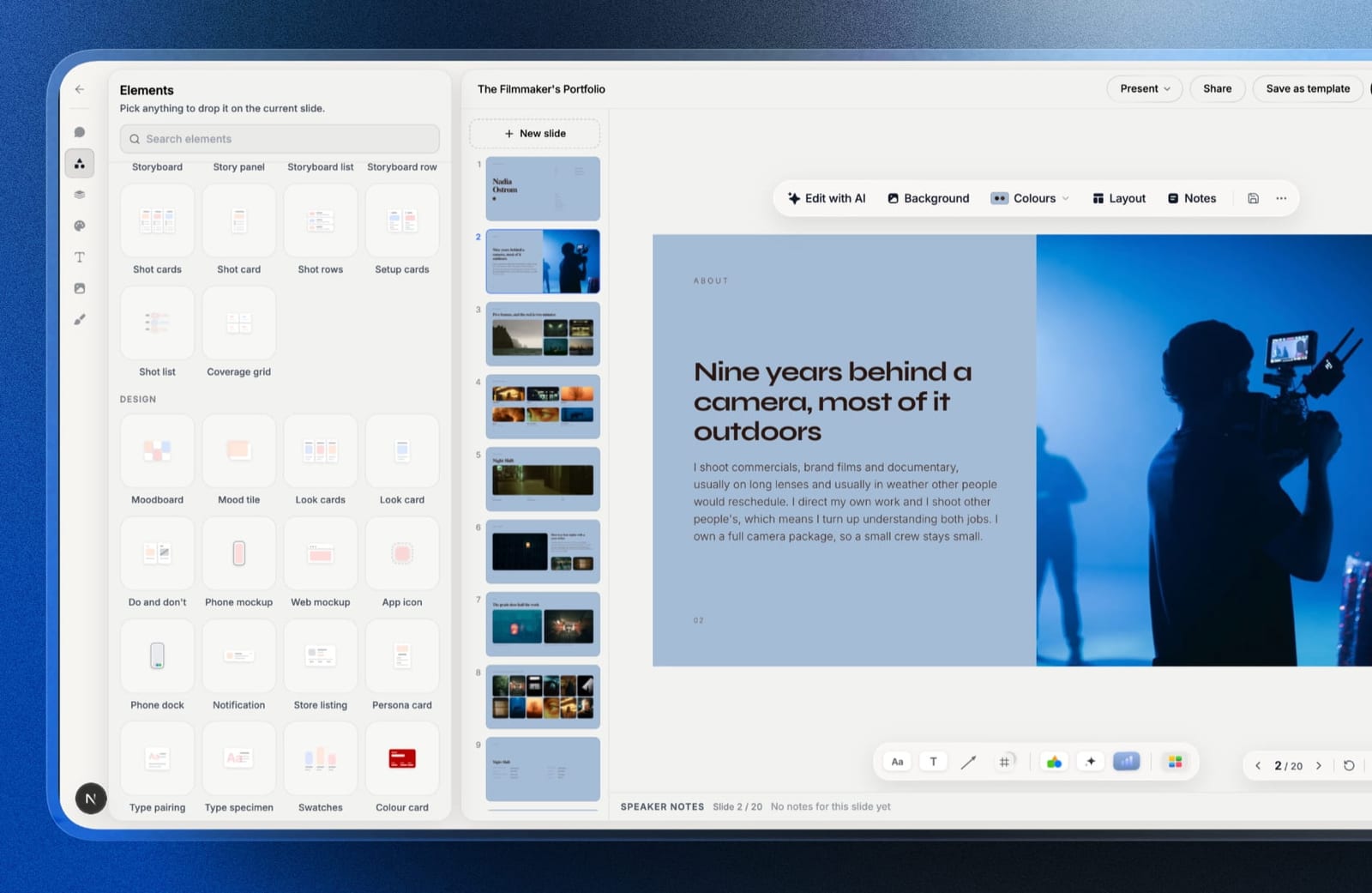
Slides keeps that loop, describe what a slide has to say and the AI writes and lays it out, then adds two things that matter for creative work: every block stays movable by hand, and the deck is a fixed set of 16:9 slides rather than a page that reshapes itself.
What a former Tome user notices first is the vocabulary.
The element library is built from how creative people actually argue: moodboards, look cards, storyboard panels and rows, shot cards and shot lists, colour swatches, type specimens, phone and web mockups, plus ordinary charts for the one slide with a budget on it.
In a twelve-slide narrative pitch, the opening slides can take a moodboard and a look card and the market slide the chart element, so the story has pictures before it has numbers, assembled from parts instead of a blank text box.
Best forFilmmakers, photographers, designers, writers and studios who used Tome for pitches and treatments, and who care how the deck looks as much as what it says.
Key features:
- AI writes and lays out any slide from a description, and everything stays editable afterwards
- Templates made for treatments, lookbooks, portfolio decks, campaign decks and pitch decks
- Your own fonts and colours carried across every slide, with speaker notes on each
- Full-screen presenting, link sharing, and PDF export on every plan
- Unlimited decks on every plan, in one account with your website, client galleries, video review and store
The real numberthe exit costs nothing. PDF export works on the free plan, so the lesson of 30 April 2025 is covered before you pay a cent.
Starter is $9 a month, or $84 a year billed annually, and adds the template library, custom fonts and removal of the "Made with Framekit" badge that sits on every free-plan deck.
The standout detailbecause Slides lives in the same account as a Framekit website, a director can send the treatment link on the same day the reel page goes up, without a second subscription, and the finished work has somewhere to live after the pitch.
The gotchawe cannot promise you Framekit will outlast every vendor on this page, and nobody honestly can, which is why the portability score below is a 7 and not a 10.
The PowerPoint export is Pro and up, capped at 60 slides, and turns each slide into a picture, so a PDF is your real archive.
There is also no deck password, no per-viewer analytics, no live multi-cursor co-editing and no importer, so old Tome PDFs are rebuilt, not uploaded.
Skip it ifyour decks are data-heavy sales documents that a team edits together, or a client insists on an editable PowerPoint. Plus AI and Pitch are better homes for that work.
Verdict: Framekit is the Tome alternative for creative work: the prompt-to-slide speed you lost, a deck that holds its layout, and a free PDF exit from day one. For the scrolling, web-native feel specifically, Gamma is still closer.
2. Gamma: The Closest Thing to What Tome Was
Our rating: 9.0/10
Gamma is where most Tome users ended up, and having generated the same brief in both, the reason is obvious.
Gamma produces web-native cards that scroll and reflow, drafts a structure rather than a list of slides, and finishes in about ninety seconds. It is the product Tome was reaching toward, built by a company that got the pricing right.
Against our brief it produced a problem slide, a positioning slide, a competitive frame, and a closing ask, in that order, unprompted. Nothing else in this comparison did that.
Best forTome users who want the same AI-first, web-native experience without the shutdown.
Key features:
- Prompt, outline, or document input, producing structure as well as copy
- Web-native cards that reflow on mobile instead of letterboxing
- Analytics on who opened a link and how far they read
- Image generation and stock search inside the editor
- PDF and PowerPoint export, flattened on the way out
The real numberthe free plan gives 400 credits once, with no refresh. Plus is $9 a month billed annually, $108 a year, refreshing 1,000 credits monthly; Pro is $18 a month billed annually, at 4,000; Ultra is $90 a month billed annually, at 20,000.
Using the only published credit-to-slide ratio in the category, roughly 5 credits a slide, the free tier is about six twelve-slide decks in total.
The gotchathe export is the weak point, which matters more after Tome than it would have before. Gamma's scrolling layout flattens into fixed slides on the way to PDF or PowerPoint, so what you can rescue is a readable document rather than the thing you built.
What reviewers say elsewherecommunity sentiment, not our own result - creators consistently praise Gamma's speed and consistently note that its decks are recognisable as Gamma decks. We saw the house style and could override it, but only by working against the defaults.
Pros:
- The only generator here that produced a genuine argument structure
- Web-native output that reads properly on a phone
- A working paid business, which is the relevant durability signal
Cons:
- Free credits never refresh, so the free tier ends permanently
- Exports flatten the layout that makes it good
- A recognisable house aesthetic until you override it
Skip it ifthe lesson you took from Tome is that your work should live in files you control. Gamma is the least portable of the top five.
Verdict: Gamma is the natural home for a displaced Tome user who loved the scrolling format, and the tool that best captures what Tome's interface felt like. It beats our own pick on generated argument structure and on link analytics. Export a PDF of anything important the week you finish it. Visit Gamma
3. Canva: The Safest Long-Term Home
Our rating: 8.9/10
If the Tome shutdown made you cautious rather than merely inconvenienced, Canva is the rational answer.
It is a large, profitable design company with an enormous paying base, its exports are clean and open elsewhere, and its AI allowance refreshes monthly rather than draining to zero.
The generation is a step behind Gamma on structure. Canva gives you a better-looking artefact and expects you to supply the argument, which for a lot of former Tome users is a fair trade for stability.
Best forPeople who want AI drafting inside a tool that is very unlikely to disappear.
Key features:
- Magic Design generation into Canva's own template system
- An AI allowance that refreshes monthly instead of a one-time pool
- The largest well-designed template library in the category
- Clean export to PDF, PPTX, MP4, and GIF
- One editor covering decks, social, print, and video
The real numberthe free plan is genuinely usable, with a monthly AI refresh of roughly 200 standard and 20 premium uses. Pro is $18 a month or $144 billed annually, about $12 a month; Business is $25 per user a month.
The gotchapremium stock assets come back watermarked in exports, and the mark is faint in the editor. Generated slides like choosing premium assets, so the discovery point is usually the finished PDF.
What reviewers say elsewhereCanva holds 4.7 out of 5 on G2 from more than 6,800 reviews, the largest verified review base of any tool in this comparison.
Pros:
- The strongest durability profile of any AI-capable tool here
- Exports that open properly in other applications
- The fastest place to repair a weak generation
Cons:
- Generation is behind Gamma on structure
- Premium assets watermark the export
- Custom brand fonts require Pro
Skip it ifthe web-native, scrolling format was what you loved about Tome. Canva is a fixed-canvas tool and always will be.
Verdict: Canva is the low-risk answer for a Tome refugee: less exciting, considerably harder to lose. Designers comparing their wider toolkit should read our best AI tools for designers roundup.
4. Plus AI: Best If You Want Your Decks in Ordinary Files
Our rating: 8.4/10
Plus AI is the direct structural answer to what happened to Tome. It generates inside Google Slides and PowerPoint, which means your decks are stored as ordinary files in your own Drive or OneDrive from the first slide.
If Plus AI vanished tomorrow, you would lose the drafting assistant and keep every deck.
The design ceiling is whatever the host application renders, so it is a step down from Tome visually. What you gain is that no future shutdown can strand your work.
Best forAnyone whose main lesson from Tome is that decks should live in files they already own.
Key features:
- Generates and edits slides inside Google Slides and PowerPoint
- Decks are stored as native files in your own account, not the vendor's
- Rewrites and reformats existing slides in place
- Custom templates and themes that the generation respects
- A 7-day trial with 1,000 AI credits
The real numberBasic is $10 per user a month on annual billing, or $15 monthly; Pro is $20 or $25; Team is $30 or $40, per Plus AI's pricing page. It is an add-on cost, so budget Basic at $120 a year plus your suite.
The gotchayou pay twice, and the combined cost is roughly double the tool it replaces. Plus AI Basic with Microsoft 365 Personal is about $220 a year against Gamma Plus at $108.
Pros:
- The only option here where a shutdown costs you nothing but the assistant
- No export step at all, because the output is already a native file
- Colleagues can edit without new accounts
Cons:
- Costs stack on top of an existing suite subscription
- Design quality is capped by PowerPoint or Slides
- No standalone value outside those two applications
Skip it ifdesign output is what you want back from Tome. This is a structure and speed tool, not a design one.
Verdict: Plus AI is the shutdown-proof choice. You are buying insurance as much as software, and after 30 April 2025 that is a defensible thing to buy.
5. Google Slides: The One That Cannot Disappear
Our rating: 8.2/10
There is a version of the post-Tome reaction that leads here, and it is not an unreasonable one. Google Slides has no AI drafting worth the name, no design ambition, and no realistic chance of being switched off.
It is free, unlimited, exports cleanly in both directions, and collaborates better than anything else in this comparison.
For a former Tome user, it is a downgrade on everything except the one thing that just went wrong.
Best forPeople who decided that durability matters more than drafting speed.
Key features:
- Free and unlimited with any Google account
- The most reliable .pptx round trip of the seven
- Real-time co-editing and threaded comments
- Version history that restores a single slide
- Add-ons, including Plus AI, if you want generation later
The real number$0 permanently on a personal account, or $7 per user a month on a company domain through Google Workspace Business Starter, per Google's published pricing.
The gotchathe design gap is exactly the gap that made Tome appealing. If you go here from Tome, you are trading the whole reason you tried an AI presentation tool for stability, and it is worth being honest with yourself about whether that trade sticks.
Pros and consfree forever, effectively unloseable, with the best collaboration and file fidelity here, against dated templates, thin type controls, and no meaningful generation without a paid add-on.
Skip it ifthe AI draft was genuinely saving you an hour per deck.
Verdict: Google Slides is the conservative reaction to a shutdown. Correct for some people, an overcorrection for most.
6. Pitch: Best for Teams Rebuilding a System
Our rating: 8.0/10
If Tome was your team's shared drafting tool, Pitch is the closest structural replacement. Shared template libraries, teamspaces, and link controls with tracking and expiry mean the team's visual system lives in the tool rather than in each person's habits.
Generation is competent rather than remarkable, and the free AI grant is smaller than Gamma's, but the workspace features are what a displaced team actually needs to rebuild.
Best forTeams that used Tome collectively and need a shared system again.
Key features:
- AI drafting into shared, custom templates
- Advanced links with tracking, expiry, and per-recipient control
- Teamspaces and shared rooms for organising decks by client
- PowerPoint export and custom fonts on paid plans
- Real-time collaboration in a modern editor
The real numberfree gives one seat, unlimited presentations, 100 one-time AI credits, and two external guests. Plus is EUR 10 a month annually with 500 refreshing credits, Team EUR 15, Business EUR 20 with 750, per Pitch's pricing page.
The gotchaPowerPoint export is a paid feature, so on the free plan your work leaves as a link or a PDF but not as an editable file. After Tome, paying for the exit is worth doing deliberately rather than discovering later.
Pros and consthe best link controls at this price and a real shared template system, against a 100-credit one-time free AI grant, two external guests on free, paid-only .pptx export, and EUR pricing.
Skip it ifyou worked alone in Tome. Most of Pitch's value needs a team.
Verdict: Pitch is the team answer. For a solo Tome user it solves problems you do not have.
7. Storydoc: Best Interactive Web Documents
Our rating: 7.0/10
Storydoc is the alternative that pushes hardest on the format Tome was exploring: scrolling, interactive, personalised documents with read analytics attached. If what you liked about Tome was that it did not feel like slides, this feels even less like slides.
That comes with the worst portability position in this comparison. Storydoc has no slide-format export, so the lesson of the shutdown applies here with more force than anywhere else on this page.
Best forSales teams who want interactive documents and will act on read data.
Key features:
- Scrolling, interactive web documents rather than fixed slides
- Section-level read analytics on every share link
- Personalisation variables for per-recipient versions
- Embedded video and live data
- Version automation for sending variants of one document
The real numberStarter is $19.80 a month, billed $237.60 a year, capped at 5 active documents with 25 AI text credits a month; Pro is $36 a month, billed $432, at 30 documents, per Storydoc's pricing page.
The gotchathe active-document cap counts what stays live. Archive an old proposal to make room and its link goes dark, which is a small preview of what a shutdown feels like.
Pros and consthe best read analytics of the seven and the most genuinely interactive output, against the highest price here, the weakest export position, and templates that need heavy overriding for creative work.
Skip it ifthe Tome shutdown taught you to keep your work in portable formats.
Verdict: Storydoc is the most Tome-like in spirit and the most exposed to the same risk. Choose it with your eyes open.
How to Choose a Tome Alternative
1. Did you use Tome for treatments, lookbooks, portfolio decks or creative pitches? Framekit Slides, for creative templates and elements, hand editing after the AI draft, and a free PDF exit. If your decks were business or sales documents, go to 2.
2. Was the scrolling, web-native format the thing you loved? Gamma, and export a PDF of anything important as you go. If not, go to 3.
3. Was the shutdown itself the lesson? Plus AI, so decks live as ordinary files in your own account, or Google Slides, which is not going anywhere.
4. Do you want broad design quality with low risk? Canva.
5. Did your team share a Tome workspace? Pitch, for shared templates and link controls.
6. Was it the interactivity and analytics? Storydoc, accepting the export position.
If what you really liked was Tome's automatic layout, Beautiful.ai is the specialist there, with no free plan and a $45 one-project licence; we cover it and its rivals in the best Beautiful.ai alternatives.
If Gamma was already your first stop and its credits or card format are wearing thin, our best Gamma alternatives comparison picks up from there, and filmmakers building treatments should read the best film treatment software guide.
Frequently Asked Questions
What happened to Tome?
Tome shut down its presentation product on 30 April 2025. The company announced the pivot in October 2024 and confirmed the sunset in March 2025, after reaching roughly 20 million users while revenue stayed under $4 million.
The original team rebranded as Lightfield, an AI-native CRM, and AngelList acquired the Tome brand for document summarisation work.
What is the best Tome alternative in 2026?
The best Tome alternative in 2026 is Framekit Slides for creative and narrative decks, because it turns a description into a finished slide, offers templates and elements made for treatments, lookbooks and pitches, and exports a PDF on every plan including free.
Gamma is the closest match to Tome's scrolling, web-native interface, Canva is the safer long-term choice, and Plus AI is the pick if you want decks stored as ordinary PowerPoint or Google Slides files.
Can I still get my decks out of Tome?
No. The presentation product closed on 30 April 2025, so anything not exported before then is gone.
This is the single strongest argument for testing an export before you commit to any tool in this category: generate one deck, export it, and confirm that what lands on your machine is readable without the vendor.
Is Gamma going to shut down like Tome did?
There is no way to know, and the honest framing is structural rather than predictive. Tome's problem was that a very large free user base never converted, with revenue under $4 million against about 20 million users.
Gamma's non-refreshing free credits and clear paid tiers are a direct response to that failure mode, which is a better signal than user numbers, but no vendor here offers a custody guarantee.
Which Tome alternative has the best free plan?
Canva has the best free plan among AI-capable alternatives, because its allowance refreshes monthly at roughly 200 standard and 20 premium AI uses rather than granting a one-time pool, and standard exports carry no watermark.
Google Slides has the best free plan overall if you do not need generation, with no credits, no caps, and no expiry of any kind.
Gamma vs Canva for former Tome users: which is better?
Gamma is closer to the Tome experience and Canva is the safer place to keep work.
Gamma produces web-native, scrolling decks with the strongest generated structure of anything tested; Canva produces fixed-canvas decks with better design defaults, cleaner exports, a monthly-refreshing AI allowance, and a much larger paying business behind it.
How do I avoid losing work if another presentation tool shuts down?
Export a finished deck the week you make it, and check what you get. A tool that produces a readable PDF gives you an archive; a tool that also produces an editable .pptx gives you a working file.
Five of the seven alternatives here export something another application can open in a form worth keeping, and the two weakest are the two with the most web-native output, Gamma and Storydoc.
Is there a free Tome alternative?
Yes. Framekit, Canva and Google Slides all let you build, present and share complete decks at no cost, and Framekit's free plan includes unlimited decks and PDF export, with a "Made with Framekit" badge on each deck until you upgrade.
Gamma's free tier gives 400 one-time AI credits, which is roughly six twelve-slide decks. Plus AI starts with a 7-day trial that needs a card, so it is the one to skip if you want to stay at zero.
What is the cheapest Tome alternative?
Google Slides is free permanently and is the cheapest option outright, and Framekit's free plan also costs nothing.
Among paid plans, Framekit Starter is $84 a year on annual billing, Gamma Plus is $108, Plus AI Basic is $120 before your suite subscription, and Canva Pro sits above that at $144.
Storydoc Starter is the most expensive individual plan here at $237.60 a year.
Framekit vs Gamma for former Tome users: which should I pick?
Framekit Slides suits former Tome users who made creative and narrative decks, because its moodboards, storyboard panels, look cards and type specimens sit on fixed 16:9 slides you can edit by hand and export to PDF for free.
Gamma suits those who loved Tome's scrolling cards and want the strongest AI-generated argument, accepting a flattened export and free credits that never refresh.
Can I import my old Tome decks into Framekit?
No. Framekit Slides has no importer for Tome exports, PowerPoint files or Google Slides, so a deck you saved from Tome as a PDF is rebuilt rather than uploaded.
The practical route is to paste each section of your old outline into a slide description and let the AI redraft it, then swap in your own images. Anything you never exported from Tome before 30 April 2025 cannot be recovered anywhere.
Final Verdict
Framekit Slides is the best Tome alternative in 2026 for the people Tome served best, those who used it to tell a story with pictures, because it drafts from a description, gives you creative building blocks like moodboards and storyboard panels, and lets you walk away with a PDF on the free plan.
Gamma is the closest to Tome's interface and wins for anyone who loved the scroll, Canva is the safer choice if the shutdown made you risk-averse, Plus AI is the structurally shutdown-proof option, and Google Slides is the tool that will still be there whatever happens to the rest of this list.
The most useful habit to take from all of this is small: export one finished deck before you commit, and see what you are actually left holding. Tome gave its users about six months of notice. The next one might not.
Where Framekit losesFramekit Slides is not the right home for team sales decks or anything a client edits after you, because its PowerPoint export is picture-based and Pro-only, and it has no deck passwords, no per-viewer analytics, and no live co-editing.
It also will not recreate Tome's scrolling feel. For those jobs Plus AI, Pitch or Gamma is the better fit.
Keep reading: the best AI tools for filmmakers, are AI website builders any good, and the best easy to use AI website builders.