Framekit templates
Start from a designer-made template
 Use template
 Use template
 Use template
 Use template
 Use template
 Use template
 Use template
 Use template
Your client gallery gets more attention than your homepage.
A wedding gallery is opened by the couple, then forwarded to parents, siblings, and the friends who were there, and each of them looks at 400 photographs with your name nowhere in sight except a small footer that says which platform hosted it.
That is the branding gap in this business. Photographers spend months on a logo and then deliver their most-viewed work inside somebody else's product.
Branding a client gallery means controlling the elements a client actually perceives: the web address the link points to, the cover and title, the typography and colour of the page, the watermark on the images, the delivery email, and whether a vendor's badge appears anywhere on it.
Most platforms let you restyle those six on a page they own. Framekit takes the other route and publishes the gallery as a page of your own website, so from the $9 Starter plan the address and the typography are already yours rather than approximated in a second system.
Brand your client gallery in this order: the URL first, because it is the only element the client sees before they open anything, then the cover and title, then typography and colour, then the vendor badge, then the delivery email, then the watermark.
Most platforms unlock branding at their first paid tier, typically $9 to $17 a month, and the deepest available change is moving the gallery onto a website you own rather than restyling a page you rent.
Framekit is an AI website builder with client galleries included, which is why gallery branding and site branding are the same settings rather than two systems that never quite match.
The Six Elements Clients Actually Perceive
Branding effort in this category is routinely spent on the elements clients notice least. Here is what a client actually perceives, ranked by how many of them see it.
| Element | Who sees it | Typical plan needed |
|---|---|---|
| The URL in the email and browser | Everyone, before opening | First paid tier |
| The cover image and title | Everyone, first screen | Free everywhere |
| Typography and colour of the page | Everyone, throughout | Free to first paid tier |
| The vendor badge or footer | Everyone, subtly | First paid tier |
| The delivery email design | The primary client only | Free to first paid tier |
| The watermark on proofs | Anyone sent a proofing set | Free everywhere |
The ordering matters. A beautifully styled gallery at yourname.vendor.com is less branded than a plain gallery at yourstudio.com, because the address is what gets pasted into messages, read aloud, and remembered.
Step One: Fix the URL
The web address is the branding change with the widest reach and the one photographers postpone longest, usually because it sits behind the first paid tier on almost every platform in the category.
There are four situations, in ascending order of ownership. A vendor subdomain such as yourname.pixieset.com puts a competitor's brand in every link you send.
A shared generic domain, which is CloudSpot's default, puts nobody's brand in the link including yours. A CNAME subdomain such as photos.yourstudio.com looks entirely yours and points at a vendor's servers.
A gallery published as a page of your own site is the only version where the pages behind the address belong to you.
The practical upgrades: Pixieset connects a domain from its $10 Basic plan, CloudSpot from its paid tiers, ShootProof through a documented CNAME setup, and Framekit publishes galleries on your own domain from the $9 Starter plan as part of your site rather than a pointed subdomain.
The full breakdown of what each arrangement survives is in our guide to client galleries with custom domains.
If you change one thing this month, change this one. Everything else is decoration on top of an address.
Step Two: The Cover and Title
The cover image is your gallery's headline, and most photographers let their export order choose it for them, which is how a technically fine frame with a face in the middle ends up cropped at every breakpoint.
Pick a horizontal frame with quiet space where the title will sit. Portrait covers crop badly across devices, and busy frames make the overlaid text unreadable, which is why a technically weaker photograph is often the better cover.
Use the client's name in the title, not the job type. "Anna and Jonas, 14 June" reads as personal; "Wedding Gallery" reads as a filing system. Clients receiving galleries from multiple suppliers routinely lose track of which link is which.
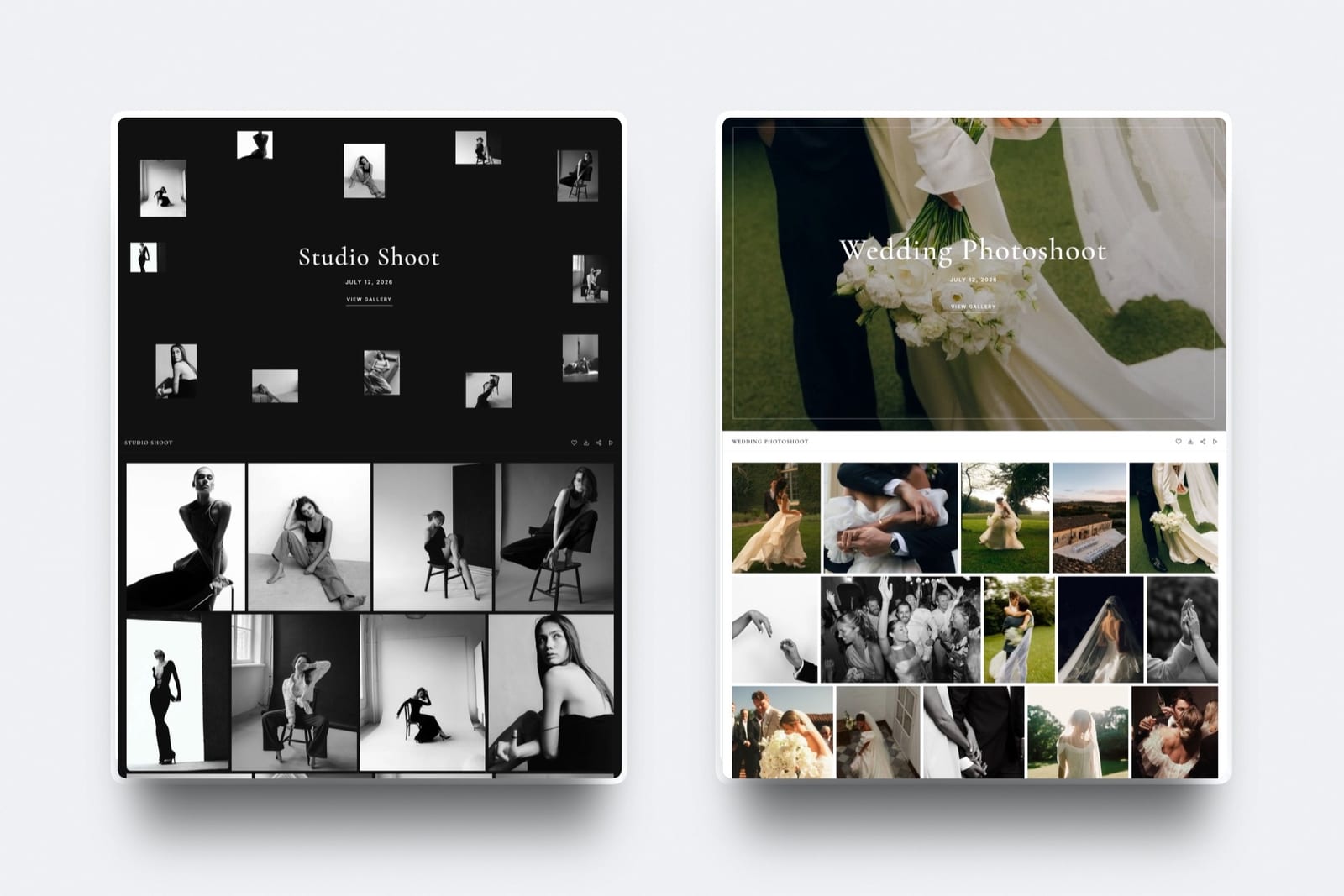
Vary the cover style by genre. Framekit ships 17 cover styles including centred, editorial, arch, poster, and collage layouts, which exists because a boudoir delivery and a corporate headshot delivery should not share a visual language.
Set a focal point. Automatic cropping will centre the frame and cut heads off at some breakpoints. Most platforms let you nominate the point that must stay visible, and it takes five seconds.
Step Three: Typography and Colour
In one linetypography is the single strongest signal that a gallery belongs to a specific studio rather than to a platform, because clients cannot name a typeface but they immediately register whether a page looks like the website they booked from.
Match the gallery to your site, not to a template. If your portfolio runs a serif headline and a neutral sans body, the gallery should too. A gallery in a different typeface reads as a third-party tool no matter how good it looks in isolation.
Use your actual fonts where the platform allows it. Framekit supports uploading your own font files for gallery pages from the Starter plan, alongside 18 typography presets, which is the difference between approximating your brand and using it.
Pick a light or dark ground deliberately. Dark grounds flatter high-contrast and moody work and can make bright, airy portrait work look heavy. Framekit galleries offer light and dark themes; test your actual images in both before deciding on a house style.
Control grid and spacing. Three layout choices, masonry, rows, and grid, plus spacing and thumbnail size, do more for perceived quality than any colour decision. Dense masonry suits large event coverage; generous rows suit editorial and fine-art work.
Keep it consistent across galleries. A house style applied to every delivery is branding. A different look every time is decoration.

Step Four: Remove the Vendor Badge
Nearly every platform stamps its name on free-plan galleries, and nearly every platform removes it at the first paid tier: Pixieset at $10, CloudSpot on paid plans, Framekit at $9 on Starter.
It is a small graphic and it does real work for the vendor, because it converts your clients into their leads. A guest who receives a gallery link and notices the badge has been introduced to a photo platform, not to you.
Removing it is usually the same upgrade that gives you the custom domain, so treat them as one decision rather than two.

Step Five: Brand the Delivery Email
The delivery email arrives before the gallery does and sets the frame for everything that follows, which makes it part of the branding rather than an administrative message attached to it.
Send from your own address rather than a platform notification. A message from a service the client has never heard of undercuts the work inside it.
Use a saved template with your voice in it.
Framekit's share-by-email screen ships with six starter templates covering wedding, portrait, editorial, event, general delivery, and reminder scenarios, and lets you save your own on top, which is how a studio keeps tone consistent when it is delivering three galleries a week.
Put the practical details in the email as well as the gallery: link, password, download deadline, and how long the gallery stays live. The full structure is in our guide to how to write a photo delivery email.
Keep the sender name identical every time. Studio name, not a personal address for some clients and a business one for others.
Step Six: The Watermark
Watermarks do branding and protection at once, and most photographers get the balance wrong in one direction or the other: either marking finished consumer deliveries that should be clean, or leaving commercial proofs unmarked.
Use them on proofing and selection rounds, not on finished consumer deliveries. A couple's delivered wedding gallery should not carry a mark; a commercial approval round absolutely should.
Prefer a small, consistent logo mark over a large tiled overlay for client-facing proofs. Tiled watermarks protect better and make the selection harder, which is a real cost when the point of the round is a decision.
Position it where a crop cannot remove it but a viewer can ignore it. Lower-third placements survive most social crops; corner placements do not.
Keep one watermark file for everything. Different marks across galleries and social posts dilute the recognition the watermark exists to build. Our watermarking tools comparison covers the production side.
What Each Platform Lets You Brand
Here is what each platform actually lets you change and what it charges to unlock it, re-verified against every vendor's published pricing and help documentation in September 2026.
| Platform | Custom address | Remove badge | Custom fonts | Cover styles | Entry price for branding |
|---|---|---|---|---|---|
| Framekit | Own domain, page of your site | Yes | Yes, uploaded files | 17 | $9 a month |
| Pixieset | Connected domain | Yes | Preset options | Several | $10 a month |
| CloudSpot | Custom URL | Yes | Preset options | Several | $7 to $17 a month |
| Pic-Time | Paid tiers | Yes | Preset options | Many | $8 to $25 a month |
| ShootProof | CNAME subdomain | Yes | Limited | Several | From $10.99 a month |
| SmugMug | Own domain, template site | Yes | Theme-level | Template-based | From about $13 a month |
| Zenfolio | Own domain, template site | Yes | Theme-level | Template-based | From about €8 a month |
Two things stand out. Branding is cheap everywhere, generally $8 to $17 a month, so photographers delivering unbranded galleries are usually doing it by inertia rather than by budget. And the deepest difference is not a setting: it is whether the page belongs to you.

The Order to Do This In
If you have one hour and want the largest branding improvement per minute spent, work through the sequence below rather than starting with the settings that are most fun to change.
Fifteen minutes: connect your domain, or upgrade to the tier that allows it. This is the change with the widest reach.
Ten minutes: set a house cover style, a typography preset or your uploaded fonts, and a light or dark ground, then save them as your default so every future gallery inherits them.
Ten minutes: remove the vendor badge and check the gallery footer for anything that is not yours.
Fifteen minutes: write and save two delivery email templates, one for consumer work and one for commercial, both with your sign-off and your studio name as the sender.
Ten minutes: set up one watermark file and apply it to your proofing preset only.
One branch is worth taking before you start.
If the thing that bothers you is the address rather than the styling, no amount of cover and typography work will fix it, and the move is to a builder that treats galleries as pages of your site instead of pages you rent: that is the specific job Framekit does, and it is also why its branding settings and your site settings are one set rather than two.
Then open the result on a phone. Everything above is decided on a small screen, and the branding you cannot see at 390 pixels wide is branding that is not working.
Frequently Asked Questions
How do I brand a client gallery?
Brand a client gallery in six steps, in order of what clients perceive first: connect your own domain so the link reads as your studio, choose a deliberate cover and a title with the client's name, apply your typography and colour so the page matches your website, remove the platform's badge, send the delivery email from your own address with a saved template, and watermark proofing rounds with a consistent mark.
Most platforms unlock all of this at their first paid tier, typically $9 to $17 a month.
Can I put my logo on a client gallery?
Yes on every serious gallery platform, usually as a header logo on the gallery page and as a watermark on the images, with both generally available from the free tier and the vendor's own badge removed at the first paid tier.
The stronger version of the same idea is publishing the gallery as a page of your own website, where your site's header, navigation, and logo appear because the gallery is part of the site rather than a page styled to resemble it.
Which client gallery platform has the best branding options?
Framekit offers the deepest branding because the gallery is a page of your own website rather than a styled vendor page, with your own uploaded fonts, 17 cover styles, 18 typography presets, light and dark themes, and badge removal from the $9 Starter plan.
Pixieset and Pic-Time offer the most polished preset-based branding among hosted platforms, and CloudSpot provides strong customisation on paid tiers with the caveat that its default gallery address carries neither your brand nor its own.
Do I need a paid plan to brand my gallery?
Partly. Cover images, titles, layout choices, and watermarks are generally available on free plans, while the two changes that matter most, a custom address and removing the vendor's badge, almost always require the first paid tier.
That tier costs $9 on Framekit Starter, $10 on Pixieset Basic, and $7 to $17 on CloudSpot, which makes unbranded delivery a habit rather than a budget decision for most working photographers.
Should client galleries match my website design?
Yes, closely enough that a client moving between them does not notice a change of product. Matching typography is the strongest single signal, followed by colour ground and image spacing.
The simplest way to achieve it is to have the gallery live on the same site, since then the header, fonts, and colours are shared by definition rather than approximated in a second system that drifts every time you redesign.
Where should the watermark go on a client gallery?
Place watermarks on proofing and selection galleries and leave finished consumer deliveries clean, using a small consistent logo mark in a lower-third position that survives typical social crops.
Tiled watermarks protect more aggressively and make selection harder, so reserve them for high-risk commercial proofs. Keep a single watermark file across galleries and social posts so the mark builds recognition rather than noise.
Does branding a gallery actually get me more work?
It changes what a gallery does after the download.
A branded gallery on your own domain puts your portfolio one click away for every guest who was forwarded the link, keeps the return visit on your site, and makes your studio the thing people remember rather than the platform.
None of that is measurable on a single job, and across a year of deliveries it is the difference between a delivery system that markets you and one that markets a vendor.
Can I use my own fonts on a client gallery?
On some platforms.
Framekit supports uploading your own font files for gallery pages from the Starter plan alongside 18 typography presets, while most hosted gallery platforms offer a curated selection of preset typefaces rather than custom uploads.
If your brand depends on a specific licensed typeface, check this before committing, because preset-only platforms will get you close to your identity without ever quite matching it.
How do I brand the emails that deliver my galleries?
Send from your own address rather than a platform notification, use a saved template with a consistent sender name and sign-off, and keep the structure identical across deliveries so clients recognise your messages.
Framekit's share-by-email screen ships with six starter templates covering wedding, portrait, editorial, event, general delivery, and reminder cases, and lets you save your own versions on top, which keeps tone consistent when you are delivering several galleries a week.
What is the fastest way to make a gallery look more professional?
Change the URL, then the cover. A gallery at your own address with a considered horizontal cover and the client's name on it reads as a studio before a single photograph loads, and both changes take under twenty minutes.
Typography, badge removal, and email templates are worth doing next; watermarks and grid tuning are refinements that matter far less than the two things a client sees first.
The Short Version
URL, cover, type, badge, email, watermark. In that order, because that is the order clients meet them. Budget one hour and $9 to $17 a month and the whole thing is done.
The version that cannot be undone by a platform is the first one: a gallery published from a website you own, where the branding is not a setting you rent but the site itself.
Related reading: what to include in a client gallery, best client galleries with custom domains, best white-label client gallery tools, and our full client gallery platform comparison.
Photographers rebuilding the site behind the gallery should start with best website builders for photographers.
For the brand fundamentals underneath all of this, Pixieset's own help centre documents what its branding controls cover on each plan.