Framekit templates
Start from a designer-made template
 Use template
 Use template
 Use template
 Use template
 Use template
 Use template
 Use template
 Use template
Shot list software gets chosen in an office and judged on a location. The features that matter in the office are templates, exports, and integrations.
The features that matter at six in the morning on a farm track with one bar of signal are whether the app opens offline, whether you can tick a shot with cold hands and gloves on, and whether the first assistant director can see the change on their phone without a refresh.
Almost every comparison of this category is written from the office. We built the same list in nine tools and then took each one out.
A shot list is a document that breaks a scene into the individual setups you will actually film, recording shot size, lens, movement, subject, and any special requirement, so the crew knows what is being made and the schedule knows how long it takes.
The best shot list software in 2026 is StudioBinder, because it produces the most usable on-set shot list of any tool here, connects that list to the schedule and call sheets without re-entering anything, and has a free tier real enough to run a small project on.
The trade-off is that it wants to be your whole production system, which is more than a solo director needs.
Shot Lister is the pick for the person actually calling shots on the day, Framekit Slides is the pick when the shot list lives inside a treatment or pitch deck the client approves, Google Sheets remains a completely legitimate free answer, and Boords is what you want when the shots need frames next to them.
Framekit is an AI website builder that also includes Slides, a deck tool with shot lists and storyboards as ready-made elements, alongside client galleries, video review and a store.
In September 2026 we re-verified Framekit's plans and features and added it as a tenth entry, since it now ships shot list elements it did not have when this guide was first written.
Full disclosure: Framekit is our own product and ranks third here for pre-production shot lists only; we did not put it through our on-set offline test, it has no schedule, call sheet or offline mode, and StudioBinder and Shot Lister both beat it on the day.
How We Tested This Shot List Software
We built the same list in every tool: sixty-four shots across four scenes for a two-day commercial, with shot size, lens, movement, subject, an estimated setup time, and a special-requirements column covering a drone shot, a practical effect, and two shots requiring a permit.
Then we took each one on set, which is where this category is actually decided.
Offline. Networking was disabled to simulate a location with no coverage, and we tried to open the list, tick shots off, and add one.
One-handed use. Whether the list can be read and marked on a phone while holding something else, which is the normal condition on a shoot.
Sharing with crew. Whether a first assistant director, a gaffer, and a client can each see what they need without an account or a licence.
Connection to the rest of production. Whether the shot list feeds a schedule and a call sheet, or whether you retype it.
Cost for a small production company, at published rates.
Three kinds of finding, kept apart. Ours by hand in August 2026: the nine builds, the offline tests, the on-set phone use, and the sharing tests.
Framekit, added in September 2026, is described from its product features and was not part of those tests or the counts below. From published pricing and documentation: every price and plan rule below, linked where it carries the argument.
From other people: recurring complaints in public reviews and crew forums, always labelled as sentiment.
What Building the Same 64-Shot List Nine Times Showed
The gap between how these tools behave in an office and how they behave on a location was much larger than we expected, and it reordered our ranking twice during testing. These counts cover the nine tools we took on set.
- 4 of 9 were fully usable with no connection. Two others opened a cached view and could not record a change.
- 3 of 9 connect the shot list to a schedule and call sheets without retyping.
- 6 of 9 let a crew member view the list without creating an account.
- Building sixty-four shots took between 22 minutes and 1 hour 40, and the fastest was not the most expensive.
- Cost for a small production company ranged from $0 to about $1,000 a year.
- 1 of 9 hides shot lists behind a paid add-on on the plan most people are on, which is the least obvious cost in this comparison.
Shot List Software Compared
The weighting: on-set usability 30%, connection to schedule and call sheets 20%, sharing with crew 20%, cost 20%, visual shot references 10%.
On-set usability carries the most because a shot list that fails on a location has failed at the only moment it exists for.
On that rubric Framekit scores lowest of the top five on on-set use and has no schedule connection at all; it ranks third because it is the strongest option here for the pre-production shot list a client signs off, which is where a commercial's shot list spends most of its life.
| Tool | Works offline | Feeds schedule and call sheets | Free tier | Frames alongside shots |
|---|---|---|---|---|
| StudioBinder | Partial, cached view | Yes | Yes, limited projects | Yes, reference images |
| Shot Lister | Yes, fully | Export only | No, paid app | Yes |
| Framekit Slides | No | No | Yes, unlimited decks | Yes, a thumbnail per shot row |
| Celtx | Partial | Yes, on Team plan | Yes, 1 project | Yes, on Team plan |
| Google Sheets | Yes, with offline enabled | No | Yes | No, links only |
| Boords | No | No | Limited | Yes, it is the point |
| Filmustage | No | Partial | Yes, limited | Generated frames |
| Yamdu | Partial | Yes | Trial only | Yes |
| Milanote | Partial | No | 100 items, 10 uploads | Yes |
| Notion | Partial, with offline pages | No | Yes, personal | Yes, images |
1. StudioBinder: The Best Shot List Software Overall
Best forproduction companies who want the shot list to be part of a system rather than a document.
StudioBinder's shot list is the best-designed in this comparison.
Columns match how crews actually describe shots, reference images sit inline, and the list view on a phone is genuinely readable rather than a desktop table squeezed sideways. Building sixty-four shots took thirty-four minutes.
Its real advantage is what happens next. The shot list feeds the shooting schedule, the schedule feeds the call sheet, and the call sheet goes out to the crew with the shots attached. Nothing is retyped, and when scene three moves to day two, everything downstream updates.
The real numberStudioBinder has a free tier with a limited number of projects and several paid tiers above it with an annual discount. Their tier structure has changed more than once, so check the current one before budgeting a year.
The standout detailthe call sheet integration is the reason production companies stay. Sending a call sheet that already contains the day's shot list, with the drone shot and the two permitted shots flagged, removes an entire evening of admin per shoot day.
The gotchaoffline is the weak point. We could open a cached view of the list with no connection and could not reliably record a change, which on a location with no coverage means marking shots on paper and re-entering them later.
Skip it ifyou are a solo director who wants a list rather than a production system. The setup overhead is real.
What reviewers say elsewhereStudioBinder holds a 4.7 out of 5 across more than 90 reviews on Capterra, where the integration between documents is the most cited strength.
Verdict: the best all-round choice and the one that pays off on the second project rather than the first. Its offline weakness is worth planning around rather than ignoring.
2. Shot Lister: Best for the Person Calling the Shots
Best forthe director or first assistant director actually running the day.
Shot Lister is the only tool here designed primarily for the moment of shooting rather than the moment of planning.
It is a mobile application, it works entirely offline, and its interface assumes you are holding a phone in one hand and something else in the other.
Ticking a shot takes one tap, and the timer tells you whether the day is running long while there is still time to do something about it.
The real numberit is a paid mobile app rather than a subscription platform, sold through the app stores. Check the current price on their site, since it is not published as a plan table.
The standout detailthe running-time estimate against actual elapsed time is the feature nothing else here has and every first assistant director wants. Knowing at 11am that you are forty minutes behind changes what you cut; knowing at 6pm does not.
The gotchait does not build the rest of production. There is no call sheet, no schedule, and no team workspace, so it is a companion to a planning tool rather than a replacement for one.
Skip it ifyou need one tool for planning and shooting.
Verdict: the best on-set experience by a clear margin and deliberately narrow. Many productions plan in StudioBinder and shoot with Shot Lister.
3. Framekit: Best for Shot Lists the Client Approves

Best forcommercial, music video and branded-content directors whose shot list is part of a treatment or pitch deck that a producer or brand has to sign off before anyone books a crew.
On a commercial the shot list has two lives. The first is the approval round, where an agency producer reads it on a phone next to the tone references and the storyboard. The second is the shoot.
Every other tool here is built for the second life; Framekit Slides is built for the first.
It is a deck tool, and shot lists are ready-made elements rather than tables you style: shot list rows with a thumbnail beside each setup, single shot cards, a coverage grid, a stripboard, and storyboard rows and panels, all dropped into the same deck as the moodboard and the director's approach.
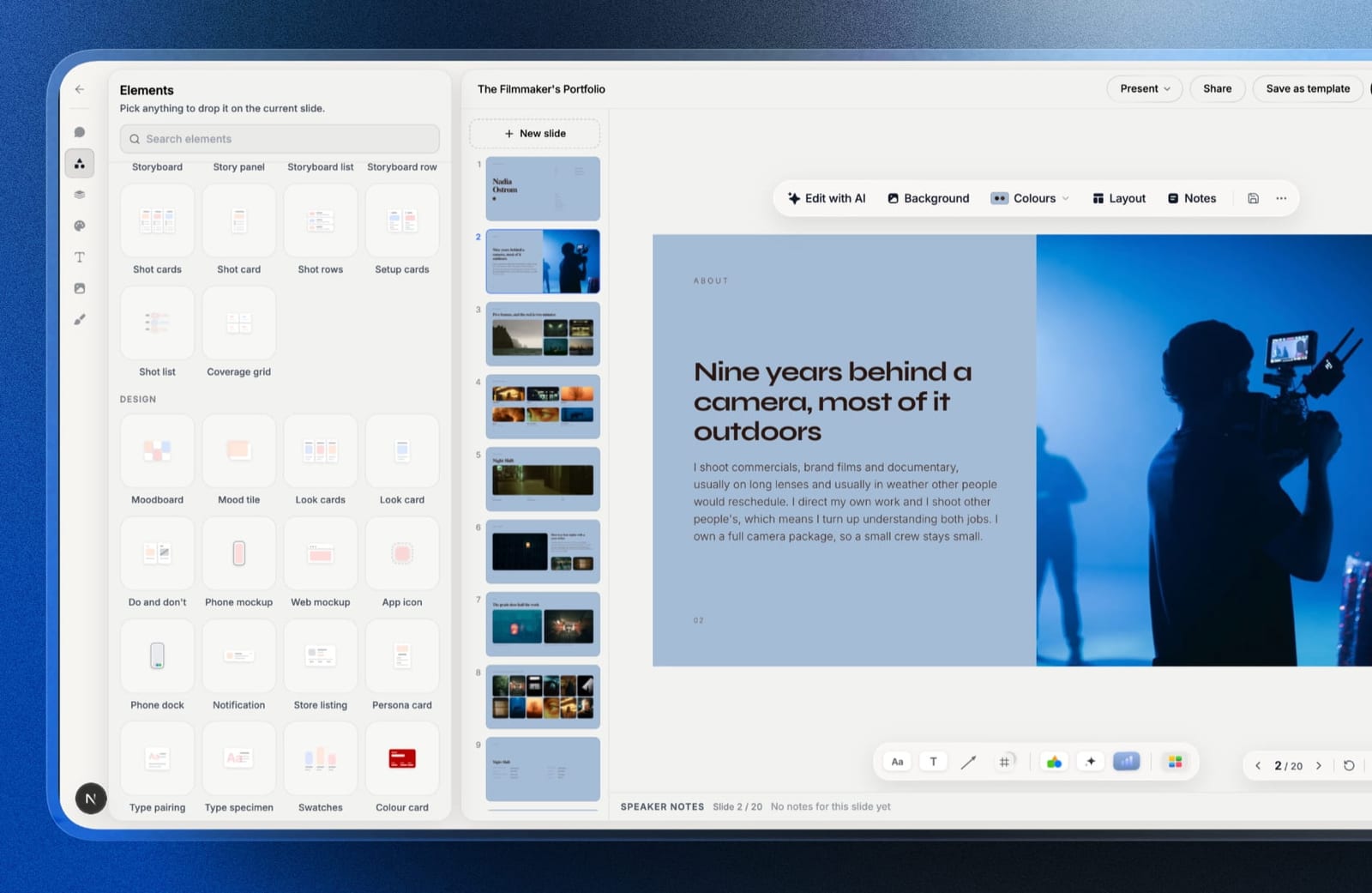
You can also describe the scene and let the AI write and lay out the slide, then edit every row by hand. Speaker notes sit on every slide for the pitch call.
The real number$0. Unlimited decks, the AI writer, a share link and PDF export are on the free plan. Starter at $9 a month adds the template library, your own fonts and removes the Framekit byline, and a .pptx export for the agency's own deck starts on Pro at $19 a month.
The standout detailthe share link updates in place. When the producer cuts shot 41 on the approval call, you change the deck and everyone holding the link sees the revised list, with no version three in anyone's inbox.
The gotchait is not an on-set tool. We did not take it through our airplane-mode test, it runs in a browser, there is no tick-off state for completed shots, no running-time tracking, and no schedule or call sheet fed from the list.
On the day, export the PDF or move the list into Shot Lister or a spreadsheet.
Skip it ifyour shot list is an operating document for the first assistant director rather than a pitch document. StudioBinder or Shot Lister, above, are the right tools.
Verdict: the best shot list tool here for the approval half of the job, because the list, the storyboard and the treatment are one link the client reads on a phone, and the wrong one to shoot from. Pair it with an on-set tool.

4. Celtx: Best If You Already Write There
Best forwriter-directors whose script and shot list should be the same document.
Celtx's argument is continuity from the script down. Tag elements in the screenplay, and the breakdown, shot list, schedule, and call sheets all draw from the same source, so a rewrite propagates rather than desynchronising.
The real numberthis is the least obvious cost in the entire comparison and it deserves reading twice.
On Celtx's own pricing page, shot lists, storyboards, breakdown, scheduling, and call sheets are add-ons on the Free, Writer, and Writer Pro plans and are only included on the Team plan.
If you subscribe to Celtx as a writer and expect to make a shot list, you do not have one yet.
The gotchathat gating catches people out because Celtx is widely recommended as an all-in-one and the plan most individuals buy is the one where production features are not included.
Skip it ifyou are on Writer or Writer Pro and do not want to add another line item.
Verdict: genuinely strong when the script is the source of truth, on a plan that costs more than most people budget for. Check which tier includes what before subscribing.
5. Google Sheets: The Best Free Shot List
Best forproductions where the shot list is a list and nothing more.
The honest position on Google Sheets is that most shot lists are tables, and Sheets is a very good table.
Ours took twenty-two minutes, the fastest of the nine, it opens on any device, the whole crew can view it without accounts, and with offline access enabled it works on a location with no signal.
The real numberfree at any team size, with Google Workspace Business Starter at $7 per user a month if you want a company domain.
The standout detailconditional formatting does more than it should. Colour-coding by scene, flagging shots that need a permit, and greying completed rows takes ten minutes to set up and gives you most of what a dedicated tool's status system provides.
The gotchait feeds nothing. Your schedule and call sheet are separate documents, and every change is entered in each of them, which is where mistakes get onto a call sheet.
Skip it ifyou shoot regularly enough that retyping becomes a weekly tax.
Verdict: the correct free answer and a genuine one rather than a consolation. Most one-off productions should stop here.
6. Boords: Best When Shots Need Frames
Best forcommercial and animation work where a shot without an image is not a specification.
Boords treats the shot list and the storyboard as the same object, which for advertising and animation is correct: the client approves frames, and the frames are the shots. Its shot numbering, animatic preview, and client review links are all built around that.
The real numberBoords Pro is $50 a month billed annually, or $75 monthly, for up to five users, with Team at $85 a month annually for ten users and Agency at $165 for thirty. That makes it the most expensive tool here for a small team.
The gotchano offline support at all, and no schedule or call sheet. It is a pre-production and approval tool that stops at the point the truck arrives.
Skip it ifyour shot list lives on set rather than in a client approval round.
Verdict: excellent for the approval half of commercial work and absent for the shooting half. Priced accordingly.

7. Filmustage: Best AI-Assisted Breakdown
Best forproductions with a locked script and no time to break it down by hand.
Filmustage reads a screenplay and produces a breakdown and shot suggestions automatically, which for a feature-length script turns days into hours.
On our commercial script it identified the practical effect and both permit-requiring locations without prompting, which was genuinely useful.
The real numberit offers a limited free tier and paid plans above it. Check current pricing on their site, since the tiers have moved.
The gotchathe suggestions are a starting point rather than a shot list. Every one of our sixty-four shots needed review, and the shot sizes it proposed were conventional in a way a director would want to change.
Skip it ifyour project is short enough to break down by hand in an afternoon.
Verdict: a real time saver on long scripts and an unnecessary layer on short ones. Treat the output as a draft.
8. Yamdu: Best for Full Production Management
Best forproductions large enough to have a production coordinator.
Yamdu is the most complete production platform here, covering script, breakdown, shot lists, schedule, cast and crew, locations, budgets, and call sheets in one place. For a series or a feature with a real production office, that consolidation is worth a great deal.
The real numberYamdu is sold on paid plans with a trial rather than a free tier, and pricing is published on their site by production size rather than as a simple per-seat figure.
The gotchathe setup effort was the highest here at one hour forty for sixty-four shots, because the system wants the whole production modelled before the shot list makes sense. For a two-day commercial that is the wrong order of magnitude.
Skip it ifyour production fits in a spreadsheet.
Verdict: the right tool at a scale most readers of this page are not at. Genuinely good, genuinely heavy.
9. Milanote: Best Visual Shot List
Best fordirectors who think in references rather than rows.
A shot list in Milanote is a board of frames with notes attached, which for a director developing a visual approach is closer to how the thinking actually happens than a table is. Nested boards per scene work well, and sharing a board with a cinematographer is one link.
The real numberMilanote's free plan allows 100 items and only 10 file uploads, which a shot list with reference frames exhausts almost immediately. Paid is $9.99 a month billed annually, or $119.88 a year.
The gotchait is not a production document. There is no shot numbering that a first assistant director can call from, no schedule, and no call sheet, so a Milanote board has to become a real list before the shoot.
Skip it ifthe document has to work on the day.
Verdict: the best place to develop a shot list and the wrong place to shoot from. Pair it with something else.
10. Notion: Best Free Customisable Option
Best forproductions who want a shot list shaped exactly how they work, for nothing.
A Notion database makes a perfectly good shot list with filtered views per scene, per day, or per unit, image columns for references, and a checkbox for completion. It took forty-one minutes and produced the most flexible result of the nine.
The real numberNotion is free for personal use with Plus at $10 per user a month billed annually.
The gotchaoffline is unreliable. Pages must be opened in advance to be cached and the mobile experience on a poor connection was the most frustrating of the nine, which for a location shoot is disqualifying rather than annoying.
Skip it ifyou shoot anywhere with bad coverage, which is most locations worth filming on.
Verdict: excellent structure, poor conditions. Fine for studio work, risky on location.
What Actually Matters on the Day
Four things decide whether a shot list tool survives contact with a shoot, and none of them appear on a product page, which is why they changed our ranking more than any feature did.
Offline is not a nice-to-have. Four of nine tools worked properly with no connection. Two showed a cached list and silently failed to save changes, which is worse than not opening at all, because you believe the shot is marked and it is not.
The phone is the device. Nobody carries a laptop between setups. Any tool whose mobile view is a compressed desktop table is a tool that gets replaced by a printed sheet by mid-morning.
Crew should not need accounts. A gaffer looking up whether shot 41 uses the long lens should not have to sign up for anything.
Six of nine allow view-only access by link; the other three require an account, which in practice means someone screenshots the list into a group chat and the screenshot becomes the source of truth.
Print still matters. Every serious production prints. A tool whose PDF export puts sixty-four shots across eleven badly broken pages will lose to a spreadsheet, regardless of what its app looks like.
In one linechoose for the location rather than the office, because the shot list's entire job happens on a day when the connection is bad and both your hands are busy.

What Shot List Software Costs a Small Production Company
Priced for a company shooting roughly eight projects a year with a two-person production team, with the two columns that actually decide it sitting to the right of the price.
| Tool | Cost per year | Works offline | Connects to call sheets |
|---|---|---|---|
| Google Sheets | $0 | Yes, with offline enabled | No |
| Framekit Slides, free | $0 | No | No |
| Notion, free | $0 | Unreliable | No |
| StudioBinder, free tier | $0 | Cached view only | Yes |
| Milanote | $119.88 | Partial | No |
| Shot Lister | One-time app purchase | Yes, fully | Export only |
| Filmustage | Free tier, then paid | No | Partial |
| StudioBinder, paid tier | Published on their site | Cached view only | Yes |
| Celtx Team | Team plan required for shot lists | Partial | Yes |
| Boords Pro | $600 | No | No |
| Yamdu | Quoted by production size | Partial | Yes |
A test you can run before your next shoot. Put your phone in airplane mode, open your shot list, tick a shot, and add a new one. If any of those three fails, you do not have a shot list tool, you have a shot list website, and you will be using paper by lunch.
What Happens to Production Documents Afterwards
Every tool above solves the shoot and almost none of them solve what the shoot becomes, which is the evidence that wins the next job.
A finished commercial produces a reel, two or three stills, a client, and a story about how a difficult day got solved, and almost all of that ends up in a folder rather than anywhere a future client can find it.
This is where Framekit's other tools come in, so read it as a disclosed interest. The cut goes to the client through video review, where notes land at the exact frame and v2 and v3 stack with their comments.
The stills and the final film are delivered in a client gallery, photos and video in one link. The reel and the case study go on your portfolio site, and the treatment and shot list that won the job stay in Slides for the next pitch.
All of that sits in one account with one pool of storage.
The limits, plainly: none of it helps on set. Framekit has no scheduling, no call sheets, no breakdown, no offline mode and no way to tick off a shot, so the day itself belongs to the tools ranked above.
Which Shot List Software Should You Use?
The right tool depends on whether the list is a planning document or an operating document, and on how bad the signal is where you shoot, so work down these questions in order.
1. Do you shoot on locations with poor coverage? Google Sheets with offline enabled, or Shot Lister, which are the two that reliably work with no connection.
2. Do you want the shot list to produce the call sheet? StudioBinder, or Yamdu if the production is large.
3. Is the shot list part of a treatment or pitch deck the client approves on a link? Framekit Slides, free, then export a PDF or move the list to an on-set tool for the shoot.
4. Is the shot list a frame-by-frame storyboard the client approves panel by panel? Boords, budgeting $600 a year for Pro.
5. Are you a writer-director working from your own script? Celtx, checking that your plan actually includes shot lists rather than offering them as an add-on.
6. Do you have a long script and no time to break it down? Filmustage for a first pass, then edit everything.
7. Are you developing the visual approach rather than the schedule? Milanote, watching the ten-upload free limit.
8. Do you shoot occasionally and want to spend nothing? Google Sheets, and stop looking.
9. Do you want a system shaped exactly around your process? Notion, accepting that offline is unreliable.
Frequently Asked Questions
What is the best shot list software in 2026?
StudioBinder is the best shot list software overall, because its list is well designed for on-set use and it feeds the shooting schedule and call sheets without anything being retyped.
Shot Lister is better for the person actually calling shots on the day, since it works fully offline and tracks running time against the schedule, and Framekit Slides is the best choice when the shot list sits inside a treatment or pitch deck a client approves.
StudioBinder vs Framekit: which should a commercial director use for shot lists?
StudioBinder is the better tool for running a production, because its shot list feeds the schedule and call sheets and holds up on set.
Framekit is better for the approval stage, because its shot list rows, storyboard panels and moodboards sit in the same deck as the treatment and go to the producer as one link that updates in place, free to start.
Many directors would use both: Framekit to win and approve the job, StudioBinder to run it.
Is there free shot list software?
StudioBinder has a free tier with a limited number of projects, Notion is free for personal use, and Google Sheets is free at any team size and is a genuinely reasonable answer rather than a compromise.
Celtx has a free plan, but shot lists are a paid add-on on it rather than an included feature.
Does Celtx include shot lists on its free plan?
Celtx does not include shot lists on its Free, Writer, or Writer Pro plans, where they are sold as add-ons, and they are only included on the Team plan.
This catches out writers who subscribe expecting an all-in-one production tool and find the production features gated behind a higher tier.
What shot list app works offline?
Shot Lister works fully offline as a native mobile application, and Google Sheets works offline once offline access is enabled and the file is opened in advance.
StudioBinder, Celtx, Yamdu, Milanote, and Notion all offer partial or cached offline access where viewing works and recording changes is unreliable.
What should a shot list include?
A shot list should include shot number, scene, shot size, lens, camera movement, subject or action, and estimated setup time, plus a column for special requirements such as permits, effects, or drone work.
The special-requirements column is the one most often omitted and the one that prevents the most expensive surprises on the day.
Is a spreadsheet good enough for a shot list?
A spreadsheet is good enough for most shot lists, works offline, opens on every device, and costs nothing, which is why experienced crews still use them.
The point at which it stops being enough is when you shoot often enough that retyping the same information into a schedule and a call sheet becomes a recurring source of errors.
Which shot list tool is best for commercials?
Boords is the strongest choice for commercials where the client approves frames rather than descriptions, since it treats the storyboard and the shot list as one object with review links built in.
StudioBinder is the better pick when the same project also needs a schedule and call sheets, and many agencies use both.
How much does shot list software cost?
Shot list tools range from free to around $1,000 a year for a small production company. Google Sheets and Notion are free, StudioBinder has a free tier and published paid plans, Milanote is $119.88 a year, and Boords Pro is $600 a year for up to five users.
Can AI generate a shot list from a script?
Filmustage generates a breakdown and suggested shots from a screenplay automatically, which saves substantial time on feature-length scripts and identifies elements like permits and effects reliably.
The suggested shot sizes are conventional, so treat the output as a first draft that a director revises rather than as a finished list.
Where should a production company keep its finished work?
Finished work belongs on a site the company owns, because a reel, stills, and a written account of how a difficult shoot was solved are the strongest evidence for winning the next job and none of that is discoverable inside a production management tool.
Shot lists and call sheets are operating documents and should stay where the production runs.
Final Verdict
StudioBinder is the right choice for production companies, because the shot list is worth more when it feeds the schedule and the call sheet than when it exists alone.
Shot Lister is the right choice for the person running the day, and the two together are a common and sensible pairing. Google Sheets is a completely legitimate free answer for one-off projects and nobody should feel underequipped using it.
The finding worth taking seriously is offline. Only four of nine tools work properly without a connection, and two of them show a cached list while silently failing to save changes, which is the worst possible behaviour on a location.
Framekit Slides is the third pick for a specific reason: when the shot list is part of the pitch, the list, the storyboard and the treatment go to the client together as one deck link that updates in place, free to start.
Where Framekit losesFramekit is not an on-set shot list tool. It has no offline mode, no tick-off of completed shots, no running-time tracking, no scheduling, no breakdown and no call sheets, so a first assistant director running the day is a better fit for Shot Lister or StudioBinder.
Before your next shoot, put your phone in airplane mode and try to tick a shot off. That five-second test tells you more than any comparison.
Related reading: our guides to the best call sheet apps for film production, the best storyboard software, the best screenwriting software, and the best website builder for production companies.
Prices above were read from published vendor pricing in August 2026, with Framekit's re-verified in September 2026, and several tools in this category publish tiers by production size or sell through app stores rather than as simple plan tables, which we have noted where it applies.