Framekit templates
Start from a designer-made template
 Use template
 Use template
 Use template
 Use template
 Use template
 Use template
 Use template
 Use template
Client delivery is usually described as one-directional: you send, they download. Real jobs are not shaped like that.
The brand team has logo files, the couple has a shot list, the agency has references, the venue has a floor plan, and the second shooter has 900 frames that need to reach you before Monday.
So the files come back as email attachments, a transfer link that expires, and a Dropbox invite the client never accepts.
A client gallery with client uploads is a delivery platform where the person receiving the gallery can also send files into it, so briefs, references, brand assets, and contributed images arrive in the same organised place as the delivery rather than scattered across three services.
PicDrop is the best client gallery with client uploads in 2026, because uploading is an explicit gallery setting rather than a workaround, clients drag files in without creating an account, and you get an email when something arrives.
Framekit ranks fifth here honestly: its client galleries are delivery-only, and the only inbound path is file attachments on video review comments from the Pro plan. If two-way exchange is your requirement, we are not the answer and PicDrop or cloud storage is.
Framekit is an AI website builder with client galleries included, and this comparison is one of the places where a delivery-first design is a genuine limitation rather than a trade-off.
Full disclosure: Framekit is our own product and we have ranked it fifth here, behind four alternatives, because our client galleries do not accept client uploads at all. We checked each platform's own documentation in August 2026, re-verified our own plan limits in September 2026, and link to them below.
Which Platforms Actually Accept Client Uploads
The feature is considerably rarer than the category's marketing implies, and almost every piece of upload documentation you will find describes the photographer uploading their own work rather than a client sending anything back.
| Platform | Client can upload | How it works | Account needed |
|---|---|---|---|
| PicDrop | Yes | Client Upload toggle per gallery | No |
| Dropbox | Yes | File requests and shared folders | Not for file requests |
| Google Drive | Yes | Shared folder with edit access | Usually yes |
| WeTransfer | Yes on paid plans | Receive-files portal | No |
| Framekit | Video review comments only, Pro and up | Attachments on a comment | No |
| Pixieset | No | Photographer-side uploader only | Not applicable |
| CloudSpot | No | Photographer-side uploader only | Not applicable |
| ShootProof | No | Photographer-side uploader only | Not applicable |
The three most popular consumer gallery platforms all sit in the bottom half, which is why photographers who need two-way exchange almost always end up running a second tool alongside them.
How We Compared Them
Eight platforms, one two-way job: deliver 220 finished images to a brand team and receive 40 reference images, a logo pack, and a brief document back.
Upload availability (35%). Whether a client can send files at all, and on which plan.
Friction for the client (25%). Whether they need an account, an app, or an explanation.
Notification and organisation (20%). Whether you are told something arrived and whether it lands somewhere sensible.
Format tolerance (10%). Whether a client can send a PDF brief and a logo pack, not just JPEGs.
Delivery quality (10%). Whether the outbound half is still a good client gallery.
Verified from primary sources rather than tested: upload availability and plan requirements, checked against each vendor's own documentation in August 2026.
Hands-on: running the two-way job on each platform that supports it and confirming what a non-technical recipient experiences.
1. PicDrop: The Only Real Two-Way Gallery
Our rating: 9.4/10
PicDrop treats receiving files as a first-class feature rather than an afterthought.
Its own documentation on receiving pictures from third parties describes opening gallery settings, switching on Client Upload in the Edit Mode section, and sharing the link, after which the recipient drags their own pictures and videos straight into the gallery.
Two details make it work in practice. The client needs no account, no login, and no app, which removes the failure point that kills most inbound file requests. And you are notified by email when new uploads arrive, so a contributed set does not sit unnoticed for a week.
Best forCommercial photographers collecting references and brand assets, and studios receiving files from second shooters and collaborators into one organised place.
The gotchaPicDrop is deliberately unbranded, so the same gallery that makes collection effortless makes your delivery say nothing about your studio.
Skip it ifthe outbound delivery is what matters most, or you sell prints. There is no store and no presentation layer.
Verdict: the only platform here where two-way exchange is a designed feature rather than an improvisation, and the right choice if collecting files is a recurring part of your work. Our PicDrop alternatives guide covers the branded delivery options to pair with it. Visit PicDrop
2. Dropbox: File Requests Without an Account
Our rating: 8.8/10
Dropbox file requests let anyone send you files into a folder you nominate without a Dropbox account, which is the most reliable inbound path in this comparison and the one most clients have used before.
It also handles every format a client might send: PDFs, logo packs, spreadsheets, video, and RAW, none of which a client gallery would accept.
Skip it ifthe same link is doing your outbound delivery. As a client-facing gallery it has no cover, no favorites, no watermarking, and no branding, which our client gallery vs Dropbox comparison covers in full.
Verdict: the best inbound tool and the wrong outbound one. Run it alongside a gallery rather than instead of one. Visit Dropbox
3. Google Drive: Capable, With Sign-In Friction
Our rating: 8.0/10
A shared folder with edit access gives a client a straightforward place to drop files, and corporate clients on Google Workspace will find it frictionless because they are already signed in.
Everyone else meets an account prompt, which is the single biggest cause of files never arriving.
Verdict: excellent for Workspace clients and unreliable for everyone else. See client gallery vs Google Drive for the delivery side. Visit Google Drive
4. WeTransfer: Receive Files on Paid Plans
Our rating: 7.6/10
WeTransfer's paid tiers include a receive-files portal, which is a clean and familiar way for a client to send you something large without creating an account, and familiarity counts for a lot with inbound requests.
Everything else about it remains wrong for client work: transfers expire, there is no gallery, and the branding is not yours.
Verdict: a competent inbound portal attached to a delivery tool you should not be using for finished work. See client gallery vs WeTransfer. Visit WeTransfer
5. Framekit: Delivery Only, With One Inbound Path

Our rating: 7.4/10
We rank ourselves fifth because on the question this page asks, four platforms beat us and one of them is free. Framekit client galleries are delivery-only: there is no client upload setting, no file request, and no way for a recipient to send images into a gallery.
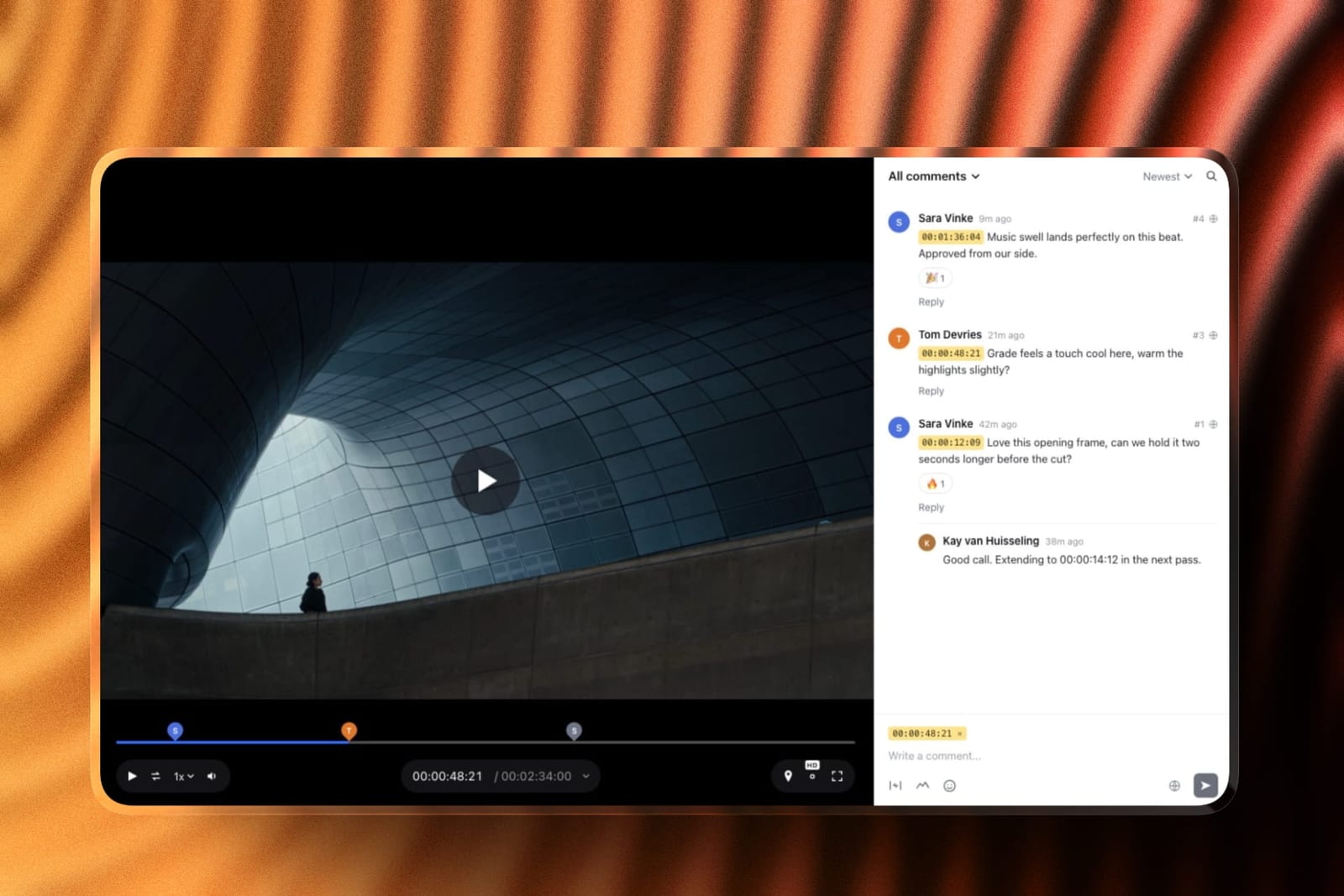
The one inbound path is in the video review product: when your account is on Pro ($19 a month) or above, reviewers can add pictures, PDFs and reference files to any comment on a cut, without an account, and those files land in your pooled storage.
That is genuinely useful for a client sending a reference frame or a brief alongside a note at 00:42, and it is not a substitute for a two-way gallery.
Best forPhotographers and filmmakers whose exchange is mostly one-directional, where the value is a branded delivery on your own domain, photos and video in one gallery, rather than a shared workspace.
The honest positionif collecting files from clients is a regular part of your workflow, use PicDrop or a Dropbox file request for the inbound half and keep a branded gallery for the outbound half. That pairing costs nothing extra on PicDrop's free tier and solves the problem properly.
Skip it iftwo-way exchange is the requirement rather than a nice-to-have. This is a real gap and we would rather say so than describe comment attachments as a client upload feature.
Verdict: the wrong tool for collecting files and a strong one for sending them, which is a distinction worth making explicitly rather than burying in a feature table. Start free at framekit.ai/client-galleries.
6. Pixieset: Photographer-Side Uploads Only
Our rating: 7.0/10
Pixieset's upload documentation describes the photographer dragging photos and videos into a collection, with files processing in the background while you keep working. That is the only upload direction the product supports.
As a delivery platform it remains the most familiar and best-presented option in the category, with its $10 Basic plan connecting a domain and removing the store commission per Pixieset's published pricing.
Verdict: an excellent one-way gallery. Pair it with a file request if clients need to send you anything. Visit Pixieset
7. CloudSpot: Fast Uploads, Wrong Direction
Our rating: 6.9/10
CloudSpot's uploader is quick and handles multiple folders at once, and like Pixieset it is built for the photographer rather than the client.
Its Lite tier at $17 a month removes the 15% store commission and bundles invoicing and contracts per its pricing page.
Verdict: a good delivery platform with a strong business bundle and no inbound path. Visit CloudSpot
8. ShootProof: Zero Commission, Zero Uploads
Our rating: 6.7/10
ShootProof charges 0% commission on every plan per its published pricing, which is the best print economics in the category, and offers no client upload route at all.
Verdict: buy it for the commission structure, not for collaboration. Visit ShootProof
What Two-Way Exchange Is Actually For
In one lineclient uploads solve four specific recurring problems rather than one general one, and knowing which of the four you have decides whether you need a two-way gallery, a file request, or nothing at all.
Collecting brand assets before a shoot. Logo packs, fonts, colour references, and previous campaign images arrive as email attachments and are lost by the time you need them. A single link that says send them here fixes it permanently.
Receiving references and shot lists. Couples with Pinterest boards and marketing teams with mood references both want to send you something. Giving them a place turns a scattered thread into an organised set.
Gathering contributed images. Second shooters, videographers, and event partners all need to send you large sets. PicDrop's own material describes exactly this: one gallery where several photographers upload to a centralised place.
Taking client selections as files. Some corporate clients return selections as a spreadsheet or annotated PDF rather than using favorites, and those documents need somewhere to live next to the job.
If none of those four describe your work, a one-way gallery is not a limitation. If two or more do, the two-tool split is worth setting up properly rather than improvising each time.

How to Run Two-Way Exchange Properly
Set the inbound link up once and reuse it. A single collection link per client, created at booking rather than at need, is the difference between a system and a scramble.
Name the inbound gallery the same as the job.
Same date-first convention as your delivery, so the brief and the delivery sit next to each other in every system you use, which our guide to how to organise client galleries sets out in full.
Ask for specific things, not files in general. "Logo in SVG or PNG, brand fonts, and any reference images" gets a usable set. "Send anything you have" gets forty screenshots.
Turn notifications on. An upload nobody knows about is worse than no upload, because you now have a client who thinks they have given you something.
Keep inbound and outbound separate. Clients who can upload into the delivery gallery will upload into the delivery gallery, and your finished set will acquire phone snaps.
Say when you need it. Assets requested at booking and needed at the shoot should have a date attached, in writing, exactly like your delivery window.
Frequently Asked Questions
Which client gallery lets clients upload photos?
PicDrop is the only mainstream client gallery with a genuine client upload feature, enabled per gallery through a Client Upload setting, where the recipient drags files in without creating an account and you are notified by email.
Dropbox file requests and Google Drive shared folders also work well for inbound files. Pixieset, CloudSpot, ShootProof, and Framekit client galleries are delivery-only, with photographer-side uploaders rather than client-facing ones.
Can clients upload to a Framekit gallery?
No. Framekit client galleries are delivery-only, with no client upload setting and no file request feature, which is why we rank ourselves fifth on this page.
The only inbound route is attaching files to a comment in the video review product, available from the Pro plan, which suits a client sending a reference alongside feedback on a cut but is not a two-way gallery.
For regular file collection, pair Framekit with PicDrop or a Dropbox file request.
Do clients need an account to upload files?
Not with PicDrop or a Dropbox file request, which both accept files from anyone with the link, and that matters more than any other factor because an account prompt is the most common reason files never arrive.
Google Drive usually requires a sign-in unless the client is already in your Workspace, and WeTransfer's receive-files portal on paid plans works without an account.
Why do most client galleries not support uploads?
Because they are built around a one-directional consumer workflow: the photographer uploads finished images and the client views, favorites, downloads, and sometimes buys prints.
Adding client uploads means handling arbitrary file types, storage attribution, moderation, and notification, none of which serve the print-selling model most of these platforms are designed around.
Tools built for professional collaboration, such as PicDrop, treat it as core instead.
How should I collect brand assets from a client?
Create a single inbound link at booking rather than at need, name it to match the job, and ask for specific items such as a logo in SVG or PNG, brand fonts, and reference images rather than for files in general.
Use PicDrop's client upload or a Dropbox file request so nobody needs an account, turn notifications on, and attach a date to the request in the same way you attach one to your delivery window.
Should clients upload into the same gallery I deliver from?
No, keep them separate. A client with upload access to the delivery gallery will eventually add phone snaps, screenshots, and duplicates to your finished set, which undermines the presentation you built.
Use one link for collection and a different one for delivery, named consistently so they are easy to find together, and keep the finished gallery read-only.
What file types can clients send?
Cloud storage accepts anything, including PDFs, logo packs, spreadsheets, video, and RAW, which is why it remains the fallback for brief documents and brand assets.
PicDrop accepts pictures and videos, which covers contributed images and references but not every document a client might send. Client galleries that accept only JPEG, PNG, WebP, and GIF are not viable inbound tools for commercial work.
Is PicDrop free for client uploads?
PicDrop has a genuinely usable free tier, and client upload is a gallery setting rather than a premium add-on, which makes it the cheapest way to run two-way exchange properly. Paid tiers exist for higher volumes.
For most photographers the practical setup is PicDrop's free tier for collection alongside whichever platform they already use for branded delivery.
How do I know when a client has uploaded something?
PicDrop notifies the account owner by email when new uploads arrive, which is the feature that turns collection from a thing you check into a thing you are told about. Dropbox notifies on file requests and shared folder activity.
Whatever tool you use, switch notifications on before you send the link, because an upload nobody knows about leaves a client believing they have already given you something.
What is the best setup for photographers who need both delivery and uploads?
Run two tools with one naming convention: PicDrop's free tier or a Dropbox file request for inbound briefs, references, and contributed images, and a branded client gallery for outbound finished work.
Name both after the job using the same date-first pattern so they sit together in every system. This costs less than forcing either tool to do the other's job and it is what most commercial studios already do.
Final Verdict: The Best Client Gallery With Client Uploads in 2026
Eight platforms, one two-way job, and a category built almost entirely for sending rather than receiving.
PicDrop is the best client gallery with client uploads in 2026 because collection is a designed feature: a per-gallery setting, no account for the client, and an email when files arrive. Dropbox file requests are the best format-agnostic fallback for briefs and brand assets.
Where Framekit loses: our client galleries do not accept client uploads at all, and the only inbound path is file attachments on video review comments from Pro upward.
If two-way exchange is what you came here for, four platforms on this page beat us and we would rather rank ourselves fifth than describe a comment attachment as a gallery upload.
Where a delivery-first tool still wins is the outbound half, which is why the practical answer for most photographers is not one platform but two: PicDrop or a file request for what comes in, and a branded gallery on your own domain for what goes out.
Related reading: our full client gallery platform comparison, client gallery vs Dropbox, best client galleries for creative agencies, and how to organise client galleries.
For the delivery half see what to include in a client gallery and best photo delivery tools.