Framekit templates
Start from a designer-made template
 Use template
 Use template
 Use template
 Use template
 Use template
 Use template
 Use template
 Use template
A hybrid shoot produces two deliverables and most photographers send them as two links from two services. The gallery comes from a photo platform, the film comes from a transfer service or a video host, and the client receives an email containing a small administrative puzzle.
Then the questions start. Which link had the highlights. Where is the ceremony film. Can the video be downloaded or only watched. Is the second link the same password.
Delivering photos and video together means handing over both parts of a hybrid job as a single branded experience, from one address, with clear separation between the images the client browses and the film they watch, rather than as two unrelated links from two vendors.
Deliver both from one domain, with the stills in a client gallery split into named sets and the film on a review or watch page beside it, and give the client one link, one password, and one set of dates.
Framekit is currently the only platform in this comparison carrying client galleries and a video product on the same plan and the same domain; Pic-Time is the strongest hosted alternative with video storage on every tier, and ShootProof does not handle video at all.
The honest trade-off is file size, because video storage is metered separately everywhere it exists.
Framekit is an AI website builder with client galleries and video review included, so a hybrid delivery does not require two subscriptions or two brands.
Why Two Links Is a Real Problem
Sending two links sounds like a minor inconvenience rather than a workflow problem, and in practice it produces four measurable costs that repeat on every hybrid job you deliver.
Version confusion. When a client forwards one of two links to a family member or a colleague, they forward the wrong one about half the time, and the recipient concludes something is missing.
Password fatigue. Two platforms means two access steps, and non-technical clients treat the second one as evidence that something is broken.
Split branding. One link carries your studio and the other carries a video host's player and suggested-video rail. The client remembers whichever was more prominent.
Two expiry clocks. Photo galleries and transfer links expire on different schedules, so half the delivery goes dark while the other half is still live, usually without you noticing.
None of these are fatal on one job. Across a season of hybrid work they add up to a delivery that feels assembled rather than designed.
What Each Platform Actually Supports
Here is what each platform can actually carry when a job contains both stills and a film, checked against every vendor's published pricing and documentation in August 2026 rather than against their feature marketing.
| Platform | Photo galleries | Video | Video per-file limit | One domain for both |
|---|---|---|---|---|
| Framekit | Yes, own domain | Yes, in gallery and review | 500MB free to 3GB Business | Yes |
| Pic-Time | Yes | Yes, storage on every tier | Plan-based | Hosted |
| Zenfolio | Yes | Yes on higher tiers | Plan-based | Hosted |
| Pixieset | Yes | Limited on paid plans | Plan-based | Hosted |
| CloudSpot | Yes | Embeds only, not hosted files | Not applicable | Hosted |
| SmugMug | Yes | Yes, plan-based | Plan-based | Partial |
| ShootProof | Yes | No | Not applicable | No |
| PicDrop | Yes | Selects only | Not applicable | No |
| Vimeo | No | Yes | Large | No |
| WeTransfer | No | Files only | Very large | No |
Two things stand out. Video has its own ceiling wherever a platform supports it, because it costs far more to serve, and on Framekit that ceiling sits inside one shared pool.
And the row that decides a hybrid workflow is the last one: whether both halves can live at the same address.
The Setup That Works
In one linethe delivery reads as one piece of work when the client receives a single address, a single password, and a single set of dates, with the stills browsable and the film watchable side by side rather than filed in two different products with two different logos.
Put the stills in named sets. Highlights first, then the full gallery, then any social crops. A client who reaches your forty strongest frames in the first screen behaves completely differently from one who lands in a run of 600.
Give the film its own page, not a folder. A downloadable file in a shared drive is not a delivery. A watch page with your branding, where the client can play the film before deciding whether to download it, is.
Separate watching from downloading. Most clients want to watch immediately and download later, if at all.
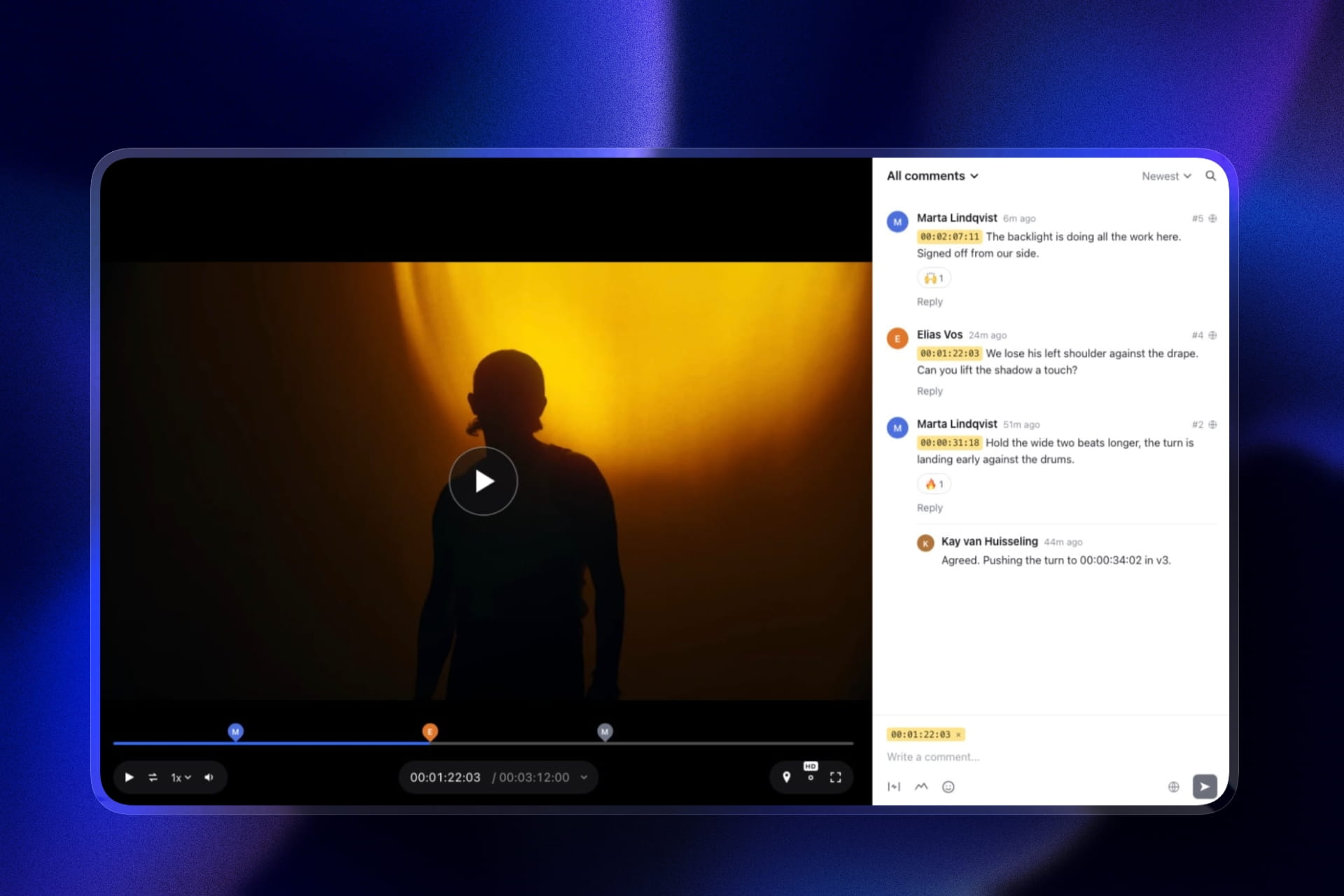
Framekit's video review supports timestamped comments and downloads with the same access controls as the galleries, so the film can be watched by anyone with the link while collection stays gated.
Framekit's details here were re-verified on 19 September 2026, after its galleries also began accepting video beside the stills.
Use one password across both. Two access steps is where non-technical clients stall. If your setup forces two, put both in the delivery email on consecutive lines and say explicitly that they are different.
State both file sizes. "The gallery is 4GB and the film is 2.4GB, both download best on a computer" prevents most of the support messages a hybrid delivery generates.
Keep both live for the same period. Set the same expiry on the gallery and the film so neither half quietly disappears first.
Sizing the Video Half
Video is what determines which plan you need rather than photos, and most hybrid shooters discover this in their second month when a single film uses more storage than an entire wedding gallery did.
A delivered wedding gallery of 500 to 700 full-resolution JPEGs is 1GB to 2GB. A single eight-minute 4K edit at typical export settings is 1GB to 4GB. A feature-length documentary cut is 8GB to 20GB.
That means a hybrid photographer delivering 25 weddings a year with one film each needs 30GB to 50GB for the photos and 25GB to 100GB for the video, which on Framekit come out of one allowance and on most other platforms are metered apart.
On Framekit that lands on the $19 Pro plan, whose 300GB pool covers both halves and lets up to 150GB of it be video, with a 2GB per-file limit, plus the website.
On a hosted stack, the equivalent is a gallery plan at $17 to $30 plus a video host at $12 to $20 plus a portfolio site, commonly $45 to $70 a month.
Export deliberately to control the bill. A 1080p delivery file alongside the 4K master halves the size for the client who only wants to watch it on a phone, and most clients do.
Compress the delivery copy rather than the master, and keep the master in cloud storage where it belongs.
Run your own numbers: count last year's films, multiply by the average export size, and check that against your platform's video allowance rather than its photo allowance. The photo side is almost never the constraint in hybrid work.

What Not to Do
Do not send the film through a transfer service. Free transfer links expire in days, and a wedding film is the deliverable clients return to most often. It is the single worst fit for an expiring link.
Do not host the film on a public video platform without protection. A public link with a suggested-video rail alongside a couple's ceremony is a poor delivery and an unpredictable one.
Do not put the video inside the photo gallery as a downloadable file. Most galleries reject video formats outright, and the ones that accept them present a 2.4GB file as an item in a photo grid, which is confusing and slow.
Do not deliver the master. Clients want a watchable, shareable file. Send a compressed delivery copy at 1080p or 4K depending on the job, and keep the master and the project files in cloud storage with your editor.
Do not use different expiry dates. If the film expires before the gallery, you will find out from the client rather than from your dashboard.
The Delivery Email for a Hybrid Job
One message, six lines, in this order, because a hybrid delivery has more to explain than a photo-only one and the explaining has to survive being read on a phone in under a minute.
One personal line about the day. Then the single link. Then the password. Then one sentence explaining what is inside: the highlights, the full gallery, and the film. Then the dates: when downloads close and how long everything stays live.
Then one ask, usually a share for wedding work.
Add a size note if the gallery is large: "The full gallery is about 4GB and the film is 2.4GB, so both download best on a computer, and individual photos save straight to a phone."
Framekit's share-by-email screen ships with six starter templates covering wedding, portrait, editorial, event, general delivery, and reminder cases, and the full structure is in our guide to how to write a photo delivery email.
Frequently Asked Questions
How do I deliver photos and video to a client together?
Deliver both from one address with one password and one set of dates: the stills in a client gallery split into named sets, and the film on its own watch page beside them rather than as a file inside the photo grid.
Framekit carries client galleries and a video review product on the same plan and the same domain, and Pic-Time is the strongest hosted alternative with video storage on every tier.
Sending two links from two services is what causes most hybrid delivery confusion.
Can client galleries handle video files?
Most cannot, and the ones that do put a separate ceiling on video. ShootProof does not support video at all, CloudSpot handles it as embeds rather than hosted downloadable files, and Pixieset offers limited video on paid plans.
Pic-Time includes video storage on every tier, Zenfolio on higher tiers, and Framekit takes video in the same gallery as the stills, transcoded to play in the browser and never watermarked, with per-file limits of 500MB free, 1GB Starter, 2GB Pro and 3GB Business, plus a separate review product for timestamped feedback on the cut.
How much storage does a hybrid photographer need?
Count the two halves, then add them, because the film is the expensive line.
Twenty-five weddings with one film each needs roughly 30GB to 50GB for photos and 25GB to 100GB for video, since a delivered gallery is 1GB to 2GB and an eight-minute 4K edit is 1GB to 4GB.
That is 55GB to 150GB in total, which on Framekit is the $19 Pro plan and its 300GB pool covering photos, video, and the website.
Should I send the video through WeTransfer?
No. Free transfer links expire within days, and a wedding or brand film is the deliverable clients return to most often, frequently months later. An expiring link is the worst possible fit for it.
Use a watch page with your branding and the same access controls as the gallery, so the client can play the film immediately and download it within a stated window.
What file size should I deliver a client film at?
Deliver a compressed 1080p or 4K delivery copy rather than the master, typically 1GB to 4GB for an eight-minute edit, and keep the master and project files in cloud storage with your editor.
Offering a 1080p option alongside a 4K one halves the download for the many clients who will only ever watch on a phone or a laptop, and it reduces your storage bill at the same time.
Can clients download the video as well as the photos?
They should be able to, and it should be a separate decision from watching.
Most clients watch immediately and download later or never, so a watch page with a download available under the same access controls as the gallery suits the actual behaviour.
Framekit's video review supports downloads and timestamped comments with the same password and expiry handling as its client galleries.
Do photos and video need the same expiry date?
Yes, and mismatched dates are one of the most common hybrid delivery failures. If the film expires before the gallery, half your delivery goes dark and you find out from the client rather than from your dashboard.
Set the same download window and the same viewing period on both, state both dates in the delivery email, and send one reminder before downloads close.
Which platform is best for delivering photos and video together?
Framekit is the only platform in this comparison carrying client galleries and a video product on the same plan and the same domain, which makes it the strongest fit for hybrid work where the delivery should read as one piece.
Pic-Time is the best hosted alternative because video storage is built into every tier rather than bolted on. ShootProof, PicDrop, and most transfer services do not handle video delivery meaningfully at all.
Should the video go inside the photo gallery?
No. Most galleries reject video formats outright, and those that accept them present a multi-gigabyte file as an item in a photo grid, which is slow to load and confusing to navigate.
Give the film its own page beside the gallery, linked from it, so the client can browse the stills and watch the film without either experience compromising the other.
How do I stop clients getting confused by a hybrid delivery?
Send one link rather than two, use one password, state what is inside in a single sentence, and give both file sizes with a note that large downloads work best on a computer.
Most hybrid confusion comes from a client receiving two unrelated links from two brands and having no way to tell which is which.
Our guide to what to include in a client gallery covers the structure that removes the rest.
The Short Version
One address, one password, one set of dates. Stills in named sets with the highlights first, film on its own watch page beside them, both live for the same period, and both file sizes stated in the delivery email.
Size the plan on the video half, because that is always the constraint, and deliver a compressed copy rather than a master so the client can actually watch what you made.
Related reading: best client gallery platforms with video, best client galleries for videographers, best tools to send video to clients, and our full client gallery platform comparison.
If the film needs an approval round before delivery, see best video review tools and best video review tools for wedding videographers.
Pic-Time publishes its per-tier video allowances on its pricing page.